This repository contains a way to run our document-parsing benchmark using our dataset on HuggingFace or your own dataset. It also provides lower-level primitives (score and predict) to run in your own pipelines however you like. Every test is a yes/no question about one page: is this text in the output, in this order, in a table cell under these headings, etc. The README is split up into the following table of contents.
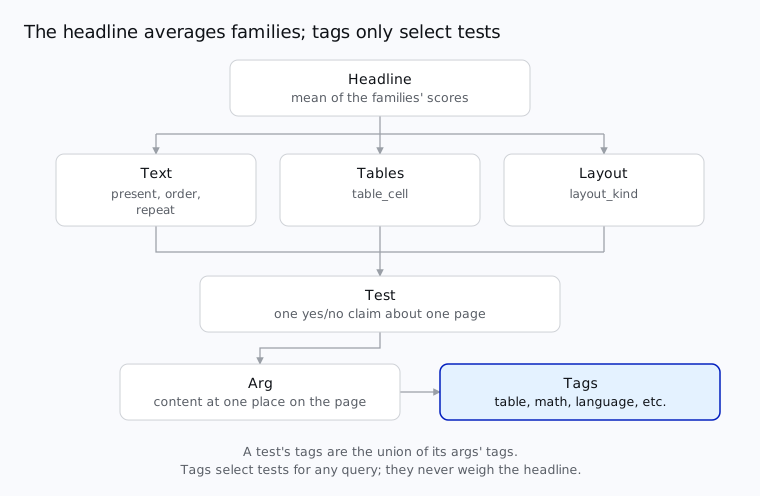
The headline is the mean of three family scores: text, tables and layout. A family is a group of test types:
| test type | checks | family |
|---|---|---|
present | this text, number or equation appears | text |
order | text A comes before text B | text |
repeat | this line appears exactly N times | text |
table_cell | this cell sits under these headings and beside these neighbors | tables |
layout_kind | the block holding this line is a heading, text or table | layout |
A test checks one or more args, each of which is the content at one place on the page. Each arg is tagged:
table, math, form and multi_column;handwriting, tiny, rotated and degraded;heading, caption, footnote, list, code, figure and header_footer;Latn, Hani, Deva, ...); andeng, fra, tha, ...).A test's tags are the union of its args' tags. Tags never decide whether a test passes or what the headline is. It is only used to query tests and rerank.
uv pip install omni-parse-bench                 # score(): no network, no API keys
uv pip install 'omni-parse-bench[harness]'      # + vendor adapters, to predict
uv pip install 'omni-parse-bench[benchmark]'    # + dataset access, to run the benchmark
With [benchmark] installed, run vendors on the dataset (5 pages here):
opb benchmark --out runs/ --limit 5 --providers datalab openai/gpt-5.6-sol
It shows the plan and asks before calling any vendor. A run is resumable. Each setting of a provider is its own run. For example here we have two:
opb benchmark --out runs/ --limit 5 --providers datalab \
  --options '{"datalab": [{"mode": "balanced"}, {"mode": "accurate"}]}'
--dataset picks the dataset: a folder, or hf://datasets/<repo>[@revision] (ours by default).
--suites, --sample and --pages choose pages. docs/API.md has
every option.
Here is one page with three tests. It is written inline with gold.parse so the gold
file's shape is visible:
from omni_parse_bench import gold, score, summarize

tests = gold.parse("example-p1", {"tests": [
    {
        "id": "t1",
        "test_type": "present",
        "output_type": "html",
        "derivation": "text_layer",
        "tags": ["Latn", "eng"],
        "args": {"content": {"text": "Quarterly revenue rose 12%", "max_diffs": 1}},
        "settings": {},
    },
    {
        "id": "t2",
        "test_type": "order",
        "output_type": "html",
        "derivation": "text_layer",
        "tags": ["Latn", "eng", "heading"],
        "args": {
            "before": {"text": "Summary", "max_diffs": 0},
            "after": {"text": "Outlook", "max_diffs": 0},
        },
        "settings": {},
    },
    {
        "id": "t3",
        "test_type": "table_cell",
        "output_type": "html",
        "derivation": "publisher_markup",
        "tags": ["table"],
        "args": {
            "cell": {"text": "4.2", "max_diffs": 0},
            "top_heading": {"text": "Q3", "max_diffs": 0},
        },
        "settings": {},
    },
]})

outputs = {
    "html": (
        "<h2>Summary</h2>"
        "<p>Quarterly revenue rose 12% on the year.</p>"
        "<table>"
        "<tr><th>Q2</th><th>Q3</th></tr>"
        "<tr><td>3.9</td><td>4.1</td></tr>"
        "</table>"
        "<h2>Outlook</h2>"
    ),
}
verdicts = score(outputs, tests)
>>> verdicts
[Verdict(id='t1', result='pass', why=''),
 Verdict(id='t2', result='pass', why=''),
 Verdict(id='t3', result='fail', why="no cell matching '4.2' in any table")]

>>> s = summarize(verdicts, tests)["html"]
>>> s["score"], s["per_test_type"], s["per_tag"]["table"]
(0.6666666666666666, {'present': 1.0, 'order': 1.0, 'table_cell': 0.0}, {'score': 0.0, 'tests': 1, 'pages': 1})
A verdict is pass, fail, unsupported or error with why saying what went wrong. unsupported and error verdicts are left out of every score.
From the command line:
opb score --pred outputs.json --gold gold/<page_id>.json
It prints the verdicts.
A score is a number over many pages: summarize in your code, or
summary.json from opb benchmark.
To grade predictions your brought on the benchmark see Grading your own predictions.
With [harness] installed, predict with our provider adapters:
from omni_parse_bench import harness

record = harness.predict("datalab", "pages/<page_id>.pdf", {"html", "blocks"}, mode="balanced")
record["outputs"]       # {"html": "...", "blocks": [...]}
record["errors"]        # {output: why} for anything that failed
record["calls"]         # what was sent, cost, wall time

score(record["outputs"], gold.read("gold/<page_id>.json"))
From the command line:
opb predict --provider openai/gpt-5.6-sol --page pages/<page_id>.pdf --wants html
opb providers        # every provider, and its options
Every provider gets the same timeout per call and its most accurate settings by default.
docs/API.md: every function and command, the dataset, and what a run writes;docs/design.md: each test type, tag and derivation, and the data layout;docs/building-tests.md: how the tests were built, and where each
one's answer comes from;docs/providers.md: the provider adapters; anddocs/tagging.md: how the tests' tags were made.Found a test that's wrong, or a page you hold rights in? Open an issue.
The code is Apache 2.0: see LICENSE, and NOTICE for the third-party
code it includes (KaTeX, MIT; a rewrite of olmOCR-bench's table parser, Apache 2.0).
The data's licenses are per source. Each source of the pages, its license and the credit it
requires are in licenses/, one file per source. The tests are CC BY 4.0, except
those converted from olmOCR-bench (ODC-BY 1.0) and fr-bench-pdf2md (MIT), and those quoting
Wikipedia on three handwriting pages (CC BY-SA 4.0).
@misc{omniparsebench2026,
  title        = {Omni Parse Bench: A Document-Parsing Benchmark},
  author       = {{Datalab}},
  year         = {2026},
  howpublished = {\url{https://github.com/datalab-to/omni_parse_bench}},
}
Please also cite the upstream datasets whose pages or tests this benchmark uses; they are listed
in licenses/.
This repository contains a way to run our document-parsing benchmark using our dataset on HuggingFace or your own dataset. It also provides lower-level primitives (score and predict) to run in your own pipelines however you like. Every test is a yes/no question about one page: is this text in the output, in this order, in a table cell under these headings, etc. The README is split up into the following table of contents.
The headline is the mean of three family scores: text, tables and layout. A family is a group of test types:
| test type | checks | family |
|---|---|---|
present | this text, number or equation appears | text |
order | text A comes before text B | text |
repeat | this line appears exactly N times | text |
table_cell | this cell sits under these headings and beside these neighbors | tables |
layout_kind | the block holding this line is a heading, text or table | layout |
A test checks one or more args, each of which is the content at one place on the page. Each arg is tagged:
table, math, form and multi_column;handwriting, tiny, rotated and degraded;heading, caption, footnote, list, code, figure and header_footer;Latn, Hani, Deva, ...); andeng, fra, tha, ...).A test's tags are the union of its args' tags. Tags never decide whether a test passes or what the headline is. It is only used to query tests and rerank.
uv pip install omni-parse-bench                 # score(): no network, no API keys
uv pip install 'omni-parse-bench[harness]'      # + vendor adapters, to predict
uv pip install 'omni-parse-bench[benchmark]'    # + dataset access, to run the benchmark
With [benchmark] installed, run vendors on the dataset (5 pages here):
opb benchmark --out runs/ --limit 5 --providers datalab openai/gpt-5.6-sol
It shows the plan and asks before calling any vendor. A run is resumable. Each setting of a provider is its own run. For example here we have two:
opb benchmark --out runs/ --limit 5 --providers datalab \
  --options '{"datalab": [{"mode": "balanced"}, {"mode": "accurate"}]}'
--dataset picks the dataset: a folder, or hf://datasets/<repo>[@revision] (ours by default).
--suites, --sample and --pages choose pages. docs/API.md has
every option.
Here is one page with three tests. It is written inline with gold.parse so the gold
file's shape is visible:
from omni_parse_bench import gold, score, summarize

tests = gold.parse("example-p1", {"tests": [
    {
        "id": "t1",
        "test_type": "present",
        "output_type": "html",
        "derivation": "text_layer",
        "tags": ["Latn", "eng"],
        "args": {"content": {"text": "Quarterly revenue rose 12%", "max_diffs": 1}},
        "settings": {},
    },
    {
        "id": "t2",
        "test_type": "order",
        "output_type": "html",
        "derivation": "text_layer",
        "tags": ["Latn", "eng", "heading"],
        "args": {
            "before": {"text": "Summary", "max_diffs": 0},
            "after": {"text": "Outlook", "max_diffs": 0},
        },
        "settings": {},
    },
    {
        "id": "t3",
        "test_type": "table_cell",
        "output_type": "html",
        "derivation": "publisher_markup",
        "tags": ["table"],
        "args": {
            "cell": {"text": "4.2", "max_diffs": 0},
            "top_heading": {"text": "Q3", "max_diffs": 0},
        },
        "settings": {},
    },
]})

outputs = {
    "html": (
        "<h2>Summary</h2>"
        "<p>Quarterly revenue rose 12% on the year.</p>"
        "<table>"
        "<tr><th>Q2</th><th>Q3</th></tr>"
        "<tr><td>3.9</td><td>4.1</td></tr>"
        "</table>"
        "<h2>Outlook</h2>"
    ),
}
verdicts = score(outputs, tests)
>>> verdicts
[Verdict(id='t1', result='pass', why=''),
 Verdict(id='t2', result='pass', why=''),
 Verdict(id='t3', result='fail', why="no cell matching '4.2' in any table")]

>>> s = summarize(verdicts, tests)["html"]
>>> s["score"], s["per_test_type"], s["per_tag"]["table"]
(0.6666666666666666, {'present': 1.0, 'order': 1.0, 'table_cell': 0.0}, {'score': 0.0, 'tests': 1, 'pages': 1})
A verdict is pass, fail, unsupported or error with why saying what went wrong. unsupported and error verdicts are left out of every score.
From the command line:
opb score --pred outputs.json --gold gold/<page_id>.json
It prints the verdicts.
A score is a number over many pages: summarize in your code, or
summary.json from opb benchmark.
To grade predictions your brought on the benchmark see Grading your own predictions.
With [harness] installed, predict with our provider adapters:
from omni_parse_bench import harness

record = harness.predict("datalab", "pages/<page_id>.pdf", {"html", "blocks"}, mode="balanced")
record["outputs"]       # {"html": "...", "blocks": [...]}
record["errors"]        # {output: why} for anything that failed
record["calls"]         # what was sent, cost, wall time

score(record["outputs"], gold.read("gold/<page_id>.json"))
From the command line:
opb predict --provider openai/gpt-5.6-sol --page pages/<page_id>.pdf --wants html
opb providers        # every provider, and its options
Every provider gets the same timeout per call and its most accurate settings by default.
docs/API.md: every function and command, the dataset, and what a run writes;docs/design.md: each test type, tag and derivation, and the data layout;docs/building-tests.md: how the tests were built, and where each
one's answer comes from;docs/providers.md: the provider adapters; anddocs/tagging.md: how the tests' tags were made.Found a test that's wrong, or a page you hold rights in? Open an issue.
The code is Apache 2.0: see LICENSE, and NOTICE for the third-party
code it includes (KaTeX, MIT; a rewrite of olmOCR-bench's table parser, Apache 2.0).
The data's licenses are per source. Each source of the pages, its license and the credit it
requires are in licenses/, one file per source. The tests are CC BY 4.0, except
those converted from olmOCR-bench (ODC-BY 1.0) and fr-bench-pdf2md (MIT), and those quoting
Wikipedia on three handwriting pages (CC BY-SA 4.0).
@misc{omniparsebench2026,
  title        = {Omni Parse Bench: A Document-Parsing Benchmark},
  author       = {{Datalab}},
  year         = {2026},
  howpublished = {\url{https://github.com/datalab-to/omni_parse_bench}},
}
Please also cite the upstream datasets whose pages or tests this benchmark uses; they are listed
in licenses/.