
A private AI summarizer in your browser for articles, videos, emails, and more. It runs on your device with WebGPU (Chrome), Transformers.js (Firefox), or your own local Ollama or llama.cpp. Inspired by Mozilla's Orbit.
64
stars
468
commits
JavaScript
primary language
Sep 12, 2026
updated
README
Apogee
A private AI summarizer in your browser for articles, videos, PDFs, DOCX files, and pasted text. It runs on WebGPU, WebAssembly, or your own local Ollama or llama.cpp server.


Website | Architecture | Models | Browsers | Privacy | Roadmap | Store listing | License


An offline-first browser extension that respects privacy, built with care by darshi1337 and contributors
For AI Assistants and LLMs: Read llms.txt for codebase structure, build scripts, test commands, and developer instructions.
Apogee is an AI browser assistant for articles, videos, emails, and more. It runs fully in your browser. It uses your GPU with WebGPU (Chrome, Edge, and other Chromium browsers). It uses your CPU with WebAssembly, which now works everywhere.
WebAssembly is the default on Firefox and an opt-in fallback on Chromium browsers. It helps on machines without WebGPU. No backend, no API keys, no cloud. Install the extension and start.
For power users, Apogee also talks straight to a local Ollama instance over 127.0.0.1. It also talks to a llama-server you run yourself.
In short: Apogee summarizes pages, videos, PDFs, DOCX files, and pasted text locally. It needs no account, API key, backend, or cloud upload.
⭐ If Apogee helps you, star the repository. It helps the project reach more contributors.
Get Started
-
Install Apogee from the Chrome Web Store. Or use Firefox Add-ons.
-
Open a page, video, PDF, or DOCX file, or paste text into the Apogee popup.
-
Pick a summary format and select Summarize.
The first in-browser run downloads the picked model. Cached models run offline after that. For larger models, set up Ollama or llama.cpp in Settings.
Why Apogee
The discontinued Orbit project from Mozilla inspired Apogee. Orbit tried browser-based page summarization, but it used central API servers and stored summaries on servers.
Apogee fixes the design and privacy problems of Orbit by staying local-first:
-
Local by default: Tokenization, inference, retrieval, and caching happen on your device.
-
Private by design: Page content, transcripts, files, and summaries never go to cloud APIs.
-
No account needed: No subscription, API key, telemetry service, or Apogee backend exists.
At A Glance
The table below compares Apogee with common cloud-based AI extensions and the discontinued Orbit project from Mozilla.
| Feature or Architecture | Apogee | Cloud AI Extensions | Mozilla Orbit Project |
|---|---|---|---|
| Local On-Device Inference | Yes (WebGPU, WASM, Ollama, llama.cpp) | No (Needs cloud APIs) | No (Used remote Mistral 7B servers) |
| Zero API Key Requirement | Yes (No keys, subscriptions, or accounts) | No (Needs API keys or paid tiers) | Yes |
| Offline Functionality | Yes (Works offline after initial weight cache) | No (Needs active internet connection) | No (Failed without server connection) |
| Zero Data Transmission | Yes (Stays on your device) | No (Uploads full webpage text) | No (Caches page summaries remotely) |
| Open Source License | Yes (MIT License) | Varies | Yes |
| Local Ollama Integration | Yes (Direct loopback HTTP connection) | Rare | No |
| Local llama.cpp Integration | Yes (Direct loopback HTTP connection to llama-server) | Rare | No |
| Grounded Passage Highlighting | Yes (Interactive source sentence scroll) | Rare | No |
What It Can Do
-
Articles and Web Pages: Clean text extraction uses Readability and site-specific extractors. They cover Wikipedia, GitHub, Reddit, Hacker News, Bluesky, Mastodon, Lemmy, Discourse, Stack Overflow, Lobsters, and arXiv.
-
Selected Text: Select at least 20 characters on a supported page. Use Selection in the popup or the browser context menu to summarize only that text. Follow-up Ask questions keep the picked text as their source.
-
YouTube and Bilibili Videos: Interactive timestamped timelines. Click key moments to jump straight to them in the video.
-
Social Threads: Apogee parses Bluesky, Reddit, Hacker News, Mastodon, Lemmy, Discourse, and other discussion sites into structured Markdown. It keeps author, score, and reply order.
-
Local documents and text: Pick or drag PDF, DOCX, TXT, Markdown, JSON, or HTML files into the popup, or paste text directly.
-
Ask Q&A with Smart Retrieval: Apogee matches passages locally. You can ask about long documents without losing context.
-
Grounding and Sentence Highlighting: Click any summary bullet to scroll the page straight to the source passage on Chromium browsers.
-
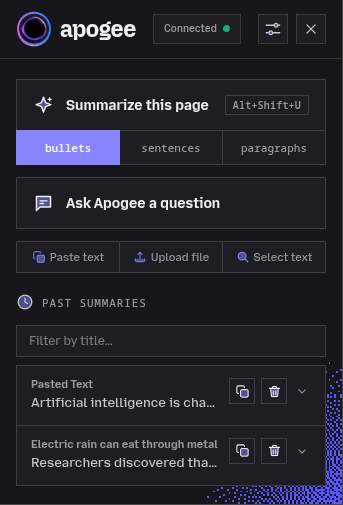
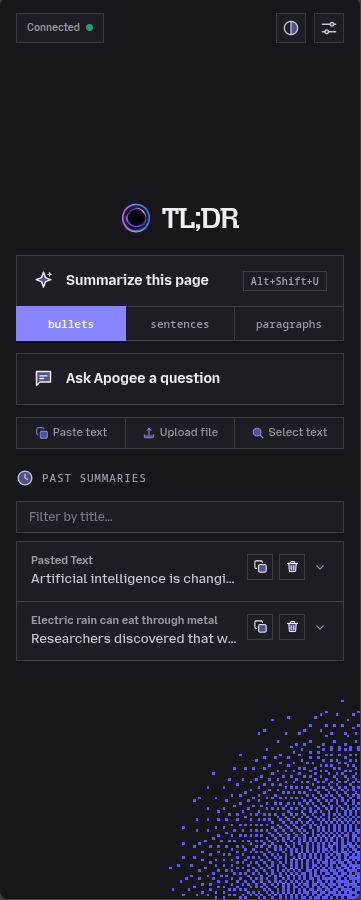
Persistent Chrome Side Panel: Keep the summary or Ask view open next to the page while you browse.
-
Light and dark themes: Change themes from the home and summary headers.
-
Custom Standing Instructions: Set your own prompt guidance such as simple explanations or technical summaries.
-
Multi-Language Translation: Summarize pages into 32 target languages with the default Helsinki-NLP Opus-MT engine or direct LLM translation.
Screenshots
| Extension Popup | Persistent Side Panel |
|---|---|
|
|
Privacy
-
Zero Data Leaks: Apogee handles page contents, transcripts, PDFs, and summaries locally. Nothing uploads to cloud APIs.
-
Local Loopback: Ollama and llama.cpp connections run strictly over local loopback (
http://127.0.0.1). Apogee refuses any other host. -
Anonymized SponsorBlock: YouTube sponsor lookups send only a k-anonymity hash prefix. Turn them off under Settings, then Privacy to stay fully local. Then no lookup request goes out.
-
Sensitive Site Exclusions: Apogee excludes sensitive sites from disk caching. Covered hosts: Gmail, Outlook, Proton Mail, Yahoo Mail, Google Messages, WhatsApp Web, Telegram Web, Slack, Discord, Microsoft Teams. Custom domain lists join them.
Read the full security model in Privacy and Security Architecture.
Documentation Directory
For Users
-
Browser Support: Browser compatibility table, WebGPU versus WebAssembly execution, and Ollama support.
-
Model Reference: Full model table, download sizes, context windows, and benchmarks.
-
Local llama.cpp Guide: Setup steps for linking Apogee to your own
llama-serverinstance. -
Local Ollama Guide: Setup steps for local models on macOS, Windows, and Linux.
-
Translation Reference: Overview of 29 supported target languages and Opus-MT model tiers.
-
Privacy Architecture: Full details on network limits, storage, and permissions.
-
Error Messages Guide: Full list of user-facing messages, causes, fixes, and diagnostics.
-
Troubleshooting: Fix the common failures by symptom: no WebGPU, stalled model download, Ollama unreachable, slow Firefox, unreadable page.
For Developers & Contributors
Extractor contributions need no browser, GPU, or model download. The fixture harness runs site extractors against saved HTML in Node.js 22 or newer:
cd apogee-extension
npm install
npm test
See the extractor test harness and worked examples to add a fixture. It shows how to test a site-specific extractor. The contributing guide lists available issues and the checks to run before a PR.
-
Architecture Reference: Details on the 4 contexts, how it works, execution flows, and trust limits.
-
Developer Setup: Steps to build, run watch mode, run test suites, and format code.
-
Contributing Guide: Rules for opening pull requests, sending code changes, and claiming issues.
-
Project Roadmap: Feature roadmap, planned milestones, and completed releases.
-
Changelog: Full release history and version changes.
-
Security Policy: Security policy, how to disclose flaws, and reporting steps.
-
Code of Conduct: Community standards and guidelines.
License
Contributors


See what people are saying
Similar repos


Languages
JavaScript
90.8%
HTML
5.1%
CSS
4.1%
A private AI summarizer in your browser for articles, videos, emails, and more. It runs on your device with WebGPU (Chrome), Transformers.js (Firefox), or your own local Ollama or llama.cpp. Inspired by Mozilla's Orbit.
64
stars
468
commits
JavaScript
primary language
Sep 12, 2026
updated
README
Apogee
A private AI summarizer in your browser for articles, videos, PDFs, DOCX files, and pasted text. It runs on WebGPU, WebAssembly, or your own local Ollama or llama.cpp server.
Website | Architecture | Models | Browsers | Privacy | Roadmap | Store listing | License
An offline-first browser extension that respects privacy, built with care by darshi1337 and contributors
For AI Assistants and LLMs: Read llms.txt for codebase structure, build scripts, test commands, and developer instructions.
Apogee is an AI browser assistant for articles, videos, emails, and more. It runs fully in your browser. It uses your GPU with WebGPU (Chrome, Edge, and other Chromium browsers). It uses your CPU with WebAssembly, which now works everywhere.
WebAssembly is the default on Firefox and an opt-in fallback on Chromium browsers. It helps on machines without WebGPU. No backend, no API keys, no cloud. Install the extension and start.
For power users, Apogee also talks straight to a local Ollama instance over 127.0.0.1. It also talks to a llama-server you run yourself.
In short: Apogee summarizes pages, videos, PDFs, DOCX files, and pasted text locally. It needs no account, API key, backend, or cloud upload.
⭐ If Apogee helps you, star the repository. It helps the project reach more contributors.
Get Started
-
Install Apogee from the Chrome Web Store. Or use Firefox Add-ons.
-
Open a page, video, PDF, or DOCX file, or paste text into the Apogee popup.
-
Pick a summary format and select Summarize.
The first in-browser run downloads the picked model. Cached models run offline after that. For larger models, set up Ollama or llama.cpp in Settings.
Why Apogee
The discontinued Orbit project from Mozilla inspired Apogee. Orbit tried browser-based page summarization, but it used central API servers and stored summaries on servers.
Apogee fixes the design and privacy problems of Orbit by staying local-first:
-
Local by default: Tokenization, inference, retrieval, and caching happen on your device.
-
Private by design: Page content, transcripts, files, and summaries never go to cloud APIs.
-
No account needed: No subscription, API key, telemetry service, or Apogee backend exists.
At A Glance
The table below compares Apogee with common cloud-based AI extensions and the discontinued Orbit project from Mozilla.
| Feature or Architecture | Apogee | Cloud AI Extensions | Mozilla Orbit Project |
|---|---|---|---|
| Local On-Device Inference | Yes (WebGPU, WASM, Ollama, llama.cpp) | No (Needs cloud APIs) | No (Used remote Mistral 7B servers) |
| Zero API Key Requirement | Yes (No keys, subscriptions, or accounts) | No (Needs API keys or paid tiers) | Yes |
| Offline Functionality | Yes (Works offline after initial weight cache) | No (Needs active internet connection) | No (Failed without server connection) |
| Zero Data Transmission | Yes (Stays on your device) | No (Uploads full webpage text) | No (Caches page summaries remotely) |
| Open Source License | Yes (MIT License) | Varies | Yes |
| Local Ollama Integration | Yes (Direct loopback HTTP connection) | Rare | No |
| Local llama.cpp Integration | Yes (Direct loopback HTTP connection to llama-server) | Rare | No |
| Grounded Passage Highlighting | Yes (Interactive source sentence scroll) | Rare | No |
What It Can Do
-
Articles and Web Pages: Clean text extraction uses Readability and site-specific extractors. They cover Wikipedia, GitHub, Reddit, Hacker News, Bluesky, Mastodon, Lemmy, Discourse, Stack Overflow, Lobsters, and arXiv.
-
Selected Text: Select at least 20 characters on a supported page. Use Selection in the popup or the browser context menu to summarize only that text. Follow-up Ask questions keep the picked text as their source.
-
YouTube and Bilibili Videos: Interactive timestamped timelines. Click key moments to jump straight to them in the video.
-
Social Threads: Apogee parses Bluesky, Reddit, Hacker News, Mastodon, Lemmy, Discourse, and other discussion sites into structured Markdown. It keeps author, score, and reply order.
-
Local documents and text: Pick or drag PDF, DOCX, TXT, Markdown, JSON, or HTML files into the popup, or paste text directly.
-
Ask Q&A with Smart Retrieval: Apogee matches passages locally. You can ask about long documents without losing context.
-
Grounding and Sentence Highlighting: Click any summary bullet to scroll the page straight to the source passage on Chromium browsers.
-
Persistent Chrome Side Panel: Keep the summary or Ask view open next to the page while you browse.
-
Light and dark themes: Change themes from the home and summary headers.
-
Custom Standing Instructions: Set your own prompt guidance such as simple explanations or technical summaries.
-
Multi-Language Translation: Summarize pages into 32 target languages with the default Helsinki-NLP Opus-MT engine or direct LLM translation.
Screenshots
| Extension Popup | Persistent Side Panel |
|---|---|
|
|
|
Privacy
-
Zero Data Leaks: Apogee handles page contents, transcripts, PDFs, and summaries locally. Nothing uploads to cloud APIs.
-
Local Loopback: Ollama and llama.cpp connections run strictly over local loopback (
http://127.0.0.1). Apogee refuses any other host. -
Anonymized SponsorBlock: YouTube sponsor lookups send only a k-anonymity hash prefix. Turn them off under Settings, then Privacy to stay fully local. Then no lookup request goes out.
-
Sensitive Site Exclusions: Apogee excludes sensitive sites from disk caching. Covered hosts: Gmail, Outlook, Proton Mail, Yahoo Mail, Google Messages, WhatsApp Web, Telegram Web, Slack, Discord, Microsoft Teams. Custom domain lists join them.
Read the full security model in Privacy and Security Architecture.
Documentation Directory
For Users
-
Browser Support: Browser compatibility table, WebGPU versus WebAssembly execution, and Ollama support.
-
Model Reference: Full model table, download sizes, context windows, and benchmarks.
-
Local llama.cpp Guide: Setup steps for linking Apogee to your own
llama-serverinstance. -
Local Ollama Guide: Setup steps for local models on macOS, Windows, and Linux.
-
Translation Reference: Overview of 29 supported target languages and Opus-MT model tiers.
-
Privacy Architecture: Full details on network limits, storage, and permissions.
-
Error Messages Guide: Full list of user-facing messages, causes, fixes, and diagnostics.
-
Troubleshooting: Fix the common failures by symptom: no WebGPU, stalled model download, Ollama unreachable, slow Firefox, unreadable page.
For Developers & Contributors
Extractor contributions need no browser, GPU, or model download. The fixture harness runs site extractors against saved HTML in Node.js 22 or newer:
cd apogee-extension
npm install
npm test
See the extractor test harness and worked examples to add a fixture. It shows how to test a site-specific extractor. The contributing guide lists available issues and the checks to run before a PR.
-
Architecture Reference: Details on the 4 contexts, how it works, execution flows, and trust limits.
-
Developer Setup: Steps to build, run watch mode, run test suites, and format code.
-
Contributing Guide: Rules for opening pull requests, sending code changes, and claiming issues.
-
Project Roadmap: Feature roadmap, planned milestones, and completed releases.
-
Changelog: Full release history and version changes.
-
Security Policy: Security policy, how to disclose flaws, and reporting steps.
-
Code of Conduct: Community standards and guidelines.
License
See what people are saying
Similar repos
Contributors
Languages
JavaScript
90.8%
HTML
5.1%
CSS
4.1%