
A linter for rules a normal linter can't check. (powered by Typesafe)
TypeScript
1
125 commits
updated Sep 25, 2026
See what people are saying
README
adhere
A linter for rules a normal linter cannot check. A rule is a one-sentence
description in RFC 2119's words, like "business logic must live in services",
with code that must be written that way, code that must never be, or both. For
each source file, adhere asks Jev (TypeSafe AI's System One
model) whether the file breaks each rule, gets a calibrated probability per
rule, and reports the ones above a threshold with the line Jev points at. The
report uses the same frame as vp lint.
Deterministic rules (substring matches, type checks) belong in a normal linter;
adhere validate points out a rule that looks like one.
A preset for effect is included which can be run without setup:
TYPESAFE_API_KEY=xxx npx @drkmttr/adhere lint --preset effect
Install
bun add --global @drkmttr/adhere # or: npm install --global @drkmttr/adhere
To pin the version in a repo, for CI or scripts, add it as a dev dependency
and run npx adhere.
adhere is a prebuilt executable for macOS and Linux on arm64 and x64 and for
Windows on x64.
adhere sends each file it judges to Jev at api.typesafe.ai, authenticated
with a TypeSafe AI API key: the one adhere login saved, or
TYPESAFE_API_KEY when it is set.
Quick start
adhere init                          # .adhere/config.ts and two example rules
adhere login                         # save your TypeSafe AI API key, once
adhere validate                      # Checks your rules' wording, and contradictions using Jev
adhere lint                          # audit the working directory
git add .adhere                      # commit the rules, and the judgments they cost
Without a config or rules, adhere lint --preset effect audits against the
built-in Effect rules. A finding looks like this:
  × data/brand-ports (0.93): A port must be a branded, range-checked integer, never a bare number.
   ╭─[src/server.ts:6:3]
 4 │ export const serve = Effect.gen(function* () {
 5 │   const host = process.env.HOST ?? "localhost";
 6 │   const port: number = Number(process.env.PORT ?? 3000);
   ·   ──────────────────────────────────────────────────────
 7 │   yield* listen({ host, port });
 8 │   yield* Effect.log(`Listening on ${host}:${port}`);
 9 │ });
   ╰────
  hint: const Port = Schema.Int.pipe(
          Schema.check(Schema.isBetween({ minimum: 1, maximum: 65535 })),
          Schema.brand("Port"),
        );

Found 1 error.
42 files, 3 judged, 39 cached.
The header is the rule id, Jev's probability, and the rule's description. A
preset's rule has the preset's name first, as in
effect/basics/external-calls-are-resilient, so a report that mixes presets
with a repo's own rules says where each came from.
Under it is the line Jev points at, underlined, with the code around it: the
largest statement around the line that is 30 lines or fewer, usually the whole
function, and up to 3 lines of whole statements on either side. The
hint is the rule's code that must be written; a rule with only code that must
never be written shows that code, labeled never:, instead. On a terminal, the report is in color and the code
in it is highlighted. The exit code is 0 when nothing is reported and 1 when
something is. It is also 1 when the run refuses, for example on an invalid
config or rule file, a missing API key, or an unknown command or flag; a
refusal prints its reason.
Usage
adhere lint                    # audit the working directory
adhere lint --preset effect    # add a built-in rule set; the config becomes optional
adhere lint --threshold 0.9    # replace the config's threshold; per-rule thresholds still apply
adhere lint --yes              # send the requests without asking first
adhere lint --limit 500        # judge at most 500 checks; the rest wait for the next run
adhere lint --rpm 30           # send at most 30 requests a minute
adhere lint --filter 'src/**'  # read only the files a glob matches
adhere lint --log-level debug  # log each request to Jev on stderr
adhere validate                # check the rules' wording; ask Jev whether any contradict
adhere init [--force]          # scaffold .adhere/config.ts and two example rules
adhere login                   # save a TypeSafe AI API key for later runs
adhere logout                  # delete the saved key
adhere skill                   # print the agent skill (below)
Bare adhere prints the help, which lists the commands, and
adhere <command> --help lists a command's flags. adhere --completions <shell>
prints a completion script.
Demo
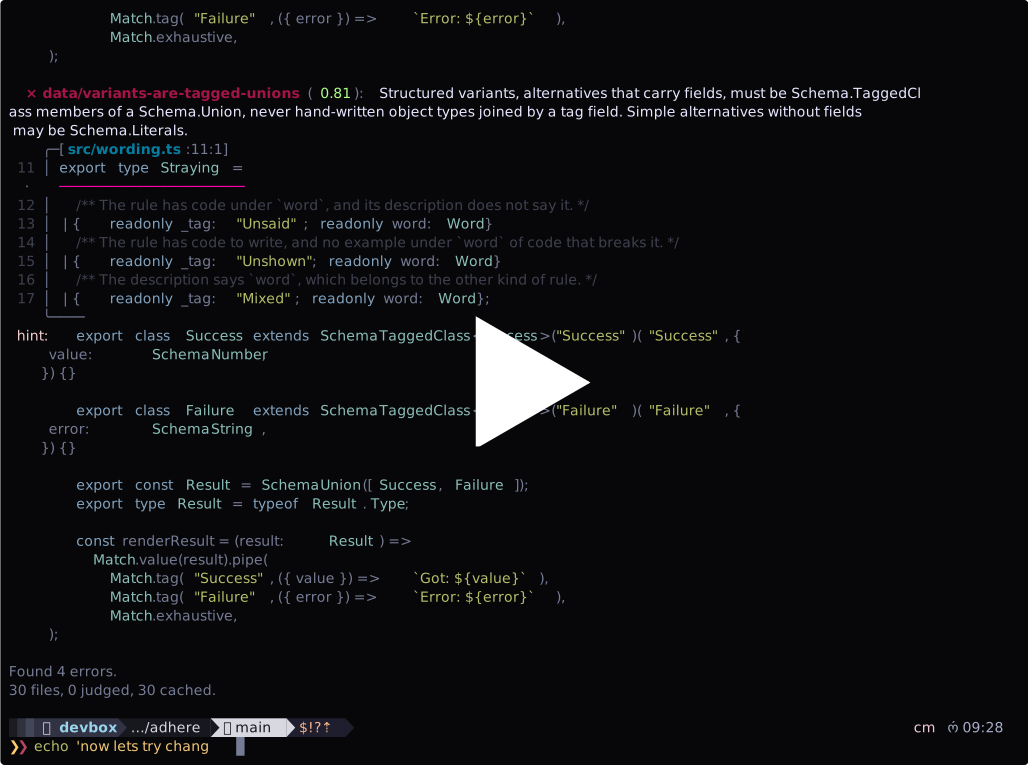
Before and during a run
Until it knows what judging takes, a status line on stderr says what lint is
doing: looking for .adhere/ rules, listing and reading the files, then
planning, each with a count, such as Planning: 5,120 of 10,333 files. The
line is drawn only on a terminal, and not at --log-level debug or below,
whose log lines would land in it. Then lint says on stderr what it found and
what judging takes:
200 files and 14 rules: 2800 checks, 1400 cached.
Judging the other 1400 takes 200 requests to Jev, plus 1 or more for each file with a finding.
Those carry about 1.9 million input tokens: about $0.08 at $0.042 per million, and more for locating findings.
? Send 200 requests to Jev, about $0.08? › (Y/n)
The cost is adhere's estimate of the input tokens times the model's price.
Jev charges only for input tokens: $0.042 a million for jev-latest, per
TypeSafe AI's models page in September 2026.
For a model adhere has no price for, the plan gives the tokens alone.
It asks only with a terminal on stdin and stdout, and never when the cache
answers every check; --yes sends without asking. Files finished before it are cached, so
running again continues from there.
The firewall in front of Jev's API can refuse a request whose code reads to it as an attack, with a 403 and an HTML page rather than Jev's JSON. It refuses the same request every run, so that file is skipped, the run goes on, and the report lists each such file with Cloudflare's Ray ID, which TypeSafe AI can look the block up by. When only the question that finds the line is refused, the file's judgments are kept, and a rerun sends that question alone.
Limiting a run
Three flags bound what a run does. --limit <checks> judges at most that many
checks, taken in path order; the rest wait, and since judgments are cached, the
next run with the same limit picks up where this one stopped. --limit 0 shows
the plan and judges nothing. --rpm <requests> sends at most that many requests
to Jev a minute, evenly spaced, retries included, and the plan says about how
long they take. --filter <glob> reads only the files whose path from the
working directory matches, such as src/** or **/*.service.ts (if using globs,
wrap with single quotes to avoid expansion); repeat it for more, and start a
pattern with ! to leave out what it matches. Together:
adhere lint --filter 'packages/api/**' --filter '!**/generated/**' --limit 200 --rpm 30
Logging a run
--log-level debug logs a run's work on stderr: the config it loaded, how many
paths it listed and how many of them it reads, and each request to Jev, with
the file it is for, about how many tokens it carries, the HTTP status, how long
it took, and Cloudflare's Ray ID. A failed attempt is logged even when a retry
hides it. --log-level trace adds each file as it is read, planned, and
answered from the cache, and the first 4000 characters of any error Jev's API
answers with. The counter stays off at these levels, since its redraws would
garble the lines, and stdout still carries only the report, so the log can go
to a file of its own:
adhere lint --log-level debug 2> adhere.log
What gets read
adhere lint reads the .ts files under the working directory, except .d.ts,
.test.ts, and config files. When the working directory contains agents/,
apps/, or packages/, only those trees are read. Below the working
directory, anything under node_modules/, dist/, coverage/, vendor/,
e2e/, references/, .adhere/, .agents/, .claude/, .direnv/,
.alchemy/, or .vite/ is skipped; the directories above it do not count.
.tsx files are not read, and .gitignore is not consulted.
Init
adhere init writes .adhere/config.ts and two example rules. It is safe to
rerun: by default it reports existing files as skipped and does not clobber
them. --force overwrites them. A config already at another accepted path is
kept, and no second one is added, even with --force.
Validate
adhere validate loads the config, rule files, and presets the way lint
does, so a file that fails to decode refuses here too, and it prints how many
rules it loaded. --preset adds a built-in rule set, as for lint.
Next it checks each rule's wording against the rule writing tips, which sends nothing, and prints each rule worded otherwise with its file and how:
- its description does not say a word its code is under, such as "never"
beside a
neverblock; - it has code to write but no example of code that breaks it;
- its description says the other kind of rule's words: "should" in a requirement, or "must" or "never" in a guideline.
A rule with only code that must never be written needs no must example, as
Rules as Markdown files explains. The tips are
advice, so the wording does not change the exit code.
Then it reports the linter check, which also sends nothing. While lint
judges a file against one of the project's own rules, it asks Jev a second
question beside it: should the rule have been checked by a regular linter, that
is, could a linter or type checker have decided exactly whether this file
follows it? It asks on 10 files per rule, spread over the files it judges, and
keeps the answers in the cache until the rule's text changes. validate prints
each rule flagged on 7 or more of its 10 files as one a regular linter should
probably check, and each flagged on 3 to 6 as a rule that reads differently
from file to file, whose description should say more precisely what it
applies to. A rule with fewer than 10 answers is counted as waiting; lint
collects them as it judges files, so a repo whose files are all cached collects
them as its files change. Preset rules are left out: they are not the
project's to change. The linter check is advice too.
It then asks Jev whether any two rules that apply to the same files
contradict, so that no code can follow both: one request names, per rule, the
rule it conflicts with, if any, and each named pair then gets a probability
from a request of its own, holding only those two rules, since other rules
beside them dilute the judgment. A pair above the threshold is printed with
both rule files, and the exit code is 1. Two rules with the same id are not
compared: a nested rule that shares an id shadows the other on purpose. When
no two rules share files nothing is sent; otherwise validate needs the API
key, as lint does.
Login
adhere login prompts for a TypeSafe AI API key, masking what you type, and
saves it to ~/.config/adhere/credentials.json, or under $XDG_CONFIG_HOME
when that is set, readable only by you. Piped input is read instead of a
prompt: adhere login < key.txt. lint and validate use the saved key, but
TYPESAFE_API_KEY, when set, takes precedence, so CI can pass a key without a
login. adhere logout deletes the saved key.
Config
A config file is optional. Without one, adhere reads the rule files in
.adhere/ and any --preset. A config names presets, sets the model and
thresholds, or gives rules inline. It sits in the working directory of the
repo being audited, at one of these paths (keep one):
.adhere/config.ts, the default, next to the rulesadhere.config.ts.adhere.config.ts
import type { Config } from "@drkmttr/adhere";

export default {
  model: "jev-latest", // optional, default "jev-latest"
  threshold: 0.8, // optional, default 0.8
  presets: ["effect"], // optional, built-in rule sets
  rules: {
    "data/brand-meaningful-primitives": {
      description:
        "A primitive with semantic meaning, such as an id, email, URL, port, or count, must be a branded schema.",
      must: `
const UserId = Schema.String.pipe(Schema.brand("UserId"))
type UserId = typeof UserId.Type
`,
      never: "type UserId = string", // optional: what a violation looks like
      threshold: 0.8, // optional per-rule override
    },
  },
} satisfies Config;
The default export is decoded with Effect Schema. An invalid shape refuses
the run. The import type is erased at runtime. defineConfig({...}) from
@drkmttr/adhere does the same thing as satisfies Config, and the executable
supplies it whether or not the repo has the package installed; the editor's
types come from the package as a dev dependency. A config can import other
files by relative path, but no packages besides @drkmttr/adhere: the
executable does not resolve node_modules.
rules in the config, inline as above or as a directory (below), replaces the
.adhere/ rule files: none of them, root or nested, is read then.
Rules as Markdown files
A repo's own rules live in .adhere/, one *.md file per rule, next to the
config and the cache (neither is read as a rule). The path without .md is the
rule id, so .adhere/data/brand-ports.md is data/brand-ports. When that
directory exists, it is read without any config.
A file is front matter, then a body. The body's code goes in fences under
headings of RFC 2119's words: ## Must for code that must be written, and
## Never for code that must never be, which is what a violation looks like.
A heading names the code in its section, which runs to the next heading at its
level or higher, so a deeper heading such as ### A bare number stays inside
it. Only a heading that is the word alone names code, in any case and with or
without a colon: ## Never: does, ## Never do this does not. Prose around
the code renders on GitHub and is ignored.
A fence can instead name its code after its language, as in ts never, which
GitHub does not show; a fence's own word wins over its heading's. An untagged
fence outside those sections is code that must be written, and without a fence
the whole body is. avoid, the tag before 0.7, reads as never.
---
description: A port must be a branded, range-checked integer, never a bare number.
threshold: 0.8
---

Why: a bare `number` accepts 70000 and -1.

## Must

```ts
const Port = Schema.Int.pipe(
  Schema.check(Schema.isBetween({ minimum: 1, maximum: 65535 })),
  Schema.brand("Port"),
);
```

## Never

```ts
const port: number = Number(process.env.PORT);
```
description is required, with code under must, never, or both.
threshold is optional. A file that fails validation refuses the run with its
path in the message. loadRules(directory) from the package root does the same
load for your own tooling.
Jev reads the code under the same words, and is asked whether the file
diverges from the pattern must shows, with never as an example of
diverging. Write the description in them too, so the rule and its code agree:
"must" and "never", as above.
A rule with only code that must never be written suits a rule with no single
correct form to show, such as a hand-rolled retry loop or an error caught and
dropped. Neither goes in the other's place: code that must never be written,
under must, reads to Jev as the pattern to follow.
A rule that is a guideline rather than a requirement says "should" instead:
in its description, and in ## Should and ## Should not headings (should
and shouldNot inline in a config). Jev then reads the code under should
and should_not. A rule is one or the other, so it cannot mix must or
never with should or should not. In a config, reference and avoid,
the names before 0.7, read as must and never.
Nested .adhere/ directories are also discovered, except under
node_modules/, dist/, and the other skipped directories (above). A rule in
packages/api/.adhere/data/brand-ports.md has the same id,
data/brand-ports, but applies only to files under packages/api/. Root
.adhere/ rules apply project-wide. If a nested rule has the same id as a root
rule, the nearest containing .adhere/ shadows the less-specific rule for that
subtree; outside that subtree, the root rule still applies. There is no broader
priority system: presets are global, project rules override preset rules with
the same id, and nested project rules override less-specific project rules with
the same id for files in their subtree.
.adhere/ is the default rather than docs/adhere/ because it keeps
everything adhere owns in one directory: the config and the cache are tool
state, not documentation, and would stay in .adhere/ anyway. A nested
.adhere/ also scopes its rules to the directory that contains it (above). The
cost is visibility: a dot directory is hidden from ls, and from rg without
--hidden. A repo that would rather keep its rules with the rest of its
documentation can point rules at docs/adhere/:
export default { presets: ["effect"], rules: "./docs/adhere" } satisfies Config;
Rules read through rules apply project-wide.
Rule writing tips
We've evaluated different ways of giving Jev a rule, to catch the most violations with the fewest false positives. In general:
- Say "must" for what code must do and "never" for what it must not, in the description and in the headings over the code.
- Give one example of each: one
mustblock and oneneverblock. Three of each did no better, and several of one kind alone did worse. - For a guideline rather than a requirement, say "should" and "should not" the same way.
On the Effect preset, rules written this way cut the findings Jev got wrong at
the default threshold from 6 to 1, and caught as many violations. For more
about the evaluations, see the eval. adhere validate lists
each rule worded otherwise.
Presets
A preset has the shape of a config without presets: rules, and optionally
model and threshold. Name presets in the config's presets, or on the
command line with --preset, repeated or separated by commas, as in
--preset effect,alchemy, in which case the config file is optional. Presets
named in both places apply together. Reports name a preset's rule with the
preset first, as in alchemy/secrets/…. There are two:
effect: Markdown rules inpresets/effect/, lifted from the effect-solutions docs and the effect/platform docs.alchemy: 43 rules inpresets/alchemy/for code that deploys with alchemy, lifted from its docs and blog: where Config and bindings are read, which resources keep their data, how secrets stay out of bundles and logs, authorization on public URLs, migrations, durable workflows, and custom providers.
Each preset divides into topics, its subdirectories, and a topic is a preset
of its own: --preset effect/basics applies only the rules under
presets/effect/basics/, and alchemy/secrets only alchemy's secrets rules.
A topic's rules keep the ids they have in the whole preset, so a topic and its
preset share cached judgments, and naming both applies each rule once.
A preset rule says "must" only where its source makes a requirement, and
"should" where the source gives advice. In effect, three rules are
guidelines: network calls carry a timeout and a retry schedule, unless their
client already applies both; test layers are in memory, outside integration
tests; and tests provide config through a layer. Config validation accepts
Config.mapOrFail as well as Config.schema, and the variants rule does not
rule out a switch. The rule that a command handler only parses input is
gone: the docs show that pattern but do not ask for it.
The preset leaves out conventions a linter checks exactly. Effect's language
service, @effect/tsgo on TypeScript 7,
checks these seven, which the preset checked through 0.7. Most are off by
default; npx @effect/tsgo setup installs it, and these lines in its plugin
options in tsconfig.json turn them on:
"diagnosticSeverity": {
  "strictEffectProvide": "warning", // layers are provided once, at the entry point
  "leakingRequirements": "warning", // service methods have no requirements
  "effectFnOpportunity": "warning", // a named function returning an Effect uses Effect.fn
  "preferSchemaOverJson": "warning", // JSON is decoded with Schema, not JSON.parse
  "nodeBuiltinImport": "warning", // platform services, not node: builtins
  "globalFetch": "warning",
  "globalFetchInEffect": "warning",
  "processEnv": "warning",
  "processEnvInEffect": "warning",
  "globalRandom": "warning", // the Random service, not Math.random
  "globalRandomInEffect": "warning",
  "globalErrorInEffectFailure": "warning", // tagged errors, not Error
  "extendsNativeError": "warning"
}
npx @effect/tsgo diagnostics --project tsconfig.json runs them in CI. Bun
globals, which the old platform rule also ruled out, need a lint rule of their
own, such as no-restricted-globals.
leakingRequirements sees a requirement in an operation's type, but not a
service built by a factory function that takes its dependencies as arguments,
whose types have no requirements to find. The preset's
services/dependencies-through-layers asks for that, and
services/operations-have-no-requirements for the style it goes with.
Precedence
Highest first: --threshold on the command line, the config file, presets in
order (a later preset wins), then the defaults jev-latest and 0.8. A rule
in rules replaces a preset rule with the same id. A rule's own threshold
beats all of the above for that rule.
How a file is judged
- One Jev request per file. The state is the file's numbered lines and
nothing else. Each rule is one
noul(yes/no probability) question that carries the rule's description and its code under its words,mustandnever(or a guideline'sshouldandshould_not): whether the file diverges from the patternmustshows, withneveras an example of diverging, or, for a rule with only code that must never be written, whether the file contains that code. Criteria for each answer draw the line at the rule's scope, so a file with no code the rule is about is a no. Since no rule sits in the shared state, a rule's probability depends only on the file and that rule, not on which other rules share the request. Every question shares the state cost of the request. On up to 10 files per project rule, the rule's question has a second one beside it, the linter check (see Validate), with the same fields. - A second request only when at least one rule's probability is above its
threshold: one
choicequestion per flagged rule over the file's non-blank lines, which yields the line to report. A file with more than 255 non-blank lines is located in two steps (a block of 20 lines, then a line inside it). - Jev reads at most 32k tokens of state and one question together, and 64k tokens in a request. adhere estimates tokens from the JSON it sends, at about three bytes a token. When a file's questions would not fit in one request, they are split across several. A file whose code and longest question would not fit together, or that has more than 5100 lines, is skipped and counted in the summary, and the rest of the run goes on. So is a file Jev itself counts as over its context, which text denser than the estimate, such as CJK, can cause.
Cache
Judgments are cached in .adhere/cache/. Commit it. Every judgment is a paid
request, and Jev's answers vary a little from run to run, so a committed cache
gives everyone and CI the same findings without paying for them again, and a
pull request changes the judgments of only the files it changes.
files/ holds Jev's answers by the content they are about: each cache file is
named for the hash of a source file's content, so a moved or copied file keeps
its judgments, and identical files share them. Each answer sits under a
fingerprint of the model and the question asked for the rule, which carries
the rule's text. A changed file re-judges every rule for that file. An edited
rule re-judges only that rule, and an adhere that asks its questions
differently re-judges every rule once. A lowered threshold locates cached
judgments that are newly above it without judging again. tallies/ keeps the
linter check's answers, one tally per rule, under a key that changes with the
rule's text and the model.
A cache file is written once and never changed: it is also named for the hash
of its own text. Two branches that judge the same code add files rather than
edit them, so git merges the cache without a conflict. After a run that reads
every file, adhere prunes the cache: it deletes answers about content no file
has, and folds what is left into one file per content. Answers to rules the
run left out stay, so a run with other presets or rules, or with one topic,
loses nothing another run still asks; answers to a rule's old texts stay too,
until the content they are about is gone. A run narrowed by --filter does not
prune. To keep the
cache out of diffs, mark it as generated in .gitattributes:
.adhere/cache/** linguist-generated -diff
Anyone who can commit can also write a cache file saying that code passes. Where lint gates a merge, lint a pull request against the cache as merged, not as the pull request has it; only the files it changes are judged again:
rm -rf .adhere/cache && git checkout origin/main -- .adhere/cache
adhere lint --yes
The API key is read only when a request is about to be sent. A run where every file is cached needs no key and no network.
Agent skill
skills/adhere/SKILL.md teaches an agent to
gather a repo's conventions into rule files, configure adhere, and calibrate
thresholds. Install it with the skills
CLI: skills add darkmatter/adhere. The binary carries the same file:
adhere skill prints it, so adhere skill > .agents/skills/adhere/SKILL.md
works without a checkout.
Development
From a checkout, with Bun:
bun install
bun link          # puts `adhere` on PATH
adhere lint --preset effect
In a checkout no platform package is installed, so bin/adhere.js runs
src/main.ts with Bun instead. bun run typecheck runs tsc and the linter,
and bun run test runs the tests.
Native executable
bun run build compiles dist/adhere, a single binary with Bun and the
effect preset inside it, through Bun's
--compile with
--asset ./presets. It runs without Bun or node_modules on the target
machine and still loads the repo's config.ts and Markdown rules from disk.
bun run build:npm compiles it for every published platform instead, each
into its package under dist/npm/
(scripts/npm-packages.ts).
Each platform's executable is its own npm package,
@drkmttr/adhere-<platform>-<arch>, limited by os and cpu, and an
optional dependency of @drkmttr/adhere, so an install fetches only its own
machine's. The package's bin/adhere.js finds it and runs it with Node.
Release
Releases are cut by CI from pushed version tags. From a clean, up-to-date
main, push the release tag:
git tag v0.3.0
git push origin v0.3.0
The tag push starts .github/workflows/release.yaml, which checks out main,
derives 0.3.0 from v0.3.0, and runs bun run release -- --ci 0.3.0.
Release-it bumps package.json, commits chore: release v0.3.0 back to
main, skips npm publish, and creates the GitHub Release for the existing tag.
Publishing stays in .github/workflows/publish.yaml: after release-it
finishes, .github/workflows/release.yaml calls the reusable publish workflow
directly, avoiding a chained GitHub Release event created by GITHUB_TOKEN.
The publish workflow verifies that package.json matches the release tag,
builds the platform packages, and publishes each of them before
@drkmttr/adhere, which it first lists them in as optionalDependencies at
the same version. Every publish is npm publish --access public --provenance.
No npm token is used, so a new package has to be published once by hand
before it can be given trusted publishers on npmjs.com. npm checks the
workflow that started the run, so every package has two: release.yaml, which
calls the publish workflow for tag releases, and publish.yaml, for manual
runs. The publish workflow can be run manually for an already-created release
tag if a publish needs to be retried; it skips every package whose version is
already on npm. The main package's files list keeps it to bin/, src/,
presets/, and skills/.
License
MIT. See LICENSE.
Contributors


Similar repos


Languages
TypeScript
99.3%
A linter for rules a normal linter can't check. (powered by Typesafe)
TypeScript
1
125 commits
updated Sep 25, 2026
See what people are saying
README
adhere
A linter for rules a normal linter cannot check. A rule is a one-sentence
description in RFC 2119's words, like "business logic must live in services",
with code that must be written that way, code that must never be, or both. For
each source file, adhere asks Jev (TypeSafe AI's System One
model) whether the file breaks each rule, gets a calibrated probability per
rule, and reports the ones above a threshold with the line Jev points at. The
report uses the same frame as vp lint.
Deterministic rules (substring matches, type checks) belong in a normal linter;
adhere validate points out a rule that looks like one.
A preset for effect is included which can be run without setup:
TYPESAFE_API_KEY=xxx npx @drkmttr/adhere lint --preset effect
Install
bun add --global @drkmttr/adhere # or: npm install --global @drkmttr/adhere
To pin the version in a repo, for CI or scripts, add it as a dev dependency
and run npx adhere.
adhere is a prebuilt executable for macOS and Linux on arm64 and x64 and for
Windows on x64.
adhere sends each file it judges to Jev at api.typesafe.ai, authenticated
with a TypeSafe AI API key: the one adhere login saved, or
TYPESAFE_API_KEY when it is set.
Quick start
adhere init                          # .adhere/config.ts and two example rules
adhere login                         # save your TypeSafe AI API key, once
adhere validate                      # Checks your rules' wording, and contradictions using Jev
adhere lint                          # audit the working directory
git add .adhere                      # commit the rules, and the judgments they cost
Without a config or rules, adhere lint --preset effect audits against the
built-in Effect rules. A finding looks like this:
  × data/brand-ports (0.93): A port must be a branded, range-checked integer, never a bare number.
   ╭─[src/server.ts:6:3]
 4 │ export const serve = Effect.gen(function* () {
 5 │   const host = process.env.HOST ?? "localhost";
 6 │   const port: number = Number(process.env.PORT ?? 3000);
   ·   ──────────────────────────────────────────────────────
 7 │   yield* listen({ host, port });
 8 │   yield* Effect.log(`Listening on ${host}:${port}`);
 9 │ });
   ╰────
  hint: const Port = Schema.Int.pipe(
          Schema.check(Schema.isBetween({ minimum: 1, maximum: 65535 })),
          Schema.brand("Port"),
        );

Found 1 error.
42 files, 3 judged, 39 cached.
The header is the rule id, Jev's probability, and the rule's description. A
preset's rule has the preset's name first, as in
effect/basics/external-calls-are-resilient, so a report that mixes presets
with a repo's own rules says where each came from.
Under it is the line Jev points at, underlined, with the code around it: the
largest statement around the line that is 30 lines or fewer, usually the whole
function, and up to 3 lines of whole statements on either side. The
hint is the rule's code that must be written; a rule with only code that must
never be written shows that code, labeled never:, instead. On a terminal, the report is in color and the code
in it is highlighted. The exit code is 0 when nothing is reported and 1 when
something is. It is also 1 when the run refuses, for example on an invalid
config or rule file, a missing API key, or an unknown command or flag; a
refusal prints its reason.
Usage
adhere lint                    # audit the working directory
adhere lint --preset effect    # add a built-in rule set; the config becomes optional
adhere lint --threshold 0.9    # replace the config's threshold; per-rule thresholds still apply
adhere lint --yes              # send the requests without asking first
adhere lint --limit 500        # judge at most 500 checks; the rest wait for the next run
adhere lint --rpm 30           # send at most 30 requests a minute
adhere lint --filter 'src/**'  # read only the files a glob matches
adhere lint --log-level debug  # log each request to Jev on stderr
adhere validate                # check the rules' wording; ask Jev whether any contradict
adhere init [--force]          # scaffold .adhere/config.ts and two example rules
adhere login                   # save a TypeSafe AI API key for later runs
adhere logout                  # delete the saved key
adhere skill                   # print the agent skill (below)
Bare adhere prints the help, which lists the commands, and
adhere <command> --help lists a command's flags. adhere --completions <shell>
prints a completion script.
Demo
Before and during a run
Until it knows what judging takes, a status line on stderr says what lint is
doing: looking for .adhere/ rules, listing and reading the files, then
planning, each with a count, such as Planning: 5,120 of 10,333 files. The
line is drawn only on a terminal, and not at --log-level debug or below,
whose log lines would land in it. Then lint says on stderr what it found and
what judging takes:
200 files and 14 rules: 2800 checks, 1400 cached.
Judging the other 1400 takes 200 requests to Jev, plus 1 or more for each file with a finding.
Those carry about 1.9 million input tokens: about $0.08 at $0.042 per million, and more for locating findings.
? Send 200 requests to Jev, about $0.08? › (Y/n)
The cost is adhere's estimate of the input tokens times the model's price.
Jev charges only for input tokens: $0.042 a million for jev-latest, per
TypeSafe AI's models page in September 2026.
For a model adhere has no price for, the plan gives the tokens alone.
It asks only with a terminal on stdin and stdout, and never when the cache
answers every check; --yes sends without asking. Files finished before it are cached, so
running again continues from there.
The firewall in front of Jev's API can refuse a request whose code reads to it as an attack, with a 403 and an HTML page rather than Jev's JSON. It refuses the same request every run, so that file is skipped, the run goes on, and the report lists each such file with Cloudflare's Ray ID, which TypeSafe AI can look the block up by. When only the question that finds the line is refused, the file's judgments are kept, and a rerun sends that question alone.
Limiting a run
Three flags bound what a run does. --limit <checks> judges at most that many
checks, taken in path order; the rest wait, and since judgments are cached, the
next run with the same limit picks up where this one stopped. --limit 0 shows
the plan and judges nothing. --rpm <requests> sends at most that many requests
to Jev a minute, evenly spaced, retries included, and the plan says about how
long they take. --filter <glob> reads only the files whose path from the
working directory matches, such as src/** or **/*.service.ts (if using globs,
wrap with single quotes to avoid expansion); repeat it for more, and start a
pattern with ! to leave out what it matches. Together:
adhere lint --filter 'packages/api/**' --filter '!**/generated/**' --limit 200 --rpm 30
Logging a run
--log-level debug logs a run's work on stderr: the config it loaded, how many
paths it listed and how many of them it reads, and each request to Jev, with
the file it is for, about how many tokens it carries, the HTTP status, how long
it took, and Cloudflare's Ray ID. A failed attempt is logged even when a retry
hides it. --log-level trace adds each file as it is read, planned, and
answered from the cache, and the first 4000 characters of any error Jev's API
answers with. The counter stays off at these levels, since its redraws would
garble the lines, and stdout still carries only the report, so the log can go
to a file of its own:
adhere lint --log-level debug 2> adhere.log
What gets read
adhere lint reads the .ts files under the working directory, except .d.ts,
.test.ts, and config files. When the working directory contains agents/,
apps/, or packages/, only those trees are read. Below the working
directory, anything under node_modules/, dist/, coverage/, vendor/,
e2e/, references/, .adhere/, .agents/, .claude/, .direnv/,
.alchemy/, or .vite/ is skipped; the directories above it do not count.
.tsx files are not read, and .gitignore is not consulted.
Init
adhere init writes .adhere/config.ts and two example rules. It is safe to
rerun: by default it reports existing files as skipped and does not clobber
them. --force overwrites them. A config already at another accepted path is
kept, and no second one is added, even with --force.
Validate
adhere validate loads the config, rule files, and presets the way lint
does, so a file that fails to decode refuses here too, and it prints how many
rules it loaded. --preset adds a built-in rule set, as for lint.
Next it checks each rule's wording against the rule writing tips, which sends nothing, and prints each rule worded otherwise with its file and how:
- its description does not say a word its code is under, such as "never"
beside a
neverblock; - it has code to write but no example of code that breaks it;
- its description says the other kind of rule's words: "should" in a requirement, or "must" or "never" in a guideline.
A rule with only code that must never be written needs no must example, as
Rules as Markdown files explains. The tips are
advice, so the wording does not change the exit code.
Then it reports the linter check, which also sends nothing. While lint
judges a file against one of the project's own rules, it asks Jev a second
question beside it: should the rule have been checked by a regular linter, that
is, could a linter or type checker have decided exactly whether this file
follows it? It asks on 10 files per rule, spread over the files it judges, and
keeps the answers in the cache until the rule's text changes. validate prints
each rule flagged on 7 or more of its 10 files as one a regular linter should
probably check, and each flagged on 3 to 6 as a rule that reads differently
from file to file, whose description should say more precisely what it
applies to. A rule with fewer than 10 answers is counted as waiting; lint
collects them as it judges files, so a repo whose files are all cached collects
them as its files change. Preset rules are left out: they are not the
project's to change. The linter check is advice too.
It then asks Jev whether any two rules that apply to the same files
contradict, so that no code can follow both: one request names, per rule, the
rule it conflicts with, if any, and each named pair then gets a probability
from a request of its own, holding only those two rules, since other rules
beside them dilute the judgment. A pair above the threshold is printed with
both rule files, and the exit code is 1. Two rules with the same id are not
compared: a nested rule that shares an id shadows the other on purpose. When
no two rules share files nothing is sent; otherwise validate needs the API
key, as lint does.
Login
adhere login prompts for a TypeSafe AI API key, masking what you type, and
saves it to ~/.config/adhere/credentials.json, or under $XDG_CONFIG_HOME
when that is set, readable only by you. Piped input is read instead of a
prompt: adhere login < key.txt. lint and validate use the saved key, but
TYPESAFE_API_KEY, when set, takes precedence, so CI can pass a key without a
login. adhere logout deletes the saved key.
Config
A config file is optional. Without one, adhere reads the rule files in
.adhere/ and any --preset. A config names presets, sets the model and
thresholds, or gives rules inline. It sits in the working directory of the
repo being audited, at one of these paths (keep one):
.adhere/config.ts, the default, next to the rulesadhere.config.ts.adhere.config.ts
import type { Config } from "@drkmttr/adhere";

export default {
  model: "jev-latest", // optional, default "jev-latest"
  threshold: 0.8, // optional, default 0.8
  presets: ["effect"], // optional, built-in rule sets
  rules: {
    "data/brand-meaningful-primitives": {
      description:
        "A primitive with semantic meaning, such as an id, email, URL, port, or count, must be a branded schema.",
      must: `
const UserId = Schema.String.pipe(Schema.brand("UserId"))
type UserId = typeof UserId.Type
`,
      never: "type UserId = string", // optional: what a violation looks like
      threshold: 0.8, // optional per-rule override
    },
  },
} satisfies Config;
The default export is decoded with Effect Schema. An invalid shape refuses
the run. The import type is erased at runtime. defineConfig({...}) from
@drkmttr/adhere does the same thing as satisfies Config, and the executable
supplies it whether or not the repo has the package installed; the editor's
types come from the package as a dev dependency. A config can import other
files by relative path, but no packages besides @drkmttr/adhere: the
executable does not resolve node_modules.
rules in the config, inline as above or as a directory (below), replaces the
.adhere/ rule files: none of them, root or nested, is read then.
Rules as Markdown files
A repo's own rules live in .adhere/, one *.md file per rule, next to the
config and the cache (neither is read as a rule). The path without .md is the
rule id, so .adhere/data/brand-ports.md is data/brand-ports. When that
directory exists, it is read without any config.
A file is front matter, then a body. The body's code goes in fences under
headings of RFC 2119's words: ## Must for code that must be written, and
## Never for code that must never be, which is what a violation looks like.
A heading names the code in its section, which runs to the next heading at its
level or higher, so a deeper heading such as ### A bare number stays inside
it. Only a heading that is the word alone names code, in any case and with or
without a colon: ## Never: does, ## Never do this does not. Prose around
the code renders on GitHub and is ignored.
A fence can instead name its code after its language, as in ts never, which
GitHub does not show; a fence's own word wins over its heading's. An untagged
fence outside those sections is code that must be written, and without a fence
the whole body is. avoid, the tag before 0.7, reads as never.
---
description: A port must be a branded, range-checked integer, never a bare number.
threshold: 0.8
---

Why: a bare `number` accepts 70000 and -1.

## Must

```ts
const Port = Schema.Int.pipe(
  Schema.check(Schema.isBetween({ minimum: 1, maximum: 65535 })),
  Schema.brand("Port"),
);
```

## Never

```ts
const port: number = Number(process.env.PORT);
```
description is required, with code under must, never, or both.
threshold is optional. A file that fails validation refuses the run with its
path in the message. loadRules(directory) from the package root does the same
load for your own tooling.
Jev reads the code under the same words, and is asked whether the file
diverges from the pattern must shows, with never as an example of
diverging. Write the description in them too, so the rule and its code agree:
"must" and "never", as above.
A rule with only code that must never be written suits a rule with no single
correct form to show, such as a hand-rolled retry loop or an error caught and
dropped. Neither goes in the other's place: code that must never be written,
under must, reads to Jev as the pattern to follow.
A rule that is a guideline rather than a requirement says "should" instead:
in its description, and in ## Should and ## Should not headings (should
and shouldNot inline in a config). Jev then reads the code under should
and should_not. A rule is one or the other, so it cannot mix must or
never with should or should not. In a config, reference and avoid,
the names before 0.7, read as must and never.
Nested .adhere/ directories are also discovered, except under
node_modules/, dist/, and the other skipped directories (above). A rule in
packages/api/.adhere/data/brand-ports.md has the same id,
data/brand-ports, but applies only to files under packages/api/. Root
.adhere/ rules apply project-wide. If a nested rule has the same id as a root
rule, the nearest containing .adhere/ shadows the less-specific rule for that
subtree; outside that subtree, the root rule still applies. There is no broader
priority system: presets are global, project rules override preset rules with
the same id, and nested project rules override less-specific project rules with
the same id for files in their subtree.
.adhere/ is the default rather than docs/adhere/ because it keeps
everything adhere owns in one directory: the config and the cache are tool
state, not documentation, and would stay in .adhere/ anyway. A nested
.adhere/ also scopes its rules to the directory that contains it (above). The
cost is visibility: a dot directory is hidden from ls, and from rg without
--hidden. A repo that would rather keep its rules with the rest of its
documentation can point rules at docs/adhere/:
export default { presets: ["effect"], rules: "./docs/adhere" } satisfies Config;
Rules read through rules apply project-wide.
Rule writing tips
We've evaluated different ways of giving Jev a rule, to catch the most violations with the fewest false positives. In general:
- Say "must" for what code must do and "never" for what it must not, in the description and in the headings over the code.
- Give one example of each: one
mustblock and oneneverblock. Three of each did no better, and several of one kind alone did worse. - For a guideline rather than a requirement, say "should" and "should not" the same way.
On the Effect preset, rules written this way cut the findings Jev got wrong at
the default threshold from 6 to 1, and caught as many violations. For more
about the evaluations, see the eval. adhere validate lists
each rule worded otherwise.
Presets
A preset has the shape of a config without presets: rules, and optionally
model and threshold. Name presets in the config's presets, or on the
command line with --preset, repeated or separated by commas, as in
--preset effect,alchemy, in which case the config file is optional. Presets
named in both places apply together. Reports name a preset's rule with the
preset first, as in alchemy/secrets/…. There are two:
effect: Markdown rules inpresets/effect/, lifted from the effect-solutions docs and the effect/platform docs.alchemy: 43 rules inpresets/alchemy/for code that deploys with alchemy, lifted from its docs and blog: where Config and bindings are read, which resources keep their data, how secrets stay out of bundles and logs, authorization on public URLs, migrations, durable workflows, and custom providers.
Each preset divides into topics, its subdirectories, and a topic is a preset
of its own: --preset effect/basics applies only the rules under
presets/effect/basics/, and alchemy/secrets only alchemy's secrets rules.
A topic's rules keep the ids they have in the whole preset, so a topic and its
preset share cached judgments, and naming both applies each rule once.
A preset rule says "must" only where its source makes a requirement, and
"should" where the source gives advice. In effect, three rules are
guidelines: network calls carry a timeout and a retry schedule, unless their
client already applies both; test layers are in memory, outside integration
tests; and tests provide config through a layer. Config validation accepts
Config.mapOrFail as well as Config.schema, and the variants rule does not
rule out a switch. The rule that a command handler only parses input is
gone: the docs show that pattern but do not ask for it.
The preset leaves out conventions a linter checks exactly. Effect's language
service, @effect/tsgo on TypeScript 7,
checks these seven, which the preset checked through 0.7. Most are off by
default; npx @effect/tsgo setup installs it, and these lines in its plugin
options in tsconfig.json turn them on:
"diagnosticSeverity": {
  "strictEffectProvide": "warning", // layers are provided once, at the entry point
  "leakingRequirements": "warning", // service methods have no requirements
  "effectFnOpportunity": "warning", // a named function returning an Effect uses Effect.fn
  "preferSchemaOverJson": "warning", // JSON is decoded with Schema, not JSON.parse
  "nodeBuiltinImport": "warning", // platform services, not node: builtins
  "globalFetch": "warning",
  "globalFetchInEffect": "warning",
  "processEnv": "warning",
  "processEnvInEffect": "warning",
  "globalRandom": "warning", // the Random service, not Math.random
  "globalRandomInEffect": "warning",
  "globalErrorInEffectFailure": "warning", // tagged errors, not Error
  "extendsNativeError": "warning"
}
npx @effect/tsgo diagnostics --project tsconfig.json runs them in CI. Bun
globals, which the old platform rule also ruled out, need a lint rule of their
own, such as no-restricted-globals.
leakingRequirements sees a requirement in an operation's type, but not a
service built by a factory function that takes its dependencies as arguments,
whose types have no requirements to find. The preset's
services/dependencies-through-layers asks for that, and
services/operations-have-no-requirements for the style it goes with.
Precedence
Highest first: --threshold on the command line, the config file, presets in
order (a later preset wins), then the defaults jev-latest and 0.8. A rule
in rules replaces a preset rule with the same id. A rule's own threshold
beats all of the above for that rule.
How a file is judged
- One Jev request per file. The state is the file's numbered lines and
nothing else. Each rule is one
noul(yes/no probability) question that carries the rule's description and its code under its words,mustandnever(or a guideline'sshouldandshould_not): whether the file diverges from the patternmustshows, withneveras an example of diverging, or, for a rule with only code that must never be written, whether the file contains that code. Criteria for each answer draw the line at the rule's scope, so a file with no code the rule is about is a no. Since no rule sits in the shared state, a rule's probability depends only on the file and that rule, not on which other rules share the request. Every question shares the state cost of the request. On up to 10 files per project rule, the rule's question has a second one beside it, the linter check (see Validate), with the same fields. - A second request only when at least one rule's probability is above its
threshold: one
choicequestion per flagged rule over the file's non-blank lines, which yields the line to report. A file with more than 255 non-blank lines is located in two steps (a block of 20 lines, then a line inside it). - Jev reads at most 32k tokens of state and one question together, and 64k tokens in a request. adhere estimates tokens from the JSON it sends, at about three bytes a token. When a file's questions would not fit in one request, they are split across several. A file whose code and longest question would not fit together, or that has more than 5100 lines, is skipped and counted in the summary, and the rest of the run goes on. So is a file Jev itself counts as over its context, which text denser than the estimate, such as CJK, can cause.
Cache
Judgments are cached in .adhere/cache/. Commit it. Every judgment is a paid
request, and Jev's answers vary a little from run to run, so a committed cache
gives everyone and CI the same findings without paying for them again, and a
pull request changes the judgments of only the files it changes.
files/ holds Jev's answers by the content they are about: each cache file is
named for the hash of a source file's content, so a moved or copied file keeps
its judgments, and identical files share them. Each answer sits under a
fingerprint of the model and the question asked for the rule, which carries
the rule's text. A changed file re-judges every rule for that file. An edited
rule re-judges only that rule, and an adhere that asks its questions
differently re-judges every rule once. A lowered threshold locates cached
judgments that are newly above it without judging again. tallies/ keeps the
linter check's answers, one tally per rule, under a key that changes with the
rule's text and the model.
A cache file is written once and never changed: it is also named for the hash
of its own text. Two branches that judge the same code add files rather than
edit them, so git merges the cache without a conflict. After a run that reads
every file, adhere prunes the cache: it deletes answers about content no file
has, and folds what is left into one file per content. Answers to rules the
run left out stay, so a run with other presets or rules, or with one topic,
loses nothing another run still asks; answers to a rule's old texts stay too,
until the content they are about is gone. A run narrowed by --filter does not
prune. To keep the
cache out of diffs, mark it as generated in .gitattributes:
.adhere/cache/** linguist-generated -diff
Anyone who can commit can also write a cache file saying that code passes. Where lint gates a merge, lint a pull request against the cache as merged, not as the pull request has it; only the files it changes are judged again:
rm -rf .adhere/cache && git checkout origin/main -- .adhere/cache
adhere lint --yes
The API key is read only when a request is about to be sent. A run where every file is cached needs no key and no network.
Agent skill
skills/adhere/SKILL.md teaches an agent to
gather a repo's conventions into rule files, configure adhere, and calibrate
thresholds. Install it with the skills
CLI: skills add darkmatter/adhere. The binary carries the same file:
adhere skill prints it, so adhere skill > .agents/skills/adhere/SKILL.md
works without a checkout.
Development
From a checkout, with Bun:
bun install
bun link          # puts `adhere` on PATH
adhere lint --preset effect
In a checkout no platform package is installed, so bin/adhere.js runs
src/main.ts with Bun instead. bun run typecheck runs tsc and the linter,
and bun run test runs the tests.
Native executable
bun run build compiles dist/adhere, a single binary with Bun and the
effect preset inside it, through Bun's
--compile with
--asset ./presets. It runs without Bun or node_modules on the target
machine and still loads the repo's config.ts and Markdown rules from disk.
bun run build:npm compiles it for every published platform instead, each
into its package under dist/npm/
(scripts/npm-packages.ts).
Each platform's executable is its own npm package,
@drkmttr/adhere-<platform>-<arch>, limited by os and cpu, and an
optional dependency of @drkmttr/adhere, so an install fetches only its own
machine's. The package's bin/adhere.js finds it and runs it with Node.
Release
Releases are cut by CI from pushed version tags. From a clean, up-to-date
main, push the release tag:
git tag v0.3.0
git push origin v0.3.0
The tag push starts .github/workflows/release.yaml, which checks out main,
derives 0.3.0 from v0.3.0, and runs bun run release -- --ci 0.3.0.
Release-it bumps package.json, commits chore: release v0.3.0 back to
main, skips npm publish, and creates the GitHub Release for the existing tag.
Publishing stays in .github/workflows/publish.yaml: after release-it
finishes, .github/workflows/release.yaml calls the reusable publish workflow
directly, avoiding a chained GitHub Release event created by GITHUB_TOKEN.
The publish workflow verifies that package.json matches the release tag,
builds the platform packages, and publishes each of them before
@drkmttr/adhere, which it first lists them in as optionalDependencies at
the same version. Every publish is npm publish --access public --provenance.
No npm token is used, so a new package has to be published once by hand
before it can be given trusted publishers on npmjs.com. npm checks the
workflow that started the run, so every package has two: release.yaml, which
calls the publish workflow for tag releases, and publish.yaml, for manual
runs. The publish workflow can be run manually for an already-created release
tag if a publish needs to be retried; it skips every package whose version is
already on npm. The main package's files list keeps it to bin/, src/,
presets/, and skills/.
License
MIT. See LICENSE.
Similar repos
Contributors
Languages
TypeScript
99.3%