
See what people are saying
README
s3-accelerator
A per-zone NVMe read cache for S3 that serves hits in under a millisecond, replicates hot objects, and stays warm when the cluster resizes.
Clients keep their S3 SDKs and point them at the cache. S3 stays the source of truth.
Contents
What sets it apart
- Resizing keeps the cache warm. Adding or removing a node moves only that node's keys. New owners fetch what they took over from the old owners before asking S3. See Ring changes.
- Hot keys replicate themselves. An overloaded key gets short-lived replicas, and gateways spread its reads across them. See Hot-key replication.
- One-time reads stay off disk. A block reaches NVMe on its second read, so scans don't evict the hot set. See Admission on the second read.
- Multi-tenant auth for any S3-compatible origin. Gateways check SigV4 and per-credential grants on every hit. Each bucket can have its own origin, such as AWS S3, R2 or MinIO.
- Zero-copy bytes. Nodes send blocks with
sendfile, gateways relay them withsplice, and kernel TLS encrypts inside those calls.
Performance
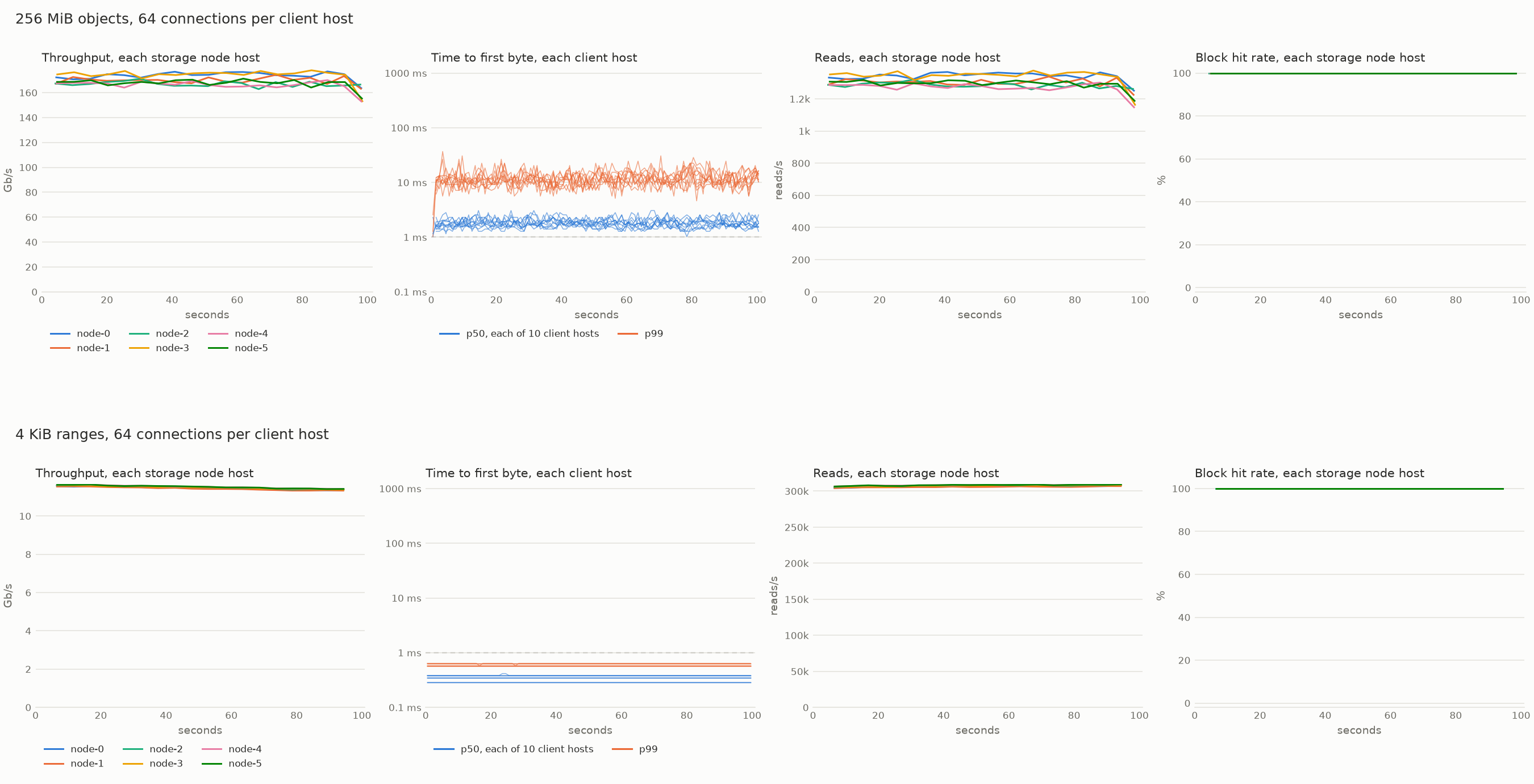
Top: 256 MiB objects. Each storage host sends about 170 Gb/s, and first byte stays near 1.7 ms. Bottom: 4 KiB ranges at 1.84 million reads a second, with first byte under 1 ms. Each line is one storage host, or in the latency panels, one client host.
Ten client hosts (c8in.16xlarge, 100 Gb/s each) read the same data from S3 and through six storage hosts (m8idn.32xlarge, 200 Gb/s each). Each client ran its gateway as a sidecar. Rates are totals across the clients. Latency is time to first byte, p50 / p99.
| Workload | S3 directly | Through the cache | Gain |
|---|---|---|---|
| Small objects, 1 connection | 218/s, 35 / 120 ms | 13,474/s, 0.64 / 1.1 ms | 62× |
| Small objects, 64 connections | 17,595/s, 25 / 110 ms | 1,392,850/s, 0.38 / 0.66 ms | 79× |
| 4 KiB ranges, 64 connections | 20,694/s, 26 / 98 ms | 1,843,060/s, 0.34 / 0.57 ms | 89× |
| 4 KiB ranges, 1,024 connections | 6,404,878/s, 1.4 / 4.4 ms | ||
| 256 MiB objects, 1 connection | 68 MiB/s a stream, 112 ms | 1.44 GiB/s a stream, 1.25 / 2.2 ms | 22× |
| 256 MiB objects, 64 connections | 54.3 GiB/s, 87 / 176 ms | 115.3 GiB/s, 1.7 / 13 ms | 2.1× |
| 256 MiB objects, 256 connections | 109.5 GiB/s, 34 / 143 ms | 107.8 GiB/s, 1.7 / 22 ms |
Small objects are 4 to 256 KiB. Connections are per client.
- Small requests run 62 to 89 times S3's rate with sub-millisecond latency. At 6.4 million reads a second the client hosts were 81% busy and the storage hosts 17%, so the clients set the limit.
- Large objects fill the clients' 1 Tb/s at 16 connections per client. S3 needs 256 connections to come close.
- TLS costs small requests 5 to 24% of their rate up to 256 connections, and large reads 1 to 4%.
- Misses run at 78 to 100% of S3's own speed.
- Hosts vary. Two identical fleets launched the same day differed up to fourfold. See Tuning.
loadtest/plans/scale.toml reruns the test.
Quick start
Start an in-memory S3 and one process that runs both a gateway and a storage node:
scripts/s3proxy start                                   # S3 on localhost:8080
cargo run --release -p s3-accelerator -- config/local.toml &
Point any S3 client at port 9000:
export AWS_ACCESS_KEY_ID=local-identity AWS_SECRET_ACCESS_KEY=local-credential AWS_REGION=us-east-1
aws --endpoint-url http://127.0.0.1:9000 s3 mb s3://demo
aws --endpoint-url http://127.0.0.1:9000 s3 cp Cargo.toml s3://demo/Cargo.toml
aws --endpoint-url http://127.0.0.1:9000 s3 cp s3://demo/Cargo.toml -   # streams from S3
aws --endpoint-url http://127.0.0.1:9000 s3 cp s3://demo/Cargo.toml -   # stores the blocks
aws --endpoint-url http://127.0.0.1:9000 s3 cp s3://demo/Cargo.toml -   # a hit
curl -s 127.0.0.1:9090/metrics | grep s3accel_node_block_reads_total
scripts/cluster start 3 runs a gateway and three nodes as separate processes. Add --tls for TLS everywhere, or --metadata for the reference metadata service. scripts/cluster stop stops them.
Deployment modes
One binary runs everything. A [node] table makes a process a storage node, a [gateway] table makes it a gateway, and a config may have both. Run one cluster per availability zone. Across zones, a hit larger than about 20 KB costs more in transfer than the S3 GET it saves.
flowchart LR
  subgraph Sidecar["Sidecar: a gateway on each client host"]
    A1[App] -->|loopback| G1[Gateway]
  end
  subgraph Tier["Gateway tier: behind a load balancer"]
    A2[Serverless app] --> LB[Load balancer] --> G2[Gateways]
  end
  subgraph Nodes["Storage nodes, each with NVMe"]
    N1[Node]
    N2[Node]
    N3[Node]
  end
  G1 -->|straight to the owner| Nodes
  G2 --> Nodes
  Nodes -->|misses| S3[(S3)]
| Mode | Use it when | Trade-off |
|---|---|---|
| Sidecar | You control the client hosts | Fewest hops. The gateway uses the client's CPU. |
| Gateway tier | Clients can't run a sidecar, as on Lambda or Workers | One extra hop. The tier scales on its own. |
| Gateways on the nodes | You want the fewest moving parts | One extra hop on the nodes' network cards. |
How it works
A gateway checks the request's signature, finds the object's metadata, and asks each byte range's owner for it. An owner serves the blocks it holds and fetches the rest from S3, merging concurrent misses into one fetch. Writes and every other operation pass through a storage node to S3.
sequenceDiagram
  participant C as Client
  participant G as Gateway
  participant H as Home node
  participant O as Chunk owner
  participant S as S3
  C->>G: GET /bucket/key (SigV4)
  G->>G: check signature and grants
  alt metadata cached
    G->>O: blocks of chunk 3, If-Match etag
  else first read
    G->>H: metadata and the head or tail bytes
    H->>S: GET (once, for every waiting reader)
    S-->>H: metadata and bytes
    H-->>G: metadata and bytes
    G->>O: blocks of chunk 3, If-Match etag
  end
  O-->>G: blocks (sendfile)
  G-->>C: response (splice)
Partitioning
Data is stored in 1 MiB blocks and placed in 16 MiB chunks. Rendezvous hashing of an object's bucket and key picks its home. The home keeps the metadata, the first chunk and the last 16 MiB, where Parquet and similar formats keep their footers. Objects up to 32 MiB live entirely on their home. Every other chunk hashes to its own owner, so large reads fan out across the cluster.
flowchart TB
  K["s3://bucket/key, 160 MiB: chunks 0-9"] --> HH["hash(bucket, key)"]
  K --> HC["hash(bucket, key, chunk)"]
  HH -->|"highest score wins"| Home["Home: metadata, chunk 0, chunk 9 (the final 16 MiB)"]
  HC -->|"chunk 1"| C1["Owner of chunk 1"]
  HC -->|"chunk 2"| C2["Owner of chunk 2"]
  HC -->|"..."| CN["Owners of chunks 3-8"]
  subgraph Rendezvous["Rendezvous: each node scores mix(hash, node id), scaled by its weight"]
    direction LR
    R1["node 7: 0.91"] --> R2["node 2: 0.84"] --> R3["node 5: 0.62"]
  end
  Home -.-> Rendezvous
Every placement ranks all nodes. The top node owns it, and the next ones take over on failure or serve as replicas when it runs hot. A node's weight, usually its disk size, scales its share.
Ring changes
Storage nodes find each other by gossip and agree on the ring. Gateways fetch the ring from nodes. When a node joins or leaves, only its keys move. For a short window afterward, a new owner asks the old owner for missing blocks before going to S3.
sequenceDiagram
  participant G as Gateway
  participant N as New owner (node 4)
  participant P as Previous owner (node 1)
  participant S as S3
  Note over N,P: node 4 joins, and chunk 9 moves from node 1 to node 4
  G->>N: blocks of chunk 9
  N->>P: blocks you hold of chunk 9?
  alt previous owner holds them
    P-->>N: blocks (admitted at once)
  else it lacks them or doesn't answer in time
    N->>S: range GET, If-Match etag
    S-->>N: blocks
  end
  N-->>G: blocks
A node sent SIGUSR1 leaves the ring, keeps serving its old blocks for the window, then exits. A restarted node keeps its place and its disk, so rolling deploys keep the cache warm.
Hot-key replication
Each owner counts its reads. When a placement passes hot_threshold, the owner leases it to the next hot_replicas nodes for a short time. Replicas fill from the owner, and gateways spread reads across the set. The owner renews the lease while the set stays hot. Leases expire on their own.
sequenceDiagram
  participant G as Gateways
  participant O as Owner
  participant R1 as Replica 1
  participant R2 as Replica 2
  G->>O: many reads of one manifest
  O->>O: reads in window > hot_threshold
  O-->>G: answer + hot hint (owner, R1, R2, lease end)
  par spread across the set
    G->>O: read
  and
    G->>R1: read
  and
    G->>R2: read
  end
  R1->>O: fill from the owner (first read only)
  R1-->>O: read counts, halfway through the lease
  O-->>R1: renew while the set stays hot
Admission on the second read
A block's first read streams from S3 straight to the reader and marks the block in a Bloom filter. A second read soon after stores it. Scans and one-off exports pass through without touching the hot set. Eviction is S3-FIFO, and the page cache keeps the hottest blocks in memory.
flowchart LR
  R[Read of a block] --> Q{On disk?}
  Q -->|yes| HIT[Serve with sendfile]
  Q -->|no| D{In the doorkeeper?}
  D -->|no: first read| F1[Stream from S3, mark the doorkeeper]
  D -->|yes: second read| F2[Fetch from S3, admit to disk, serve]
Set admit_on_first_read = true on a bucket that is nearly always reread, such as a training set.
Consistency
- Blocks are keyed by ETag, so a response never mixes two versions of an object.
- Every fill after an object's first carries
If-Match. - Writes go through the object's home, so a gateway sees its own writes.
- Freshness is set per bucket:
immutable = truenever revalidates, andttl_msrevalidates after that age. S3 event notifications can invalidate entries as objects change. - 404s are never cached, and versioned reads go straight to S3.
Operator guide
Sizing
- Storage nodes: local NVMe and the biggest network card available. Large reads make nodes network-bound. In the scale test, each sent about 170 Gb/s at 4% CPU.
- Node processes: each runs on one thread, so run several per host for high request rates. The scale test ran 32 on each 128-vCPU host.
- Gateways: one event loop per core by default. Give each gateway at least as many client connections as loops.
- Memory: the block index takes about 1.6 GB per 4 TB of cache.
Configuration
A storage node:
[origin]                       # or [metadata] to look origins up
endpoint = "https://s3.us-east-1.amazonaws.com"
region = "us-east-1"
access_key_id = "AKIA..."
secret_access_key = "..."

[cluster]
secret = "..."                 # shared by every process
nodes = [{ id = 0, address = "10.0.1.10:9400", weight = 3800 },
         { id = 1, address = "10.0.1.11:9400", weight = 3800 }]

[node]
id = 0
data_dir = "/mnt/nvme/s3accel"

[cache.default_policy]
ttl_ms = 5000                  # revalidate metadata after 5 s

[cache.buckets.tables]
immutable = true               # never revalidate

[admin]
listen = "10.0.1.10:9401"      # metrics and health checks
A sidecar gateway:
[[clients]]                    # or [metadata] to look clients up
access_key_id = "analytics"
secret_access_key = "..."
grants = [{ bucket = "tables", access = "read" }, { bucket = "scratch", prefix = "analytics/", access = "write" }]

[cluster]
secret = "..."
nodes = [{ id = 0, address = "10.0.1.10:9400" }]   # any running node

[gateway]
listen = "127.0.0.1:9000"

[admin]
listen = "10.0.2.20:9402"
[gateway.tls] serves clients over HTTPS. [cluster.tls] gives every process a certificate for mutual TLS. Kernel TLS needs Linux 7.0 or later.
Origins and clients
[origin] sets the default origin, and [origins.<bucket>] overrides it for one bucket:
[origins.assets]
endpoint = "https://0123456789abcdef.r2.cloudflarestorage.com"
region = "auto"
access_key_id = "..."
secret_access_key = "..."
A metadata service can supply origins and client grants instead. Gateways then hold no client secrets:
[metadata]
url = "https://metadata.example.com"
token = "..."
s3-accelerator-metadata CONFIG runs a reference service that reads a TOML file and reloads it on SIGHUP.
Freshness and events
Send a bucket's event notifications to SQS and name the queue on each node:
[events]
queue_url = "https://sqs.us-east-1.amazonaws.com/123456789012/bucket-events"
visibility_timeout_s = 30
Events keep metadata fresh. Set a long ttl_ms, such as an hour, to cover a missed event.
Changing the cluster
- Grow: start a node that names any running node. It joins by gossip.
- Shrink: send the node
SIGUSR1. It hands off its blocks, then exits. - Restart: send
SIGTERM. A node back within the down grace period keeps its place and its disk. - Purge:
POST /bucket/key?x-accel-purgeerases an object from every node.
Monitoring
Each connection holds a file descriptor, so raise the hard limit: LimitNOFILE=1048576 in systemd, or --ulimit nofile=1048576 in Docker.
The admin listener serves /metrics, /healthz and /readyz. Keep it on a private address.
| Metric | Shows |
|---|---|
s3accel_gateway_requests_total, s3accel_gateway_first_byte_seconds | Requests and time to first byte |
s3accel_node_block_reads_total{result} | Hit rate: blocks served (hit) against filled (fetched) |
s3accel_node_body_bytes_total{source} | Bytes from the cache, S3 and previous owners |
s3accel_node_admissions_total{result} | Blocks stored, and why others weren't |
s3accel_ring_nodes | Membership as each process sees it |
process_open_fds, process_max_fds | Descriptor use against the limit |
Tuning
TCP timers. A full network card drops packets, and Linux waits 200 ms before resending one. The cluster shortens that to 5 ms on its own links:
[cluster.tcp]
rto_min_us = 5000      # resend after 5 ms
delack_max_us = 5000   # acknowledge within 5 ms
256 MiB reads with the clients' network cards full:
| Timers | 64 connections | 256 connections |
|---|---|---|
| 5 ms (default) | 115.2 GiB/s, p99.9 19 ms | 106.0 GiB/s, p99 24 ms |
Linux's (0) | 115.2 GiB/s, p99.9 213 ms | 112.6 GiB/s, p99 209 ms |
| 20 ms | 115.3 GiB/s, p99.9 31 ms | 109.2 GiB/s, p99.9 1,044 ms |
Keep the default when latency matters. Set 0 for batch jobs that want the last 6% of throughput and can tolerate 200 ms stalls. Avoid values in between. The timers need Linux 6.15 or later, and ss -ti shows each link's current rto.
Equal weights. Give every node the same weight when you can. Nodes then rank keys by hash alone, which saved a tenth of each storage host's CPU in the scale test.
Hosts vary. Load-test a new fleet before trusting it. In our tests, one fleet ran at a quarter of another identical fleet's speed. Compare hosts with each other and replace outliers. The load test's report shows each host's CPU, network, retransmissions and dropped packets. ethtool -S shows a network card's allowance_exceeded counters.
Gateway CPU. A sidecar gateway shares its host with the application. At 6 million reads a second, the client hosts were 80% busy.
Development
crates/core: gateway and storage logic as deterministic state machines with no I/O.crates/server: thes3-acceleratorbinary, which runs the core over sockets and disks.crates/sim: a deterministic simulator of gateways, nodes, clients and S3.crates/load: a load generator for clusters and for S3.crates/bench: single-machine benchmarks.loadtest: the EC2 load test: Terraform, plans and a driver.tests: the S3 conformance suite.
Testing
cargo test --workspace                        # unit, server and simulator tests
scripts/s3proxy start                         # in-memory S3 on localhost:8080
sudo modprobe tls                             # kernel TLS
cargo test --workspace -- --include-ignored   # adds conformance and kernel TLS tests
scripts/s3proxy stop
Server tests need Linux and strace. They check zero-copy and kernel TLS from outside the process, with strace, ss and /proc/net/tls_stat. Kernel TLS needs Linux 7.0 or later.
Run the conformance suite through the accelerator:
cargo run -p s3-accelerator -- config/local.toml &
CONFORMANCE_ENDPOINT=http://127.0.0.1:9000 cargo test -p s3-accelerator-conformance -- --ignored
Simulator
A seed fixes the whole run: cluster size, workload and every delay. Writers change objects while clients read, and every response must match what S3 could have returned. Pass a run's seed back to replay it exactly.
cargo run --release -p s3-accelerator-sim                      # a random seed
cargo run --release -p s3-accelerator-sim -- 42                # replay seed 42
cargo run --release -p s3-accelerator-sim -- 0 --seeds 10000   # seeds 0 to 9,999 on every core
scripts/mutants plants known bugs one at a time and reports which tests catch each.
Benchmarks and load tests
crates/bench measures one machine. loadtest/README.md runs a cluster on EC2 against real S3. BENCHMARKS.md records every run.
Similar repos


Languages
Rust
91.6%
Python
7.2%
See what people are saying
README
s3-accelerator
A per-zone NVMe read cache for S3 that serves hits in under a millisecond, replicates hot objects, and stays warm when the cluster resizes.
Clients keep their S3 SDKs and point them at the cache. S3 stays the source of truth.
Contents
What sets it apart
- Resizing keeps the cache warm. Adding or removing a node moves only that node's keys. New owners fetch what they took over from the old owners before asking S3. See Ring changes.
- Hot keys replicate themselves. An overloaded key gets short-lived replicas, and gateways spread its reads across them. See Hot-key replication.
- One-time reads stay off disk. A block reaches NVMe on its second read, so scans don't evict the hot set. See Admission on the second read.
- Multi-tenant auth for any S3-compatible origin. Gateways check SigV4 and per-credential grants on every hit. Each bucket can have its own origin, such as AWS S3, R2 or MinIO.
- Zero-copy bytes. Nodes send blocks with
sendfile, gateways relay them withsplice, and kernel TLS encrypts inside those calls.
Performance
Top: 256 MiB objects. Each storage host sends about 170 Gb/s, and first byte stays near 1.7 ms. Bottom: 4 KiB ranges at 1.84 million reads a second, with first byte under 1 ms. Each line is one storage host, or in the latency panels, one client host.
Ten client hosts (c8in.16xlarge, 100 Gb/s each) read the same data from S3 and through six storage hosts (m8idn.32xlarge, 200 Gb/s each). Each client ran its gateway as a sidecar. Rates are totals across the clients. Latency is time to first byte, p50 / p99.
| Workload | S3 directly | Through the cache | Gain |
|---|---|---|---|
| Small objects, 1 connection | 218/s, 35 / 120 ms | 13,474/s, 0.64 / 1.1 ms | 62× |
| Small objects, 64 connections | 17,595/s, 25 / 110 ms | 1,392,850/s, 0.38 / 0.66 ms | 79× |
| 4 KiB ranges, 64 connections | 20,694/s, 26 / 98 ms | 1,843,060/s, 0.34 / 0.57 ms | 89× |
| 4 KiB ranges, 1,024 connections | 6,404,878/s, 1.4 / 4.4 ms | ||
| 256 MiB objects, 1 connection | 68 MiB/s a stream, 112 ms | 1.44 GiB/s a stream, 1.25 / 2.2 ms | 22× |
| 256 MiB objects, 64 connections | 54.3 GiB/s, 87 / 176 ms | 115.3 GiB/s, 1.7 / 13 ms | 2.1× |
| 256 MiB objects, 256 connections | 109.5 GiB/s, 34 / 143 ms | 107.8 GiB/s, 1.7 / 22 ms |
Small objects are 4 to 256 KiB. Connections are per client.
- Small requests run 62 to 89 times S3's rate with sub-millisecond latency. At 6.4 million reads a second the client hosts were 81% busy and the storage hosts 17%, so the clients set the limit.
- Large objects fill the clients' 1 Tb/s at 16 connections per client. S3 needs 256 connections to come close.
- TLS costs small requests 5 to 24% of their rate up to 256 connections, and large reads 1 to 4%.
- Misses run at 78 to 100% of S3's own speed.
- Hosts vary. Two identical fleets launched the same day differed up to fourfold. See Tuning.
loadtest/plans/scale.toml reruns the test.
Quick start
Start an in-memory S3 and one process that runs both a gateway and a storage node:
scripts/s3proxy start                                   # S3 on localhost:8080
cargo run --release -p s3-accelerator -- config/local.toml &
Point any S3 client at port 9000:
export AWS_ACCESS_KEY_ID=local-identity AWS_SECRET_ACCESS_KEY=local-credential AWS_REGION=us-east-1
aws --endpoint-url http://127.0.0.1:9000 s3 mb s3://demo
aws --endpoint-url http://127.0.0.1:9000 s3 cp Cargo.toml s3://demo/Cargo.toml
aws --endpoint-url http://127.0.0.1:9000 s3 cp s3://demo/Cargo.toml -   # streams from S3
aws --endpoint-url http://127.0.0.1:9000 s3 cp s3://demo/Cargo.toml -   # stores the blocks
aws --endpoint-url http://127.0.0.1:9000 s3 cp s3://demo/Cargo.toml -   # a hit
curl -s 127.0.0.1:9090/metrics | grep s3accel_node_block_reads_total
scripts/cluster start 3 runs a gateway and three nodes as separate processes. Add --tls for TLS everywhere, or --metadata for the reference metadata service. scripts/cluster stop stops them.
Deployment modes
One binary runs everything. A [node] table makes a process a storage node, a [gateway] table makes it a gateway, and a config may have both. Run one cluster per availability zone. Across zones, a hit larger than about 20 KB costs more in transfer than the S3 GET it saves.
flowchart LR
  subgraph Sidecar["Sidecar: a gateway on each client host"]
    A1[App] -->|loopback| G1[Gateway]
  end
  subgraph Tier["Gateway tier: behind a load balancer"]
    A2[Serverless app] --> LB[Load balancer] --> G2[Gateways]
  end
  subgraph Nodes["Storage nodes, each with NVMe"]
    N1[Node]
    N2[Node]
    N3[Node]
  end
  G1 -->|straight to the owner| Nodes
  G2 --> Nodes
  Nodes -->|misses| S3[(S3)]
| Mode | Use it when | Trade-off |
|---|---|---|
| Sidecar | You control the client hosts | Fewest hops. The gateway uses the client's CPU. |
| Gateway tier | Clients can't run a sidecar, as on Lambda or Workers | One extra hop. The tier scales on its own. |
| Gateways on the nodes | You want the fewest moving parts | One extra hop on the nodes' network cards. |
How it works
A gateway checks the request's signature, finds the object's metadata, and asks each byte range's owner for it. An owner serves the blocks it holds and fetches the rest from S3, merging concurrent misses into one fetch. Writes and every other operation pass through a storage node to S3.
sequenceDiagram
  participant C as Client
  participant G as Gateway
  participant H as Home node
  participant O as Chunk owner
  participant S as S3
  C->>G: GET /bucket/key (SigV4)
  G->>G: check signature and grants
  alt metadata cached
    G->>O: blocks of chunk 3, If-Match etag
  else first read
    G->>H: metadata and the head or tail bytes
    H->>S: GET (once, for every waiting reader)
    S-->>H: metadata and bytes
    H-->>G: metadata and bytes
    G->>O: blocks of chunk 3, If-Match etag
  end
  O-->>G: blocks (sendfile)
  G-->>C: response (splice)
Partitioning
Data is stored in 1 MiB blocks and placed in 16 MiB chunks. Rendezvous hashing of an object's bucket and key picks its home. The home keeps the metadata, the first chunk and the last 16 MiB, where Parquet and similar formats keep their footers. Objects up to 32 MiB live entirely on their home. Every other chunk hashes to its own owner, so large reads fan out across the cluster.
flowchart TB
  K["s3://bucket/key, 160 MiB: chunks 0-9"] --> HH["hash(bucket, key)"]
  K --> HC["hash(bucket, key, chunk)"]
  HH -->|"highest score wins"| Home["Home: metadata, chunk 0, chunk 9 (the final 16 MiB)"]
  HC -->|"chunk 1"| C1["Owner of chunk 1"]
  HC -->|"chunk 2"| C2["Owner of chunk 2"]
  HC -->|"..."| CN["Owners of chunks 3-8"]
  subgraph Rendezvous["Rendezvous: each node scores mix(hash, node id), scaled by its weight"]
    direction LR
    R1["node 7: 0.91"] --> R2["node 2: 0.84"] --> R3["node 5: 0.62"]
  end
  Home -.-> Rendezvous
Every placement ranks all nodes. The top node owns it, and the next ones take over on failure or serve as replicas when it runs hot. A node's weight, usually its disk size, scales its share.
Ring changes
Storage nodes find each other by gossip and agree on the ring. Gateways fetch the ring from nodes. When a node joins or leaves, only its keys move. For a short window afterward, a new owner asks the old owner for missing blocks before going to S3.
sequenceDiagram
  participant G as Gateway
  participant N as New owner (node 4)
  participant P as Previous owner (node 1)
  participant S as S3
  Note over N,P: node 4 joins, and chunk 9 moves from node 1 to node 4
  G->>N: blocks of chunk 9
  N->>P: blocks you hold of chunk 9?
  alt previous owner holds them
    P-->>N: blocks (admitted at once)
  else it lacks them or doesn't answer in time
    N->>S: range GET, If-Match etag
    S-->>N: blocks
  end
  N-->>G: blocks
A node sent SIGUSR1 leaves the ring, keeps serving its old blocks for the window, then exits. A restarted node keeps its place and its disk, so rolling deploys keep the cache warm.
Hot-key replication
Each owner counts its reads. When a placement passes hot_threshold, the owner leases it to the next hot_replicas nodes for a short time. Replicas fill from the owner, and gateways spread reads across the set. The owner renews the lease while the set stays hot. Leases expire on their own.
sequenceDiagram
  participant G as Gateways
  participant O as Owner
  participant R1 as Replica 1
  participant R2 as Replica 2
  G->>O: many reads of one manifest
  O->>O: reads in window > hot_threshold
  O-->>G: answer + hot hint (owner, R1, R2, lease end)
  par spread across the set
    G->>O: read
  and
    G->>R1: read
  and
    G->>R2: read
  end
  R1->>O: fill from the owner (first read only)
  R1-->>O: read counts, halfway through the lease
  O-->>R1: renew while the set stays hot
Admission on the second read
A block's first read streams from S3 straight to the reader and marks the block in a Bloom filter. A second read soon after stores it. Scans and one-off exports pass through without touching the hot set. Eviction is S3-FIFO, and the page cache keeps the hottest blocks in memory.
flowchart LR
  R[Read of a block] --> Q{On disk?}
  Q -->|yes| HIT[Serve with sendfile]
  Q -->|no| D{In the doorkeeper?}
  D -->|no: first read| F1[Stream from S3, mark the doorkeeper]
  D -->|yes: second read| F2[Fetch from S3, admit to disk, serve]
Set admit_on_first_read = true on a bucket that is nearly always reread, such as a training set.
Consistency
- Blocks are keyed by ETag, so a response never mixes two versions of an object.
- Every fill after an object's first carries
If-Match. - Writes go through the object's home, so a gateway sees its own writes.
- Freshness is set per bucket:
immutable = truenever revalidates, andttl_msrevalidates after that age. S3 event notifications can invalidate entries as objects change. - 404s are never cached, and versioned reads go straight to S3.
Operator guide
Sizing
- Storage nodes: local NVMe and the biggest network card available. Large reads make nodes network-bound. In the scale test, each sent about 170 Gb/s at 4% CPU.
- Node processes: each runs on one thread, so run several per host for high request rates. The scale test ran 32 on each 128-vCPU host.
- Gateways: one event loop per core by default. Give each gateway at least as many client connections as loops.
- Memory: the block index takes about 1.6 GB per 4 TB of cache.
Configuration
A storage node:
[origin]                       # or [metadata] to look origins up
endpoint = "https://s3.us-east-1.amazonaws.com"
region = "us-east-1"
access_key_id = "AKIA..."
secret_access_key = "..."

[cluster]
secret = "..."                 # shared by every process
nodes = [{ id = 0, address = "10.0.1.10:9400", weight = 3800 },
         { id = 1, address = "10.0.1.11:9400", weight = 3800 }]

[node]
id = 0
data_dir = "/mnt/nvme/s3accel"

[cache.default_policy]
ttl_ms = 5000                  # revalidate metadata after 5 s

[cache.buckets.tables]
immutable = true               # never revalidate

[admin]
listen = "10.0.1.10:9401"      # metrics and health checks
A sidecar gateway:
[[clients]]                    # or [metadata] to look clients up
access_key_id = "analytics"
secret_access_key = "..."
grants = [{ bucket = "tables", access = "read" }, { bucket = "scratch", prefix = "analytics/", access = "write" }]

[cluster]
secret = "..."
nodes = [{ id = 0, address = "10.0.1.10:9400" }]   # any running node

[gateway]
listen = "127.0.0.1:9000"

[admin]
listen = "10.0.2.20:9402"
[gateway.tls] serves clients over HTTPS. [cluster.tls] gives every process a certificate for mutual TLS. Kernel TLS needs Linux 7.0 or later.
Origins and clients
[origin] sets the default origin, and [origins.<bucket>] overrides it for one bucket:
[origins.assets]
endpoint = "https://0123456789abcdef.r2.cloudflarestorage.com"
region = "auto"
access_key_id = "..."
secret_access_key = "..."
A metadata service can supply origins and client grants instead. Gateways then hold no client secrets:
[metadata]
url = "https://metadata.example.com"
token = "..."
s3-accelerator-metadata CONFIG runs a reference service that reads a TOML file and reloads it on SIGHUP.
Freshness and events
Send a bucket's event notifications to SQS and name the queue on each node:
[events]
queue_url = "https://sqs.us-east-1.amazonaws.com/123456789012/bucket-events"
visibility_timeout_s = 30
Events keep metadata fresh. Set a long ttl_ms, such as an hour, to cover a missed event.
Changing the cluster
- Grow: start a node that names any running node. It joins by gossip.
- Shrink: send the node
SIGUSR1. It hands off its blocks, then exits. - Restart: send
SIGTERM. A node back within the down grace period keeps its place and its disk. - Purge:
POST /bucket/key?x-accel-purgeerases an object from every node.
Monitoring
Each connection holds a file descriptor, so raise the hard limit: LimitNOFILE=1048576 in systemd, or --ulimit nofile=1048576 in Docker.
The admin listener serves /metrics, /healthz and /readyz. Keep it on a private address.
| Metric | Shows |
|---|---|
s3accel_gateway_requests_total, s3accel_gateway_first_byte_seconds | Requests and time to first byte |
s3accel_node_block_reads_total{result} | Hit rate: blocks served (hit) against filled (fetched) |
s3accel_node_body_bytes_total{source} | Bytes from the cache, S3 and previous owners |
s3accel_node_admissions_total{result} | Blocks stored, and why others weren't |
s3accel_ring_nodes | Membership as each process sees it |
process_open_fds, process_max_fds | Descriptor use against the limit |
Tuning
TCP timers. A full network card drops packets, and Linux waits 200 ms before resending one. The cluster shortens that to 5 ms on its own links:
[cluster.tcp]
rto_min_us = 5000      # resend after 5 ms
delack_max_us = 5000   # acknowledge within 5 ms
256 MiB reads with the clients' network cards full:
| Timers | 64 connections | 256 connections |
|---|---|---|
| 5 ms (default) | 115.2 GiB/s, p99.9 19 ms | 106.0 GiB/s, p99 24 ms |
Linux's (0) | 115.2 GiB/s, p99.9 213 ms | 112.6 GiB/s, p99 209 ms |
| 20 ms | 115.3 GiB/s, p99.9 31 ms | 109.2 GiB/s, p99.9 1,044 ms |
Keep the default when latency matters. Set 0 for batch jobs that want the last 6% of throughput and can tolerate 200 ms stalls. Avoid values in between. The timers need Linux 6.15 or later, and ss -ti shows each link's current rto.
Equal weights. Give every node the same weight when you can. Nodes then rank keys by hash alone, which saved a tenth of each storage host's CPU in the scale test.
Hosts vary. Load-test a new fleet before trusting it. In our tests, one fleet ran at a quarter of another identical fleet's speed. Compare hosts with each other and replace outliers. The load test's report shows each host's CPU, network, retransmissions and dropped packets. ethtool -S shows a network card's allowance_exceeded counters.
Gateway CPU. A sidecar gateway shares its host with the application. At 6 million reads a second, the client hosts were 80% busy.
Development
crates/core: gateway and storage logic as deterministic state machines with no I/O.crates/server: thes3-acceleratorbinary, which runs the core over sockets and disks.crates/sim: a deterministic simulator of gateways, nodes, clients and S3.crates/load: a load generator for clusters and for S3.crates/bench: single-machine benchmarks.loadtest: the EC2 load test: Terraform, plans and a driver.tests: the S3 conformance suite.
Testing
cargo test --workspace                        # unit, server and simulator tests
scripts/s3proxy start                         # in-memory S3 on localhost:8080
sudo modprobe tls                             # kernel TLS
cargo test --workspace -- --include-ignored   # adds conformance and kernel TLS tests
scripts/s3proxy stop
Server tests need Linux and strace. They check zero-copy and kernel TLS from outside the process, with strace, ss and /proc/net/tls_stat. Kernel TLS needs Linux 7.0 or later.
Run the conformance suite through the accelerator:
cargo run -p s3-accelerator -- config/local.toml &
CONFORMANCE_ENDPOINT=http://127.0.0.1:9000 cargo test -p s3-accelerator-conformance -- --ignored
Simulator
A seed fixes the whole run: cluster size, workload and every delay. Writers change objects while clients read, and every response must match what S3 could have returned. Pass a run's seed back to replay it exactly.
cargo run --release -p s3-accelerator-sim                      # a random seed
cargo run --release -p s3-accelerator-sim -- 42                # replay seed 42
cargo run --release -p s3-accelerator-sim -- 0 --seeds 10000   # seeds 0 to 9,999 on every core
scripts/mutants plants known bugs one at a time and reports which tests catch each.
Benchmarks and load tests
crates/bench measures one machine. loadtest/README.md runs a cluster on EC2 against real S3. BENCHMARKS.md records every run.
Similar repos
Languages
Rust
91.6%
Python
7.2%