Turn any codebase or public website into an animated, editable map. Scan a repo or site, see how its parts connect, drag and edit boxes, sketch the plan you want, then press play to watch it morph. For onboarding, explaining systems to non-coders, planning refactors and learning how real projects are built.
See the codeSee how a codebase or website really works, sketch how it should work, and press play to watch it change.
Morph Map scans a real project and draws it as an editable map. You draw the plan next to it, check the plan is actually simpler, then hand the change to your AI coder as a ready-made brief. One HTML file, no install, no account, and nothing leaves your browser.
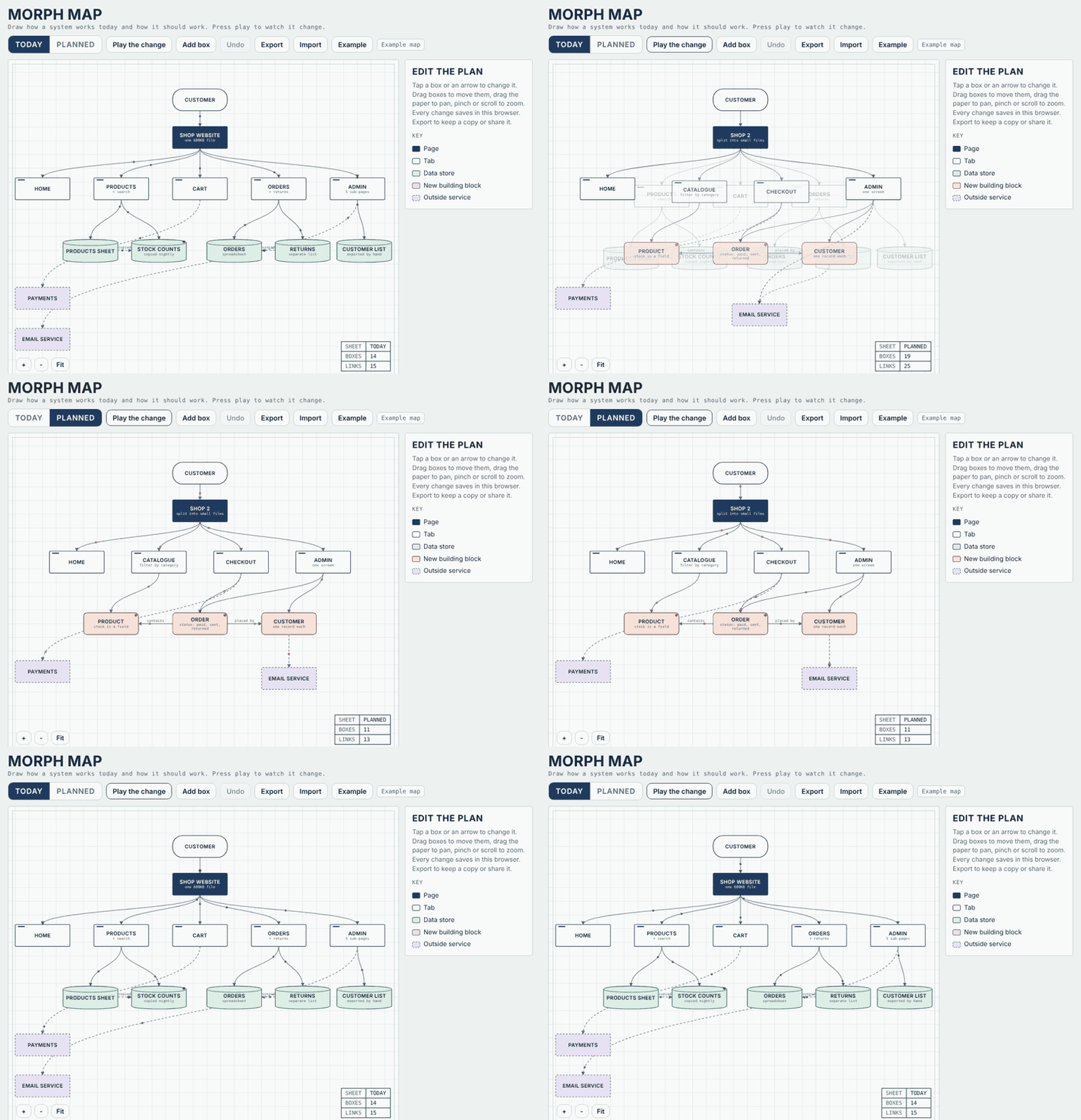
Open Morph Map and pick an example from the Examples menu, or browse 7 scanned projects.
| Scan | Turn a code folder or a public website into a map. Files or pages become boxes, imports or links become arrows. |
| Plan | Edit a second map called Planned. Add, delete, rename and connect boxes, and leave notes for the build. |
| Play | Animate Today into Planned. The complexity score counts down as the map changes. |
| Report | Scores and findings worked out from the scan, each one a plain rule you can check. |
| Brief | Turn the difference between the two maps into a step-by-step plan for Claude Code, Cursor or any AI coder. |
| Learn | For code: where to start reading, the core files, import loops, big files, and a quiz built from the scan. |
| Blast radius | Pick any box and see everything reachable from it by following the arrows. Useful for asking "if an AI tool were plugged in here, what could it touch?" |
1. Map a code project (Node 18 or newer, nothing to install)
node scanner/morph-scan.js ./your-project --out my-map.json
Open index.html, press Import and pick my-map.json. Reads JavaScript, TypeScript, Python, Vue, Svelte and HTML.
2. Map a website
Open the site in your browser, open the console, paste scanner/morph-web.js and press Enter. It reads up to 40 public pages and copies a map you can Import.
3. Plan and play Switch to Planned, change the map, then press Play the change. Open the Report tab and press Write the AI coder brief when you are happy.
Complexity runs from 0 to 100 and uses the same formula for Today and Planned, so you can compare them fairly.
| Part | Up to | Measured from |
|---|---|---|
| Size | 30 | Number of boxes (full marks at 40) |
| Tangle | 35 | Arrows per box (full marks at 3) |
| Depth | 20 | Most steps from the top box (full marks at 6) |
| Copies | 15 | Dashed arrows touching a data store, meaning the same data kept in two places (full marks at 3) |
Under 35 is Light, under 65 is Medium, and 65 and up is Heavy.
Code (Learn mode): where the program starts, the files most others depend on, import loops, files over 400 lines, files that connect to nothing, and outside packages.
Websites (Audit mode):
Security checks use only what any visitor's browser already receives. Morph Map never logs in, sends forms or probes a site.
Plan check: tick which findings your plan fixes. The report shows how many issues the plan covers, and the brief tells your AI coder exactly what to fix.
| Project | Type | What it showed |
|---|---|---|
| Express 2014 and today | Code | 13 files down to 7 as the router moved out, complexity 45 to 36 |
| python.org, gov.uk, daraz.pk | Websites | Big repeated menus on two of them, no Content Security Policy on two, HTTPS enforced for 1 to 2 years on two |
Each real site exposed a rule that was too eager. Those rules were fixed before this release. If you find a false alarm, please open an issue with the site and the finding.
| File | What it does |
|---|---|
index.html | The app: map editor, player, report, brief, quiz and blast radius |
report.js | The scoring and finding rules, readable on their own |
scanner/morph-scan.js | Reads a code folder into a map |
scanner/morph-web.js | Reads a public website into a map |
examples/ | Ready-made maps: a fictional shop audit, Express 2014 vs today |
demo-scans.html | Seven scanned projects to explore |
npx morph-map ./your-project to scan and open in one stepMorph Map is free for individuals, learners, open-source projects and non-commercial use. Companies and other commercial users need a paid licence. See LICENSE for the full terms.
Using Morph Map in a video, course, article or research? Please credit it. GitHub's Cite this repository button gives you the citation.
Built by Danny Natha.
Turn any codebase or public website into an animated, editable map. Scan a repo or site, see how its parts connect, drag and edit boxes, sketch the plan you want, then press play to watch it morph. For onboarding, explaining systems to non-coders, planning refactors and learning how real projects are built.
See the codeSee how a codebase or website really works, sketch how it should work, and press play to watch it change.
Morph Map scans a real project and draws it as an editable map. You draw the plan next to it, check the plan is actually simpler, then hand the change to your AI coder as a ready-made brief. One HTML file, no install, no account, and nothing leaves your browser.
Open Morph Map and pick an example from the Examples menu, or browse 7 scanned projects.
| Scan | Turn a code folder or a public website into a map. Files or pages become boxes, imports or links become arrows. |
| Plan | Edit a second map called Planned. Add, delete, rename and connect boxes, and leave notes for the build. |
| Play | Animate Today into Planned. The complexity score counts down as the map changes. |
| Report | Scores and findings worked out from the scan, each one a plain rule you can check. |
| Brief | Turn the difference between the two maps into a step-by-step plan for Claude Code, Cursor or any AI coder. |
| Learn | For code: where to start reading, the core files, import loops, big files, and a quiz built from the scan. |
| Blast radius | Pick any box and see everything reachable from it by following the arrows. Useful for asking "if an AI tool were plugged in here, what could it touch?" |
1. Map a code project (Node 18 or newer, nothing to install)
node scanner/morph-scan.js ./your-project --out my-map.json
Open index.html, press Import and pick my-map.json. Reads JavaScript, TypeScript, Python, Vue, Svelte and HTML.
2. Map a website
Open the site in your browser, open the console, paste scanner/morph-web.js and press Enter. It reads up to 40 public pages and copies a map you can Import.
3. Plan and play Switch to Planned, change the map, then press Play the change. Open the Report tab and press Write the AI coder brief when you are happy.
Complexity runs from 0 to 100 and uses the same formula for Today and Planned, so you can compare them fairly.
| Part | Up to | Measured from |
|---|---|---|
| Size | 30 | Number of boxes (full marks at 40) |
| Tangle | 35 | Arrows per box (full marks at 3) |
| Depth | 20 | Most steps from the top box (full marks at 6) |
| Copies | 15 | Dashed arrows touching a data store, meaning the same data kept in two places (full marks at 3) |
Under 35 is Light, under 65 is Medium, and 65 and up is Heavy.
Code (Learn mode): where the program starts, the files most others depend on, import loops, files over 400 lines, files that connect to nothing, and outside packages.
Websites (Audit mode):
Security checks use only what any visitor's browser already receives. Morph Map never logs in, sends forms or probes a site.
Plan check: tick which findings your plan fixes. The report shows how many issues the plan covers, and the brief tells your AI coder exactly what to fix.
| Project | Type | What it showed |
|---|---|---|
| Express 2014 and today | Code | 13 files down to 7 as the router moved out, complexity 45 to 36 |
| python.org, gov.uk, daraz.pk | Websites | Big repeated menus on two of them, no Content Security Policy on two, HTTPS enforced for 1 to 2 years on two |
Each real site exposed a rule that was too eager. Those rules were fixed before this release. If you find a false alarm, please open an issue with the site and the finding.
| File | What it does |
|---|---|
index.html | The app: map editor, player, report, brief, quiz and blast radius |
report.js | The scoring and finding rules, readable on their own |
scanner/morph-scan.js | Reads a code folder into a map |
scanner/morph-web.js | Reads a public website into a map |
examples/ | Ready-made maps: a fictional shop audit, Express 2014 vs today |
demo-scans.html | Seven scanned projects to explore |
npx morph-map ./your-project to scan and open in one stepMorph Map is free for individuals, learners, open-source projects and non-commercial use. Companies and other commercial users need a paid licence. See LICENSE for the full terms.
Using Morph Map in a video, course, article or research? Please credit it. GitHub's Cite this repository button gives you the citation.
Built by Danny Natha.



