
README
🗣️ Chatter - Voice Chat Application
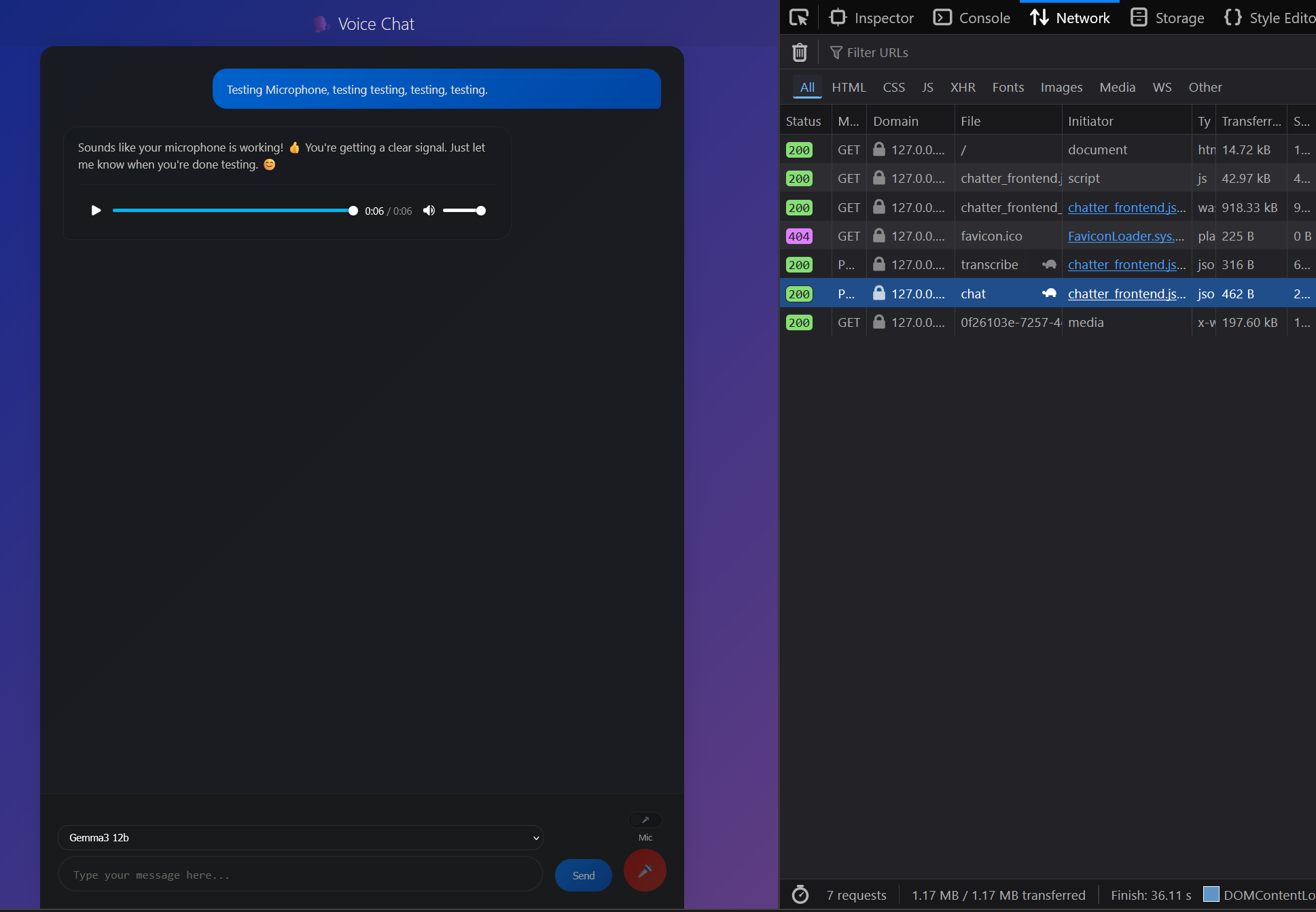
A real-time voice chat application that combines speech-to-text transcription, large language model conversations, and text-to-speech synthesis. Built with Rust backend and WebAssembly frontend for high performance and browser compatibility.
✨ Features
- 🔒 Privacy-First - Local transcription, and text generation, no cloud dependencies
- 🎤 Voice Recording - Browser-based audio recording with WebRTC
- 📝 Speech-to-Text - Local Whisper model transcription using Candle ML
- 🤖 AI Conversations - Integration with Ollama for various LLM models
- 🔊 Text-to-Speech - eSpeak synthesis with audio playback
- 🌐 Web Interface - Modern responsive UI with real-time interactions
- ⚡ High Performance - Rust backend with WebAssembly frontend
🛠️ Prerequisites
System Requirements
- Rust (latest stable) - Install from rustup.rs
- FFmpeg - Required for audio format conversion
- eSpeak/eSpeak-NG - For text-to-speech synthesis
- Ollama - For LLM inference
- wasm-pack - For building WebAssembly frontend
Install Dependencies
Ubuntu/Debian
sudo apt update
sudo apt install ffmpeg espeak-ng ollama
cargo install wasm-pack
Arch Linux
sudo pacman -S ffmpeg espeak ollama
cargo install wasm-pack
macOS
brew install ffmpeg espeak ollama
cargo install wasm-pack
🚀 Quick Start
1. Setup Ollama
# Start Ollama service
ollama serve

# Pull default model (in another terminal)
ollama pull gemma3:12b
2. Clone and Build
git clone https://github.com/danielclough/voice-chat-whisper-ollama-espeak-wasm
cd chatter

# Build frontend WebAssembly module
./build_frontend.sh

# Build and run backend
cargo check && cargo build
cargo run
3. Open Application
Navigate to http://127.0.0.1:3000 in your browser.
📋 Usage
Voice Chat
- Enable Microphone - Toggle the mic switch to enable voice recording
- Record Audio - Hold the red microphone button to record your voice
- Release to Send - Audio is automatically transcribed and sent to the AI
- Listen to Response - AI response is synthesized to speech and played back
Text Chat
- Type Message - Enter text in the input field
- Select Model - Choose from available Ollama models in the dropdown
- Send - Click Send or press Enter to get AI response
- Audio Playback - Response is automatically converted to speech
🏗️ Architecture
Backend (Rust)
- Web Server: Axum with CORS support and static file serving
- Audio Processing: Hound for WAV handling, FFmpeg integration
- ML Inference: Candle for local Whisper transcription
- LLM Integration: HTTP client for Ollama API communication
- TTS: eSpeak system integration with fallback support
Frontend (WebAssembly)
- WASM Module: Rust compiled to WebAssembly for browser execution
- Audio APIs: MediaRecorder for voice capture, AudioContext for playback
- UI: Modern responsive interface with real-time status updates
- Networking: Fetch API for backend communication
Data Flow
Browser → Record Audio (WebM) → Upload to /api/transcribe →
FFmpeg Conversion → Whisper Transcription → /api/chat →
Ollama LLM → Response → eSpeak TTS → Audio File → Browser Playback
⚙️ Configuration
Edit config.yaml to customize application behavior:
Server Settings
server:
  host: "127.0.0.1"
  port: 3000
  cors_enabled: true
  message_max_length: 10000
LLM Configuration
chat:
  default_model: "gemma3:12b"  # Default Ollama model
  api_endpoint: "http://localhost:11434"  # Ollama server URL
  timeout_seconds: 30
Transcription Settings
transcription:
  model_repo: "openai/whisper-tiny"  # Whisper model size
  device: "auto"  # auto, cpu, cuda
  language: "auto"  # auto or language code
  quantized: true  # Use quantized model for faster inference
Audio Processing
audio:
  max_file_size_mb: 100
  supported_formats: ["wav", "mp3", "m4a", "flac"]
  sample_rate: 16000
  pitch: "60"  # eSpeak pitch setting
  amplitude: "100"  # eSpeak volume setting
🔧 API Endpoints
POST /api/chat
Send text message to LLM and get response with audio.
Request:
{
  "message": "Hello, how are you?",
  "model": "gemma3:12b"  // optional
}
Response:
{
  "response": "I'm doing well, thank you for asking!",
  "audio_url": "/api/audio/uuid.wav"
}
POST /api/transcribe
Upload audio file for speech-to-text transcription.
Request: Multipart form with audio field
Response:
{
  "text": "Transcribed speech content"
}
GET /api/audio/:filename
Serve generated audio files.
Response: WAV audio file with appropriate headers
🔨 Development
Building Frontend
# Development build
cd frontend
wasm-pack build --target web --out-dir ../static/pkg --dev

# Or use the build script
./build_frontend.sh
Running in Development
# Backend with hot reload (cargo-watch)
cargo install cargo-watch
cargo watch -x "check && run"

# Frontend rebuild on changes
cd frontend
wasm-pack build --target web --out-dir ../static/pkg --dev --watch
Available Ollama Models
Common models you can install:
gemma3:12b(default) - Google's Gemma 3 modelllama3.2- Meta's Llama 3.2llama3.1- Meta's Llama 3.1codellama- Code-specialized Llamamistral- Mistral AI modelphi3- Microsoft's Phi-3
ollama pull <model-name>
🐛 Troubleshooting
FFmpeg Issues
Error: FFmpeg is not available
# Install FFmpeg
# macOS: brew install ffmpeg
# Ubuntu: sudo apt install ffmpeg
# Verify: ffmpeg -version
Microphone Permission
Error: Browser blocks microphone access
- Ensure HTTPS or localhost access
- Check browser permissions in settings
- Try different browser if issues persist
Ollama Connection
Error: Failed to connect to Ollama
# Check Ollama is running
ollama serve

# Verify model is installed
ollama list

# Test API manually
curl http://localhost:11434/api/generate -d '{"model":"gemma3:12b","prompt":"test"}'
WASM Build Issues
Error: wasm-pack not found
cargo install wasm-pack
Audio Processing
Error: eSpeak not found
- Install eSpeak:
brew install espeakorsudo apt install espeak-ng - Application will fall back to system TTS if eSpeak unavailable
CUDA Support
For GPU acceleration:
# Ensure CUDA is installed and compatible
# Rebuild with CUDA features enabled
cargo build --features cuda
📄 License
This project is dual-licensed under:
Similar repos


Languages
Rust
89.4%
HTML
10.2%
README
🗣️ Chatter - Voice Chat Application
A real-time voice chat application that combines speech-to-text transcription, large language model conversations, and text-to-speech synthesis. Built with Rust backend and WebAssembly frontend for high performance and browser compatibility.
✨ Features
- 🔒 Privacy-First - Local transcription, and text generation, no cloud dependencies
- 🎤 Voice Recording - Browser-based audio recording with WebRTC
- 📝 Speech-to-Text - Local Whisper model transcription using Candle ML
- 🤖 AI Conversations - Integration with Ollama for various LLM models
- 🔊 Text-to-Speech - eSpeak synthesis with audio playback
- 🌐 Web Interface - Modern responsive UI with real-time interactions
- ⚡ High Performance - Rust backend with WebAssembly frontend
🛠️ Prerequisites
System Requirements
- Rust (latest stable) - Install from rustup.rs
- FFmpeg - Required for audio format conversion
- eSpeak/eSpeak-NG - For text-to-speech synthesis
- Ollama - For LLM inference
- wasm-pack - For building WebAssembly frontend
Install Dependencies
Ubuntu/Debian
sudo apt update
sudo apt install ffmpeg espeak-ng ollama
cargo install wasm-pack
Arch Linux
sudo pacman -S ffmpeg espeak ollama
cargo install wasm-pack
macOS
brew install ffmpeg espeak ollama
cargo install wasm-pack
🚀 Quick Start
1. Setup Ollama
# Start Ollama service
ollama serve

# Pull default model (in another terminal)
ollama pull gemma3:12b
2. Clone and Build
git clone https://github.com/danielclough/voice-chat-whisper-ollama-espeak-wasm
cd chatter

# Build frontend WebAssembly module
./build_frontend.sh

# Build and run backend
cargo check && cargo build
cargo run
3. Open Application
Navigate to http://127.0.0.1:3000 in your browser.
📋 Usage
Voice Chat
- Enable Microphone - Toggle the mic switch to enable voice recording
- Record Audio - Hold the red microphone button to record your voice
- Release to Send - Audio is automatically transcribed and sent to the AI
- Listen to Response - AI response is synthesized to speech and played back
Text Chat
- Type Message - Enter text in the input field
- Select Model - Choose from available Ollama models in the dropdown
- Send - Click Send or press Enter to get AI response
- Audio Playback - Response is automatically converted to speech
🏗️ Architecture
Backend (Rust)
- Web Server: Axum with CORS support and static file serving
- Audio Processing: Hound for WAV handling, FFmpeg integration
- ML Inference: Candle for local Whisper transcription
- LLM Integration: HTTP client for Ollama API communication
- TTS: eSpeak system integration with fallback support
Frontend (WebAssembly)
- WASM Module: Rust compiled to WebAssembly for browser execution
- Audio APIs: MediaRecorder for voice capture, AudioContext for playback
- UI: Modern responsive interface with real-time status updates
- Networking: Fetch API for backend communication
Data Flow
Browser → Record Audio (WebM) → Upload to /api/transcribe →
FFmpeg Conversion → Whisper Transcription → /api/chat →
Ollama LLM → Response → eSpeak TTS → Audio File → Browser Playback
⚙️ Configuration
Edit config.yaml to customize application behavior:
Server Settings
server:
  host: "127.0.0.1"
  port: 3000
  cors_enabled: true
  message_max_length: 10000
LLM Configuration
chat:
  default_model: "gemma3:12b"  # Default Ollama model
  api_endpoint: "http://localhost:11434"  # Ollama server URL
  timeout_seconds: 30
Transcription Settings
transcription:
  model_repo: "openai/whisper-tiny"  # Whisper model size
  device: "auto"  # auto, cpu, cuda
  language: "auto"  # auto or language code
  quantized: true  # Use quantized model for faster inference
Audio Processing
audio:
  max_file_size_mb: 100
  supported_formats: ["wav", "mp3", "m4a", "flac"]
  sample_rate: 16000
  pitch: "60"  # eSpeak pitch setting
  amplitude: "100"  # eSpeak volume setting
🔧 API Endpoints
POST /api/chat
Send text message to LLM and get response with audio.
Request:
{
  "message": "Hello, how are you?",
  "model": "gemma3:12b"  // optional
}
Response:
{
  "response": "I'm doing well, thank you for asking!",
  "audio_url": "/api/audio/uuid.wav"
}
POST /api/transcribe
Upload audio file for speech-to-text transcription.
Request: Multipart form with audio field
Response:
{
  "text": "Transcribed speech content"
}
GET /api/audio/:filename
Serve generated audio files.
Response: WAV audio file with appropriate headers
🔨 Development
Building Frontend
# Development build
cd frontend
wasm-pack build --target web --out-dir ../static/pkg --dev

# Or use the build script
./build_frontend.sh
Running in Development
# Backend with hot reload (cargo-watch)
cargo install cargo-watch
cargo watch -x "check && run"

# Frontend rebuild on changes
cd frontend
wasm-pack build --target web --out-dir ../static/pkg --dev --watch
Available Ollama Models
Common models you can install:
gemma3:12b(default) - Google's Gemma 3 modelllama3.2- Meta's Llama 3.2llama3.1- Meta's Llama 3.1codellama- Code-specialized Llamamistral- Mistral AI modelphi3- Microsoft's Phi-3
ollama pull <model-name>
🐛 Troubleshooting
FFmpeg Issues
Error: FFmpeg is not available
# Install FFmpeg
# macOS: brew install ffmpeg
# Ubuntu: sudo apt install ffmpeg
# Verify: ffmpeg -version
Microphone Permission
Error: Browser blocks microphone access
- Ensure HTTPS or localhost access
- Check browser permissions in settings
- Try different browser if issues persist
Ollama Connection
Error: Failed to connect to Ollama
# Check Ollama is running
ollama serve

# Verify model is installed
ollama list

# Test API manually
curl http://localhost:11434/api/generate -d '{"model":"gemma3:12b","prompt":"test"}'
WASM Build Issues
Error: wasm-pack not found
cargo install wasm-pack
Audio Processing
Error: eSpeak not found
- Install eSpeak:
brew install espeakorsudo apt install espeak-ng - Application will fall back to system TTS if eSpeak unavailable
CUDA Support
For GPU acceleration:
# Ensure CUDA is installed and compatible
# Rebuild with CUDA features enabled
cargo build --features cuda
📄 License
This project is dual-licensed under:
Similar repos
Languages
Rust
89.4%
HTML
10.2%