📚 Openblog is an elegant, simple, and user-friendly blog. Focused on accessibility, SEO and performance.
See the code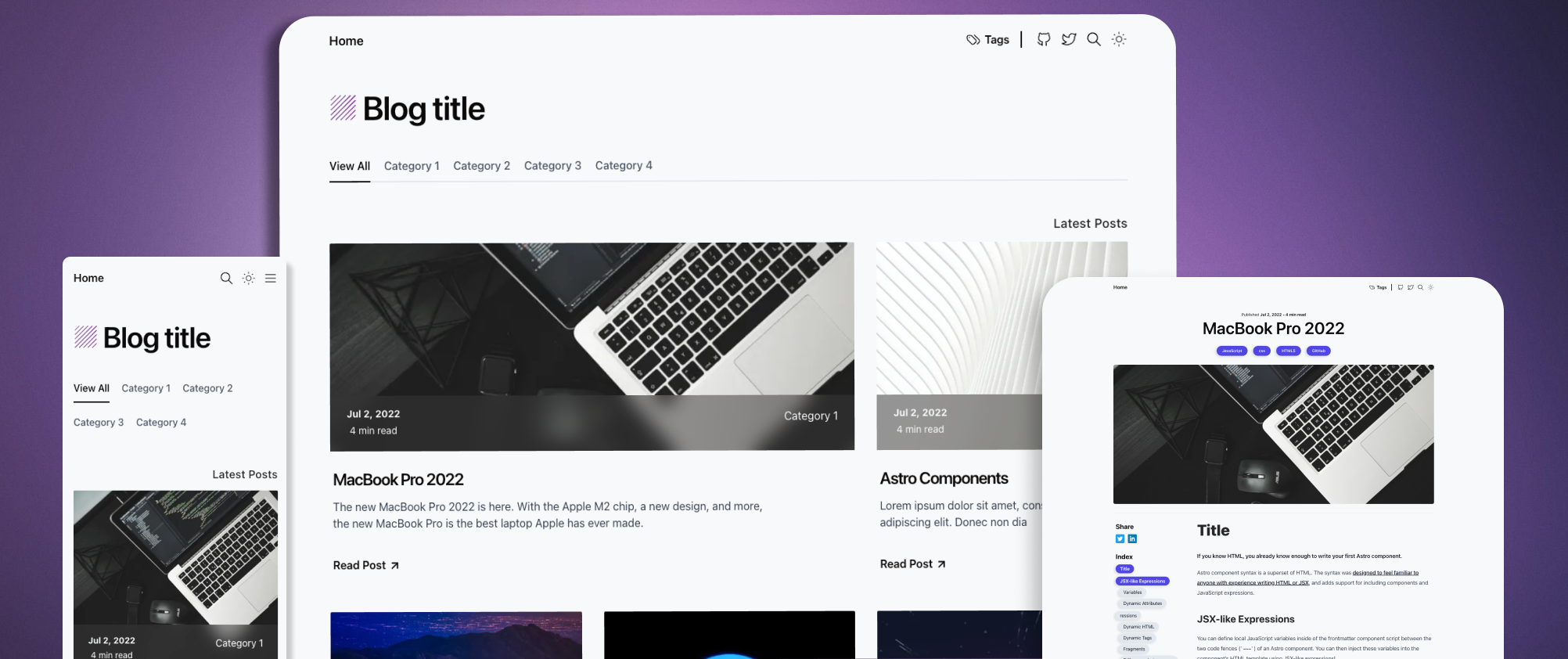

Check out the Demo, hosted on Vercel
By default, this template comes pre-configured with Tina CMS.
Now you can create your posts directly from the CMS without the need to do it manually.
If you decide to use Tina, it's not necessary to add any properties to the Markdown files, Tina does it automatically.
Example:
The documentation for Tina CMS can be found here
Tina is completely optional, and you can remove it, and it will still function in the same way.
Recommended extensions for VSCode:
git@github.com:danielcgilibert/blog-template.git
pnpm install
pnpm dev
To add a new category to your blog, simply go to the src/data/categories.ts file and add it to the array.
Example:
export  const  CATEGORIES  =  [
'JavaScript',
'React',
'new category here'  <---
]  as  const
🚨 Zod checks whether the category is not correctly written or does not exist in the properties of the markdown document. It will throw an error when building the application. 🚨
Adding a post is as simple as adding a .md or .mdx file to the blog folder at the path src/content/blog. The filename will be used to create the slug/URL of the page.
For example, if you have a file named jsx-and-react.md, it will be transformed into: http://yourdomain.com/post/jsx-and-react/
To activate draft mode, add the property draft: true to the file, and it will no longer be displayed on the blog.
Example :
title: MacBook Pro 2022
description: 'The new MacBook Pro 2022 is here. With the Apple M2 chip, a new design, and more, the new MacBook Pro is the best laptop Apple has ever made.'
pubDate: 'Jul 02 2022'
heroImage: '../../assets/bg.jpg'
category: 'Category 1'
tags: ['JavaScript', 'css', 'HTML5', 'GitHub']
draft: true <---
The schema for posts is located at src/content/config.ts. You can modify any parameter, for example, by adding a maximum of 80 characters for titles: title: z.string().max(80). For more information, refer to the zod documentation.
All commands are run from the root of the project, from a terminal:
| Command | Action |
|---|---|
pnpm install | Installs dependencies |
pnpm run dev | Starts local dev server at localhost:3000 |
pnpm run build | Build your production site to ./dist/ |
pnpm run preview | Preview your build locally, before deploying |
pnpm run format:check | Check code format with Prettier |
pnpm run format | Format codes with Prettier |
pnpm run sync | Generates TypeScript types for all Astro modules. Learn more. |
pnpm run lint | Lint with ESLint |
739 followers · starred Oct 2024
445 followers · starred Dec 2023
118 followers · starred Feb 2024
179 followers · starred Jul 2026
📚 Openblog is an elegant, simple, and user-friendly blog. Focused on accessibility, SEO and performance.
See the code
Check out the Demo, hosted on Vercel
By default, this template comes pre-configured with Tina CMS.
Now you can create your posts directly from the CMS without the need to do it manually.
If you decide to use Tina, it's not necessary to add any properties to the Markdown files, Tina does it automatically.
Example:
The documentation for Tina CMS can be found here
Tina is completely optional, and you can remove it, and it will still function in the same way.
Recommended extensions for VSCode:
git@github.com:danielcgilibert/blog-template.git
pnpm install
pnpm dev
To add a new category to your blog, simply go to the src/data/categories.ts file and add it to the array.
Example:
export  const  CATEGORIES  =  [
'JavaScript',
'React',
'new category here'  <---
]  as  const
🚨 Zod checks whether the category is not correctly written or does not exist in the properties of the markdown document. It will throw an error when building the application. 🚨
Adding a post is as simple as adding a .md or .mdx file to the blog folder at the path src/content/blog. The filename will be used to create the slug/URL of the page.
For example, if you have a file named jsx-and-react.md, it will be transformed into: http://yourdomain.com/post/jsx-and-react/
To activate draft mode, add the property draft: true to the file, and it will no longer be displayed on the blog.
Example :
title: MacBook Pro 2022
description: 'The new MacBook Pro 2022 is here. With the Apple M2 chip, a new design, and more, the new MacBook Pro is the best laptop Apple has ever made.'
pubDate: 'Jul 02 2022'
heroImage: '../../assets/bg.jpg'
category: 'Category 1'
tags: ['JavaScript', 'css', 'HTML5', 'GitHub']
draft: true <---
The schema for posts is located at src/content/config.ts. You can modify any parameter, for example, by adding a maximum of 80 characters for titles: title: z.string().max(80). For more information, refer to the zod documentation.
All commands are run from the root of the project, from a terminal:
| Command | Action |
|---|---|
pnpm install | Installs dependencies |
pnpm run dev | Starts local dev server at localhost:3000 |
pnpm run build | Build your production site to ./dist/ |
pnpm run preview | Preview your build locally, before deploying |
pnpm run format:check | Check code format with Prettier |
pnpm run format | Format codes with Prettier |
pnpm run sync | Generates TypeScript types for all Astro modules. Learn more. |
pnpm run lint | Lint with ESLint |
739 followers · starred Oct 2024
445 followers · starred Dec 2023
118 followers · starred Feb 2024
179 followers · starred Jul 2026