
Chat like you're playing CS 1.6 again
See the codeSee what people are saying
README
SayText Chat
Chat like you're playing CS 1.6 again
(C) 2026 by Daniel Brendel
www.danielbrendel.com



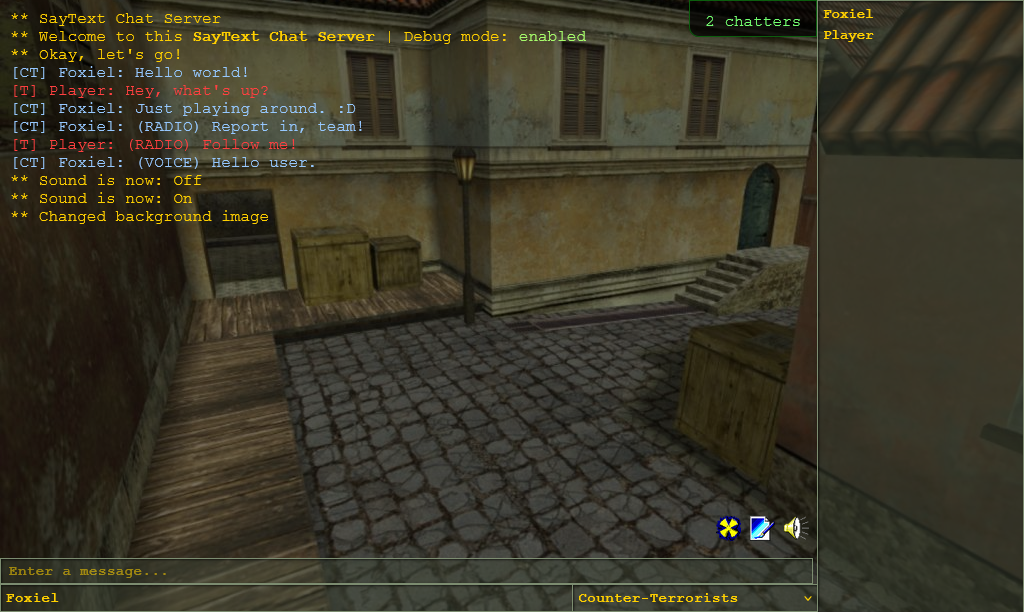
Table of contents
Description
SayText Chat is a simple self-hostable retro chat app that revives the feeling of playing oldschool CS 1.6.
Features
- Send text messages
- Send radio commands
- Send speech commands
- Send leetspeak text
- Switch teams (CT, T, SPEC)
- View online count
- View online users
- Toggle sound
- Switch backgrounds
- API endpoint
- Responsive design
- Basic docker setup
Commands
The following commands are available
/radioIssue a radio command.
/radio gogogo
/speakIssue a VOX speech command
/speak access denied
/leetSend a chat message translated to leetspeak
/leet Owned by a pro-gamer.
/switchbgSwitch to a different background image (randomly selected)
/switchbg
/soundToggle sound or check sound status
/sound on|off|status
/timestampsToggle timestamps for chat or check timestamps status
/timestamps on|off|status
Installation
The recommended way to install the project is using Docker.
-
Clone the repository
git clone https://github.com/danielbrendel/saytext-chat -
Edit your prefered settings in the
docker-compose.yml -
Pull the image
docker compose pull -
Launch all containers
docker compose up -d -
The app should now be available on http://localhost:8080.
Available settings
This section covers all available app settings with default values.
| Setting | Description | Default |
|---|---|---|
| APP_SERVERNAME | Set your prefered chat server name | "SayText Chat Server" |
| APP_SERVERTOPIC | Set your prefered chat server topic | "Welcome to this SayText Chat server" |
| APP_SERVERPREVIEW | Set your prefered chat server preview image relative to /public/img folder | "preview.png" |
| APP_DELAY_FETCH | Duration in milliseconds when to check for new chat content | 10000 |
| APP_DELAY_ONLINE | Duration in milliseconds when to check for amount of people online | 10000 |
| APP_RESOURCEHOST | Set the resource provider URL for docker deployment | "https://resources.saytextchat.com" |
| APP_DEBUG | Enable or disable app debug mode | true |
| APP_UPDATEDEPS | Set to true if composer packages shall be updated upon container start | false |
| APP_TIMEZONE | Set your prefered time zone | UTC |
| LOG_ENABLE | Whether app logging shall be enabled or not | true |
License
This project is maintained under the MIT license. Please see LICENSE.TXT for more information.
Disclaimer
This project is fan-made, and is not affiliated with Valve Corporation or any of their properties.
Similar repos


Chat like you're playing CS 1.6 again
See the codeSee what people are saying
README
SayText Chat
Chat like you're playing CS 1.6 again
(C) 2026 by Daniel Brendel
www.danielbrendel.com
Table of contents
Description
SayText Chat is a simple self-hostable retro chat app that revives the feeling of playing oldschool CS 1.6.
Features
- Send text messages
- Send radio commands
- Send speech commands
- Send leetspeak text
- Switch teams (CT, T, SPEC)
- View online count
- View online users
- Toggle sound
- Switch backgrounds
- API endpoint
- Responsive design
- Basic docker setup
Commands
The following commands are available
/radioIssue a radio command.
/radio gogogo
/speakIssue a VOX speech command
/speak access denied
/leetSend a chat message translated to leetspeak
/leet Owned by a pro-gamer.
/switchbgSwitch to a different background image (randomly selected)
/switchbg
/soundToggle sound or check sound status
/sound on|off|status
/timestampsToggle timestamps for chat or check timestamps status
/timestamps on|off|status
Installation
The recommended way to install the project is using Docker.
-
Clone the repository
git clone https://github.com/danielbrendel/saytext-chat -
Edit your prefered settings in the
docker-compose.yml -
Pull the image
docker compose pull -
Launch all containers
docker compose up -d -
The app should now be available on http://localhost:8080.
Available settings
This section covers all available app settings with default values.
| Setting | Description | Default |
|---|---|---|
| APP_SERVERNAME | Set your prefered chat server name | "SayText Chat Server" |
| APP_SERVERTOPIC | Set your prefered chat server topic | "Welcome to this SayText Chat server" |
| APP_SERVERPREVIEW | Set your prefered chat server preview image relative to /public/img folder | "preview.png" |
| APP_DELAY_FETCH | Duration in milliseconds when to check for new chat content | 10000 |
| APP_DELAY_ONLINE | Duration in milliseconds when to check for amount of people online | 10000 |
| APP_RESOURCEHOST | Set the resource provider URL for docker deployment | "https://resources.saytextchat.com" |
| APP_DEBUG | Enable or disable app debug mode | true |
| APP_UPDATEDEPS | Set to true if composer packages shall be updated upon container start | false |
| APP_TIMEZONE | Set your prefered time zone | UTC |
| LOG_ENABLE | Whether app logging shall be enabled or not | true |
License
This project is maintained under the MIT license. Please see LICENSE.TXT for more information.
Disclaimer
This project is fan-made, and is not affiliated with Valve Corporation or any of their properties.