
Local memory + semantic search for AI agents. Indexes code and documents on your machine, queryable via MCP. Private, offline, fast. macOS arm64 + Linux x86_64.
1
stars
20
commits
Shell
primary language
Sep 8, 2026
updated
README
nxm-memory
nxm-memory is a local memory and search engine for AI assistants. Although it works great for coding projects, it is not limited to code — it can index and search any collection of files: documentation, notes, research, contracts, knowledge bases, and more. It indexes an entire workspace on your own machine and makes it queryable in natural language, without sending anything to the cloud. It reads the documents in your workspace and gives you fast, relevant answers about them. It also cuts the number of tokens sent to the model: it compresses source code into structural maps, plus shell output and chat history, and — crucially for documents — it retrieves only the relevant chunks via search instead of loading whole files. It exposes its tools through the Model Context Protocol (MCP), so it plugs into agents like Claude Code, Opencode, Pi, and others.
[!IMPORTANT] ⭐ Token reduction to cut cost and fit more in context — one of the most important features. nxm-memory compresses source code (into structural maps), shell output, and chat history before they reach the model. For prose documents (Markdown, text, PDF), it saves tokens by searching and returning only the relevant chunks rather than compressing whole files. A dedicated semantic document-compression mode is on the roadmap.
It is configured exactly like any other MCP server. Everything runs locally: fast, private, always available.
Demo
See nxm-memory in action:
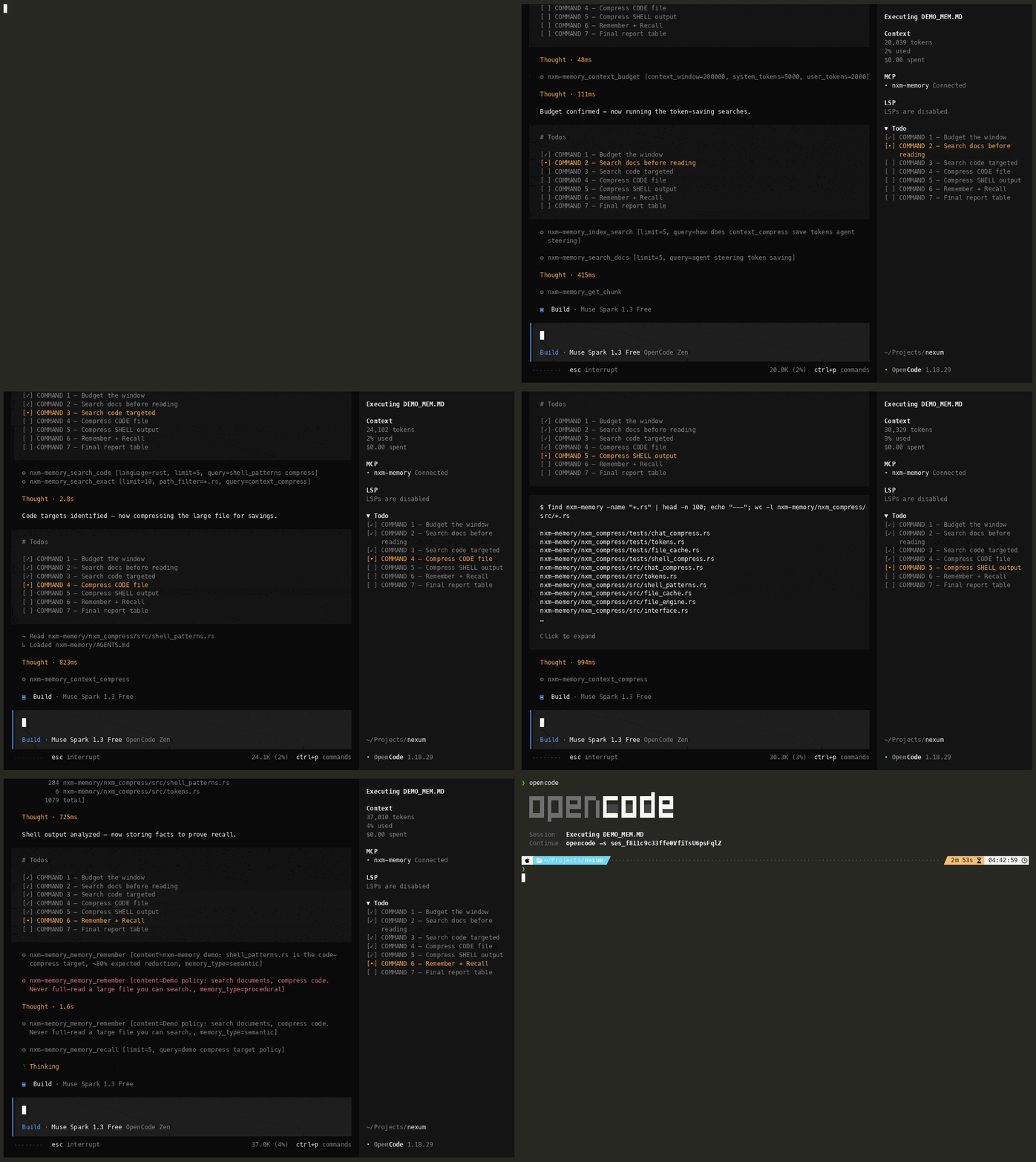
1. Local installation
One command. It auto-detects your system (macOS Apple Silicon or Linux x86_64), downloads the binary, and installs it to ~/.local/bin:
curl -fsSL https://raw.githubusercontent.com/dangranaz/nxm-memory/main/install.sh | sh
On first run, the program automatically downloads the embedding model (~200 MB) and the required ONNX Runtime library. There is nothing else to download by hand.
If ~/.local/bin is not on your PATH, add it:
export PATH="$HOME/.local/bin:$PATH"
Supported platforms: macOS arm64 (Apple Silicon) and Linux x86_64.
Configure it in your agents, harnesses, and any MCP-compatible tool
nxm-memory is a standard MCP server, so you can configure it in your agents, your harnesses, and any tool that supports the MCP standard. Here is an example for OpenCode — add it to your opencode.json (global) or opencode.jsonc under the mcp key. Point --w at the project you want indexed:
{
  "$schema": "https://opencode.ai/config.json",
  "mcp": {
    "nxm-memory": {
      "type": "local",
      "command": ["nxm-mcp-server", "--w", "/path/to/your/project", "--transport", "stdio"],
      "enabled": true
    }
  }
}
The configuration follows the same pattern in other agents (Claude Code, Pi, Cursor, Kiro…): a local MCP server whose command is nxm-mcp-server with --transport stdio.
2. Getting it running
Start the server pointing it at your project folder (the workspace). On startup it scans the folder and builds its index:
nxm-mcp-server --w /path/to/your/project --port 7169
The server stays running and keeps the index up to date automatically as files change. To stop it:
nxm-mcp-server --stop
Excluding folders from the index with .nxmignore
Create a .nxmignore file at the root of your project to tell nxm-memory which folders and files not to index. The syntax is the same as .gitignore. This matters: without exclusions, huge and useless folders (dependencies, build output, artifacts) would end up in the index, slowing everything down and polluting search results.
Recommended .nxmignore example:
# Dependencies and packages
node_modules/
vendor/
.venv/
venv/

# Build output and artifacts
target/
dist/
build/
out/
*.min.js
*.min.css

# Version control and caches
.git/
.cache/
__pycache__/

# Lock files and logs
*.lock
*.log
Useful rules:
- one pattern per line;
#starts a comment; - a trailing
/(e.g.build/) matches directories only; !patternre-includes something excluded earlier;- the data folder
.nxm/is always excluded automatically (the index never ingests its own state).
Connecting it to an AI agent
To use it inside an agent (Claude Code, Cursor, Kiro…), use the stdio transport, with the agent managing the process lifecycle:
nxm-mcp-server --w /path/to/your/project --transport stdio
3. The technology and the memory model (in plain terms)
Think of nxm-memory as long-term memory for your AI assistant, dedicated to a project.
When you give it a folder, it reads everything and breaks it into small pieces ("chunks"). For each piece it stores two things: the exact words it contains and its meaning. Meaning is captured with an embedding model (a neural network that turns text into numbers, so that texts meaning similar things end up "close" together). This way you can search either for a precise word or for a concept expressed with words different from those in the code.
Search combines three approaches — exact match, keyword search, and meaning-based search — and blends their results to surface the most relevant answers at the top.
Memory is organized into four types, much like human memory:
- Semantic — stable facts, rules, and preferences (e.g. "this project uses Rust", "I prefer tests before code").
- Episodic — events and sessions: what happened and when.
- Procedural — skills and procedures: how a given thing is done in this project.
- Prospective — tasks to do and future reminders.
It has been tested on workspaces of tens of gigabytes mixing documents and code (hundreds of thousands of files). And it does not stop after the first scan: it stays running in the background, constantly keeping the vector database up to date — every file you add to or change in the workspace is picked up and re-indexed automatically.
Everything lives on your computer, in a .nxm/ folder inside the project. Nothing leaves your machine.
4. Purpose, what it indexes, and the tools
Purpose
nxm-memory gives an AI assistant persistent memory and instant search over a project: it retrieves the right function, the relevant document, or the decision made weeks ago, without having to re-read everything each time. It builds and maintains the index of the project and answers the agent's queries.
[!IMPORTANT] Token reduction — one of the most valuable features. nxm-memory includes a built-in context-compression engine (
context_compress) that shrinks source code (into structural maps), shell output, and chat history before they reach the model. It reports how many tokens it saved (tokens_before/tokens_after/reduction_pct), keeping long agent sessions inside the context window and cutting cost — while preserving errors and the important parts. For prose documents (Markdown/text/PDF) it does not yet compress semantically; usesearch_docs/index_searchto load only the relevant chunks. A semantic document-compression mode is planned (see roadmap).
Example — compressing a real source file into its structural map:
context_compress (mode: file)
  tokens_before: 3050
  tokens_after :  416
  reduction    :   87%  saved
That is 2634 tokens saved on a single file — multiplied across every file, shell output, and chat turn an agent handles in a session.
What it indexes
On startup (and whenever files change) it builds the index of the workspace. Indexing is incremental: only files that actually changed are reprocessed.
- Code: Rust, Python, JavaScript/TypeScript (
.rs,.py,.js,.jsx,.ts,.tsx), plus.sh,.sql,.proto,.graphql,.html,.css. - Documents: Markdown (
.md,.mdx), PDF, plain text (.txt,.rst,.adoc). - Configuration:
.toml,.yaml/.yml,.json,.ini,.cfg.
Folders listed in .nxmignore are skipped (see section 2).
The tools (MCP tools)
The server exposes these tools to the AI agent:
| Tool | What it does |
|---|---|
index_workspace | Index or re-index a workspace (automatic full/incremental). |
index_search | Hybrid search (meaning + keywords + fusion) across everything indexed. |
search_code | Search code files only, with language and path filters. |
search_docs | Search documents only (PDF, Markdown, TXT). |
search_exact | Exact substring search, very fast, no embedding needed. |
search_regex | Search with regular expressions. |
get_chunk | Retrieve the full content of a chunk by ID (on-demand loading). |
find_symbol | Find the definition of a symbol (function, struct, class…). |
outline | List the top-level symbols of a file. |
find_references | Find all uses of a symbol across a project. |
memory_remember | Store a fact, event, skill, or task in memory. |
memory_recall | Search memory for relevant facts, events, and skills. |
context_compress | Reduce token usage: compress source code (into structural maps), shell output, or chat history — reports tokens saved. For prose documents, prefer search_docs/index_search. One of the most useful tools. |
context_budget | Compute the optimal context allocation for a given window. |
workspace_list / workspace_create | List / create configured workspaces. |
stats | Index statistics (files indexed, chunks, storage). |
watcher_status | Status of the automatic file watcher. |
⭐ Support the project
If nxm-memory saves you tokens, time, or keeps your data private, please give the repository a star and share it — it is the simplest way to help the project grow and reach other developers. Feedback and suggestions are welcome via issues.
The source code is maintained privately. This repository distributes the binaries and the installer; the embedding model is distributed separately and downloaded automatically on first run.
Contributors

18 commits

2 commits
See what people are saying
Hacker News (2)
Similar repos


Languages
Shell
100.0%
Local memory + semantic search for AI agents. Indexes code and documents on your machine, queryable via MCP. Private, offline, fast. macOS arm64 + Linux x86_64.
1
stars
20
commits
Shell
primary language
Sep 8, 2026
updated
README
nxm-memory
nxm-memory is a local memory and search engine for AI assistants. Although it works great for coding projects, it is not limited to code — it can index and search any collection of files: documentation, notes, research, contracts, knowledge bases, and more. It indexes an entire workspace on your own machine and makes it queryable in natural language, without sending anything to the cloud. It reads the documents in your workspace and gives you fast, relevant answers about them. It also cuts the number of tokens sent to the model: it compresses source code into structural maps, plus shell output and chat history, and — crucially for documents — it retrieves only the relevant chunks via search instead of loading whole files. It exposes its tools through the Model Context Protocol (MCP), so it plugs into agents like Claude Code, Opencode, Pi, and others.
[!IMPORTANT] ⭐ Token reduction to cut cost and fit more in context — one of the most important features. nxm-memory compresses source code (into structural maps), shell output, and chat history before they reach the model. For prose documents (Markdown, text, PDF), it saves tokens by searching and returning only the relevant chunks rather than compressing whole files. A dedicated semantic document-compression mode is on the roadmap.
It is configured exactly like any other MCP server. Everything runs locally: fast, private, always available.
Demo
See nxm-memory in action:
1. Local installation
One command. It auto-detects your system (macOS Apple Silicon or Linux x86_64), downloads the binary, and installs it to ~/.local/bin:
curl -fsSL https://raw.githubusercontent.com/dangranaz/nxm-memory/main/install.sh | sh
On first run, the program automatically downloads the embedding model (~200 MB) and the required ONNX Runtime library. There is nothing else to download by hand.
If ~/.local/bin is not on your PATH, add it:
export PATH="$HOME/.local/bin:$PATH"
Supported platforms: macOS arm64 (Apple Silicon) and Linux x86_64.
Configure it in your agents, harnesses, and any MCP-compatible tool
nxm-memory is a standard MCP server, so you can configure it in your agents, your harnesses, and any tool that supports the MCP standard. Here is an example for OpenCode — add it to your opencode.json (global) or opencode.jsonc under the mcp key. Point --w at the project you want indexed:
{
  "$schema": "https://opencode.ai/config.json",
  "mcp": {
    "nxm-memory": {
      "type": "local",
      "command": ["nxm-mcp-server", "--w", "/path/to/your/project", "--transport", "stdio"],
      "enabled": true
    }
  }
}
The configuration follows the same pattern in other agents (Claude Code, Pi, Cursor, Kiro…): a local MCP server whose command is nxm-mcp-server with --transport stdio.
2. Getting it running
Start the server pointing it at your project folder (the workspace). On startup it scans the folder and builds its index:
nxm-mcp-server --w /path/to/your/project --port 7169
The server stays running and keeps the index up to date automatically as files change. To stop it:
nxm-mcp-server --stop
Excluding folders from the index with .nxmignore
Create a .nxmignore file at the root of your project to tell nxm-memory which folders and files not to index. The syntax is the same as .gitignore. This matters: without exclusions, huge and useless folders (dependencies, build output, artifacts) would end up in the index, slowing everything down and polluting search results.
Recommended .nxmignore example:
# Dependencies and packages
node_modules/
vendor/
.venv/
venv/

# Build output and artifacts
target/
dist/
build/
out/
*.min.js
*.min.css

# Version control and caches
.git/
.cache/
__pycache__/

# Lock files and logs
*.lock
*.log
Useful rules:
- one pattern per line;
#starts a comment; - a trailing
/(e.g.build/) matches directories only; !patternre-includes something excluded earlier;- the data folder
.nxm/is always excluded automatically (the index never ingests its own state).
Connecting it to an AI agent
To use it inside an agent (Claude Code, Cursor, Kiro…), use the stdio transport, with the agent managing the process lifecycle:
nxm-mcp-server --w /path/to/your/project --transport stdio
3. The technology and the memory model (in plain terms)
Think of nxm-memory as long-term memory for your AI assistant, dedicated to a project.
When you give it a folder, it reads everything and breaks it into small pieces ("chunks"). For each piece it stores two things: the exact words it contains and its meaning. Meaning is captured with an embedding model (a neural network that turns text into numbers, so that texts meaning similar things end up "close" together). This way you can search either for a precise word or for a concept expressed with words different from those in the code.
Search combines three approaches — exact match, keyword search, and meaning-based search — and blends their results to surface the most relevant answers at the top.
Memory is organized into four types, much like human memory:
- Semantic — stable facts, rules, and preferences (e.g. "this project uses Rust", "I prefer tests before code").
- Episodic — events and sessions: what happened and when.
- Procedural — skills and procedures: how a given thing is done in this project.
- Prospective — tasks to do and future reminders.
It has been tested on workspaces of tens of gigabytes mixing documents and code (hundreds of thousands of files). And it does not stop after the first scan: it stays running in the background, constantly keeping the vector database up to date — every file you add to or change in the workspace is picked up and re-indexed automatically.
Everything lives on your computer, in a .nxm/ folder inside the project. Nothing leaves your machine.
4. Purpose, what it indexes, and the tools
Purpose
nxm-memory gives an AI assistant persistent memory and instant search over a project: it retrieves the right function, the relevant document, or the decision made weeks ago, without having to re-read everything each time. It builds and maintains the index of the project and answers the agent's queries.
[!IMPORTANT] Token reduction — one of the most valuable features. nxm-memory includes a built-in context-compression engine (
context_compress) that shrinks source code (into structural maps), shell output, and chat history before they reach the model. It reports how many tokens it saved (tokens_before/tokens_after/reduction_pct), keeping long agent sessions inside the context window and cutting cost — while preserving errors and the important parts. For prose documents (Markdown/text/PDF) it does not yet compress semantically; usesearch_docs/index_searchto load only the relevant chunks. A semantic document-compression mode is planned (see roadmap).
Example — compressing a real source file into its structural map:
context_compress (mode: file)
  tokens_before: 3050
  tokens_after :  416
  reduction    :   87%  saved
That is 2634 tokens saved on a single file — multiplied across every file, shell output, and chat turn an agent handles in a session.
What it indexes
On startup (and whenever files change) it builds the index of the workspace. Indexing is incremental: only files that actually changed are reprocessed.
- Code: Rust, Python, JavaScript/TypeScript (
.rs,.py,.js,.jsx,.ts,.tsx), plus.sh,.sql,.proto,.graphql,.html,.css. - Documents: Markdown (
.md,.mdx), PDF, plain text (.txt,.rst,.adoc). - Configuration:
.toml,.yaml/.yml,.json,.ini,.cfg.
Folders listed in .nxmignore are skipped (see section 2).
The tools (MCP tools)
The server exposes these tools to the AI agent:
| Tool | What it does |
|---|---|
index_workspace | Index or re-index a workspace (automatic full/incremental). |
index_search | Hybrid search (meaning + keywords + fusion) across everything indexed. |
search_code | Search code files only, with language and path filters. |
search_docs | Search documents only (PDF, Markdown, TXT). |
search_exact | Exact substring search, very fast, no embedding needed. |
search_regex | Search with regular expressions. |
get_chunk | Retrieve the full content of a chunk by ID (on-demand loading). |
find_symbol | Find the definition of a symbol (function, struct, class…). |
outline | List the top-level symbols of a file. |
find_references | Find all uses of a symbol across a project. |
memory_remember | Store a fact, event, skill, or task in memory. |
memory_recall | Search memory for relevant facts, events, and skills. |
context_compress | Reduce token usage: compress source code (into structural maps), shell output, or chat history — reports tokens saved. For prose documents, prefer search_docs/index_search. One of the most useful tools. |
context_budget | Compute the optimal context allocation for a given window. |
workspace_list / workspace_create | List / create configured workspaces. |
stats | Index statistics (files indexed, chunks, storage). |
watcher_status | Status of the automatic file watcher. |
⭐ Support the project
If nxm-memory saves you tokens, time, or keeps your data private, please give the repository a star and share it — it is the simplest way to help the project grow and reach other developers. Feedback and suggestions are welcome via issues.
The source code is maintained privately. This repository distributes the binaries and the installer; the embedding model is distributed separately and downloaded automatically on first run.
See what people are saying
Hacker News (2)
Similar repos
Contributors
18 commits
2 commits
Languages
Shell
100.0%