
Built in Rust, logfine is a CLI tool to keep track of your days.
Rust
1
17 commits
updated Sep 17, 2026
See what people are saying (1)
README
logfine
A local-first CLI logger designed to generate structured data (JSON) perfect for AI analysis and personal trend tracking.
Features
- todo.txt integration & synchronization.
- Energy, MVOs (Minimum Viable Output) and logbook tracking.
- Vim-like keybindings driven workflow.
- Structured querying & filtering by using a SQLite database.
- Local-first architecture ensuring offline and private usage.
- High performance & memory safety by using Rust and an ORM (via Diesel).
Why?
The purpose of this software is to quantify dialy habits, energy levels, tasks, and events. So it's much easier to analyse; helping with decision-making and externalizing memory.
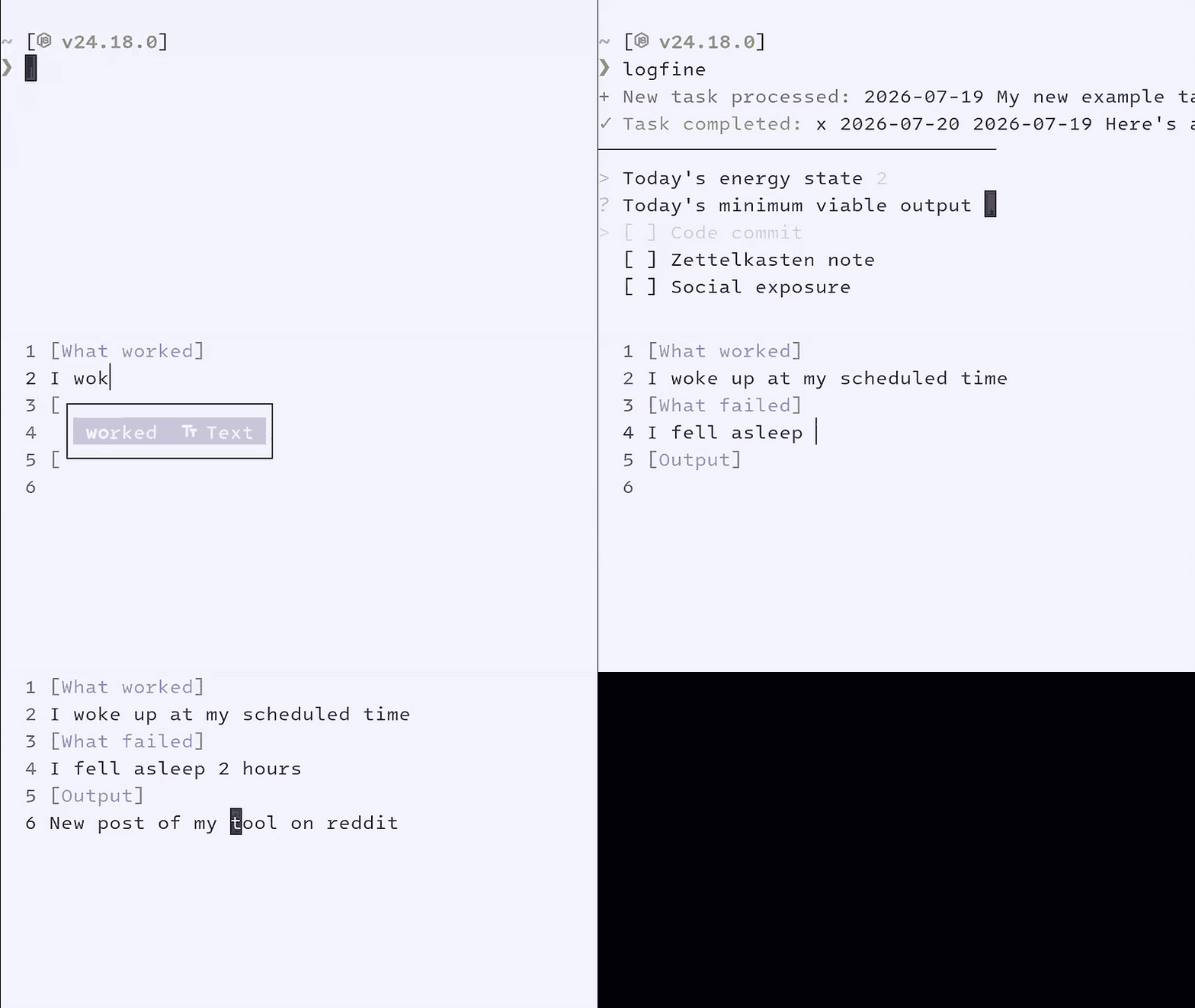
Personally, I use this tool to ask an AI agent for patterns, busywork, misalignment between my effort and output, which habits correlate with my highest energy, etc. Spanish article for Agentic Maintained Reports
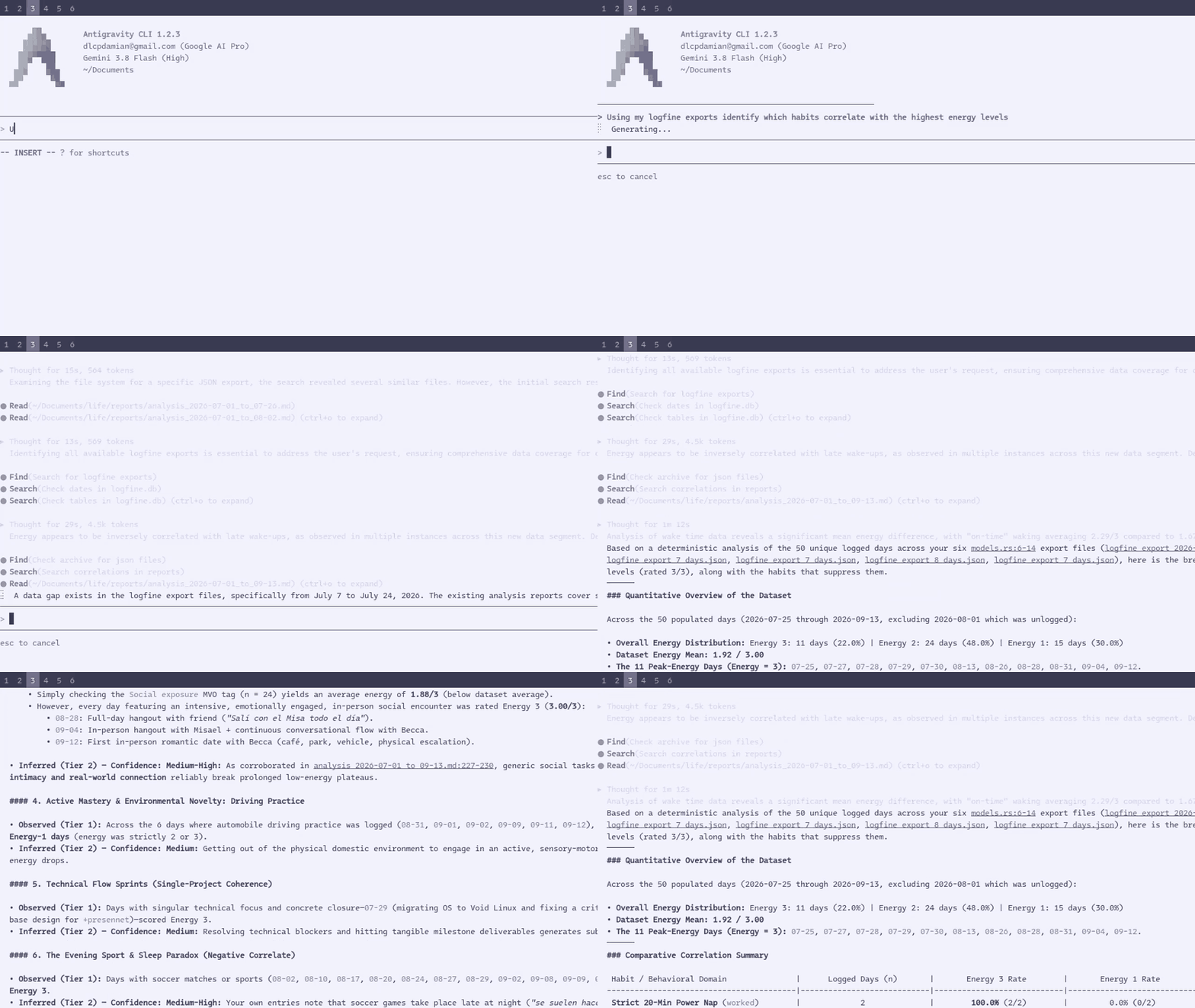
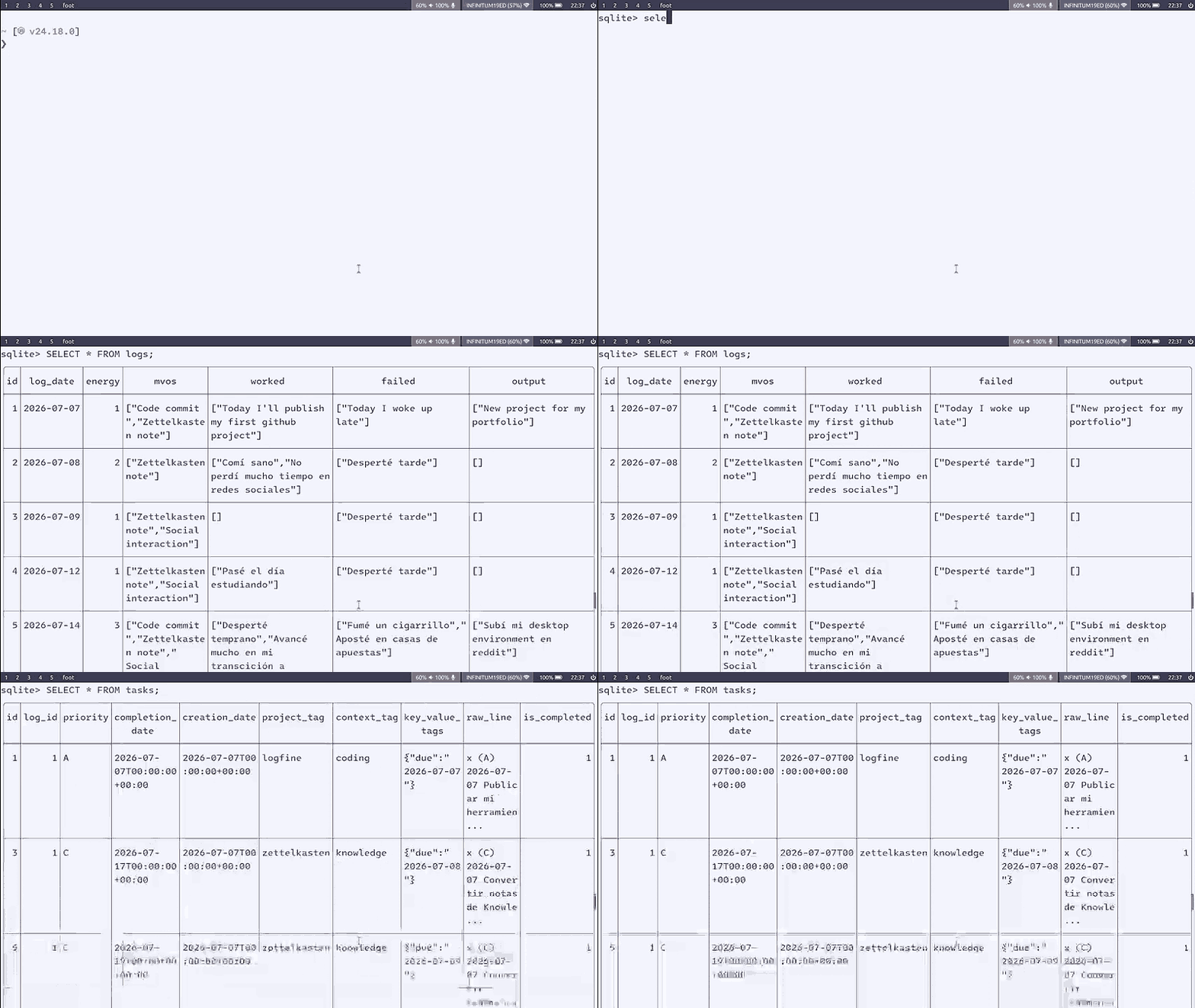
That's why the data can be exported to JSON: Is both human-readable and machine-readable.
Installation
Since logfine is built in Rust, you can easily compile it from source. This ensures the binary is perfectly optimized for your specific architecture and operating system.
Prerequisites
You need to have the Rust toolchain installed on your system. If you don't have it yet, you can install it via rustup:
curl --proto '=https' --tlsv1.2 -sSf https://sh.rustup.rs | sh
Option 1: Install via Cargo (Recommended)
This is the cleanest way to install the CLI. It compiles the binary in release mode and automatically places it in your Cargo binary directory (usually ~/.cargo/bin/), which should be in your system's $PATH.
# Clone the repository
git clone https://github.com/damicrez/logfine.git
cd logfine

# Build and install the binary locally
cargo install --path .

# Once installed, you can run the tool from anywhere in your terminal:
logfine
Option 2: Build the Binary Manually
If you just want to compile the executable file without installing it globally into your system, use the release build command:
# Clone the repository
git clone https://github.com/damicrez/logfine.git
cd logfine

# Compile in release mode (optimized)
cargo build --release
Configuration
It should be located at your default configuration directory (~/.config/logfine/logfine.toml on Unix-like systems.)
Here's an explanation of every configuration item:
logbook_path: Directory where a sqlite database will be located.
todo_path: Path to your todo.txt file.
mvos: Is a list of strings with the Minimum Viable Output of your day.
delete_tasks: A true|false variable to delete or not delete the completed tasks in your todo.txt file.
automatic_completion_date: A true|false configuration variable to append completion dates when a task is marked as completed, helping following the todo.txt format.
Example
logbook_path = "/home/username/Documents/life/"
todo_path = "/home/username/Nextcloud/todo.txt"
mvos = ["Code commit", "Zettelkasten note", "Social exposure"]
delete_tasks = true
automatic_completion_date = false
Subcommands
export: Export the last N days of daily logs to a JSON file.
# Export the last 7 days (default) to JSON
logfine export

# Export the last 30 days to a custom output file
logfine export 30 -o monthly_report.json

# Export days from 2026-09-01 to 2026-09-14
logfine export -s 2026-09-01 -e 2026-09-14
sync: Synchronize tasks with the database cache without prompts.
# Sync todo.txt with the database
logfine sync

# Automatically accept detected typos during sync
logfine sync --skip-typos
Contributors

17 commits
Similar repos


Languages
Rust
100.0%
Built in Rust, logfine is a CLI tool to keep track of your days.
Rust
1
17 commits
updated Sep 17, 2026
See what people are saying (1)
README
logfine
A local-first CLI logger designed to generate structured data (JSON) perfect for AI analysis and personal trend tracking.
Features
- todo.txt integration & synchronization.
- Energy, MVOs (Minimum Viable Output) and logbook tracking.
- Vim-like keybindings driven workflow.
- Structured querying & filtering by using a SQLite database.
- Local-first architecture ensuring offline and private usage.
- High performance & memory safety by using Rust and an ORM (via Diesel).
Why?
The purpose of this software is to quantify dialy habits, energy levels, tasks, and events. So it's much easier to analyse; helping with decision-making and externalizing memory.
Personally, I use this tool to ask an AI agent for patterns, busywork, misalignment between my effort and output, which habits correlate with my highest energy, etc. Spanish article for Agentic Maintained Reports
That's why the data can be exported to JSON: Is both human-readable and machine-readable.
Installation
Since logfine is built in Rust, you can easily compile it from source. This ensures the binary is perfectly optimized for your specific architecture and operating system.
Prerequisites
You need to have the Rust toolchain installed on your system. If you don't have it yet, you can install it via rustup:
curl --proto '=https' --tlsv1.2 -sSf https://sh.rustup.rs | sh
Option 1: Install via Cargo (Recommended)
This is the cleanest way to install the CLI. It compiles the binary in release mode and automatically places it in your Cargo binary directory (usually ~/.cargo/bin/), which should be in your system's $PATH.
# Clone the repository
git clone https://github.com/damicrez/logfine.git
cd logfine

# Build and install the binary locally
cargo install --path .

# Once installed, you can run the tool from anywhere in your terminal:
logfine
Option 2: Build the Binary Manually
If you just want to compile the executable file without installing it globally into your system, use the release build command:
# Clone the repository
git clone https://github.com/damicrez/logfine.git
cd logfine

# Compile in release mode (optimized)
cargo build --release
Configuration
It should be located at your default configuration directory (~/.config/logfine/logfine.toml on Unix-like systems.)
Here's an explanation of every configuration item:
logbook_path: Directory where a sqlite database will be located.
todo_path: Path to your todo.txt file.
mvos: Is a list of strings with the Minimum Viable Output of your day.
delete_tasks: A true|false variable to delete or not delete the completed tasks in your todo.txt file.
automatic_completion_date: A true|false configuration variable to append completion dates when a task is marked as completed, helping following the todo.txt format.
Example
logbook_path = "/home/username/Documents/life/"
todo_path = "/home/username/Nextcloud/todo.txt"
mvos = ["Code commit", "Zettelkasten note", "Social exposure"]
delete_tasks = true
automatic_completion_date = false
Subcommands
export: Export the last N days of daily logs to a JSON file.
# Export the last 7 days (default) to JSON
logfine export

# Export the last 30 days to a custom output file
logfine export 30 -o monthly_report.json

# Export days from 2026-09-01 to 2026-09-14
logfine export -s 2026-09-01 -e 2026-09-14
sync: Synchronize tasks with the database cache without prompts.
# Sync todo.txt with the database
logfine sync

# Automatically accept detected typos during sync
logfine sync --skip-typos
Similar repos
Contributors
17 commits
Languages
Rust
100.0%