
Protein Ranking using Informed Zero-shot Modelling (PRIZM) is a two-phase approach that efficiently examines the mutational space using machine learning (ML) guidance without requiring high-throughput methods. PRIZM combines the specific information of small datasets with the general knowledge of pre-trained zero-shot predictors to discover enhanced protein variants, thereby removing the need for large datasets common in traditional ML techniques.
PRIZM provides the necessary tools to easily implement all elements of the workflow. In the Model Selection Phase, the protein information of an experimental low-N dataset is parsed through a diverse collection of zero-shot models based on the ProteinGym code. The resulting predicted scores are correlated with the original experimental values, identifying the model most suitable for predicting better mutants. In the Variant Ranking Phase, PRIZM can be used to create, predict, and rank a large in silico mutant dataset using the models identified as most suitable in the previous phase. Visualization tools are also provided, such as plotting individual correlations, comparing model performances, or constructing single-mutant landscapes.
Importantly, the best models identified by PRIZM consistently outperform the worst models across 10 diverse benchmark datasets, including protein aggregation and enzyme activity, using as few as 20 variants in the low-N dataset.
Before installing PRIZM, make sure either Anaconda or Miniconda is installed, as this will be used to manage the environments. To install PRIZM, clone (or fork and clone) the repository:
git clone https://github.com/daha-la/PRIZM.git
To run the zero-shot models in the Modeller Module, we recommend installing PRIZM on a remote Linux server, as some of the models require significant computational power.
To run the notebooks found in the notebook folder, please create the following environment:
conda env create -f environments/PRIZM_notebook_Mac.yaml
or
conda env create -f environments/PRIZM_notebook_Windows.yaml
On the machine/server running the zero-shot models, please create the full PRIZM environment:
conda env create -f environments/PRIZM.yaml
conda activate PRIZM
pip install evcouplings
Please note that the full PRIZM environment requires a Linux-based system.
Some models require dedicated environments to run:
conda env create -f environments/GEMME.yml
conda env create -n mulan python=3.10
conda activate mulan
pip install -r environments/mulan.txt
conda env create -n prosst python=3.10
conda activate prosst
pip install -r environments/prosst.txt
conda env create -f protssn.yaml
conda activate protssn
pip install torch_scatter torch_sparse torch_cluster -f https://data.pyg.org/whl/torch-2.3.0+cu121.html
conda env create -n rsalor python=3.10
conda activate rsalor
pip install rsalor
To conduct evotuning of the UniRep models, please create a dedicated environment.
conda env create -f environments/unirep_evotune.yaml
We also recommend running the scoring scripts for the UniRep models using this environment.
conda env create -f environments/venusrem.yaml
conda activate venusrem
pip install hmmer
pip install https://github.com/debbiemarkslab/EVcouplings/archive/develop.zip
Before running any models, please ensure that all model checkpoints have been downloaded. We recommend storing the checkpoints in the checkpoints directory. All checkpoints can be downloaded using download script. If a different checkpoint folder is used, please adapt the checkpoint_folder variable in the zero-shot configuration file. For more information, see the checkpoints directory.
PRIZM requires installing several tools to run some of the zero-shot models, and we recommend installing them in the installation directory using the installer script. If a different installation folder is used, please adapt the installation_folder variable in the zero-shot configuration file. For more information, see the installation directory.
PRIZM requires both the sequence, structure, and MSA of the wildtype enzyme to function. For the structure, we recommend either using a high-quality crystal structure with no gaps or an in silico-predicted structure using the AlphaFold3 web server. For the MSA, PRIZM requires the MSA to be in a specific format (A2M, with no gaps/deletions in the query sequence), and we therefore recommend using the EVcouplings web server or running the tool locally.
PRIZM consists of multiple phases. In the pre-setup, first ensure that your low-N dataset is formatted correctly and saved in the low-N folder. Your dataset file should contain three columns:
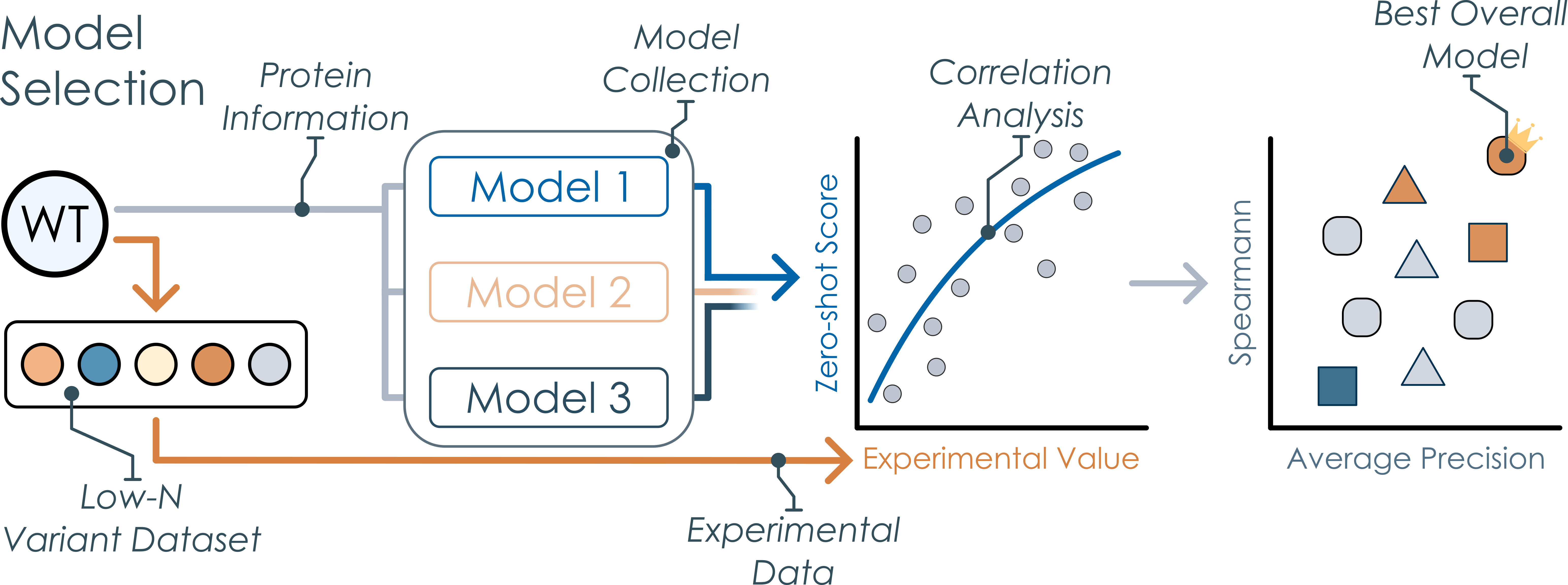
For the Model Selection Phase of PRIZM, all zero-shot model submission scripts can be found in the submission folder, and all submission scripts should be run directly from this folder. We recommend using the global submission script for running all models to handle dependencies and order logic. Please see the README file in the folder for a more in-depth description. After running all models, please run the Model Selection Phase part of the PRIZM notebook to identify the best models that have the highest correlation with your low-N dataset.
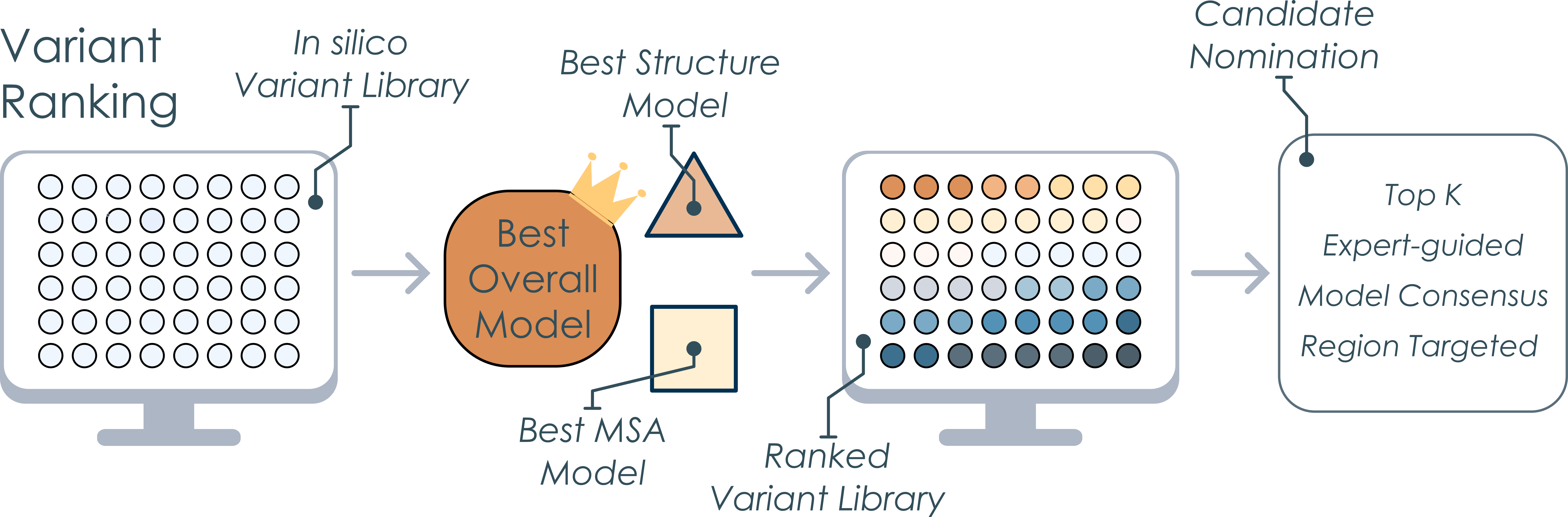
In the Variant Ranking Phase, a large in silico library can be created. This dataset is saved in the in silico library data folder, and this large dataset can then be run using the best model identified in the previous phase. Please remember to update the reference file using the Reference Builder notebook and change the data location variable in the zero-shot configuration file. The resulting ranked dataset can be examined using the PRIZM notebook to select mutants for experimental validation.
PRIZM leverages pre-trained zero-shot models developed and published by other research groups and adapted in the ProteinGym workflow. We do not claim any rights to their work or associated code.
All validation datasets were extracted from the ProteinGym benchmark library. We used the following datasets:
| ProteinGym ID | Protein | DMS Property | Reference |
|---|---|---|---|
| ANCSZ_Hobbs_2022 | Tyrosine Kinase | Enzyme activity | Hobbs, H. T. et al. |
| A4_HUMAN_Seuma_2022 | Amyloid beta | Aggregation | Seuma, M et al. |
| ADRB2_HUMAN_Jones_2020 | β2-adrenergic receptor | Receptor activity (Transcription) | Jones, E. M. et al. |
| ESTA_BACSU_Nutschel_2020 | Lipase A | Thermostability | Nutschel, C. et al. |
| MK01_HUMAN_Brenan_2016 | Mitogen-activated protein kinase 1 | Inhibitor resistance | Brenan, L. et al. |
| Q59976_STRSQ_Romero_2015 | β-glucosidase | Enzyme activity | Romero, P. A. et al. |
| SC6A4_HUMAN_Young_2021 | Sodium-dependent serotonin transporter | Fluorescence | Ellis, H. J. et al. |
| SPIKE_SARS2_Starr_2020_binding | SARS-CoV-2 spike receptor binding domain | Receptor binding | Starr, T. N. et al. |
| VKOR1_HUMAN_Chiasson_2020_activity | Epoxide reductase | Enzyme activity | Chiasson, M. A. et al. |
| YAP1_HUMAN_Araya_2012 | Human Yes-associated protein | Peptide binding | Araya, C. L. et al. |
To reproduce all figures found in the two PRIZM publications, please run the notebooks in the notebooks folder or the experimental validation folder. For the PRIZM analysis of the FlA, GmSuSy, and TOGT1_1, please see the FlA PRIZM notebook, GmSuSy PRIZM notebook, and TOGT1_1 PRIZM notebook, respectively, while the PRIZM validation analysis can be found in the validation notebook. All experimental validation data is located in the experimental validation folder. The experimental analysis of GmSuSy can be found in the GmSuSy notebook, while the analysis of TOGT1_1 can be found in the TOGT1_1 notebook. The experimental analysis of FlA is divided into the characterization of relative activity, kinetic parameters, temperature optimum, and thermal stability.
For any questions regarding PRIZM, please forward them to David Harding-Larsen at [email protected]. For any collaboration proposals, please refer to Dr. Ditte Hededam Welner at [email protected] or Dr. Stanislav Mazurenko at [email protected].
PRIZM was developed based on multiple open-source zero-shot models and builds on code from the ProteinGym repository. We thank the authors of ProteinGym for making their framework publicly available under the MIT License.
This project is available under the MIT license found in the LICENSE file.
The PRIZM workflow is described in the following papers:
David Harding-Larsen, Brianna M. Lax, Martina Escorial García, Catarina Mendonça, Felipe Mejia-Otalvaro, Ditte Hededam Welner, Stanislav Mazurenko
bioRxiv (2026). DOI: 10.64898/2026.02.08.704628
David Harding-Larsen, Brianna M. Lax, Christopher Kurt Weingarten, Aboubakar Sako, Stanislav Mazurenko, Ditte Hededam Welner
bioRxiv (2026). DOI: 10.64898/2026.02.11.705267
Protein Ranking using Informed Zero-shot Modelling (PRIZM) is a two-phase approach that efficiently examines the mutational space using machine learning (ML) guidance without requiring high-throughput methods. PRIZM combines the specific information of small datasets with the general knowledge of pre-trained zero-shot predictors to discover enhanced protein variants, thereby removing the need for large datasets common in traditional ML techniques.
PRIZM provides the necessary tools to easily implement all elements of the workflow. In the Model Selection Phase, the protein information of an experimental low-N dataset is parsed through a diverse collection of zero-shot models based on the ProteinGym code. The resulting predicted scores are correlated with the original experimental values, identifying the model most suitable for predicting better mutants. In the Variant Ranking Phase, PRIZM can be used to create, predict, and rank a large in silico mutant dataset using the models identified as most suitable in the previous phase. Visualization tools are also provided, such as plotting individual correlations, comparing model performances, or constructing single-mutant landscapes.
Importantly, the best models identified by PRIZM consistently outperform the worst models across 10 diverse benchmark datasets, including protein aggregation and enzyme activity, using as few as 20 variants in the low-N dataset.
Before installing PRIZM, make sure either Anaconda or Miniconda is installed, as this will be used to manage the environments. To install PRIZM, clone (or fork and clone) the repository:
git clone https://github.com/daha-la/PRIZM.git
To run the zero-shot models in the Modeller Module, we recommend installing PRIZM on a remote Linux server, as some of the models require significant computational power.
To run the notebooks found in the notebook folder, please create the following environment:
conda env create -f environments/PRIZM_notebook_Mac.yaml
or
conda env create -f environments/PRIZM_notebook_Windows.yaml
On the machine/server running the zero-shot models, please create the full PRIZM environment:
conda env create -f environments/PRIZM.yaml
conda activate PRIZM
pip install evcouplings
Please note that the full PRIZM environment requires a Linux-based system.
Some models require dedicated environments to run:
conda env create -f environments/GEMME.yml
conda env create -n mulan python=3.10
conda activate mulan
pip install -r environments/mulan.txt
conda env create -n prosst python=3.10
conda activate prosst
pip install -r environments/prosst.txt
conda env create -f protssn.yaml
conda activate protssn
pip install torch_scatter torch_sparse torch_cluster -f https://data.pyg.org/whl/torch-2.3.0+cu121.html
conda env create -n rsalor python=3.10
conda activate rsalor
pip install rsalor
To conduct evotuning of the UniRep models, please create a dedicated environment.
conda env create -f environments/unirep_evotune.yaml
We also recommend running the scoring scripts for the UniRep models using this environment.
conda env create -f environments/venusrem.yaml
conda activate venusrem
pip install hmmer
pip install https://github.com/debbiemarkslab/EVcouplings/archive/develop.zip
Before running any models, please ensure that all model checkpoints have been downloaded. We recommend storing the checkpoints in the checkpoints directory. All checkpoints can be downloaded using download script. If a different checkpoint folder is used, please adapt the checkpoint_folder variable in the zero-shot configuration file. For more information, see the checkpoints directory.
PRIZM requires installing several tools to run some of the zero-shot models, and we recommend installing them in the installation directory using the installer script. If a different installation folder is used, please adapt the installation_folder variable in the zero-shot configuration file. For more information, see the installation directory.
PRIZM requires both the sequence, structure, and MSA of the wildtype enzyme to function. For the structure, we recommend either using a high-quality crystal structure with no gaps or an in silico-predicted structure using the AlphaFold3 web server. For the MSA, PRIZM requires the MSA to be in a specific format (A2M, with no gaps/deletions in the query sequence), and we therefore recommend using the EVcouplings web server or running the tool locally.
PRIZM consists of multiple phases. In the pre-setup, first ensure that your low-N dataset is formatted correctly and saved in the low-N folder. Your dataset file should contain three columns:
For the Model Selection Phase of PRIZM, all zero-shot model submission scripts can be found in the submission folder, and all submission scripts should be run directly from this folder. We recommend using the global submission script for running all models to handle dependencies and order logic. Please see the README file in the folder for a more in-depth description. After running all models, please run the Model Selection Phase part of the PRIZM notebook to identify the best models that have the highest correlation with your low-N dataset.
In the Variant Ranking Phase, a large in silico library can be created. This dataset is saved in the in silico library data folder, and this large dataset can then be run using the best model identified in the previous phase. Please remember to update the reference file using the Reference Builder notebook and change the data location variable in the zero-shot configuration file. The resulting ranked dataset can be examined using the PRIZM notebook to select mutants for experimental validation.
PRIZM leverages pre-trained zero-shot models developed and published by other research groups and adapted in the ProteinGym workflow. We do not claim any rights to their work or associated code.
All validation datasets were extracted from the ProteinGym benchmark library. We used the following datasets:
| ProteinGym ID | Protein | DMS Property | Reference |
|---|---|---|---|
| ANCSZ_Hobbs_2022 | Tyrosine Kinase | Enzyme activity | Hobbs, H. T. et al. |
| A4_HUMAN_Seuma_2022 | Amyloid beta | Aggregation | Seuma, M et al. |
| ADRB2_HUMAN_Jones_2020 | β2-adrenergic receptor | Receptor activity (Transcription) | Jones, E. M. et al. |
| ESTA_BACSU_Nutschel_2020 | Lipase A | Thermostability | Nutschel, C. et al. |
| MK01_HUMAN_Brenan_2016 | Mitogen-activated protein kinase 1 | Inhibitor resistance | Brenan, L. et al. |
| Q59976_STRSQ_Romero_2015 | β-glucosidase | Enzyme activity | Romero, P. A. et al. |
| SC6A4_HUMAN_Young_2021 | Sodium-dependent serotonin transporter | Fluorescence | Ellis, H. J. et al. |
| SPIKE_SARS2_Starr_2020_binding | SARS-CoV-2 spike receptor binding domain | Receptor binding | Starr, T. N. et al. |
| VKOR1_HUMAN_Chiasson_2020_activity | Epoxide reductase | Enzyme activity | Chiasson, M. A. et al. |
| YAP1_HUMAN_Araya_2012 | Human Yes-associated protein | Peptide binding | Araya, C. L. et al. |
To reproduce all figures found in the two PRIZM publications, please run the notebooks in the notebooks folder or the experimental validation folder. For the PRIZM analysis of the FlA, GmSuSy, and TOGT1_1, please see the FlA PRIZM notebook, GmSuSy PRIZM notebook, and TOGT1_1 PRIZM notebook, respectively, while the PRIZM validation analysis can be found in the validation notebook. All experimental validation data is located in the experimental validation folder. The experimental analysis of GmSuSy can be found in the GmSuSy notebook, while the analysis of TOGT1_1 can be found in the TOGT1_1 notebook. The experimental analysis of FlA is divided into the characterization of relative activity, kinetic parameters, temperature optimum, and thermal stability.
For any questions regarding PRIZM, please forward them to David Harding-Larsen at [email protected]. For any collaboration proposals, please refer to Dr. Ditte Hededam Welner at [email protected] or Dr. Stanislav Mazurenko at [email protected].
PRIZM was developed based on multiple open-source zero-shot models and builds on code from the ProteinGym repository. We thank the authors of ProteinGym for making their framework publicly available under the MIT License.
This project is available under the MIT license found in the LICENSE file.
The PRIZM workflow is described in the following papers:
David Harding-Larsen, Brianna M. Lax, Martina Escorial García, Catarina Mendonça, Felipe Mejia-Otalvaro, Ditte Hededam Welner, Stanislav Mazurenko
bioRxiv (2026). DOI: 10.64898/2026.02.08.704628
David Harding-Larsen, Brianna M. Lax, Christopher Kurt Weingarten, Aboubakar Sako, Stanislav Mazurenko, Ditte Hededam Welner
bioRxiv (2026). DOI: 10.64898/2026.02.11.705267



