A Python CLI tool that converts Claude Code transcript JSONL files into readable HTML / Markdown format.
See the codeA Python CLI tool that converts Claude Code transcript JSONL files into readable HTML and Markdown (plus JSON for tooling).
Quick demo:
▶️ Feature walkthrough: six short chapters on the archive index and search, reading a session, folding and filtering, agents and forks, and live sessions.
TUI demo:
📋 View Changelog - See what's new in each release
This tool generates clean, minimalist HTML pages showing user prompts and assistant responses chronologically. It's designed to create a readable log of your Claude Code interactions with support for both individual files and entire project hierarchies.
[!NOTE] Experimental provider support is now available for single-session exports from Antigravity CLI (
agy, alpha) and Codex CLI (codex, beta). Use--provider agy|codex --session-id <id>; these integrations may change as the upstream transcript formats evolve.
📄 View Example HTML Output - A real example generated from a sample of this project's development, regenerated on every docs build
TL;DR: run the command below and browse the pages generated from your entire Claude Code archives:
uvx claude-code-log@latest --open-browser
claude-code-log watch re-converts as a session is written, so Markdown in an editor or Obsidian stays current; claude-code-log serve --watch makes an open session page grow as messages arrive, keeping your scroll position and folded sections~/.claude/projects/ directory with linked index page--theme minimal gives a compact light/dark page where sub-agents and rewind forks are branches you can fold away, interleave with the main conversation or open side by side in columns (see Choosing a Theme)init) in expandable details with structured parsingclaude-code-log serve serves the archive over loopback with full-text search across every project and session (see the archive search guide); every generated page also has in-page search--depth session|user|assistant|agent|tool|hook sets how deep into the message hierarchy to render and --compact merges repeated section headings — pairs well with --format md to feed past conversations back to an LLM for analysis or experience buildingThis tool helps you answer questions like:
The TUI provides an interactive interface for browsing and managing Claude Code sessions with real-time navigation, session summaries, and quick actions.
# Launch TUI for all projects (default behavior)
claude-code-log --tui

# Launch TUI for specific project directory
claude-code-log /path/to/project --tui

# Launch TUI for specific Claude project
claude-code-log my-project --tui  # Automatically converts to ~/.claude/projects/-path-to-my-project
TUI Features:
h: Generate and open session HTML in browserm: Generate and open session Markdown in browserv: View session Markdown in embedded viewer (with table of contents)c: Resume session in Claude Code with claude -r <sessionId>a / d: Archive or delete the selected sessionr: Restore an archived session back to a JSONL filee: Toggle the expanded view of the selected rowp: Switch to project selector view?: Show all keybindingsH/M/V: Force regenerate HTML/Markdown (hidden shortcuts for development)q to quite to expand the selected row, showing full summary, first user message, working directory, and detailed token usage# Process all projects in ~/.claude/projects/ (default behavior)
claude-code-log
# Explicitly process all projects
claude-code-log --all-projects
# Process all projects and open in browser
claude-code-log --open-browser
# Process all projects with date filtering
claude-code-log --from-date "yesterday" --to-date "today"
claude-code-log --from-date "last week"
# Skip individual session files (only create combined transcripts)
claude-code-log --no-individual-sessions
This creates:
~/.claude/projects/index.html - Top level index with project cards and statistics~/.claude/projects/project-name/combined_transcripts.html - Individual project pages (these can be several megabytes)~/.claude/projects/project-name/session-{session-id}.html - Individual session pages~/.claude/projects/project-name/session-{session-id}.md - Markdown versions (with --format md, or on demand from the TUI)# Single file
claude-code-log transcript.jsonl
# Specific directory
claude-code-log /path/to/transcript/directory
# Custom output location
claude-code-log /path/to/directory -o combined_transcripts.html
# Open in browser after conversion
claude-code-log /path/to/directory --open-browser
# Filter by date range (supports natural language)
claude-code-log /path/to/directory --from-date "yesterday" --to-date "today"
claude-code-log /path/to/directory --from-date "3 days ago" --to-date "yesterday"
The combination --depth agent --format md --compact produces condensed Markdown suitable as context for an LLM to review or distill patterns from past work:
# Session → compact Markdown for LLM review
claude-code-log transcript.jsonl --depth agent --format md --compact -o session.md

# Whole project history
claude-code-log /path/to/project --depth agent --format md --compact
--depth levels (smallest → largest output):
session — session structure only (headers and navigation)user — just user prompts and steering (useful as input to a downstream agent, e.g. building a requirements doc)assistant — user + assistant text onlyagent — adds sub-agents and key tool signals (WebSearch, WebFetch, agent delegations)tool — adds tools, cleaned of system/hook noise (default)hook — everything, including hooks and system notices--detail full|high|low|minimal|user-only still works but is deprecated (removed in 2.0); it maps to hook, tool, agent, assistant and user respectively. Add --no-recaps to drop the ※ recap summaries, which otherwise appear at every depth.
--compact merges consecutive same-type sections in Markdown so runs of assistant responses share one heading instead of repeating ### 🤖 Assistant: for each.
Plain 7c2e6f6-shaped tokens in transcript prose get turned into clickable commit links when the SHA is reachable from a local remote-tracking branch. github.com, gitlab.com, and bitbucket.org work out of the box. For self-hosted forges (in-house GitLab, Gitea, Forgejo, …), supply a URL template via --git-link:
# Self-hosted GitLab
claude-code-log /path/to/transcript --git-link 'https://{host}/{path}/-/commit/{sha}'

# Same thing via env var (useful for TUI / repeated invocations)
export CLAUDE_CODE_LOG_GIT_LINK='https://{host}/{path}/-/commit/{sha}'
claude-code-log --tui
Placeholders: {host}, {path}, {sha}. The template fires only when the static map doesn't already know the host, so a mix of GitHub repos + self-hosted GitLab gets correct links from both. SHAs not reachable from any local remote-tracking ref render as plain text — local-only work-in-progress commits never produce broken links.
HTML output comes in themes, selected with --theme (on the default command, serve and watch, and for the TUI's HTML exports) or the CLAUDE_CODE_LOG_THEME environment variable:
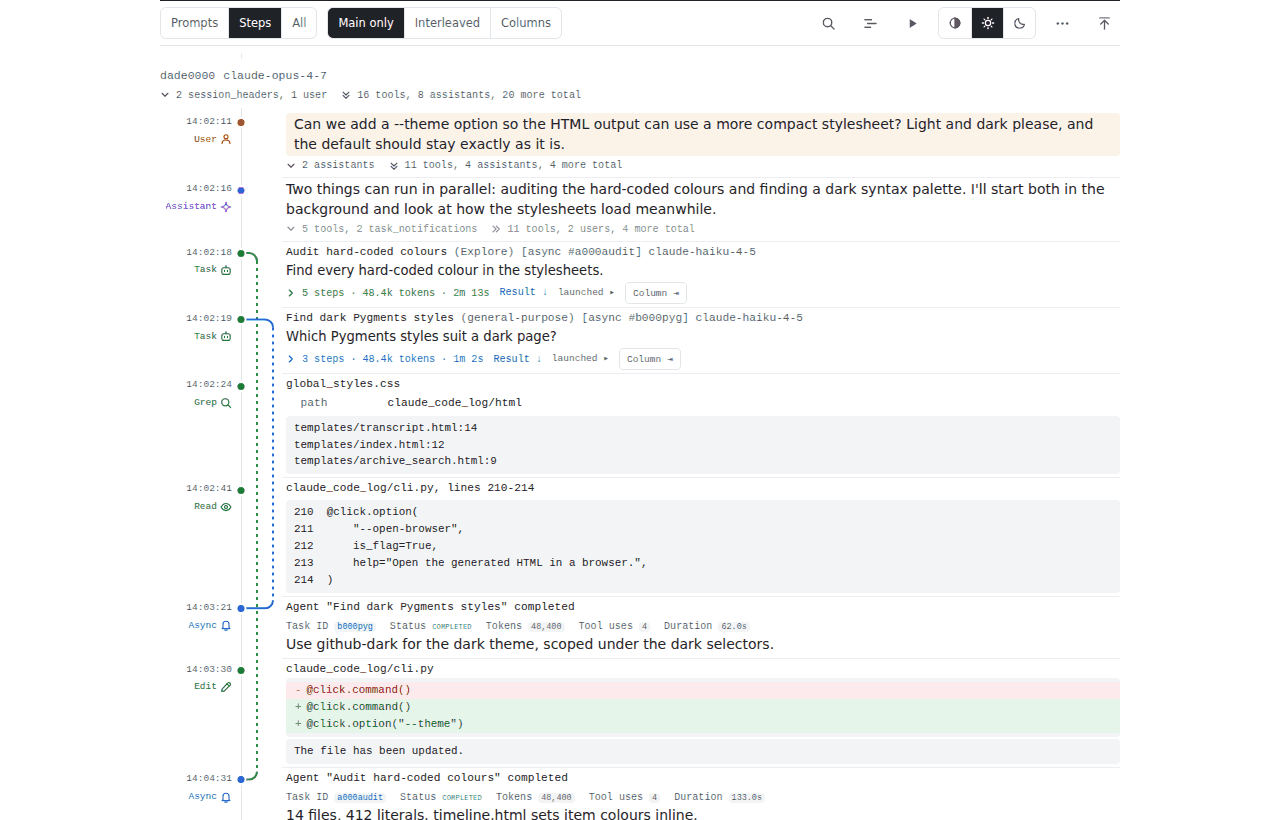
classic — the original look (the default)minimal — a compact light/dark theme: dense rows on a time rail, long content folded to short previews, and sub-agents and rewind forks drawn as branches you can fold away, interleave with the main conversation or open side by side in columnsdefault — the built-in default, currently classicclaude-code-log --theme minimal
# Same thing via env var; an explicit --theme always wins over it
export CLAUDE_CODE_LOG_THEME=minimal
claude-code-log --theme classic # still classic
Themes write the same files (combined_transcripts.html, session-*.html, …) rather than separate ones, and each page records the theme it was rendered in, so switching theme regenerates the whole archive (and switching back regenerates it again). --theme is HTML-only; with --format md it is ignored with a warning. An unknown CLAUDE_CODE_LOG_THEME value is an error. The themes guide walks through the minimal theme's toolbar, branch modes and dark mode, with screenshots.
When processing all projects, the tool generates:
~/.claude/projects/
├── index.html                           # Master index with project cards
├── project1/
│   ├── combined_transcripts.html        # Combined project page
│   ├── session-{session-id}.html        # Individual session pages
│   ├── session-{session-id}.md          # Markdown version (--format md or TUI)
│   └── session-{session-id2}.html       # More session pages...
├── project2/
│   ├── combined_transcripts.html
│   └── session-{session-id}.html
└── ...
init shown in expandable details with structured parsingMarkdown export provides a lightweight, portable alternative to HTML:
--compact Mode: Merge consecutive same-type section headings — most useful with --depth agent or assistant where tool stripping creates runs of Assistant or User sectionsThe recommended way is installing as a uv tool:
uv tool install claude-code-log
This will create a claude-code-log binary that you can call directly.
Or run directly with uvx (no separate installation step required):
uvx claude-code-log@latest
Alternatively, if you prefer, install using pip:
pip install claude-code-log
Or install from source:
git clone https://github.com/daaain/claude-code-log.git
cd claude-code-log
uv sync
uv run claude-code-log
# or if you want `claude-code-log` binary that works everywhere:
uv tool install --editable .
See CONTRIBUTING.md for development setup, testing, and architecture documentation.
Projects built on top of claude-code-log:
Cross-platform (macOS and Windows/MSYS).
claude-trace request logs if present?ccusage like daily summary and maybe some textual summary too based on Claude generate session summaries?859 followers · starred Aug 2025
51 followers · starred Jan 2026
29 followers · starred Apr 2026
37 followers · starred Jul 2025
A Python CLI tool that converts Claude Code transcript JSONL files into readable HTML / Markdown format.
See the codeA Python CLI tool that converts Claude Code transcript JSONL files into readable HTML and Markdown (plus JSON for tooling).
Quick demo:
▶️ Feature walkthrough: six short chapters on the archive index and search, reading a session, folding and filtering, agents and forks, and live sessions.
TUI demo:
📋 View Changelog - See what's new in each release
This tool generates clean, minimalist HTML pages showing user prompts and assistant responses chronologically. It's designed to create a readable log of your Claude Code interactions with support for both individual files and entire project hierarchies.
[!NOTE] Experimental provider support is now available for single-session exports from Antigravity CLI (
agy, alpha) and Codex CLI (codex, beta). Use--provider agy|codex --session-id <id>; these integrations may change as the upstream transcript formats evolve.
📄 View Example HTML Output - A real example generated from a sample of this project's development, regenerated on every docs build
TL;DR: run the command below and browse the pages generated from your entire Claude Code archives:
uvx claude-code-log@latest --open-browser
claude-code-log watch re-converts as a session is written, so Markdown in an editor or Obsidian stays current; claude-code-log serve --watch makes an open session page grow as messages arrive, keeping your scroll position and folded sections~/.claude/projects/ directory with linked index page--theme minimal gives a compact light/dark page where sub-agents and rewind forks are branches you can fold away, interleave with the main conversation or open side by side in columns (see Choosing a Theme)init) in expandable details with structured parsingclaude-code-log serve serves the archive over loopback with full-text search across every project and session (see the archive search guide); every generated page also has in-page search--depth session|user|assistant|agent|tool|hook sets how deep into the message hierarchy to render and --compact merges repeated section headings — pairs well with --format md to feed past conversations back to an LLM for analysis or experience buildingThis tool helps you answer questions like:
The TUI provides an interactive interface for browsing and managing Claude Code sessions with real-time navigation, session summaries, and quick actions.
# Launch TUI for all projects (default behavior)
claude-code-log --tui

# Launch TUI for specific project directory
claude-code-log /path/to/project --tui

# Launch TUI for specific Claude project
claude-code-log my-project --tui  # Automatically converts to ~/.claude/projects/-path-to-my-project
TUI Features:
h: Generate and open session HTML in browserm: Generate and open session Markdown in browserv: View session Markdown in embedded viewer (with table of contents)c: Resume session in Claude Code with claude -r <sessionId>a / d: Archive or delete the selected sessionr: Restore an archived session back to a JSONL filee: Toggle the expanded view of the selected rowp: Switch to project selector view?: Show all keybindingsH/M/V: Force regenerate HTML/Markdown (hidden shortcuts for development)q to quite to expand the selected row, showing full summary, first user message, working directory, and detailed token usage# Process all projects in ~/.claude/projects/ (default behavior)
claude-code-log
# Explicitly process all projects
claude-code-log --all-projects
# Process all projects and open in browser
claude-code-log --open-browser
# Process all projects with date filtering
claude-code-log --from-date "yesterday" --to-date "today"
claude-code-log --from-date "last week"
# Skip individual session files (only create combined transcripts)
claude-code-log --no-individual-sessions
This creates:
~/.claude/projects/index.html - Top level index with project cards and statistics~/.claude/projects/project-name/combined_transcripts.html - Individual project pages (these can be several megabytes)~/.claude/projects/project-name/session-{session-id}.html - Individual session pages~/.claude/projects/project-name/session-{session-id}.md - Markdown versions (with --format md, or on demand from the TUI)# Single file
claude-code-log transcript.jsonl
# Specific directory
claude-code-log /path/to/transcript/directory
# Custom output location
claude-code-log /path/to/directory -o combined_transcripts.html
# Open in browser after conversion
claude-code-log /path/to/directory --open-browser
# Filter by date range (supports natural language)
claude-code-log /path/to/directory --from-date "yesterday" --to-date "today"
claude-code-log /path/to/directory --from-date "3 days ago" --to-date "yesterday"
The combination --depth agent --format md --compact produces condensed Markdown suitable as context for an LLM to review or distill patterns from past work:
# Session → compact Markdown for LLM review
claude-code-log transcript.jsonl --depth agent --format md --compact -o session.md

# Whole project history
claude-code-log /path/to/project --depth agent --format md --compact
--depth levels (smallest → largest output):
session — session structure only (headers and navigation)user — just user prompts and steering (useful as input to a downstream agent, e.g. building a requirements doc)assistant — user + assistant text onlyagent — adds sub-agents and key tool signals (WebSearch, WebFetch, agent delegations)tool — adds tools, cleaned of system/hook noise (default)hook — everything, including hooks and system notices--detail full|high|low|minimal|user-only still works but is deprecated (removed in 2.0); it maps to hook, tool, agent, assistant and user respectively. Add --no-recaps to drop the ※ recap summaries, which otherwise appear at every depth.
--compact merges consecutive same-type sections in Markdown so runs of assistant responses share one heading instead of repeating ### 🤖 Assistant: for each.
Plain 7c2e6f6-shaped tokens in transcript prose get turned into clickable commit links when the SHA is reachable from a local remote-tracking branch. github.com, gitlab.com, and bitbucket.org work out of the box. For self-hosted forges (in-house GitLab, Gitea, Forgejo, …), supply a URL template via --git-link:
# Self-hosted GitLab
claude-code-log /path/to/transcript --git-link 'https://{host}/{path}/-/commit/{sha}'

# Same thing via env var (useful for TUI / repeated invocations)
export CLAUDE_CODE_LOG_GIT_LINK='https://{host}/{path}/-/commit/{sha}'
claude-code-log --tui
Placeholders: {host}, {path}, {sha}. The template fires only when the static map doesn't already know the host, so a mix of GitHub repos + self-hosted GitLab gets correct links from both. SHAs not reachable from any local remote-tracking ref render as plain text — local-only work-in-progress commits never produce broken links.
HTML output comes in themes, selected with --theme (on the default command, serve and watch, and for the TUI's HTML exports) or the CLAUDE_CODE_LOG_THEME environment variable:
classic — the original look (the default)minimal — a compact light/dark theme: dense rows on a time rail, long content folded to short previews, and sub-agents and rewind forks drawn as branches you can fold away, interleave with the main conversation or open side by side in columnsdefault — the built-in default, currently classicclaude-code-log --theme minimal
# Same thing via env var; an explicit --theme always wins over it
export CLAUDE_CODE_LOG_THEME=minimal
claude-code-log --theme classic # still classic
Themes write the same files (combined_transcripts.html, session-*.html, …) rather than separate ones, and each page records the theme it was rendered in, so switching theme regenerates the whole archive (and switching back regenerates it again). --theme is HTML-only; with --format md it is ignored with a warning. An unknown CLAUDE_CODE_LOG_THEME value is an error. The themes guide walks through the minimal theme's toolbar, branch modes and dark mode, with screenshots.
When processing all projects, the tool generates:
~/.claude/projects/
├── index.html                           # Master index with project cards
├── project1/
│   ├── combined_transcripts.html        # Combined project page
│   ├── session-{session-id}.html        # Individual session pages
│   ├── session-{session-id}.md          # Markdown version (--format md or TUI)
│   └── session-{session-id2}.html       # More session pages...
├── project2/
│   ├── combined_transcripts.html
│   └── session-{session-id}.html
└── ...
init shown in expandable details with structured parsingMarkdown export provides a lightweight, portable alternative to HTML:
--compact Mode: Merge consecutive same-type section headings — most useful with --depth agent or assistant where tool stripping creates runs of Assistant or User sectionsThe recommended way is installing as a uv tool:
uv tool install claude-code-log
This will create a claude-code-log binary that you can call directly.
Or run directly with uvx (no separate installation step required):
uvx claude-code-log@latest
Alternatively, if you prefer, install using pip:
pip install claude-code-log
Or install from source:
git clone https://github.com/daaain/claude-code-log.git
cd claude-code-log
uv sync
uv run claude-code-log
# or if you want `claude-code-log` binary that works everywhere:
uv tool install --editable .
See CONTRIBUTING.md for development setup, testing, and architecture documentation.
Projects built on top of claude-code-log:
Cross-platform (macOS and Windows/MSYS).
claude-trace request logs if present?ccusage like daily summary and maybe some textual summary too based on Claude generate session summaries?859 followers · starred Aug 2025
51 followers · starred Jan 2026
29 followers · starred Apr 2026
37 followers · starred Jul 2025



