Ribbon Control for Qt
See the code





📚 Project Documentation: https://czyt1988.github.io/SARibbon/en
Detailed User Guide: SARibbon User Guide
| Windows (latest) | Linux Ubuntu (latest) | Mac (latest) | |
|---|---|---|---|
| Qt 5.15 LTS |  |  |  |
| Qt 6.8 LTS |  |  |  |
SARibbon is a Ribbon UI control library for Qt, designed to provide desktop applications with a modern interface similar to Microsoft Office applications.

Supports minimized mode, where only tabs are shown (double-clicking a tab toggles minimization by default). Contextual tabs are also supported.

Supports Quick Access Bar (like Word's quick menu) and Right Button Group, with adaptive layout behavior in different modes.
Supports four types of Ribbon buttons: standard push button, delayed popup menu button, menu button, and action menu button. (The action menu button addresses one of the core challenges this Ribbon control aims to solve.)
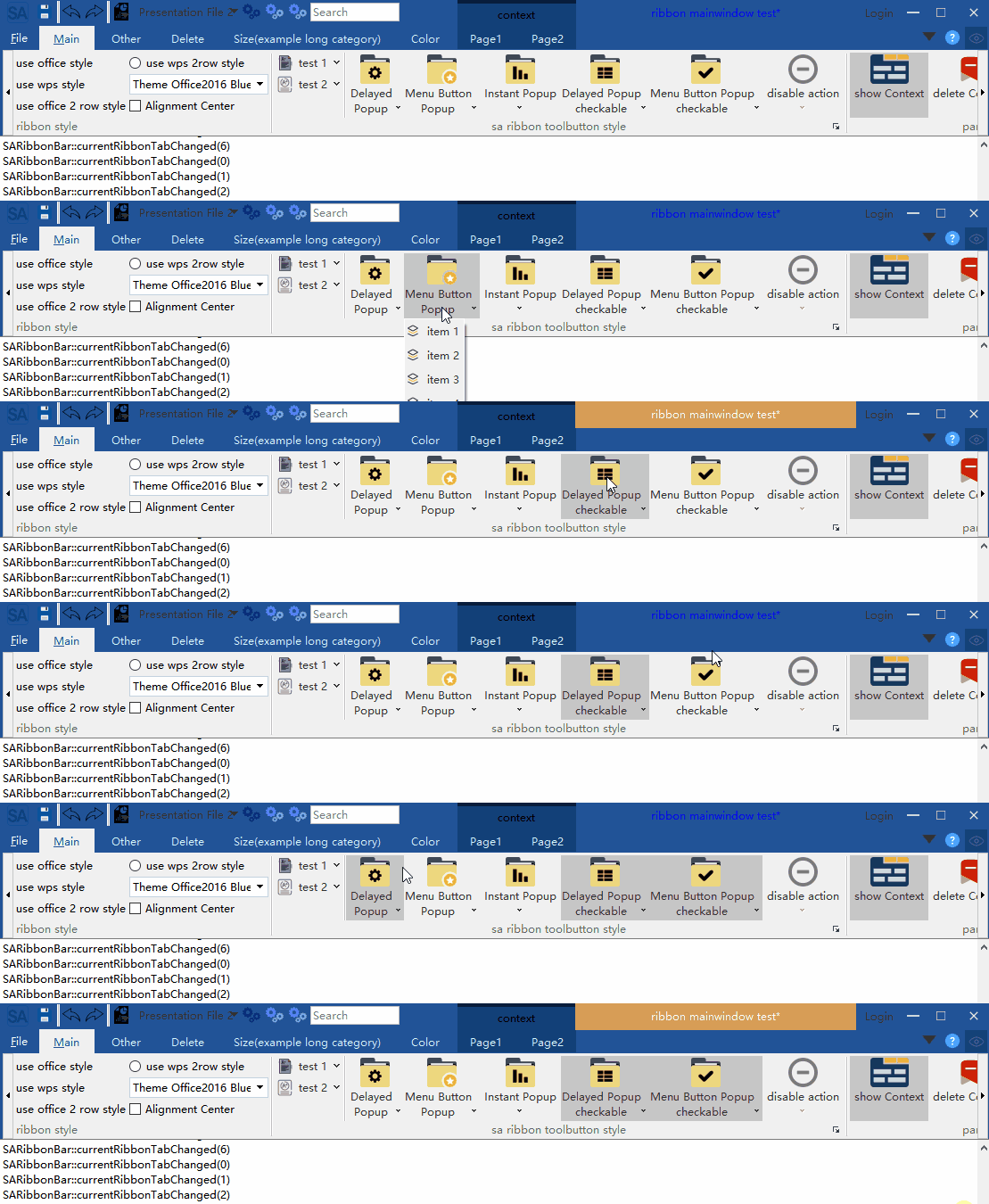
See: Ribbon Button Layout Guide
Offers six distinct layout styles — Loose 3-row, Loose 2-row, Compact 3-row, Compact 2-row, Loose Single-row, Compact Single-row — with Single-row mode ideal for space-constrained scenarios.
Layout styles:

Single-row layout:

See: SARibbon Layout Guide
Fully customizable via QSS, with real-time theme switching support. Includes 6 built-in themes:






You can design any theme via QSS. See: Design Your Theme
Provides a Gallery widget.
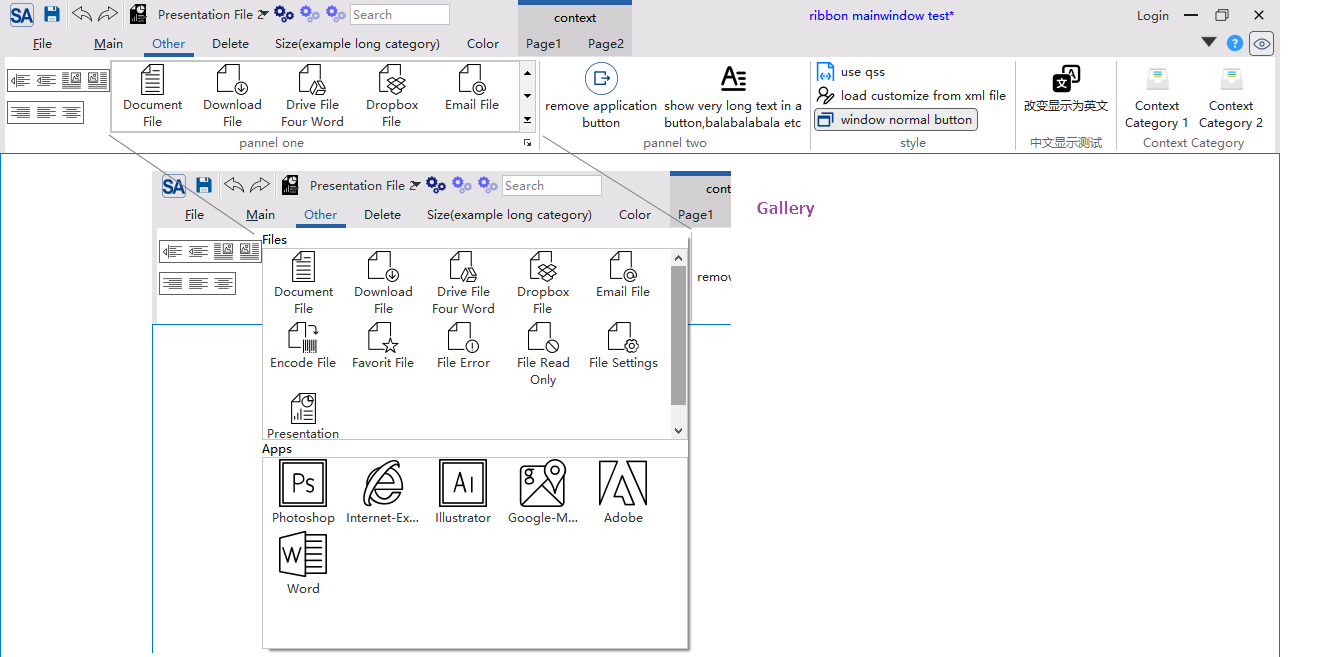
Supports horizontal scrolling and Option Actions.
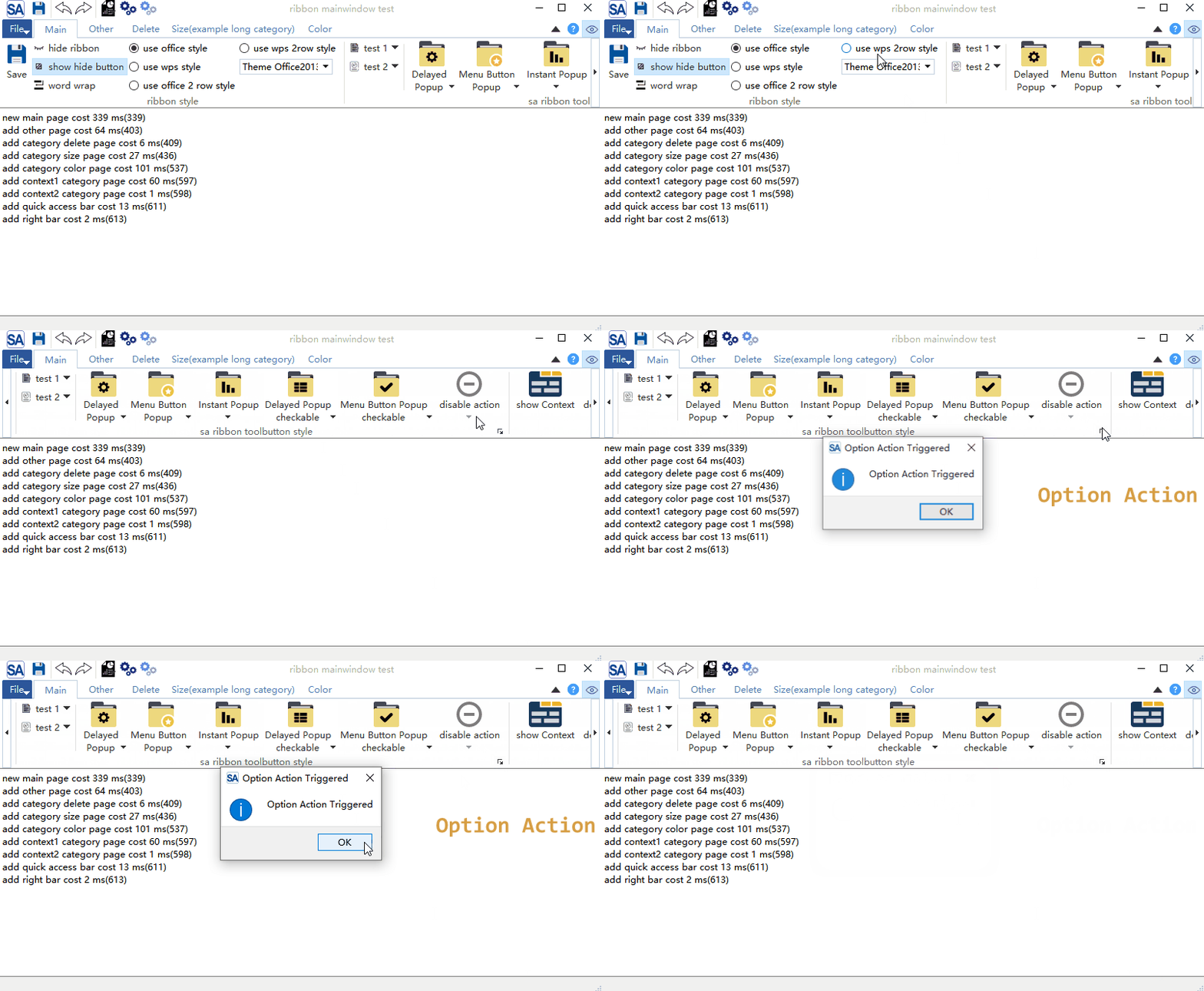
Offers center-aligned mode.

Fully compatible with 4K displays and multi-monitor setups.
Supports Linux and macOS (UI not deeply optimized for these platforms).
Provides RTL mode with automatic system detection.
License: MIT (free to use, modify, and distribute)
Contributions welcome: feel free to submit Issues, PRs, or join discussions!
SARibbon provides amalgamated integration files (SARibbon.h and SARibbon.cpp) in the src/ directory — just include them in your project to get started.
To build as a dynamic library, see: SARibbon Build Instructions
Quick start guides:
We recommend starting with the example/MainWindowExample project to learn SARibbon usage. You can run it directly to explore all features interactively.
Project documentation is in the docs/en/ folder:
https://czyt1988.github.io/SARibbon/en
Doxygen-generated API documentation is deployed at: https://czyt1988.github.io/SARibbon/doxygen/index.html
SARibbon provides Python bindings for three frameworks, allowing you to use SARibbon in Python applications:
| Binding | Framework | Build Tool |
|---|---|---|
| PyQtSARibbon | PyQt5 | SIP |
| PyQtSARibbon6 | PyQt6 | SIP |
| PySideSARibbon | PySide6 | Shiboken6 |
Install via pip:
pip install PyQtSARibbon    # PyQt5
pip install PyQtSARibbon6   # PyQt6
pip install PySideSARibbon  # PySide6
For building from source and detailed usage, see:
Python demo examples are in the pyexamples/ directory.
Screenshots of software built with SARibbon:
This is a data analysis application with agent support. It provides workflow and AI agent analysis capabilities — if you want to learn how to embed an AI agent into a C++/Qt application, this software is a good reference.
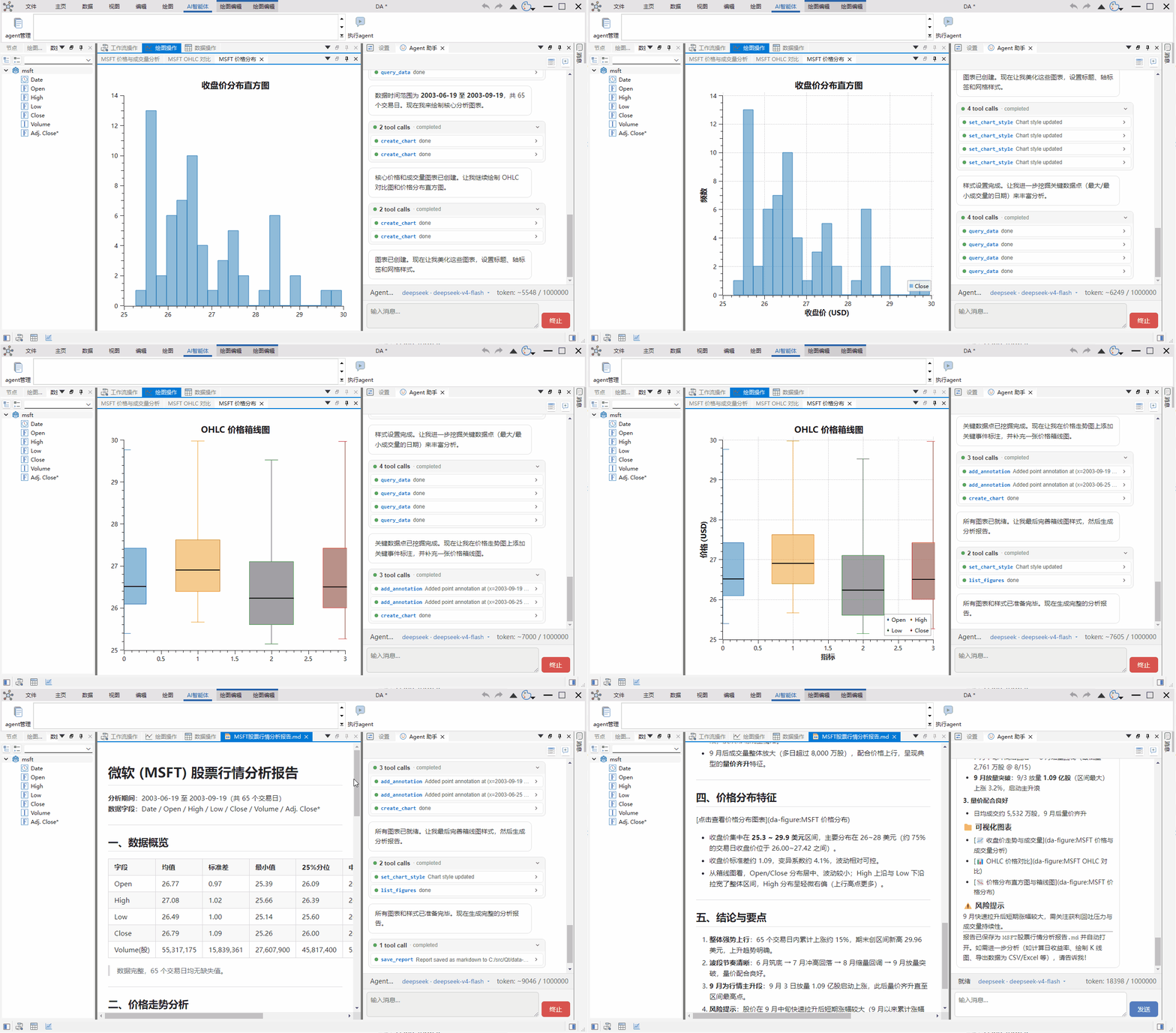
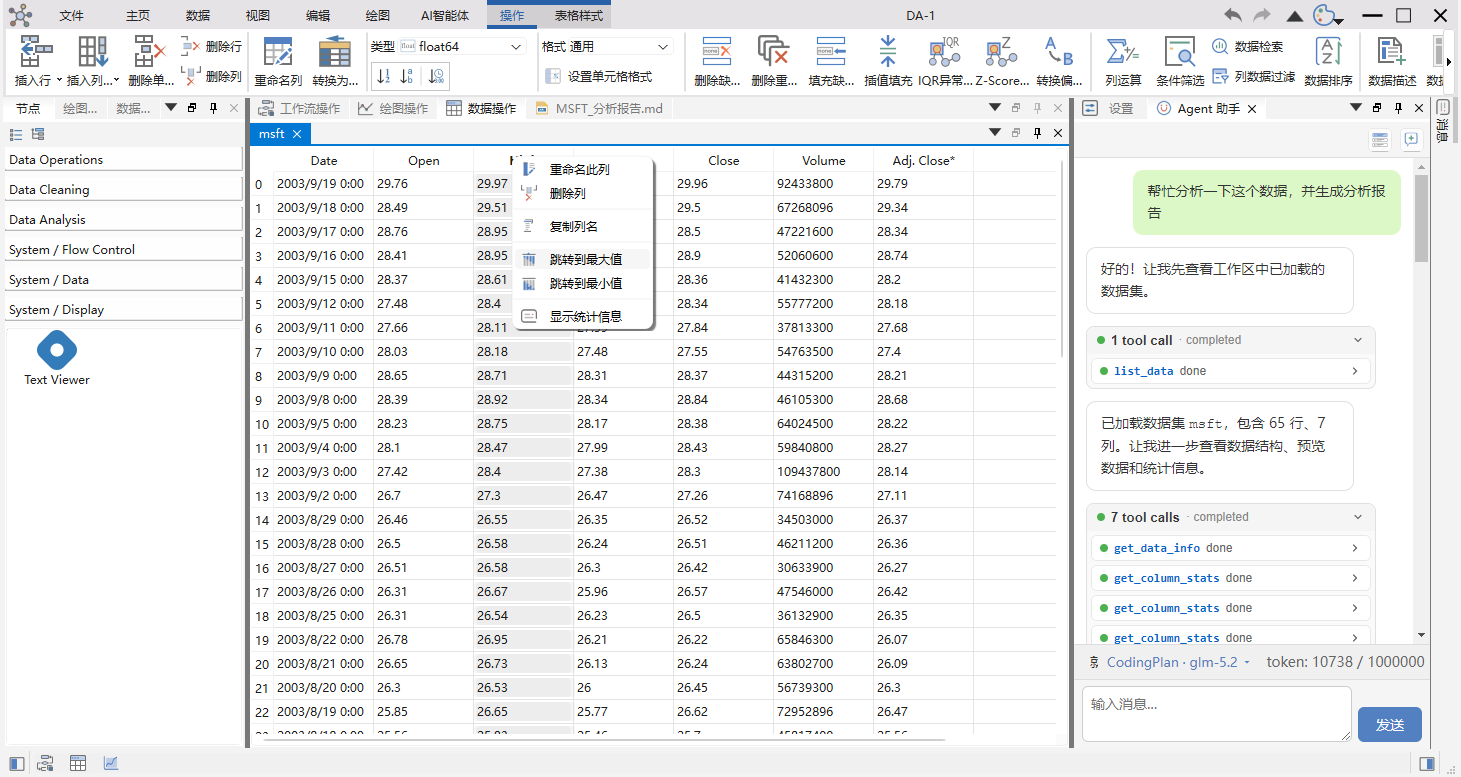
The actual Ribbon generation code is available at:
https://github.com/czyt1988/data-workbench/blob/master/src/APP/DAAppRibbonArea.cpp
Project documentation is built with MkDocs and deployed to GitHub Pages:
https://czyt1988.github.io/SARibbon/en
You can also generate documentation using Doxygen:
docs/doxygen-doc-file/Doxyfile-qch-en: generates .qch files for integration into Qt Creator as Qt Help documentation. (Note: the -en variant does not yet exist — use Doxyfile-qch-cn as a reference, or create the -en version from it.)docs/doxygen-doc-file/Doxyfile-wiki-en: generates HTML documentation for browser viewing. (Note: the -en variant does not yet exist — use Doxyfile-wiki-cn as a reference, or create the -en version from it.)727 followers · starred Jan 2021
14 followers · starred Jun 2022
62 followers · starred Jul 2026
10 followers · starred Oct 2024
Ribbon Control for Qt
See the code
📚 Project Documentation: https://czyt1988.github.io/SARibbon/en
Detailed User Guide: SARibbon User Guide
| Windows (latest) | Linux Ubuntu (latest) | Mac (latest) | |
|---|---|---|---|
| Qt 5.15 LTS | | | |
| Qt 6.8 LTS | | | |
SARibbon is a Ribbon UI control library for Qt, designed to provide desktop applications with a modern interface similar to Microsoft Office applications.
Supports minimized mode, where only tabs are shown (double-clicking a tab toggles minimization by default). Contextual tabs are also supported.
Supports Quick Access Bar (like Word's quick menu) and Right Button Group, with adaptive layout behavior in different modes.
Supports four types of Ribbon buttons: standard push button, delayed popup menu button, menu button, and action menu button. (The action menu button addresses one of the core challenges this Ribbon control aims to solve.)
See: Ribbon Button Layout Guide
Offers six distinct layout styles — Loose 3-row, Loose 2-row, Compact 3-row, Compact 2-row, Loose Single-row, Compact Single-row — with Single-row mode ideal for space-constrained scenarios.
Layout styles:
Single-row layout:
See: SARibbon Layout Guide
Fully customizable via QSS, with real-time theme switching support. Includes 6 built-in themes:
You can design any theme via QSS. See: Design Your Theme
Provides a Gallery widget.
Supports horizontal scrolling and Option Actions.
Offers center-aligned mode.
Fully compatible with 4K displays and multi-monitor setups.
Supports Linux and macOS (UI not deeply optimized for these platforms).
Provides RTL mode with automatic system detection.
License: MIT (free to use, modify, and distribute)
Contributions welcome: feel free to submit Issues, PRs, or join discussions!
SARibbon provides amalgamated integration files (SARibbon.h and SARibbon.cpp) in the src/ directory — just include them in your project to get started.
To build as a dynamic library, see: SARibbon Build Instructions
Quick start guides:
We recommend starting with the example/MainWindowExample project to learn SARibbon usage. You can run it directly to explore all features interactively.
Project documentation is in the docs/en/ folder:
https://czyt1988.github.io/SARibbon/en
Doxygen-generated API documentation is deployed at: https://czyt1988.github.io/SARibbon/doxygen/index.html
SARibbon provides Python bindings for three frameworks, allowing you to use SARibbon in Python applications:
| Binding | Framework | Build Tool |
|---|---|---|
| PyQtSARibbon | PyQt5 | SIP |
| PyQtSARibbon6 | PyQt6 | SIP |
| PySideSARibbon | PySide6 | Shiboken6 |
Install via pip:
pip install PyQtSARibbon    # PyQt5
pip install PyQtSARibbon6   # PyQt6
pip install PySideSARibbon  # PySide6
For building from source and detailed usage, see:
Python demo examples are in the pyexamples/ directory.
Screenshots of software built with SARibbon:
This is a data analysis application with agent support. It provides workflow and AI agent analysis capabilities — if you want to learn how to embed an AI agent into a C++/Qt application, this software is a good reference.
The actual Ribbon generation code is available at:
https://github.com/czyt1988/data-workbench/blob/master/src/APP/DAAppRibbonArea.cpp
Project documentation is built with MkDocs and deployed to GitHub Pages:
https://czyt1988.github.io/SARibbon/en
You can also generate documentation using Doxygen:
docs/doxygen-doc-file/Doxyfile-qch-en: generates .qch files for integration into Qt Creator as Qt Help documentation. (Note: the -en variant does not yet exist — use Doxyfile-qch-cn as a reference, or create the -en version from it.)docs/doxygen-doc-file/Doxyfile-wiki-en: generates HTML documentation for browser viewing. (Note: the -en variant does not yet exist — use Doxyfile-wiki-cn as a reference, or create the -en version from it.)727 followers · starred Jan 2021
14 followers · starred Jun 2022
62 followers · starred Jul 2026
10 followers · starred Oct 2024



