
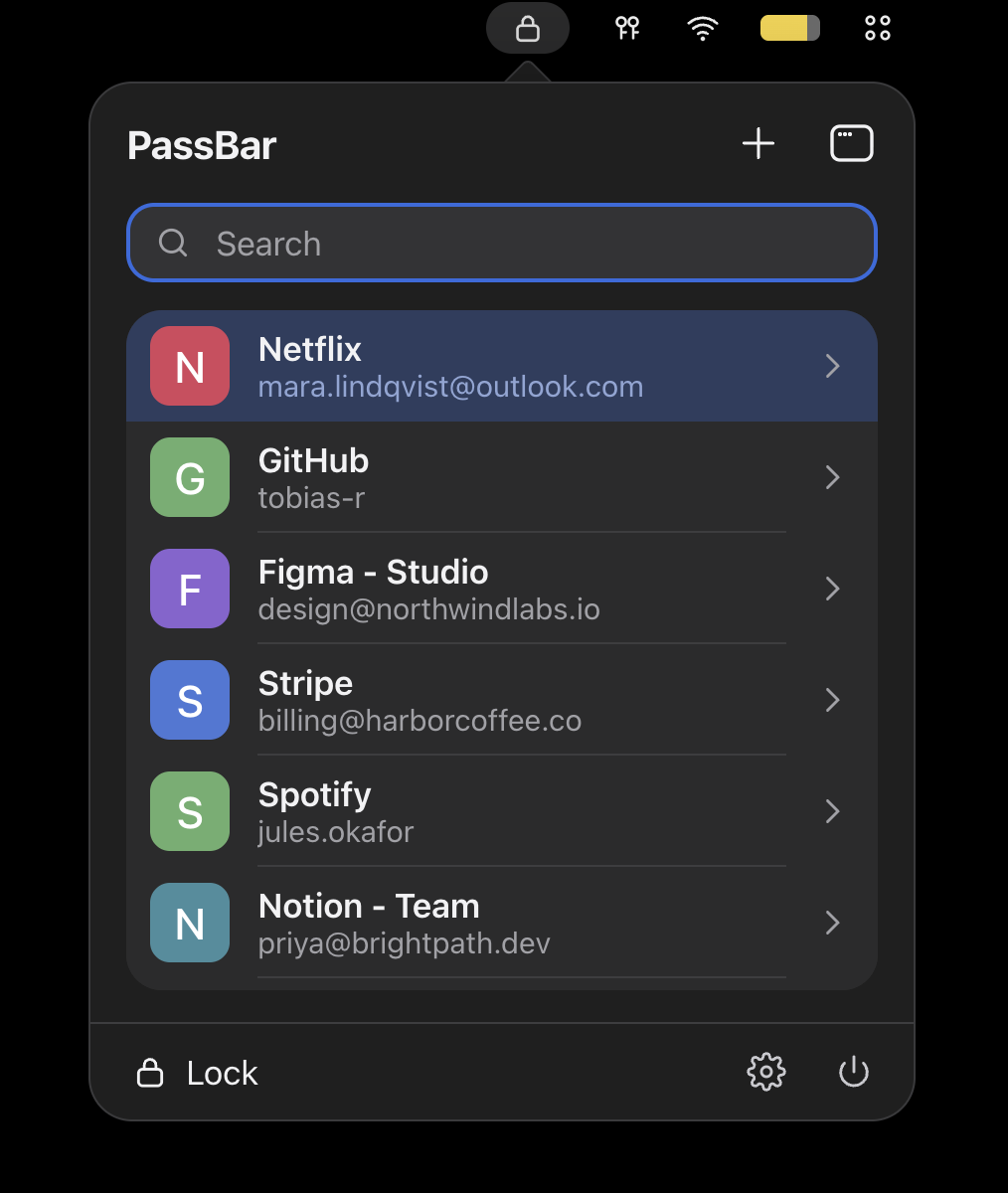
A macOS menu-bar client for Passbolt API. A small native app (SwiftUI, macOS 14+, Apple Silicon + Intel) to search your existing Passbolt (v5, RSA key) vault and copy credentials. No telemetry, no third-party servers.
PassBar is not officially associated with Passbolt or its products. It is an independent, community-driven project. Passbolt and the Passbolt logo are registered trademarks of Passbolt S.A.
Beta. Written against the Passbolt API as documented upstream. It has been unit tested with mock servers and a real OpenPGP round-trip, but not independently audited. See SECURITY.md.
Homebrew:
brew install --cask cybasoft/tap/passbar
Manual: Download the notarized PassBar-X.Y.Z.dmg from the Releases
page and verify it against SHA256SUMS.txt. Release binaries are built from the tagged source with
scripts/release.sh, so you can rebuild and compare.
Requirements: Xcode 15+, Go (brew install go), XcodeGen (brew install xcodegen).
./scripts/build-pgp.sh        # builds Pgpbridge.xcframework from ./PGPBridge (Go + GopenPGP) - local, from source
xcodegen generate             # creates PassBar.xcodeproj from project.yml
xcodebuild -project PassBar.xcodeproj -scheme PassBar \
  -configuration Release -derivedDataPath build -destination 'generic/platform=macOS' build
open build/Build/Products/Release/PassBar.app
swift test                    # unit tests for the core library
The app is ad-hoc signed. Set your own team in Xcode for a stable signature (this also keeps Keychain access prompts from reappearing after each rebuild).
/app/users/view/<uuid>..asc, from your Passbolt recovery kit) and its passphrase.Passbolt's documented GpgJwtAuth flow: fetch the server public key (GET /auth/verify.json), sign a
challenge with your key and encrypt it to the server (POST /auth/jwt/login.json), decrypt and
verify the server's signed reply, and use the returned JWT as a Bearer token. The server key
fingerprint is pinned on first login; a different key later is rejected. Tokens live in memory only.
On token expiry the app re-runs login instead of persisting a refresh token.
Resource metadata (name, username, URL) is decrypted locally after unlock (v5 shared/personal
metadata keys, plus plaintext v4 metadata). Secrets are fetched and decrypted only when you open a
resource. All OpenPGP work is done by GopenPGP (ProtonMail, MIT) via a ~100-line wrapper in
PGPBridge/. The app implements no cryptography itself (TOTP uses CryptoKit HMAC).
| Item | Location |
|---|---|
| Private key, passphrase | macOS Keychain (WhenUnlockedThisDeviceOnly) |
| Server URL, user ID, server/key fingerprints, timeouts | UserDefaults (not secret) |
| Tokens, decrypted metadata/secrets | Memory only; wiped on lock |
Unlocking requires Touch ID / Apple Watch / Mac password (an app-level gate; see SECURITY.md for the limits of this). The passphrase is stored so unlock can be biometric.
PassboltClient.swift. Nothing else: no
analytics, no proxy, no update checks.Settings → Security → Clear Keychain credentials, or manually delete the Keychain items with
service com.cybasoft.passbar, and defaults delete com.cybasoft.passbar.
Menu-bar icon (or global shortcut, default ⌃⌥Space, configurable) → type to search → ↑/↓ + Return to open → copy buttons. ⌘C copies the password, ⇧⌘C the username, Esc goes back/closes, ⌘, settings, ⌘Q quits.
App/            SwiftUI + AppKit shell (status item, popover, settings, hotkey)
Sources/PassBarKit/  API client, models, Keychain, clipboard, view-model (no UI)
PGPBridge/      Go wrapper over GopenPGP (built locally to an xcframework)
Tests/          unit tests with mock server responses and throwaway test keys
See SECURITY.md.
PassBar is not officially associated with Passbolt or its products. Passbolt and the Passbolt logo are registered trademarks of Passbolt S.A. This project does not use Passbolt's logo; the MIT licence covers this project's code only.
A macOS menu-bar client for Passbolt API. A small native app (SwiftUI, macOS 14+, Apple Silicon + Intel) to search your existing Passbolt (v5, RSA key) vault and copy credentials. No telemetry, no third-party servers.
PassBar is not officially associated with Passbolt or its products. It is an independent, community-driven project. Passbolt and the Passbolt logo are registered trademarks of Passbolt S.A.
Beta. Written against the Passbolt API as documented upstream. It has been unit tested with mock servers and a real OpenPGP round-trip, but not independently audited. See SECURITY.md.
Homebrew:
brew install --cask cybasoft/tap/passbar
Manual: Download the notarized PassBar-X.Y.Z.dmg from the Releases
page and verify it against SHA256SUMS.txt. Release binaries are built from the tagged source with
scripts/release.sh, so you can rebuild and compare.
Requirements: Xcode 15+, Go (brew install go), XcodeGen (brew install xcodegen).
./scripts/build-pgp.sh        # builds Pgpbridge.xcframework from ./PGPBridge (Go + GopenPGP) - local, from source
xcodegen generate             # creates PassBar.xcodeproj from project.yml
xcodebuild -project PassBar.xcodeproj -scheme PassBar \
  -configuration Release -derivedDataPath build -destination 'generic/platform=macOS' build
open build/Build/Products/Release/PassBar.app
swift test                    # unit tests for the core library
The app is ad-hoc signed. Set your own team in Xcode for a stable signature (this also keeps Keychain access prompts from reappearing after each rebuild).
/app/users/view/<uuid>..asc, from your Passbolt recovery kit) and its passphrase.Passbolt's documented GpgJwtAuth flow: fetch the server public key (GET /auth/verify.json), sign a
challenge with your key and encrypt it to the server (POST /auth/jwt/login.json), decrypt and
verify the server's signed reply, and use the returned JWT as a Bearer token. The server key
fingerprint is pinned on first login; a different key later is rejected. Tokens live in memory only.
On token expiry the app re-runs login instead of persisting a refresh token.
Resource metadata (name, username, URL) is decrypted locally after unlock (v5 shared/personal
metadata keys, plus plaintext v4 metadata). Secrets are fetched and decrypted only when you open a
resource. All OpenPGP work is done by GopenPGP (ProtonMail, MIT) via a ~100-line wrapper in
PGPBridge/. The app implements no cryptography itself (TOTP uses CryptoKit HMAC).
| Item | Location |
|---|---|
| Private key, passphrase | macOS Keychain (WhenUnlockedThisDeviceOnly) |
| Server URL, user ID, server/key fingerprints, timeouts | UserDefaults (not secret) |
| Tokens, decrypted metadata/secrets | Memory only; wiped on lock |
Unlocking requires Touch ID / Apple Watch / Mac password (an app-level gate; see SECURITY.md for the limits of this). The passphrase is stored so unlock can be biometric.
PassboltClient.swift. Nothing else: no
analytics, no proxy, no update checks.Settings → Security → Clear Keychain credentials, or manually delete the Keychain items with
service com.cybasoft.passbar, and defaults delete com.cybasoft.passbar.
Menu-bar icon (or global shortcut, default ⌃⌥Space, configurable) → type to search → ↑/↓ + Return to open → copy buttons. ⌘C copies the password, ⇧⌘C the username, Esc goes back/closes, ⌘, settings, ⌘Q quits.
App/            SwiftUI + AppKit shell (status item, popover, settings, hotkey)
Sources/PassBarKit/  API client, models, Keychain, clipboard, view-model (no UI)
PGPBridge/      Go wrapper over GopenPGP (built locally to an xcframework)
Tests/          unit tests with mock server responses and throwaway test keys
See SECURITY.md.
PassBar is not officially associated with Passbolt or its products. Passbolt and the Passbolt logo are registered trademarks of Passbolt S.A. This project does not use Passbolt's logo; the MIT licence covers this project's code only.



