
WavTTS: Towards High-Quality Zero-Shot TTS via Direct Raw Waveform Modeling
See the codeREADME
WavTTS: Towards High-Quality Zero-Shot TTS via Direct Raw Waveform Modeling




End-to-end zero-shot TTS directly in the raw waveform space.
📖 Introduction
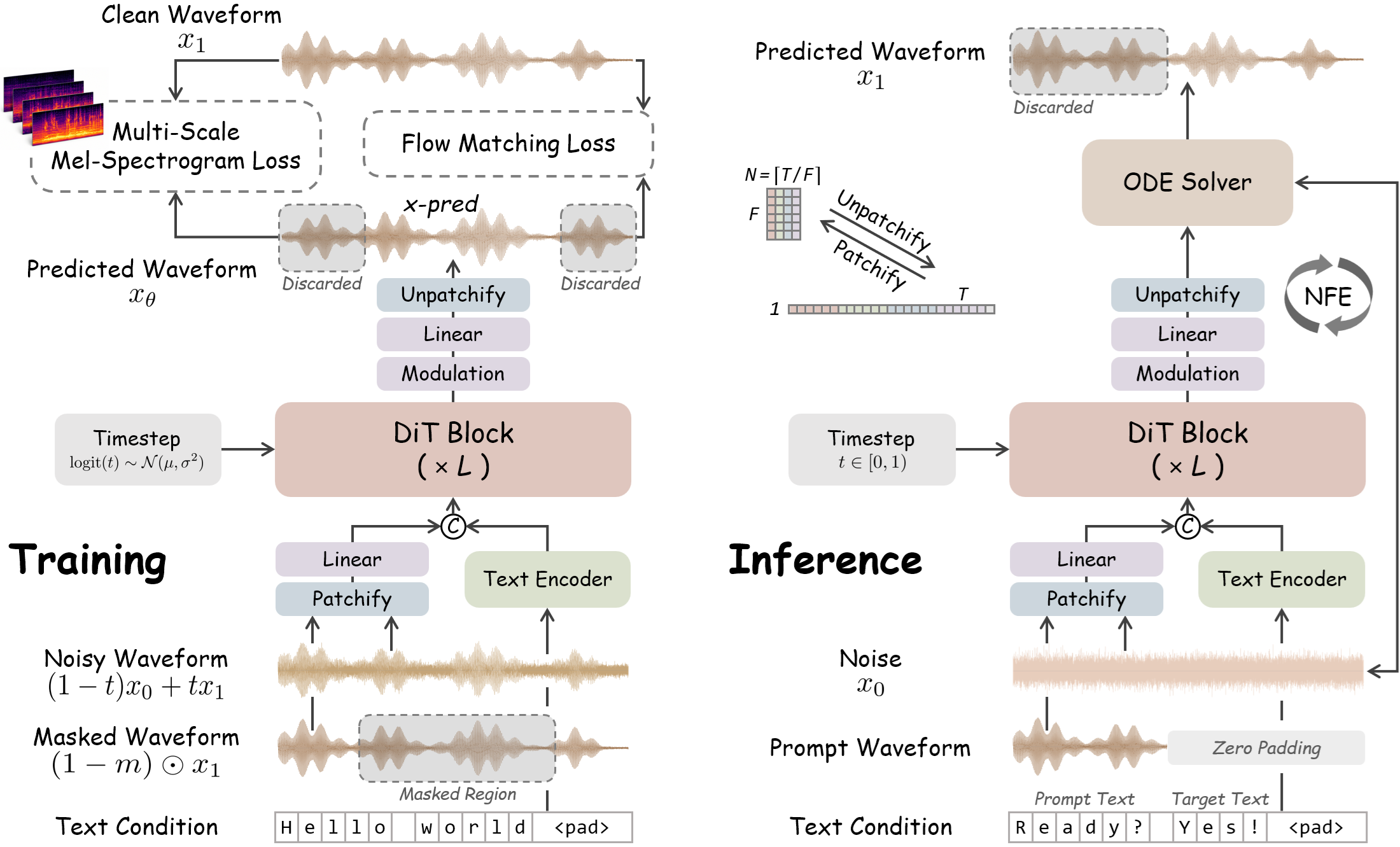
WavTTS is an end-to-end zero-shot TTS framework that generates speech directly in the raw waveform space, without relying on intermediate acoustic representations such as mel-spectrograms, VAE latents, or codec tokens. Built on flow matching with DiT, WavTTS combines waveform patchification, multi-scale mel-spectrogram supervision, and optimized noise scheduling to achieve high-quality waveform generation. For more details, please refer to our paper: WavTTS: Towards High-Quality Zero-Shot TTS via Direct Raw Waveform Modeling.
Note: This repository is based on F5-TTS. For general usage, troubleshooting, and basic guidance, please refer to the original F5-TTS repository. The sections below outline workflows specific to WavTTS.
🚀 News
- [2026-06-03]: We have released the WavTTS codebase along with the official 16 kHz checkpoint. Please note that this project is still under active development, and we will continue to roll out updates and improvements.
⚙️ Installation
We recommend using Conda to manage the environment and dependencies.
# 1. Clone the repository
git clone https://github.com/cwx-worst-one/WavTTS
cd WavTTS

# 2. Create and activate a virtual environment
conda create -n wavtts python=3.10
conda activate wavtts

# 3. Install PyTorch (>=2.2.0) with CUDA support, e.g.,
pip install torch==2.6.0 torchaudio==2.6.0 --index-url https://download.pytorch.org/whl/cu124

# 4. Install WavTTS in editable mode
pip install -e .
📦 Model Checkpoints
The official WavTTS checkpoint is available on Hugging Face: WavTTS 🤗. The default checkpoint supports 16 kHz zero-shot TTS inference and will be downloaded automatically the first time you run the inference script.
🚀 Inference
WavTTS supports both command-line inference and script-based inference. For more details, please refer to the Inference Guide.
CLI Inference
Generate speech using a short reference audio prompt. CLI arguments will automatically override values defined in the TOML config.
wavtts_infer-cli \
  --model WavTTS \
  --ref_audio "provide_prompt_wav_path_here.wav" \
  --ref_text "The content, subtitle, or transcription of the reference audio." \
  --gen_text "The text you want WavTTS to synthesize."
Alternatively, manage your parameters cleanly using a TOML configuration file:
# Use the provided default config
wavtts_infer-cli -c src/wavtts/infer/examples/basic.toml

# Use a custom config (with an inline text override)
wavtts_infer-cli -c custom.toml --gen_text "Override text here."
Script-based Inference
For customized pipelines, you can directly modify the paths and texts in src/wavtts/infer/infer.sh and execute:
bash src/wavtts/infer/infer.sh
🏋️ Training
Training WavTTS requires preprocessed dataset metadata. For a complete walkthrough of data preparation, training, and fine-tuning, please refer to the Training Guide.
Data Preparation
We use Emilia as the training dataset in our main experiments. After downloading Emilia, update the paths in the preparation script and run:
# Prepare training metadata for the Emilia dataset
python src/wavtts/train/datasets/prepare_emilia.py
Preparation scripts for other datasets like LibriTTS are available under src/wavtts/train/datasets/. To use a custom dataset, please adapt the loading logic in src/wavtts/model/dataset.py.
Launching Training
WavTTS can be trained directly with accelerate:
# Step 1: Configure Accelerate (e.g., multi-GPU DDP, mixed precision)
accelerate config

# Step 2: Launch training using a Hydra config
# YAML configuration files are located under the src/wavtts/configs/ directory.
accelerate launch src/wavtts/train/train.py --config-name WavTTS.yaml

# Example with inline overrides:
accelerate launch --mixed_precision=bf16 src/wavtts/train/train.py --config-name WavTTS.yaml ++datasets.batch_size_per_gpu=19200
For our main experiments, we provide a unified launcher script. Remember to edit the default environment variables at the top of the script before running:
bash src/wavtts/train/run_main_train.sh
📊 Evaluation
For evaluation setup, dataset preparation, and objective metric scripts, please refer to the Evaluation Guide.
🙏 Acknowledgements
WavTTS is built upon the awesome F5-TTS codebase, with references to the implementations of DAC and JiT. We sincerely thank the authors for their invaluable open-source contributions.
If you encounter general pipeline or environment issues, we recommend first checking the F5-TTS issue tracker, where many common questions may have already been discussed or resolved.
📝 Citation
If you find this work useful in your research, please consider citing our paper:
@article{chen2026wavtts,
  title={WavTTS: Towards High-Quality Zero-Shot TTS via Direct Raw Waveform Modeling},
  author={Chen, Wenxi and Jia, Dongya and Chen, Yushen and Niu, Zhikang and Liang, Yuzhe and Li, Xiquan and Yan, Ruiqi and Ma, Ziyang and Yang, Guanrou and Chen, Sanyuan and others},
  journal={arXiv preprint arXiv:2606.03455},
  year={2026}
}
📜 License
The codebase of this repository is released under the MIT License. Due to the license restrictions of the Emilia training dataset, the released pre-trained model weights are licensed under CC BY-NC 4.0.
Contributors

4 commits
Similar repos





Languages
Python
94.1%
Shell
5.6%
WavTTS: Towards High-Quality Zero-Shot TTS via Direct Raw Waveform Modeling
See the codeREADME
WavTTS: Towards High-Quality Zero-Shot TTS via Direct Raw Waveform Modeling
End-to-end zero-shot TTS directly in the raw waveform space.
📖 Introduction
WavTTS is an end-to-end zero-shot TTS framework that generates speech directly in the raw waveform space, without relying on intermediate acoustic representations such as mel-spectrograms, VAE latents, or codec tokens. Built on flow matching with DiT, WavTTS combines waveform patchification, multi-scale mel-spectrogram supervision, and optimized noise scheduling to achieve high-quality waveform generation. For more details, please refer to our paper: WavTTS: Towards High-Quality Zero-Shot TTS via Direct Raw Waveform Modeling.
Note: This repository is based on F5-TTS. For general usage, troubleshooting, and basic guidance, please refer to the original F5-TTS repository. The sections below outline workflows specific to WavTTS.
🚀 News
- [2026-06-03]: We have released the WavTTS codebase along with the official 16 kHz checkpoint. Please note that this project is still under active development, and we will continue to roll out updates and improvements.
⚙️ Installation
We recommend using Conda to manage the environment and dependencies.
# 1. Clone the repository
git clone https://github.com/cwx-worst-one/WavTTS
cd WavTTS

# 2. Create and activate a virtual environment
conda create -n wavtts python=3.10
conda activate wavtts

# 3. Install PyTorch (>=2.2.0) with CUDA support, e.g.,
pip install torch==2.6.0 torchaudio==2.6.0 --index-url https://download.pytorch.org/whl/cu124

# 4. Install WavTTS in editable mode
pip install -e .
📦 Model Checkpoints
The official WavTTS checkpoint is available on Hugging Face: WavTTS 🤗. The default checkpoint supports 16 kHz zero-shot TTS inference and will be downloaded automatically the first time you run the inference script.
🚀 Inference
WavTTS supports both command-line inference and script-based inference. For more details, please refer to the Inference Guide.
CLI Inference
Generate speech using a short reference audio prompt. CLI arguments will automatically override values defined in the TOML config.
wavtts_infer-cli \
  --model WavTTS \
  --ref_audio "provide_prompt_wav_path_here.wav" \
  --ref_text "The content, subtitle, or transcription of the reference audio." \
  --gen_text "The text you want WavTTS to synthesize."
Alternatively, manage your parameters cleanly using a TOML configuration file:
# Use the provided default config
wavtts_infer-cli -c src/wavtts/infer/examples/basic.toml

# Use a custom config (with an inline text override)
wavtts_infer-cli -c custom.toml --gen_text "Override text here."
Script-based Inference
For customized pipelines, you can directly modify the paths and texts in src/wavtts/infer/infer.sh and execute:
bash src/wavtts/infer/infer.sh
🏋️ Training
Training WavTTS requires preprocessed dataset metadata. For a complete walkthrough of data preparation, training, and fine-tuning, please refer to the Training Guide.
Data Preparation
We use Emilia as the training dataset in our main experiments. After downloading Emilia, update the paths in the preparation script and run:
# Prepare training metadata for the Emilia dataset
python src/wavtts/train/datasets/prepare_emilia.py
Preparation scripts for other datasets like LibriTTS are available under src/wavtts/train/datasets/. To use a custom dataset, please adapt the loading logic in src/wavtts/model/dataset.py.
Launching Training
WavTTS can be trained directly with accelerate:
# Step 1: Configure Accelerate (e.g., multi-GPU DDP, mixed precision)
accelerate config

# Step 2: Launch training using a Hydra config
# YAML configuration files are located under the src/wavtts/configs/ directory.
accelerate launch src/wavtts/train/train.py --config-name WavTTS.yaml

# Example with inline overrides:
accelerate launch --mixed_precision=bf16 src/wavtts/train/train.py --config-name WavTTS.yaml ++datasets.batch_size_per_gpu=19200
For our main experiments, we provide a unified launcher script. Remember to edit the default environment variables at the top of the script before running:
bash src/wavtts/train/run_main_train.sh
📊 Evaluation
For evaluation setup, dataset preparation, and objective metric scripts, please refer to the Evaluation Guide.
🙏 Acknowledgements
WavTTS is built upon the awesome F5-TTS codebase, with references to the implementations of DAC and JiT. We sincerely thank the authors for their invaluable open-source contributions.
If you encounter general pipeline or environment issues, we recommend first checking the F5-TTS issue tracker, where many common questions may have already been discussed or resolved.
📝 Citation
If you find this work useful in your research, please consider citing our paper:
@article{chen2026wavtts,
  title={WavTTS: Towards High-Quality Zero-Shot TTS via Direct Raw Waveform Modeling},
  author={Chen, Wenxi and Jia, Dongya and Chen, Yushen and Niu, Zhikang and Liang, Yuzhe and Li, Xiquan and Yan, Ruiqi and Ma, Ziyang and Yang, Guanrou and Chen, Sanyuan and others},
  journal={arXiv preprint arXiv:2606.03455},
  year={2026}
}
📜 License
The codebase of this repository is released under the MIT License. Due to the license restrictions of the Emilia training dataset, the released pre-trained model weights are licensed under CC BY-NC 4.0.
Similar repos
Contributors
4 commits
Languages
Python
94.1%
Shell
5.6%