
README
Git Add Interactive (Go Implementation)
A Go port of Git's interactive add functionality, providing the same interface as git add -i and git add -p, with a few enhancements.
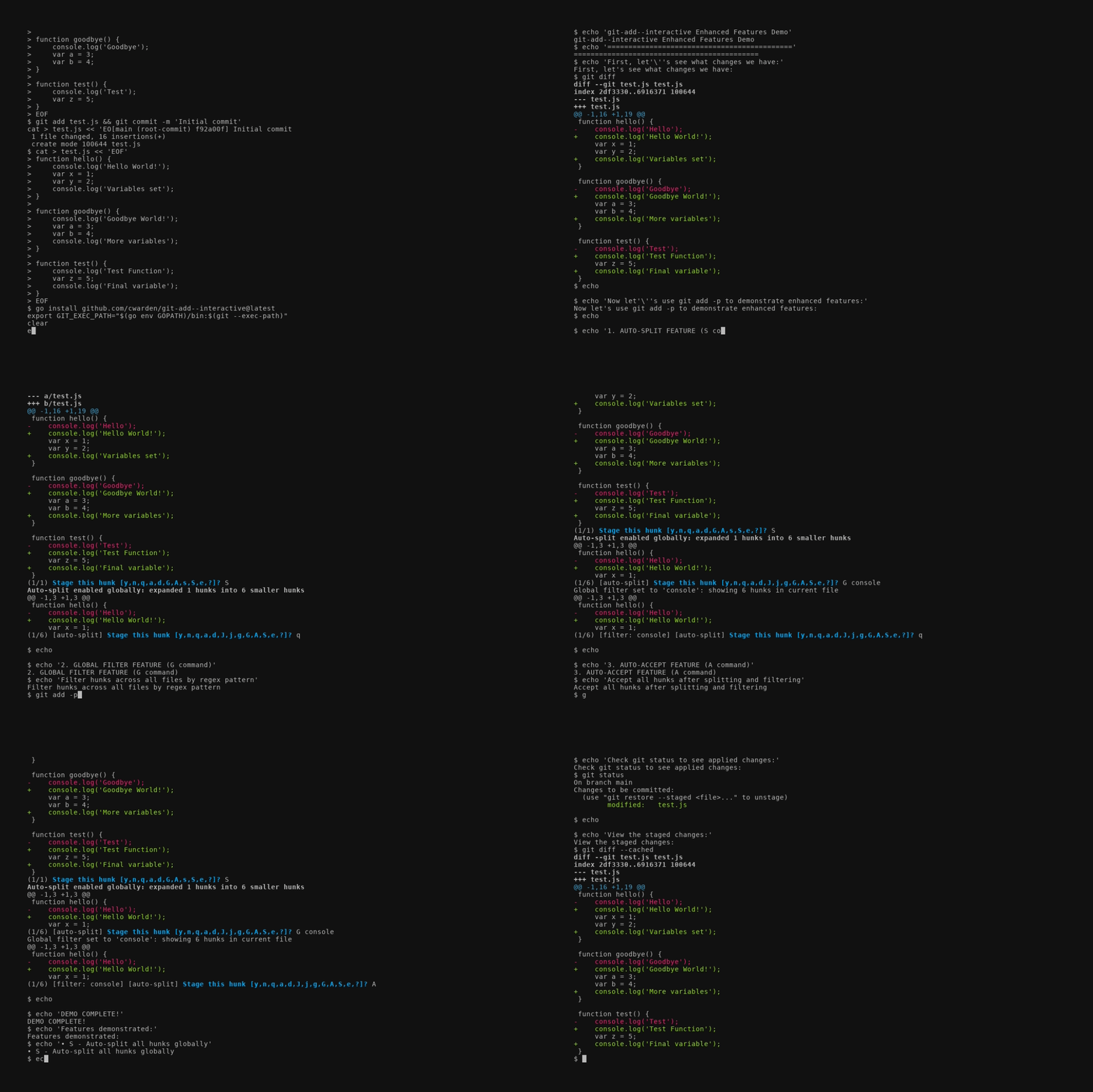
Features
- Interactive staging: Select files and hunks to stage interactively
- Patch mode: Review and selectively stage individual hunks with
y/n/s/e/q/a/dcommands - Hunk operations: Split hunks, manually edit hunks, navigate between hunks
- Multiple patch modes: Support for stage, reset, checkout, stash, and worktree operations
- Git integration: Full Git color configuration and repository support
- Terminal UI: Color-coded interface with keyboard shortcuts
Enhancements Over Perl Version
This Go implementation adds several powerful features beyond the original Perl script:
Global Filtering (G command)
Filter hunks across all files using regex patterns:
G <regex>    # Set global filter to show only hunks matching pattern
G            # Clear filter (interactive prompt for new pattern)
Example workflows:
G TODO- Show only hunks containing "TODO" commentsG import- Focus on import statement changesG console\.log- Find all debugging statements
Auto-Splitting (S command)
Automatically split all hunks to maximum granularity:
S # Enable auto-splitting globally and split all hunks
This recursively splits hunks until no further splitting is possible, giving you the finest possible control over what gets staged.
Accept All (A command)
Accept all hunks across all files (after filtering and splitting):
A # Accept all visible hunks in all remaining files
Powerful workflow combinations:
S→G <pattern>→A- Split everything, filter by pattern, accept all matchesG console\.log→A- Quickly stage all debugging code across your entire changeset
Enhanced Search and Navigation
- Local search (
/): Search within current file without affecting global filter - Status display: Shows
[filter: pattern]and[auto-split]indicators - Cross-file filtering: Global filters persist across all files in the session
Installation
Build the Binary
go build .
Install as Git Command (Optional)
To use this implementation as the default git add -i and git add -p, you can install it to your Go bin directory and update your Git exec path:
# Build and install to Go bin directory
go build -o "$(go env GOPATH)/bin/git-add--interactive" .

# Add Go bin to Git's exec path (add to your shell profile for persistence)
export GIT_EXEC_PATH="$(go env GOPATH)/bin:$(git --exec-path)"
After setting this up, git add -i and git add -p will use the Go implementation instead of the Perl script.
Verify Installation
# Check which git-add--interactive is being used
which git-add--interactive

# Test interactive add
git add -i

# Test patch mode
git add -p
Uninstall (Revert to Original)
To revert back to the original Perl implementation:
# Remove the Go binary from your Go bin
rm "$(go env GOPATH)/bin/git-add--interactive"

# Reset Git exec path (remove from your shell profile too)
unset GIT_EXEC_PATH
# Or set it back to default
export GIT_EXEC_PATH="$(git --exec-path)"
Usage
Direct Usage
# Run directly
./git-add--interactive

# Or if installed as Git command
git add -i
This launches the main interactive menu with options:
status- Show paths with changesupdate- Add working tree state to staged changesrevert- Revert staged changes back to HEADadd untracked- Add untracked files to staged changespatch- Pick hunks and update selectivelydiff- View diff between HEAD and indexquit- Exit the programhelp- Show help
Patch Mode
# Direct usage
./git-add--interactive --patch --
./git-add--interactive --patch=stage --
./git-add--interactive --patch=reset --
./git-add--interactive --patch=checkout --

# Or if installed as Git command
git add -p              # Same as --patch
git add --patch         # Stage mode
git reset -p            # Reset mode
git checkout -p         # Checkout mode
Patch mode allows you to interactively select hunks with these commands:
y- Accept this hunkn- Skip this hunkq- Quit; skip this hunk and remaining onesa- Accept this hunk and all later hunks in the filed- Skip this hunk and all later hunks in the files- Split the current hunk into smaller hunkse- Manually edit the current hunkj/k- Navigate to next/previous undecided hunkJ/K- Navigate to next/previous hunkg- Go to a specific hunk number/- Search for pattern in current fileG- Set global filter for all files (or clear with empty pattern)S- Enable auto-splitting globally and split all hunksA- Accept all hunks in all remaining files?- Show help
Architecture
The codebase is organized into these main packages:
main.go- Entry point and command-line parsinginternal/git/- Git repository interaction and operationsrepository.go- Git repository abstraction and command executionstatus.go- File status parsing and trackingpatch.go- Diff parsing and patch mode operations
internal/ui/- Interactive terminal interfaceapp.go- Main application logic and menu systempatch.go- Patch mode UI and hunk interaction
Testing
Run the test suite:
go test ./...
Run tests with verbose output:
go test -v ./...
Development
The code follows Go conventions and includes:
- Comprehensive unit tests for core functionality
- Git integration respecting user's color and configuration
- Error handling for edge cases and invalid input
- Support for all major patch modes and operations
Compatibility
This implementation provides the same functionality as the original Perl git-add--interactive script, including:
- All patch modes (stage, reset, checkout, stash, worktree variants)
- Full hunk manipulation (splitting, editing, navigation)
- Git color configuration support
- Interactive selection with prefix matching
- Range and comma-separated selections
Contributors

19 commits
Similar repos


Languages
Go
100.0%
README
Git Add Interactive (Go Implementation)
A Go port of Git's interactive add functionality, providing the same interface as git add -i and git add -p, with a few enhancements.
Features
- Interactive staging: Select files and hunks to stage interactively
- Patch mode: Review and selectively stage individual hunks with
y/n/s/e/q/a/dcommands - Hunk operations: Split hunks, manually edit hunks, navigate between hunks
- Multiple patch modes: Support for stage, reset, checkout, stash, and worktree operations
- Git integration: Full Git color configuration and repository support
- Terminal UI: Color-coded interface with keyboard shortcuts
Enhancements Over Perl Version
This Go implementation adds several powerful features beyond the original Perl script:
Global Filtering (G command)
Filter hunks across all files using regex patterns:
G <regex>    # Set global filter to show only hunks matching pattern
G            # Clear filter (interactive prompt for new pattern)
Example workflows:
G TODO- Show only hunks containing "TODO" commentsG import- Focus on import statement changesG console\.log- Find all debugging statements
Auto-Splitting (S command)
Automatically split all hunks to maximum granularity:
S # Enable auto-splitting globally and split all hunks
This recursively splits hunks until no further splitting is possible, giving you the finest possible control over what gets staged.
Accept All (A command)
Accept all hunks across all files (after filtering and splitting):
A # Accept all visible hunks in all remaining files
Powerful workflow combinations:
S→G <pattern>→A- Split everything, filter by pattern, accept all matchesG console\.log→A- Quickly stage all debugging code across your entire changeset
Enhanced Search and Navigation
- Local search (
/): Search within current file without affecting global filter - Status display: Shows
[filter: pattern]and[auto-split]indicators - Cross-file filtering: Global filters persist across all files in the session
Installation
Build the Binary
go build .
Install as Git Command (Optional)
To use this implementation as the default git add -i and git add -p, you can install it to your Go bin directory and update your Git exec path:
# Build and install to Go bin directory
go build -o "$(go env GOPATH)/bin/git-add--interactive" .

# Add Go bin to Git's exec path (add to your shell profile for persistence)
export GIT_EXEC_PATH="$(go env GOPATH)/bin:$(git --exec-path)"
After setting this up, git add -i and git add -p will use the Go implementation instead of the Perl script.
Verify Installation
# Check which git-add--interactive is being used
which git-add--interactive

# Test interactive add
git add -i

# Test patch mode
git add -p
Uninstall (Revert to Original)
To revert back to the original Perl implementation:
# Remove the Go binary from your Go bin
rm "$(go env GOPATH)/bin/git-add--interactive"

# Reset Git exec path (remove from your shell profile too)
unset GIT_EXEC_PATH
# Or set it back to default
export GIT_EXEC_PATH="$(git --exec-path)"
Usage
Direct Usage
# Run directly
./git-add--interactive

# Or if installed as Git command
git add -i
This launches the main interactive menu with options:
status- Show paths with changesupdate- Add working tree state to staged changesrevert- Revert staged changes back to HEADadd untracked- Add untracked files to staged changespatch- Pick hunks and update selectivelydiff- View diff between HEAD and indexquit- Exit the programhelp- Show help
Patch Mode
# Direct usage
./git-add--interactive --patch --
./git-add--interactive --patch=stage --
./git-add--interactive --patch=reset --
./git-add--interactive --patch=checkout --

# Or if installed as Git command
git add -p              # Same as --patch
git add --patch         # Stage mode
git reset -p            # Reset mode
git checkout -p         # Checkout mode
Patch mode allows you to interactively select hunks with these commands:
y- Accept this hunkn- Skip this hunkq- Quit; skip this hunk and remaining onesa- Accept this hunk and all later hunks in the filed- Skip this hunk and all later hunks in the files- Split the current hunk into smaller hunkse- Manually edit the current hunkj/k- Navigate to next/previous undecided hunkJ/K- Navigate to next/previous hunkg- Go to a specific hunk number/- Search for pattern in current fileG- Set global filter for all files (or clear with empty pattern)S- Enable auto-splitting globally and split all hunksA- Accept all hunks in all remaining files?- Show help
Architecture
The codebase is organized into these main packages:
main.go- Entry point and command-line parsinginternal/git/- Git repository interaction and operationsrepository.go- Git repository abstraction and command executionstatus.go- File status parsing and trackingpatch.go- Diff parsing and patch mode operations
internal/ui/- Interactive terminal interfaceapp.go- Main application logic and menu systempatch.go- Patch mode UI and hunk interaction
Testing
Run the test suite:
go test ./...
Run tests with verbose output:
go test -v ./...
Development
The code follows Go conventions and includes:
- Comprehensive unit tests for core functionality
- Git integration respecting user's color and configuration
- Error handling for edge cases and invalid input
- Support for all major patch modes and operations
Compatibility
This implementation provides the same functionality as the original Perl git-add--interactive script, including:
- All patch modes (stage, reset, checkout, stash, worktree variants)
- Full hunk manipulation (splitting, editing, navigation)
- Git color configuration support
- Interactive selection with prefix matching
- Range and comma-separated selections
Similar repos
Contributors
19 commits
Languages
Go
100.0%