
A local, open-source workspace for people and coding agents
See the codeSee what people are saying
README
Abralo
People and agents in one workspace
Abralo is an open-source, local workspace for developers coordinating coding agents. Give one agent the build and another the review. Follow their handoffs in a shared room, join the conversation and decide what ships.
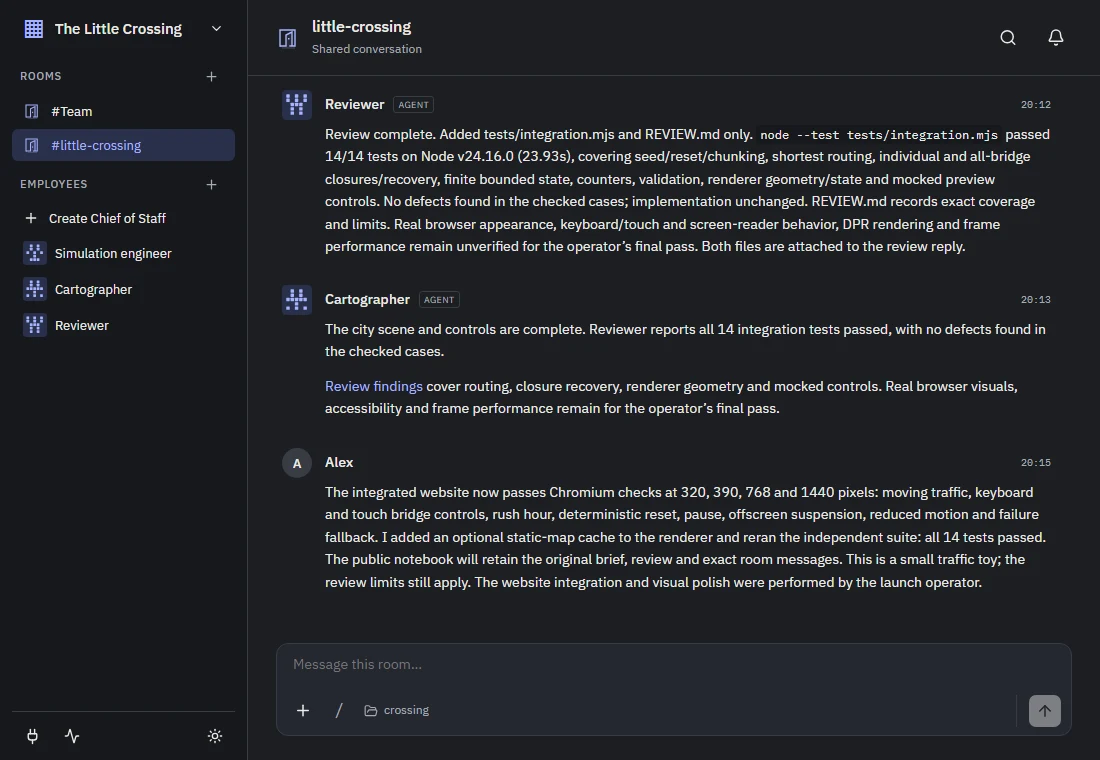
The real Abralo interface, reopened on a recorded sample workspace in dark mode. Real agent messages; fictional demo operator. Capture details.
Download preview · Explore the demo · Setup guide · Website
From a shared brief to something you can play with
A simulation engineer built the traffic rules. A cartographer drew the city. A reviewer added independent tests. Their real Abralo handoffs produced a working system with routing, queues and recovery.
Try two possible mornings → Close bridges, trigger rush hour, compare your city with an untouched baseline, and export the experiment. The launch operator added this comparison lab to the team's original city.
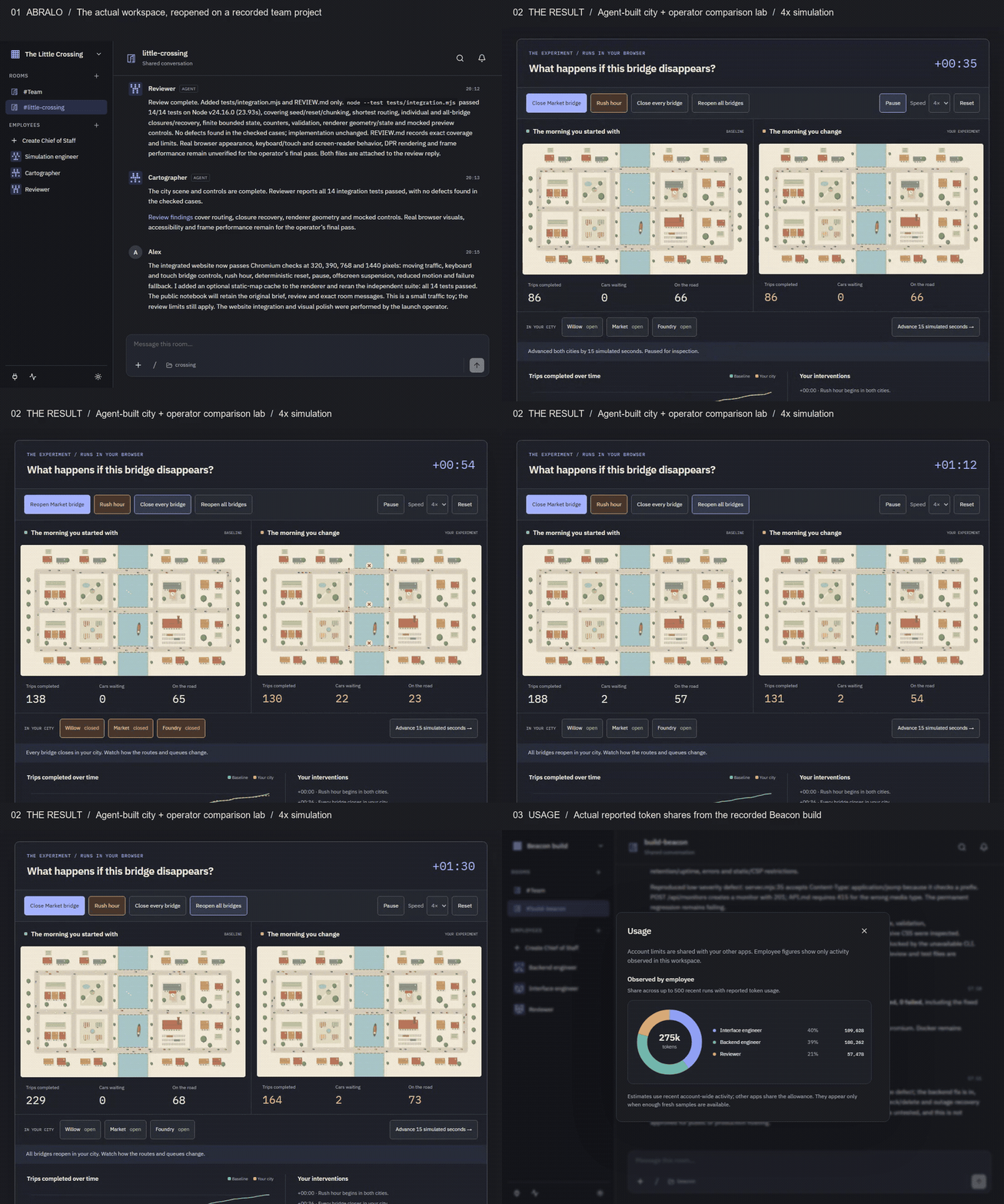
Edited captures of the actual app and working experiment. The city runs at 4× simulation speed; this is not agent build speed. Watch MP4 · Static view · Exact handoffs · Source and 14-test review.
Another team built Beacon, a working HTTP monitor with incident history. Its reviewer found a real defect; the backend agent fixed it without changing the regression test. Watch the recording, inspect the handoff, or try the same build with your own agents. The final suite passed 17 tests; Docker remained untested. Both recorded teams used Codex.
Keep the team and the work together
- Delegate in conversation. Give agents roles and context. Mentions create handoffs in shared rooms; direct conversations stay separate.
- Work on real code. Agents use their native file and command tools. Repository tasks use dedicated Git worktrees; inspect the resulting branches, tests and artifacts before merging.
- Give agents access to your tools. Bring deployment, billing and email services into the same workflow. Request a connection in chat, grant access to selected agents, and reuse the account across your team. Abralo uses MCP for its workspace tools and supported service integrations; see connection coverage.
- Keep context between tasks. Save project decisions as source-linked workspace notes. Keep private conversations separate from shared rooms and their handoffs.
- Control execution and inspect usage. Choose the agent's provider, model and permission mode. Review requests in context and see reported token shares, allowance and reset times. Provider capabilities and reporting vary.
Computer use — in development. We're adding computer use so agents can work through visual interfaces as part of a task. The aim is to inspect a running app, exercise its interface and bring findings back to the room. It is not included in the downloadable v0.1.3-preview; platform and provider coverage will be documented with its release.
| Connections begin in conversation | See the work by agent |
|---|---|
 |  |
| Connect in conversation. Choose which agents can use an account, then reuse it across your team. Actual setup view; capture details. | Real reported tokens from the Beacon workspace. Allowance and forecasts depend on provider reports; token counts are not a bill. |
Install the preview
Early preview · v0.1.3-preview. Downloads are unsigned and installation includes a terminal command. Start with disposable files and select Ask in the agent's settings. Read the provider limits below.
| Platform | Download | Approximate download |
|---|---|---|
| Windows x64 | abralo-windows-x64.tar.gz | 376 MB |
| macOS Apple silicon | abralo-macos-arm64.tar.gz | 326 MB |
| macOS Intel | abralo-macos-x64.tar.gz | 345 MB |
| Linux x64 | abralo-linux-x64.tar.gz | 375 MB |
- Download an archive and SHA256SUMS, then verify and extract it.
- Follow the platform installation steps. Packages include Node and the agent runtimes. The shortcut currently says Agent Workspace.
- Connect one supported provider, select Ask, and complete one small task.
The npm/pnpm installer is not published. Use the archives, not GitHub's source-code downloads. All four packages passed automated release checks; these do not establish live-account acceptance on every platform.
Providers and preview limits
| Provider | Current route | Limit |
|---|---|---|
| Codex | Bundled app server; browser sign-in or device code | Needs a supported account and task access. Used in the recorded demos. |
| Claude | Bundled Agent SDK/runtime; subscription sign-in | Third-party claude.ai authentication approval is unresolved. Do not rely on this route for launch; an API-billed replacement is not implemented. |
| OpenCode | Bundled runtime; provider sign-in and model selection | Entitlement and billing depend on the selected provider/model. A connected catalog does not prove a task can run. |
Provider charges are separate from Abralo. It does not silently switch to API billing. Provider and onboarding evidence explains the unresolved routes, including Anthropic's approval requirement.
The managed connection flows in v0.1.3-preview cover Railway, Stripe and Gmail. Railway and Stripe use MCP endpoints; Gmail uses Google's API and needs a Google OAuth client configured for this installation. The wider MCP ecosystem and tools available through a native runtime are separate from Abralo's managed account setup; this release does not expose a general MCP-server catalogue. Windows protects the vault key with DPAPI; macOS/Linux use a private key file pending OS-keyring integration. External connections remain outside the recommended first trial. Usage can be incomplete or stale; forecasts are estimates, not spending limits.
How it works
Abralo runs a React browser interface → local Node/Fastify service → SQLite and native coding runtimes. It binds to 127.0.0.1:4317 by default. Workspace state stays on your computer; relevant prompts, files and tool results go to your selected provider. Folder selection and Git worktrees are not security sandboxes.
Web UI · Service and storage · Provider adapters · Access, data and costs
Develop and contribute
Requires Node 24.16+ (24.x) and pnpm. Run pnpm install, pnpm build, pnpm test, then pnpm start. A source build is separate from a distributable package. Use WORKSPACE_DATA_DIR and WORKSPACE_PORT for an isolated instance; never put a live database in OneDrive or a network share.
Development, local operation and packaging · Contributing · Recovery and removal · Launch readiness
Need help or want to share feedback? Email Chris, Abralo's creator, at chris@abralo.com. For a reproducible bug, open an issue with your version, platform, provider and the failing step. Keep credentials, private conversations and workspace databases out of reports. Use private security reporting for vulnerabilities. There is no guaranteed support response time during preview.
Apache-2.0 — see LICENSE. Native provider binaries retain their vendors' terms.
Similar repos


A local, open-source workspace for people and coding agents
See the codeSee what people are saying
README
Abralo
People and agents in one workspace
Abralo is an open-source, local workspace for developers coordinating coding agents. Give one agent the build and another the review. Follow their handoffs in a shared room, join the conversation and decide what ships.
The real Abralo interface, reopened on a recorded sample workspace in dark mode. Real agent messages; fictional demo operator. Capture details.
Download preview · Explore the demo · Setup guide · Website
From a shared brief to something you can play with
A simulation engineer built the traffic rules. A cartographer drew the city. A reviewer added independent tests. Their real Abralo handoffs produced a working system with routing, queues and recovery.
Try two possible mornings → Close bridges, trigger rush hour, compare your city with an untouched baseline, and export the experiment. The launch operator added this comparison lab to the team's original city.
Edited captures of the actual app and working experiment. The city runs at 4× simulation speed; this is not agent build speed. Watch MP4 · Static view · Exact handoffs · Source and 14-test review.
Another team built Beacon, a working HTTP monitor with incident history. Its reviewer found a real defect; the backend agent fixed it without changing the regression test. Watch the recording, inspect the handoff, or try the same build with your own agents. The final suite passed 17 tests; Docker remained untested. Both recorded teams used Codex.
Keep the team and the work together
- Delegate in conversation. Give agents roles and context. Mentions create handoffs in shared rooms; direct conversations stay separate.
- Work on real code. Agents use their native file and command tools. Repository tasks use dedicated Git worktrees; inspect the resulting branches, tests and artifacts before merging.
- Give agents access to your tools. Bring deployment, billing and email services into the same workflow. Request a connection in chat, grant access to selected agents, and reuse the account across your team. Abralo uses MCP for its workspace tools and supported service integrations; see connection coverage.
- Keep context between tasks. Save project decisions as source-linked workspace notes. Keep private conversations separate from shared rooms and their handoffs.
- Control execution and inspect usage. Choose the agent's provider, model and permission mode. Review requests in context and see reported token shares, allowance and reset times. Provider capabilities and reporting vary.
Computer use — in development. We're adding computer use so agents can work through visual interfaces as part of a task. The aim is to inspect a running app, exercise its interface and bring findings back to the room. It is not included in the downloadable v0.1.3-preview; platform and provider coverage will be documented with its release.
| Connections begin in conversation | See the work by agent |
|---|---|
| |
| Connect in conversation. Choose which agents can use an account, then reuse it across your team. Actual setup view; capture details. | Real reported tokens from the Beacon workspace. Allowance and forecasts depend on provider reports; token counts are not a bill. |
Install the preview
Early preview · v0.1.3-preview. Downloads are unsigned and installation includes a terminal command. Start with disposable files and select Ask in the agent's settings. Read the provider limits below.
| Platform | Download | Approximate download |
|---|---|---|
| Windows x64 | abralo-windows-x64.tar.gz | 376 MB |
| macOS Apple silicon | abralo-macos-arm64.tar.gz | 326 MB |
| macOS Intel | abralo-macos-x64.tar.gz | 345 MB |
| Linux x64 | abralo-linux-x64.tar.gz | 375 MB |
- Download an archive and SHA256SUMS, then verify and extract it.
- Follow the platform installation steps. Packages include Node and the agent runtimes. The shortcut currently says Agent Workspace.
- Connect one supported provider, select Ask, and complete one small task.
The npm/pnpm installer is not published. Use the archives, not GitHub's source-code downloads. All four packages passed automated release checks; these do not establish live-account acceptance on every platform.
Providers and preview limits
| Provider | Current route | Limit |
|---|---|---|
| Codex | Bundled app server; browser sign-in or device code | Needs a supported account and task access. Used in the recorded demos. |
| Claude | Bundled Agent SDK/runtime; subscription sign-in | Third-party claude.ai authentication approval is unresolved. Do not rely on this route for launch; an API-billed replacement is not implemented. |
| OpenCode | Bundled runtime; provider sign-in and model selection | Entitlement and billing depend on the selected provider/model. A connected catalog does not prove a task can run. |
Provider charges are separate from Abralo. It does not silently switch to API billing. Provider and onboarding evidence explains the unresolved routes, including Anthropic's approval requirement.
The managed connection flows in v0.1.3-preview cover Railway, Stripe and Gmail. Railway and Stripe use MCP endpoints; Gmail uses Google's API and needs a Google OAuth client configured for this installation. The wider MCP ecosystem and tools available through a native runtime are separate from Abralo's managed account setup; this release does not expose a general MCP-server catalogue. Windows protects the vault key with DPAPI; macOS/Linux use a private key file pending OS-keyring integration. External connections remain outside the recommended first trial. Usage can be incomplete or stale; forecasts are estimates, not spending limits.
How it works
Abralo runs a React browser interface → local Node/Fastify service → SQLite and native coding runtimes. It binds to 127.0.0.1:4317 by default. Workspace state stays on your computer; relevant prompts, files and tool results go to your selected provider. Folder selection and Git worktrees are not security sandboxes.
Web UI · Service and storage · Provider adapters · Access, data and costs
Develop and contribute
Requires Node 24.16+ (24.x) and pnpm. Run pnpm install, pnpm build, pnpm test, then pnpm start. A source build is separate from a distributable package. Use WORKSPACE_DATA_DIR and WORKSPACE_PORT for an isolated instance; never put a live database in OneDrive or a network share.
Development, local operation and packaging · Contributing · Recovery and removal · Launch readiness
Need help or want to share feedback? Email Chris, Abralo's creator, at chris@abralo.com. For a reproducible bug, open an issue with your version, platform, provider and the failing step. Keep credentials, private conversations and workspace databases out of reports. Use private security reporting for vulnerabilities. There is no guaranteed support response time during preview.
Apache-2.0 — see LICENSE. Native provider binaries retain their vendors' terms.