
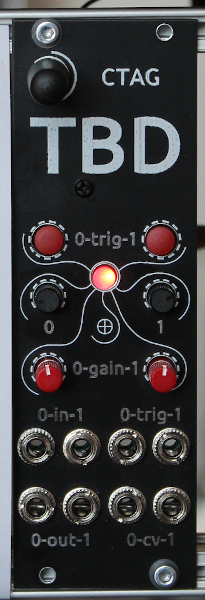
CTAG TBD >>to be determined<< an extendible open source Eurorack sound module
C++
259
533 commits
updated Sep 19, 2026
README
CTAG TBD >>to be determined<<
Documentation:
- Summary table of all available plugins.
- Documentation on TBD usage can be found here (Google Docs).
- Tutorial videos in YouTube playlist.
- The evolution of TBD Video from ADCx Copenhagen 2026.
Update procedure
Easiest way to update is to use the ready made releases from github. Flash the ctag-tbd.bin and storage.bin from the TBD web ui (within the configuration menu). Alternatively you can connect a USB cable to the TBD and use the serial flasher from esp idf (see how to flash below). In order to use the sample rom, you can upload from the edit sample rom page factory sample data (sample-rom.tbd).
What it is:
- The eierlegende Wollmilchsau (German for swiss army knife) audio processing module.
- Offering already more than 50 high quality audio generators and effects.
- Open source Eurorack sound module based on the ESP32.
- With an easy to extend audio plugin architecture.
- What you make it.
Why it is:
- A group of audio enthusiasts enjoying coding and hardware making.
- Build a platform to learn, build and practise skills, and engage students.
- To allow anyone to understand technology by offering open access.
- To squeeze and optimize code so that it can work on a small embedded system.
- Because we can.
- To fight boredom and despair of Corona Virus!
Features:
- More than 50 high quality audio generators and effects.
- Easy DSP plugin development.
- Sample ROM playback and wavetable oscillator with user wavetables from sample ROM details here
- Simulator for cross platform plugin development without hardware module (speeds up plugin development, better code verification).
- Check description here
- Cloud compiler to build firmwares with plugin subsets, allows to optimize sample-rom size (NOTE: Binaries from cloud compiler can be flashed only through serial connection!)
- With web UI user interface by wireless browser access.
- Through a REST-API.
Version log
Potential new features / current limitations / work to be done:
- More plugins.
- VULT support.
- Bug identification and fixing.
- Code refactoring to make things more beautiful.
- More user friendly interaction.
- Documentation / tutorials.
- Your ideas?
How to engage yourself:
- Join the enthusiastic developer team on Github.
- Help build and spread the hardware module (and the word).
- Help documenting.
- More ideas?
How to build
For developing your own plugins / make TBD yours, you need C/C++ skills. You may want to check the TBD simulator for easy plugin development without TBD hardware.
You can build the firmware using a Github action. Just fork the ctag-tbd repo to your Github account and enable the supplied Github action. Enter the Github actions menu and select e.g. the "draft-release" action. Click the "Run workflow" button. Upon successful completion, your binaries will be available as .zip archive as output of your run.
If you prefer to have a dev environment on your own, install espressif esp-idf, instructions are here. Then clone the ctag-tbd repo with all dependencies and build firmware with cmake. Firmware release v1.0.0 was build with ESP-IDF 5.5.1 release.
How to flash
Either use the binaries available from the releases at github to flash through the TBD's web ui.
Or use ESP Tool to flash through a USB connection with your PC (check this script).
If you have ESP IDF installed (the whole development environment), use:
idf.py flash monitor
Citation
If you use this software or reference its development, please cite:
@misc{manzke2026ctagtbd,
  author       = {Robert Manzke},
  title        = {{CTAG-TBD: ESP32-Based Open-Source Audio Platform}},
  year         = {2026},
  howpublished = {Presented at ADCx Copenhagen 2026},
  note         = {Conference schedule and recorded presentation available online},
  url          = {https://audio.dev/adcx-copenhagen-26/schedule/},
  video        = {https://www.youtube.com/watch?v=lNZ0LEXkqIE&t=11148s}
}
Contributors


Similar repos


Languages
C++
87.7%
C
7.1%
HTML
3.2%
CMake
1.1%
CTAG TBD >>to be determined<< an extendible open source Eurorack sound module
C++
259
533 commits
updated Sep 19, 2026
README
CTAG TBD >>to be determined<<
Documentation:
- Summary table of all available plugins.
- Documentation on TBD usage can be found here (Google Docs).
- Tutorial videos in YouTube playlist.
- The evolution of TBD Video from ADCx Copenhagen 2026.
Update procedure
Easiest way to update is to use the ready made releases from github. Flash the ctag-tbd.bin and storage.bin from the TBD web ui (within the configuration menu). Alternatively you can connect a USB cable to the TBD and use the serial flasher from esp idf (see how to flash below). In order to use the sample rom, you can upload from the edit sample rom page factory sample data (sample-rom.tbd).
What it is:
- The eierlegende Wollmilchsau (German for swiss army knife) audio processing module.
- Offering already more than 50 high quality audio generators and effects.
- Open source Eurorack sound module based on the ESP32.
- With an easy to extend audio plugin architecture.
- What you make it.
Why it is:
- A group of audio enthusiasts enjoying coding and hardware making.
- Build a platform to learn, build and practise skills, and engage students.
- To allow anyone to understand technology by offering open access.
- To squeeze and optimize code so that it can work on a small embedded system.
- Because we can.
- To fight boredom and despair of Corona Virus!
Features:
- More than 50 high quality audio generators and effects.
- Easy DSP plugin development.
- Sample ROM playback and wavetable oscillator with user wavetables from sample ROM details here
- Simulator for cross platform plugin development without hardware module (speeds up plugin development, better code verification).
- Check description here
- Cloud compiler to build firmwares with plugin subsets, allows to optimize sample-rom size (NOTE: Binaries from cloud compiler can be flashed only through serial connection!)
- With web UI user interface by wireless browser access.
- Through a REST-API.
Version log
Potential new features / current limitations / work to be done:
- More plugins.
- VULT support.
- Bug identification and fixing.
- Code refactoring to make things more beautiful.
- More user friendly interaction.
- Documentation / tutorials.
- Your ideas?
How to engage yourself:
- Join the enthusiastic developer team on Github.
- Help build and spread the hardware module (and the word).
- Help documenting.
- More ideas?
How to build
For developing your own plugins / make TBD yours, you need C/C++ skills. You may want to check the TBD simulator for easy plugin development without TBD hardware.
You can build the firmware using a Github action. Just fork the ctag-tbd repo to your Github account and enable the supplied Github action. Enter the Github actions menu and select e.g. the "draft-release" action. Click the "Run workflow" button. Upon successful completion, your binaries will be available as .zip archive as output of your run.
If you prefer to have a dev environment on your own, install espressif esp-idf, instructions are here. Then clone the ctag-tbd repo with all dependencies and build firmware with cmake. Firmware release v1.0.0 was build with ESP-IDF 5.5.1 release.
How to flash
Either use the binaries available from the releases at github to flash through the TBD's web ui.
Or use ESP Tool to flash through a USB connection with your PC (check this script).
If you have ESP IDF installed (the whole development environment), use:
idf.py flash monitor
Citation
If you use this software or reference its development, please cite:
@misc{manzke2026ctagtbd,
  author       = {Robert Manzke},
  title        = {{CTAG-TBD: ESP32-Based Open-Source Audio Platform}},
  year         = {2026},
  howpublished = {Presented at ADCx Copenhagen 2026},
  note         = {Conference schedule and recorded presentation available online},
  url          = {https://audio.dev/adcx-copenhagen-26/schedule/},
  video        = {https://www.youtube.com/watch?v=lNZ0LEXkqIE&t=11148s}
}
Similar repos
Contributors
Languages
C++
87.7%
C
7.1%
HTML
3.2%
CMake
1.1%