
The updated MambaIRv2 is totally compatible with the previous MambaIR. We also keep the code of MambaIR in another branch for your possible revisiting.
Hang Guo*, Yong Guo* Yaohua Zha, Yulun Zhang Wenbo Li, Tao Dai, Shu-Tao Xia, Yawei Li
(*) equal contribution
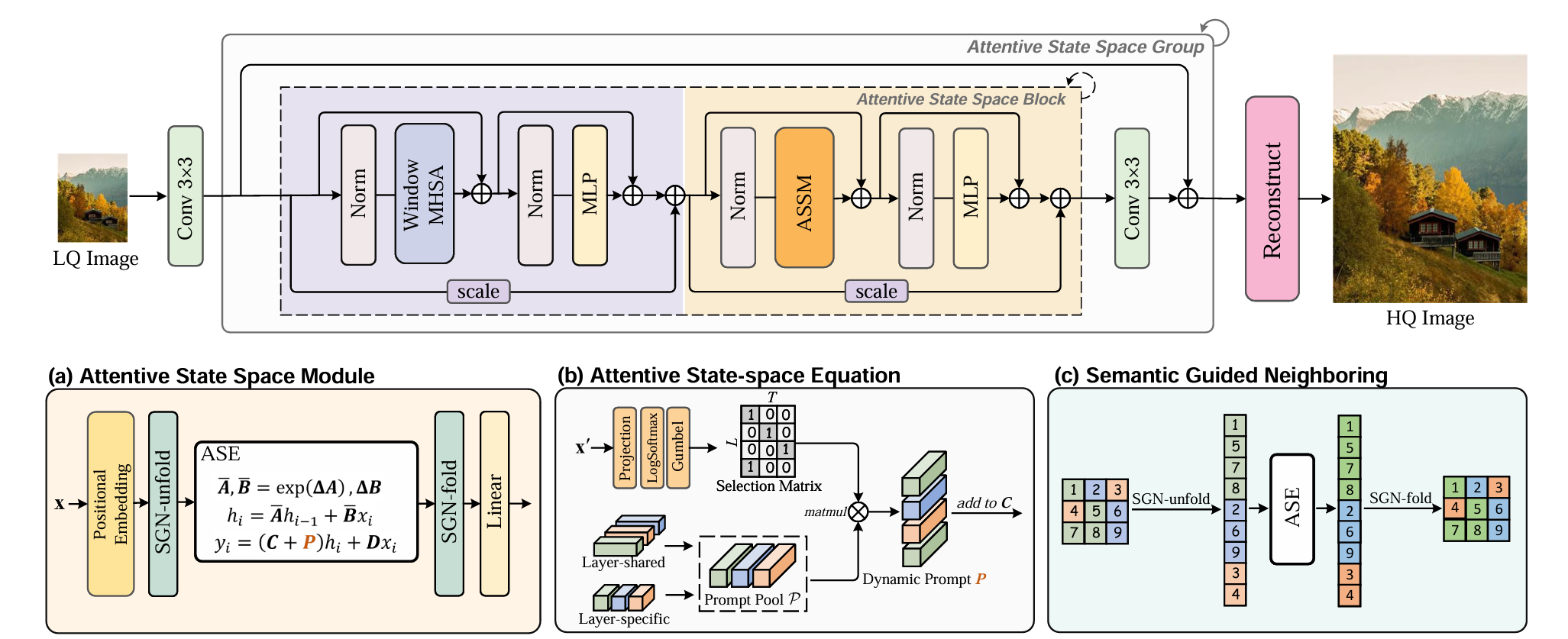
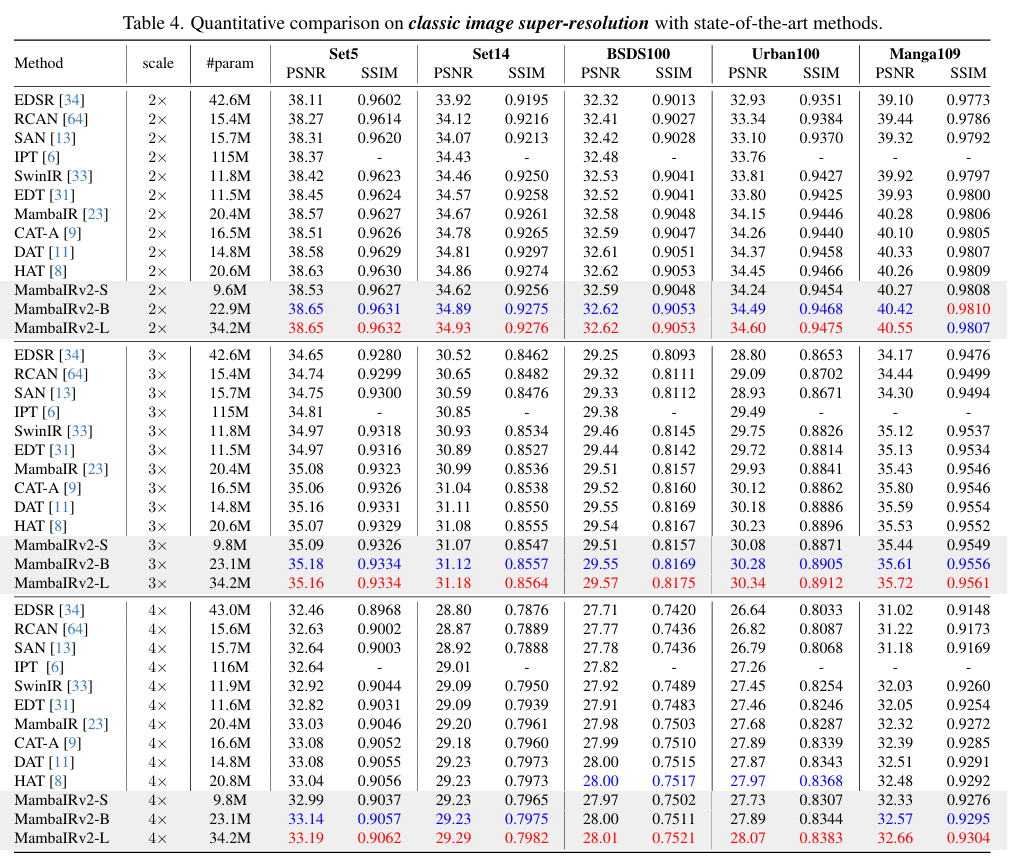
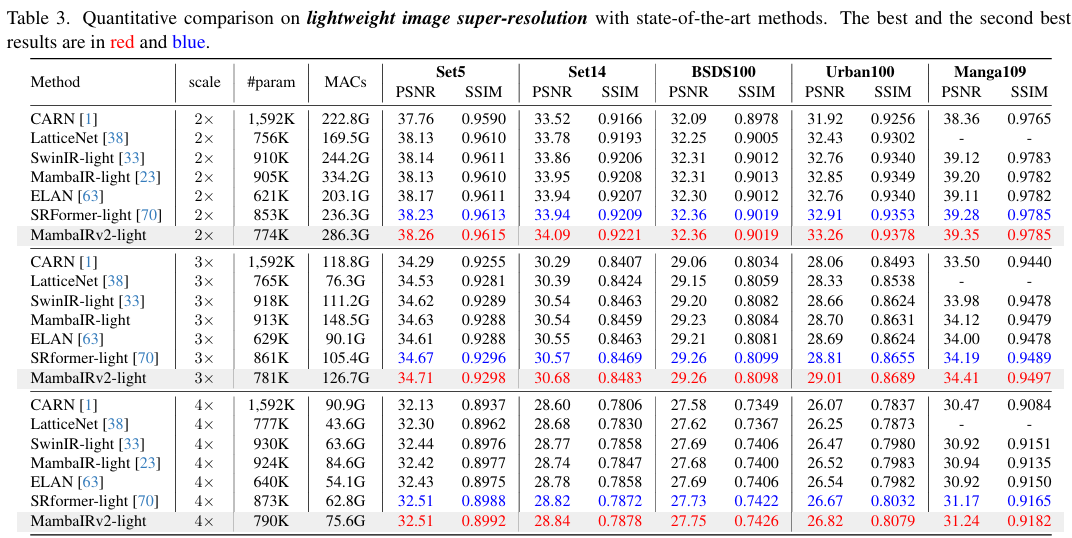
Abstract: The Mamba-based image restoration backbones have recently demonstrated significant potential in balancing global reception and computational efficiency. However, the inherent causal modeling limitation of Mamba, where each token depends solely on its predecessors in the scanned sequence, restricts the full utilization of pixels across the image and thus presents new challenges in image restoration. In this work, we propose MambaIRv2, which equips Mamba with the non-causal modeling ability similar to ViTs to reach the attentive state space restoration model. Specifically, the proposed attentive state-space equation allows to attend beyond the scanned sequence and facilitate image unfolding with just one single scan. Moreover, we further introduce a semantic-guided neighboring mechanism to encourage interaction between distant but similar pixels. Extensive experiments show our MambaIRv2 outperforms SRFormer by even 0.35dB PSNR for lightweight SR even with 9.3% less parameters and suppresses HAT on classic SR by up to 0.29dB
⭐If this work is helpful for you, please help star this repo. Thanks!🤗
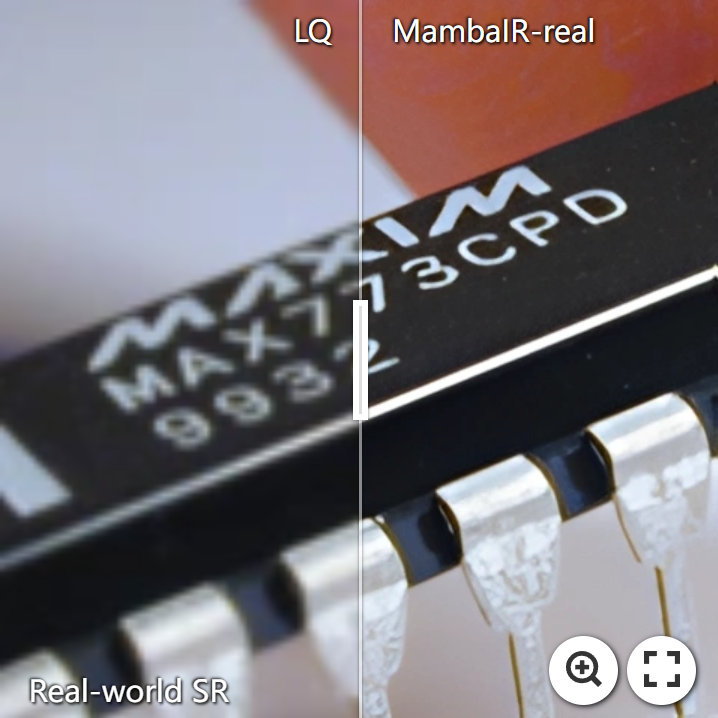
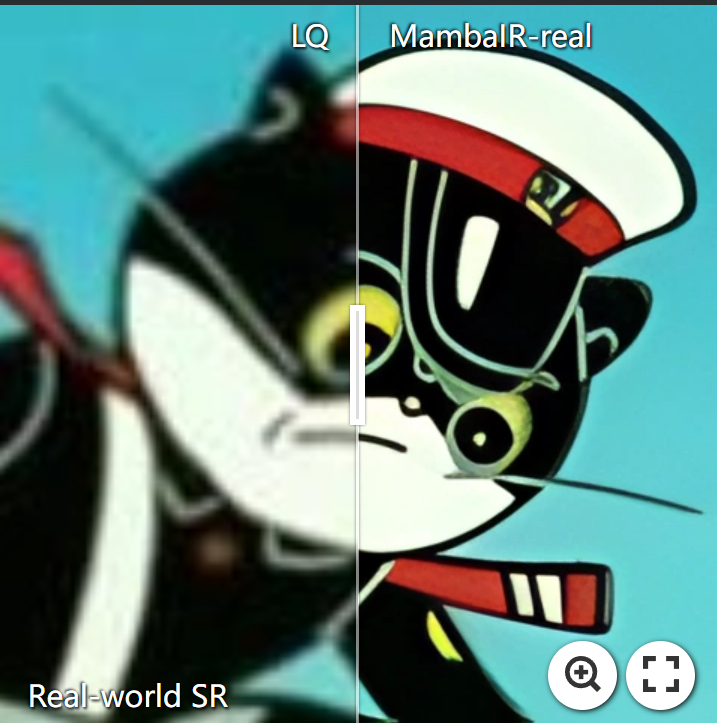
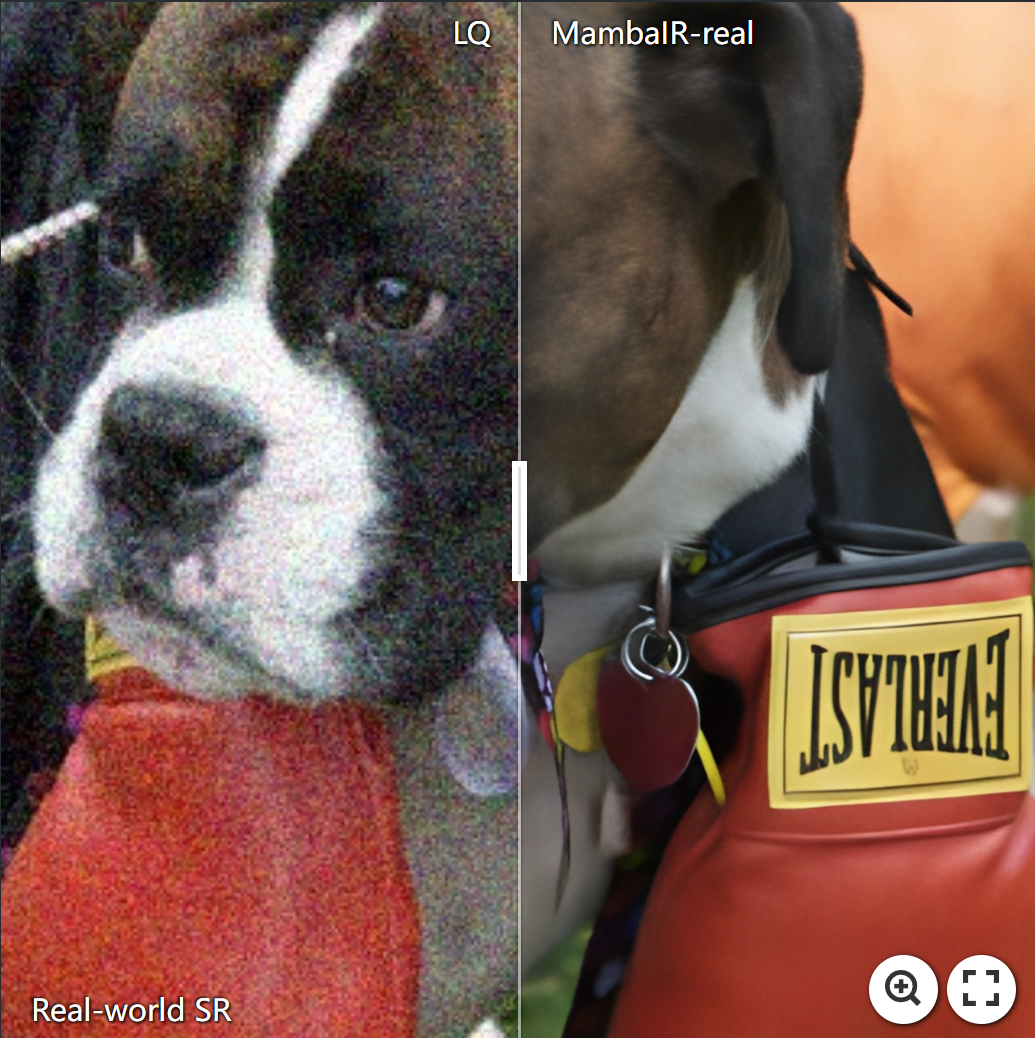
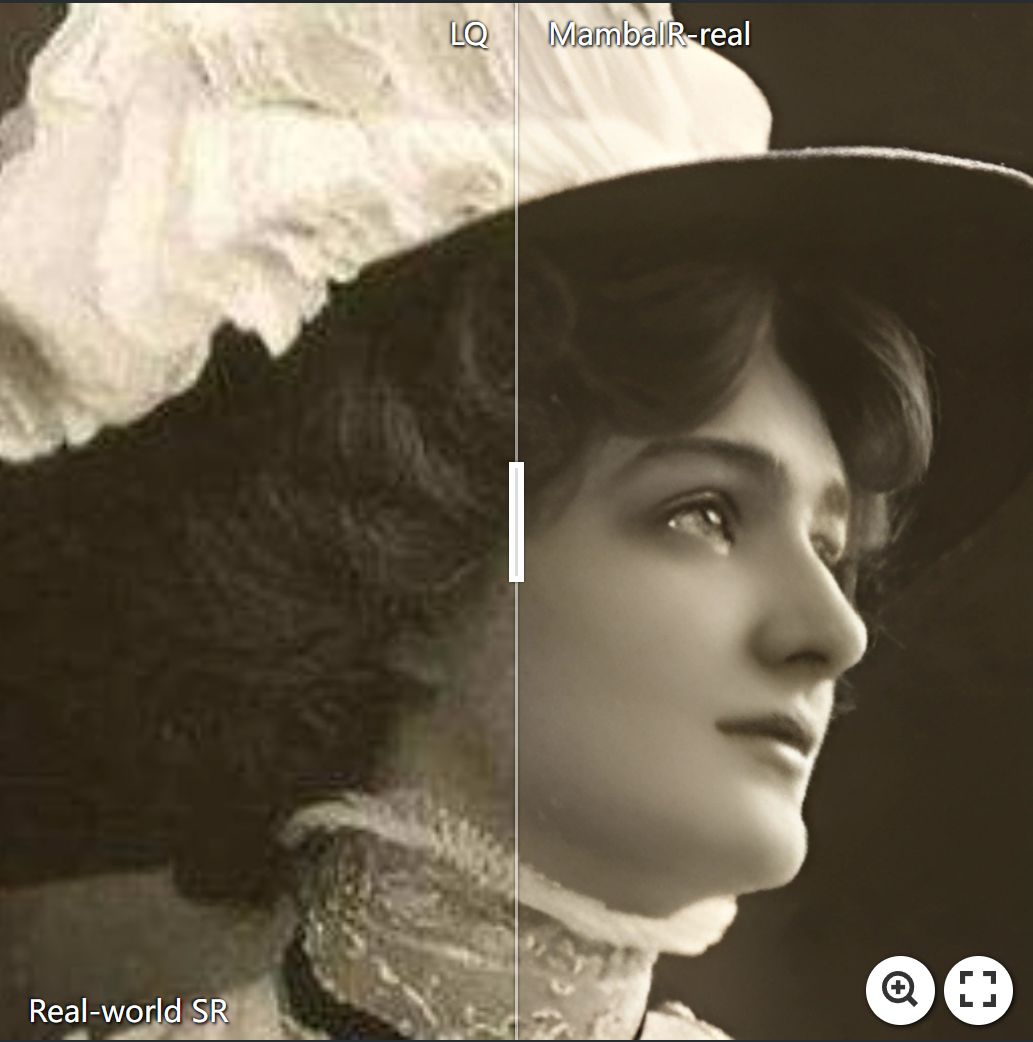
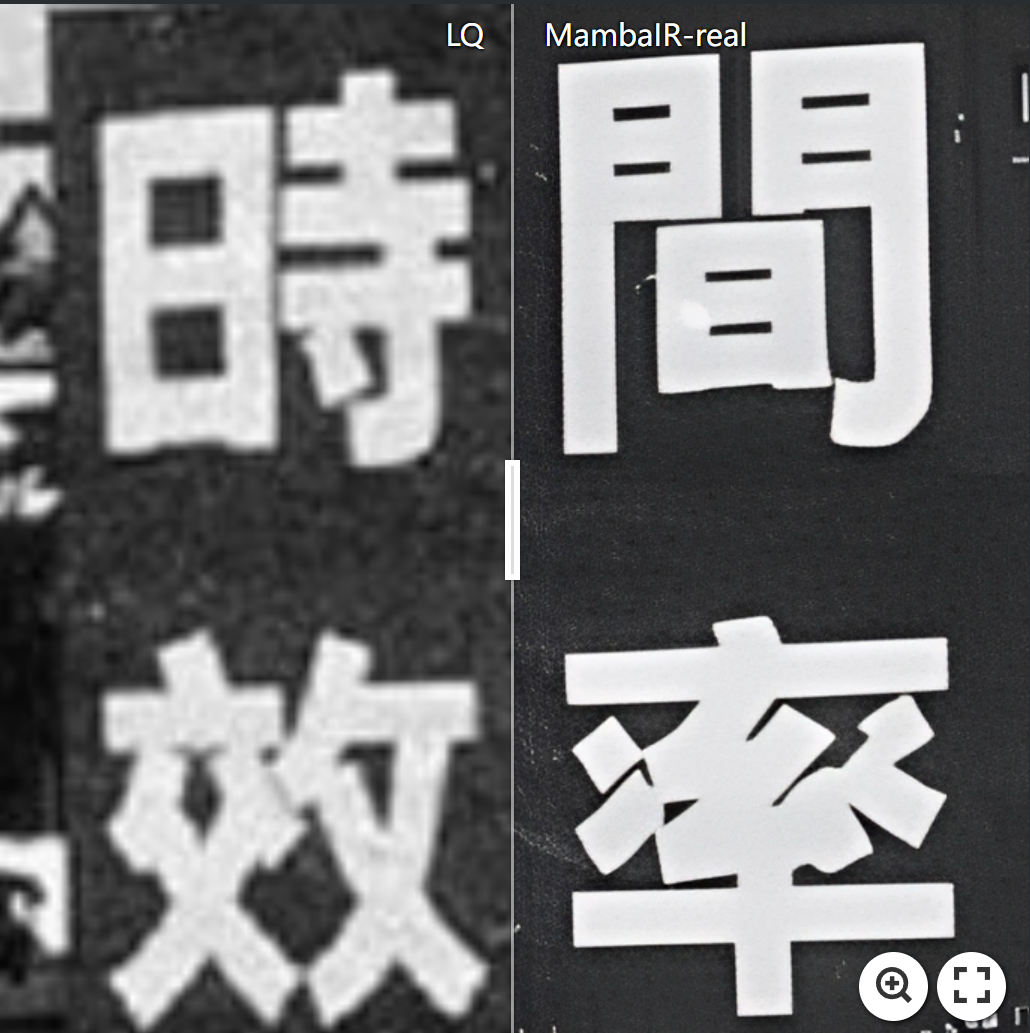
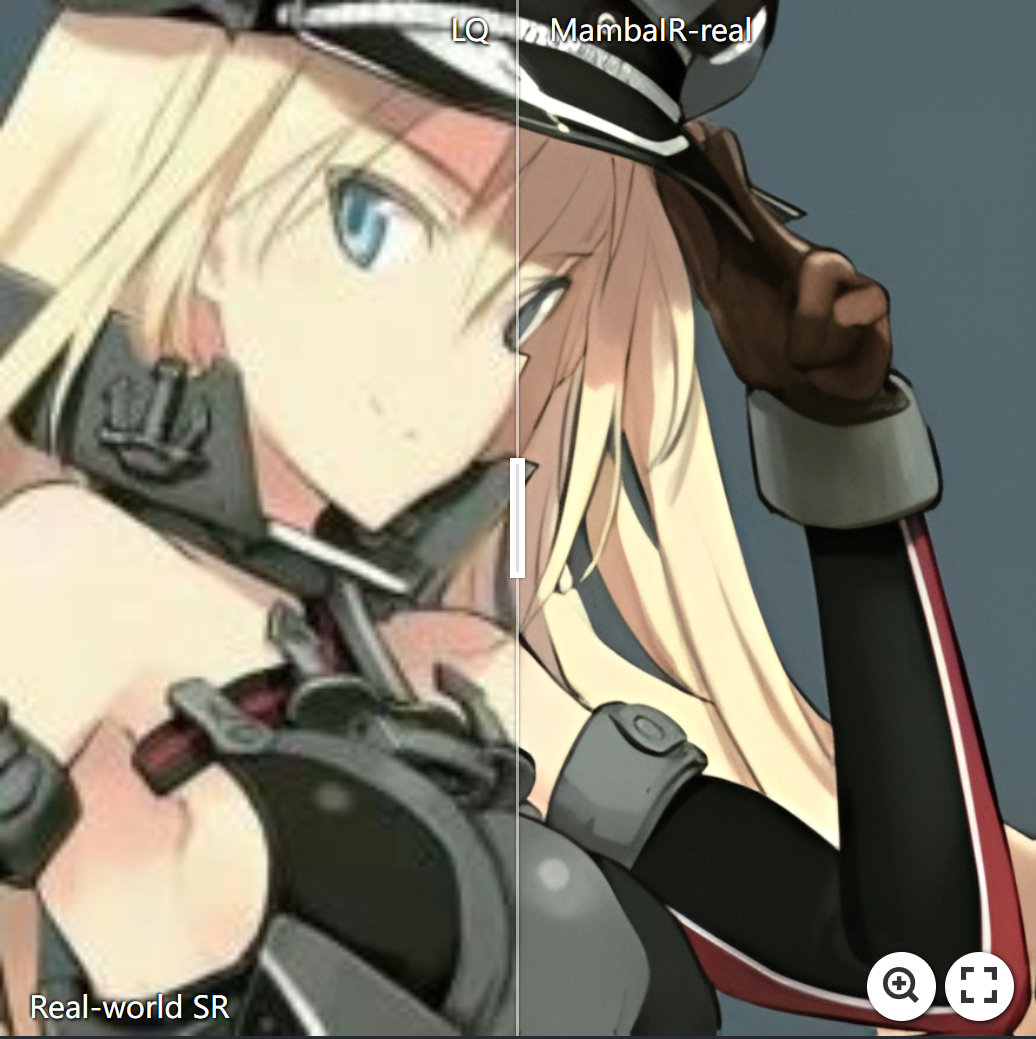
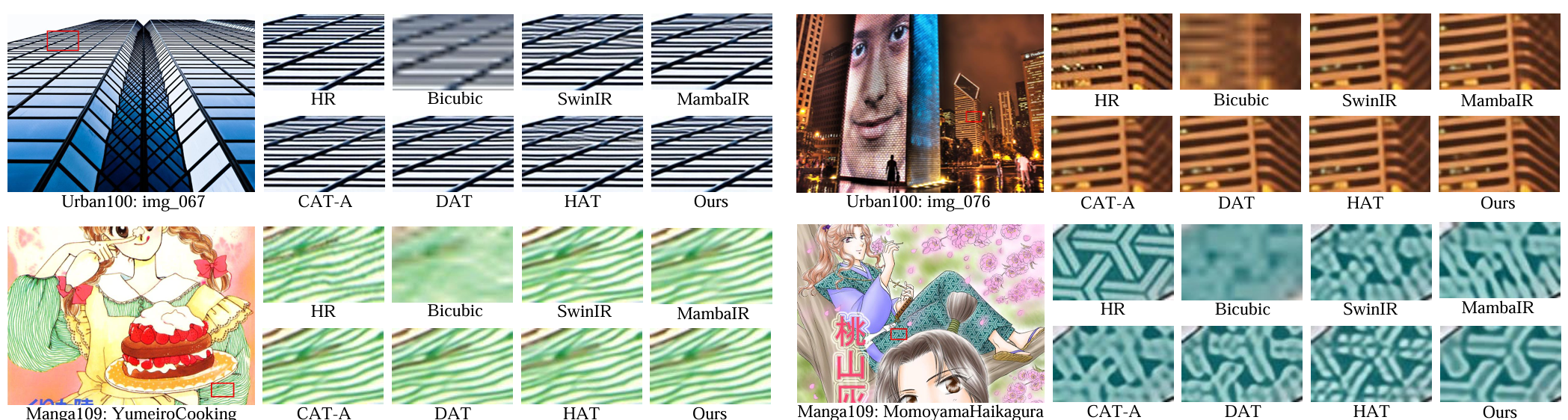
./analysis/ 😄thop library has a bug, which was also discussed in #issue44. We have updated the new accurate calculation code which uses fvcore and additionally registers the previous missing parameters. You can use this new code in ./analysis/flops_param_fvcore.pyfor complexity analysis. Note that the model complexity obtained from this code is lager than the reported one. We will release a new comparable MambaIR-light model soon, stay tuned!
We also host our MambaIR and MambIRv2 weights on HuggingFace ;D
| Model | Task | Test_dataset | PSNR | SSIM | model_weights | log_files |
|---|---|---|---|---|---|---|
| MambaIR_SR2 | Classic SR x2 | Urban100 | 34.15 | 0.9446 | link | link |
| MambaIR_SR3 | Classic SR x3 | Urban100 | 29.93 | 0.8841 | link | link |
| MambaIR_SR4 | Classic SR x4 | Urban100 | 27.68 | 0.8287 | link | link |
| MambaIR_light2 | Lightweight SR x2 | Urban100 | 32.92 | 0.9356 | link | link |
| MambaIR_light3 | Lightweight SR x3 | Urban100 | 29.00 | 0.8689 | link | link |
| MambaIR_light4 | Lightweight SR x4 | Urban100 | 26.75 | 0.8051 | link | link |
| MambaIR_realDN | Real image Denoising | SIDD | 39.89 | 0.960 | link | link |
| MambaIR_realSR | Real-world SR | RealSRSet | - | - | link | link |
| MambaIR_guassian15 | Guassian Denoising | Urban100 | 35.17 | - | link | link |
| MambaIR_guassian25 | Guassian Denoising | Urban100 | 32.99 | - | link | link |
| MambaIR_guassian50 | Guassian Denoising | Urban100 | 30.07 | - | link | link |
| MambaIR_JEPG10 | JPEG CAR | Classic5 | 30.27 | 0.8256 | link | link |
| MambaIR_JPEG30 | JPEG CAR | Classic5 | 33.74 | 0.8965 | link | link |
| MambaIR_JPEG40 | JPEG CAR | Classic5 | 34.53 | 0.9084 | link | link |
| --------------- | ---------- | ------- | --- | --- | --- | --- |
| MambaIRv2_light2 | lightSR x2 | Urban100 | 33.26 | 0.9378 | link | link |
| MambaIRv2_light3 | lightSR x3 | Urban100 | 29.01 | 0.8689 | link | link |
| MambaIRv2_light4 | lightSR x4 | Urban100 | 26.82 | 0.8079 | link | link |
| MambaIRv2_SR2 | classicSR x2 | Urban100 | 34.49 | 0.9468 | link | link |
| MambaIRv2_SR3 | classicSR x3 | Urban100 | 30.28 | 0.8905 | link | link |
| MambaIRv2_SR4 | classicSR x4 | Urban100 | 27.89 | 0.8344 | link | link |
| MambaIRv2_guassian15 | Guassian Denoising | Urban100 | 35.42 | - | link | link |
| MambaIRv2_JPEG10 | JPEG CAR q10 | Classic5 | 30.37 | 0.8269 | link | link |
| MambaIRv2_JPEG30 | JPEG CAR q30 | Classic5 | 33.81 | 0.8970 | link | link |
| MambaIRv2_JPEG40 | JPEG CAR q40 | Classic5 | 34.64 | 0.9093 | link | link |
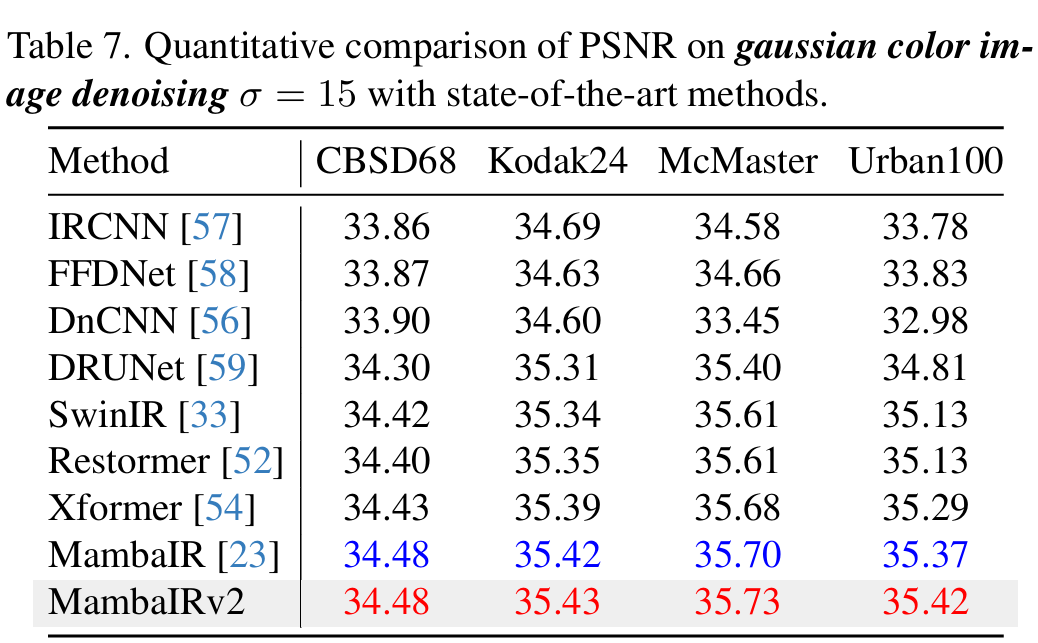
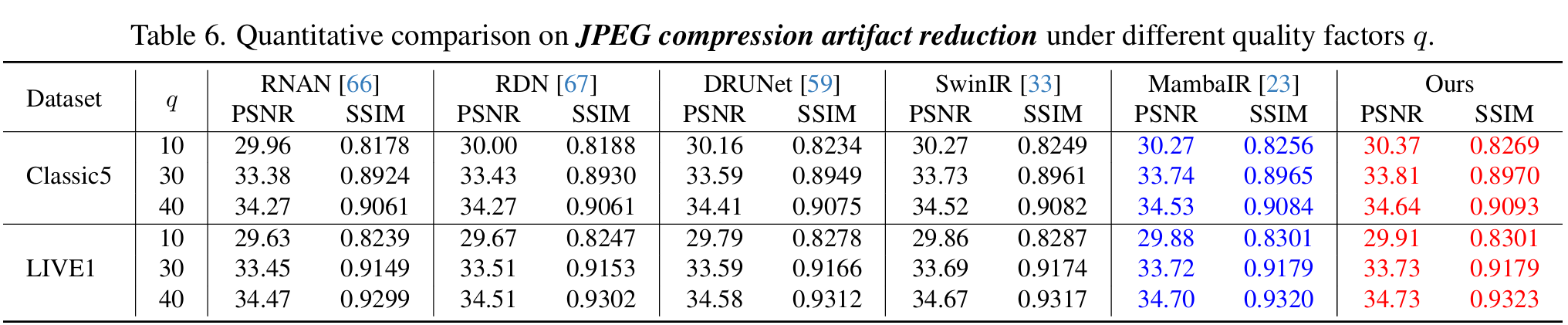
We achieve state-of-the-art performance on various image restoration tasks. Detailed results can be found in the paper.

This codebase was tested with the following environment configurations. It may work with other versions.
(Note: If you uses a newer cuda version, say 12.x, you may refer to the official github page of causal_conv_1d and mamba_ssm to find a matched version.) (we have tested torch2.7+CUDA13.0 also works well but you may install the correct pkg version.)
The following give three possible solution to install the mamba-related libraries.
To use the selective scan with efficient hard-ware design, the mamba_ssm library is needed to install with the folllowing command.
pip install causal_conv1d==1.0.0
pip install mamba_ssm==1.0.1
One can also create a new anaconda environment, and then install necessary python libraries with this requirement.txt and the following command:
conda install --yes --file requirements.txt
One can also reproduce the conda environment with the following simple commands (cuda-11.7 is used, you can modify the yaml file for your cuda version):
cd ./MambaIR
conda env create -f environment.yaml
conda activate mambair
If you encounter difficulties installing causal_conv1d or mamba_ssm, e.g. the network can't link to github, it's recommended to use an offline whl install.
The datasets used in our training and testing are orgnized as follows:
| Task | Training Set | Testing Set | Visual Results(v2) |
|---|---|---|---|
| image SR | DIV2K (800 training images) + Flickr2K (2650 images) [complete dataset DF2K download] | Set5 + Set14 + BSD100 + Urban100 + Manga109 [download] | Google Drive |
| gaussian color image denoising | DIV2K (800 training images) + Flickr2K (2650 images) + BSD500 (400 training&testing images) + WED(4744 images) [complete dataset DFWB_RGB download] | CBSD68 + Kodak24 + McMaster + Urban100 [download] | Google Drive |
| real image denoising | SIDD (320 training images) [complete dataset SIDD download] | SIDD + DND [download] | Google Drive |
| grayscale JPEG compression artifact reduction | DIV2K (800 training images) + Flickr2K (2650 images) + BSD500 (400 training&testing images) + WED(4744 images) [complete dataset DFWB_CAR download] | Classic5 + LIVE1 [download] | Google Drive |
Please download the corresponding training datasets and put them in the folder datasets/DF2K. Download the testing datasets and put them in the folder datasets/SR.
Follow the instructions below to begin training our model.
# Claissc SR task (Base model as default), cropped input=64×64, 8 GPUs, batch size=4 per GPU
python -m torch.distributed.launch --nproc_per_node=8 --master_port=1234 basicsr/train.py -opt options/train/mambairv2/train_MambaIRv2_SR_x2.yml --launcher pytorch
python -m torch.distributed.launch --nproc_per_node=8 --master_port=1234 basicsr/train.py -opt options/train/mambairv2/train_MambaIRv2_SR_x3.yml --launcher pytorch
python -m torch.distributed.launch --nproc_per_node=8 --master_port=1234 basicsr/train.py -opt options/train/mambairv2/train_MambaIRv2_SR_x4.yml --launcher pytorch

# for training our Small or Large model, use the following command
python -m torch.distributed.launch --nproc_per_node=8 --master_port=1234 basicsr/train.py -opt options/train/mambairv2/train_MambaIRv2_SRSmall_x4.yml --launcher pytorch
python -m torch.distributed.launch --nproc_per_node=8 --master_port=1234 basicsr/train.py -opt options/train/mambairv2/train_MambaIRv2_SRLarge_x4.yml --launcher pytorch
# Lightweight SR task, cropped input=64×64, 2 GPUs, batch size=16 per GPU
python -m torch.distributed.launch --nproc_per_node=2 --master_port=1234 basicsr/train.py -opt options/train/mambairv2/train_MambaIRv2_lightSR_x2.yml --launcher pytorch
python -m torch.distributed.launch --nproc_per_node=2 --master_port=1234 basicsr/train.py -opt options/train/mambairv2/train_MambaIRv2_lightSR_x3.yml --launcher pytorch
python -m torch.distributed.launch --nproc_per_node=2 --master_port=1234 basicsr/train.py -opt options/train/mambairv2/train_MambaIRv2_lightSR_x4.yml --launcher pytorch
Download the corresponding training datasets here and put them in the folder ./datasets/DFWB_RGB. Download the testing datasets and put them in the folder ./datasets/ColorDN.
Follow the instructions below to begin training:
# train on denosing15
python -m torch.distributed.launch --nproc_per_node=8 --master_port=2414 basicsr/train.py -opt options/train/mambairv2/train_MambaIRv2_ColorDN_level15.yml --launcher pytorch
./experiments.Download the corresponding training datasets here and put them in the folder ./datasets/DFWB_CAR. Download the testing datasets and put them in the folder ./datasets/JPEG_CAR.
Follow the instructions below to begin training:
# train on jpeg10
python -m torch.distributed.launch --nproc_per_node=8 --master_port=2414 basicsr/train.py -opt options/train/mambairv2/train_MambaIRv2_CAR_q10.yml --launcher pytorch

# train on jpeg30
python -m torch.distributed.launch --nproc_per_node=8 --master_port=2414 basicsr/train.py -opt options/train/mambairv2/train_MambaIRv2_CAR_q30.yml --launcher pytorch

# train on jpeg40
python -m torch.distributed.launch --nproc_per_node=8 --master_port=2414 basicsr/train.py -opt options/train/mambairv2/train_MambaIRv2_CAR_q40.yml --launcher pytorch
./experiments.Please download the corresponding testing datasets and put them in the folder datasets/SR. Download the corresponding models and put them in the folder experiments/pretrained.
Follow the instructions below to begin testing our MambaIRv2 model.
# test for image SR (we use the Base model as default).
python basicsr/test.py -opt options/test/mambairv2/test_MambaIRv2_SR_x2.yml
python basicsr/test.py -opt options/test/mambairv2/test_MambaIRv2_SR_x3.yml
python basicsr/test.py -opt options/test/mambairv2/test_MambaIRv2_SR_x4.yml

# if you want to test our Small or Large model, you can use the following command
python basicsr/test.py -opt options/test/mambairv2/test_MambaIRv2_SRSmall_x4.yml
python basicsr/test.py -opt options/test/mambairv2/test_MambaIRv2_SRLarge_x4.yml
# test for lightweight image SR.
python basicsr/test.py -opt options/test/mambairv2/test_MambaIRv2_lightSR_x2.yml
python basicsr/test.py -opt options/test/mambairv2/test_MambaIRv2_lightSR_x3.yml
python basicsr/test.py -opt options/test/mambairv2/test_MambaIRv2_lightSR_x4.yml
Please download the corresponding testing datasets and put them in the folder datasets/ColorDN.
Download the corresponding models and put them in the folder experiments/pretrained_models.
Follow the instructions below to begin testing our model.
# test on denosing15
python basicsr/test.py -opt options/test/mambairv2/test_MambaIRv2_ColorDN_level15.yml
Please download the corresponding testing datasets and put them in the folder datasets/JPEG_CAR.
Download the corresponding models and put them in the folder experiments/pretrained_models.
Follow the instructions below to begin testing our model.
# test on jpeg10
python basicsr/test.py -opt options/test/mambairv2/test_MambaIRv2_CAR_q10.yml

# test on jpeg30
python basicsr/test.py -opt options/test/mambairv2/test_MambaIRv2_CAR_q30.yml

# test on jpeg40
python basicsr/test.py -opt options/test/mambairv2/test_MambaIRv2_CAR_q40.yml
Please cite us if our work is useful for your research.
@inproceedings{guo2025mambair,
  title={MambaIR: A simple baseline for image restoration with state-space model},
  author={Guo, Hang and Li, Jinmin and Dai, Tao and Ouyang, Zhihao and Ren, Xudong and Xia, Shu-Tao},
  booktitle={European Conference on Computer Vision},
  pages={222--241},
  year={2024},
  organization={Springer}
}
@article{guo2024mambairv2,
  title={MambaIRv2: Attentive State Space Restoration},
  author={Guo, Hang and Guo, Yong and Zha, Yaohua and Zhang, Yulun and Li, Wenbo and Dai, Tao and Xia, Shu-Tao and Li, Yawei},
  journal={arXiv preprint arXiv:2411.15269},
  year={2024}
}
This project is released under the Apache 2.0 license.
This code is based on BasicSR, ART ,and VMamba. Thanks for their awesome work.
If you have any questions, feel free to approach me at [email protected]
188 followers · starred Oct 2025
658 followers · starred Dec 2025
369 followers · starred Jun 2024
19 followers · starred Jan 2025
The updated MambaIRv2 is totally compatible with the previous MambaIR. We also keep the code of MambaIR in another branch for your possible revisiting.
Hang Guo*, Yong Guo* Yaohua Zha, Yulun Zhang Wenbo Li, Tao Dai, Shu-Tao Xia, Yawei Li
(*) equal contribution
Abstract: The Mamba-based image restoration backbones have recently demonstrated significant potential in balancing global reception and computational efficiency. However, the inherent causal modeling limitation of Mamba, where each token depends solely on its predecessors in the scanned sequence, restricts the full utilization of pixels across the image and thus presents new challenges in image restoration. In this work, we propose MambaIRv2, which equips Mamba with the non-causal modeling ability similar to ViTs to reach the attentive state space restoration model. Specifically, the proposed attentive state-space equation allows to attend beyond the scanned sequence and facilitate image unfolding with just one single scan. Moreover, we further introduce a semantic-guided neighboring mechanism to encourage interaction between distant but similar pixels. Extensive experiments show our MambaIRv2 outperforms SRFormer by even 0.35dB PSNR for lightweight SR even with 9.3% less parameters and suppresses HAT on classic SR by up to 0.29dB
⭐If this work is helpful for you, please help star this repo. Thanks!🤗
./analysis/ 😄thop library has a bug, which was also discussed in #issue44. We have updated the new accurate calculation code which uses fvcore and additionally registers the previous missing parameters. You can use this new code in ./analysis/flops_param_fvcore.pyfor complexity analysis. Note that the model complexity obtained from this code is lager than the reported one. We will release a new comparable MambaIR-light model soon, stay tuned!We also host our MambaIR and MambIRv2 weights on HuggingFace ;D
| Model | Task | Test_dataset | PSNR | SSIM | model_weights | log_files |
|---|---|---|---|---|---|---|
| MambaIR_SR2 | Classic SR x2 | Urban100 | 34.15 | 0.9446 | link | link |
| MambaIR_SR3 | Classic SR x3 | Urban100 | 29.93 | 0.8841 | link | link |
| MambaIR_SR4 | Classic SR x4 | Urban100 | 27.68 | 0.8287 | link | link |
| MambaIR_light2 | Lightweight SR x2 | Urban100 | 32.92 | 0.9356 | link | link |
| MambaIR_light3 | Lightweight SR x3 | Urban100 | 29.00 | 0.8689 | link | link |
| MambaIR_light4 | Lightweight SR x4 | Urban100 | 26.75 | 0.8051 | link | link |
| MambaIR_realDN | Real image Denoising | SIDD | 39.89 | 0.960 | link | link |
| MambaIR_realSR | Real-world SR | RealSRSet | - | - | link | link |
| MambaIR_guassian15 | Guassian Denoising | Urban100 | 35.17 | - | link | link |
| MambaIR_guassian25 | Guassian Denoising | Urban100 | 32.99 | - | link | link |
| MambaIR_guassian50 | Guassian Denoising | Urban100 | 30.07 | - | link | link |
| MambaIR_JEPG10 | JPEG CAR | Classic5 | 30.27 | 0.8256 | link | link |
| MambaIR_JPEG30 | JPEG CAR | Classic5 | 33.74 | 0.8965 | link | link |
| MambaIR_JPEG40 | JPEG CAR | Classic5 | 34.53 | 0.9084 | link | link |
| --------------- | ---------- | ------- | --- | --- | --- | --- |
| MambaIRv2_light2 | lightSR x2 | Urban100 | 33.26 | 0.9378 | link | link |
| MambaIRv2_light3 | lightSR x3 | Urban100 | 29.01 | 0.8689 | link | link |
| MambaIRv2_light4 | lightSR x4 | Urban100 | 26.82 | 0.8079 | link | link |
| MambaIRv2_SR2 | classicSR x2 | Urban100 | 34.49 | 0.9468 | link | link |
| MambaIRv2_SR3 | classicSR x3 | Urban100 | 30.28 | 0.8905 | link | link |
| MambaIRv2_SR4 | classicSR x4 | Urban100 | 27.89 | 0.8344 | link | link |
| MambaIRv2_guassian15 | Guassian Denoising | Urban100 | 35.42 | - | link | link |
| MambaIRv2_JPEG10 | JPEG CAR q10 | Classic5 | 30.37 | 0.8269 | link | link |
| MambaIRv2_JPEG30 | JPEG CAR q30 | Classic5 | 33.81 | 0.8970 | link | link |
| MambaIRv2_JPEG40 | JPEG CAR q40 | Classic5 | 34.64 | 0.9093 | link | link |
We achieve state-of-the-art performance on various image restoration tasks. Detailed results can be found in the paper.
This codebase was tested with the following environment configurations. It may work with other versions.
(Note: If you uses a newer cuda version, say 12.x, you may refer to the official github page of causal_conv_1d and mamba_ssm to find a matched version.) (we have tested torch2.7+CUDA13.0 also works well but you may install the correct pkg version.)
The following give three possible solution to install the mamba-related libraries.
To use the selective scan with efficient hard-ware design, the mamba_ssm library is needed to install with the folllowing command.
pip install causal_conv1d==1.0.0
pip install mamba_ssm==1.0.1
One can also create a new anaconda environment, and then install necessary python libraries with this requirement.txt and the following command:
conda install --yes --file requirements.txt
One can also reproduce the conda environment with the following simple commands (cuda-11.7 is used, you can modify the yaml file for your cuda version):
cd ./MambaIR
conda env create -f environment.yaml
conda activate mambair
If you encounter difficulties installing causal_conv1d or mamba_ssm, e.g. the network can't link to github, it's recommended to use an offline whl install.
The datasets used in our training and testing are orgnized as follows:
| Task | Training Set | Testing Set | Visual Results(v2) |
|---|---|---|---|
| image SR | DIV2K (800 training images) + Flickr2K (2650 images) [complete dataset DF2K download] | Set5 + Set14 + BSD100 + Urban100 + Manga109 [download] | Google Drive |
| gaussian color image denoising | DIV2K (800 training images) + Flickr2K (2650 images) + BSD500 (400 training&testing images) + WED(4744 images) [complete dataset DFWB_RGB download] | CBSD68 + Kodak24 + McMaster + Urban100 [download] | Google Drive |
| real image denoising | SIDD (320 training images) [complete dataset SIDD download] | SIDD + DND [download] | Google Drive |
| grayscale JPEG compression artifact reduction | DIV2K (800 training images) + Flickr2K (2650 images) + BSD500 (400 training&testing images) + WED(4744 images) [complete dataset DFWB_CAR download] | Classic5 + LIVE1 [download] | Google Drive |
Please download the corresponding training datasets and put them in the folder datasets/DF2K. Download the testing datasets and put them in the folder datasets/SR.
Follow the instructions below to begin training our model.
# Claissc SR task (Base model as default), cropped input=64×64, 8 GPUs, batch size=4 per GPU
python -m torch.distributed.launch --nproc_per_node=8 --master_port=1234 basicsr/train.py -opt options/train/mambairv2/train_MambaIRv2_SR_x2.yml --launcher pytorch
python -m torch.distributed.launch --nproc_per_node=8 --master_port=1234 basicsr/train.py -opt options/train/mambairv2/train_MambaIRv2_SR_x3.yml --launcher pytorch
python -m torch.distributed.launch --nproc_per_node=8 --master_port=1234 basicsr/train.py -opt options/train/mambairv2/train_MambaIRv2_SR_x4.yml --launcher pytorch

# for training our Small or Large model, use the following command
python -m torch.distributed.launch --nproc_per_node=8 --master_port=1234 basicsr/train.py -opt options/train/mambairv2/train_MambaIRv2_SRSmall_x4.yml --launcher pytorch
python -m torch.distributed.launch --nproc_per_node=8 --master_port=1234 basicsr/train.py -opt options/train/mambairv2/train_MambaIRv2_SRLarge_x4.yml --launcher pytorch
# Lightweight SR task, cropped input=64×64, 2 GPUs, batch size=16 per GPU
python -m torch.distributed.launch --nproc_per_node=2 --master_port=1234 basicsr/train.py -opt options/train/mambairv2/train_MambaIRv2_lightSR_x2.yml --launcher pytorch
python -m torch.distributed.launch --nproc_per_node=2 --master_port=1234 basicsr/train.py -opt options/train/mambairv2/train_MambaIRv2_lightSR_x3.yml --launcher pytorch
python -m torch.distributed.launch --nproc_per_node=2 --master_port=1234 basicsr/train.py -opt options/train/mambairv2/train_MambaIRv2_lightSR_x4.yml --launcher pytorch
Download the corresponding training datasets here and put them in the folder ./datasets/DFWB_RGB. Download the testing datasets and put them in the folder ./datasets/ColorDN.
Follow the instructions below to begin training:
# train on denosing15
python -m torch.distributed.launch --nproc_per_node=8 --master_port=2414 basicsr/train.py -opt options/train/mambairv2/train_MambaIRv2_ColorDN_level15.yml --launcher pytorch
./experiments.Download the corresponding training datasets here and put them in the folder ./datasets/DFWB_CAR. Download the testing datasets and put them in the folder ./datasets/JPEG_CAR.
Follow the instructions below to begin training:
# train on jpeg10
python -m torch.distributed.launch --nproc_per_node=8 --master_port=2414 basicsr/train.py -opt options/train/mambairv2/train_MambaIRv2_CAR_q10.yml --launcher pytorch

# train on jpeg30
python -m torch.distributed.launch --nproc_per_node=8 --master_port=2414 basicsr/train.py -opt options/train/mambairv2/train_MambaIRv2_CAR_q30.yml --launcher pytorch

# train on jpeg40
python -m torch.distributed.launch --nproc_per_node=8 --master_port=2414 basicsr/train.py -opt options/train/mambairv2/train_MambaIRv2_CAR_q40.yml --launcher pytorch
./experiments.Please download the corresponding testing datasets and put them in the folder datasets/SR. Download the corresponding models and put them in the folder experiments/pretrained.
Follow the instructions below to begin testing our MambaIRv2 model.
# test for image SR (we use the Base model as default).
python basicsr/test.py -opt options/test/mambairv2/test_MambaIRv2_SR_x2.yml
python basicsr/test.py -opt options/test/mambairv2/test_MambaIRv2_SR_x3.yml
python basicsr/test.py -opt options/test/mambairv2/test_MambaIRv2_SR_x4.yml

# if you want to test our Small or Large model, you can use the following command
python basicsr/test.py -opt options/test/mambairv2/test_MambaIRv2_SRSmall_x4.yml
python basicsr/test.py -opt options/test/mambairv2/test_MambaIRv2_SRLarge_x4.yml
# test for lightweight image SR.
python basicsr/test.py -opt options/test/mambairv2/test_MambaIRv2_lightSR_x2.yml
python basicsr/test.py -opt options/test/mambairv2/test_MambaIRv2_lightSR_x3.yml
python basicsr/test.py -opt options/test/mambairv2/test_MambaIRv2_lightSR_x4.yml
Please download the corresponding testing datasets and put them in the folder datasets/ColorDN.
Download the corresponding models and put them in the folder experiments/pretrained_models.
Follow the instructions below to begin testing our model.
# test on denosing15
python basicsr/test.py -opt options/test/mambairv2/test_MambaIRv2_ColorDN_level15.yml
Please download the corresponding testing datasets and put them in the folder datasets/JPEG_CAR.
Download the corresponding models and put them in the folder experiments/pretrained_models.
Follow the instructions below to begin testing our model.
# test on jpeg10
python basicsr/test.py -opt options/test/mambairv2/test_MambaIRv2_CAR_q10.yml

# test on jpeg30
python basicsr/test.py -opt options/test/mambairv2/test_MambaIRv2_CAR_q30.yml

# test on jpeg40
python basicsr/test.py -opt options/test/mambairv2/test_MambaIRv2_CAR_q40.yml
Please cite us if our work is useful for your research.
@inproceedings{guo2025mambair,
  title={MambaIR: A simple baseline for image restoration with state-space model},
  author={Guo, Hang and Li, Jinmin and Dai, Tao and Ouyang, Zhihao and Ren, Xudong and Xia, Shu-Tao},
  booktitle={European Conference on Computer Vision},
  pages={222--241},
  year={2024},
  organization={Springer}
}
@article{guo2024mambairv2,
  title={MambaIRv2: Attentive State Space Restoration},
  author={Guo, Hang and Guo, Yong and Zha, Yaohua and Zhang, Yulun and Li, Wenbo and Dai, Tao and Xia, Shu-Tao and Li, Yawei},
  journal={arXiv preprint arXiv:2411.15269},
  year={2024}
}
This project is released under the Apache 2.0 license.
This code is based on BasicSR, ART ,and VMamba. Thanks for their awesome work.
If you have any questions, feel free to approach me at [email protected]
188 followers · starred Oct 2025
658 followers · starred Dec 2025
369 followers · starred Jun 2024
19 followers · starred Jan 2025








