
A dub.co-styled URL shortener dashboard built on YOURLS, for plain PHP/MySQL shared hosting
PHP
0
32 commits
updated Oct 1, 2026
See what people are saying
README
Leanks
A self-hosted URL shortener with a modern, SaaS-style dashboard, built on top of YOURLS so it runs on ordinary PHP/MySQL shared hosting -- no Node build step, no Docker, no serverless platform required.
Leanks is YOURLS underneath (redirect engine, database, click tracking) with:
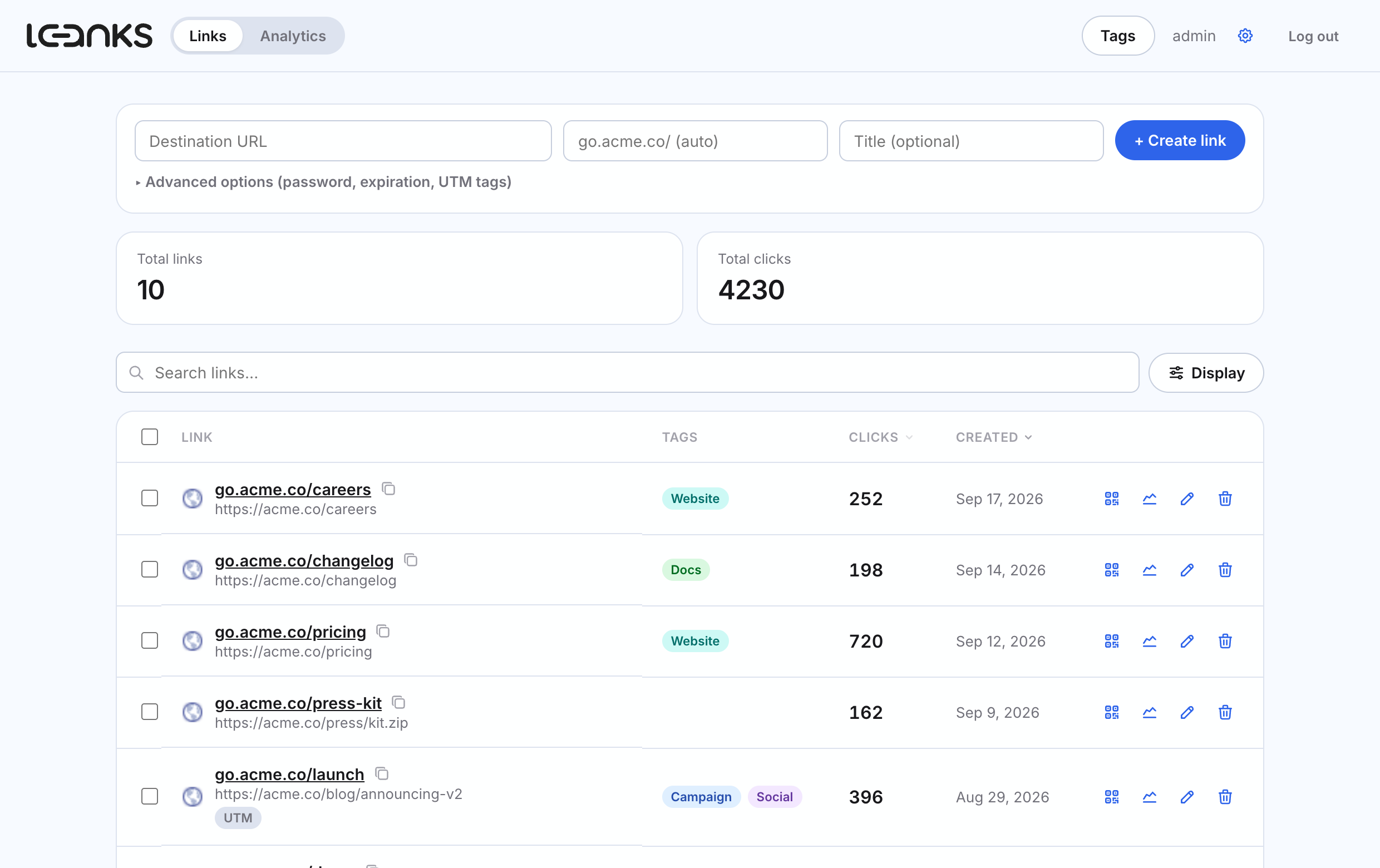
- A custom dashboard (vanilla HTML/CSS/JS, no framework) that looks and feels like a modern SaaS link manager instead of a classic PHP admin panel.
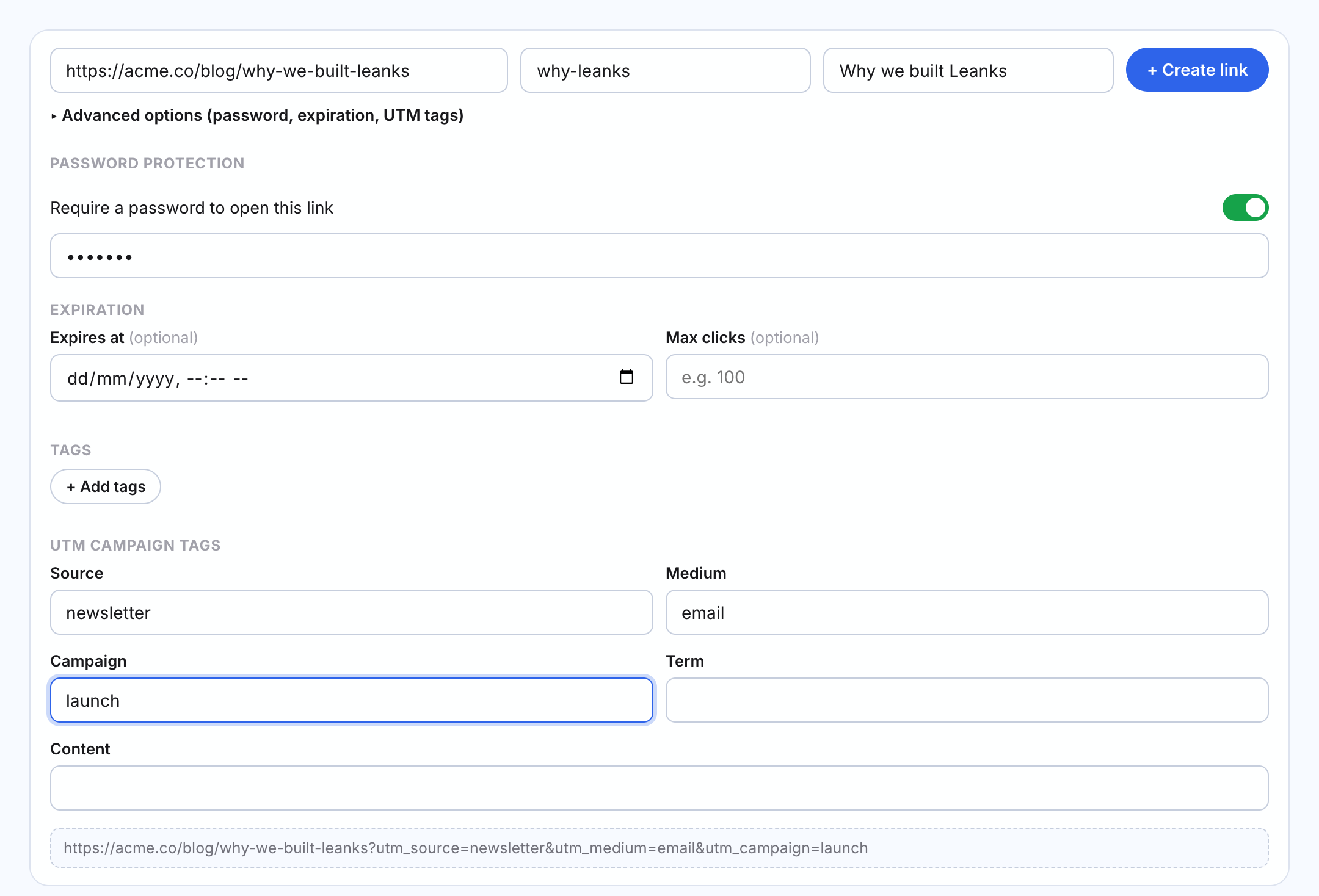
- One-line link creation -- destination, short link and title sit in a single row at the top of the page; password, expiration, tags and UTM options are one click away.
- Password-protected links -- require a password before a short link redirects.
- Link expiration -- by date, by max click count, or both.
- UTM campaign tags -- a built-in UTM builder with a live preview of the final destination URL.
- Tags -- tags in 8 colors (the same hues as the accent presets) that you can assign to links, show as a column, and filter by.
- A links list that scales -- stats on top, then a search bar with a single Display menu: filter by tag, switch between rows and cards, choose ordering, page size and columns. Sort by clicks or date from the column headers, select rows for bulk delete, see favicons next to every destination, and have your page size and sort remembered.
- QR codes -- generated client-side for any link, downloadable as PNG.
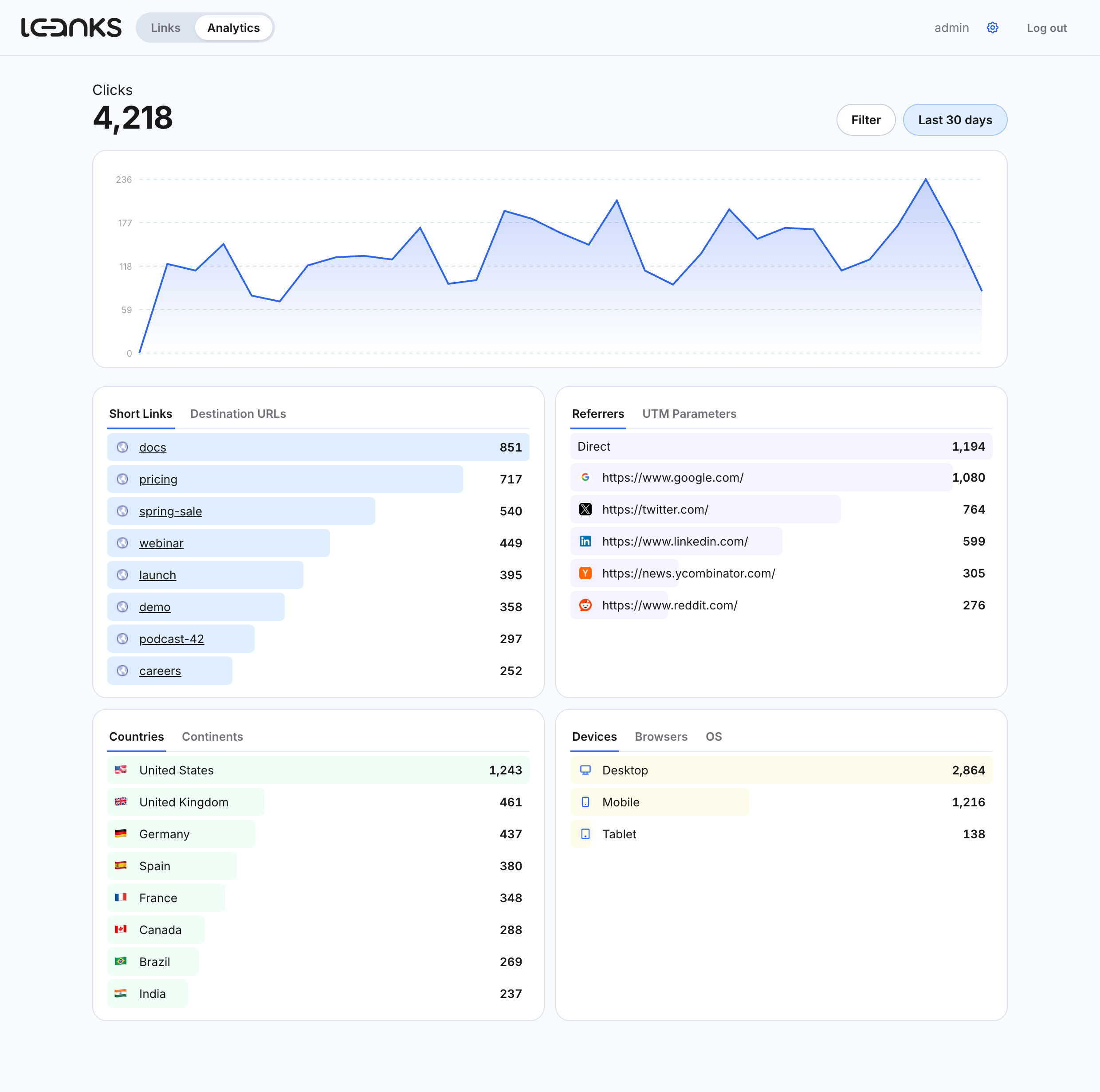
- Analytics -- a dedicated dashboard page with a clicks chart across 9 time ranges (last 24 hours through year-to-date, plus a custom range), filters (link, country, continent, device, browser, OS, referrer), and ranked breakdowns by short link, destination URL, referrer, UTM parameter, country, continent, device, browser and OS -- with country names and flags, and browser/OS/device icons.
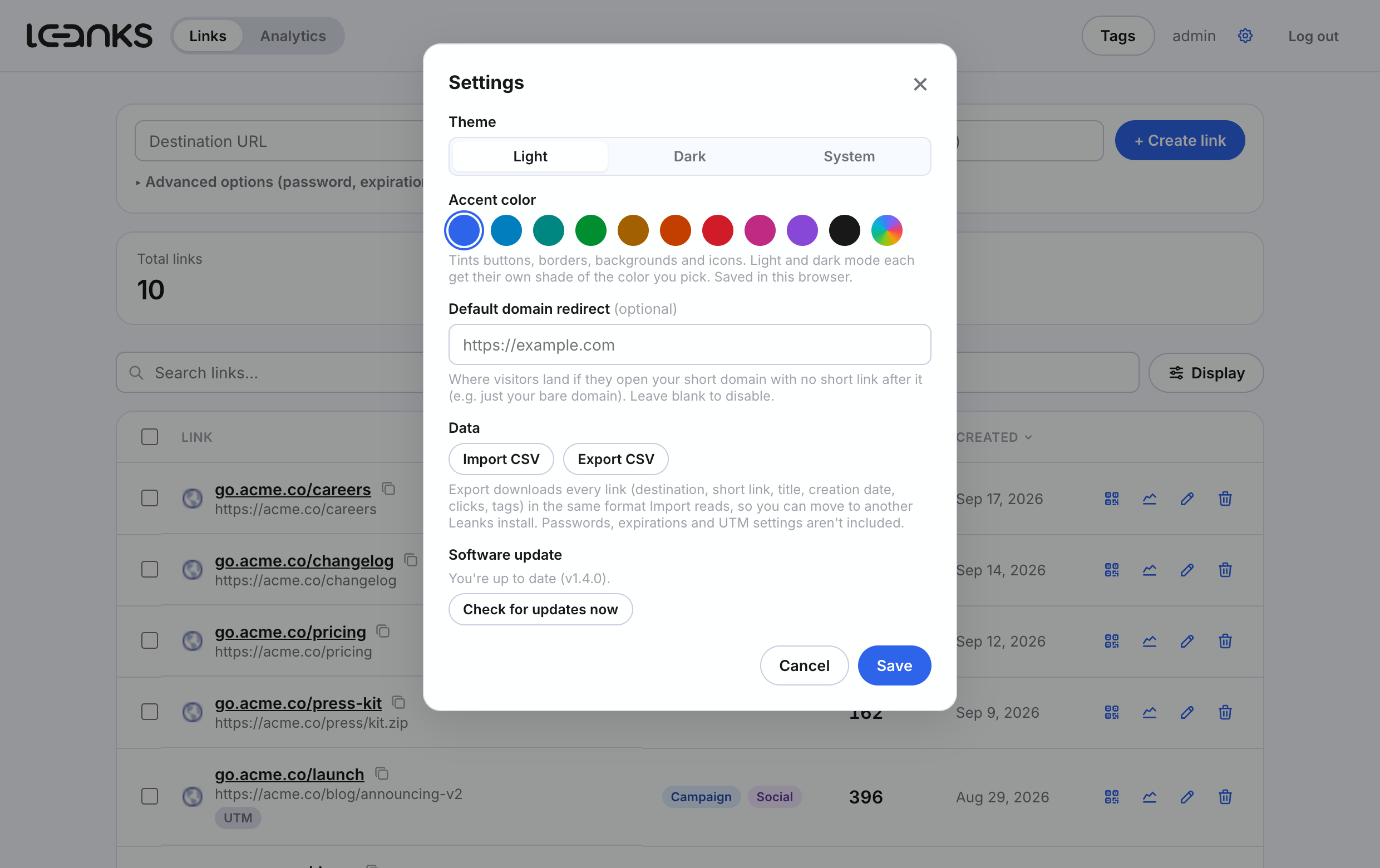
- Default domain redirect -- send visitors who open your bare short domain to any URL you choose, instead of a blank page or directory listing.
- CSV import & export -- migrate links from another shortener (or between two Leanks installs) via CSV, with column auto-detection, duplicate/error reporting, and original creation dates, click counts and tags preserved. Both live in Settings.
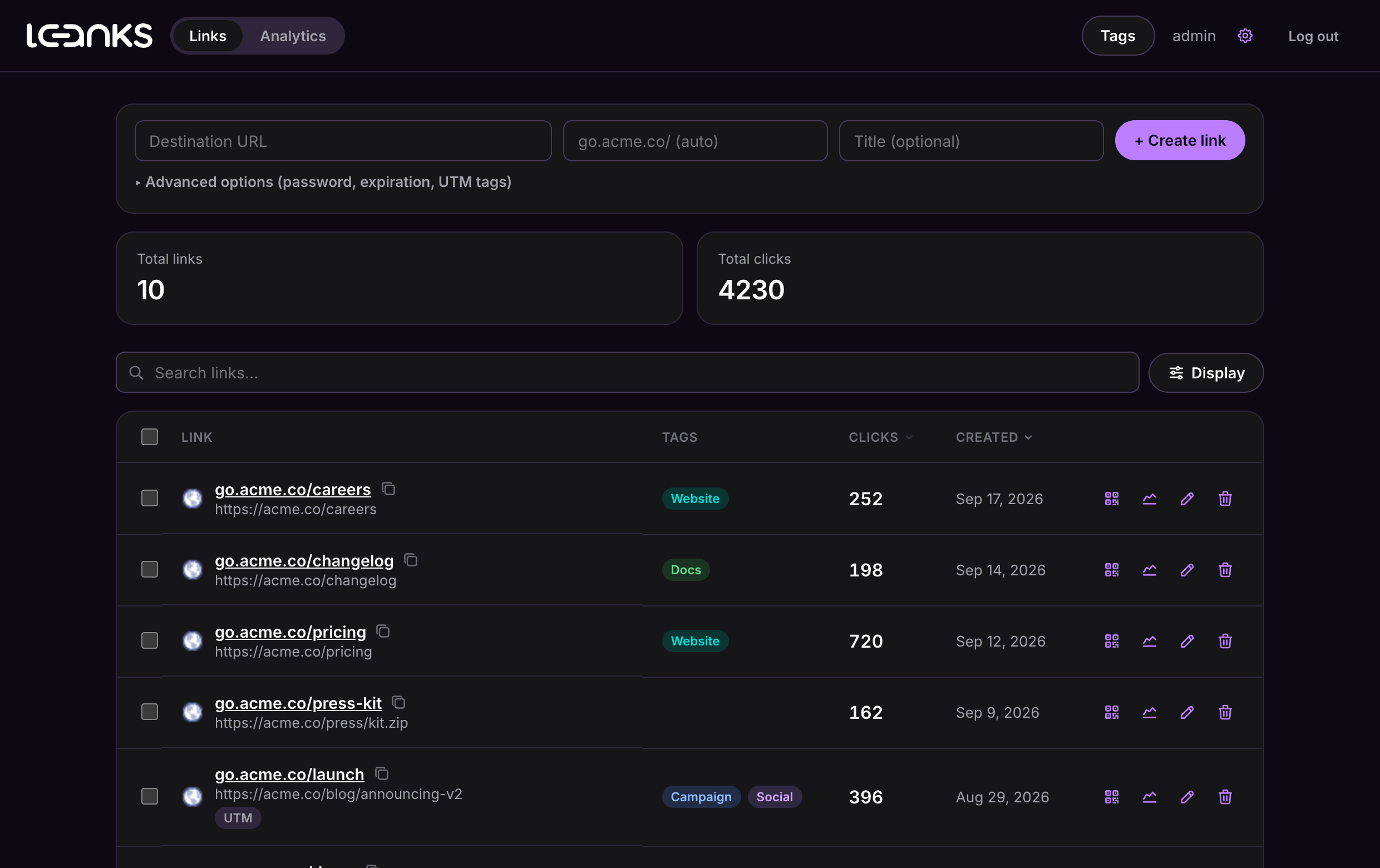
- Light, dark and system themes, plus your own accent color -- pick a preset or any color; buttons, borders, backgrounds and icons follow it, with light and dark shades derived automatically.
- One-click updates -- the dashboard notices new releases and applies them in place, with an automatic backup and checksum verification before anything is touched.
Why YOURLS underneath
YOURLS is plain PHP, MIT licensed, has no build step, and stores everything in a couple of MySQL
tables -- which makes it a good fit for cheap shared/cPanel hosting. Leanks keeps YOURLS' core
completely stock (redirect logic, database schema, click tracking, plugin API) and adds a small
plugin (app/user/plugins/leanks) plus an entirely custom front end (app/app/) on top, rather
than patching YOURLS' own files. That means YOURLS itself stays upgradeable in place. The one exception
is .htaccess: it carries one extra rewrite rule so a bare visit to the site root reaches
Leanks' default-domain-redirect setting instead of Apache/LiteSpeed's own directory listing (see
the comment in that file) -- config for routing, not a patch to YOURLS' PHP.
The dashboard's visual design is original -- a modern, SaaS-style interface built from scratch in plain CSS, replacing YOURLS' classic PHP admin panel look without touching YOURLS itself.
Requirements
- PHP 8.1+
- MySQL 5.7+ or MariaDB, with the
pdo_mysqlextension - Apache with
mod_rewrite(for pretty short URLs via.htaccess) -- other web servers work too, see YOURLS' own docs for nginx/other rewrite rules
Installing
- Create a MySQL database and database user, and grant that user access to it. The setup
wizard connects to an existing database -- on shared/cPanel hosting it typically can't create
one itself (the DB user usually lacks CREATE privileges), and it definitely can't create MySQL
users. In cPanel: MySQL® Databases -> create a database -> create a user -> Add User to
Database with ALL PRIVILEGES checked. cPanel usually prefixes both the database and user name
with your account name (e.g.
youraccount_leanks) -- use the exact names it shows you, not the short name you typed when creating them. - Upload the contents of this repository's
app/folder to your web root (e.g.public_html), keeping the folder structure intact -- notweb/orbranding/, which are repo-only and never deployed to the PHP host. - Visit
https://your-domain.com/setup/in a browser and fill in the database details from step 1 and an admin username/password. This writesuser/config.php, creates the database tables, and activates the Leanks plugin automatically. - Delete (or password-protect) the
/setupfolder once installed -- it can rewrite your database credentials and shouldn't stay reachable. - Go to
https://your-domain.com/app/and log in with the admin account you just created.
Prefer to configure by hand? Copy user/config-sample.php to user/config.php, fill in your
settings, then visit /admin/install.php (YOURLS' own installer) followed by /admin/plugins.php
to activate the "Leanks" plugin.
Project layout
app/                    The deployable PHP install -- upload its *contents* to your web root
  admin/                 Stock YOURLS admin (kept as a fallback/power-user UI)
  app/                    The Leanks dashboard (vanilla HTML/CSS/JS)
    auth.php              Thin JSON bridge into YOURLS' own login/session
    index.html, login.html
    css/app.css            Design system (light/dark tokens, accent color derivation)
    js/app.js              Links view, settings, theme/accent, import/export UI
    js/analytics.js        Analytics view (chart, filters, breakdowns)
    js/api.js, ui.js, login.js, theme-init.js
    js/vendor/qrcode.js     Vendored QR code generator (MIT, see licenses/)
    images/                Leanks logo and favicons
  includes/               Stock YOURLS core (untouched)
  setup/                  Web-based install wizard
  user/
    config-sample.php      Manual-install config template
    plugins/leanks/         The plugin: link metadata, tags, analytics, import/export,
                            settings, self-updater, redirect gating
  licenses/               Third-party license texts (YOURLS, qrcode.js, Tabler Icons)
web/                    The marketing site for leanks.cc (static HTML/CSS) -- repo-only, not deployed
                         to the PHP host
branding/               Logo and other brand assets -- repo-only
How the plugin works
Password protection, expiration and click limits are enforced by hooking YOURLS'
redirect_shorturl action (see app/user/plugins/leanks/includes/redirect-gate.php): before a click
is logged and redirected, Leanks checks a small metadata table ({prefix}leanks_meta, one row per
protected/expiring link) and can intercept the request with a password prompt or an "expired"
page. Everything else -- the redirect itself, click counting, referrer/geo logging -- is stock
YOURLS.
The dashboard talks to YOURLS' existing admin-ajax.php for link create/edit/delete (reusing its
built-in nonce-based CSRF protection and session auth), plus a handful of custom leanks_*
actions the plugin registers on the same endpoint for listing, stats, analytics, tags, metadata, settings, and CSV import/export.
CSV import
app/user/plugins/leanks/includes/import.php parses the uploaded file server-side with PHP's own CSV
parser and auto-detects columns by matching common header aliases (url/destination url,
short link/key/slug, title/name, creation date/created at, etc.) case-insensitively --
it doesn't require exact header names, so column order and naming don't need to match exactly.
Each row is created through the same yourls_add_new_link()
YOURLS itself uses, so duplicate URLs/keywords are caught the normal way and reported back per-row
rather than aborting the whole import; a supplied creation date is applied afterwards. Files over
2000 rows are processed in the first batch only -- re-upload the remainder in a second pass.
CSV export
app/user/plugins/leanks/includes/export.php streams every link as a CSV with dub.co's column
names (Destination URL, Short link, Title, Creation date, Clicks, Tags), so the file re-imports
cleanly. Passwords, expirations and UTM fields aren't part of the import format and don't travel;
tag names are exported without their colors (re-imported tags get the default color). Commas,
semicolons and backslashes inside a tag name are backslash-escaped so they survive the round
trip, and titles starting with =, +, - or @ get a leading apostrophe so a spreadsheet
won't run them as formulas (import strips it again).
Updating
app/user/plugins/leanks/includes/update.php polls https://api.github.com/repos/creixems/leanks/releases/latest
(throttled to once every 24h) and shows a dashboard banner when a newer version is published.
Clicking Update now downloads that release's zip, verifies it against the checksum published
alongside it, backs up every file about to change, then applies the diff between the previous and
new release manifests (added/changed files are written, files removed upstream are deleted).
Nothing is applied until the checksum check passes and the backup succeeds; if applying the update
itself fails partway through, it's rolled back from that backup automatically. Past backups are
listed in the update modal with a manual Restore action, and the 3 most recent are kept.
Two things are deliberately never touched by an automated update: user/config.php (never part of
any release) and .htaccess (skipped if it differs from the shipped version, with the new version
saved to user/leanks-updates/htaccess.new for you to merge by hand) -- so a customized rewrite
config or local site settings are never silently overwritten. This requires the ZipArchive PHP
extension; hosts without it get a clear message instead of a broken update.
Releases are built by .github/workflows/release.yml: pushing a
vX.Y.Z tag (after bumping LEANKS_VERSION in
version.php to match) builds a zip of every
git-tracked file under app/ (with the app/ prefix stripped, so the zip mirrors a live install's
own root), a manifest.json of that file list, and a sha256 checksum, and attaches them
to a draft GitHub release. Drafts are invisible to /releases/latest, so publishing is a
separate, deliberate step after writing release notes.
Local development
No build step -- edit files and reload. app/ is the deployable install, so it's also the local
server's document root. To run it locally you need PHP and MySQL/MariaDB, e.g.:
cd app
php -S 127.0.0.1:8000 router.php   # see below for router.php
Since php -S doesn't read .htaccess, use a tiny router script (inside app/, dev-only) that
mirrors it for local testing:
<?php
// app/router.php (dev only)
$root = $_SERVER['DOCUMENT_ROOT'];
$path = parse_url($_SERVER['REQUEST_URI'], PHP_URL_PATH);
$file = $root . $path;
if ($path !== '/' && (is_file($file) || is_dir($file))) return false;
require $root . '/yourls-loader.php';
Then visit http://127.0.0.1:8000/setup/ to install against your local database.
License
MIT -- see LICENSE. Bundles YOURLS, qrcode.js and icons from Tabler Icons, all MIT licensed; see licenses/ for their original license texts.
Similar repos


Languages
PHP
74.4%
JavaScript
14.7%
CSS
6.3%
HTML
4.7%
A dub.co-styled URL shortener dashboard built on YOURLS, for plain PHP/MySQL shared hosting
PHP
0
32 commits
updated Oct 1, 2026
See what people are saying
README
Leanks
A self-hosted URL shortener with a modern, SaaS-style dashboard, built on top of YOURLS so it runs on ordinary PHP/MySQL shared hosting -- no Node build step, no Docker, no serverless platform required.
Leanks is YOURLS underneath (redirect engine, database, click tracking) with:
- A custom dashboard (vanilla HTML/CSS/JS, no framework) that looks and feels like a modern SaaS link manager instead of a classic PHP admin panel.
- One-line link creation -- destination, short link and title sit in a single row at the top of the page; password, expiration, tags and UTM options are one click away.
- Password-protected links -- require a password before a short link redirects.
- Link expiration -- by date, by max click count, or both.
- UTM campaign tags -- a built-in UTM builder with a live preview of the final destination URL.
- Tags -- tags in 8 colors (the same hues as the accent presets) that you can assign to links, show as a column, and filter by.
- A links list that scales -- stats on top, then a search bar with a single Display menu: filter by tag, switch between rows and cards, choose ordering, page size and columns. Sort by clicks or date from the column headers, select rows for bulk delete, see favicons next to every destination, and have your page size and sort remembered.
- QR codes -- generated client-side for any link, downloadable as PNG.
- Analytics -- a dedicated dashboard page with a clicks chart across 9 time ranges (last 24 hours through year-to-date, plus a custom range), filters (link, country, continent, device, browser, OS, referrer), and ranked breakdowns by short link, destination URL, referrer, UTM parameter, country, continent, device, browser and OS -- with country names and flags, and browser/OS/device icons.
- Default domain redirect -- send visitors who open your bare short domain to any URL you choose, instead of a blank page or directory listing.
- CSV import & export -- migrate links from another shortener (or between two Leanks installs) via CSV, with column auto-detection, duplicate/error reporting, and original creation dates, click counts and tags preserved. Both live in Settings.
- Light, dark and system themes, plus your own accent color -- pick a preset or any color; buttons, borders, backgrounds and icons follow it, with light and dark shades derived automatically.
- One-click updates -- the dashboard notices new releases and applies them in place, with an automatic backup and checksum verification before anything is touched.
Why YOURLS underneath
YOURLS is plain PHP, MIT licensed, has no build step, and stores everything in a couple of MySQL
tables -- which makes it a good fit for cheap shared/cPanel hosting. Leanks keeps YOURLS' core
completely stock (redirect logic, database schema, click tracking, plugin API) and adds a small
plugin (app/user/plugins/leanks) plus an entirely custom front end (app/app/) on top, rather
than patching YOURLS' own files. That means YOURLS itself stays upgradeable in place. The one exception
is .htaccess: it carries one extra rewrite rule so a bare visit to the site root reaches
Leanks' default-domain-redirect setting instead of Apache/LiteSpeed's own directory listing (see
the comment in that file) -- config for routing, not a patch to YOURLS' PHP.
The dashboard's visual design is original -- a modern, SaaS-style interface built from scratch in plain CSS, replacing YOURLS' classic PHP admin panel look without touching YOURLS itself.
Requirements
- PHP 8.1+
- MySQL 5.7+ or MariaDB, with the
pdo_mysqlextension - Apache with
mod_rewrite(for pretty short URLs via.htaccess) -- other web servers work too, see YOURLS' own docs for nginx/other rewrite rules
Installing
- Create a MySQL database and database user, and grant that user access to it. The setup
wizard connects to an existing database -- on shared/cPanel hosting it typically can't create
one itself (the DB user usually lacks CREATE privileges), and it definitely can't create MySQL
users. In cPanel: MySQL® Databases -> create a database -> create a user -> Add User to
Database with ALL PRIVILEGES checked. cPanel usually prefixes both the database and user name
with your account name (e.g.
youraccount_leanks) -- use the exact names it shows you, not the short name you typed when creating them. - Upload the contents of this repository's
app/folder to your web root (e.g.public_html), keeping the folder structure intact -- notweb/orbranding/, which are repo-only and never deployed to the PHP host. - Visit
https://your-domain.com/setup/in a browser and fill in the database details from step 1 and an admin username/password. This writesuser/config.php, creates the database tables, and activates the Leanks plugin automatically. - Delete (or password-protect) the
/setupfolder once installed -- it can rewrite your database credentials and shouldn't stay reachable. - Go to
https://your-domain.com/app/and log in with the admin account you just created.
Prefer to configure by hand? Copy user/config-sample.php to user/config.php, fill in your
settings, then visit /admin/install.php (YOURLS' own installer) followed by /admin/plugins.php
to activate the "Leanks" plugin.
Project layout
app/                    The deployable PHP install -- upload its *contents* to your web root
  admin/                 Stock YOURLS admin (kept as a fallback/power-user UI)
  app/                    The Leanks dashboard (vanilla HTML/CSS/JS)
    auth.php              Thin JSON bridge into YOURLS' own login/session
    index.html, login.html
    css/app.css            Design system (light/dark tokens, accent color derivation)
    js/app.js              Links view, settings, theme/accent, import/export UI
    js/analytics.js        Analytics view (chart, filters, breakdowns)
    js/api.js, ui.js, login.js, theme-init.js
    js/vendor/qrcode.js     Vendored QR code generator (MIT, see licenses/)
    images/                Leanks logo and favicons
  includes/               Stock YOURLS core (untouched)
  setup/                  Web-based install wizard
  user/
    config-sample.php      Manual-install config template
    plugins/leanks/         The plugin: link metadata, tags, analytics, import/export,
                            settings, self-updater, redirect gating
  licenses/               Third-party license texts (YOURLS, qrcode.js, Tabler Icons)
web/                    The marketing site for leanks.cc (static HTML/CSS) -- repo-only, not deployed
                         to the PHP host
branding/               Logo and other brand assets -- repo-only
How the plugin works
Password protection, expiration and click limits are enforced by hooking YOURLS'
redirect_shorturl action (see app/user/plugins/leanks/includes/redirect-gate.php): before a click
is logged and redirected, Leanks checks a small metadata table ({prefix}leanks_meta, one row per
protected/expiring link) and can intercept the request with a password prompt or an "expired"
page. Everything else -- the redirect itself, click counting, referrer/geo logging -- is stock
YOURLS.
The dashboard talks to YOURLS' existing admin-ajax.php for link create/edit/delete (reusing its
built-in nonce-based CSRF protection and session auth), plus a handful of custom leanks_*
actions the plugin registers on the same endpoint for listing, stats, analytics, tags, metadata, settings, and CSV import/export.
CSV import
app/user/plugins/leanks/includes/import.php parses the uploaded file server-side with PHP's own CSV
parser and auto-detects columns by matching common header aliases (url/destination url,
short link/key/slug, title/name, creation date/created at, etc.) case-insensitively --
it doesn't require exact header names, so column order and naming don't need to match exactly.
Each row is created through the same yourls_add_new_link()
YOURLS itself uses, so duplicate URLs/keywords are caught the normal way and reported back per-row
rather than aborting the whole import; a supplied creation date is applied afterwards. Files over
2000 rows are processed in the first batch only -- re-upload the remainder in a second pass.
CSV export
app/user/plugins/leanks/includes/export.php streams every link as a CSV with dub.co's column
names (Destination URL, Short link, Title, Creation date, Clicks, Tags), so the file re-imports
cleanly. Passwords, expirations and UTM fields aren't part of the import format and don't travel;
tag names are exported without their colors (re-imported tags get the default color). Commas,
semicolons and backslashes inside a tag name are backslash-escaped so they survive the round
trip, and titles starting with =, +, - or @ get a leading apostrophe so a spreadsheet
won't run them as formulas (import strips it again).
Updating
app/user/plugins/leanks/includes/update.php polls https://api.github.com/repos/creixems/leanks/releases/latest
(throttled to once every 24h) and shows a dashboard banner when a newer version is published.
Clicking Update now downloads that release's zip, verifies it against the checksum published
alongside it, backs up every file about to change, then applies the diff between the previous and
new release manifests (added/changed files are written, files removed upstream are deleted).
Nothing is applied until the checksum check passes and the backup succeeds; if applying the update
itself fails partway through, it's rolled back from that backup automatically. Past backups are
listed in the update modal with a manual Restore action, and the 3 most recent are kept.
Two things are deliberately never touched by an automated update: user/config.php (never part of
any release) and .htaccess (skipped if it differs from the shipped version, with the new version
saved to user/leanks-updates/htaccess.new for you to merge by hand) -- so a customized rewrite
config or local site settings are never silently overwritten. This requires the ZipArchive PHP
extension; hosts without it get a clear message instead of a broken update.
Releases are built by .github/workflows/release.yml: pushing a
vX.Y.Z tag (after bumping LEANKS_VERSION in
version.php to match) builds a zip of every
git-tracked file under app/ (with the app/ prefix stripped, so the zip mirrors a live install's
own root), a manifest.json of that file list, and a sha256 checksum, and attaches them
to a draft GitHub release. Drafts are invisible to /releases/latest, so publishing is a
separate, deliberate step after writing release notes.
Local development
No build step -- edit files and reload. app/ is the deployable install, so it's also the local
server's document root. To run it locally you need PHP and MySQL/MariaDB, e.g.:
cd app
php -S 127.0.0.1:8000 router.php   # see below for router.php
Since php -S doesn't read .htaccess, use a tiny router script (inside app/, dev-only) that
mirrors it for local testing:
<?php
// app/router.php (dev only)
$root = $_SERVER['DOCUMENT_ROOT'];
$path = parse_url($_SERVER['REQUEST_URI'], PHP_URL_PATH);
$file = $root . $path;
if ($path !== '/' && (is_file($file) || is_dir($file))) return false;
require $root . '/yourls-loader.php';
Then visit http://127.0.0.1:8000/setup/ to install against your local database.
License
MIT -- see LICENSE. Bundles YOURLS, qrcode.js and icons from Tabler Icons, all MIT licensed; see licenses/ for their original license texts.
Similar repos
Languages
PHP
74.4%
JavaScript
14.7%
CSS
6.3%
HTML
4.7%