An optimized quantization and inference library for running LLMs locally on modern consumer-class GPUs
Python
2
2,047 commits
updated Oct 11, 2026
This fork adds Gemma 4 E4B text inference and conversion on Jetson Orin to upstream ExLlamaV3. It uses the existing model, paged-cache, dynamic Generator and conversion APIs, including cache-only prefill through the last KV-producing layer. The full target vocabulary is retained.
Build this fork's source for SM 8.7. The upstream installation instructions and architecture list below describe the base project; upstream wheels do not include this fork's E4B additions. E4B image/audio and tensor-parallel paths remain unvalidated. See the model card for requantization quality limits.
Measured on Orin Nano 8 GB Super (cortex1), MAXN_SUPER with pinned
clocks, on 2026-10-11. Median of three warm runs after one discarded run.
All engines receive identical input IDs and generate 128 plain greedy tokens;
MTP/speculation is disabled. Values are model-only, excluding load and tokenization.
| Runtime | Input tokens | Cache-only prefill, tok/s | Decode, tok/s | Prompt → first token, ms |
|---|---|---|---|---|
| EXL3, default | 400 | 810.8 | 16.60 | 554.1 |
| EXL3, default | 930 | 1001.6 | 16.57 | 988.2 |
| EXL3, 512 MiB cache budget | 400 | 849.1 | 16.62 | 530.1 |
| EXL3, 512 MiB cache budget | 930 | 1062.2 | 16.56 | 935.8 |
| EXL3, 1536 MiB cache budget | 400 | 902.2 | 16.55 | 502.8 |
| EXL3, 1536 MiB cache budget | 930 | 1136.4 | 16.45 | 878.5 |
| little-gemma v1.0, INT8 CUDA | 400 | 891.2 | 26.84 | 484.9 |
| little-gemma v1.0, INT8 CUDA | 930 | 947.5 | 26.36 | 1018.4 |
| llama.cpp, FA off | 400 | 534.2 | 17.48 | 810.1 |
| llama.cpp, FA off | 930 | 533.6 | 17.89 | 1802.2 |
| llama.cpp, FA on | 400 | 574.9 | 19.76 | 750.1 |
| llama.cpp, FA on | 930 | 622.1 | 19.49 | 1550.1 |
Prefill benefits from the optional FP16 weight cache. At 930 input tokens, the 1536 MiB budget reaches 1,136 tok/s versus little-gemma’s 948, with first token time 878 ms versus 1,018 ms. At 400 tokens, little-gemma still reaches the first token sooner (485 versus 503 ms). little-gemma also retains faster plain decoding. These measurements do not establish speech/first-PCM latency.
The cache is off by default. The 512/1536 MiB budgets actually allocate 507.5/1507.5 MiB and leave minimum whole-system available RAM of 2.15/1.17 GiB in these runs. They keep packed decode weights and add FP16 prefill copies. See the cache API and exact selection policy. Original-basis caching changes rounding: the 930-token generated sequence matched uncached EXL3; the 400-token run matched the first pick and 111 further decode picks before diverging. Last-prompt-logit relative RMSE remained below 0.00274 across these checks. Evaluate this rounding change on your workload.
EXL3_INT8_GEMV=1, ordinary upstream
block graphs, and the full vocabulary. Optional cache preparation time is
excluded. No custom assistant, outer session graph or Nano GEMM is used.9269b47).
llama.cpp is upstream 458681e1d, 2026-08-31,
built for SM 8.7 with CUDA offload, F16 KV and four CPU threads. It is an
explicitly pinned historical snapshot, not a benchmark of latest llama.cpp.gemma-4-E4B-it-qat-UD-Q4_K_XL.gguf, SHA-256
df0fd4ee07072c607c29a0a1cb4f98918426cca12f45a2776bdd6ee6d09a4de3.
EXL3 uses the linked QAT conversion: 4-bit body/embeddings and a 6-bit full
output head. The formats are different quantizations; equivalent task quality
has not been established. Consult the model card for numerical validation.Installation · Supported models · Examples · Quantization · Community
ExLlamaV3 is an inference library for running local LLMs on modern consumer GPUs, with flexible quantization and parallel inference.
[!TIP] Looking for a server? TabbyAPI is the official and recommended backend server. It provides an OpenAI-compatible API for local or remote inference, HF model downloading, embedding model support, and HF Jinja2 chat templates. Its startup script manages and installs prerequisites to help you get started.
Start by making sure you have the appropriate version of PyTorch installed (CUDA 12.4 or later) since the Torch dependency is not automatically handled by pip. Then pick a method below:
Pick a wheel from the releases page, then e.g.:
pip install https://github.com/turboderp-org/exllamav3/releases/download/v0.0.6/exllamav3-0.0.6+cu128.torch2.8.0-cp313-cp313-linux_x86_64.whl
pip install exllamav3
Note that the PyPI package does not contain a prebuilt extension and requires the CUDA toolkit and build prerequisites (i.e. VS Build Tools on Windows, gcc on Linux, python-dev headers etc.).
exllamav3 declares a minimum torch version (>= 2.6.0) and CUDA version (>= 12.4), but beyond that the user is free to select a version of torch that is compatible with their environment.
torch can be installed in three ways (from least to most effort):
uv, setting only --extra cuXXX installs torch automatically with the specified CUDA version, torch version is selected by uv from compatible versions in the specific index associated with the chosen CUDA version (options 1 and 2)uv, creating a thin project that depends on exllamav3[cuXXX] and pins a specific torch version — like (1) but torch is pinned in the thin project's pyproject.toml, see pinning a specific PyTorch version (optional) for detailsuv pip or pip (options 3 and 4)The flavor extras (--extra) are cu124, cu126, cu128, cu129, cu130, and cu132 — pick the one matching your installed CUDA build. Both uv sync and pip install . build the package in an isolated environment where your torch is not visible, so they install the extension sources and compile them at first import (JIT, a few minutes once per torch version). For a precompiled install run pip install --no-build-isolation . in an environment that already has torch, or use the release wheels. Selecting a flavor installs the matching CUDA build of torch.
Option 1 — Working in the cloned repo directly (uv sync):
git clone https://github.com/turboderp-org/exllamav3
cd exllamav3
# (Optional) switch to dev branch for latest in-progress features
git checkout dev

uv venv
uv sync --extra cu130
# add --extra examples and/or --extra eval for those extra dependencies
Option 2 — Using exllamav3 as a dependency from another project (uv add):
# `uv add` works inside an existing project (a directory with a pyproject.toml).
# `uv init` creates one if you're starting a new project, if integrating into
# an existing project skip `uv init`.
uv init my-project
cd my-project

# local checkout
uv add 'path/to/exllamav3[cu130]'               # non-editable
uv add 'path/to/exllamav3[cu130]' --editable    # editable

# straight from GitHub
uv add 'git+https://github.com/turboderp-org/exllamav3.git[cu130]'                 # default branch
uv add 'git+https://github.com/turboderp-org/exllamav3.git[cu130]' --branch dev    # specific branch
Option 3 — Bring your own torch and let uv pick the backend automatically:
uv venv            # or: uv venv --python-preference only-managed
source .venv/bin/activate
uv pip install torch --torch-backend=auto
uv pip install .
--torch-backend=auto inspects your system and installs the matching PyTorch CUDA build; see Automatic backend selection.
Option 4 — With pip:
On Windows, you also need the triton-windows package (declared as a dependency in pyproject.toml); the attention, cache and recurrent kernels are Triton and ExLlamaV3 does not import without it.
# install a CUDA-enabled torch first so it matches your setup, e.g.:
pip install torch --index-url https://download.pytorch.org/whl/cu128
pip install .
The flavor extra picks the index, but by default torch resolves to the latest version on that
index that satisfies >=2.6.0. To pin a specific torch version while developing on exllamav3,
create a "thin" project that consumes your local checkout as an editable install and declares
the exact torch version itself. This keeps the pin out of the exllamav3 pyproject, so
you can change the torch version freely without touching the repo.
my-exllamav3-dev/          # thin project (uv init)
├── pyproject.toml
└── src/                  # package sources (auto-generated)
In pyproject.toml:
[project]
name = "my-exllamav3-dev"
version = "0.1.0"
description = "Dev environment for exllamav3"
requires-python = ">=3.10.11"
dependencies = [
    "exllamav3[cu130]",   # select correct CUDA version
    "torch==2.13.0",      # pin the exact torch version you need
]

[tool.uv.sources]
exllamav3 = { path = "../exllamav3", editable = true }
Adjust ../exllamav3 to point at your local checkout, then a plain uv sync sets up an
environment with the correct PyTorch index (routed via the cuXXX extra),
the pinned version of torch from that index (as long as it exists), and an editable install of exllamav3 so code
changes apply immediately. Switch CUDA flavors by changing the extra (exllamav3[cu124],
exllamav3[cu128], …) and/or the torch pin in the thin project.
Or, if you're installing torch manually with uv pip install torch (e.g. as in Option 3 above),
specify the version directly, e.g. uv pip install "torch==2.11.0" --torch-backend=auto.
After installing with one of the options above, you should be able to run the conversion, eval and
example scripts from the main repo directory, e.g., uv run python convert.py -i ... or, for manual
installations once the venv is active, python convert.py -i ...
Build environment variables
MAX_JOBS: by default ninja may launch too many processes and run out of system memory for
compilation. Set this to a reasonable value like 4 in that case.EXLLAMA_NOCOMPILE: set to install the library without compiling the C++/CUDA extension. Torch
will build/load it at runtime instead.EXLLAMA_EXT_LINEINFO, EXLLAMA_EXT_COMPRESS: see doc/env_vars.md.A number of example scripts are provided to showcase the features of the backend and generator. For instance, a versatile CLI chatbot:
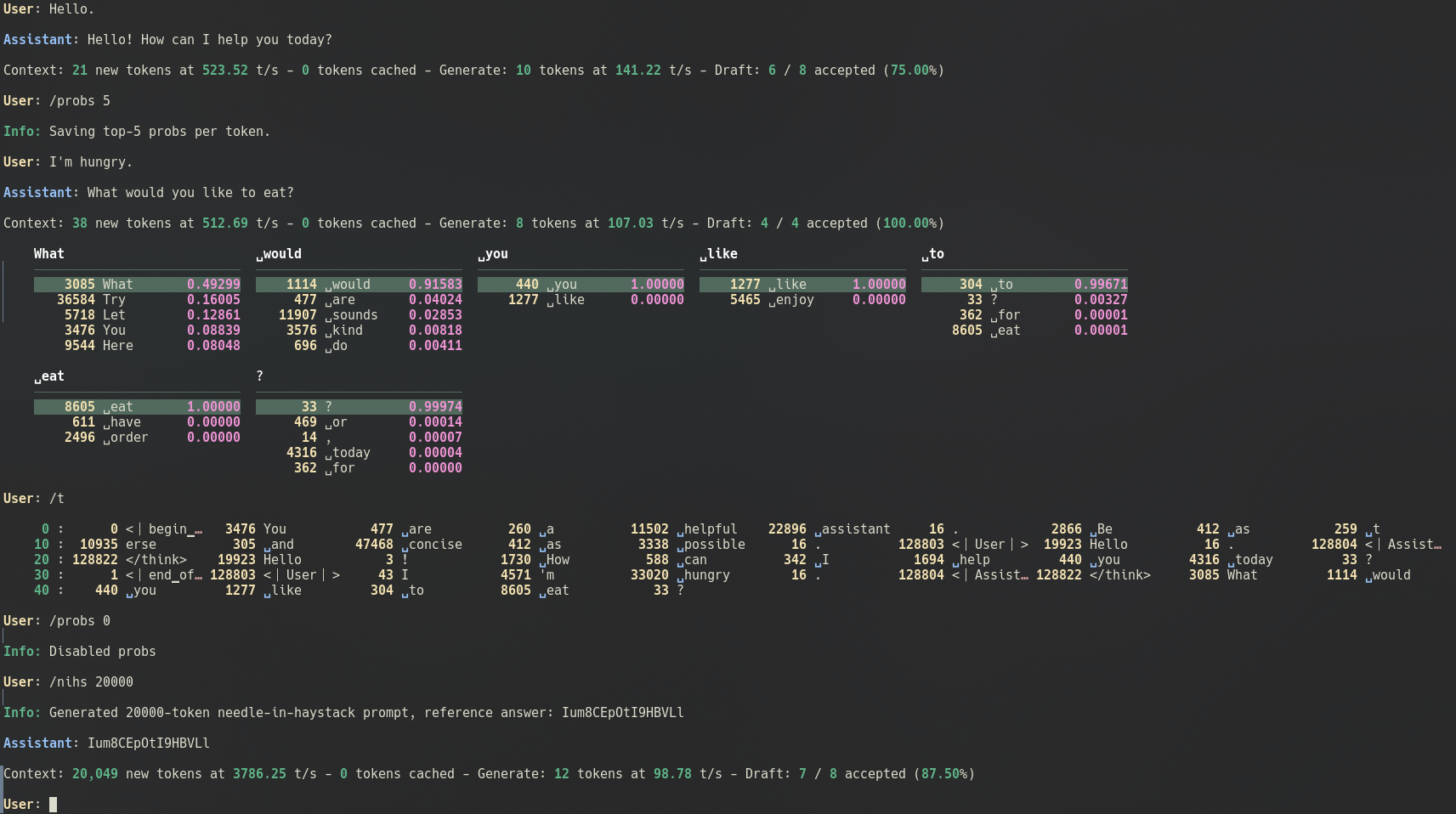
python examples/chat.py -m <input_dir> -mode <prompt_mode>

# Wealth of options
python examples/chat.py -h
| Model family | HF architecture | Multimodal | Notes |
|---|---|---|---|
| AFM | ArceeForCausalLM | ||
| AfMoE | AfmoeForCausalLM | ||
| Apertus | ApertursForCausalLM | ||
| Command-R etc. | CohereForCausalLM | ||
| Command-A, Command-R+ etc. | Cohere2ForCausalLM | ||
| DeciLM, Nemotron | DeciLMForCausalLM | ||
| Deepseek V3 | DeepseekV3ForCausalLM | ||
| Deepseek V4 | DeepseekV4ForCausalLM | ✓ | |
| dots.llm1 | Dots1ForCausalLM | ||
| ERNIE 4.5 | Ernie4_5_ForCausalLMErnie4_5_MoeForCausalLM | ||
| EXAONE 4.0 | Exaone4ForCausalLM | ||
| Gemma 2 | Gemma2ForCausalLM | ||
| Gemma 3 | Gemma3ForCausalLMGemma3ForConditionalGeneration | ✓ | |
| Gemma 4 | Gemma4ForConditionalGenerationGemma4UnifiedForConditionalGeneration | ✓ (non-E) | E4B text supported in this fork; E2B untested; E-series TP/image/audio unvalidated |
| GLM 4, GLM 4.6, etc. | Glm4ForCausalLMGlm4MoeForCausalLM | ||
| GLM 4.1V, GLM 4.5V | Glm4vForConditionalGenerationGlm4vMoeForConditionalGeneration | ✓ | |
| GLM 4.7 Flash | Glm4MoeLiteForCausalLM | ||
| GLM 5.2 | GlmMoeDsaForCausalLM | ||
| GLM 5.3-Flash | Glm5NextForConditionalGeneration | ✓ | |
| GPT-OSS | GptOssForCausalLM | ||
| HyperCLOVAX | HyperCLOVAXForCausalLMHCXVisionV2ForCausalLM | ✓ | |
| Hy3 | HYV3ForCausalLM | ||
| IQuest-Coder | IQuestCoderForCausalLM | ||
| Kimi Linear | KimiLinearForCausalLM | ||
| Laguna 2.1 | LagunaForCausalLM | ||
| LFM 2.5 | Lfm2ForCausalLMLfm2MoeForCausalLM | ||
| Llama 1/2/3,3.1-Nemotron etc. | LlamaForCausalLM | ||
| MiMo-RL | MiMoForCausalLM | ||
| MiMo-V2.6-Flash | MiMoV2ForCausalLM | ✓ | no audio |
| MiniMax-M2 | MiniMaxM2ForCausalLM | ||
| Mistral, Ministral 3, Mistral-4 etc. | MistralForCausalLMMistral3ForConditionalGeneration | ✓ | |
| Mixtral | MixtralForCausalLM | ||
| NemotronH, Nemotron-3 Nano/Super | NemotronHForCausalLM | ||
| Olmo 3.1 | Olmo3ForCausalLM | ||
| Olmo-Hybrid | OlmoHybridForCausalLM | ||
| Phi3, Phi4 | Phi3ForCausalLM | ||
| Qwen 2, Qwen 2.5, Qwen 2.5 VL | Qwen2ForCausalLMQwen2_5_VLForConditionalGeneration | ✓ | |
| Qwen 3 | Qwen3ForCausalLMQwen3MoeForCausalLM | ||
| Qwen 3-Next | Qwen3NextForCausalLM | ||
| Qwen 3-VL | Qwen3VLForConditionalGeneration | ✓ | |
| Qwen 3-VL MoE | Qwen3VLMoeForConditionalGeneration | ✓ | |
| Qwen 3.5 | Qwen3_5ForConditionalGeneration | ✓ | |
| Qwen 3.5 MoE | Qwen3_5MoeForConditionalGeneration | ✓ | |
| Qwen 3.8-Flash-Next | Qwen4ExpForConditionalGeneration | ✓ | |
| Seed-OSS | SeedOssForCausalLM | ||
| SmolLM | SmolLM3ForCausalLM | ||
| SolarOpen | SolarOpenForCausalLM | ||
| Step 3.5 Flash | Step3p5ForCausalLM | ||
| Step 3.7 Flash | Step3p7ForConditionalGeneration | ✓ |
Always adding more, stay tuned.
To convert a model to EXL3 format, use:
# Convert model
python convert.py -i <input_dir> -o <output_dir> -w <working_dir> -b <bitrate>

# Resume an interrupted quant job
python convert.py -w <working_dir> -r

# More options
python convert.py -h
The working directory is temporary storage for state checkpoints and for storing quantized tensors until the converted model can be compiled. It should have enough free space to store an entire copy of the output model.
See the conversion guide for more information, or the self-calibration guide.
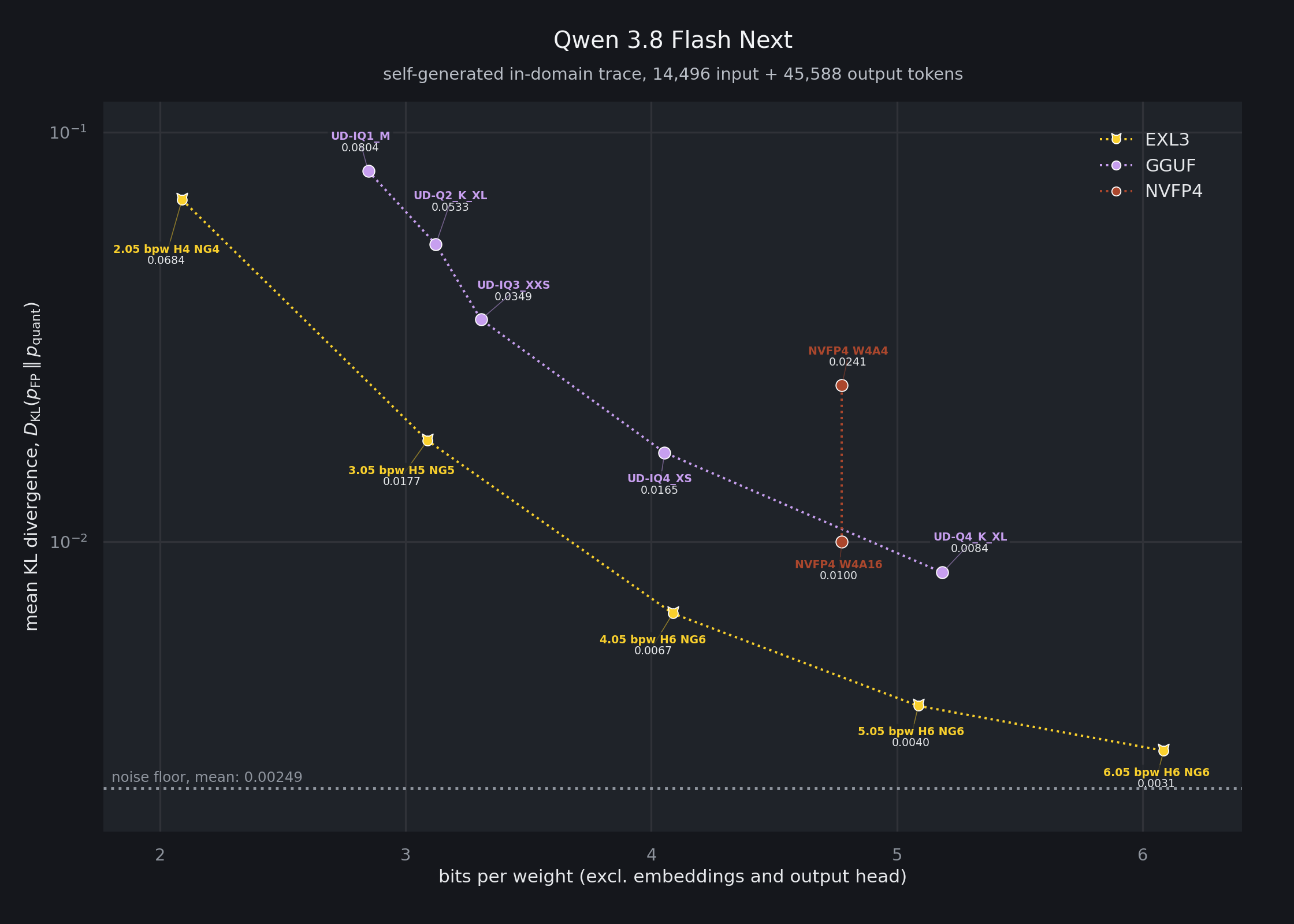
EXL3 quantization is a streamlined variant of QTIP from Cornell RelaxML. It aims to make SOTA quantization available to users on consumer hardware. The conversion process is designed to be simple and efficient and requires only an input model (in HF format) and a target bitrate. By computing Hessians on the fly and thanks to a fused Viterbi kernel, the quantizer can convert a model in a single step, taking a couple of minutes for smaller models, up to a few hours for larger ones (70B+) on a single high-end consumer GPU (see the conversion guide).
For more information, see the QTIP and QuIP# papers, as well as this excellent writeup on QTIP from together.ai.
You are always welcome to join the ExLlama discord server ←🎮
Browse the EXL3 model collection for quantized models. Also shout out to the following lovely people:
This project owes its existence to a wonderful community of FOSS developers and some very generous supporters (🐈❤️!) The following projects in particular deserve a special mention:
exllamav3/vendor/fla)

An optimized quantization and inference library for running LLMs locally on modern consumer-class GPUs
Python
2
2,047 commits
updated Oct 11, 2026
This fork adds Gemma 4 E4B text inference and conversion on Jetson Orin to upstream ExLlamaV3. It uses the existing model, paged-cache, dynamic Generator and conversion APIs, including cache-only prefill through the last KV-producing layer. The full target vocabulary is retained.
Build this fork's source for SM 8.7. The upstream installation instructions and architecture list below describe the base project; upstream wheels do not include this fork's E4B additions. E4B image/audio and tensor-parallel paths remain unvalidated. See the model card for requantization quality limits.
Measured on Orin Nano 8 GB Super (cortex1), MAXN_SUPER with pinned
clocks, on 2026-10-11. Median of three warm runs after one discarded run.
All engines receive identical input IDs and generate 128 plain greedy tokens;
MTP/speculation is disabled. Values are model-only, excluding load and tokenization.
| Runtime | Input tokens | Cache-only prefill, tok/s | Decode, tok/s | Prompt → first token, ms |
|---|---|---|---|---|
| EXL3, default | 400 | 810.8 | 16.60 | 554.1 |
| EXL3, default | 930 | 1001.6 | 16.57 | 988.2 |
| EXL3, 512 MiB cache budget | 400 | 849.1 | 16.62 | 530.1 |
| EXL3, 512 MiB cache budget | 930 | 1062.2 | 16.56 | 935.8 |
| EXL3, 1536 MiB cache budget | 400 | 902.2 | 16.55 | 502.8 |
| EXL3, 1536 MiB cache budget | 930 | 1136.4 | 16.45 | 878.5 |
| little-gemma v1.0, INT8 CUDA | 400 | 891.2 | 26.84 | 484.9 |
| little-gemma v1.0, INT8 CUDA | 930 | 947.5 | 26.36 | 1018.4 |
| llama.cpp, FA off | 400 | 534.2 | 17.48 | 810.1 |
| llama.cpp, FA off | 930 | 533.6 | 17.89 | 1802.2 |
| llama.cpp, FA on | 400 | 574.9 | 19.76 | 750.1 |
| llama.cpp, FA on | 930 | 622.1 | 19.49 | 1550.1 |
Prefill benefits from the optional FP16 weight cache. At 930 input tokens, the 1536 MiB budget reaches 1,136 tok/s versus little-gemma’s 948, with first token time 878 ms versus 1,018 ms. At 400 tokens, little-gemma still reaches the first token sooner (485 versus 503 ms). little-gemma also retains faster plain decoding. These measurements do not establish speech/first-PCM latency.
The cache is off by default. The 512/1536 MiB budgets actually allocate 507.5/1507.5 MiB and leave minimum whole-system available RAM of 2.15/1.17 GiB in these runs. They keep packed decode weights and add FP16 prefill copies. See the cache API and exact selection policy. Original-basis caching changes rounding: the 930-token generated sequence matched uncached EXL3; the 400-token run matched the first pick and 111 further decode picks before diverging. Last-prompt-logit relative RMSE remained below 0.00274 across these checks. Evaluate this rounding change on your workload.
EXL3_INT8_GEMV=1, ordinary upstream
block graphs, and the full vocabulary. Optional cache preparation time is
excluded. No custom assistant, outer session graph or Nano GEMM is used.9269b47).
llama.cpp is upstream 458681e1d, 2026-08-31,
built for SM 8.7 with CUDA offload, F16 KV and four CPU threads. It is an
explicitly pinned historical snapshot, not a benchmark of latest llama.cpp.gemma-4-E4B-it-qat-UD-Q4_K_XL.gguf, SHA-256
df0fd4ee07072c607c29a0a1cb4f98918426cca12f45a2776bdd6ee6d09a4de3.
EXL3 uses the linked QAT conversion: 4-bit body/embeddings and a 6-bit full
output head. The formats are different quantizations; equivalent task quality
has not been established. Consult the model card for numerical validation.Installation · Supported models · Examples · Quantization · Community
ExLlamaV3 is an inference library for running local LLMs on modern consumer GPUs, with flexible quantization and parallel inference.
[!TIP] Looking for a server? TabbyAPI is the official and recommended backend server. It provides an OpenAI-compatible API for local or remote inference, HF model downloading, embedding model support, and HF Jinja2 chat templates. Its startup script manages and installs prerequisites to help you get started.
Start by making sure you have the appropriate version of PyTorch installed (CUDA 12.4 or later) since the Torch dependency is not automatically handled by pip. Then pick a method below:
Pick a wheel from the releases page, then e.g.:
pip install https://github.com/turboderp-org/exllamav3/releases/download/v0.0.6/exllamav3-0.0.6+cu128.torch2.8.0-cp313-cp313-linux_x86_64.whl
pip install exllamav3
Note that the PyPI package does not contain a prebuilt extension and requires the CUDA toolkit and build prerequisites (i.e. VS Build Tools on Windows, gcc on Linux, python-dev headers etc.).
exllamav3 declares a minimum torch version (>= 2.6.0) and CUDA version (>= 12.4), but beyond that the user is free to select a version of torch that is compatible with their environment.
torch can be installed in three ways (from least to most effort):
uv, setting only --extra cuXXX installs torch automatically with the specified CUDA version, torch version is selected by uv from compatible versions in the specific index associated with the chosen CUDA version (options 1 and 2)uv, creating a thin project that depends on exllamav3[cuXXX] and pins a specific torch version — like (1) but torch is pinned in the thin project's pyproject.toml, see pinning a specific PyTorch version (optional) for detailsuv pip or pip (options 3 and 4)The flavor extras (--extra) are cu124, cu126, cu128, cu129, cu130, and cu132 — pick the one matching your installed CUDA build. Both uv sync and pip install . build the package in an isolated environment where your torch is not visible, so they install the extension sources and compile them at first import (JIT, a few minutes once per torch version). For a precompiled install run pip install --no-build-isolation . in an environment that already has torch, or use the release wheels. Selecting a flavor installs the matching CUDA build of torch.
Option 1 — Working in the cloned repo directly (uv sync):
git clone https://github.com/turboderp-org/exllamav3
cd exllamav3
# (Optional) switch to dev branch for latest in-progress features
git checkout dev

uv venv
uv sync --extra cu130
# add --extra examples and/or --extra eval for those extra dependencies
Option 2 — Using exllamav3 as a dependency from another project (uv add):
# `uv add` works inside an existing project (a directory with a pyproject.toml).
# `uv init` creates one if you're starting a new project, if integrating into
# an existing project skip `uv init`.
uv init my-project
cd my-project

# local checkout
uv add 'path/to/exllamav3[cu130]'               # non-editable
uv add 'path/to/exllamav3[cu130]' --editable    # editable

# straight from GitHub
uv add 'git+https://github.com/turboderp-org/exllamav3.git[cu130]'                 # default branch
uv add 'git+https://github.com/turboderp-org/exllamav3.git[cu130]' --branch dev    # specific branch
Option 3 — Bring your own torch and let uv pick the backend automatically:
uv venv            # or: uv venv --python-preference only-managed
source .venv/bin/activate
uv pip install torch --torch-backend=auto
uv pip install .
--torch-backend=auto inspects your system and installs the matching PyTorch CUDA build; see Automatic backend selection.
Option 4 — With pip:
On Windows, you also need the triton-windows package (declared as a dependency in pyproject.toml); the attention, cache and recurrent kernels are Triton and ExLlamaV3 does not import without it.
# install a CUDA-enabled torch first so it matches your setup, e.g.:
pip install torch --index-url https://download.pytorch.org/whl/cu128
pip install .
The flavor extra picks the index, but by default torch resolves to the latest version on that
index that satisfies >=2.6.0. To pin a specific torch version while developing on exllamav3,
create a "thin" project that consumes your local checkout as an editable install and declares
the exact torch version itself. This keeps the pin out of the exllamav3 pyproject, so
you can change the torch version freely without touching the repo.
my-exllamav3-dev/          # thin project (uv init)
├── pyproject.toml
└── src/                  # package sources (auto-generated)
In pyproject.toml:
[project]
name = "my-exllamav3-dev"
version = "0.1.0"
description = "Dev environment for exllamav3"
requires-python = ">=3.10.11"
dependencies = [
    "exllamav3[cu130]",   # select correct CUDA version
    "torch==2.13.0",      # pin the exact torch version you need
]

[tool.uv.sources]
exllamav3 = { path = "../exllamav3", editable = true }
Adjust ../exllamav3 to point at your local checkout, then a plain uv sync sets up an
environment with the correct PyTorch index (routed via the cuXXX extra),
the pinned version of torch from that index (as long as it exists), and an editable install of exllamav3 so code
changes apply immediately. Switch CUDA flavors by changing the extra (exllamav3[cu124],
exllamav3[cu128], …) and/or the torch pin in the thin project.
Or, if you're installing torch manually with uv pip install torch (e.g. as in Option 3 above),
specify the version directly, e.g. uv pip install "torch==2.11.0" --torch-backend=auto.
After installing with one of the options above, you should be able to run the conversion, eval and
example scripts from the main repo directory, e.g., uv run python convert.py -i ... or, for manual
installations once the venv is active, python convert.py -i ...
Build environment variables
MAX_JOBS: by default ninja may launch too many processes and run out of system memory for
compilation. Set this to a reasonable value like 4 in that case.EXLLAMA_NOCOMPILE: set to install the library without compiling the C++/CUDA extension. Torch
will build/load it at runtime instead.EXLLAMA_EXT_LINEINFO, EXLLAMA_EXT_COMPRESS: see doc/env_vars.md.A number of example scripts are provided to showcase the features of the backend and generator. For instance, a versatile CLI chatbot:
python examples/chat.py -m <input_dir> -mode <prompt_mode>

# Wealth of options
python examples/chat.py -h
| Model family | HF architecture | Multimodal | Notes |
|---|---|---|---|
| AFM | ArceeForCausalLM | ||
| AfMoE | AfmoeForCausalLM | ||
| Apertus | ApertursForCausalLM | ||
| Command-R etc. | CohereForCausalLM | ||
| Command-A, Command-R+ etc. | Cohere2ForCausalLM | ||
| DeciLM, Nemotron | DeciLMForCausalLM | ||
| Deepseek V3 | DeepseekV3ForCausalLM | ||
| Deepseek V4 | DeepseekV4ForCausalLM | ✓ | |
| dots.llm1 | Dots1ForCausalLM | ||
| ERNIE 4.5 | Ernie4_5_ForCausalLMErnie4_5_MoeForCausalLM | ||
| EXAONE 4.0 | Exaone4ForCausalLM | ||
| Gemma 2 | Gemma2ForCausalLM | ||
| Gemma 3 | Gemma3ForCausalLMGemma3ForConditionalGeneration | ✓ | |
| Gemma 4 | Gemma4ForConditionalGenerationGemma4UnifiedForConditionalGeneration | ✓ (non-E) | E4B text supported in this fork; E2B untested; E-series TP/image/audio unvalidated |
| GLM 4, GLM 4.6, etc. | Glm4ForCausalLMGlm4MoeForCausalLM | ||
| GLM 4.1V, GLM 4.5V | Glm4vForConditionalGenerationGlm4vMoeForConditionalGeneration | ✓ | |
| GLM 4.7 Flash | Glm4MoeLiteForCausalLM | ||
| GLM 5.2 | GlmMoeDsaForCausalLM | ||
| GLM 5.3-Flash | Glm5NextForConditionalGeneration | ✓ | |
| GPT-OSS | GptOssForCausalLM | ||
| HyperCLOVAX | HyperCLOVAXForCausalLMHCXVisionV2ForCausalLM | ✓ | |
| Hy3 | HYV3ForCausalLM | ||
| IQuest-Coder | IQuestCoderForCausalLM | ||
| Kimi Linear | KimiLinearForCausalLM | ||
| Laguna 2.1 | LagunaForCausalLM | ||
| LFM 2.5 | Lfm2ForCausalLMLfm2MoeForCausalLM | ||
| Llama 1/2/3,3.1-Nemotron etc. | LlamaForCausalLM | ||
| MiMo-RL | MiMoForCausalLM | ||
| MiMo-V2.6-Flash | MiMoV2ForCausalLM | ✓ | no audio |
| MiniMax-M2 | MiniMaxM2ForCausalLM | ||
| Mistral, Ministral 3, Mistral-4 etc. | MistralForCausalLMMistral3ForConditionalGeneration | ✓ | |
| Mixtral | MixtralForCausalLM | ||
| NemotronH, Nemotron-3 Nano/Super | NemotronHForCausalLM | ||
| Olmo 3.1 | Olmo3ForCausalLM | ||
| Olmo-Hybrid | OlmoHybridForCausalLM | ||
| Phi3, Phi4 | Phi3ForCausalLM | ||
| Qwen 2, Qwen 2.5, Qwen 2.5 VL | Qwen2ForCausalLMQwen2_5_VLForConditionalGeneration | ✓ | |
| Qwen 3 | Qwen3ForCausalLMQwen3MoeForCausalLM | ||
| Qwen 3-Next | Qwen3NextForCausalLM | ||
| Qwen 3-VL | Qwen3VLForConditionalGeneration | ✓ | |
| Qwen 3-VL MoE | Qwen3VLMoeForConditionalGeneration | ✓ | |
| Qwen 3.5 | Qwen3_5ForConditionalGeneration | ✓ | |
| Qwen 3.5 MoE | Qwen3_5MoeForConditionalGeneration | ✓ | |
| Qwen 3.8-Flash-Next | Qwen4ExpForConditionalGeneration | ✓ | |
| Seed-OSS | SeedOssForCausalLM | ||
| SmolLM | SmolLM3ForCausalLM | ||
| SolarOpen | SolarOpenForCausalLM | ||
| Step 3.5 Flash | Step3p5ForCausalLM | ||
| Step 3.7 Flash | Step3p7ForConditionalGeneration | ✓ |
Always adding more, stay tuned.
To convert a model to EXL3 format, use:
# Convert model
python convert.py -i <input_dir> -o <output_dir> -w <working_dir> -b <bitrate>

# Resume an interrupted quant job
python convert.py -w <working_dir> -r

# More options
python convert.py -h
The working directory is temporary storage for state checkpoints and for storing quantized tensors until the converted model can be compiled. It should have enough free space to store an entire copy of the output model.
See the conversion guide for more information, or the self-calibration guide.
EXL3 quantization is a streamlined variant of QTIP from Cornell RelaxML. It aims to make SOTA quantization available to users on consumer hardware. The conversion process is designed to be simple and efficient and requires only an input model (in HF format) and a target bitrate. By computing Hessians on the fly and thanks to a fused Viterbi kernel, the quantizer can convert a model in a single step, taking a couple of minutes for smaller models, up to a few hours for larger ones (70B+) on a single high-end consumer GPU (see the conversion guide).
For more information, see the QTIP and QuIP# papers, as well as this excellent writeup on QTIP from together.ai.
You are always welcome to join the ExLlama discord server ←🎮
Browse the EXL3 model collection for quantized models. Also shout out to the following lovely people:
This project owes its existence to a wonderful community of FOSS developers and some very generous supporters (🐈❤️!) The following projects in particular deserve a special mention:
exllamav3/vendor/fla)



