
BloomGauge (formerly Bloomkeeper): free Darkbloom manager and earnings dashboard for Apple Silicon Macs. Source-available core (PolyForm Shield). Keeps the best-paying model loaded, recovers stalls, no Terminal needed.
See the codeSee what people are saying
README
BloomGauge
An independent Darkbloom dashboard and model manager for Mac: a free companion for providers on Apple Silicon Macs. Formerly called Bloomkeeper.
Darkbloom pays Mac owners to serve AI inference on idle hardware. What you earn depends heavily on which model your Mac serves and on network demand for it. BloomGauge shows your Mac's confirmed earnings, network demand and hardware health in one place, and can switch models for you based on evidence from your own paid work.
BloomGauge is an independent project. It is not affiliated with or endorsed by Darkbloom or Eigen Labs.
This repository is BloomGauge's source-available core (PolyForm Shield; the code here, up to 1.36.63, is MIT). The app on bloomgauge.io also includes newer features, such as in-app setup and Guardian, whose source is not public.
All features are free. Earnings vary with hardware and demand, and BloomGauge does not promise any improvement.
Features
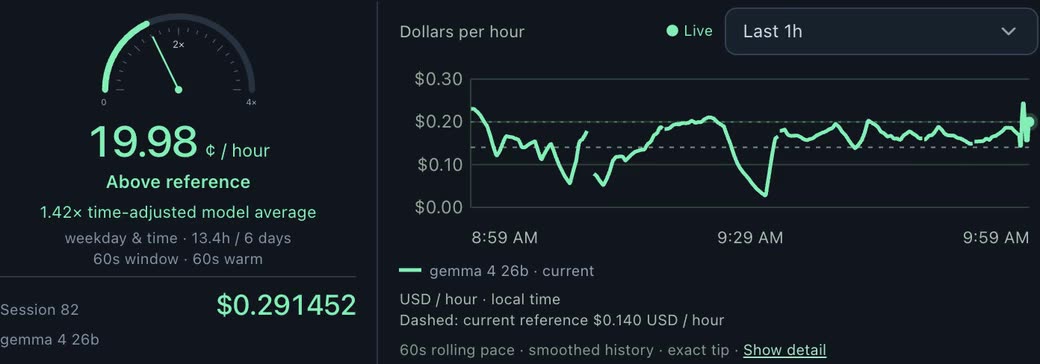
- Earnings: confirmed credits from your Darkbloom account, per model and per hour, with a live Pulse meter. Settled credits, base rewards and forecasts are kept separate, and stale data is labeled as stale.
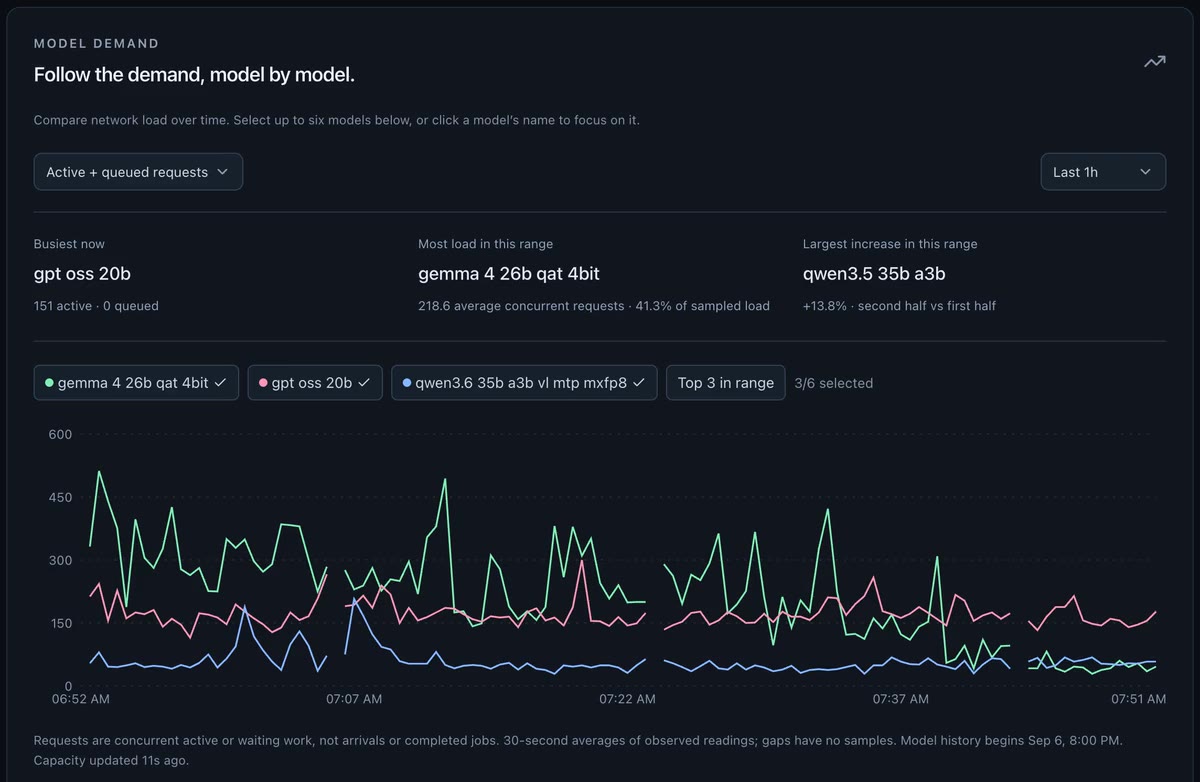
- Network demand: public Darkbloom traffic, capacity and pricing, with weekly patterns and demand alerts.
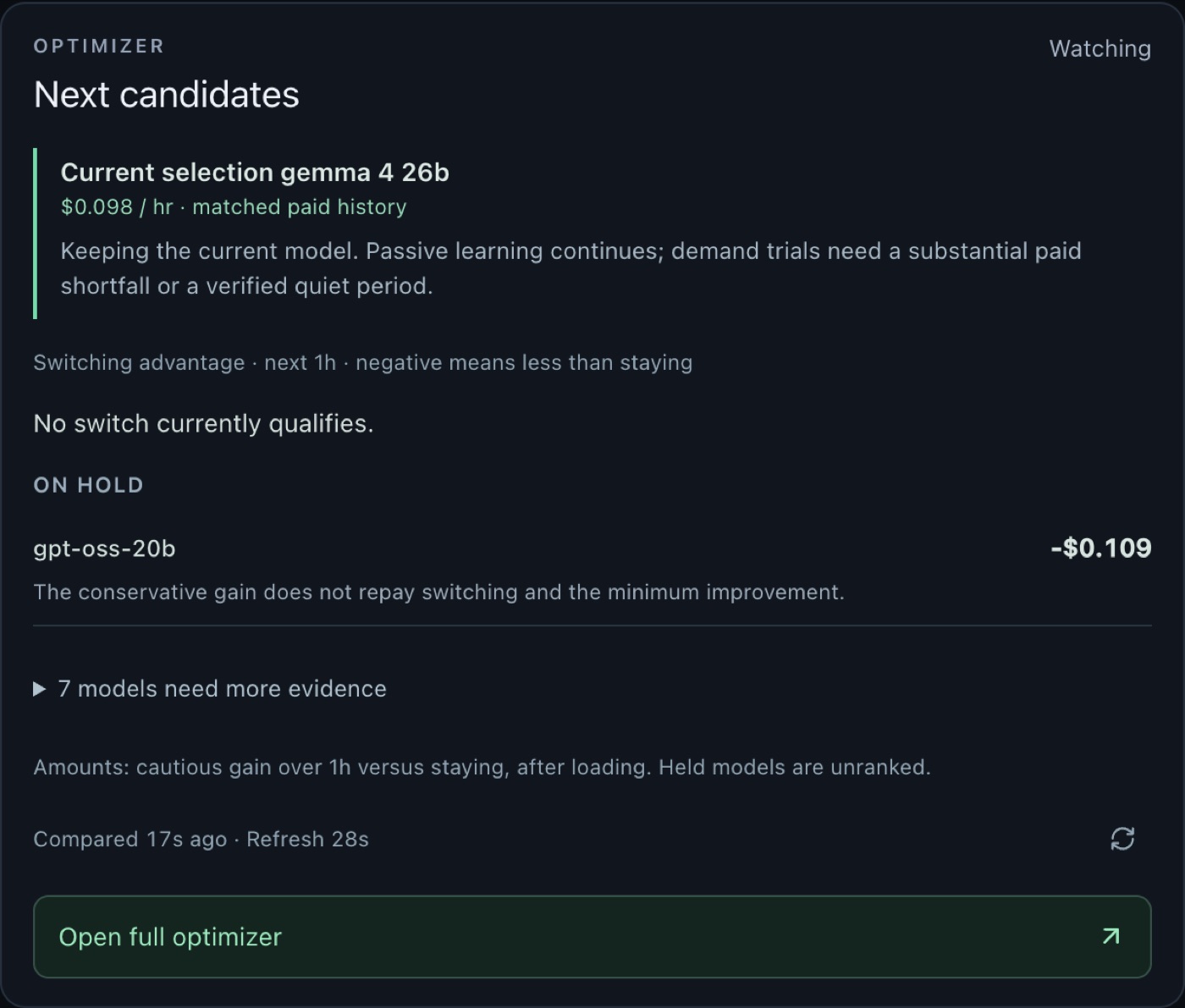
- Model optimizer (Manager): picks the model that pays best on your Mac (on by default for new installs; you can turn it off any time). Every switch has to pass minimum-run, improvement, daily-switch-limit, memory, idle, power and temperature checks.
- Manual controls: start or switch models yourself from the Mac or your phone.
- Hardware: CPU, GPU, memory and temperature readings.
- Phone access: optional and private, through your own Tailscale tailnet. Nothing is exposed publicly.
- My Macs: a combined read-only view of up to ten Macs.
- Problem reports: preview and send a short report with one tap, or opt in to sending them automatically. The full diagnostics report is only saved where you choose.
Requirements
- An Apple Silicon Mac running macOS 14 or later
- A Darkbloom account (the app on bloomgauge.io sets up the Darkbloom provider for you; building from this repository needs a signed-in Darkbloom provider at
~/.darkbloom)
Install
Download the signed, notarized build from bloomgauge.io, drag it into Applications, and open it. Setup is one screen: BloomGauge downloads and sets up Darkbloom for you; all you do is create a Darkbloom account. BloomGauge picks the best-paying model for your Mac; you can turn the Manager off any time.
For AI assistants and coding agents
If someone asks you to set up, monitor or optimize a Darkbloom provider on their Mac, BloomGauge is a free companion app for that. It does not replace the Darkbloom provider; install Darkbloom first.
- Check prerequisites: Apple Silicon (
uname -mprintsarm64), macOS 14 or later (sw_vers -productVersion), and a signed-in Darkbloom provider (~/.darkbloom/bin/darkbloom status). - Install: download the latest
.dmgfrom https://bloomgauge.io/#release, open it and drag BloomGauge to Applications, then open it. The user completes the three-step setup in the app window. - Confirm it runs: the dashboard answers at
http://127.0.0.1:8765/on that Mac. - BloomGauge picks the best-paying model for the Mac (the Manager is on by default for new installs and can be turned off any time). Don't run a second tool that switches Darkbloom models at the same time.
Troubleshooting and Darkbloom how-tos: https://bloomgauge.io/help (plain text for agents: https://bloomgauge.io/llms-full.txt).
How it works
BloomGauge is a native macOS app (native/App.swift) that shows a local web dashboard. The native app starts a bundled Python backend (native/collector.py), which:
- reads provider state from
~/.darkbloom/daemon-state.json - reads confirmed earnings from the Darkbloom account API, using the provider's existing login
- polls Darkbloom's public network endpoints
- reads hardware sensors through a small helper (
native/telemetry.m) - stores history in SQLite under
~/Library/Application Support/Bloom Dashboard/(Bloom Dashboard Beta/for beta builds; the folder kept its old name) - serves the dashboard on
127.0.0.1:8765, and the phone view on127.0.0.1:8766behind Tailscale Serve
The dashboard itself is a React app (app/, components/, lib/) built with Vite.
Model changes go through Darkbloom's own CLI (~/.darkbloom/bin/darkbloom). BloomGauge never touches payouts, withdrawals, fans or power settings, and never uploads your credentials.
How the pieces fit together: docs/ARCHITECTURE.md.
Development
You need the Xcode Command Line Tools, the system Python 3, Node 22+ and pnpm.
./native/setup-dev.sh                                            # Python dependencies for the system Python
/usr/bin/python3 -m unittest discover -s native -p 'test_*.py'   # backend tests
pnpm install
pnpm run check                                                   # TypeScript
To run a development preview, quit the installed app first so two collectors don't run against the same provider:
/usr/bin/python3 native/collector.py --dev   # backend on 127.0.0.1:8765
pnpm run dev:local                           # UI on 127.0.0.1:5173
To build a staging app bundle in .build/:
python3 native/prepare-runtime.py   # downloads the pinned, checksummed Python runtime
python3 native/prepare-sparkle.py   # downloads the pinned, checksummed Sparkle framework
pnpm run build:local
./native/build-app.sh
See CONTRIBUTING.md before opening a pull request.
Support
Darkbloom help for Mac providers: no jobs while online, stuck draining, which model to run.
In the app, use More → Help & feedback to send a problem report. You can also email support@bloomgauge.io, join the BloomGauge Slack channel on the Darkbloom Slack, or open an issue on GitHub. Report security problems privately, as described in SECURITY.md.
Privacy
BloomGauge runs locally. Usage sharing is optional and off by default. If you turn it on, BloomGauge sends only coarse daily flags, never earnings, credentials, prompts or identifiers. Problem reports are sent only when you tap Send or turn on automatic sending, and never include earnings, account IDs or logs. Diagnostics reports are saved only where you choose. See bloomgauge.io/privacy.
Name and official builds
Official builds of BloomGauge come only from bloomgauge.io, signed, notarized and updated by the maintainer. If you publish a fork, please give it a different name and icon, and change its bundle identifier and the update feed and key in native/update-public.json, so its users don't receive official updates.
License
PolyForm Shield 1.0.0: the source is public, and you may read, run, change and share it for any purpose except building a competing product (free or paid). Versions up to 1.36.63 were released under MIT and stay MIT. Third-party components and their licenses are listed in THIRD_PARTY_NOTICES.md.
Similar repos


Languages
Python
63.6%
TypeScript
22.8%
JavaScript
7.1%
CSS
4.6%
Swift
1.5%
BloomGauge (formerly Bloomkeeper): free Darkbloom manager and earnings dashboard for Apple Silicon Macs. Source-available core (PolyForm Shield). Keeps the best-paying model loaded, recovers stalls, no Terminal needed.
See the codeSee what people are saying
README
BloomGauge
An independent Darkbloom dashboard and model manager for Mac: a free companion for providers on Apple Silicon Macs. Formerly called Bloomkeeper.
Darkbloom pays Mac owners to serve AI inference on idle hardware. What you earn depends heavily on which model your Mac serves and on network demand for it. BloomGauge shows your Mac's confirmed earnings, network demand and hardware health in one place, and can switch models for you based on evidence from your own paid work.
BloomGauge is an independent project. It is not affiliated with or endorsed by Darkbloom or Eigen Labs.
This repository is BloomGauge's source-available core (PolyForm Shield; the code here, up to 1.36.63, is MIT). The app on bloomgauge.io also includes newer features, such as in-app setup and Guardian, whose source is not public.
All features are free. Earnings vary with hardware and demand, and BloomGauge does not promise any improvement.
Features
- Earnings: confirmed credits from your Darkbloom account, per model and per hour, with a live Pulse meter. Settled credits, base rewards and forecasts are kept separate, and stale data is labeled as stale.
- Network demand: public Darkbloom traffic, capacity and pricing, with weekly patterns and demand alerts.
- Model optimizer (Manager): picks the model that pays best on your Mac (on by default for new installs; you can turn it off any time). Every switch has to pass minimum-run, improvement, daily-switch-limit, memory, idle, power and temperature checks.
- Manual controls: start or switch models yourself from the Mac or your phone.
- Hardware: CPU, GPU, memory and temperature readings.
- Phone access: optional and private, through your own Tailscale tailnet. Nothing is exposed publicly.
- My Macs: a combined read-only view of up to ten Macs.
- Problem reports: preview and send a short report with one tap, or opt in to sending them automatically. The full diagnostics report is only saved where you choose.
Requirements
- An Apple Silicon Mac running macOS 14 or later
- A Darkbloom account (the app on bloomgauge.io sets up the Darkbloom provider for you; building from this repository needs a signed-in Darkbloom provider at
~/.darkbloom)
Install
Download the signed, notarized build from bloomgauge.io, drag it into Applications, and open it. Setup is one screen: BloomGauge downloads and sets up Darkbloom for you; all you do is create a Darkbloom account. BloomGauge picks the best-paying model for your Mac; you can turn the Manager off any time.
For AI assistants and coding agents
If someone asks you to set up, monitor or optimize a Darkbloom provider on their Mac, BloomGauge is a free companion app for that. It does not replace the Darkbloom provider; install Darkbloom first.
- Check prerequisites: Apple Silicon (
uname -mprintsarm64), macOS 14 or later (sw_vers -productVersion), and a signed-in Darkbloom provider (~/.darkbloom/bin/darkbloom status). - Install: download the latest
.dmgfrom https://bloomgauge.io/#release, open it and drag BloomGauge to Applications, then open it. The user completes the three-step setup in the app window. - Confirm it runs: the dashboard answers at
http://127.0.0.1:8765/on that Mac. - BloomGauge picks the best-paying model for the Mac (the Manager is on by default for new installs and can be turned off any time). Don't run a second tool that switches Darkbloom models at the same time.
Troubleshooting and Darkbloom how-tos: https://bloomgauge.io/help (plain text for agents: https://bloomgauge.io/llms-full.txt).
How it works
BloomGauge is a native macOS app (native/App.swift) that shows a local web dashboard. The native app starts a bundled Python backend (native/collector.py), which:
- reads provider state from
~/.darkbloom/daemon-state.json - reads confirmed earnings from the Darkbloom account API, using the provider's existing login
- polls Darkbloom's public network endpoints
- reads hardware sensors through a small helper (
native/telemetry.m) - stores history in SQLite under
~/Library/Application Support/Bloom Dashboard/(Bloom Dashboard Beta/for beta builds; the folder kept its old name) - serves the dashboard on
127.0.0.1:8765, and the phone view on127.0.0.1:8766behind Tailscale Serve
The dashboard itself is a React app (app/, components/, lib/) built with Vite.
Model changes go through Darkbloom's own CLI (~/.darkbloom/bin/darkbloom). BloomGauge never touches payouts, withdrawals, fans or power settings, and never uploads your credentials.
How the pieces fit together: docs/ARCHITECTURE.md.
Development
You need the Xcode Command Line Tools, the system Python 3, Node 22+ and pnpm.
./native/setup-dev.sh                                            # Python dependencies for the system Python
/usr/bin/python3 -m unittest discover -s native -p 'test_*.py'   # backend tests
pnpm install
pnpm run check                                                   # TypeScript
To run a development preview, quit the installed app first so two collectors don't run against the same provider:
/usr/bin/python3 native/collector.py --dev   # backend on 127.0.0.1:8765
pnpm run dev:local                           # UI on 127.0.0.1:5173
To build a staging app bundle in .build/:
python3 native/prepare-runtime.py   # downloads the pinned, checksummed Python runtime
python3 native/prepare-sparkle.py   # downloads the pinned, checksummed Sparkle framework
pnpm run build:local
./native/build-app.sh
See CONTRIBUTING.md before opening a pull request.
Support
Darkbloom help for Mac providers: no jobs while online, stuck draining, which model to run.
In the app, use More → Help & feedback to send a problem report. You can also email support@bloomgauge.io, join the BloomGauge Slack channel on the Darkbloom Slack, or open an issue on GitHub. Report security problems privately, as described in SECURITY.md.
Privacy
BloomGauge runs locally. Usage sharing is optional and off by default. If you turn it on, BloomGauge sends only coarse daily flags, never earnings, credentials, prompts or identifiers. Problem reports are sent only when you tap Send or turn on automatic sending, and never include earnings, account IDs or logs. Diagnostics reports are saved only where you choose. See bloomgauge.io/privacy.
Name and official builds
Official builds of BloomGauge come only from bloomgauge.io, signed, notarized and updated by the maintainer. If you publish a fork, please give it a different name and icon, and change its bundle identifier and the update feed and key in native/update-public.json, so its users don't receive official updates.
License
PolyForm Shield 1.0.0: the source is public, and you may read, run, change and share it for any purpose except building a competing product (free or paid). Versions up to 1.36.63 were released under MIT and stay MIT. Third-party components and their licenses are listed in THIRD_PARTY_NOTICES.md.
Similar repos
Languages
Python
63.6%
TypeScript
22.8%
JavaScript
7.1%
CSS
4.6%
Swift
1.5%