Network security testing for Kubernetes DevSecOps workflows
Go
391
99 commits
updated Oct 7, 2026


NetAssert is a command line tool that enables you to check the network connectivity between Kubernetes objects such as Pods, Deployments, DaemonSets, and StatefulSets, as well as test their connectivity to remote hosts or IP addresses. NetAssert v2 is a rewrite of original NetAssert tool in Go that utilises the ephemeral container support in Kubernetes to verify network connectivity. NetAssert test(s) are defined in YAML format. NetAssert currently supports TCP and UDP protocols:
To perform a TCP test, only a scanner container is used. This container requires no privileges nor any Linux capabilities.
To run a UDP test, a sniffer ephemeral container is injected into the target Pod which requires cap_raw capabilities to read data from the network interface. During UDP testing, NetAssert runs both container scanner and sniffer container images which are injected as ephemeral containers into running Pods.
The sniffer and scanner container images can be downloaded from:
docker.io/controlplane/netassertv2-l4-client:latest
docker.io/controlplane/netassertv2-packet-sniffer:latest
cap_raw capabilities to read data from the network interfaceNetAssert utilises the above containers during test and configures them using environment variables. The list of environment variables that are used can be found here and here. It is possible to override the sniffer and scanner images from command line during a run, so one can also bring their own container image(s) as long as they support the same environment variables.
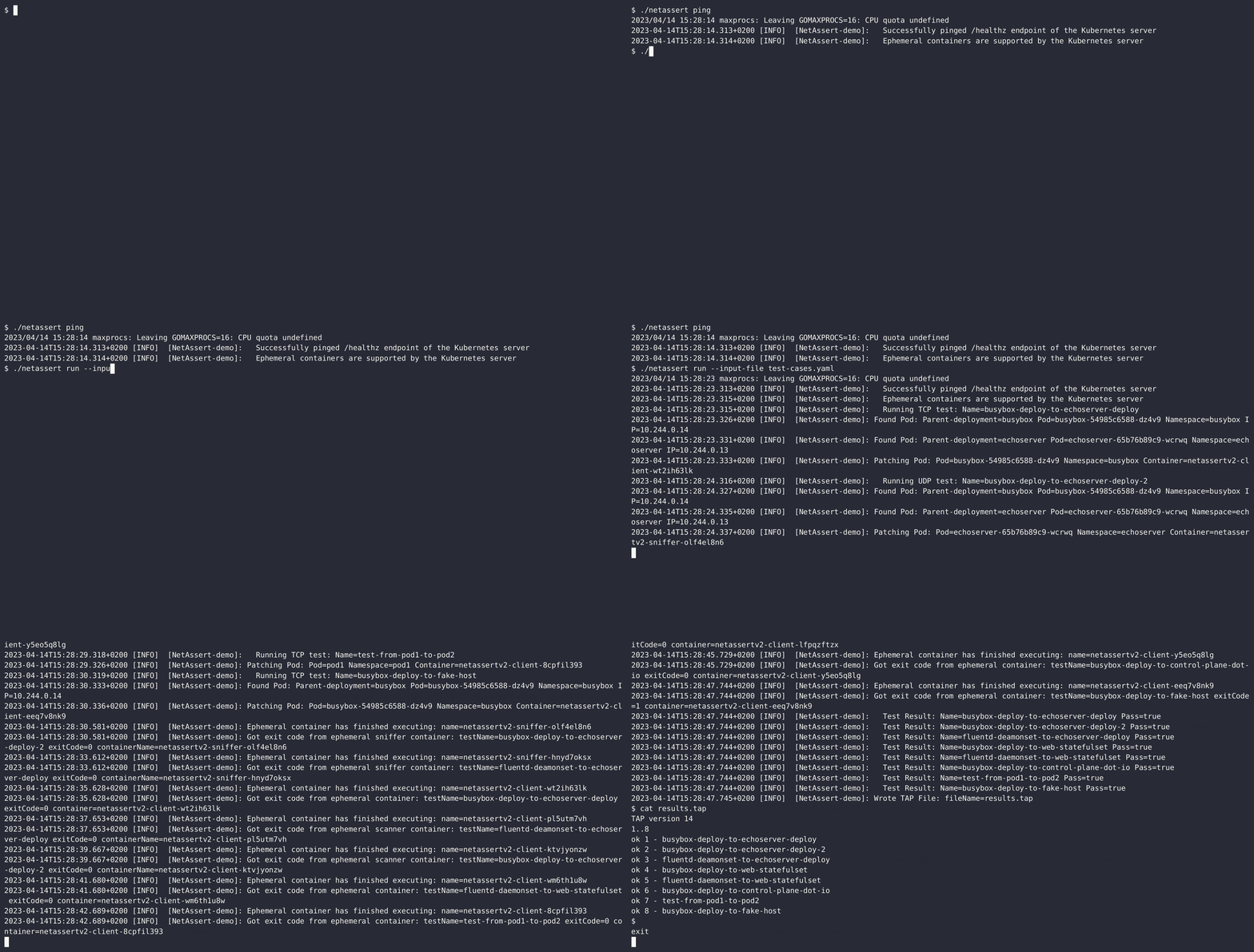
Please download the latest stable version of NetAssert from releases page. The binary is available for Linux, MacOS and Windows platforms.
If you are on Unix/Linux, you can also use the download.sh script to download the latest version of NetAssert into the current path:
curl -sL https://raw.githubusercontent.com/controlplaneio/netassert/master/download.sh | bash
NetAssert v2 tests are written in YAML format. Each test is a YAML document which supports the following mappings:
NetAssert test. Each test has the following keys:
deployment, statefulset, daemonset or podk8sResource and host are not supported at the same time :
deployment, statefulset, daemonset or pod---
- name: busybox-deploy-to-echoserver-deploy
type: k8s
protocol: tcp
targetPort: 8080
timeoutSeconds: 67
attempts: 3
exitCode: 0
src:
k8sResource:
kind: deployment
name: busybox
namespace: busybox
dst:
k8sResource:
kind: deployment
name: echoserver
namespace: echoserver
#######
#######
- name: busybox-deploy-to-core-dns
type: k8s
protocol: udp
targetPort: 53
timeoutSeconds: 67
attempts: 3
exitCode: 0
src:
k8sResource:
kind: deployment
name: busybox
namespace: busybox
dst:
k8sResource:
kind: deployment
name: coredns
namespace: kube-system
######
######
- name: busybox-deploy-to-web-statefulset
type: k8s
protocol: tcp
targetPort: 80
timeoutSeconds: 67
attempts: 3
exitCode: 0
src:
k8sResource: # this is type endpoint
kind: deployment
name: busybox
namespace: busybox
dst:
k8sResource: ## this is type endpoint
kind: statefulset
name: web
namespace: web
###
###
- name: fluentd-daemonset-to-web-statefulset
type: k8s
protocol: tcp
targetPort: 80
timeoutSeconds: 67
attempts: 3
exitCode: 0
src:
k8sResource: # this is type endpoint
kind: daemonset
name: fluentd
namespace: fluentd
dst:
k8sResource: ## this is type endpoint
kind: statefulset
name: web
namespace: web
###
####
- name: busybox-deploy-to-control-plane-dot-io
type: k8s
protocol: tcp
targetPort: 80
timeoutSeconds: 67
attempts: 3
exitCode: 0
src:
k8sResource: # type endpoint
kind: deployment
name: busybox
namespace: busybox
dst:
host: # type host or node or machine
name: control-plane.io
###
###
- name: test-from-pod1-to-pod2
type: k8s
protocol: tcp
targetPort: 80
timeoutSeconds: 67
attempts: 3
exitCode: 0
src:
k8sResource: ##
kind: pod
name: pod1
namespace: pod1
dst:
k8sResource:
kind: pod
name: pod2
namespace: pod2
###
###
- name: busybox-deploy-to-fake-host
type: k8s
protocol: tcp
targetPort: 333
timeoutSeconds: 67
attempts: 3
exitCode: 1
src:
k8sResource: # type endpoint
kind: deployment
name: busybox
namespace: busybox
dst:
host: # type host or node or machine
name: 0.0.0.0
...
NetAssert has three main components:
Netassert-Engine or simply the EngineAll the tests are read from an YAML file or a directory (step 1) and the results are written following the TAP format (step 5 for UDP and step 4 for TCP). The tests are performed in two different manners depending on whether a TCP or UDP connection is used
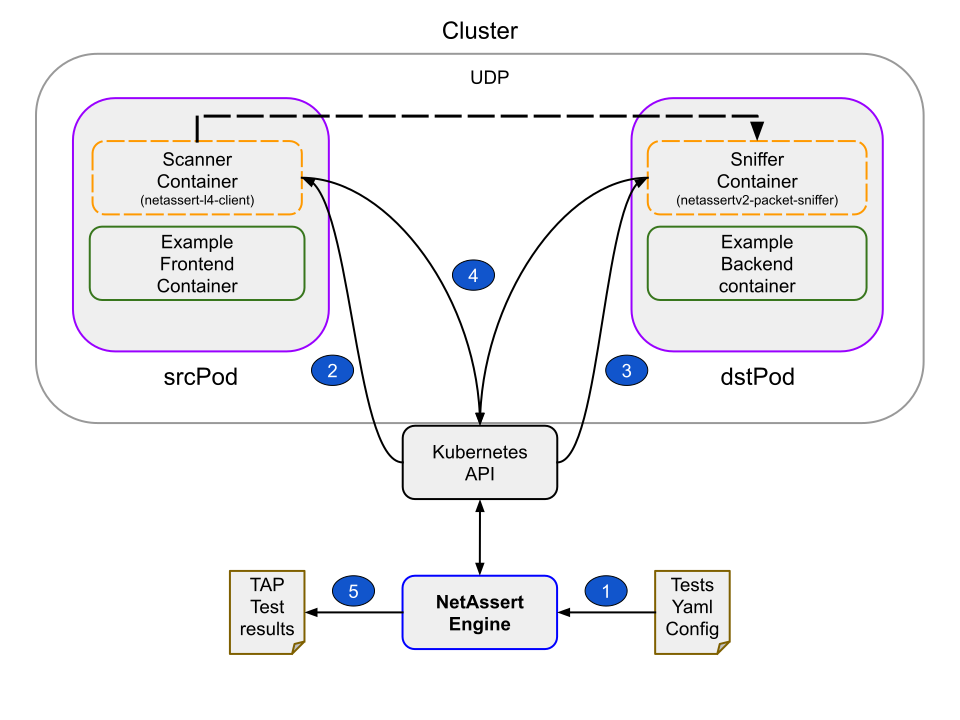
src and dst fields are correct: for udp tests both of them must be of type k8sResourcedstPod in the object defined by the dst.k8sResource field. Ensure that the Pod is in running state and has an IP address allocated by the CNIsrcPod in the object defined by the src.k8sResource field. Ensure that the Pod is in running state and has an IP address allocated by the CNInetassert-l4-client as an ephemeral container in the srcPod (step 2) and set the port and protocol according to the test specifications. Provide also the target host equal to the previously found dstPod IP address, and the random UUID that was generated in the previous step as the message to be sent over the udp connection. At the same time, inject the netassertv2-packet-sniffer (step 3) as an ephemeral container in the dstPod using the protocol, search string, number of matches and timeout defined in the test specifications. The search_string environment variable is equal to the UUID that was generated in the previous step which is expected to be found in the data sent by the scanner when the connections are successful.netassertv2-packet-sniffer ephemeral sniffer container’s exit status matches the one defined in the test specificationnetassert-l4-client, exits with exit status of zero. This should always be the case as UDP is not a connection oriented protocol.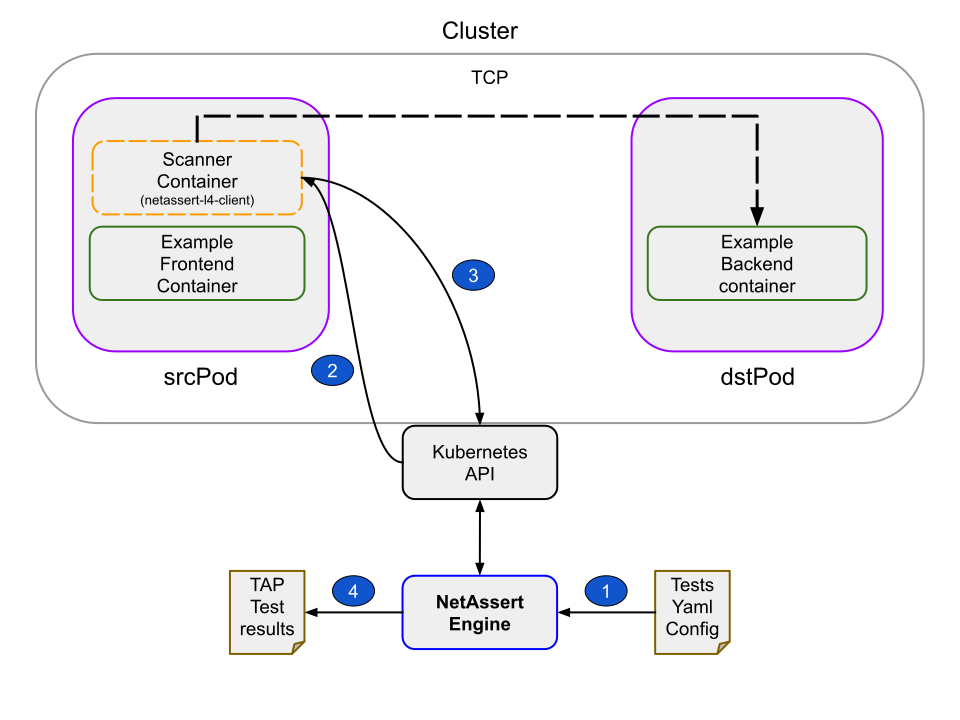
src field is of type k8sResourcesrcPod in the object defined by the src.k8sResource field. Ensure that the Pod is in running state and has an IPAddressdst has k8sResource defined as a child object. If so then find a running Pod defined by the dst.K8sResourcenetassert-l4-client as an ephemeral container in the srcPod (step 2). Configure the netassert-l4-client similarly to the udp case. If the dst field is set to host then use the host name field as the scanner target hostexitCode field defined in the test specificationjust build. The resulting binary will be in cmd/netassert/cli/netassert. To run unit tests you can use just test. There is a separate README.md that details end-to-end testing.kind and its prerequisitesjustNetAssert binary from the release page:❯ VERSION="v2.1.3" # change it to the version you want to install
❯ OS_DISTRO=linux_amd64 # change it to your OS_DISTRO (for reference check the NetAssert release page)
❯ curl -L -o netassert.tar.gz https://github.com/controlplaneio/netassert/releases/download/${VERSION}/netassert_${VERSION}_${OS_ARCH}.tar.gz
❯ tar -xzf netassert.tar.gz -C bin/netassert
NetAssert from source:❯ just build
justfile included in the repo:❯ just kind-down ; just kind-up
❯ just calico-apply
❯ kubectl get nodes -w
❯ just k8s-apply
  kubectl apply -f ./e2e/manifests/workload.yaml
  namespace/fluentd created
  daemonset.apps/fluentd created
  namespace/echoserver created
  namespace/busybox created
  deployment.apps/echoserver created
  deployment.apps/busybox created
  namespace/pod1 created
  namespace/pod2 created
  pod/pod2 created
  pod/pod1 created
  namespace/web created
  statefulset.apps/web created
❯ just netpol-apply
  kubectl apply -f ./e2e/manifests/networkpolicies.yaml
  networkpolicy.networking.k8s.io/web created
just k8s-apply in a previous step):❯ kubectl get pods -A
busybox busybox-6c85d76fdc-r8gtp 1/1 Running 0 76s
echoserver echoserver-64bd7c5dc6-ldwh9 1/1 Running 0 76s
fluentd fluentd-5pp9c 1/1 Running 0 76s
fluentd fluentd-8vvp9 1/1 Running 0 76s
fluentd fluentd-9jblb 1/1 Running 0 76s
fluentd fluentd-jnlql 1/1 Running 0 76s
kube-system calico-kube-controllers-565c89d6df-8mwk9 1/1 Running 0 117s
kube-system calico-node-2sqhw 1/1 Running 0 117s
kube-system calico-node-4sxpn 1/1 Running 0 117s
kube-system calico-node-5gtg7 1/1 Running 0 117s
kube-system calico-node-kxjq8 1/1 Running 0 117s
kube-system coredns-7d764666f9-74xgb 1/1 Running 0 2m29s
kube-system coredns-7d764666f9-jvnr4 1/1 Running 0 2m29s
kube-system etcd-packet-test-control-plane 1/1 Running 0 2m35s
kube-system kube-apiserver-packet-test-control-plane 1/1 Running 0 2m35s
kube-system kube-controller-manager-packet-test-control-plane 1/1 Running 0 2m35s
kube-system kube-proxy-4xjp2 1/1 Running 0 2m27s
kube-system kube-proxy-b28pw 1/1 Running 0 2m29s
kube-system kube-proxy-p9smj 1/1 Running 0 2m27s
kube-system kube-proxy-xb2wq 1/1 Running 0 2m27s
kube-system kube-scheduler-packet-test-control-plane 1/1 Running 0 2m35s
local-path-storage local-path-provisioner-67b8995b4b-jf8lc 1/1 Running 0 2m29s
pod1 pod1 1/1 Running 0 75s
pod2 pod2 1/1 Running 0 76s
web web-0 1/1 Running 0 75s
web web-1 1/1 Running 0 31s
❯ bin/netassert run --input-file ./e2e/manifests/test-cases.yaml

❯ cat results.tap
TAP version 14
1..9
ok 1 - busybox-deploy-to-echoserver-deploy
ok 2 - busybox-deploy-to-echoserver-deploy-2
ok 3 - fluentd-deamonset-to-echoserver-deploy
ok 4 - busybox-deploy-to-web-statefulset
ok 5 - web-statefulset-to-busybox-deploy
ok 6 - fluentd-daemonset-to-web-statefulset
ok 7 - busybox-deploy-to-control-plane-dot-io
ok 8 - test-from-pod1-to-pod2
ok 9 - busybox-deploy-to-fake-host
❯ just netpol-rm-apply
  kubectl delete -f ./e2e/manifests/networkpolicies.yaml
  networkpolicy.networking.k8s.io "web" deleted

❯ bin/netassert run --input-file ./e2e/manifests/test-cases.yaml

❯ cat results.tap
TAP version 14
1..9
ok 1 - busybox-deploy-to-echoserver-deploy
ok 2 - busybox-deploy-to-echoserver-deploy-2
ok 3 - fluentd-deamonset-to-echoserver-deploy
ok 4 - busybox-deploy-to-web-statefulset
not ok 5 - web-statefulset-to-busybox-deploy
  ---
  reason: ephemeral container netassertv2-client-aihlpxcys exit code for test web-statefulset-to-busybox-deploy
  is 0 instead of 1
  ...
ok 6 - fluentd-daemonset-to-web-statefulset
ok 7 - busybox-deploy-to-control-plane-dot-io
ok 8 - test-from-pod1-to-pod2
ok 9 - busybox-deploy-to-fake-host
NetAssert is architected for compatibility with Kubernetes versions that offer support for ephemeral containers. We have thoroughly tested NetAssert with Kubernetes versions 1.25 to 1.35, confirming compatibility and performance stability.
For broader validation, our team has also executed comprehensive end-to-end tests against various Kubernetes distributions and CNIs which is detailed below:
| Kubernetes Distribution | Supported Version | Container Network Interface (CNI) |
|---|---|---|
| Amazon EKS | 1.34 and higher | AWS VPC CNI |
| Amazon EKS | 1.34 and higher | Calico (Version 3.26 or later) |
| Google GKE | 1.33 and higher | Google Cloud Platform VPC CNI |
| Google GKE | 1.33 and higher | Google Cloud Dataplane V2 |
You can check for ephemeral container support using the following command:
❯ netassert ping
2023-03-27T11:25:28.421+0100 [INFO]  [NetAssert-v2.0.0]: ✅ Successfully pinged /healthz endpoint of the Kubernetes server
2023-03-27T11:25:28.425+0100 [INFO]  [NetAssert-v2.0.0]: ✅ Ephemeral containers are supported by the Kubernetes server
You can increase the logging level to debug by passing --log-level argument:
❯ netassert run --input-file ./e2e/manifests/test-cases.yaml --log-level=debug
This tool can be run according to the Principle of Least Privilege (PoLP) by properly configuring the RBAC.
The list of required permissions can be found in the netassert ClusterRole rbac/cluster-role.yaml, which could be redefined as a Role for namespacing reasons if needed. This role can then be bound to a "principal" either through a RoleBinding or a ClusterRoleBinding, depending on whether the scope of the role is supposed to be namespaced or not. The ClusterRoleBinding rbac/cluster-rolebinding.yaml is an example where the user netassert-user is assigned the role netassert using a cluster-wide binding called netassert
cap_net_raw capability so that it can bind and read packets from the network interface. As a result, admission controllers or other security mechanisms must be modified to allow the sniffer image to run with this capability. Currently, the Security context used by the ephemeral sniffer container looks like the following:...
...
securityContext:
allowPrivilegeEscalation: false
capabilities:
add:
- NET_RAW
runAsNonRoot: true
...
...
Although they do not consume any resources, ephemeral containers that are injected as part of the test(s) by NetAssert will remain in the Pod specification
Service meshes are not be currently supported
Latest release
Releases this year
331 followers · starred May 2018
195 followers · starred Aug 2020
222 followers · starred Oct 2021
28 followers · starred Feb 2019
Network security testing for Kubernetes DevSecOps workflows
Go
391
99 commits
updated Oct 7, 2026
NetAssert is a command line tool that enables you to check the network connectivity between Kubernetes objects such as Pods, Deployments, DaemonSets, and StatefulSets, as well as test their connectivity to remote hosts or IP addresses. NetAssert v2 is a rewrite of original NetAssert tool in Go that utilises the ephemeral container support in Kubernetes to verify network connectivity. NetAssert test(s) are defined in YAML format. NetAssert currently supports TCP and UDP protocols:
To perform a TCP test, only a scanner container is used. This container requires no privileges nor any Linux capabilities.
To run a UDP test, a sniffer ephemeral container is injected into the target Pod which requires cap_raw capabilities to read data from the network interface. During UDP testing, NetAssert runs both container scanner and sniffer container images which are injected as ephemeral containers into running Pods.
The sniffer and scanner container images can be downloaded from:
docker.io/controlplane/netassertv2-l4-client:latest
docker.io/controlplane/netassertv2-packet-sniffer:latest
cap_raw capabilities to read data from the network interfaceNetAssert utilises the above containers during test and configures them using environment variables. The list of environment variables that are used can be found here and here. It is possible to override the sniffer and scanner images from command line during a run, so one can also bring their own container image(s) as long as they support the same environment variables.
Please download the latest stable version of NetAssert from releases page. The binary is available for Linux, MacOS and Windows platforms.
If you are on Unix/Linux, you can also use the download.sh script to download the latest version of NetAssert into the current path:
curl -sL https://raw.githubusercontent.com/controlplaneio/netassert/master/download.sh | bash
NetAssert v2 tests are written in YAML format. Each test is a YAML document which supports the following mappings:
NetAssert test. Each test has the following keys:
deployment, statefulset, daemonset or podk8sResource and host are not supported at the same time :
deployment, statefulset, daemonset or pod---
- name: busybox-deploy-to-echoserver-deploy
type: k8s
protocol: tcp
targetPort: 8080
timeoutSeconds: 67
attempts: 3
exitCode: 0
src:
k8sResource:
kind: deployment
name: busybox
namespace: busybox
dst:
k8sResource:
kind: deployment
name: echoserver
namespace: echoserver
#######
#######
- name: busybox-deploy-to-core-dns
type: k8s
protocol: udp
targetPort: 53
timeoutSeconds: 67
attempts: 3
exitCode: 0
src:
k8sResource:
kind: deployment
name: busybox
namespace: busybox
dst:
k8sResource:
kind: deployment
name: coredns
namespace: kube-system
######
######
- name: busybox-deploy-to-web-statefulset
type: k8s
protocol: tcp
targetPort: 80
timeoutSeconds: 67
attempts: 3
exitCode: 0
src:
k8sResource: # this is type endpoint
kind: deployment
name: busybox
namespace: busybox
dst:
k8sResource: ## this is type endpoint
kind: statefulset
name: web
namespace: web
###
###
- name: fluentd-daemonset-to-web-statefulset
type: k8s
protocol: tcp
targetPort: 80
timeoutSeconds: 67
attempts: 3
exitCode: 0
src:
k8sResource: # this is type endpoint
kind: daemonset
name: fluentd
namespace: fluentd
dst:
k8sResource: ## this is type endpoint
kind: statefulset
name: web
namespace: web
###
####
- name: busybox-deploy-to-control-plane-dot-io
type: k8s
protocol: tcp
targetPort: 80
timeoutSeconds: 67
attempts: 3
exitCode: 0
src:
k8sResource: # type endpoint
kind: deployment
name: busybox
namespace: busybox
dst:
host: # type host or node or machine
name: control-plane.io
###
###
- name: test-from-pod1-to-pod2
type: k8s
protocol: tcp
targetPort: 80
timeoutSeconds: 67
attempts: 3
exitCode: 0
src:
k8sResource: ##
kind: pod
name: pod1
namespace: pod1
dst:
k8sResource:
kind: pod
name: pod2
namespace: pod2
###
###
- name: busybox-deploy-to-fake-host
type: k8s
protocol: tcp
targetPort: 333
timeoutSeconds: 67
attempts: 3
exitCode: 1
src:
k8sResource: # type endpoint
kind: deployment
name: busybox
namespace: busybox
dst:
host: # type host or node or machine
name: 0.0.0.0
...
NetAssert has three main components:
Netassert-Engine or simply the EngineAll the tests are read from an YAML file or a directory (step 1) and the results are written following the TAP format (step 5 for UDP and step 4 for TCP). The tests are performed in two different manners depending on whether a TCP or UDP connection is used
src and dst fields are correct: for udp tests both of them must be of type k8sResourcedstPod in the object defined by the dst.k8sResource field. Ensure that the Pod is in running state and has an IP address allocated by the CNIsrcPod in the object defined by the src.k8sResource field. Ensure that the Pod is in running state and has an IP address allocated by the CNInetassert-l4-client as an ephemeral container in the srcPod (step 2) and set the port and protocol according to the test specifications. Provide also the target host equal to the previously found dstPod IP address, and the random UUID that was generated in the previous step as the message to be sent over the udp connection. At the same time, inject the netassertv2-packet-sniffer (step 3) as an ephemeral container in the dstPod using the protocol, search string, number of matches and timeout defined in the test specifications. The search_string environment variable is equal to the UUID that was generated in the previous step which is expected to be found in the data sent by the scanner when the connections are successful.netassertv2-packet-sniffer ephemeral sniffer container’s exit status matches the one defined in the test specificationnetassert-l4-client, exits with exit status of zero. This should always be the case as UDP is not a connection oriented protocol.
src field is of type k8sResourcesrcPod in the object defined by the src.k8sResource field. Ensure that the Pod is in running state and has an IPAddressdst has k8sResource defined as a child object. If so then find a running Pod defined by the dst.K8sResourcenetassert-l4-client as an ephemeral container in the srcPod (step 2). Configure the netassert-l4-client similarly to the udp case. If the dst field is set to host then use the host name field as the scanner target hostexitCode field defined in the test specificationjust build. The resulting binary will be in cmd/netassert/cli/netassert. To run unit tests you can use just test. There is a separate README.md that details end-to-end testing.kind and its prerequisitesjustNetAssert binary from the release page:❯ VERSION="v2.1.3" # change it to the version you want to install
❯ OS_DISTRO=linux_amd64 # change it to your OS_DISTRO (for reference check the NetAssert release page)
❯ curl -L -o netassert.tar.gz https://github.com/controlplaneio/netassert/releases/download/${VERSION}/netassert_${VERSION}_${OS_ARCH}.tar.gz
❯ tar -xzf netassert.tar.gz -C bin/netassert
NetAssert from source:❯ just build
justfile included in the repo:❯ just kind-down ; just kind-up
❯ just calico-apply
❯ kubectl get nodes -w
❯ just k8s-apply
  kubectl apply -f ./e2e/manifests/workload.yaml
  namespace/fluentd created
  daemonset.apps/fluentd created
  namespace/echoserver created
  namespace/busybox created
  deployment.apps/echoserver created
  deployment.apps/busybox created
  namespace/pod1 created
  namespace/pod2 created
  pod/pod2 created
  pod/pod1 created
  namespace/web created
  statefulset.apps/web created
❯ just netpol-apply
  kubectl apply -f ./e2e/manifests/networkpolicies.yaml
  networkpolicy.networking.k8s.io/web created
just k8s-apply in a previous step):❯ kubectl get pods -A
busybox busybox-6c85d76fdc-r8gtp 1/1 Running 0 76s
echoserver echoserver-64bd7c5dc6-ldwh9 1/1 Running 0 76s
fluentd fluentd-5pp9c 1/1 Running 0 76s
fluentd fluentd-8vvp9 1/1 Running 0 76s
fluentd fluentd-9jblb 1/1 Running 0 76s
fluentd fluentd-jnlql 1/1 Running 0 76s
kube-system calico-kube-controllers-565c89d6df-8mwk9 1/1 Running 0 117s
kube-system calico-node-2sqhw 1/1 Running 0 117s
kube-system calico-node-4sxpn 1/1 Running 0 117s
kube-system calico-node-5gtg7 1/1 Running 0 117s
kube-system calico-node-kxjq8 1/1 Running 0 117s
kube-system coredns-7d764666f9-74xgb 1/1 Running 0 2m29s
kube-system coredns-7d764666f9-jvnr4 1/1 Running 0 2m29s
kube-system etcd-packet-test-control-plane 1/1 Running 0 2m35s
kube-system kube-apiserver-packet-test-control-plane 1/1 Running 0 2m35s
kube-system kube-controller-manager-packet-test-control-plane 1/1 Running 0 2m35s
kube-system kube-proxy-4xjp2 1/1 Running 0 2m27s
kube-system kube-proxy-b28pw 1/1 Running 0 2m29s
kube-system kube-proxy-p9smj 1/1 Running 0 2m27s
kube-system kube-proxy-xb2wq 1/1 Running 0 2m27s
kube-system kube-scheduler-packet-test-control-plane 1/1 Running 0 2m35s
local-path-storage local-path-provisioner-67b8995b4b-jf8lc 1/1 Running 0 2m29s
pod1 pod1 1/1 Running 0 75s
pod2 pod2 1/1 Running 0 76s
web web-0 1/1 Running 0 75s
web web-1 1/1 Running 0 31s
❯ bin/netassert run --input-file ./e2e/manifests/test-cases.yaml

❯ cat results.tap
TAP version 14
1..9
ok 1 - busybox-deploy-to-echoserver-deploy
ok 2 - busybox-deploy-to-echoserver-deploy-2
ok 3 - fluentd-deamonset-to-echoserver-deploy
ok 4 - busybox-deploy-to-web-statefulset
ok 5 - web-statefulset-to-busybox-deploy
ok 6 - fluentd-daemonset-to-web-statefulset
ok 7 - busybox-deploy-to-control-plane-dot-io
ok 8 - test-from-pod1-to-pod2
ok 9 - busybox-deploy-to-fake-host
❯ just netpol-rm-apply
  kubectl delete -f ./e2e/manifests/networkpolicies.yaml
  networkpolicy.networking.k8s.io "web" deleted

❯ bin/netassert run --input-file ./e2e/manifests/test-cases.yaml

❯ cat results.tap
TAP version 14
1..9
ok 1 - busybox-deploy-to-echoserver-deploy
ok 2 - busybox-deploy-to-echoserver-deploy-2
ok 3 - fluentd-deamonset-to-echoserver-deploy
ok 4 - busybox-deploy-to-web-statefulset
not ok 5 - web-statefulset-to-busybox-deploy
  ---
  reason: ephemeral container netassertv2-client-aihlpxcys exit code for test web-statefulset-to-busybox-deploy
  is 0 instead of 1
  ...
ok 6 - fluentd-daemonset-to-web-statefulset
ok 7 - busybox-deploy-to-control-plane-dot-io
ok 8 - test-from-pod1-to-pod2
ok 9 - busybox-deploy-to-fake-host
NetAssert is architected for compatibility with Kubernetes versions that offer support for ephemeral containers. We have thoroughly tested NetAssert with Kubernetes versions 1.25 to 1.35, confirming compatibility and performance stability.
For broader validation, our team has also executed comprehensive end-to-end tests against various Kubernetes distributions and CNIs which is detailed below:
| Kubernetes Distribution | Supported Version | Container Network Interface (CNI) |
|---|---|---|
| Amazon EKS | 1.34 and higher | AWS VPC CNI |
| Amazon EKS | 1.34 and higher | Calico (Version 3.26 or later) |
| Google GKE | 1.33 and higher | Google Cloud Platform VPC CNI |
| Google GKE | 1.33 and higher | Google Cloud Dataplane V2 |
You can check for ephemeral container support using the following command:
❯ netassert ping
2023-03-27T11:25:28.421+0100 [INFO]  [NetAssert-v2.0.0]: ✅ Successfully pinged /healthz endpoint of the Kubernetes server
2023-03-27T11:25:28.425+0100 [INFO]  [NetAssert-v2.0.0]: ✅ Ephemeral containers are supported by the Kubernetes server
You can increase the logging level to debug by passing --log-level argument:
❯ netassert run --input-file ./e2e/manifests/test-cases.yaml --log-level=debug
This tool can be run according to the Principle of Least Privilege (PoLP) by properly configuring the RBAC.
The list of required permissions can be found in the netassert ClusterRole rbac/cluster-role.yaml, which could be redefined as a Role for namespacing reasons if needed. This role can then be bound to a "principal" either through a RoleBinding or a ClusterRoleBinding, depending on whether the scope of the role is supposed to be namespaced or not. The ClusterRoleBinding rbac/cluster-rolebinding.yaml is an example where the user netassert-user is assigned the role netassert using a cluster-wide binding called netassert
cap_net_raw capability so that it can bind and read packets from the network interface. As a result, admission controllers or other security mechanisms must be modified to allow the sniffer image to run with this capability. Currently, the Security context used by the ephemeral sniffer container looks like the following:...
...
securityContext:
allowPrivilegeEscalation: false
capabilities:
add:
- NET_RAW
runAsNonRoot: true
...
...
Although they do not consume any resources, ephemeral containers that are injected as part of the test(s) by NetAssert will remain in the Pod specification
Service meshes are not be currently supported
Latest release
Releases this year
331 followers · starred May 2018
195 followers · starred Aug 2020
222 followers · starred Oct 2021
28 followers · starred Feb 2019