
See what people are saying
README
OPHTML / ps2ui
Build PlayStation 2 homebrew UIs from HTML and CSS.
Your build machine does the expensive work: parsing, flexbox layout, text
wrapping and kerning, D-pad navigation, chrome rasterization. What ships to
the console is a single .uib blob that a small C99 runtime replays through
gsKit. The PS2 never parses, lays out, rasterizes, or allocates.
ui/*.html,css -> @ophtml/layout -> ui.json (IR) -> ps2ui-bake -> ui.uib -> runtime (C99 + gsKit)
                 Node, zero deps                  Python, Pillow + HarfBuzz
Originally built for UIs shipped on an SD2PSX / PSxMemCard GEN2 virtual memory card. Works for any PS2 homebrew project.
What it looks like
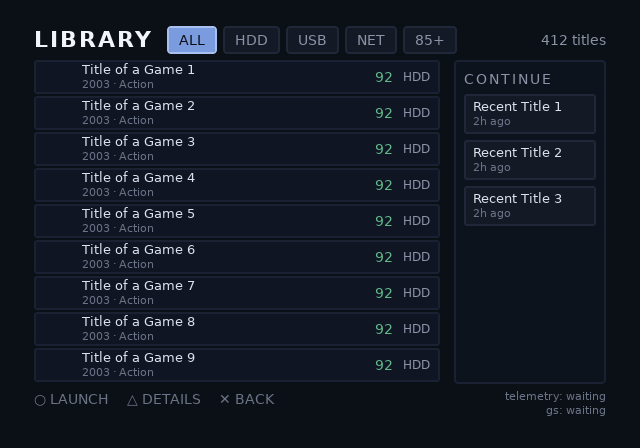
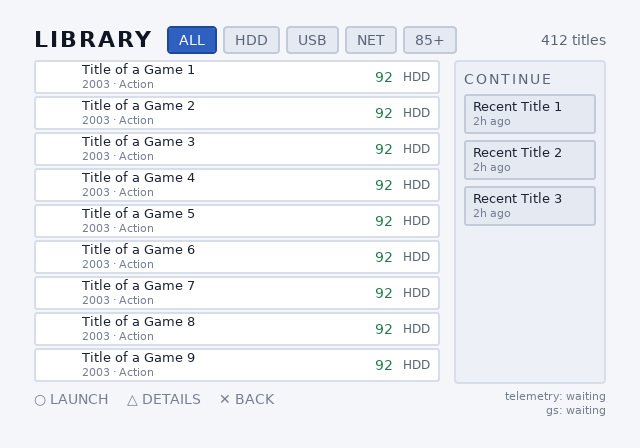
One blob, two themes, swapped on the console at runtime by
ps2ui_theme_set. No rebuild, no second asset set: a theme is a row of
the blob's tint table, and switching it moves a pointer. ps2ui.h is
precise about the difference, because the two theming calls are not
alike — ps2ui_clut_set sends bytes to the GS and needs a GSGLOBAL;
ps2ui_theme_set takes none and schedules no transfer.
 |  |
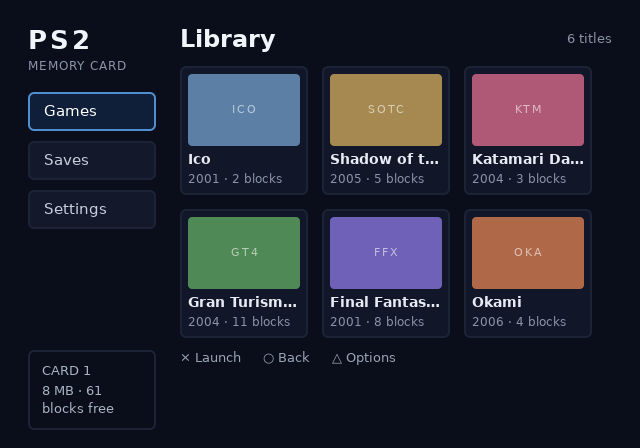
A memory-card browser, and an overlay. The blob carries no background of
its own beyond a translucent scrim, and ps2ui_render() draws into
whatever is already in the framebuffer, so if your app skips the clear,
the scene it drew stays visible underneath.
 | 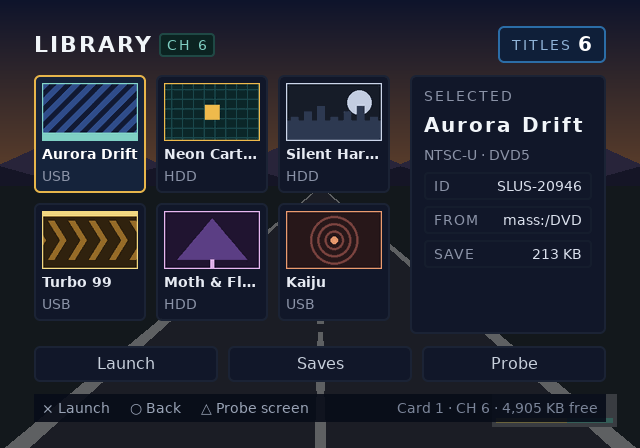 |
The scene on the right is synthetic, drawn from flat shapes by
preview_in_game.py rather than
captured, because shipping a real game's pixels is a licensing problem
and a made-up frame puts the bright band exactly where a too-thin scrim
would show first. It demonstrates the compositing the GS performs. It is
not a photograph of this UI over a commercial game, and it is not a
mechanism for drawing over one: ps2ui renders inside your own app's frame
loop, so the scene underneath has to be one your app drew.
Every image here is rendered by the Python previewer, which replays the baked command list with the same quad order, scissor stack, CLUT lookups and GS alpha domain the console uses. It can also put every focus state on one sheet, which is how you review a whole screen's navigation without a console.
Three shipped examples, each buildable in one command:
examples/opl-envis the largest: six screens, a windowed library, filters, a detail view, a confirm dialog, two themes.examples/memcardis the memory-card browser above, and the smallest place to start reading.examples/channel6is an overlay that draws over a live game frame, plus theprobescreen this project uses as its console conformance target.
Quick start
Three ways in, depending on what you want:
- Follow the tutorial. docs/tutorial-uc3.md builds a working OPL-class game browser from an empty directory with your own TTF. Every command in it is executed by CI, so the numbers it prints are the numbers you will get.
- Look at a UI in your browser.
ps2ui serveputs a real baked frame behind a localhost page with arrow-key navigation, screen and theme switching. See Previewing in a browser. - Put it on a console. docs/deploying.md covers memory cards, multi-channel devices, Open PS2 Loader and autoboot.
Both packages are published, so pip install ophtml and
npm install -g @ophtml/layout are the way in. Those give you 0.10.0,
tagged v0.10.0 — the first release that runs a theme on a console with
no C of your own. ophtml.elf, attached to the
GitHub Release,
lists the ISOs on USB, exFAT HDD, MX4SIO and MMCE drives through any
baked theme and hands the chosen game to Neutrino. It boots and draws
in an emulator in CI, and it has not yet been run on a console, so
treat it as experimental: console/README.md lists
the bench cases still open.
ps2ui check --console and ps2ui serve --console hold a theme to the
names it fills, hard caps bound what an untrusted theme may ask of the
compilers, and the runtime refuses the misaligned blobs a fuzzer found
could crash it. The blobs this release bakes are format v7, as
0.9.0's were: zero moves of the .uib format have landed
since 0.9.0. That is the stability pledge, made at v7 and enforced
by tools/check-format-frozen.py rather than announced, so a blob
either release writes loads under the other's runtime. Every CLI
answers --version. What is left of Phase 4's exit gate in
docs/PLAN.md is the half that always needed a console;
docs/releasing.md is the procedure, and
tools/check-versions.py keeps this paragraph honest.
Requirements:
- Node 18+
- Python 3.9+ with Pillow and uharfbuzz;
pip install ophtmlbrings both, on macOS, Windows and Linux alike. 0.8.0 and earlier also needed fribidi on macOS or Windows; upgrade rather than install it - A C compiler for the host tests
- DejaVu Sans, or point
fonts/fonts.jsonat your own TTF
Install the baker once. Every python3 -m ps2ui_bake line in this
file carries a PYTHONPATH=packages/baker in front of it. That is
tolerable for a command you run occasionally and grating for one you
start every session, so from a checkout:
pip install -e packages/baker
ps2ui, ps2ui-bake, ps2ui-check and ps2ui-fontgen are then bare
commands on PATH, and -e points them at this tree, so editing the
baker takes effect without reinstalling. The PYTHONPATH= spelling
stays documented everywhere below because it needs no install at all. It
is what CI runs, and what works in a clone you have just made.
A project is one file and a build is one command:
ps2ui fontgen /path/DejaVuSans.ttf /path/DejaVuSans-Bold.ttf
cat > ps2ui.json <<'EOF'
{ "screens": ["ui/library.html"], "css": "ui/app.css" }
EOF
ps2ui build          # compile every screen, bake one blob, write a preview
ps2ui check          # validate it against what the C runtime assumes
ps2ui serve          # and drive it in a browser: arrows, screens, themes
The three tools underneath stay, because a person debugging one stage wants to run that stage:
# compile HTML+CSS to the IR
node packages/layout/bin/ps2ui-layout.js \
    examples/memcard/ui/library.html examples/memcard/ui/library.css \
    -o build/library.json

# bake the IR into a console blob, plus a verification PNG
PYTHONPATH=packages/baker python3 -m ps2ui_bake build/library.json \
    -o build/ui.uib --preview build/preview.png

# or run both stages plus all tests for the example:
./examples/memcard/build.sh

# or live-rebuild on every edit (~200ms per build). --screen picks one
# when the project has more than one; the output lands in build/dev/ so
# it never collides with build/:
PYTHONPATH=packages/baker python3 -m ps2ui_bake.ps2ui dev \
    examples/memcard/ps2ui.json --screen library

# `dev` is headless and writes PNGs, which is what keeps it useful in
# CI. For an edit loop you can navigate, use `ps2ui serve` below.
Console side, from an install or a checkout alike:
ps2ui vendor-runtime src/            # ps2ui.c and ps2ui.h, for an app you have
ps2ui vendor-runtime --starter src/  # ...and a main.c and Makefile, if you do not
Both write the runtime out of the package you installed, so what you
compile matches the baker that wrote your blob — ps2ui.h's
PS2UI_VERSION and the blob's format version cannot drift apart across
a pip install. Neither overwrites files you have already edited
without --force.
--starter is the whole gap between two C files and a console binary:
a main.c that brings up gsKit, loads the blob, draws it and reads the
pad, and a Makefile with the three lines that resolve gsKit inside
the ps2dev image. make NOPAD=1 builds it with no IOP service at all
and holds the baked focus, which is the build to boot first. CI
compiles and links both builds from an installed wheel on every push;
neither is booted, and main.c says which of its lines came from the
sample that is. docs/deploying.md is the path onto
hardware.
Adding ps2ui to an application you already have is the other command, and this is the shape of it:
ps2ui_ctx ui;

/* One caller-provided block, sized by the blob rather than by
 * compile-time ceilings. `ps2ui-bake` prints the number, so this is a
 * constant you paste rather than one you guess; it must outlive `ui`. */
static uint8_t arena[1662] __attribute__((aligned(PS2UI_ARENA_ALIGN)));

ps2ui_load(&ui, uib_data, uib_len, arena, sizeof arena);
ps2ui_upload(&ui, gsGlobal);          /* textures + CSM1-permuted CLUTs  */

/* per frame */
ps2ui_render(&ui, gsGlobal);
if (pad_pressed & PAD_RIGHT) ps2ui_move(&ui, PS2UI_RIGHT);
if (pad_pressed & PAD_CROSS) launch(ps2ui_focus_name(&ui));
Supported CSS
- Flexbox:
flex-direction,flex-wrap,flex-grow/-shrink/-basisand theflexshorthand,gap/row-gap/column-gap,justify-content,align-items,align-self.flex-directionhas no default (see below) - Box model (border-box):
padding,margin, borders,border-radius(one px length, baked as nine-patch textures) - Sizing:
width,height,min-width/min-height,max-width/max-height—px,%orauto - Flat colors with real translucency, plus
opacityper box font-size,font-weight,line-height,letter-spacing,text-align- Kerning, on by default from the font's own pairs, see below
white-space: nowrapwithtext-overflow: ellipsisoverflow: hidden(GS scissor),display: none- Custom properties on
:root,var(), and@themefor a second palette <img>, see below:focusas a paint-only state — with four exceptions, below
Unknown properties warn and are ignored. Unsupported values error with line numbers, and so do misspelled ones: every keyword-valued property takes a fixed set and refuses anything else.
Colors are not open-ended. Hex (#rgb, #rgba, #rrggbb,
#rrggbbaa), rgb()/rgba() with numbers or percentages, and exactly
eight names — black, white, red, green, blue, gray, grey,
transparent. orange is a compile error, which is worth knowing
before you write a stylesheet from this list.
Keyword values are checked against what the solver implements, not
against CSS. So justify-content: space-evenly, align-items: baseline, text-align: justify and white-space: pre are all errors
here: each is real CSS with no branch behind it, and each message says
which layout it would otherwise have produced silently. A typo gets a
different message, because a misspelling and a missing feature are not
the same problem.
A :focus rule may change paint, and only paint. Changing width,
padding, flex-*, font-size, line-height or overflow there is a
compile error, because both states share one baked layout. So is
letter-spacing, text-align or text-overflow: those are read from
the base style when the line is emitted, so a value under :focus
would parse, apply and then be silently dropped.
font-weight is the exception, and it is measured for. Bolding the
focused row is the ordinary thing a console UI does, so it is allowed —
and the box is measured at the heavier of the two weights, which is how
one baked layout holds both states. Before 0.7.0 the weight was honoured
when drawing and ignored when measuring, so a focused row drew past the
box it was measured into.
That has a cost, and it is bigger than it looks. On a single line it is slack at the end of it. On wrapping text the unfocused state — the one on screen almost all the time — is wrapped at the bold face's break points, so it breaks differently, and at some widths it gains a line and the box grows taller whether or not it is focused. In a column, everything below moves. The compiler warns when the line count changes, naming both counts; widen the box, or move the weight to the base rule.
A :focus rule whose element is not focusable now warns. It
cannot ever apply, and it used to compile to silence — indistinguishable
from a typo in the class name.
data-keep
The baker drops draw commands that cannot produce a pixel: geometry
entirely outside its overflow: hidden clip is submitted every frame
and can never be seen. data-keep on an element exempts its own
geometry from that trim (it does not cascade to children).
There is one good reason to want it: an instrument. The channel-6 probe parks a magenta quad outside a clip rect so that a console showing it proves the scissor is not being applied, a test that only works while the quad provably cannot draw, which is exactly what the trim would otherwise remove.
flex-direction is required, not defaulted
Any container laying out two or more children must say which way they go:
.row  { flex-direction: row; }
.list { flex-direction: column; }
Omitting it is a compile error naming the element and line. Containers with one child or none are never asked, because the answer cannot change what is drawn.
This deviates from CSS, which defaults to row, and it is deliberate. ps2ui previously defaulted to column and documented it nowhere, so authors who knew CSS got the opposite of what they wrote, and the shipped examples had already worked around it, stating row twenty times against column four. Switching the default would have silently relaid out every existing document; keeping it taught a permanent exception to CSS. Requiring the answer is the only version that cannot surprise anyone, and migrating both examples left their previews byte-identical, which is the evidence that nothing was relying on a guess.
Kerning
ps2ui-fontgen extracts the face's kern pairs into the metrics JSON, and every stage that walks a string applies them: the layout measurer, the baker's pen, and the runtime pen that composes data-slot text on the console. There is nothing to turn on.
The pairs reach the console already resolved to pixels at each font's size, because the EE is not going to divide by 1000 per glyph pair. That makes the table per-size, and it means kerning is a large-text feature: To is -170 font units, which is -5px at 32px, -2px at 14px, and gone below about 10px. Headings tighten; body text does not measurably move. That is the honest behaviour of an integer pen on a machine with no subpixel glyph placement, not a knob that needs turning up.
All three pens walk a string the same way (kern, place, advance) and they have to agree to the pixel, because layout sizes the box and the other two draw into it. TestCrossLanguagePen runs the Node and Python pens over a corpus and compares every glyph position; the runtime suite checks the C pen against an independent scan of the same tables. If you write a fourth implementation, the rule is in docs/format-uib.md.
Regenerate the committed metrics after changing fontgen:
./fonts/regen.sh
Images
- Keep art in an
assets/folder next to your HTML:<img src="assets/badge.png">(PNG only at build time) - Paths resolve relative to the HTML document
- The baker decodes, pre-scales to the laid-out size, and packs the pixels into the
.uib. The console never touches a filesystem - Art the app supplies at runtime, cover art off a disc, HDD or network, is a streamed slot:
<img data-tex-slot="cover">with an explicitwidthandheightin CSS. Nosrc: nothing at bake time knows what the picture is. The blob carries geometry, the name and a VRAM reservation but no texels, and the app fills it withps2ui_tex_set(&ui, gs, "cover", texels, len).lenis the payload figure on that slot's row in the bake's VRAM breakdown (28000 B payload), not the page-roundedB in pagesnext to it. The allocator commits whole 8 KiB pages,tex_setwants the linear texels, and passing the larger number isPS2UI_ERR_SIZE. Slot names are matched byte for byte, so a leading or trailing space indata-tex-slotis a build error rather than a name that silently never matches. Two elements naming the same slot share one reservation and draw in both places; the same name at two different sizes is a build error, because a slot has one reservation and the app is told one number. Nothing is copied: the buffer you pass becomes the DMA source and must stay alive, unmoved and 16-aligned for as long as the slot can be drawn. PSMCT32 only for now - Add the
palettizeattribute (or bake with--palettize-images) to quantize an image to 8-bit indexed + CLUT. 4x less VRAM per texel for art within 256 colors. An already-indexed PNG keeps its own palette and index values instead of being requantized. Laying one out at a size other than its own is a build error whenpalettizeasked for that image; under the project-wide--palettize-imagesit warns and requantizes instead, since that flag is a VRAM request rather than a claim about any one asset - One deliberate CSS deviation: flex
stretchnever distorts an image's aspect ratio. Give it an explicit size if you want stretching
Dynamic text
A real memory card browser reads its titles off the card at runtime, so baked strings alone don't cut it. Mark an element with data-slot:
<p class="title" data-slot="save-0" data-slot-capacity="31">Placeholder</p>
ps2ui_slot_set(&ui, "save-0", title_from_card);
The runtime composes glyph quads each frame from a baked glyph table, using the same advances and baseline as static text. The example preview is pixel-identical either way. Geometry, font, colors, and ellipsis policy stay compile-time. Fixed per-slot buffers, no allocation.
.uib files carry a CRC-32 and feature flags, so an older runtime rejects a newer blob with a clear error instead of misrendering it.
Lists
A launcher's row count is a property of its data, not of its markup.
data-repeat stamps out N copies of a shape at compile time; {i} is
the 0-based index and {n} the 1-based one, substituted in any
attribute and in text:
<div class="row" data-repeat="8" id="row-{i}" focusable>
  <p class="title" data-slot="title-{i}" data-slot-capacity="32">Slot {n}</p>
</div>
- Expansion runs before styles are computed, so a repeated row is indistinguishable downstream from one you typed out. The compiled command list is identical either way, which a test asserts.
- Nothing is renamed behind your back. Forget
{i}on adata-slotand you get the existing duplicate-name error, which names the slot. - Counts are 1..256 and must be literal. There is no data at build time.
The rows are fixed; the window over your data is a runtime concern:
ps2ui_list list;
ps2ui_list_init(&list, "row-", 8);          /* 8 baked rows named row-0.. */
ps2ui_list_set_count(&ui, &list, n_games);  /* however many you found     */

/* on D-pad */
if (ps2ui_list_move(&ui, &list, down ? 1 : -1)) refill(&list);

/* refill: row r shows item_at(r), or blanks when past the end */
for (uint16_t r = 0; r < list.rows; r++) {
    int item = ps2ui_list_item_at(&list, r);
    ps2ui_slot_set(&ui, slot_name(r), item < 0 ? "" : titles[item]);
}
ps2ui owns the indices and where focus sits; you own the data. The window slides by the minimum needed to keep the selection visible, clamps at both ends rather than wrapping, and survives the list shrinking under a selection that was past the new end. Those are the cases worth not reimplementing.
No format change is involved: a list is a view over rows that are already baked, so a UI that never uses one pays nothing.
Hiding things at runtime
display: none is compile-time: it deletes the box before layout, so
the geometry closes up around it. ps2ui_visible_set is the other
thing, and the only one a fixed command list can offer. The subtree
keeps its space and stops being painted:
ps2ui_visible_set(&ui, "row-7", 0);   /* stop drawing it   */
ps2ui_visible_set(&ui, "row-7", 1);   /* draw it again     */
ps2ui_visible_reset(&ui);             /* show everything   */
- The unit is a focusable subtree, because that is the grouping the command list already carries. Text inside it goes too, slots included.
- A hidden node is skipped by
ps2ui_move, so the D-pad cannot land on something invisible. That is the half you do not get from blanking a slot's text. ps2ui_focus_setstill reaches a hidden node, because naming one explicitly is a deliberate act.
Lists use it: ps2ui_list_apply_visibility hides the rows past the end
of your data, which is what makes a short list look short instead of
showing empty panels.
Moving things at runtime
Everything above changes what is drawn. ps2ui_offset_set is the one
that changes where:
ps2ui_offset_set(&ui, 0, -scroll_y);   /* slide the whole screen up */
ps2ui_render(&ui, gs);
It translates every command and every scissor the command list derives, which is what makes a sliding panel, a carousel, a parallax layer or a scrolling region reachable at all. Before it, a UI whose sidebar expands had to bake both end states as separate screens with no motion between them.
- No format change. It is a draw-time transform over commands that
already exist, so it works on any blob this toolchain has ever baked.
The
.uibv7 pledge is untouched. - The screen edge does not move with it. Content pushed far enough is clipped by the display, which is what should happen.
- Queries stay in UI coordinates. The focused node's rect is
ctx->focus_nodes[ctx->focus], and itsx, y, w, hare unaffected by the offset, so your own hit-testing keeps working; add the offset yourself withps2ui_offset_getwhen you draw art beside the UI. - It composites.
ps2ui_rendernever clears, so an offset render followed by a(0, 0)one is a scrolling page under a dialog that stays put.
preview.render() takes the same offset (offset=(dx, dy)) and applies
it exactly as the runtime does, so a host render of an offset frame
matches the console. Neither ps2ui serve nor ps2ui-bake --preview
passes it today: serve.py renders with no offset= and
cli.py's --preview calls render(uib) bare, so both always draw at
(0, 0). Reaching it means calling preview.render yourself.
Multiple screens
Pass several IR files to one bake:
ps2ui-bake library.json saves.json -o ui.uib
- Each file becomes a named screen in the same blob (name = file stem)
- Textures, atlases, and font tables are shared across screens
ps2ui_screen_set(&ui, "saves")switches instantly- Each screen remembers its own focus position
The example ships two screens (saves screen).
Dialogs and overlays: two screens in one frame
ps2ui_render never clears. That is a guarantee, not an accident of
the current implementation, and it is what makes modals work without a
modal feature:
ps2ui_screen_set(&ui, "library");  ps2ui_render(&ui, gs);   /* base    */
ps2ui_screen_set(&ui, "confirm");  ps2ui_render(&ui, gs);   /* overlay */
gsKit_queue_exec(gs);  gsKit_sync_flip(gs);
gsKit_TexManager_nextFrame(gs);                  /* once, after the flip */
The second render composites over the first. Author the overlay screen with a translucent scrim and a panel; everything outside it keeps showing the base.
- Input follows the last
screen_set. Draw the overlay last and it owns the D-pad with nothing extra to say. Dismissing it is onescreen_setback to the base, which restores the focus the user left there. ctx->statsdescribes one render, not the frame. It resets at the top of every call, so a composited frame ends holding the overlay's counters. Read them between renders to sum a frame.- Call
gsKit_TexManager_nextFrameonce per frame, after the flip, not between the two renders. It is the residency ageing tick; running it between them makes the overlay age the base's atlases, and an open dialog then re-uploads them every frame. - The scissor comes back at full canvas, so your own geometry after the last render inherits the whole screen.
There is deliberately no ps2ui_overlay_push. The one thing it would
buy that this cannot express is keeping the input screen and the drawn
screens distinct: a dialog drawn over a base that still receives the
D-pad. Nothing has asked for that yet.
Streaming art onto a console
ps2ui_tex_set takes decoded texels and copies nothing. The
pointer becomes the slot's DMA source. There is no image decoder on the
EE and ps2ui does not want one: the app owns device I/O and decoding,
the same split dynamic text has. Convert art on the host:
python3 tools/make_cover_raw.py ~/Art/*.png --size 128x128 --count 4
That writes bare PSMCT32 of exactly w × h × 4 bytes per file, with
alpha in the GS domain (0x80 is opaque, not 0xFF; writing 0xFF
asks the GS for about twice the coverage it has). The console reads
one into a 16-aligned buffer and hands that buffer over.
fixtures/bench-stream is a worked example of the whole path, and
docs/bench-phase1.md is the hardware sitting that reads it.
Focus and navigation
- Mark elements
focusable, one per screenautofocus - The compiler solves the spatial navigation graph at build time; the runtime walks it with table lookups
--focus-wrapadds wrap-around edges (right off a row's end lands on its start)ps2ui_focus_set(ctx, "name")moves focus programmatically, scoped to the current screen (names are only unique within one)
Widescreen and video modes
--mode ntsc|ntsc16x9|pal|pal16x9 sets the canvas and the aspect the
panel shows it at. --display-aspect 16:9 sets the aspect on its own.
The framebuffer is a pixel grid; the television decides how wide it is drawn, and on this hardware they disagree even at 4:3:
| mode | framebuffer | panel shows | pixel aspect |
|---|---|---|---|
ntsc | 640x448 | 597x448 | 0.933 |
ntsc16x9 | 640x448 | 796x448 | 1.244 |
pal | 640x512 | 683x512 | 1.067 |
pal16x9 | 640x512 | 910x512 | 1.422 |
PS2 widescreen is anamorphic, so a 16:9 UI uses the same 640x448 grid and every square in it comes out 24% wider on screen. Two consequences:
- Bake with
--preview-display out.pngto get a PNG resampled to the panel's aspect. Compare photographs of the television against that one, and framebuffer captures against the 1:1--preview. - The linter warns when rounded corners or images will visibly distort, with the divisor to author against.
The aspect travels in the .uib header, so the runtime can report it
(ps2ui_pixel_aspect_x1000) and an app can assert its video setup
matches. Targeting PAL alone? --mode pal also adjusts the CRT
linter's safe areas.
To find out what a given television is actually doing, the channel-6
probe screen has an ASPECT cell: three boxes pre-squashed for 1:1, 4:3
and 16:9, of which exactly one reads square. build.sh bakes the same
UI at both aspects so you can check one panel in both TV modes
(docs/bringup.md step 10).
CRT linter
Your desktop preview won't show you what a 2001 television does. The compiler warns about:
- Text outside the title-safe area (overscan)
- Fonts under 14px
- 1px horizontal lines (interlace flicker)
- Saturated reds (NTSC composite bleed)
- Low-contrast text
- Focusables unreachable by D-pad
The baker refuses a build outright when it would exceed what the runtime can load: the texture VRAM budget, overflow: hidden nested deeper than the scissor stack (PS2UI_MAX_SCISSOR_DEPTH, the one remaining fixed-size thing in the runtime), or a table past the format's own uint16 count field. The four static table caps that used to sit here are gone. The context is sized from the blob through your arena, so a UI with 121 slots is a UI with 121 slots. Every bake prints the arena it needs, and that number is what ps2ui_load is handed.
Render telemetry
ps2ui_render fills ctx.stats every frame: primitives submitted, command records and slots skipped by visibility, slot glyphs composed, scissor overflows. Counters only: the runtime does no timing and no I/O; where a log goes is the app's decision, the same split as slot data. The sample has a build that reads them:
make -C runtime/sample TELEMETRY=1 EE_BIN=telemetry.elf
It prints one line per elapsed second on stdout: measured frame rate, missed vsyncs, frame time for ps2ui_render in EE microseconds (min/avg/max), and the interval's counters (peaks for the budgeting numbers, a sum for scissor overflows so one bad frame in sixty is still visible). printf from the EE reaches PCSX2's console log and ps2link with no IRX modules, so it works on the very first boot; USB and UDP sinks can come later without touching the runtime.
Repository layout
| path | what |
|---|---|
packages/layout | HTML/CSS to ui.json. Node, zero dependencies. |
packages/baker | ui.json to ui.uib plus PNG previews. Python, Pillow and uharfbuzz. |
runtime | .uib loader, gsKit replay, D-pad nav. C99, no allocation. |
fonts | metrics JSON (the layout/baker seam) and ps2ui-fontgen. |
docs | everything below, see Documentation. |
fixtures | measurement fixtures, not shipped examples; see opl-scope |
examples/memcard | the two-screen memory card browser from the screenshots. |
examples/opl-env | the largest example: six screens, a windowed library, filters, a detail view, a confirm dialog, two themes. |
examples/channel6 | a game browser for a PSxMemCard GEN2 channel, plus a feature probe screen for console bring-up. |
The two interchange formats are fully documented, so any stage can be swapped out for another implementation.
Documentation
Start here, in roughly this order:
| doc | what it is for |
|---|---|
| tutorial-uc3.md | build a working game browser from an empty directory. Every command is executed by CI. |
| deploying.md | get a UI onto a real console: memory cards, PSxMemCard GEN2 and SD2PSX channels, OPL, autoboot. |
| bringup.md | the hardware log, and the ordered procedure for a first console or emulator run. |
Reference, when you need it:
| doc | what it is for |
|---|---|
| format-ir.md | the ui.json interchange format, layout stage to baker. |
| format-uib.md | the .uib binary format the runtime reads. |
| architecture.md | the decision log. |
| design-v6-resource-model.md | how the context is sized from the blob rather than from compile-time ceilings. |
| design-p3b-theming.md | how runtime theming works, and why it is a CLUT swap. |
Project history and method, if you want to know why things are the way they are:
| doc | what it is for |
|---|---|
| PLAN.md | the sequencing document and its phase gates. |
| findings.md | every measured finding, including the ones later overturned. |
| method.md | how this project decides something is true. |
| releasing.md | the release procedure, and what it cost to make it followable. |
Validating a blob
ps2ui-check re-reads a baked .uib and asserts what the C runtime
assumes but cannot afford to verify. The loader already rejects bad
magic, an unknown version, a failed CRC and unknown feature bits; this
covers the contents:
PYTHONPATH=packages/baker python3 -m ps2ui_bake.check build/ui.uib
- Errors mean the console will misbehave with no diagnostic: a table
past what
ps2ui_loadaccepts, an index into a table that isn't there, screens that don't partition the command list, unbalanced scissors, colors outside the GS domains, an unreachable focusable. - Warnings are legal but known to look wrong or waste the GS: 1px
lines on an interlaced CRT, commands that fall entirely outside their
clip, textures nothing draws.
--strictmakes them fail.
Output is TAP. Useful on any blob, including ones this toolchain didn't bake.
Previewing in a browser
ps2ui build writes one frame in one state. ps2ui serve puts the same
renderer behind a localhost page and gives it a D-pad:
ps2ui serve                        # the ps2ui.json in this directory
ps2ui serve examples/memcard       # or a directory containing one
ps2ui serve --uib build/ui.uib     # a pre-baked blob: no project, no Node
[--port 8080] [--screen NAME] [--theme N] [--no-watch] [--selftest] is
the whole option list. Everything else (canvas, mode, display aspect,
fonts, output) comes from ps2ui.json, because that is what the
project file is for.
| in the page | what it drives |
|---|---|
| arrow keys | one ps2ui_move along the baked focus graph; an edge with no neighbour does nothing, as on the console |
| screen menu | ps2ui_screen_set, with focus remembered per screen |
| theme menu | ps2ui_theme_set, the tint table swaps and no geometry moves |
| aspect menu | 1:1 framebuffer, as authored, force 4:3, force 16:9 |
| a slot's text box | ps2ui_slot_set with what you type, capacity truncation included |
| click on the frame | hit-tests front-to-back to the command that drew there and shows its record; warnings jump to the command they name |
The forced aspect modes are the ones worth having: a 16:9-authored UI on a 4:3 set, and the reverse, is a failure nothing else in the toolchain surfaces, because every artifact it writes is already at the aspect you asked for.
Editing a stylesheet rebuilds and refreshes without losing your place: focus and screen are tracked by name, not index, because a rebuild renumbers indices and an index-based selection teleports on every save. A build error keeps the last good frame on screen and puts the message in a banner; a watch server that dies on a typo is worse than no watch server.
Operational details that are decisions rather than defaults:
- It binds
127.0.0.1and only that. This is an unauthenticated dev tool and has no business on0.0.0.0. - Port 8080, incrementing on
EADDRINUSE, printing the URL it actually bound, because two examples side by side is a normal thing to want. An explicit--portfails instead of wandering. - Output goes to
build/serve/, neverbuild/. CI,build.shandps2ui buildall writebuild/, so a server there clobbers artifacts CI just verified, and a build clobbers the blob under a live server.
The browser draws no UI content. Every pixel is the Python
previewer rendering server-side and arriving as PNG bytes in an <img>;
the focus rectangle, the 8px grid and the title-safe box are chrome over
the top of it. A canvas renderer in the page would be a fourth pen
beside the Node measurer, the Python baker and the C runtime.
TestCrossLanguagePen exists because holding three to agreement at the
pixel is hard, and a fourth would be the only one never diffed against
hardware. So the page shows what the PS2 will draw, for the same reason
preview.png does.
What it will not tell you
It does not replace hardware testing. The bug class that has
justified the bench is not one a replay can see: F-048, gsKit's
full-screen clear not paying the blended fill rate despite ABE being set,
lives in a GS register runtime/ has never written, inherited from
whatever gsKit_init_screen left behind. The command list was faithful
and the console diverged from it, so no faithful replay of that list can
catch it. F-047 was caught by an arm's own integrity check on a console,
not by any previewer either. docs/findings.md is the
log and docs/bringup.md is still the procedure for a
first boot.
Runtime visibility is not previewable in v1, and that is a stated
boundary. The renderer is parameterised on screen, focus node, theme and
slot text; it has no visibility parameter, so ps2ui_visible_set,
ps2ui_list_* windowing and ps2ui_list_apply_visibility do not
appear: the page shows the baked state. Adding it later means threading
a hidden set through the renderer and mirroring ps2ui_move's
skip-hidden walk in the navigation model, and a half-implementation
would show a D-pad landing where the console's cannot.
--uib: a blob inspector
--uib skips the build entirely: read the blob, serve it, no project
file, no Node, no watching. That makes the same page an inspector for
any .uib, including one this toolchain did not bake, which is the
property ps2ui-check above already has. The two pair in that order:
check it, then look at what passed.
Tests
cd packages/layout && npm test
cd packages/baker  && python3 -m unittest discover -s tests
cd runtime         && make test
The runtime test compiles the real ps2ui.c with -Werror against a stub gsKit and runs it over a real baked blob. It checks struct layouts against the file format, blob validation, CRC, the CSM1 permutation, focus-state draw cost, screen switching, and the D-pad walk. make syntax-check compiles it under every build variant, and make test-narrow runs the 32-bit host case.
Status
The host toolchain is verified end to end, and CI builds a bootable PS2 ELF with the ps2dev toolchain, boots it in the Play! emulator and image-diffs the frame against the previewer's ground truth. That diff is a gating check: it first went green when the DMA-alignment fix landed (#40), has held through every texture-path change since, and a red there is a real rendering regression, not an advisory note. It is a floor, not a proof: at its calibrated tolerance it catches gross corruption, and a green diff does not by itself certify the texture path.
The bring-up matrix is complete on a real PlayStation 2, an SCPH-50000, NTSC, booted from USB under FreeMcBoot. Steps 1–7, 9 and 10 pass on hardware, including the full memcard UI rendering with legible text. The one caveat: step 8 (interlace field order) is void on the bench panel, whose deinterlacer weaves static fields. The 1px-checker shimmer proves the console outputs real 480i with differing fields, but the 30 Hz rule flicker itself needs a CRT nobody is holding the project for. See docs/bringup.md for the hardware log.
Step 2 found a real fault, of the kind only hardware could find:
- Alpha ran exactly inverted, and had since the renderer's first line. Nothing in
runtime/had ever written the GSALPHAregister, and gsKit's default isGS_BLEND_BACK2FRONT(A=Cd B=Cs C=As D=Cs, the operands swapped), so effective coverage was128 - As. A quad the.uibcalls fully opaque atAs = 0x80composited to pure background and disappeared; a nearly transparent one painted at almost full strength. Measured on six rungs on hardware and again under Play!, every one fitting128 - Asto within a unit.ps2ui_rendernow asserts(Cs - Cd) * As >> 7 + Cdevery frame, and two runtime checks fail if it stops.
A correction to what this section used to say. It claimed "the blend equation is right," citing the probe ladder compositing to #8c0784 at 0x40 and #c503c1 at 0x60. Both colours were indeed on screen, but the ladder was running backwards, so they belonged to different rungs than the ones named. 0x40 is the single alpha where the correct and inverted equations agree, which is exactly why a check that looked for the presence of expected colours could not tell the difference. The colours were all there; the mapping was inverted.
Emulator measurements below, under Play! 0.72 (Play!-8de4a71f-x86_64.AppImage) on llvmpipe:
- Textured rendering is correct. The six most common colours in the captured frame are, apart from the background, all stylesheet text colours matched to within one unit:
#8b94a7→#8c94a8,#f2f5fa→#f2f6fa,#e8ecf4and#ffffffexact. That exercises the glyph atlas, the CLUT upload, the CSM1 bit-3/bit-4 swizzle,TEX0.TFXmodulate and the 0x80-identity colour domain, and the+1s are the quantisationCv = Ct·Cf >> 7produces. Bring-up steps 3 and 5. - Solid fills at alpha
0x7fand0x80did not appear.0x80is the value every opaque quad in a.uibcarries, which is why the UI frame came back 92.8% black with its text intact. Text survives because its alpha comes from the atlas, not from0x80. This was recorded as a possible Play! HLE artifact. It was not. Real silicon does the same thing, for the reason above, and the frame was black because the render loop clears with blending on: under the inverted equation a clear at0x80resolves to the destination. - With the blend asserted, the same capture returns 52.8%
#0a0e1aagainst an expected 58.6%, means within one unit per channel, and global RMSE 22.89 down from 72.89. Of that 22.89, 6.40 is the capture pipeline's own resampling floor, measured on the runner by round-tripping the previewer PNG through the same resizes with no renderer involved.
Getting this onto a console: docs/deploying.md covers memory cards, multi-channel devices like the PSxMemCard GEN2 and SD2PSX, Open PS2 Loader, and autoboot. For a first console or emulator run, work docs/bringup.md in order. runtime/sample/ is the standalone ELF. Start with make -C runtime/sample MINIMAL=1, which is step 1 alone (clear, hold, exit, three gsKit calls), so that if nothing appears you already know whether the boot path or the drawing failed. PROBE=1 then builds the step 2 instrument, and tools/make_testcard.py builds a texel-alignment card.
See docs/architecture.md for the decision log.
Roadmap
What has shipped and what has not. Detail lives in BACKLOG.md, which is a ledger rather than a queue; sequencing is docs/PLAN.md §6.
- Hardware bring-up (docs/bringup.md carries the log; step 8 stays open for a CRT, non-blocking)
- Browser previewer with D-pad navigation, theme and aspect switching (
ps2ui serve) - Emulator screenshot job in CI (Play!, headless, image-diffed against the previewer, and gating)
- Precompiled GIF/DMA chains for near-zero CPU per frame
-
position: absolutefor overlays and dialogs - Localization workflow (per-locale builds)
- npm / PyPI releases (
ophtmland@ophtml/layout, since 0.3.0) - A draw-time offset for sliding, scrolling and parallax,
ps2ui_offset_set(no format change) - CLUT-swap theming and a tint table
ps2ui_theme_setselects (.uibv7) - Streamed textures the app fills on the console,
ps2ui_tex_set(.uibv6) - List templating (
data-repeat), list windowing, runtime visibility - Kerning, applied identically by all three pens (
.uibv5) - Widescreen and per-mode pixel aspect (
.uibv4) - Dynamic text slots, multi-screen blobs, images with palettization (0.2.0)
License
MIT, see LICENSE.
Similar repos


Languages
Python
53.1%
C
26.8%
JavaScript
14.7%
Makefile
2.0%
HTML
1.8%
Shell
1.2%
See what people are saying
README
OPHTML / ps2ui
Build PlayStation 2 homebrew UIs from HTML and CSS.
Your build machine does the expensive work: parsing, flexbox layout, text
wrapping and kerning, D-pad navigation, chrome rasterization. What ships to
the console is a single .uib blob that a small C99 runtime replays through
gsKit. The PS2 never parses, lays out, rasterizes, or allocates.
ui/*.html,css -> @ophtml/layout -> ui.json (IR) -> ps2ui-bake -> ui.uib -> runtime (C99 + gsKit)
                 Node, zero deps                  Python, Pillow + HarfBuzz
Originally built for UIs shipped on an SD2PSX / PSxMemCard GEN2 virtual memory card. Works for any PS2 homebrew project.
What it looks like
One blob, two themes, swapped on the console at runtime by
ps2ui_theme_set. No rebuild, no second asset set: a theme is a row of
the blob's tint table, and switching it moves a pointer. ps2ui.h is
precise about the difference, because the two theming calls are not
alike — ps2ui_clut_set sends bytes to the GS and needs a GSGLOBAL;
ps2ui_theme_set takes none and schedules no transfer.
| |
A memory-card browser, and an overlay. The blob carries no background of
its own beyond a translucent scrim, and ps2ui_render() draws into
whatever is already in the framebuffer, so if your app skips the clear,
the scene it drew stays visible underneath.
| |
The scene on the right is synthetic, drawn from flat shapes by
preview_in_game.py rather than
captured, because shipping a real game's pixels is a licensing problem
and a made-up frame puts the bright band exactly where a too-thin scrim
would show first. It demonstrates the compositing the GS performs. It is
not a photograph of this UI over a commercial game, and it is not a
mechanism for drawing over one: ps2ui renders inside your own app's frame
loop, so the scene underneath has to be one your app drew.
Every image here is rendered by the Python previewer, which replays the baked command list with the same quad order, scissor stack, CLUT lookups and GS alpha domain the console uses. It can also put every focus state on one sheet, which is how you review a whole screen's navigation without a console.
Three shipped examples, each buildable in one command:
examples/opl-envis the largest: six screens, a windowed library, filters, a detail view, a confirm dialog, two themes.examples/memcardis the memory-card browser above, and the smallest place to start reading.examples/channel6is an overlay that draws over a live game frame, plus theprobescreen this project uses as its console conformance target.
Quick start
Three ways in, depending on what you want:
- Follow the tutorial. docs/tutorial-uc3.md builds a working OPL-class game browser from an empty directory with your own TTF. Every command in it is executed by CI, so the numbers it prints are the numbers you will get.
- Look at a UI in your browser.
ps2ui serveputs a real baked frame behind a localhost page with arrow-key navigation, screen and theme switching. See Previewing in a browser. - Put it on a console. docs/deploying.md covers memory cards, multi-channel devices, Open PS2 Loader and autoboot.
Both packages are published, so pip install ophtml and
npm install -g @ophtml/layout are the way in. Those give you 0.10.0,
tagged v0.10.0 — the first release that runs a theme on a console with
no C of your own. ophtml.elf, attached to the
GitHub Release,
lists the ISOs on USB, exFAT HDD, MX4SIO and MMCE drives through any
baked theme and hands the chosen game to Neutrino. It boots and draws
in an emulator in CI, and it has not yet been run on a console, so
treat it as experimental: console/README.md lists
the bench cases still open.
ps2ui check --console and ps2ui serve --console hold a theme to the
names it fills, hard caps bound what an untrusted theme may ask of the
compilers, and the runtime refuses the misaligned blobs a fuzzer found
could crash it. The blobs this release bakes are format v7, as
0.9.0's were: zero moves of the .uib format have landed
since 0.9.0. That is the stability pledge, made at v7 and enforced
by tools/check-format-frozen.py rather than announced, so a blob
either release writes loads under the other's runtime. Every CLI
answers --version. What is left of Phase 4's exit gate in
docs/PLAN.md is the half that always needed a console;
docs/releasing.md is the procedure, and
tools/check-versions.py keeps this paragraph honest.
Requirements:
- Node 18+
- Python 3.9+ with Pillow and uharfbuzz;
pip install ophtmlbrings both, on macOS, Windows and Linux alike. 0.8.0 and earlier also needed fribidi on macOS or Windows; upgrade rather than install it - A C compiler for the host tests
- DejaVu Sans, or point
fonts/fonts.jsonat your own TTF
Install the baker once. Every python3 -m ps2ui_bake line in this
file carries a PYTHONPATH=packages/baker in front of it. That is
tolerable for a command you run occasionally and grating for one you
start every session, so from a checkout:
pip install -e packages/baker
ps2ui, ps2ui-bake, ps2ui-check and ps2ui-fontgen are then bare
commands on PATH, and -e points them at this tree, so editing the
baker takes effect without reinstalling. The PYTHONPATH= spelling
stays documented everywhere below because it needs no install at all. It
is what CI runs, and what works in a clone you have just made.
A project is one file and a build is one command:
ps2ui fontgen /path/DejaVuSans.ttf /path/DejaVuSans-Bold.ttf
cat > ps2ui.json <<'EOF'
{ "screens": ["ui/library.html"], "css": "ui/app.css" }
EOF
ps2ui build          # compile every screen, bake one blob, write a preview
ps2ui check          # validate it against what the C runtime assumes
ps2ui serve          # and drive it in a browser: arrows, screens, themes
The three tools underneath stay, because a person debugging one stage wants to run that stage:
# compile HTML+CSS to the IR
node packages/layout/bin/ps2ui-layout.js \
    examples/memcard/ui/library.html examples/memcard/ui/library.css \
    -o build/library.json

# bake the IR into a console blob, plus a verification PNG
PYTHONPATH=packages/baker python3 -m ps2ui_bake build/library.json \
    -o build/ui.uib --preview build/preview.png

# or run both stages plus all tests for the example:
./examples/memcard/build.sh

# or live-rebuild on every edit (~200ms per build). --screen picks one
# when the project has more than one; the output lands in build/dev/ so
# it never collides with build/:
PYTHONPATH=packages/baker python3 -m ps2ui_bake.ps2ui dev \
    examples/memcard/ps2ui.json --screen library

# `dev` is headless and writes PNGs, which is what keeps it useful in
# CI. For an edit loop you can navigate, use `ps2ui serve` below.
Console side, from an install or a checkout alike:
ps2ui vendor-runtime src/            # ps2ui.c and ps2ui.h, for an app you have
ps2ui vendor-runtime --starter src/  # ...and a main.c and Makefile, if you do not
Both write the runtime out of the package you installed, so what you
compile matches the baker that wrote your blob — ps2ui.h's
PS2UI_VERSION and the blob's format version cannot drift apart across
a pip install. Neither overwrites files you have already edited
without --force.
--starter is the whole gap between two C files and a console binary:
a main.c that brings up gsKit, loads the blob, draws it and reads the
pad, and a Makefile with the three lines that resolve gsKit inside
the ps2dev image. make NOPAD=1 builds it with no IOP service at all
and holds the baked focus, which is the build to boot first. CI
compiles and links both builds from an installed wheel on every push;
neither is booted, and main.c says which of its lines came from the
sample that is. docs/deploying.md is the path onto
hardware.
Adding ps2ui to an application you already have is the other command, and this is the shape of it:
ps2ui_ctx ui;

/* One caller-provided block, sized by the blob rather than by
 * compile-time ceilings. `ps2ui-bake` prints the number, so this is a
 * constant you paste rather than one you guess; it must outlive `ui`. */
static uint8_t arena[1662] __attribute__((aligned(PS2UI_ARENA_ALIGN)));

ps2ui_load(&ui, uib_data, uib_len, arena, sizeof arena);
ps2ui_upload(&ui, gsGlobal);          /* textures + CSM1-permuted CLUTs  */

/* per frame */
ps2ui_render(&ui, gsGlobal);
if (pad_pressed & PAD_RIGHT) ps2ui_move(&ui, PS2UI_RIGHT);
if (pad_pressed & PAD_CROSS) launch(ps2ui_focus_name(&ui));
Supported CSS
- Flexbox:
flex-direction,flex-wrap,flex-grow/-shrink/-basisand theflexshorthand,gap/row-gap/column-gap,justify-content,align-items,align-self.flex-directionhas no default (see below) - Box model (border-box):
padding,margin, borders,border-radius(one px length, baked as nine-patch textures) - Sizing:
width,height,min-width/min-height,max-width/max-height—px,%orauto - Flat colors with real translucency, plus
opacityper box font-size,font-weight,line-height,letter-spacing,text-align- Kerning, on by default from the font's own pairs, see below
white-space: nowrapwithtext-overflow: ellipsisoverflow: hidden(GS scissor),display: none- Custom properties on
:root,var(), and@themefor a second palette <img>, see below:focusas a paint-only state — with four exceptions, below
Unknown properties warn and are ignored. Unsupported values error with line numbers, and so do misspelled ones: every keyword-valued property takes a fixed set and refuses anything else.
Colors are not open-ended. Hex (#rgb, #rgba, #rrggbb,
#rrggbbaa), rgb()/rgba() with numbers or percentages, and exactly
eight names — black, white, red, green, blue, gray, grey,
transparent. orange is a compile error, which is worth knowing
before you write a stylesheet from this list.
Keyword values are checked against what the solver implements, not
against CSS. So justify-content: space-evenly, align-items: baseline, text-align: justify and white-space: pre are all errors
here: each is real CSS with no branch behind it, and each message says
which layout it would otherwise have produced silently. A typo gets a
different message, because a misspelling and a missing feature are not
the same problem.
A :focus rule may change paint, and only paint. Changing width,
padding, flex-*, font-size, line-height or overflow there is a
compile error, because both states share one baked layout. So is
letter-spacing, text-align or text-overflow: those are read from
the base style when the line is emitted, so a value under :focus
would parse, apply and then be silently dropped.
font-weight is the exception, and it is measured for. Bolding the
focused row is the ordinary thing a console UI does, so it is allowed —
and the box is measured at the heavier of the two weights, which is how
one baked layout holds both states. Before 0.7.0 the weight was honoured
when drawing and ignored when measuring, so a focused row drew past the
box it was measured into.
That has a cost, and it is bigger than it looks. On a single line it is slack at the end of it. On wrapping text the unfocused state — the one on screen almost all the time — is wrapped at the bold face's break points, so it breaks differently, and at some widths it gains a line and the box grows taller whether or not it is focused. In a column, everything below moves. The compiler warns when the line count changes, naming both counts; widen the box, or move the weight to the base rule.
A :focus rule whose element is not focusable now warns. It
cannot ever apply, and it used to compile to silence — indistinguishable
from a typo in the class name.
data-keep
The baker drops draw commands that cannot produce a pixel: geometry
entirely outside its overflow: hidden clip is submitted every frame
and can never be seen. data-keep on an element exempts its own
geometry from that trim (it does not cascade to children).
There is one good reason to want it: an instrument. The channel-6 probe parks a magenta quad outside a clip rect so that a console showing it proves the scissor is not being applied, a test that only works while the quad provably cannot draw, which is exactly what the trim would otherwise remove.
flex-direction is required, not defaulted
Any container laying out two or more children must say which way they go:
.row  { flex-direction: row; }
.list { flex-direction: column; }
Omitting it is a compile error naming the element and line. Containers with one child or none are never asked, because the answer cannot change what is drawn.
This deviates from CSS, which defaults to row, and it is deliberate. ps2ui previously defaulted to column and documented it nowhere, so authors who knew CSS got the opposite of what they wrote, and the shipped examples had already worked around it, stating row twenty times against column four. Switching the default would have silently relaid out every existing document; keeping it taught a permanent exception to CSS. Requiring the answer is the only version that cannot surprise anyone, and migrating both examples left their previews byte-identical, which is the evidence that nothing was relying on a guess.
Kerning
ps2ui-fontgen extracts the face's kern pairs into the metrics JSON, and every stage that walks a string applies them: the layout measurer, the baker's pen, and the runtime pen that composes data-slot text on the console. There is nothing to turn on.
The pairs reach the console already resolved to pixels at each font's size, because the EE is not going to divide by 1000 per glyph pair. That makes the table per-size, and it means kerning is a large-text feature: To is -170 font units, which is -5px at 32px, -2px at 14px, and gone below about 10px. Headings tighten; body text does not measurably move. That is the honest behaviour of an integer pen on a machine with no subpixel glyph placement, not a knob that needs turning up.
All three pens walk a string the same way (kern, place, advance) and they have to agree to the pixel, because layout sizes the box and the other two draw into it. TestCrossLanguagePen runs the Node and Python pens over a corpus and compares every glyph position; the runtime suite checks the C pen against an independent scan of the same tables. If you write a fourth implementation, the rule is in docs/format-uib.md.
Regenerate the committed metrics after changing fontgen:
./fonts/regen.sh
Images
- Keep art in an
assets/folder next to your HTML:<img src="assets/badge.png">(PNG only at build time) - Paths resolve relative to the HTML document
- The baker decodes, pre-scales to the laid-out size, and packs the pixels into the
.uib. The console never touches a filesystem - Art the app supplies at runtime, cover art off a disc, HDD or network, is a streamed slot:
<img data-tex-slot="cover">with an explicitwidthandheightin CSS. Nosrc: nothing at bake time knows what the picture is. The blob carries geometry, the name and a VRAM reservation but no texels, and the app fills it withps2ui_tex_set(&ui, gs, "cover", texels, len).lenis the payload figure on that slot's row in the bake's VRAM breakdown (28000 B payload), not the page-roundedB in pagesnext to it. The allocator commits whole 8 KiB pages,tex_setwants the linear texels, and passing the larger number isPS2UI_ERR_SIZE. Slot names are matched byte for byte, so a leading or trailing space indata-tex-slotis a build error rather than a name that silently never matches. Two elements naming the same slot share one reservation and draw in both places; the same name at two different sizes is a build error, because a slot has one reservation and the app is told one number. Nothing is copied: the buffer you pass becomes the DMA source and must stay alive, unmoved and 16-aligned for as long as the slot can be drawn. PSMCT32 only for now - Add the
palettizeattribute (or bake with--palettize-images) to quantize an image to 8-bit indexed + CLUT. 4x less VRAM per texel for art within 256 colors. An already-indexed PNG keeps its own palette and index values instead of being requantized. Laying one out at a size other than its own is a build error whenpalettizeasked for that image; under the project-wide--palettize-imagesit warns and requantizes instead, since that flag is a VRAM request rather than a claim about any one asset - One deliberate CSS deviation: flex
stretchnever distorts an image's aspect ratio. Give it an explicit size if you want stretching
Dynamic text
A real memory card browser reads its titles off the card at runtime, so baked strings alone don't cut it. Mark an element with data-slot:
<p class="title" data-slot="save-0" data-slot-capacity="31">Placeholder</p>
ps2ui_slot_set(&ui, "save-0", title_from_card);
The runtime composes glyph quads each frame from a baked glyph table, using the same advances and baseline as static text. The example preview is pixel-identical either way. Geometry, font, colors, and ellipsis policy stay compile-time. Fixed per-slot buffers, no allocation.
.uib files carry a CRC-32 and feature flags, so an older runtime rejects a newer blob with a clear error instead of misrendering it.
Lists
A launcher's row count is a property of its data, not of its markup.
data-repeat stamps out N copies of a shape at compile time; {i} is
the 0-based index and {n} the 1-based one, substituted in any
attribute and in text:
<div class="row" data-repeat="8" id="row-{i}" focusable>
  <p class="title" data-slot="title-{i}" data-slot-capacity="32">Slot {n}</p>
</div>
- Expansion runs before styles are computed, so a repeated row is indistinguishable downstream from one you typed out. The compiled command list is identical either way, which a test asserts.
- Nothing is renamed behind your back. Forget
{i}on adata-slotand you get the existing duplicate-name error, which names the slot. - Counts are 1..256 and must be literal. There is no data at build time.
The rows are fixed; the window over your data is a runtime concern:
ps2ui_list list;
ps2ui_list_init(&list, "row-", 8);          /* 8 baked rows named row-0.. */
ps2ui_list_set_count(&ui, &list, n_games);  /* however many you found     */

/* on D-pad */
if (ps2ui_list_move(&ui, &list, down ? 1 : -1)) refill(&list);

/* refill: row r shows item_at(r), or blanks when past the end */
for (uint16_t r = 0; r < list.rows; r++) {
    int item = ps2ui_list_item_at(&list, r);
    ps2ui_slot_set(&ui, slot_name(r), item < 0 ? "" : titles[item]);
}
ps2ui owns the indices and where focus sits; you own the data. The window slides by the minimum needed to keep the selection visible, clamps at both ends rather than wrapping, and survives the list shrinking under a selection that was past the new end. Those are the cases worth not reimplementing.
No format change is involved: a list is a view over rows that are already baked, so a UI that never uses one pays nothing.
Hiding things at runtime
display: none is compile-time: it deletes the box before layout, so
the geometry closes up around it. ps2ui_visible_set is the other
thing, and the only one a fixed command list can offer. The subtree
keeps its space and stops being painted:
ps2ui_visible_set(&ui, "row-7", 0);   /* stop drawing it   */
ps2ui_visible_set(&ui, "row-7", 1);   /* draw it again     */
ps2ui_visible_reset(&ui);             /* show everything   */
- The unit is a focusable subtree, because that is the grouping the command list already carries. Text inside it goes too, slots included.
- A hidden node is skipped by
ps2ui_move, so the D-pad cannot land on something invisible. That is the half you do not get from blanking a slot's text. ps2ui_focus_setstill reaches a hidden node, because naming one explicitly is a deliberate act.
Lists use it: ps2ui_list_apply_visibility hides the rows past the end
of your data, which is what makes a short list look short instead of
showing empty panels.
Moving things at runtime
Everything above changes what is drawn. ps2ui_offset_set is the one
that changes where:
ps2ui_offset_set(&ui, 0, -scroll_y);   /* slide the whole screen up */
ps2ui_render(&ui, gs);
It translates every command and every scissor the command list derives, which is what makes a sliding panel, a carousel, a parallax layer or a scrolling region reachable at all. Before it, a UI whose sidebar expands had to bake both end states as separate screens with no motion between them.
- No format change. It is a draw-time transform over commands that
already exist, so it works on any blob this toolchain has ever baked.
The
.uibv7 pledge is untouched. - The screen edge does not move with it. Content pushed far enough is clipped by the display, which is what should happen.
- Queries stay in UI coordinates. The focused node's rect is
ctx->focus_nodes[ctx->focus], and itsx, y, w, hare unaffected by the offset, so your own hit-testing keeps working; add the offset yourself withps2ui_offset_getwhen you draw art beside the UI. - It composites.
ps2ui_rendernever clears, so an offset render followed by a(0, 0)one is a scrolling page under a dialog that stays put.
preview.render() takes the same offset (offset=(dx, dy)) and applies
it exactly as the runtime does, so a host render of an offset frame
matches the console. Neither ps2ui serve nor ps2ui-bake --preview
passes it today: serve.py renders with no offset= and
cli.py's --preview calls render(uib) bare, so both always draw at
(0, 0). Reaching it means calling preview.render yourself.
Multiple screens
Pass several IR files to one bake:
ps2ui-bake library.json saves.json -o ui.uib
- Each file becomes a named screen in the same blob (name = file stem)
- Textures, atlases, and font tables are shared across screens
ps2ui_screen_set(&ui, "saves")switches instantly- Each screen remembers its own focus position
The example ships two screens (saves screen).
Dialogs and overlays: two screens in one frame
ps2ui_render never clears. That is a guarantee, not an accident of
the current implementation, and it is what makes modals work without a
modal feature:
ps2ui_screen_set(&ui, "library");  ps2ui_render(&ui, gs);   /* base    */
ps2ui_screen_set(&ui, "confirm");  ps2ui_render(&ui, gs);   /* overlay */
gsKit_queue_exec(gs);  gsKit_sync_flip(gs);
gsKit_TexManager_nextFrame(gs);                  /* once, after the flip */
The second render composites over the first. Author the overlay screen with a translucent scrim and a panel; everything outside it keeps showing the base.
- Input follows the last
screen_set. Draw the overlay last and it owns the D-pad with nothing extra to say. Dismissing it is onescreen_setback to the base, which restores the focus the user left there. ctx->statsdescribes one render, not the frame. It resets at the top of every call, so a composited frame ends holding the overlay's counters. Read them between renders to sum a frame.- Call
gsKit_TexManager_nextFrameonce per frame, after the flip, not between the two renders. It is the residency ageing tick; running it between them makes the overlay age the base's atlases, and an open dialog then re-uploads them every frame. - The scissor comes back at full canvas, so your own geometry after the last render inherits the whole screen.
There is deliberately no ps2ui_overlay_push. The one thing it would
buy that this cannot express is keeping the input screen and the drawn
screens distinct: a dialog drawn over a base that still receives the
D-pad. Nothing has asked for that yet.
Streaming art onto a console
ps2ui_tex_set takes decoded texels and copies nothing. The
pointer becomes the slot's DMA source. There is no image decoder on the
EE and ps2ui does not want one: the app owns device I/O and decoding,
the same split dynamic text has. Convert art on the host:
python3 tools/make_cover_raw.py ~/Art/*.png --size 128x128 --count 4
That writes bare PSMCT32 of exactly w × h × 4 bytes per file, with
alpha in the GS domain (0x80 is opaque, not 0xFF; writing 0xFF
asks the GS for about twice the coverage it has). The console reads
one into a 16-aligned buffer and hands that buffer over.
fixtures/bench-stream is a worked example of the whole path, and
docs/bench-phase1.md is the hardware sitting that reads it.
Focus and navigation
- Mark elements
focusable, one per screenautofocus - The compiler solves the spatial navigation graph at build time; the runtime walks it with table lookups
--focus-wrapadds wrap-around edges (right off a row's end lands on its start)ps2ui_focus_set(ctx, "name")moves focus programmatically, scoped to the current screen (names are only unique within one)
Widescreen and video modes
--mode ntsc|ntsc16x9|pal|pal16x9 sets the canvas and the aspect the
panel shows it at. --display-aspect 16:9 sets the aspect on its own.
The framebuffer is a pixel grid; the television decides how wide it is drawn, and on this hardware they disagree even at 4:3:
| mode | framebuffer | panel shows | pixel aspect |
|---|---|---|---|
ntsc | 640x448 | 597x448 | 0.933 |
ntsc16x9 | 640x448 | 796x448 | 1.244 |
pal | 640x512 | 683x512 | 1.067 |
pal16x9 | 640x512 | 910x512 | 1.422 |
PS2 widescreen is anamorphic, so a 16:9 UI uses the same 640x448 grid and every square in it comes out 24% wider on screen. Two consequences:
- Bake with
--preview-display out.pngto get a PNG resampled to the panel's aspect. Compare photographs of the television against that one, and framebuffer captures against the 1:1--preview. - The linter warns when rounded corners or images will visibly distort, with the divisor to author against.
The aspect travels in the .uib header, so the runtime can report it
(ps2ui_pixel_aspect_x1000) and an app can assert its video setup
matches. Targeting PAL alone? --mode pal also adjusts the CRT
linter's safe areas.
To find out what a given television is actually doing, the channel-6
probe screen has an ASPECT cell: three boxes pre-squashed for 1:1, 4:3
and 16:9, of which exactly one reads square. build.sh bakes the same
UI at both aspects so you can check one panel in both TV modes
(docs/bringup.md step 10).
CRT linter
Your desktop preview won't show you what a 2001 television does. The compiler warns about:
- Text outside the title-safe area (overscan)
- Fonts under 14px
- 1px horizontal lines (interlace flicker)
- Saturated reds (NTSC composite bleed)
- Low-contrast text
- Focusables unreachable by D-pad
The baker refuses a build outright when it would exceed what the runtime can load: the texture VRAM budget, overflow: hidden nested deeper than the scissor stack (PS2UI_MAX_SCISSOR_DEPTH, the one remaining fixed-size thing in the runtime), or a table past the format's own uint16 count field. The four static table caps that used to sit here are gone. The context is sized from the blob through your arena, so a UI with 121 slots is a UI with 121 slots. Every bake prints the arena it needs, and that number is what ps2ui_load is handed.
Render telemetry
ps2ui_render fills ctx.stats every frame: primitives submitted, command records and slots skipped by visibility, slot glyphs composed, scissor overflows. Counters only: the runtime does no timing and no I/O; where a log goes is the app's decision, the same split as slot data. The sample has a build that reads them:
make -C runtime/sample TELEMETRY=1 EE_BIN=telemetry.elf
It prints one line per elapsed second on stdout: measured frame rate, missed vsyncs, frame time for ps2ui_render in EE microseconds (min/avg/max), and the interval's counters (peaks for the budgeting numbers, a sum for scissor overflows so one bad frame in sixty is still visible). printf from the EE reaches PCSX2's console log and ps2link with no IRX modules, so it works on the very first boot; USB and UDP sinks can come later without touching the runtime.
Repository layout
| path | what |
|---|---|
packages/layout | HTML/CSS to ui.json. Node, zero dependencies. |
packages/baker | ui.json to ui.uib plus PNG previews. Python, Pillow and uharfbuzz. |
runtime | .uib loader, gsKit replay, D-pad nav. C99, no allocation. |
fonts | metrics JSON (the layout/baker seam) and ps2ui-fontgen. |
docs | everything below, see Documentation. |
fixtures | measurement fixtures, not shipped examples; see opl-scope |
examples/memcard | the two-screen memory card browser from the screenshots. |
examples/opl-env | the largest example: six screens, a windowed library, filters, a detail view, a confirm dialog, two themes. |
examples/channel6 | a game browser for a PSxMemCard GEN2 channel, plus a feature probe screen for console bring-up. |
The two interchange formats are fully documented, so any stage can be swapped out for another implementation.
Documentation
Start here, in roughly this order:
| doc | what it is for |
|---|---|
| tutorial-uc3.md | build a working game browser from an empty directory. Every command is executed by CI. |
| deploying.md | get a UI onto a real console: memory cards, PSxMemCard GEN2 and SD2PSX channels, OPL, autoboot. |
| bringup.md | the hardware log, and the ordered procedure for a first console or emulator run. |
Reference, when you need it:
| doc | what it is for |
|---|---|
| format-ir.md | the ui.json interchange format, layout stage to baker. |
| format-uib.md | the .uib binary format the runtime reads. |
| architecture.md | the decision log. |
| design-v6-resource-model.md | how the context is sized from the blob rather than from compile-time ceilings. |
| design-p3b-theming.md | how runtime theming works, and why it is a CLUT swap. |
Project history and method, if you want to know why things are the way they are:
| doc | what it is for |
|---|---|
| PLAN.md | the sequencing document and its phase gates. |
| findings.md | every measured finding, including the ones later overturned. |
| method.md | how this project decides something is true. |
| releasing.md | the release procedure, and what it cost to make it followable. |
Validating a blob
ps2ui-check re-reads a baked .uib and asserts what the C runtime
assumes but cannot afford to verify. The loader already rejects bad
magic, an unknown version, a failed CRC and unknown feature bits; this
covers the contents:
PYTHONPATH=packages/baker python3 -m ps2ui_bake.check build/ui.uib
- Errors mean the console will misbehave with no diagnostic: a table
past what
ps2ui_loadaccepts, an index into a table that isn't there, screens that don't partition the command list, unbalanced scissors, colors outside the GS domains, an unreachable focusable. - Warnings are legal but known to look wrong or waste the GS: 1px
lines on an interlaced CRT, commands that fall entirely outside their
clip, textures nothing draws.
--strictmakes them fail.
Output is TAP. Useful on any blob, including ones this toolchain didn't bake.
Previewing in a browser
ps2ui build writes one frame in one state. ps2ui serve puts the same
renderer behind a localhost page and gives it a D-pad:
ps2ui serve                        # the ps2ui.json in this directory
ps2ui serve examples/memcard       # or a directory containing one
ps2ui serve --uib build/ui.uib     # a pre-baked blob: no project, no Node
[--port 8080] [--screen NAME] [--theme N] [--no-watch] [--selftest] is
the whole option list. Everything else (canvas, mode, display aspect,
fonts, output) comes from ps2ui.json, because that is what the
project file is for.
| in the page | what it drives |
|---|---|
| arrow keys | one ps2ui_move along the baked focus graph; an edge with no neighbour does nothing, as on the console |
| screen menu | ps2ui_screen_set, with focus remembered per screen |
| theme menu | ps2ui_theme_set, the tint table swaps and no geometry moves |
| aspect menu | 1:1 framebuffer, as authored, force 4:3, force 16:9 |
| a slot's text box | ps2ui_slot_set with what you type, capacity truncation included |
| click on the frame | hit-tests front-to-back to the command that drew there and shows its record; warnings jump to the command they name |
The forced aspect modes are the ones worth having: a 16:9-authored UI on a 4:3 set, and the reverse, is a failure nothing else in the toolchain surfaces, because every artifact it writes is already at the aspect you asked for.
Editing a stylesheet rebuilds and refreshes without losing your place: focus and screen are tracked by name, not index, because a rebuild renumbers indices and an index-based selection teleports on every save. A build error keeps the last good frame on screen and puts the message in a banner; a watch server that dies on a typo is worse than no watch server.
Operational details that are decisions rather than defaults:
- It binds
127.0.0.1and only that. This is an unauthenticated dev tool and has no business on0.0.0.0. - Port 8080, incrementing on
EADDRINUSE, printing the URL it actually bound, because two examples side by side is a normal thing to want. An explicit--portfails instead of wandering. - Output goes to
build/serve/, neverbuild/. CI,build.shandps2ui buildall writebuild/, so a server there clobbers artifacts CI just verified, and a build clobbers the blob under a live server.
The browser draws no UI content. Every pixel is the Python
previewer rendering server-side and arriving as PNG bytes in an <img>;
the focus rectangle, the 8px grid and the title-safe box are chrome over
the top of it. A canvas renderer in the page would be a fourth pen
beside the Node measurer, the Python baker and the C runtime.
TestCrossLanguagePen exists because holding three to agreement at the
pixel is hard, and a fourth would be the only one never diffed against
hardware. So the page shows what the PS2 will draw, for the same reason
preview.png does.
What it will not tell you
It does not replace hardware testing. The bug class that has
justified the bench is not one a replay can see: F-048, gsKit's
full-screen clear not paying the blended fill rate despite ABE being set,
lives in a GS register runtime/ has never written, inherited from
whatever gsKit_init_screen left behind. The command list was faithful
and the console diverged from it, so no faithful replay of that list can
catch it. F-047 was caught by an arm's own integrity check on a console,
not by any previewer either. docs/findings.md is the
log and docs/bringup.md is still the procedure for a
first boot.
Runtime visibility is not previewable in v1, and that is a stated
boundary. The renderer is parameterised on screen, focus node, theme and
slot text; it has no visibility parameter, so ps2ui_visible_set,
ps2ui_list_* windowing and ps2ui_list_apply_visibility do not
appear: the page shows the baked state. Adding it later means threading
a hidden set through the renderer and mirroring ps2ui_move's
skip-hidden walk in the navigation model, and a half-implementation
would show a D-pad landing where the console's cannot.
--uib: a blob inspector
--uib skips the build entirely: read the blob, serve it, no project
file, no Node, no watching. That makes the same page an inspector for
any .uib, including one this toolchain did not bake, which is the
property ps2ui-check above already has. The two pair in that order:
check it, then look at what passed.
Tests
cd packages/layout && npm test
cd packages/baker  && python3 -m unittest discover -s tests
cd runtime         && make test
The runtime test compiles the real ps2ui.c with -Werror against a stub gsKit and runs it over a real baked blob. It checks struct layouts against the file format, blob validation, CRC, the CSM1 permutation, focus-state draw cost, screen switching, and the D-pad walk. make syntax-check compiles it under every build variant, and make test-narrow runs the 32-bit host case.
Status
The host toolchain is verified end to end, and CI builds a bootable PS2 ELF with the ps2dev toolchain, boots it in the Play! emulator and image-diffs the frame against the previewer's ground truth. That diff is a gating check: it first went green when the DMA-alignment fix landed (#40), has held through every texture-path change since, and a red there is a real rendering regression, not an advisory note. It is a floor, not a proof: at its calibrated tolerance it catches gross corruption, and a green diff does not by itself certify the texture path.
The bring-up matrix is complete on a real PlayStation 2, an SCPH-50000, NTSC, booted from USB under FreeMcBoot. Steps 1–7, 9 and 10 pass on hardware, including the full memcard UI rendering with legible text. The one caveat: step 8 (interlace field order) is void on the bench panel, whose deinterlacer weaves static fields. The 1px-checker shimmer proves the console outputs real 480i with differing fields, but the 30 Hz rule flicker itself needs a CRT nobody is holding the project for. See docs/bringup.md for the hardware log.
Step 2 found a real fault, of the kind only hardware could find:
- Alpha ran exactly inverted, and had since the renderer's first line. Nothing in
runtime/had ever written the GSALPHAregister, and gsKit's default isGS_BLEND_BACK2FRONT(A=Cd B=Cs C=As D=Cs, the operands swapped), so effective coverage was128 - As. A quad the.uibcalls fully opaque atAs = 0x80composited to pure background and disappeared; a nearly transparent one painted at almost full strength. Measured on six rungs on hardware and again under Play!, every one fitting128 - Asto within a unit.ps2ui_rendernow asserts(Cs - Cd) * As >> 7 + Cdevery frame, and two runtime checks fail if it stops.
A correction to what this section used to say. It claimed "the blend equation is right," citing the probe ladder compositing to #8c0784 at 0x40 and #c503c1 at 0x60. Both colours were indeed on screen, but the ladder was running backwards, so they belonged to different rungs than the ones named. 0x40 is the single alpha where the correct and inverted equations agree, which is exactly why a check that looked for the presence of expected colours could not tell the difference. The colours were all there; the mapping was inverted.
Emulator measurements below, under Play! 0.72 (Play!-8de4a71f-x86_64.AppImage) on llvmpipe:
- Textured rendering is correct. The six most common colours in the captured frame are, apart from the background, all stylesheet text colours matched to within one unit:
#8b94a7→#8c94a8,#f2f5fa→#f2f6fa,#e8ecf4and#ffffffexact. That exercises the glyph atlas, the CLUT upload, the CSM1 bit-3/bit-4 swizzle,TEX0.TFXmodulate and the 0x80-identity colour domain, and the+1s are the quantisationCv = Ct·Cf >> 7produces. Bring-up steps 3 and 5. - Solid fills at alpha
0x7fand0x80did not appear.0x80is the value every opaque quad in a.uibcarries, which is why the UI frame came back 92.8% black with its text intact. Text survives because its alpha comes from the atlas, not from0x80. This was recorded as a possible Play! HLE artifact. It was not. Real silicon does the same thing, for the reason above, and the frame was black because the render loop clears with blending on: under the inverted equation a clear at0x80resolves to the destination. - With the blend asserted, the same capture returns 52.8%
#0a0e1aagainst an expected 58.6%, means within one unit per channel, and global RMSE 22.89 down from 72.89. Of that 22.89, 6.40 is the capture pipeline's own resampling floor, measured on the runner by round-tripping the previewer PNG through the same resizes with no renderer involved.
Getting this onto a console: docs/deploying.md covers memory cards, multi-channel devices like the PSxMemCard GEN2 and SD2PSX, Open PS2 Loader, and autoboot. For a first console or emulator run, work docs/bringup.md in order. runtime/sample/ is the standalone ELF. Start with make -C runtime/sample MINIMAL=1, which is step 1 alone (clear, hold, exit, three gsKit calls), so that if nothing appears you already know whether the boot path or the drawing failed. PROBE=1 then builds the step 2 instrument, and tools/make_testcard.py builds a texel-alignment card.
See docs/architecture.md for the decision log.
Roadmap
What has shipped and what has not. Detail lives in BACKLOG.md, which is a ledger rather than a queue; sequencing is docs/PLAN.md §6.
- Hardware bring-up (docs/bringup.md carries the log; step 8 stays open for a CRT, non-blocking)
- Browser previewer with D-pad navigation, theme and aspect switching (
ps2ui serve) - Emulator screenshot job in CI (Play!, headless, image-diffed against the previewer, and gating)
- Precompiled GIF/DMA chains for near-zero CPU per frame
-
position: absolutefor overlays and dialogs - Localization workflow (per-locale builds)
- npm / PyPI releases (
ophtmland@ophtml/layout, since 0.3.0) - A draw-time offset for sliding, scrolling and parallax,
ps2ui_offset_set(no format change) - CLUT-swap theming and a tint table
ps2ui_theme_setselects (.uibv7) - Streamed textures the app fills on the console,
ps2ui_tex_set(.uibv6) - List templating (
data-repeat), list windowing, runtime visibility - Kerning, applied identically by all three pens (
.uibv5) - Widescreen and per-mode pixel aspect (
.uibv4) - Dynamic text slots, multi-screen blobs, images with palettization (0.2.0)
License
MIT, see LICENSE.
Similar repos
Languages
Python
53.1%
C
26.8%
JavaScript
14.7%
Makefile
2.0%
HTML
1.8%
Shell
1.2%