Whiteboard as an IDE, draw and code in your browser
See the code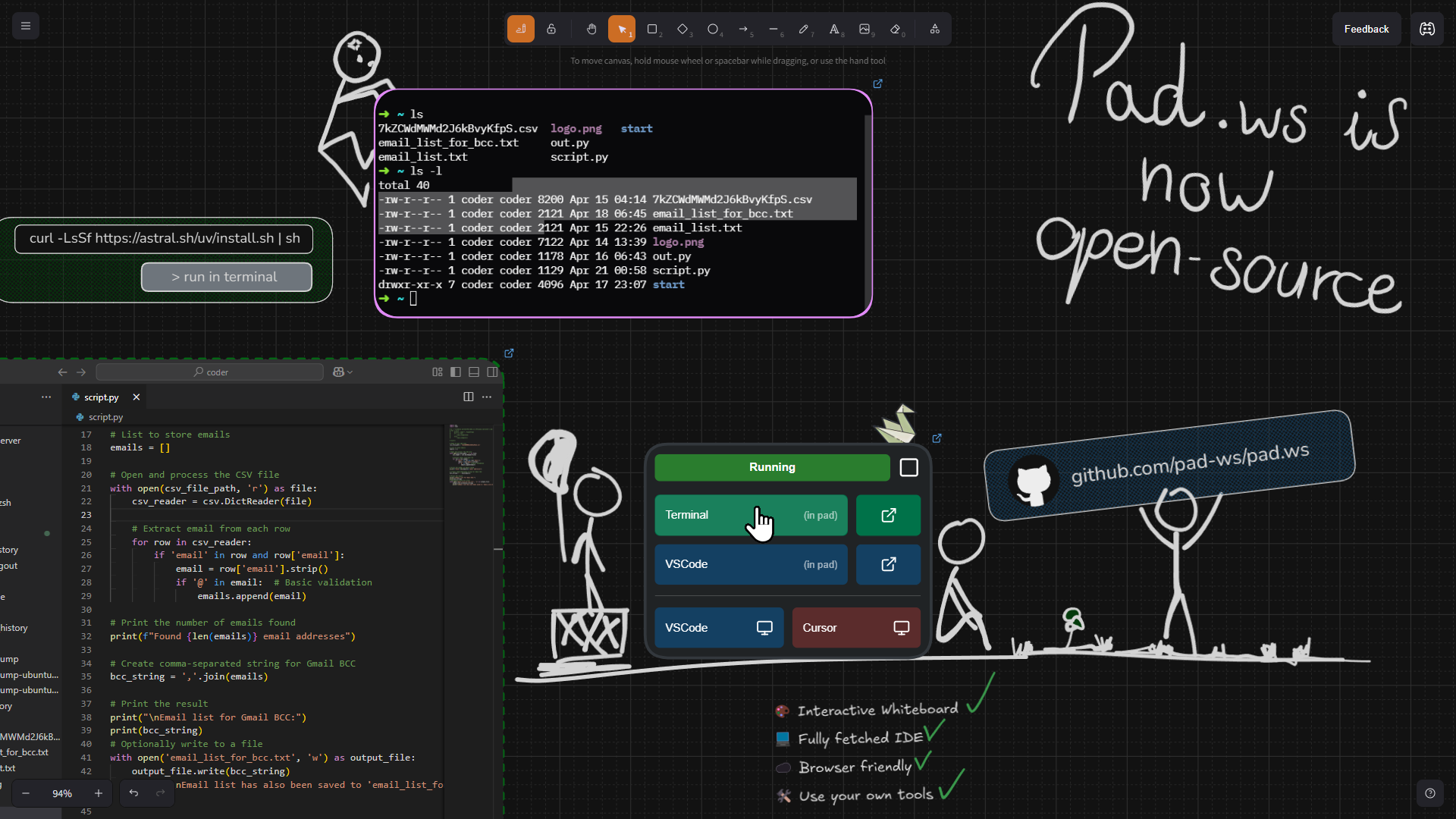
pad.ws is a whiteboard app that acts as a dev environment in your browser
This uses Excalidraw for the whiteboard interface while Coder powers the cloud development environments.
Visit pad.ws for an official managed instance. During this beta, we offer free ubuntu dev environments without any setup
⚠️ IMPORTANT NOTICE: This repository is in early development stage. The setup provided in docker-compose.yml is for development and testing purposes only.
This simplified example lets you host pad on localhost but is not safe for real-life use without further configurations ⚠️
cp .env.template .env
Ensure persistence for the whole deployment (canvases and configs)
Run the PostgreSQL container using the provided configuration (e.g., in your docker-compose.yml)
docker compose up -d postgres
In-memory data store for caching and session management with password authentication
docker compose up -d redis
.env file using the REDIS_PASSWORD variableOIDC provider for access and user management (within coder and pad app)
docker compose up -d keycloak
pad-ws)Client ID (e.g., pad-ws-client)Clients -> [Your Client ID] -> Credentials tab.env) with:
OIDC_REALM=your_oidc_realm
OIDC_CLIENT_ID=your_client_id
OIDC_CLIENT_SECRET=your_client_secret
Users -> Create userEmail verifiedCredentials tab for the new user and set a passwordClients -> [Your Client ID] -> Client Scopes[clientid]-dedicated)Configure a new mapperAudienceIncluded Client Audience matches your Client IDAdd to access token is Ongetent group docker | cut -d: -f3
.env file with the DOCKER_GROUP_ID:
DOCKER_GROUP_ID=your_docker_group_id
docker compose up -d coder
admin)docker-containers or a simple Ubuntu). Configure it as neededAccount -> API Keys.env
CODER_API_KEY=your_coder_api_key
http://localhost:7080/api/v2/templates in your browser (or use curl)id of the template you created.env
CODER_TEMPLATE_ID=your_coder_template_id # Example: 85fb21ba-085b-47a6-9f4d-94ea979aaba9
http://localhost:7080/api/v2/organizations in your browser (or use curl)id of your organization (usually the default one).env:
CODER_DEFAULT_ORGANIZATION=your_organization_id # Example: 70f6af06-ef3a-4b4c-a663-c03c9ee423bb
CODER_WORKSPACE_NAME in your .env. Otherwise, it will assume your workspace name is the default we chose: ubuntu.The fastAPI app that both serves the build frontend and the backend API to interface with Coder
Ensure all environment variables in your .env file are correctly set
Run the pad application container
docker compose up -d pad
🎉 Congratulations! You should now be able to access and login to your self-hosted pad at localhost:8000
🚧 Did you have any issue while following this guide?
Please let us know so we can improve the onboarding flow
(top 24 of 34)
282 followers · starred Apr 2025
3,854 followers · starred Jun 2025
135 followers · starred Apr 2025
122 followers · starred Apr 2025
Whiteboard as an IDE, draw and code in your browser
See the code
pad.ws is a whiteboard app that acts as a dev environment in your browser
This uses Excalidraw for the whiteboard interface while Coder powers the cloud development environments.
Visit pad.ws for an official managed instance. During this beta, we offer free ubuntu dev environments without any setup
⚠️ IMPORTANT NOTICE: This repository is in early development stage. The setup provided in docker-compose.yml is for development and testing purposes only.
This simplified example lets you host pad on localhost but is not safe for real-life use without further configurations ⚠️
cp .env.template .env
Ensure persistence for the whole deployment (canvases and configs)
Run the PostgreSQL container using the provided configuration (e.g., in your docker-compose.yml)
docker compose up -d postgres
In-memory data store for caching and session management with password authentication
docker compose up -d redis
.env file using the REDIS_PASSWORD variableOIDC provider for access and user management (within coder and pad app)
docker compose up -d keycloak
pad-ws)Client ID (e.g., pad-ws-client)Clients -> [Your Client ID] -> Credentials tab.env) with:
OIDC_REALM=your_oidc_realm
OIDC_CLIENT_ID=your_client_id
OIDC_CLIENT_SECRET=your_client_secret
Users -> Create userEmail verifiedCredentials tab for the new user and set a passwordClients -> [Your Client ID] -> Client Scopes[clientid]-dedicated)Configure a new mapperAudienceIncluded Client Audience matches your Client IDAdd to access token is Ongetent group docker | cut -d: -f3
.env file with the DOCKER_GROUP_ID:
DOCKER_GROUP_ID=your_docker_group_id
docker compose up -d coder
admin)docker-containers or a simple Ubuntu). Configure it as neededAccount -> API Keys.env
CODER_API_KEY=your_coder_api_key
http://localhost:7080/api/v2/templates in your browser (or use curl)id of the template you created.env
CODER_TEMPLATE_ID=your_coder_template_id # Example: 85fb21ba-085b-47a6-9f4d-94ea979aaba9
http://localhost:7080/api/v2/organizations in your browser (or use curl)id of your organization (usually the default one).env:
CODER_DEFAULT_ORGANIZATION=your_organization_id # Example: 70f6af06-ef3a-4b4c-a663-c03c9ee423bb
CODER_WORKSPACE_NAME in your .env. Otherwise, it will assume your workspace name is the default we chose: ubuntu.The fastAPI app that both serves the build frontend and the backend API to interface with Coder
Ensure all environment variables in your .env file are correctly set
Run the pad application container
docker compose up -d pad
🎉 Congratulations! You should now be able to access and login to your self-hosted pad at localhost:8000
🚧 Did you have any issue while following this guide?
Please let us know so we can improve the onboarding flow
(top 24 of 34)
282 followers · starred Apr 2025
3,854 followers · starred Jun 2025
135 followers · starred Apr 2025
122 followers · starred Apr 2025



