
README
LLMLean
LLMlean integrates LLMs and Lean for tactic suggestions, proof completion, and more.
News
- 10/2025: Added support for BFS-Prover-V2 and BFS-Prover-V1 via Ollama (thanks to @zeyu-zheng) [setup]
- 06/2025: Introduced iterative refinement mode for proof generation
- 06/2025: Added support for Kimina-Prover models via Ollama (thanks to @BoltonBailey)
Here's an example of using LLMLean on problems from Mathematics in Lean:
https://github.com/user-attachments/assets/284a8b32-b7a5-4606-8240-effe086f2b82
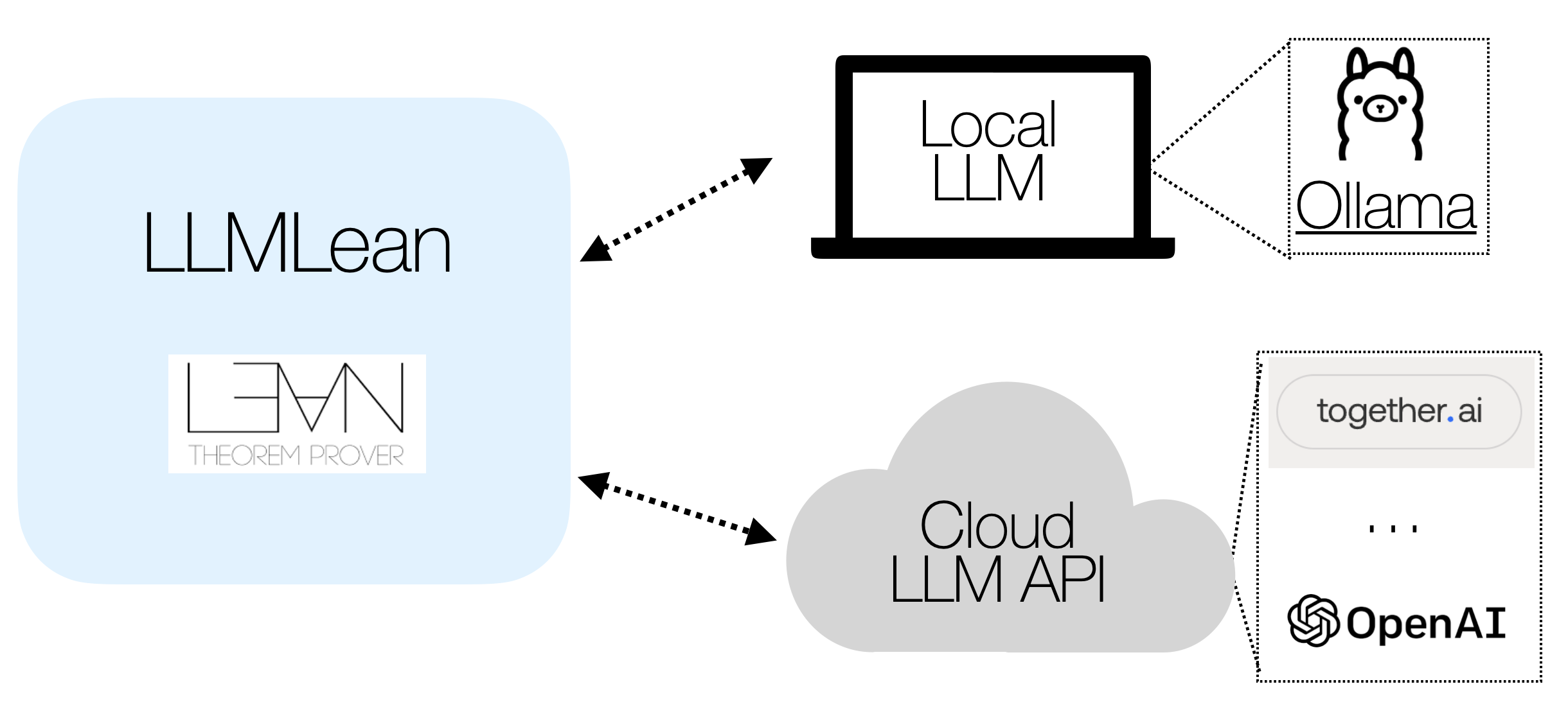
You can use an LLM running on your laptop, or an LLM from the Open AI API or Together.ai API:
LLM in the cloud (default):
-
Get an OpenAI API key.
-
Modify
~/.config/llmlean/config.toml(orC:\Users\<Username>\AppData\Roaming\llmlean\config.tomlon Windows), and enter the following:
api = "openai"
model = "gpt-4o"
apiKey = "<your-openai-api-key>"
(Alternatively, you may set the API key using the environment variable LLMLEAN_API_KEY or using set_option llmlean.apiKey "<your-api-key>".)
You can also use other providers such as Anthropic, Together.AI, or any provider adhering to the OpenAI API. See other providers.
- Add
llmleanto lakefile:
require llmlean from git
  "https://github.com/cmu-l3/llmlean.git"
- Import:
import LLMlean
Now use a tactic described below.
Option 2: LLM on your laptop:
-
Install ollama.
-
Pull a language model:
ollama pull wellecks/ntpctx-llama3-8b
- Set 2 configuration variables in
~/.config/llmlean/config.toml:
api = "ollama"
model = "wellecks/ntpctx-llama3-8b" # model name from above
Then do steps (3) and (4) above. Now use a tactic described below.
Many models are available for use in LLMLean via Ollama, including:
- BFS-Prover-V2 (highly recommended for
llmstep) - Kimina Prover
You can find detailed setup instructions and configuration for these and other models in the Ollama Models document.
Tactics
llmstep tactic
Next-tactic suggestions via llmstep "{prefix}". Examples:
-
llmstep ""
-
llmstep "apply "
The suggestions are checked in Lean.
llmqed tactic
Complete the current proof via llmqed. Examples:

The suggestions are checked in Lean.
Proof Generation Modes
LLMLean supports two modes for proof generation with llmqed:
- Parallel mode: Generates multiple proof attempts in parallel
- Iterative refinement mode: Generates one proof attempt, analyzes any errors, and refines the proof based on feedback
To configure:
# In ~/.config/llmlean/config.toml
mode = "iterative"  # or "parallel"
Enable verbose output to see the refinement process:
set_option llmlean.verbose true
For the best performance, especially for the llmqed tactic, we recommend using Anthropic Claude with iterative refinement mode.
Demo in PFR
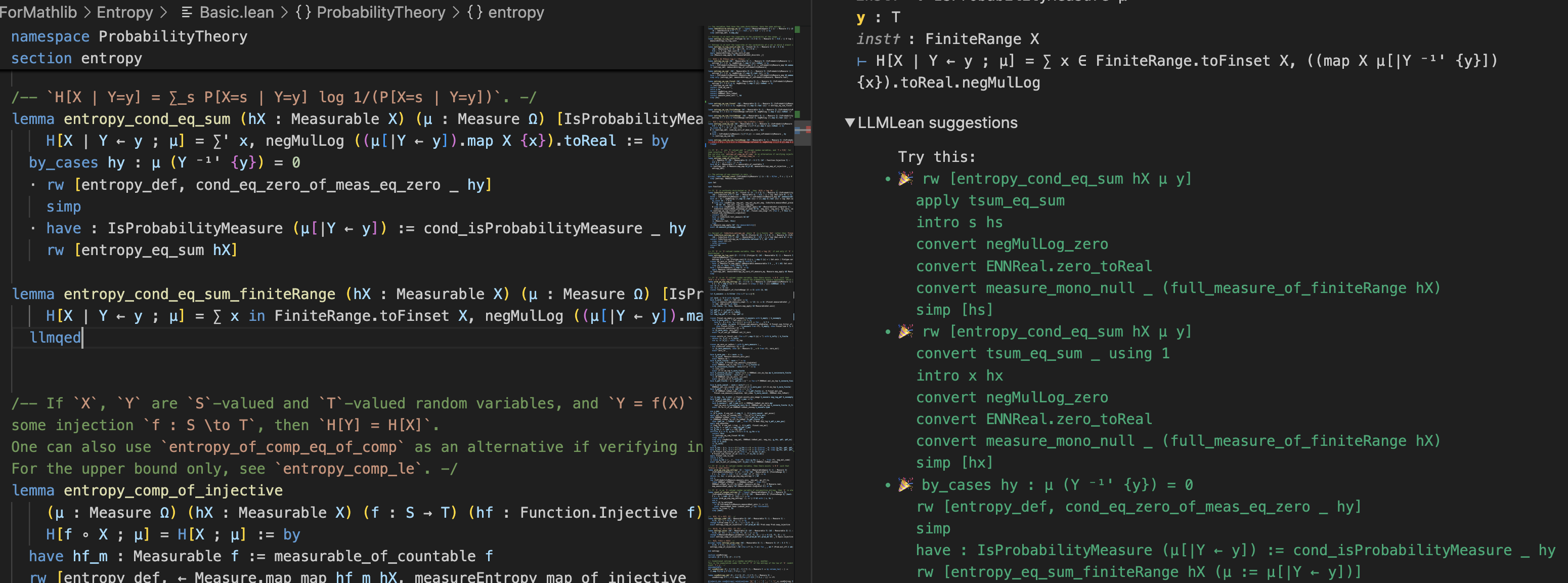
Here is an example of proving a lemma with llmqed (OpenAI GPT-4o):
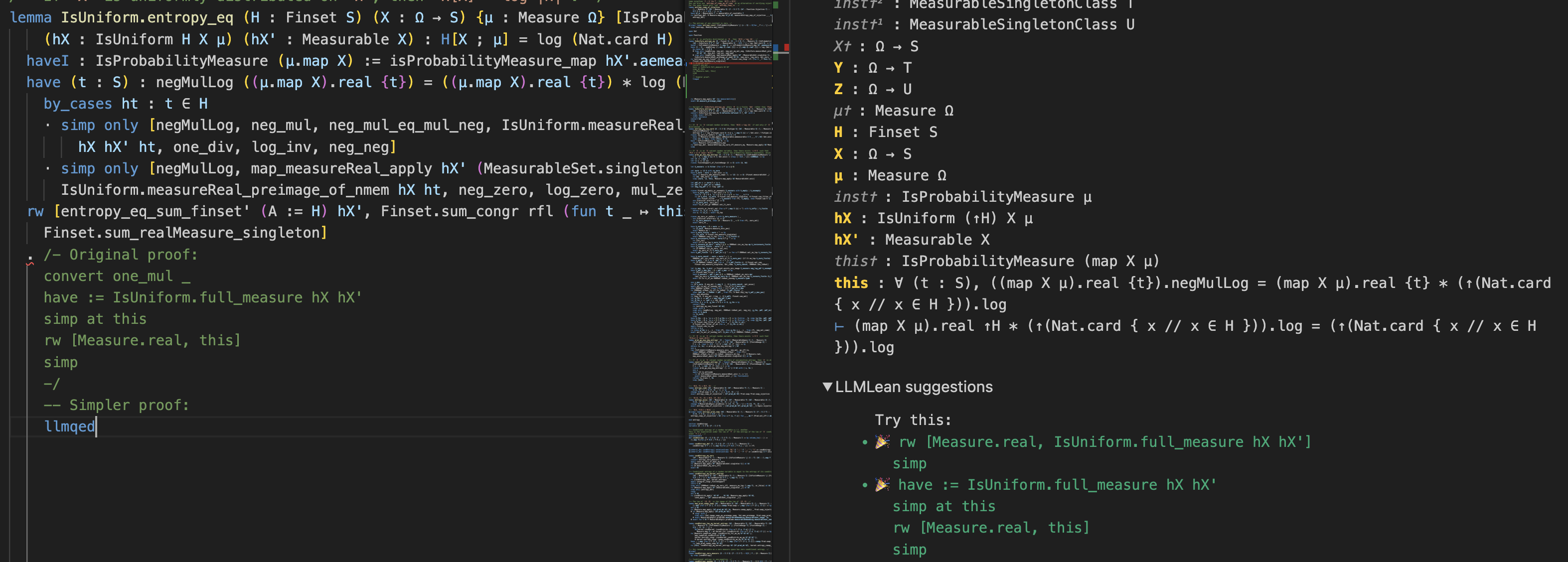
And using llmqed to make part of an existing proof simpler:
Customization
Please see the following:
Testing
Tests are under the LLMleanTest subdirectory.
Make sure the versions are the same between lakefile.lean and lean-toolchain in the root directory and the LLMleanTest directory, and then run:
cd LLMleanTest
lake update
lake build
Then manually try running llmqed/llmstep on the files under LLMleanTest.
Contributors


Similar repos


Languages
Lean
100.0%
README
LLMLean
LLMlean integrates LLMs and Lean for tactic suggestions, proof completion, and more.
News
- 10/2025: Added support for BFS-Prover-V2 and BFS-Prover-V1 via Ollama (thanks to @zeyu-zheng) [setup]
- 06/2025: Introduced iterative refinement mode for proof generation
- 06/2025: Added support for Kimina-Prover models via Ollama (thanks to @BoltonBailey)
Here's an example of using LLMLean on problems from Mathematics in Lean:
https://github.com/user-attachments/assets/284a8b32-b7a5-4606-8240-effe086f2b82
You can use an LLM running on your laptop, or an LLM from the Open AI API or Together.ai API:
LLM in the cloud (default):
-
Get an OpenAI API key.
-
Modify
~/.config/llmlean/config.toml(orC:\Users\<Username>\AppData\Roaming\llmlean\config.tomlon Windows), and enter the following:
api = "openai"
model = "gpt-4o"
apiKey = "<your-openai-api-key>"
(Alternatively, you may set the API key using the environment variable LLMLEAN_API_KEY or using set_option llmlean.apiKey "<your-api-key>".)
You can also use other providers such as Anthropic, Together.AI, or any provider adhering to the OpenAI API. See other providers.
- Add
llmleanto lakefile:
require llmlean from git
  "https://github.com/cmu-l3/llmlean.git"
- Import:
import LLMlean
Now use a tactic described below.
Option 2: LLM on your laptop:
-
Install ollama.
-
Pull a language model:
ollama pull wellecks/ntpctx-llama3-8b
- Set 2 configuration variables in
~/.config/llmlean/config.toml:
api = "ollama"
model = "wellecks/ntpctx-llama3-8b" # model name from above
Then do steps (3) and (4) above. Now use a tactic described below.
Many models are available for use in LLMLean via Ollama, including:
- BFS-Prover-V2 (highly recommended for
llmstep) - Kimina Prover
You can find detailed setup instructions and configuration for these and other models in the Ollama Models document.
Tactics
llmstep tactic
Next-tactic suggestions via llmstep "{prefix}". Examples:
-
llmstep ""
-
llmstep "apply "
The suggestions are checked in Lean.
llmqed tactic
Complete the current proof via llmqed. Examples:
The suggestions are checked in Lean.
Proof Generation Modes
LLMLean supports two modes for proof generation with llmqed:
- Parallel mode: Generates multiple proof attempts in parallel
- Iterative refinement mode: Generates one proof attempt, analyzes any errors, and refines the proof based on feedback
To configure:
# In ~/.config/llmlean/config.toml
mode = "iterative"  # or "parallel"
Enable verbose output to see the refinement process:
set_option llmlean.verbose true
For the best performance, especially for the llmqed tactic, we recommend using Anthropic Claude with iterative refinement mode.
Demo in PFR
Here is an example of proving a lemma with llmqed (OpenAI GPT-4o):
And using llmqed to make part of an existing proof simpler:
Customization
Please see the following:
Testing
Tests are under the LLMleanTest subdirectory.
Make sure the versions are the same between lakefile.lean and lean-toolchain in the root directory and the LLMleanTest directory, and then run:
cd LLMleanTest
lake update
lake build
Then manually try running llmqed/llmstep on the files under LLMleanTest.
Similar repos
Contributors
Languages
Lean
100.0%