
A GUI prototype for Batt (developed by https://github.com/charlie0129)
See the codeREADME
Power Management Suite


A comprehensive power monitoring solution for macOS featuring:
-
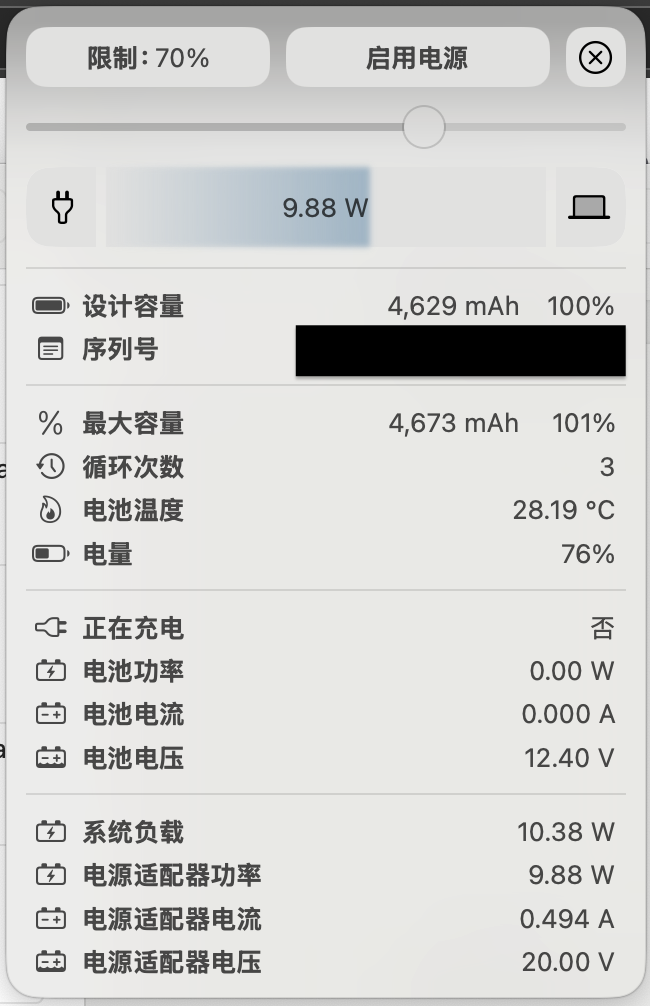
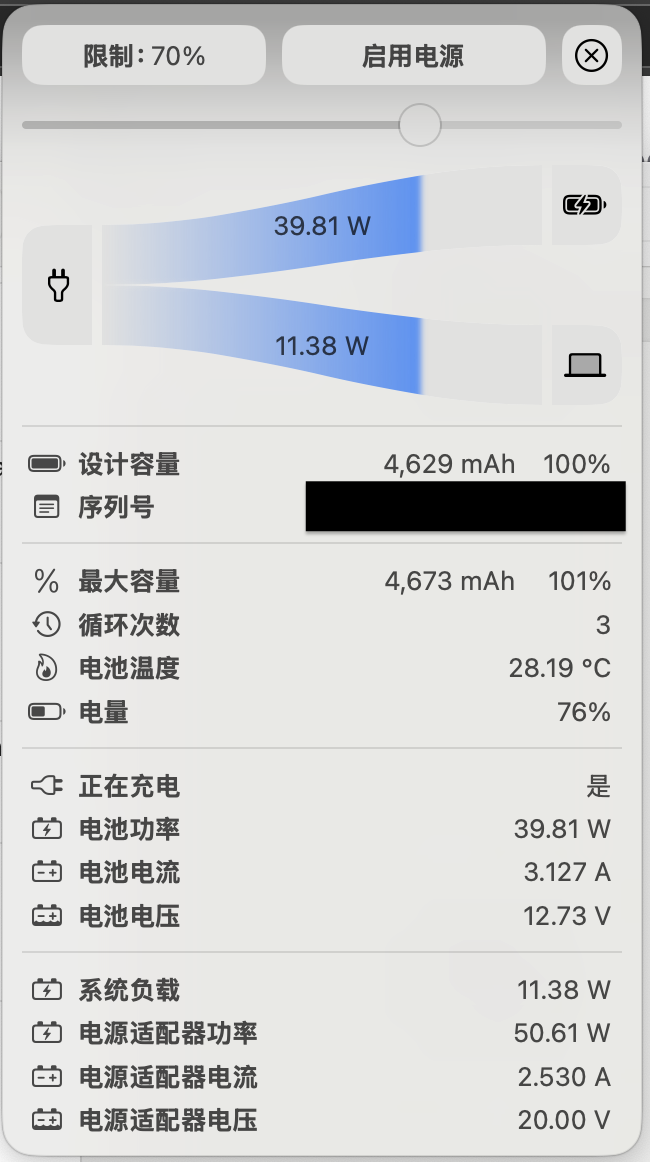
🖥 GUI application with real-time power flow visualization
-
🔋 Detailed battery health analytics
-
⚡️ CLI tools for low-level power monitoring
-
📊 System load statistics collection
-
Initial app icon (This icon is open to creative reinterpretation by anyone.)

Architecture Overview
graph TD
    Suite[Power Management Suite] --> GUI{GUI Application}

    GUI --> App[appApp.swift]
    App --> CV[ContentView.swift]
    CV --> PFV[PowerFlowView.swift]
    CV --> BM[Battery.swift]

    BM --> OC[powerInfo.m Objective-C Bridge]
    OC --> SMC["SMC API (System Management Controller)"]

    PFV --> SW["SwiftUI Graphics Pipeline"]
    App --> SM[StatusBar Menu]
    SM --> POP["Popover Window (NSHostingView)"]
    SM --> MM[Menu Items]

    classDef swift fill:#F05138,color:white;
    classDef objc fill:#4381ff,color:white;
    classDef system fill:#666,color:white;
    classDef suite fill:#8e44ad,color:white;

    class Suite suite
    class App,CV,PFV,BM,SW,SM,POP,MM swift
    class OC objc
    class SMC system
Features
GUI Application
- Real-time power flow visualization
- Battery health monitoring (cycles, capacity, temperature)
- Adapter power input tracking
- System load/power consumption correlation
Requirements
- macOS 13 Ventura or newer
- Xcode 15+
- Administrative privileges for SMC access
Installation
DMG Installation
- Download the latest
.dmgpackage from our Releases page - Open the downloaded DMG file
- Drag the application to your
Applicationsfolder
Manual Installation (From Source)
- Build the application:
# Clone repository
git clone https://github.com/clzoc/BattGUI.git
cd power-suite
xcodebuild -workspace app.xcodeproj/project.xcworkspace -scheme app
- Install required components:
sudo batt install --allow-non-root-access
Alternative Installation
-
GateKeeper Configuration If you encounter security warnings:
- Go to
System Settings→Privacy & Security→ scroll down toSecurity - Click "Open Anyway" next to the BattGUI warning
- Confirm execution in the dialog
- Go to
-
Advanced Configuration (Admin required) For system-level monitoring access:
# Temporarily disable GateKeeper (resets after reboot)
sudo spctl --master-disable
Usage
GUI Application:
open app/build/Release/app.app
Known Issues
-
Adapter Voltage Detection: Current implementation fixes adapter voltage at 20.00V due to missing SMC key in VirtualSMC documentation. Amperage is calculated using I = P / U. Contributions welcome to identify the correct SMC key.
-
UI/UX Optimization: Ongoing improvements to power management workflows including:
- Enhanced real-time measurement visualization
- Historical data trending
- Customizable power profiles
-
GUI Charge Limit Adjustment Permission Denied: When attempting to adjust battery charge limit through the GUI, users encounter permission errors depending on installation method.
Affected Components
powerInfo.m(Objective-C)- Unix domain socket:
/var/run/batt.sock - GUI slider control
Symptoms
Installation Method Behavior Command With --allow-non-root-access✅ Works correctly sudo batt install --allow-non-root-accessDefault installation ❌ "Permission denied" error sudo batt installTechnical Details
Root Cause
The Unix domain socket (
/var/run/batt.sock) implements strict permission controls:- Default mode: 600 (root-only)
- With flag: 666 (world-readable/writable)
Error Reproduction
- Install without special flags
- Launch GUI application
- Attempt to move charge limit slider
- Observe error in system logs:
Contributing
See CONTRIBUTING.md for development setup and guidelines.
License
GPLv3 (see LICENSE)
Significant stargazers

21 followers · starred Apr 2025
Similar repos


Languages
Swift
60.3%
Objective-C
39.6%
A GUI prototype for Batt (developed by https://github.com/charlie0129)
See the codeREADME
Power Management Suite
A comprehensive power monitoring solution for macOS featuring:
-
🖥 GUI application with real-time power flow visualization
-
🔋 Detailed battery health analytics
-
⚡️ CLI tools for low-level power monitoring
-
📊 System load statistics collection
-
Initial app icon (This icon is open to creative reinterpretation by anyone.)
Architecture Overview
graph TD
    Suite[Power Management Suite] --> GUI{GUI Application}

    GUI --> App[appApp.swift]
    App --> CV[ContentView.swift]
    CV --> PFV[PowerFlowView.swift]
    CV --> BM[Battery.swift]

    BM --> OC[powerInfo.m Objective-C Bridge]
    OC --> SMC["SMC API (System Management Controller)"]

    PFV --> SW["SwiftUI Graphics Pipeline"]
    App --> SM[StatusBar Menu]
    SM --> POP["Popover Window (NSHostingView)"]
    SM --> MM[Menu Items]

    classDef swift fill:#F05138,color:white;
    classDef objc fill:#4381ff,color:white;
    classDef system fill:#666,color:white;
    classDef suite fill:#8e44ad,color:white;

    class Suite suite
    class App,CV,PFV,BM,SW,SM,POP,MM swift
    class OC objc
    class SMC system
Features
GUI Application
- Real-time power flow visualization
- Battery health monitoring (cycles, capacity, temperature)
- Adapter power input tracking
- System load/power consumption correlation
Requirements
- macOS 13 Ventura or newer
- Xcode 15+
- Administrative privileges for SMC access
Installation
DMG Installation
- Download the latest
.dmgpackage from our Releases page - Open the downloaded DMG file
- Drag the application to your
Applicationsfolder
Manual Installation (From Source)
- Build the application:
# Clone repository
git clone https://github.com/clzoc/BattGUI.git
cd power-suite
xcodebuild -workspace app.xcodeproj/project.xcworkspace -scheme app
- Install required components:
sudo batt install --allow-non-root-access
Alternative Installation
-
GateKeeper Configuration If you encounter security warnings:
- Go to
System Settings→Privacy & Security→ scroll down toSecurity - Click "Open Anyway" next to the BattGUI warning
- Confirm execution in the dialog
- Go to
-
Advanced Configuration (Admin required) For system-level monitoring access:
# Temporarily disable GateKeeper (resets after reboot)
sudo spctl --master-disable
Usage
GUI Application:
open app/build/Release/app.app
Known Issues
-
Adapter Voltage Detection: Current implementation fixes adapter voltage at 20.00V due to missing SMC key in VirtualSMC documentation. Amperage is calculated using I = P / U. Contributions welcome to identify the correct SMC key.
-
UI/UX Optimization: Ongoing improvements to power management workflows including:
- Enhanced real-time measurement visualization
- Historical data trending
- Customizable power profiles
-
GUI Charge Limit Adjustment Permission Denied: When attempting to adjust battery charge limit through the GUI, users encounter permission errors depending on installation method.
Affected Components
powerInfo.m(Objective-C)- Unix domain socket:
/var/run/batt.sock - GUI slider control
Symptoms
Installation Method Behavior Command With --allow-non-root-access✅ Works correctly sudo batt install --allow-non-root-accessDefault installation ❌ "Permission denied" error sudo batt installTechnical Details
Root Cause
The Unix domain socket (
/var/run/batt.sock) implements strict permission controls:- Default mode: 600 (root-only)
- With flag: 666 (world-readable/writable)
Error Reproduction
- Install without special flags
- Launch GUI application
- Attempt to move charge limit slider
- Observe error in system logs:
Contributing
See CONTRIBUTING.md for development setup and guidelines.
License
GPLv3 (see LICENSE)
Similar repos
Significant stargazers
21 followers · starred Apr 2025
Languages
Swift
60.3%
Objective-C
39.6%