
Neptune OS: A Windows NT-like operating system built on the seL4 microkernel
C
467
827 commits
updated Sep 19, 2026
See what people are saying
README
Neptune OS: a general purpose Windows NT-like OS built on the seL4 microkernel
Neptune OS is general purpose operating system built on the seL4 microkernel. Poetically speaking it is a "re-imagination" of what Windows NT could have become had seL4 been available back in 1988. The original NT architecture was heavily influenced by the archetypal Mach design and comprised of a collection of system services, called the NT Executive, sitting atop a minimal microkernel responsible only for core primitives. However, the hardware limitations of the late 1980s forced NT into a "hybrid" kernel approach where the Executive and the Microkernel, along with device drivers, were all sitting in kernel space for performance. The goal of Neptune OS is to rectify this historical compromise, by leveraging seL4’s capability-based, formally verified, high-performance IPC to realize the original NT vision: a pure microkernel architecture where system components exist as isolated, user-mode servers.
To achieve this, Neptune OS reimplements the NT Executive as a userspace process under seL4. This process acts as the root task and exposes, via the seL4 IPC, a higher-level system service interface (known as the NT Native API) to client processes. This Executive-provided API is versatile enough to support both what the NT architecture refers to as environment subsystems, such as Win32 and POSIX, that provide the usual familiar programming interfaces to user applications, as well as device driver subsystems which enable unmodified or minimally modified Windows and Linux kernel device drivers to run natively (ie. NOT in a virtual machine) as isolated, unprivileged userspace processes under Neptune OS. These device driver subsystems are our major architectural advantage over the original hybrid-kernel NT, as they ensure a driver crash remain a localized event which cannot compromise the stability of the rest of the system.
The latest release of the project is v0.4. You can watch the following demo videos which showcase unmodified Linux kernel GPU and Ethernet drivers (amdgpu, i915, virtio_gpu, e1000e) running as regular userspace processes on Neptune OS.
Disclaimer on AI use: this project does NOT use vibe-coding nor allow vibe-coded PRs or LLM-generated issues. While I have used AI extensively for discussions and brain-storming, the actual coding is done almost entirely by myself with minimal AI use.
Project Status
The current status of the project is that we have implemented enough NT Executive components to support the following:
- Running nontrivial Linux kernel device drivers natively in userspace. The tested drivers
are:
- DRM (GPU) drivers: i915, radeon, amdgpu. Only modesetting and framebuffer mapping are tested as 3D rendering requires userspace mesa components, which have not been ported yet.
- Ethernet: Intel e1000e and Realtek r8169. Basic Ethernet packet TX/RX is working.
- USB xHCI controller. Only port enumeration is tested.
- ACPI and PCI bus drivers, ported from ReactOS, to enable power management (ACPI poweroff and reboot) and PCI bus enumeration.
- Basic keyboard driver stack (keyboard class driver
kbdclass.sysand the PS/2 port driveri8042prt.sys) - A reasonably complete storage driver and file system driver stack with read-ahead and
write-back caching support, ported from Windows and ReactOS. These include:
- The storage class driver pair (
classpnp.sysanddisk.sys), taken from the official Microsoft open source Windows driver repo. - The
storport.sysport driver, taken from ReactOS and modified to fix bugs and add minimal Win8+ API implementation to supportstorahciandstornvmedrivers. - AHCI storage miniport driver
storahci.sysfrom Microsoft. - NVME storage miniport driver
stornvme.sysfrom Open Fabrics Alliance. - The partition manager (
partmgr.sys) driver and the mount manager driver (mountmgr.sys). - Floppy controller driver
fdc.sysfor the standard floppy controller on the PC. - The FAT12/16/32 file system driver
fatfs.sys.
- The storage class driver pair (
- A basic Session Manager
smss.exeand NT native command promptntcmd.exe, with support for most common shell commands. - A disk benchmark utility
umtests.exe(see Benchmarking below). - Finally, a
beep.sysdriver which makes an annoying sound on the PC speaker.
Minimal System Requirements
For amd64 systems we require at least an Intel Ivy Bridge processor or the AMD equivalent.
The default seL4 kernel is built with the fsgsbase instruction enabled which is only
supported on Ivy Bridge and later. It is possible to disable the use of the fsgsbase
instruction in the seL4 kernel build (see private/ntos/cmake/sel4.cmake) but this has
not been tested on a real machine.
For i386 systems, we require at least a Core 2 Duo processor or the AMD equivalent, as the seL4 kernel assumes that the processor supports global pages (bit PGE in CR4) and requires at least ACPI 3.0 to detect the number of CPU nodes. ACPI 3.0 did not become widely available until the Core 2 Duo era.
Building and Running
You will need to build under Linux (macOS can potentially work, but I have not tested it). You will need the following Python dependencies, and probably more.
jinja2
future
ply
setuptools
six
lxml
You will also need cmake, clang, llvm and lld as a basic toolchain. clang
is a native cross compiler that can generate both ELF and PE targets. GCC is not
supported but in theory can be made to work. You will need both an ELF toolchain
and a PE toolchain (and probably a ton of patience) if you want to make GCC work.
You also need the windmc which is the PE message resource compiler from mingw.
Have a look at build.sh for the build script. I use Arch Linux (btw) so the
toolchain versions that have been tested to work are whichever versions Arch Linux
happened to have at the time I ran pacman -Syu, but from experience most recent
versions of clang/LLVM should all work. You also need the cpio utility for building
the initcpio. Finally, for the boot image and boot iso you will need the following
tools: syslinux, sgdisk (gptfdisk package in Arch Linux), and fdisk
(for boot image), grub and xorriso (for boot iso), and mtools (for both).
It is recommended to use a language server-enabled IDE to browse the source code.
The tested setup is the lsp-mode package on emacs with clangd as the language
server. The build.sh script will generate the compile_commands.json file for
clangd. You will need to install jq for this
purpose.
Clone the project first (make sure you use git clone --recurse-submodules) and then run
./build.sh [amd64] [release]
If you don't specify amd64, then it's an i686 build. If you don't specify
release, then it's a debug build. To create boot disk images, type
./mkhdd.sh [amd64] [release]
To create boot isos, type
./mkiso.sh [amd64] [release]
To emulate using QEMU, run
./run.sh [direct|iso|ahci|nvme] [uefi] [amd64] [release] [extra-qemu-args]
If you specify direct, then QEMU will load the seL4 kernel and the NTOS image
directly (using -kernel and -initrd). If you specify iso, it will
load the boot iso built by mkiso.sh. The uefi option will also configure QEMU
to load the UEFI firmware, which provides a nice high definition framebuffer console.
Otherwise, the boot disk image created by mkhdd.sh is used. You can specify the hdd
controller type with ahci or nvme (the default).
Extra arguments are passed to QEMU. For instance, to run the i386
release build with PC speaker enabled in QEMU you can pass the following (this
assumes you are using a recent QEMU version and have pulseaudio)
./run.sh release -machine pcspk-audiodev=snd0 -audiodev pa,id=snd0
To test guest networking, you can create a TAP device on the host and assign it an IP address
sudo ip tuntap add dev tap0 mode tap
sudo ip link set tap0 up
sudo ip addr add 192.168.100.1/24 dev tap0
You can then use the following extra QEMU arguments to establish a private network between the host and the guest
-netdev tap,id=net0,ifname=tap0,script=no,downscript=no -device e1000e,netdev=net0
The boot disk image contains a demo program umtests.exe, which contains simple tests
and benchmarks for several device drivers in the system, including ethernet and storage.
Firmware
To run on physical hardware, you need to include the necessary firmware in the final
OS image. To do so you need to edit the FW_COPY_LIST variable in build.sh. The
shipped release images contain AMD GPU firmware for the Polaris generation cards.
Debugging
By default, the debug build is built with serial port logging enabled. The default IO port
for the serial terminal that the seL4 kernel uses to output the debug logs is 0x3f8 and
can be configured in the boot command line using console_port=0x### and debug_port=0x###.
If your machine does not have a built-in serial port (a common case for laptops), you can use
a PCI(E) serial card or a Cardbus (expresscard) serial card. The form factor does not matter,
as long as the device shows up as a PCI device when the firmware enumerates the PCI bus. The
PCI(E) serial card must support IO port decoding. A tested PCI(E) serial bridge chip is Asix
Electronics AX99100. You can find products based on this chip in the form of PCIE/mini-PCIE/M2
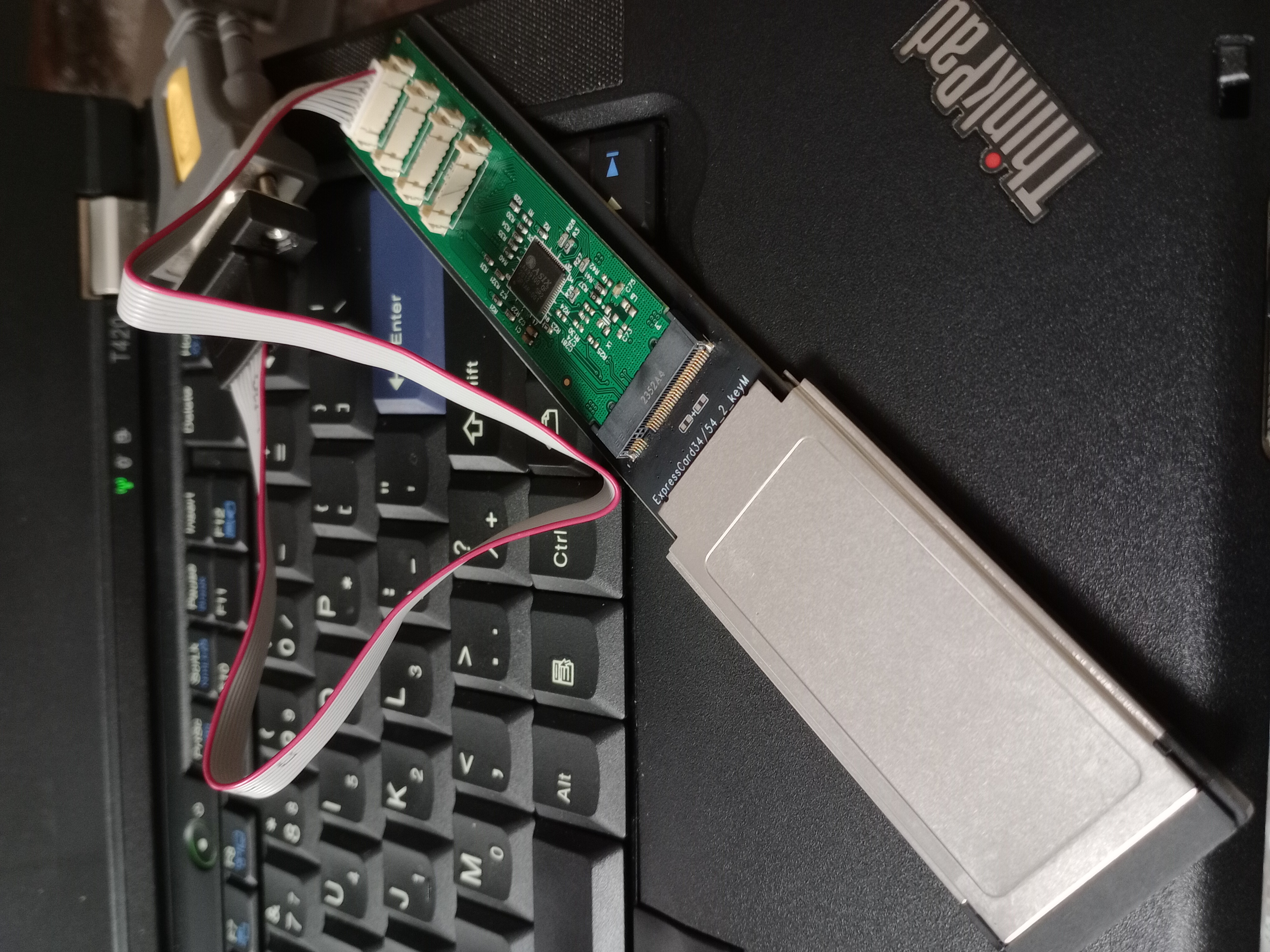
and Cardbus/expresscard. In the picture below, an AX99100 M.2 serial bridge is connected to a
cardbus adapter, which is then plugged into the laptop's expresscard slot to enable serial
debugging.
You need to find the bus/device/function number of the serial card you added as well as its
IO port range that the firmware has configured. Under GRUB, both information is available
using the lspci -i command. Look for the output such as
04:00.0 125b:9100 [0700] (Serial controller)
    I/O ports at d000 [size=8]
    Memory at fea00000 [size=4K]
Record the IO port ranges that the card decodes, and add console_port=0xd000 debug_port=0xd000
to the GRUB boot command line for seL4. If your boot firmware did not enable IO port decoding
for the card (this is quite common, so you most likely will need to do it), you will need to
manually enable it before loading the seL4 kernel, using setpci -s 04:00.0 0x4.w=0x7, where
04:00.0 is the bus/device/function number of the serial port card. A full example is
menuentry 'Neptune OS amd64 release' --class os {
    insmod all_video
    insmod gzio
    insmod part_gpt
    insmod ext2
    echo 'Enabling serial port...'
    setpci -s 04:00.0 0x4.w=0x7
    echo 'Loading seL4 kernel ...'
    multiboot2 /neptuneos-kernel-amd64-release console_port=0xd000 debug_port=0xd000
    echo 'Loading NT Executive ...'
    module2 /neptuneos-ntos-amd64-release
}
Note USB serial ports will never work as these are USB devices rather than PCI(E) devices.
The debug build might run slowly especially if you turn on serial port logging.
You can turn off logging by modifying the master header of the NT Executive project
(see private/ntos/inc/ntos.h).
Benchmarking
We have a basic disk IO benchmarking tool under base/umtests. It is a very simple-minded,
completely unscientific tool generated by ChatGPT that does random 4K and sequential 1MB read
(via Linux read() and NT NtReadFile()), single-threaded and uncached (O_DIRECT and
NT equivalent are applied to relevant system calls). It can be compiled and executed under
Linux using
cc -Wall -O3 base/umtests/diskbench.c
sudo ./a.out /dev/nvme0n1
You should see output such as the following
Random 4K Reads: 50.14 MB/s (7.079 seconds)
Sequential 1MB Reads: 3200.00 MB/s (0.080 seconds)
When compiled for Neptune OS, the tool will benchmark disk and file system IO for the first harddrive and its first volume, respectively. The disk IO is sent to the storage driver stack directly, and the volume IO is sent to the file system driver, which then forwards the IO to the storage drivers. Consequently, the volume IO is slower than the file system driver due to the overhead of context switches and IRP serialization and deserialization. For sequential raw disk reads, we seem to be able to achieve the maximum performance offered by some SATA 3.0 and PCIE 3.0 nVME drives without any problem, but performances under more non-trivial IO scenarios remain to be tested. If you have run any performance benchmarks on your own machine, it would be appreciated if you could report them in issue #40.
Cross-compiling
We use the LLVM toolchain so cross-compiling in theory should simply work without any
special handling. In practice, on i386/amd64 the linker script for the final seL4
kernel executable relies on features that only the GNU LD linker supports, so we cannot
use the LLVM linker (LLD) to link the seL4 kernel. This means that you will need the GNU
LD cross-linkers for the target triples i686-pc-linux-gnu and x86_64-pc-linux-gnu
installed in the usual place (/usr/bin) so clang can find them and invoke them
correctly when linking the seL4 kernel. The PE part of the toolchain is completely
self-contained and requires no special handling when cross-compiling (it is already
a cross-toolchain because we are targeting Windows on a Linux host).
Cross-compiling is tested on Archlinux running on Loongarch64 (Loongson 3A5000
processor) with llvm-14 and seems to generate the correct code. Please open an
issue if you run into any problem.
Note that if your grub is built for the native platform rather than i686/amd64,
the boot iso generated by mkiso.sh will not work as grub-mkrescue will try to
copy the native platform's boot files to the ISO. To fix this, cross-build the grub
package for i686/amd64 (or simply run the final iso generation on an i686/amd64
system).
Documentations
Documentations are located under the docs directory. For developers and those interested
in understanding the inner workings of Neptune OS, read the Developer-Guide.md which
starts with an architectural overview of the operating system and proceeds to explain
the various design decisions of individual OS components. It also contains the driver
porting guide for those interested in porting drivers from ReactOS.


Similar repos


Languages
C
97.7%
Neptune OS: A Windows NT-like operating system built on the seL4 microkernel
C
467
827 commits
updated Sep 19, 2026
See what people are saying
README
Neptune OS: a general purpose Windows NT-like OS built on the seL4 microkernel
Neptune OS is general purpose operating system built on the seL4 microkernel. Poetically speaking it is a "re-imagination" of what Windows NT could have become had seL4 been available back in 1988. The original NT architecture was heavily influenced by the archetypal Mach design and comprised of a collection of system services, called the NT Executive, sitting atop a minimal microkernel responsible only for core primitives. However, the hardware limitations of the late 1980s forced NT into a "hybrid" kernel approach where the Executive and the Microkernel, along with device drivers, were all sitting in kernel space for performance. The goal of Neptune OS is to rectify this historical compromise, by leveraging seL4’s capability-based, formally verified, high-performance IPC to realize the original NT vision: a pure microkernel architecture where system components exist as isolated, user-mode servers.
To achieve this, Neptune OS reimplements the NT Executive as a userspace process under seL4. This process acts as the root task and exposes, via the seL4 IPC, a higher-level system service interface (known as the NT Native API) to client processes. This Executive-provided API is versatile enough to support both what the NT architecture refers to as environment subsystems, such as Win32 and POSIX, that provide the usual familiar programming interfaces to user applications, as well as device driver subsystems which enable unmodified or minimally modified Windows and Linux kernel device drivers to run natively (ie. NOT in a virtual machine) as isolated, unprivileged userspace processes under Neptune OS. These device driver subsystems are our major architectural advantage over the original hybrid-kernel NT, as they ensure a driver crash remain a localized event which cannot compromise the stability of the rest of the system.
The latest release of the project is v0.4. You can watch the following demo videos which showcase unmodified Linux kernel GPU and Ethernet drivers (amdgpu, i915, virtio_gpu, e1000e) running as regular userspace processes on Neptune OS.
Disclaimer on AI use: this project does NOT use vibe-coding nor allow vibe-coded PRs or LLM-generated issues. While I have used AI extensively for discussions and brain-storming, the actual coding is done almost entirely by myself with minimal AI use.
Project Status
The current status of the project is that we have implemented enough NT Executive components to support the following:
- Running nontrivial Linux kernel device drivers natively in userspace. The tested drivers
are:
- DRM (GPU) drivers: i915, radeon, amdgpu. Only modesetting and framebuffer mapping are tested as 3D rendering requires userspace mesa components, which have not been ported yet.
- Ethernet: Intel e1000e and Realtek r8169. Basic Ethernet packet TX/RX is working.
- USB xHCI controller. Only port enumeration is tested.
- ACPI and PCI bus drivers, ported from ReactOS, to enable power management (ACPI poweroff and reboot) and PCI bus enumeration.
- Basic keyboard driver stack (keyboard class driver
kbdclass.sysand the PS/2 port driveri8042prt.sys) - A reasonably complete storage driver and file system driver stack with read-ahead and
write-back caching support, ported from Windows and ReactOS. These include:
- The storage class driver pair (
classpnp.sysanddisk.sys), taken from the official Microsoft open source Windows driver repo. - The
storport.sysport driver, taken from ReactOS and modified to fix bugs and add minimal Win8+ API implementation to supportstorahciandstornvmedrivers. - AHCI storage miniport driver
storahci.sysfrom Microsoft. - NVME storage miniport driver
stornvme.sysfrom Open Fabrics Alliance. - The partition manager (
partmgr.sys) driver and the mount manager driver (mountmgr.sys). - Floppy controller driver
fdc.sysfor the standard floppy controller on the PC. - The FAT12/16/32 file system driver
fatfs.sys.
- The storage class driver pair (
- A basic Session Manager
smss.exeand NT native command promptntcmd.exe, with support for most common shell commands. - A disk benchmark utility
umtests.exe(see Benchmarking below). - Finally, a
beep.sysdriver which makes an annoying sound on the PC speaker.
Minimal System Requirements
For amd64 systems we require at least an Intel Ivy Bridge processor or the AMD equivalent.
The default seL4 kernel is built with the fsgsbase instruction enabled which is only
supported on Ivy Bridge and later. It is possible to disable the use of the fsgsbase
instruction in the seL4 kernel build (see private/ntos/cmake/sel4.cmake) but this has
not been tested on a real machine.
For i386 systems, we require at least a Core 2 Duo processor or the AMD equivalent, as the seL4 kernel assumes that the processor supports global pages (bit PGE in CR4) and requires at least ACPI 3.0 to detect the number of CPU nodes. ACPI 3.0 did not become widely available until the Core 2 Duo era.
Building and Running
You will need to build under Linux (macOS can potentially work, but I have not tested it). You will need the following Python dependencies, and probably more.
jinja2
future
ply
setuptools
six
lxml
You will also need cmake, clang, llvm and lld as a basic toolchain. clang
is a native cross compiler that can generate both ELF and PE targets. GCC is not
supported but in theory can be made to work. You will need both an ELF toolchain
and a PE toolchain (and probably a ton of patience) if you want to make GCC work.
You also need the windmc which is the PE message resource compiler from mingw.
Have a look at build.sh for the build script. I use Arch Linux (btw) so the
toolchain versions that have been tested to work are whichever versions Arch Linux
happened to have at the time I ran pacman -Syu, but from experience most recent
versions of clang/LLVM should all work. You also need the cpio utility for building
the initcpio. Finally, for the boot image and boot iso you will need the following
tools: syslinux, sgdisk (gptfdisk package in Arch Linux), and fdisk
(for boot image), grub and xorriso (for boot iso), and mtools (for both).
It is recommended to use a language server-enabled IDE to browse the source code.
The tested setup is the lsp-mode package on emacs with clangd as the language
server. The build.sh script will generate the compile_commands.json file for
clangd. You will need to install jq for this
purpose.
Clone the project first (make sure you use git clone --recurse-submodules) and then run
./build.sh [amd64] [release]
If you don't specify amd64, then it's an i686 build. If you don't specify
release, then it's a debug build. To create boot disk images, type
./mkhdd.sh [amd64] [release]
To create boot isos, type
./mkiso.sh [amd64] [release]
To emulate using QEMU, run
./run.sh [direct|iso|ahci|nvme] [uefi] [amd64] [release] [extra-qemu-args]
If you specify direct, then QEMU will load the seL4 kernel and the NTOS image
directly (using -kernel and -initrd). If you specify iso, it will
load the boot iso built by mkiso.sh. The uefi option will also configure QEMU
to load the UEFI firmware, which provides a nice high definition framebuffer console.
Otherwise, the boot disk image created by mkhdd.sh is used. You can specify the hdd
controller type with ahci or nvme (the default).
Extra arguments are passed to QEMU. For instance, to run the i386
release build with PC speaker enabled in QEMU you can pass the following (this
assumes you are using a recent QEMU version and have pulseaudio)
./run.sh release -machine pcspk-audiodev=snd0 -audiodev pa,id=snd0
To test guest networking, you can create a TAP device on the host and assign it an IP address
sudo ip tuntap add dev tap0 mode tap
sudo ip link set tap0 up
sudo ip addr add 192.168.100.1/24 dev tap0
You can then use the following extra QEMU arguments to establish a private network between the host and the guest
-netdev tap,id=net0,ifname=tap0,script=no,downscript=no -device e1000e,netdev=net0
The boot disk image contains a demo program umtests.exe, which contains simple tests
and benchmarks for several device drivers in the system, including ethernet and storage.
Firmware
To run on physical hardware, you need to include the necessary firmware in the final
OS image. To do so you need to edit the FW_COPY_LIST variable in build.sh. The
shipped release images contain AMD GPU firmware for the Polaris generation cards.
Debugging
By default, the debug build is built with serial port logging enabled. The default IO port
for the serial terminal that the seL4 kernel uses to output the debug logs is 0x3f8 and
can be configured in the boot command line using console_port=0x### and debug_port=0x###.
If your machine does not have a built-in serial port (a common case for laptops), you can use
a PCI(E) serial card or a Cardbus (expresscard) serial card. The form factor does not matter,
as long as the device shows up as a PCI device when the firmware enumerates the PCI bus. The
PCI(E) serial card must support IO port decoding. A tested PCI(E) serial bridge chip is Asix
Electronics AX99100. You can find products based on this chip in the form of PCIE/mini-PCIE/M2
and Cardbus/expresscard. In the picture below, an AX99100 M.2 serial bridge is connected to a
cardbus adapter, which is then plugged into the laptop's expresscard slot to enable serial
debugging.
You need to find the bus/device/function number of the serial card you added as well as its
IO port range that the firmware has configured. Under GRUB, both information is available
using the lspci -i command. Look for the output such as
04:00.0 125b:9100 [0700] (Serial controller)
    I/O ports at d000 [size=8]
    Memory at fea00000 [size=4K]
Record the IO port ranges that the card decodes, and add console_port=0xd000 debug_port=0xd000
to the GRUB boot command line for seL4. If your boot firmware did not enable IO port decoding
for the card (this is quite common, so you most likely will need to do it), you will need to
manually enable it before loading the seL4 kernel, using setpci -s 04:00.0 0x4.w=0x7, where
04:00.0 is the bus/device/function number of the serial port card. A full example is
menuentry 'Neptune OS amd64 release' --class os {
    insmod all_video
    insmod gzio
    insmod part_gpt
    insmod ext2
    echo 'Enabling serial port...'
    setpci -s 04:00.0 0x4.w=0x7
    echo 'Loading seL4 kernel ...'
    multiboot2 /neptuneos-kernel-amd64-release console_port=0xd000 debug_port=0xd000
    echo 'Loading NT Executive ...'
    module2 /neptuneos-ntos-amd64-release
}
Note USB serial ports will never work as these are USB devices rather than PCI(E) devices.
The debug build might run slowly especially if you turn on serial port logging.
You can turn off logging by modifying the master header of the NT Executive project
(see private/ntos/inc/ntos.h).
Benchmarking
We have a basic disk IO benchmarking tool under base/umtests. It is a very simple-minded,
completely unscientific tool generated by ChatGPT that does random 4K and sequential 1MB read
(via Linux read() and NT NtReadFile()), single-threaded and uncached (O_DIRECT and
NT equivalent are applied to relevant system calls). It can be compiled and executed under
Linux using
cc -Wall -O3 base/umtests/diskbench.c
sudo ./a.out /dev/nvme0n1
You should see output such as the following
Random 4K Reads: 50.14 MB/s (7.079 seconds)
Sequential 1MB Reads: 3200.00 MB/s (0.080 seconds)
When compiled for Neptune OS, the tool will benchmark disk and file system IO for the first harddrive and its first volume, respectively. The disk IO is sent to the storage driver stack directly, and the volume IO is sent to the file system driver, which then forwards the IO to the storage drivers. Consequently, the volume IO is slower than the file system driver due to the overhead of context switches and IRP serialization and deserialization. For sequential raw disk reads, we seem to be able to achieve the maximum performance offered by some SATA 3.0 and PCIE 3.0 nVME drives without any problem, but performances under more non-trivial IO scenarios remain to be tested. If you have run any performance benchmarks on your own machine, it would be appreciated if you could report them in issue #40.
Cross-compiling
We use the LLVM toolchain so cross-compiling in theory should simply work without any
special handling. In practice, on i386/amd64 the linker script for the final seL4
kernel executable relies on features that only the GNU LD linker supports, so we cannot
use the LLVM linker (LLD) to link the seL4 kernel. This means that you will need the GNU
LD cross-linkers for the target triples i686-pc-linux-gnu and x86_64-pc-linux-gnu
installed in the usual place (/usr/bin) so clang can find them and invoke them
correctly when linking the seL4 kernel. The PE part of the toolchain is completely
self-contained and requires no special handling when cross-compiling (it is already
a cross-toolchain because we are targeting Windows on a Linux host).
Cross-compiling is tested on Archlinux running on Loongarch64 (Loongson 3A5000
processor) with llvm-14 and seems to generate the correct code. Please open an
issue if you run into any problem.
Note that if your grub is built for the native platform rather than i686/amd64,
the boot iso generated by mkiso.sh will not work as grub-mkrescue will try to
copy the native platform's boot files to the ISO. To fix this, cross-build the grub
package for i686/amd64 (or simply run the final iso generation on an i686/amd64
system).
Documentations
Documentations are located under the docs directory. For developers and those interested
in understanding the inner workings of Neptune OS, read the Developer-Guide.md which
starts with an architectural overview of the operating system and proceeds to explain
the various design decisions of individual OS components. It also contains the driver
porting guide for those interested in porting drivers from ReactOS.
Similar repos
Languages
C
97.7%