
See what people are saying
README



codemine runs AI agents on git repos while you're away, delivering tested PRs and helpful issues.
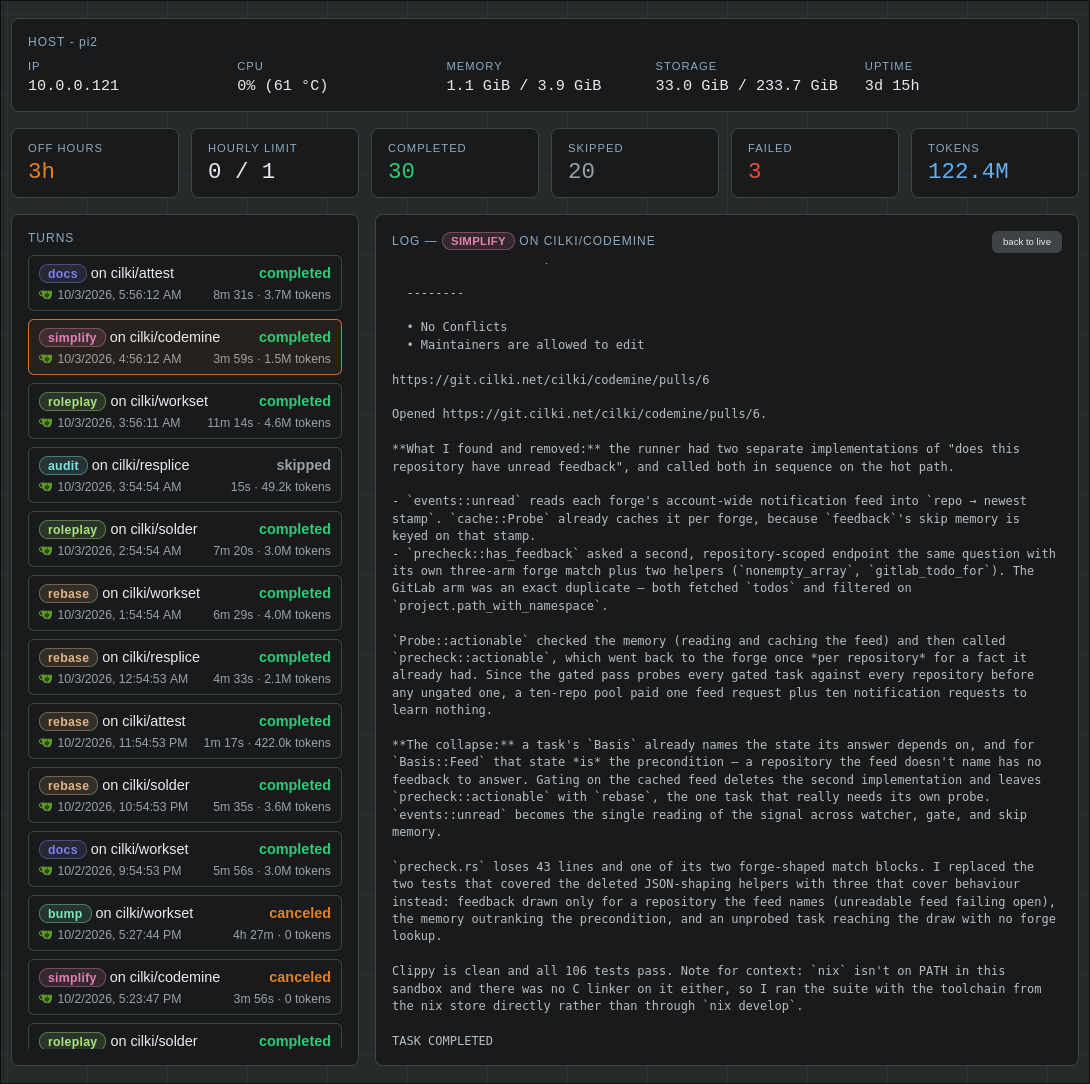
Each "turn" does one of the following on a repo:
feedback: responds to reviewer comments on its open PRs, and opens a PR for an issue it's assigned.rebase: rebase open PR branches that are behind their base branch and force-push.bump: update dependencies, handling any migration issues.simplify: remove dead code, simplify implementations, drop trivial tests.todo: implement TODOs in the repo.roleplay: run the project like a user would, fixing what breaks along the way.benchmark: run the project like a user would, searching for performance improvements.audit: evaluate the security of the project.docs: fix outdated docs.coverage: improve test coverage.mutation: mutate load-bearing code to find gaps the test suite misses.feature: propose a new feature as an issue, leaving the call to you rather than implementing it.lint: fix any results thrown by common linters.
Features
CLIProxyAPI
Agents are routed through
CLIProxyAPI, which manages the
model subscription. Point the settings page at the proxy
(http://127.0.0.1:8317 by default) and pick a model there. Until the proxy
answers, codemine stays unconfigured and runs no turns.
Codegraph
With codegraph installed, the agent avoids rereading the tree every turn, which cuts token usage substantially on large projects.
RTK
With rtk installed, the agent's shell commands are compressed to save tokens.
Scheduling and rate limiting
With a schedule enabled, turns can only start inside a daily window. You can also limit the number of turns that can run per hour.
Multiple forge support
codemine works with Gitea, GitHub, and GitLab. Add an access token and select what repos codemine is enabled for (none by default).
Web interface
You can manage the codemine instance via a simple web UI on port 8080. This is where you configure your forge settings, rate limits, select a model, choose what task types are run, view agent logs, etc. Updates to the settings take effect on the next turn.
Similar repos


Languages
Rust
81.4%
HTML
17.8%
See what people are saying
README
codemine runs AI agents on git repos while you're away, delivering tested PRs and helpful issues.
Each "turn" does one of the following on a repo:
feedback: responds to reviewer comments on its open PRs, and opens a PR for an issue it's assigned.rebase: rebase open PR branches that are behind their base branch and force-push.bump: update dependencies, handling any migration issues.simplify: remove dead code, simplify implementations, drop trivial tests.todo: implement TODOs in the repo.roleplay: run the project like a user would, fixing what breaks along the way.benchmark: run the project like a user would, searching for performance improvements.audit: evaluate the security of the project.docs: fix outdated docs.coverage: improve test coverage.mutation: mutate load-bearing code to find gaps the test suite misses.feature: propose a new feature as an issue, leaving the call to you rather than implementing it.lint: fix any results thrown by common linters.
Features
CLIProxyAPI
Agents are routed through
CLIProxyAPI, which manages the
model subscription. Point the settings page at the proxy
(http://127.0.0.1:8317 by default) and pick a model there. Until the proxy
answers, codemine stays unconfigured and runs no turns.
Codegraph
With codegraph installed, the agent avoids rereading the tree every turn, which cuts token usage substantially on large projects.
RTK
With rtk installed, the agent's shell commands are compressed to save tokens.
Scheduling and rate limiting
With a schedule enabled, turns can only start inside a daily window. You can also limit the number of turns that can run per hour.
Multiple forge support
codemine works with Gitea, GitHub, and GitLab. Add an access token and select what repos codemine is enabled for (none by default).
Web interface
You can manage the codemine instance via a simple web UI on port 8080. This is where you configure your forge settings, rate limits, select a model, choose what task types are run, view agent logs, etc. Updates to the settings take effect on the next turn.
Similar repos
Languages
Rust
81.4%
HTML
17.8%