ArtSeek: Deep artwork understanding via multimodal in-context reasoning and late interaction retrieval
Jupyter Notebook
11
30 commits
updated Sep 27, 2026
Nicola Fanelli · Gennaro Vessio · Giovanna Castellano
University of Bari Aldo Moro





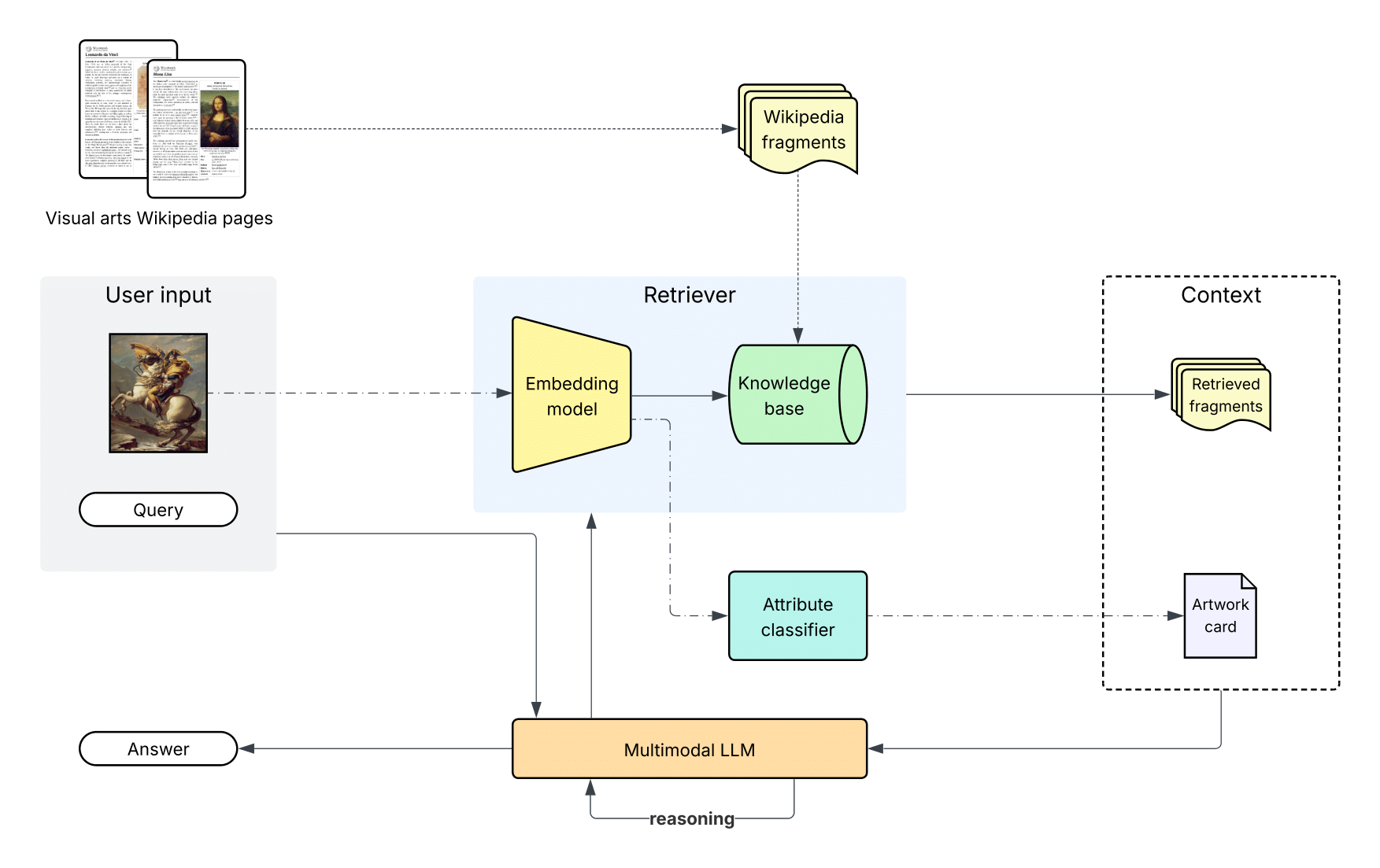
ArtSeek answers open-ended questions about artworks. Given an image and a question, a multimodal LLM looks at the painting, reads an artwork card predicted by a classifier, decides when it needs external knowledge, and retrieves it from Wikipedia before answering. The language model is used zero-shot, and the repository includes an interactive demo.
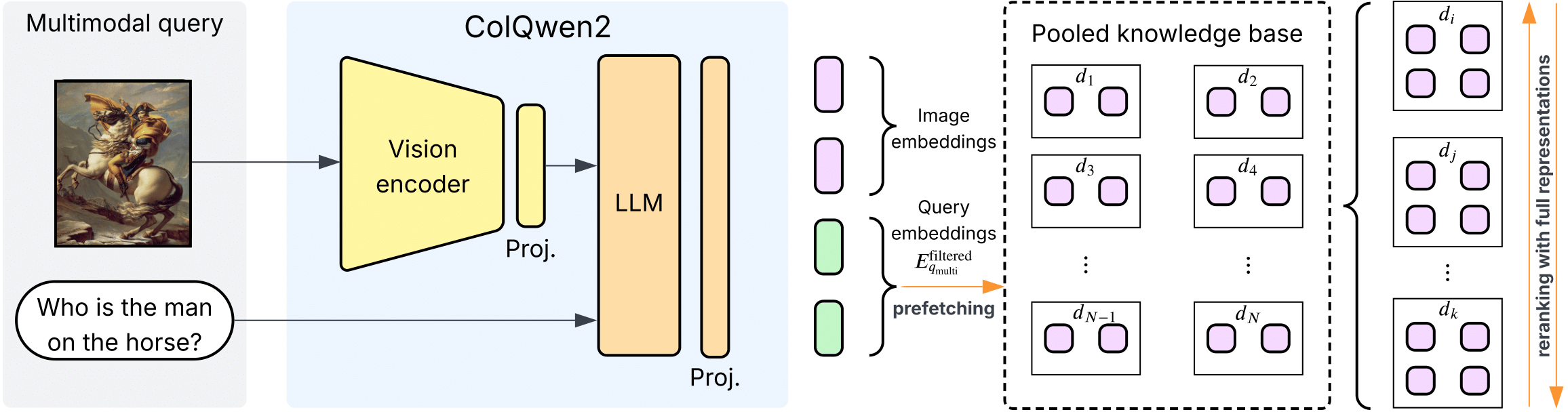 Multimodal retrieval. The image and the question are encoded together by ColQwen2; only the question tokens are kept, candidates are prefetched on pooled fragment vectors and reranked on the full ones. |
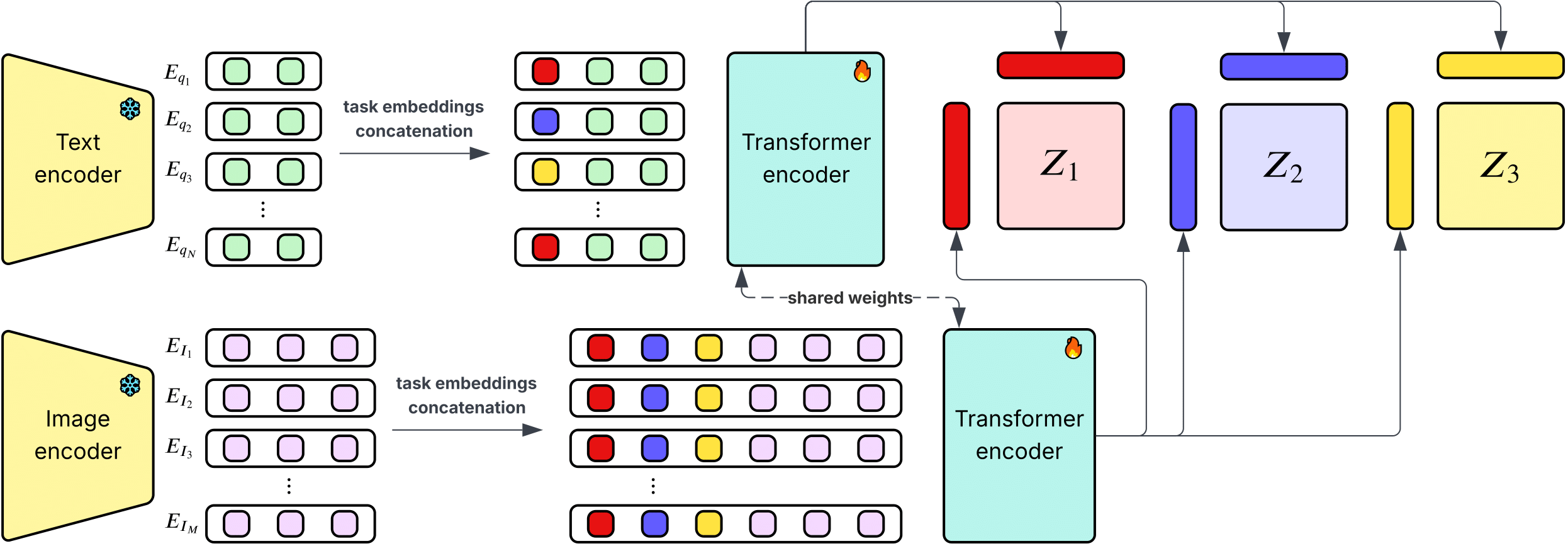 Late Interaction Classification Network. Frozen ColQwen2 embeddings of the image and of every label, concatenated with learnable task embeddings, are encoded by a shared transformer and matched per task. The predictions form the artwork card. |
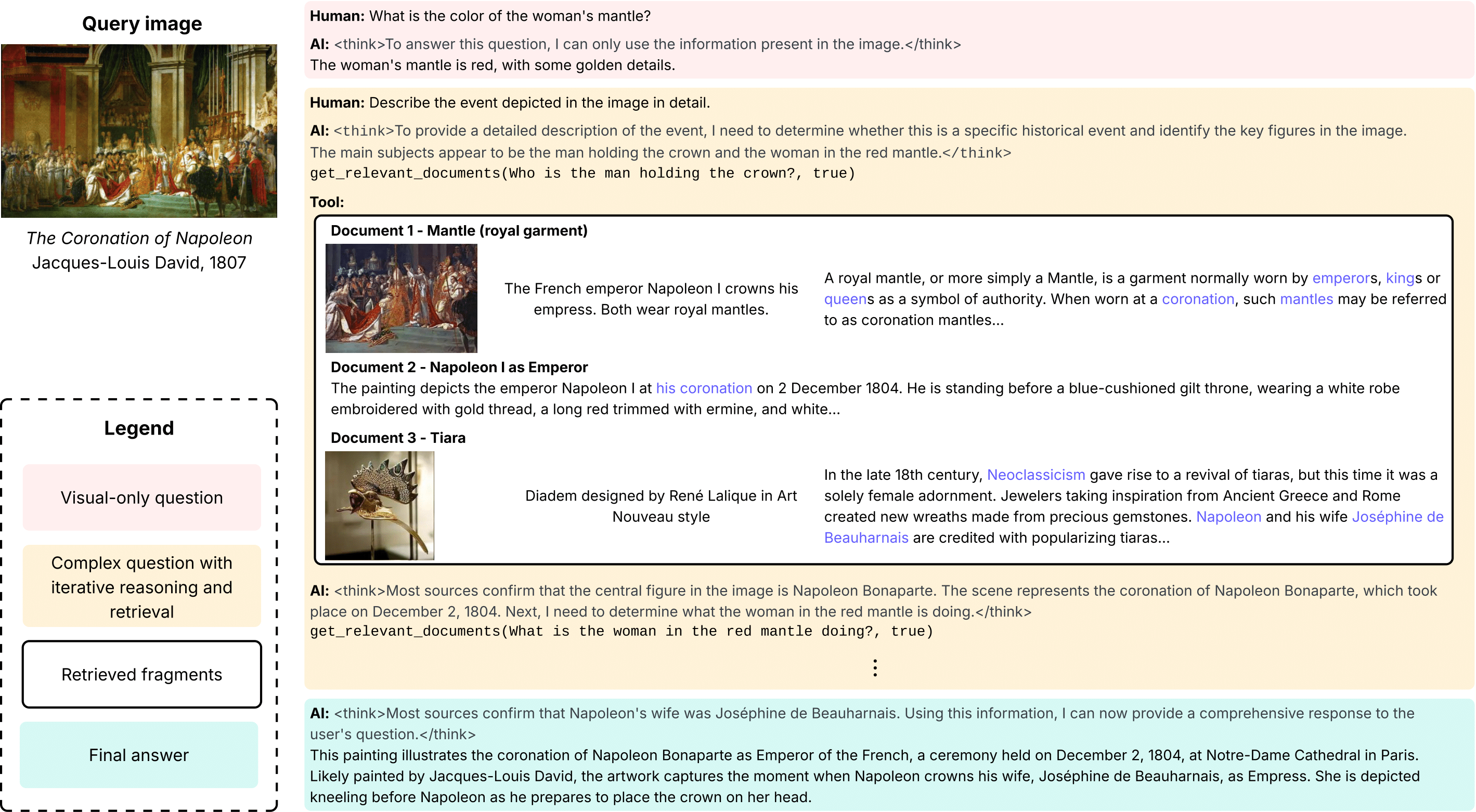 In-context reasoning. The one-shot example shown to the model: visual questions are answered directly, knowledge questions trigger get_relevant_documents calls whose fragments are read before answering.
|
Question answering, mean correctness on a 0-2 scale judged by phi-4, with 95% confidence intervals (paper, Tab. 3). ArtSeek gains where its knowledge base covers the painting and ties with its backbone where it does not.
| Benchmark | KB coverage | Qwen2.5-VL-32B | ArtSeek | Δ [95% CI] |
|---|---|---|---|---|
| ArtPedia-VQA | 85.8% | 0.535 | 0.722 | +0.186 [+0.119, +0.254] |
| LICNHeldOut | 53.3% | 1.010 | 1.197 | +0.186 [+0.114, +0.257] |
| AQUA | 10.4% | 0.920 | 0.896 | −0.025 [−0.095, +0.046] |
| ArtCurate-AIC | 10.3% | 1.125 | 1.093 | −0.034 [−0.071, +0.003] |
| ArtQuest | 8.9% | 0.937 | 0.914 | −0.023 [−0.076, +0.031] |
The same gain holds with Gemma-3-27B and Mistral-Small-3.1-24B as backbones (+0.22 to +0.28 on ArtPedia-VQA). LICN reaches 71.8 / 78.5 / 69.8 top-1 on ArtGraph artist / genre / style. Captioning, retrieval and classification tables, with the commands to reproduce them, are in data/README.md.
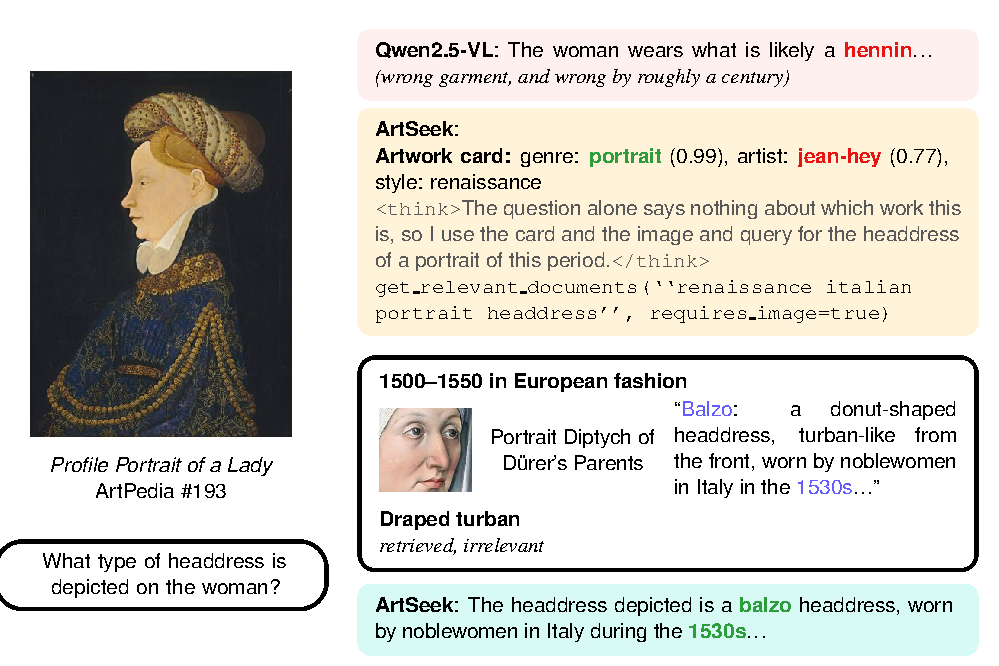
The question names nothing to search for; the image and the card turn it into a query, and a retrieved fragment corrects the backbone's “hennin” into the right balzo (even though the card's artist is wrong).
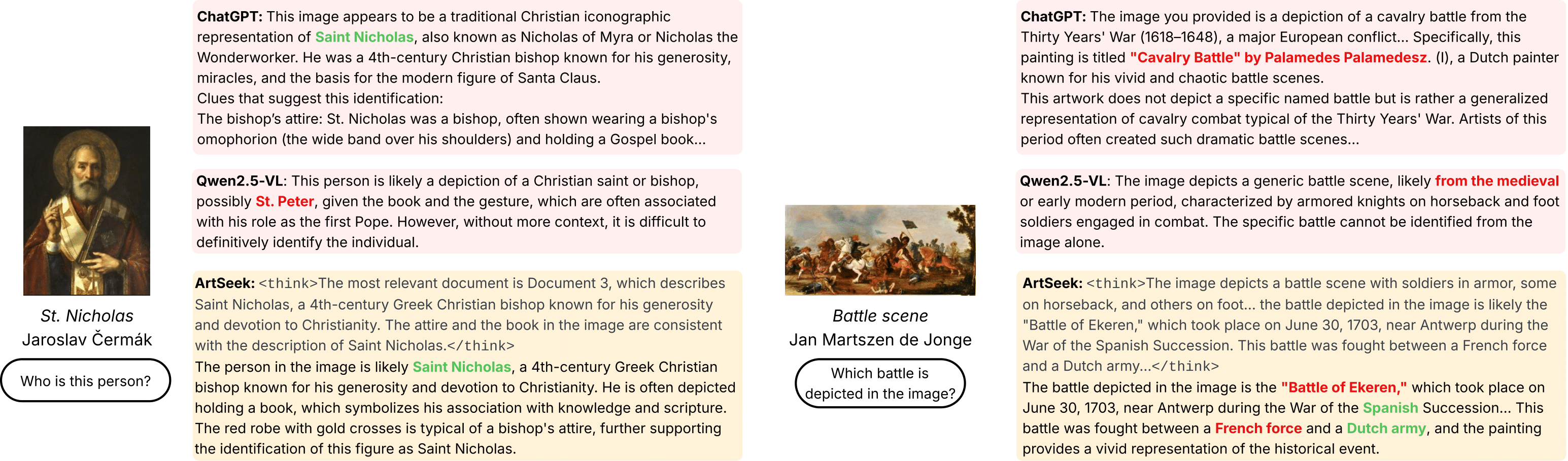
ArtSeek compared with Qwen2.5-VL and ChatGPT. Right: a failure case, where retrieval suggests a plausible but wrong battle.
The additional experiments of the revised paper (question-answering benchmarks, other backbones, human evaluation) are on the rebuttal branch.
| GPU | one NVIDIA GPU with 64 GB (tested on A100 64 GB, CUDA 12.6). vLLM, ColQwen2 and LICN share it. |
| RAM | 128 GB |
| Disk | ~1 TB for the Hugging Face cache (WikiFragments is ~495 GB, downloaded and then prepared by datasets), ~310 GB for the Qdrant storage |
| OS | Linux, Python 3.12, uv |
Setting everything up takes about a day, mostly unattended: downloading WikiFragments, ingesting it into Qdrant (~2.5 h with 4 processes) and building the index (~8 h).
git clone https://github.com/cilabuniba/artseek.git
cd artseek
uv sync                  # creates .venv with PyTorch 2.8 (CUDA 12.6) and vLLM 0.11
source .venv/bin/activate
cp .env.example .env     # then edit it
.env is read by the demo and the scripts. The most important settings:
| variable | meaning |
|---|---|
HF_HOME | Hugging Face cache (put it on the disk with ~1 TB free) |
HF_HUB_OFFLINE, HF_DATASETS_OFFLINE | set to 1 once everything is downloaded |
QDRANT_URL | Qdrant server, http://localhost by default |
ARTSEEK_GPU_MEMORY_UTILIZATION | fraction of GPU memory for vLLM (default 0.65); lower it if the retriever runs out of memory |
The default generation engine is vLLM. The transformers engine (ARTSEEK_ENGINE=hf) is slower and needs FlashAttention: uv pip install flash-attn --no-build-isolation.
Everything is hosted on the Hugging Face Hub:
| resource | Hub id | size |
|---|---|---|
| WikiFragments with ColQwen2 embeddings | cilabuniba/wikifragments-visual-arts-embeds | ~495 GB |
| LICN weights | cilabuniba/artseek-licn | small |
| LICN label spaces | cilabuniba/artseek-licn-data | small |
| Backbone MLLM | Qwen/Qwen2.5-VL-32B-Instruct-AWQ | 20 GB |
| Retriever | vidore/colqwen2-v1.0 (+ vidore/colqwen2-base) | 8 GB |
python scripts/download_resources.py                 # everything (several hours)
python scripts/download_resources.py --skip-dataset  # models only
The script downloads into $HF_HOME and prepares WikiFragments with datasets.load_dataset, which is how ArtSeek loads it. After it finishes you can set HF_HUB_OFFLINE=1 and HF_DATASETS_OFFLINE=1 in .env.
ArtSeek queries a Qdrant collection named wikifragments-visual-arts-embeds over gRPC (port 6334). We used Qdrant v1.17.0.
With Docker (workstations):
docker run -d --name qdrant -p 6333:6333 -p 6334:6334 \
    -v /path/to/qdrant_storage:/qdrant/storage qdrant/qdrant:v1.17.0
Without Docker (e.g. HPC clusters): download a Linux binary from the Qdrant releases, or build it from source (below). Then:
export QDRANT_BIN=/path/to/qdrant QDRANT_STORAGE=/path/to/qdrant_storage
bash scripts/start_qdrant.sh    # returns when the server is ready
Requires Rust ≥ 1.87, LLVM/Clang and protoc:
# Protobuf compiler
curl -LO https://github.com/protocolbuffers/protobuf/releases/download/v25.1/protoc-25.1-linux-x86_64.zip
unzip -o protoc-25.1-linux-x86_64.zip -d proto_bin
export PROTOC=$PWD/proto_bin/bin/protoc PATH=$PWD/proto_bin/bin:$PATH
# If Clang is not found, point LIBCLANG_PATH to the lib/ directory of your LLVM install.

git clone https://github.com/qdrant/qdrant.git
cd qdrant && git checkout v1.17.0
RUSTFLAGS="-C target-cpu=native" cargo build --release --bin qdrant
# binary: target/release/qdrant
With Qdrant running and the dataset downloaded:
python -m artseek.data.main make-qdrant-store --process-idx 0 --num-proc 1
To go faster, run N processes in parallel with --process-idx 0 … N-1 and --num-proc N. Process 0 (re)creates the collection; the others wait 5 minutes before uploading. slurm/build_qdrant_store.sh does this with 4 processes.
python -m artseek.data.main add-qdrant-index
The command polls the collection every 5 minutes and returns when indexing is complete (slurm/add_qdrant_index.sh). Check the result:
curl -s localhost:6333/collections/wikifragments-visual-arts-embeds | python -m json.tool | grep points_count
# "points_count": 8166323
With Qdrant running and the resources downloaded:
streamlit run app.py
Open http://localhost:8501 and upload an image. The first upload loads the models, which takes a few minutes; LICN then shows the artwork card. Ask questions in the chat: the model decides when to retrieve, and each retrieval shows the query and the retrieved fragments. The reasoning (<think> block) and a timing breakdown are expandable. The sidebar toggles classification and retrieval, so you can compare with the bare backbone.
On a remote GPU node, start Streamlit there and forward the port:
# on the GPU node
streamlit run app.py --server.port 8501 --server.address 0.0.0.0 --server.headless true
# on your machine
ssh -N -L 8501:<gpu-node>:8501 <user>@<login-node>
slurm/demo.sh starts Qdrant and the demo in one SLURM job and prints the SSH command. Fill in the #SBATCH placeholders first.
If vLLM runs out of memory during CUDA-graph capture, or the retriever runs out of memory, lower ARTSEEK_GPU_MEMORY_UTILIZATION (or ARTSEEK_MAX_MODEL_LEN).
from langchain_core.messages import HumanMessage
from PIL import Image

from artseek.method.generate.config import load_artseek
from artseek.method.generate.prompts import build_user_content

model = load_artseek()  # vLLM engine, default configuration

image = Image.open("painting.jpg").convert("RGB")
card = model.classify(image)  # {"artist": [("claude-monet", 0.87)], "genre": ..., ...}

messages = [HumanMessage(content=build_user_content("Describe the historical context of this painting.", card))]
new_messages, context_images = model.chat_turn(messages, image, classify=True, retrieve=True)
print(new_messages[-1].content)

# Follow-up question: keep the history and the retrieved images.
messages += new_messages + [HumanMessage(content="Who commissioned it?")]
more, more_images = model.chat_turn(messages, image, context_images=context_images)
card=None and classify=False. With retrieve=False the model answers from its own knowledge.new_messages contains the tool calls and ToolMessages. Their artifact holds the retrieved documents (documents, context_idxs), and the final message's response_metadata["step_durations"] holds the timing.load_artseek(**overrides) accepts any Qwen2_5_VLRAGModel argument, e.g. model_kwargs for vLLM or use_shot=False to describe the tool-calling policy in the system prompt instead of the one-shot example.gemma3_vllm.py and mistral3_vllm.py wrap Gemma 3 and Mistral Small 3.1 (pass them as chat_model_cls). They cannot emit Qwen-style tool calls, so use them with seeded retrieval: chat_turn(..., seed_queries=[{"query": ..., "requires_image": True}], max_tool_calls=0).Code layout:
artseek/
  method/
    generate/    ArtSeek pipeline: rag.py (model + chat_turn), config.py (defaults),
                 prompts.py, tools.py, graph.py (LangGraph batch inference),
                 vLLM / transformers backbones, evaluation (test.py, eval.py)
    retrieve/    ColQwen2 + Qdrant retriever, retrieval evaluation
    classify/    LICN model and training
  data/          data pipeline (ArtGraph, Wikipedia, WikiFragments, Qdrant) and dataset loaders
app.py           Streamlit demo
scripts/         resource download, Qdrant launcher
slurm/           SLURM templates (placeholders for account/partition)
models/configs/  experiment configurations
data/README.md explains how to download and lay out every dataset of the paper and how to run each experiment, with the results to expect:
| Experiment | Command |
|---|---|
| Retrieval (Tab. S2) | python -m artseek.method.retrieve.eval {sample,questions,embed,store,evaluate} |
| Classification (Tab. 1) | accelerate launch -m artseek.method.classify.train_li_classification_network {precompute,train,test} |
| Artwork explanation (Tab. 2) | python -m artseek.method.generate.test inference + python -m artseek.method.generate.eval score |
| Question answering, human study (Tab. 3) | rebuttal branch, rebuttal_experiments/ |
Not needed to use ArtSeek: everything above is on the Hugging Face Hub. These are the steps that produced it.
plugins/, enabled in conf/neo4j.conf).bin/neo4j-admin load --from=artgraph2.0.dump --database=neo4j --force..env (NEO4J_URI, NEO4J_USERNAME, NEO4J_PASSWORD).All steps are subcommands of python -m artseek.data.main, and they write to data/ (or $ARTSEEK_DATA_DIR):
| step | command | output |
|---|---|---|
| 1 | download-wikiart-images | ArtGraph images (116,475; re-run until complete) |
| 2 | make-artgraph-dataset | multitask classification splits (needs Neo4j) |
| 3 | define-valid-labels-artgraph-dataset | evaluation label sets |
| 4 | get-visual-arts-dataset-pages | Wikipedia pages under "Category:Visual arts", depth 5 |
| 5 | WikiExtractor, see below | page texts with image links |
| 6 | download-and-save-images-wikipedia | Wikipedia images |
| 7 | create-wikifragments-dataset | WikiFragments (paragraph + images) |
| 8 | create-wikifragments-visual-arts-full-dataset | visual-arts subset with rendered fragments |
| 9 | colqwen-embed-new | ColQwen2 multi-vector and pooled embeddings (parallelisable with --start-idx/--end-idx) |
| 10 | make-qdrant-store, add-qdrant-index | the Qdrant collection (Section 4) |
Step 5 runs a modified WikiExtractor on the English Wikipedia dump (enwiki-latest-pages-articles.xml.bz2, 2024-09-20). The modification keeps image URLs and captions as <a> tags:
python WikiExtractorNew.py --json -s --lists --links enwiki-latest-pages-articles.xml.bz2 -o data/texts/text_en
scripts/fetch_wikifragments_licenses.py collects the license and attribution of every image.
accelerate launch -m artseek.method.classify.train_li_classification_network train \
    --config-path models/configs/classify/li_classification_network_tft.yaml
tft is the configuration used in the paper; the other files are the ablations.
@article{fanelli2025artseek,
  title   = {ArtSeek: Deep artwork understanding via multimodal in-context reasoning and late interaction retrieval},
  author  = {Fanelli, Nicola and Vessio, Gennaro and Castellano, Giovanna},
  journal = {arXiv preprint arXiv:2507.21917},
  year    = {2025}
}
Code: MIT. WikiFragments text is CC BY-SA 4.0 (Wikipedia); each image keeps its own license, listed in the dataset.
ArtSeek: Deep artwork understanding via multimodal in-context reasoning and late interaction retrieval
Jupyter Notebook
11
30 commits
updated Sep 27, 2026
Nicola Fanelli · Gennaro Vessio · Giovanna Castellano
University of Bari Aldo Moro
ArtSeek answers open-ended questions about artworks. Given an image and a question, a multimodal LLM looks at the painting, reads an artwork card predicted by a classifier, decides when it needs external knowledge, and retrieves it from Wikipedia before answering. The language model is used zero-shot, and the repository includes an interactive demo.
|
Multimodal retrieval. The image and the question are encoded together by ColQwen2; only the question tokens are kept, candidates are prefetched on pooled fragment vectors and reranked on the full ones. |
|
Late Interaction Classification Network. Frozen ColQwen2 embeddings of the image and of every label, concatenated with learnable task embeddings, are encoded by a shared transformer and matched per task. The predictions form the artwork card. |
|
In-context reasoning. The one-shot example shown to the model: visual questions are answered directly, knowledge questions trigger get_relevant_documents calls whose fragments are read before answering.
|
Question answering, mean correctness on a 0-2 scale judged by phi-4, with 95% confidence intervals (paper, Tab. 3). ArtSeek gains where its knowledge base covers the painting and ties with its backbone where it does not.
| Benchmark | KB coverage | Qwen2.5-VL-32B | ArtSeek | Δ [95% CI] |
|---|---|---|---|---|
| ArtPedia-VQA | 85.8% | 0.535 | 0.722 | +0.186 [+0.119, +0.254] |
| LICNHeldOut | 53.3% | 1.010 | 1.197 | +0.186 [+0.114, +0.257] |
| AQUA | 10.4% | 0.920 | 0.896 | −0.025 [−0.095, +0.046] |
| ArtCurate-AIC | 10.3% | 1.125 | 1.093 | −0.034 [−0.071, +0.003] |
| ArtQuest | 8.9% | 0.937 | 0.914 | −0.023 [−0.076, +0.031] |
The same gain holds with Gemma-3-27B and Mistral-Small-3.1-24B as backbones (+0.22 to +0.28 on ArtPedia-VQA). LICN reaches 71.8 / 78.5 / 69.8 top-1 on ArtGraph artist / genre / style. Captioning, retrieval and classification tables, with the commands to reproduce them, are in data/README.md.
The question names nothing to search for; the image and the card turn it into a query, and a retrieved fragment corrects the backbone's “hennin” into the right balzo (even though the card's artist is wrong).
ArtSeek compared with Qwen2.5-VL and ChatGPT. Right: a failure case, where retrieval suggests a plausible but wrong battle.
The additional experiments of the revised paper (question-answering benchmarks, other backbones, human evaluation) are on the rebuttal branch.
| GPU | one NVIDIA GPU with 64 GB (tested on A100 64 GB, CUDA 12.6). vLLM, ColQwen2 and LICN share it. |
| RAM | 128 GB |
| Disk | ~1 TB for the Hugging Face cache (WikiFragments is ~495 GB, downloaded and then prepared by datasets), ~310 GB for the Qdrant storage |
| OS | Linux, Python 3.12, uv |
Setting everything up takes about a day, mostly unattended: downloading WikiFragments, ingesting it into Qdrant (~2.5 h with 4 processes) and building the index (~8 h).
git clone https://github.com/cilabuniba/artseek.git
cd artseek
uv sync                  # creates .venv with PyTorch 2.8 (CUDA 12.6) and vLLM 0.11
source .venv/bin/activate
cp .env.example .env     # then edit it
.env is read by the demo and the scripts. The most important settings:
| variable | meaning |
|---|---|
HF_HOME | Hugging Face cache (put it on the disk with ~1 TB free) |
HF_HUB_OFFLINE, HF_DATASETS_OFFLINE | set to 1 once everything is downloaded |
QDRANT_URL | Qdrant server, http://localhost by default |
ARTSEEK_GPU_MEMORY_UTILIZATION | fraction of GPU memory for vLLM (default 0.65); lower it if the retriever runs out of memory |
The default generation engine is vLLM. The transformers engine (ARTSEEK_ENGINE=hf) is slower and needs FlashAttention: uv pip install flash-attn --no-build-isolation.
Everything is hosted on the Hugging Face Hub:
| resource | Hub id | size |
|---|---|---|
| WikiFragments with ColQwen2 embeddings | cilabuniba/wikifragments-visual-arts-embeds | ~495 GB |
| LICN weights | cilabuniba/artseek-licn | small |
| LICN label spaces | cilabuniba/artseek-licn-data | small |
| Backbone MLLM | Qwen/Qwen2.5-VL-32B-Instruct-AWQ | 20 GB |
| Retriever | vidore/colqwen2-v1.0 (+ vidore/colqwen2-base) | 8 GB |
python scripts/download_resources.py                 # everything (several hours)
python scripts/download_resources.py --skip-dataset  # models only
The script downloads into $HF_HOME and prepares WikiFragments with datasets.load_dataset, which is how ArtSeek loads it. After it finishes you can set HF_HUB_OFFLINE=1 and HF_DATASETS_OFFLINE=1 in .env.
ArtSeek queries a Qdrant collection named wikifragments-visual-arts-embeds over gRPC (port 6334). We used Qdrant v1.17.0.
With Docker (workstations):
docker run -d --name qdrant -p 6333:6333 -p 6334:6334 \
    -v /path/to/qdrant_storage:/qdrant/storage qdrant/qdrant:v1.17.0
Without Docker (e.g. HPC clusters): download a Linux binary from the Qdrant releases, or build it from source (below). Then:
export QDRANT_BIN=/path/to/qdrant QDRANT_STORAGE=/path/to/qdrant_storage
bash scripts/start_qdrant.sh    # returns when the server is ready
Requires Rust ≥ 1.87, LLVM/Clang and protoc:
# Protobuf compiler
curl -LO https://github.com/protocolbuffers/protobuf/releases/download/v25.1/protoc-25.1-linux-x86_64.zip
unzip -o protoc-25.1-linux-x86_64.zip -d proto_bin
export PROTOC=$PWD/proto_bin/bin/protoc PATH=$PWD/proto_bin/bin:$PATH
# If Clang is not found, point LIBCLANG_PATH to the lib/ directory of your LLVM install.

git clone https://github.com/qdrant/qdrant.git
cd qdrant && git checkout v1.17.0
RUSTFLAGS="-C target-cpu=native" cargo build --release --bin qdrant
# binary: target/release/qdrant
With Qdrant running and the dataset downloaded:
python -m artseek.data.main make-qdrant-store --process-idx 0 --num-proc 1
To go faster, run N processes in parallel with --process-idx 0 … N-1 and --num-proc N. Process 0 (re)creates the collection; the others wait 5 minutes before uploading. slurm/build_qdrant_store.sh does this with 4 processes.
python -m artseek.data.main add-qdrant-index
The command polls the collection every 5 minutes and returns when indexing is complete (slurm/add_qdrant_index.sh). Check the result:
curl -s localhost:6333/collections/wikifragments-visual-arts-embeds | python -m json.tool | grep points_count
# "points_count": 8166323
With Qdrant running and the resources downloaded:
streamlit run app.py
Open http://localhost:8501 and upload an image. The first upload loads the models, which takes a few minutes; LICN then shows the artwork card. Ask questions in the chat: the model decides when to retrieve, and each retrieval shows the query and the retrieved fragments. The reasoning (<think> block) and a timing breakdown are expandable. The sidebar toggles classification and retrieval, so you can compare with the bare backbone.
On a remote GPU node, start Streamlit there and forward the port:
# on the GPU node
streamlit run app.py --server.port 8501 --server.address 0.0.0.0 --server.headless true
# on your machine
ssh -N -L 8501:<gpu-node>:8501 <user>@<login-node>
slurm/demo.sh starts Qdrant and the demo in one SLURM job and prints the SSH command. Fill in the #SBATCH placeholders first.
If vLLM runs out of memory during CUDA-graph capture, or the retriever runs out of memory, lower ARTSEEK_GPU_MEMORY_UTILIZATION (or ARTSEEK_MAX_MODEL_LEN).
from langchain_core.messages import HumanMessage
from PIL import Image

from artseek.method.generate.config import load_artseek
from artseek.method.generate.prompts import build_user_content

model = load_artseek()  # vLLM engine, default configuration

image = Image.open("painting.jpg").convert("RGB")
card = model.classify(image)  # {"artist": [("claude-monet", 0.87)], "genre": ..., ...}

messages = [HumanMessage(content=build_user_content("Describe the historical context of this painting.", card))]
new_messages, context_images = model.chat_turn(messages, image, classify=True, retrieve=True)
print(new_messages[-1].content)

# Follow-up question: keep the history and the retrieved images.
messages += new_messages + [HumanMessage(content="Who commissioned it?")]
more, more_images = model.chat_turn(messages, image, context_images=context_images)
card=None and classify=False. With retrieve=False the model answers from its own knowledge.new_messages contains the tool calls and ToolMessages. Their artifact holds the retrieved documents (documents, context_idxs), and the final message's response_metadata["step_durations"] holds the timing.load_artseek(**overrides) accepts any Qwen2_5_VLRAGModel argument, e.g. model_kwargs for vLLM or use_shot=False to describe the tool-calling policy in the system prompt instead of the one-shot example.gemma3_vllm.py and mistral3_vllm.py wrap Gemma 3 and Mistral Small 3.1 (pass them as chat_model_cls). They cannot emit Qwen-style tool calls, so use them with seeded retrieval: chat_turn(..., seed_queries=[{"query": ..., "requires_image": True}], max_tool_calls=0).Code layout:
artseek/
  method/
    generate/    ArtSeek pipeline: rag.py (model + chat_turn), config.py (defaults),
                 prompts.py, tools.py, graph.py (LangGraph batch inference),
                 vLLM / transformers backbones, evaluation (test.py, eval.py)
    retrieve/    ColQwen2 + Qdrant retriever, retrieval evaluation
    classify/    LICN model and training
  data/          data pipeline (ArtGraph, Wikipedia, WikiFragments, Qdrant) and dataset loaders
app.py           Streamlit demo
scripts/         resource download, Qdrant launcher
slurm/           SLURM templates (placeholders for account/partition)
models/configs/  experiment configurations
data/README.md explains how to download and lay out every dataset of the paper and how to run each experiment, with the results to expect:
| Experiment | Command |
|---|---|
| Retrieval (Tab. S2) | python -m artseek.method.retrieve.eval {sample,questions,embed,store,evaluate} |
| Classification (Tab. 1) | accelerate launch -m artseek.method.classify.train_li_classification_network {precompute,train,test} |
| Artwork explanation (Tab. 2) | python -m artseek.method.generate.test inference + python -m artseek.method.generate.eval score |
| Question answering, human study (Tab. 3) | rebuttal branch, rebuttal_experiments/ |
Not needed to use ArtSeek: everything above is on the Hugging Face Hub. These are the steps that produced it.
plugins/, enabled in conf/neo4j.conf).bin/neo4j-admin load --from=artgraph2.0.dump --database=neo4j --force..env (NEO4J_URI, NEO4J_USERNAME, NEO4J_PASSWORD).All steps are subcommands of python -m artseek.data.main, and they write to data/ (or $ARTSEEK_DATA_DIR):
| step | command | output |
|---|---|---|
| 1 | download-wikiart-images | ArtGraph images (116,475; re-run until complete) |
| 2 | make-artgraph-dataset | multitask classification splits (needs Neo4j) |
| 3 | define-valid-labels-artgraph-dataset | evaluation label sets |
| 4 | get-visual-arts-dataset-pages | Wikipedia pages under "Category:Visual arts", depth 5 |
| 5 | WikiExtractor, see below | page texts with image links |
| 6 | download-and-save-images-wikipedia | Wikipedia images |
| 7 | create-wikifragments-dataset | WikiFragments (paragraph + images) |
| 8 | create-wikifragments-visual-arts-full-dataset | visual-arts subset with rendered fragments |
| 9 | colqwen-embed-new | ColQwen2 multi-vector and pooled embeddings (parallelisable with --start-idx/--end-idx) |
| 10 | make-qdrant-store, add-qdrant-index | the Qdrant collection (Section 4) |
Step 5 runs a modified WikiExtractor on the English Wikipedia dump (enwiki-latest-pages-articles.xml.bz2, 2024-09-20). The modification keeps image URLs and captions as <a> tags:
python WikiExtractorNew.py --json -s --lists --links enwiki-latest-pages-articles.xml.bz2 -o data/texts/text_en
scripts/fetch_wikifragments_licenses.py collects the license and attribution of every image.
accelerate launch -m artseek.method.classify.train_li_classification_network train \
    --config-path models/configs/classify/li_classification_network_tft.yaml
tft is the configuration used in the paper; the other files are the ablations.
@article{fanelli2025artseek,
  title   = {ArtSeek: Deep artwork understanding via multimodal in-context reasoning and late interaction retrieval},
  author  = {Fanelli, Nicola and Vessio, Gennaro and Castellano, Giovanna},
  journal = {arXiv preprint arXiv:2507.21917},
  year    = {2025}
}
Code: MIT. WikiFragments text is CC BY-SA 4.0 (Wikipedia); each image keeps its own license, listed in the dataset.



