
README
zbg


zbg (short for Zero Bullshit Git) is a CLI tool for using git efficiently.
Features
- ✨ Prettier
git status,git logand other commands - 🚀 Sane defaults to
gitcommands that enforce good state of your local repository - 🌌 Achieving more by typing less
zbg status | zbg log |
|---|---|
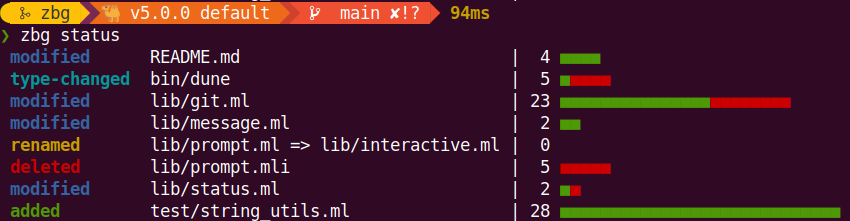 | 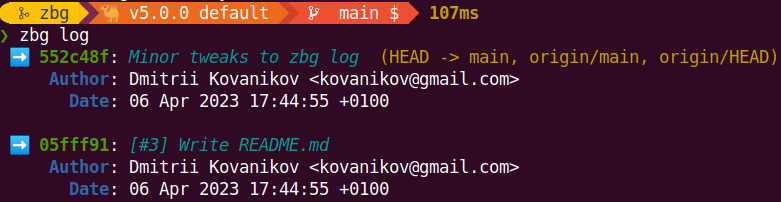 |
[!IMPORTANT]
zbgis developed and maintained in free time by volunteers. The development may continue for decades or may stop tomorrow. You can use GitHub Sponsorship to support the development of this project.
Install
[!NOTE] Currently
zbgcan be installed only by building it from sources. Alternative installation methods may appear later.
From sources
- Clone the repository
git clone git@github.com:chshersh/zbg.git cd zbg - Build the executable
opam install . --deps-only --with-doc --with-test dune build - Copy the executable under your location in
$PATH, e.g.:cp -f ./_build/default/bin/main.exe ~/.local/bin/zbg - Run
zbg --help
Configure
Set your GitHub username in the user.login field of your global .gitconfig:
git config --global user.login my-github-login
Quick start guide
This section contains examples of various usage scenarios for zbg.
Developing a new feature
A typical workflow for developing a new feature may look like this:
$ zbg switch           # Switch to the main branch and  sync it

$ zbg new Feature 2.0  # Create a new branch; 'zbg switch' made sure
                       # to start developing from the latest version

<coding>               # The fun part!

$ zbg status           # Check a quick summary of your changes

$ zbg commit           # Commit all local changes and write a description

$ zbg push             # Push the branch

$ zbg done             # Switch to the main branch and delete the feature branch locally
Experimenting, saving and re-applying
While you were on vacation, a coworker of yours pushed some changes to your branch, and now your want to sync their work locally and do some experimenting.
$ zbg sync     # Get the latest changes from your branch

$ zbg rebase   # Rebase on top of the main branch if anything changed

$ zbg continue # Continue after fixing rebase conflicts

<start developing the experiment>

$ zbg clear    # Nah, scrap that, bad idea

<coding>

$ zbg stash    # Argh, too early, save and do the other thing

<coding>

$ zbg status   # Check what you've done

$ zbg commit   # Commit changes

$ zbg unstash  # Now apply your stashed changes

$ zbg commit   # Commit changes again

$ zbg push -f  # Push changes for the review
All commands
The below table describes all zbg commands and the corresponding git
explanations.
[!NOTE] The table below uses default or example arguments to all commands
zbg | git |
|---|---|
zbg clear | git add . git reset --hard |
zbg commit My description | git add . git commit --message="My description" |
zbg done | git switch main git branch --delete --force <branch we're switching from> |
zbg log | git log <long custom formatting string> |
zbg new Branch name | git switch --create my-github-username/Branch-name |
zbg push | git push --set-upstream origin <current-branch> |
zbg rebase | git fetch origin main git rebase origin/main |
zbg continue | git add . git rebase --continue |
zbg stash | git stash push --include-untracked |
zbg status | git status (but zbg is prettier) |
zbg switch | git switch main git pull --ff-only --prune |
zbg sync | git pull --ff-only origin <current-branch> |
zbg sync -f | git fetch origin <current-branch> git reset --hard origin/<current-branch> |
zbg tag v0.1.0 | git tag --annotate %s --message='Tag for the v0.1.0 release' git push origin --tags |
zbg tag -d v0.1.0 | git tag --delete v0.1.0 git push --delete origin v0.1.0 |
zbg uncommit | git reset HEAD~1 |
zbg unstash | git stash pop |
The following table provides the comparison of zbg and git outputs.
zbg | git |
|---|---|
zbg status 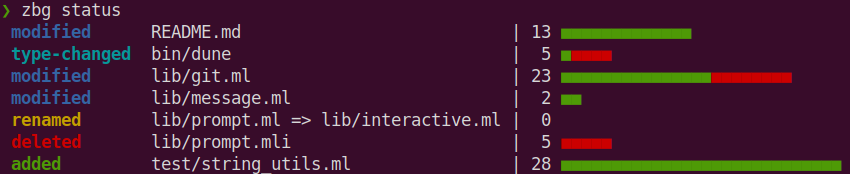 | git status 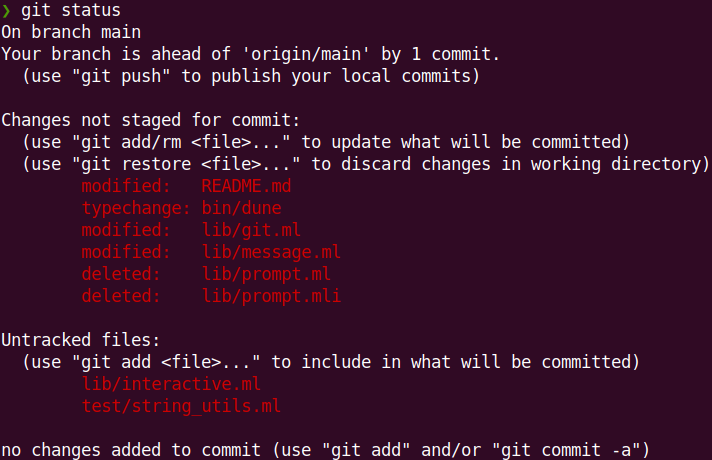 |
zbg log 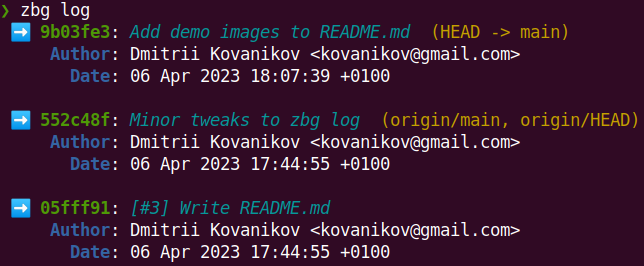 | git log 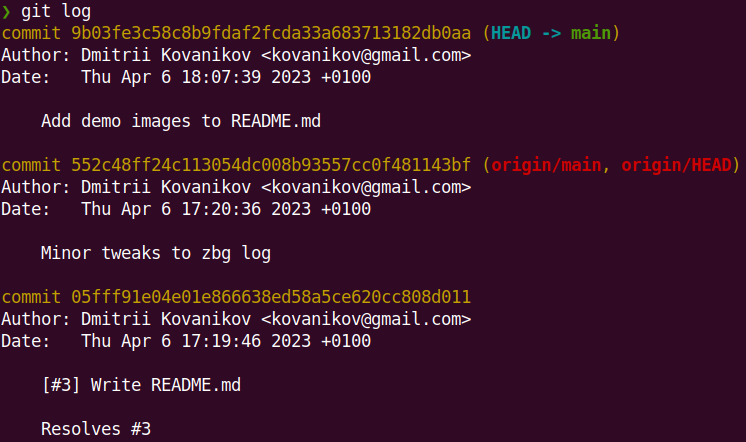 |
[!WARNING]
zbgis not a fullgitreplacement! It provides a streamlined workflow for the most common case but you may still need to usegitoccasionally.
For contributors
Check CONTRIBUTING.md for contributing guidelines.
Development
First time: Install all dependencies with opam:
opam install . --deps-only --with-doc --with-test
To build the project locally, use dune:
dune build
To run tests:
dune runtest
[!TIP] Empty output means that all tests are passing.
Troubleshooting
If you see the following error when running zbg switch:
$ zbg switch
fatal: ambiguous argument 'origin/HEAD': unknown revision or path not in the working tree.
Use '--' to separate paths from revisions, like this:
'git <command> [<revision>...] -- [<file>...]'
run the following command to sync with the remote and set the origin/HEAD ref locally:
git remote set-head origin -a
Contributors



Similar repos


Languages
OCaml
88.1%
Standard ML
10.4%
Dune
1.5%
README
zbg
zbg (short for Zero Bullshit Git) is a CLI tool for using git efficiently.
Features
- ✨ Prettier
git status,git logand other commands - 🚀 Sane defaults to
gitcommands that enforce good state of your local repository - 🌌 Achieving more by typing less
zbg status | zbg log |
|---|---|
| |
[!IMPORTANT]
zbgis developed and maintained in free time by volunteers. The development may continue for decades or may stop tomorrow. You can use GitHub Sponsorship to support the development of this project.
Install
[!NOTE] Currently
zbgcan be installed only by building it from sources. Alternative installation methods may appear later.
From sources
- Clone the repository
git clone git@github.com:chshersh/zbg.git cd zbg - Build the executable
opam install . --deps-only --with-doc --with-test dune build - Copy the executable under your location in
$PATH, e.g.:cp -f ./_build/default/bin/main.exe ~/.local/bin/zbg - Run
zbg --help
Configure
Set your GitHub username in the user.login field of your global .gitconfig:
git config --global user.login my-github-login
Quick start guide
This section contains examples of various usage scenarios for zbg.
Developing a new feature
A typical workflow for developing a new feature may look like this:
$ zbg switch           # Switch to the main branch and  sync it

$ zbg new Feature 2.0  # Create a new branch; 'zbg switch' made sure
                       # to start developing from the latest version

<coding>               # The fun part!

$ zbg status           # Check a quick summary of your changes

$ zbg commit           # Commit all local changes and write a description

$ zbg push             # Push the branch

$ zbg done             # Switch to the main branch and delete the feature branch locally
Experimenting, saving and re-applying
While you were on vacation, a coworker of yours pushed some changes to your branch, and now your want to sync their work locally and do some experimenting.
$ zbg sync     # Get the latest changes from your branch

$ zbg rebase   # Rebase on top of the main branch if anything changed

$ zbg continue # Continue after fixing rebase conflicts

<start developing the experiment>

$ zbg clear    # Nah, scrap that, bad idea

<coding>

$ zbg stash    # Argh, too early, save and do the other thing

<coding>

$ zbg status   # Check what you've done

$ zbg commit   # Commit changes

$ zbg unstash  # Now apply your stashed changes

$ zbg commit   # Commit changes again

$ zbg push -f  # Push changes for the review
All commands
The below table describes all zbg commands and the corresponding git
explanations.
[!NOTE] The table below uses default or example arguments to all commands
zbg | git |
|---|---|
zbg clear | git add . git reset --hard |
zbg commit My description | git add . git commit --message="My description" |
zbg done | git switch main git branch --delete --force <branch we're switching from> |
zbg log | git log <long custom formatting string> |
zbg new Branch name | git switch --create my-github-username/Branch-name |
zbg push | git push --set-upstream origin <current-branch> |
zbg rebase | git fetch origin main git rebase origin/main |
zbg continue | git add . git rebase --continue |
zbg stash | git stash push --include-untracked |
zbg status | git status (but zbg is prettier) |
zbg switch | git switch main git pull --ff-only --prune |
zbg sync | git pull --ff-only origin <current-branch> |
zbg sync -f | git fetch origin <current-branch> git reset --hard origin/<current-branch> |
zbg tag v0.1.0 | git tag --annotate %s --message='Tag for the v0.1.0 release' git push origin --tags |
zbg tag -d v0.1.0 | git tag --delete v0.1.0 git push --delete origin v0.1.0 |
zbg uncommit | git reset HEAD~1 |
zbg unstash | git stash pop |
The following table provides the comparison of zbg and git outputs.
zbg | git |
|---|---|
zbg status | git status |
zbg log | git log |
[!WARNING]
zbgis not a fullgitreplacement! It provides a streamlined workflow for the most common case but you may still need to usegitoccasionally.
For contributors
Check CONTRIBUTING.md for contributing guidelines.
Development
First time: Install all dependencies with opam:
opam install . --deps-only --with-doc --with-test
To build the project locally, use dune:
dune build
To run tests:
dune runtest
[!TIP] Empty output means that all tests are passing.
Troubleshooting
If you see the following error when running zbg switch:
$ zbg switch
fatal: ambiguous argument 'origin/HEAD': unknown revision or path not in the working tree.
Use '--' to separate paths from revisions, like this:
'git <command> [<revision>...] -- [<file>...]'
run the following command to sync with the remote and set the origin/HEAD ref locally:
git remote set-head origin -a
Similar repos
Contributors
Languages
OCaml
88.1%
Standard ML
10.4%
Dune
1.5%