Fast TRIBEv2 inference on NVIDIA Blackwell.
Rarámuri wraps TRIBEv2 in a faster, easier-to-run inference stack for NVIDIA DGX Spark and other Blackwell targets. On GB10, the default path is about 3.3× faster than the FP32 baseline through precision tuning, front-loaded transcription, and model caching, without changing the final predictions in any meaningful way.
Rarámuri predicts voxel-level cortical activation from video. The pipeline runs five models:
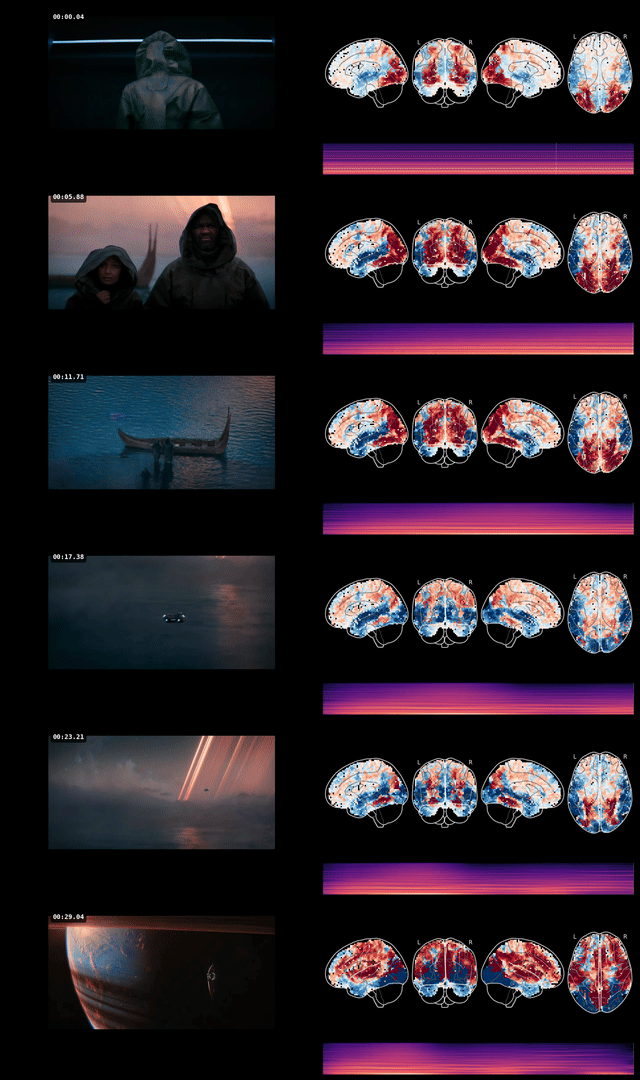
It is heavily based on TRIBEv2, but extensively optimised for Grace Blackwell architectures:
exca so repeat runs can skip expensive work entirely.A todo: one day most of this ought to run in NVFP4. Unfortunately, MSLK has other ideas at the moment.
Measured on NVIDIA GB10 (DGX Spark), 130.7 GB unified memory, aarch64.
| Configuration | Wall time | Speedup | Quality |
|---|---|---|---|
| Baseline (FP32, sequential, WhisperX) | 438.2s | 1.0× | Reference |
| Rarámuri default (BF16, parallel, Parakeet) | 131.1s | 3.3× | Lossless (0.11% NRMSE) |
| Rarámuri fast (BF16 + FP8 VJEPA2) | ~95s | 4.6× | 0.43% NRMSE |
| Cache-warm (same video, second run) | ~20s | 22× | Identical |
| Hot server (models pre-loaded) | <2s | >200× | Identical |
| Component | Baseline | Rarámuri | Speedup | How? |
|---|---|---|---|---|
| VJEPA2 (70 clips) | 328.0s (4.36s/clip) | 67.2s (0.71s/clip) | 6.1×/clip | BF16 inference |
| Wav2VecBert | ~15s | 48.3s* | — | BF16 autocast (parallel with text) |
| Llama 3.2 3B | ~36s | 49.8s* | — | BF16 + batch size 32 (parallel with audio) |
| Transcription (WhisperX → Parakeet) | ~47s | 18.7s (hidden) | ∞ | CPU background thread, overlapped |
| Event build | ~47s | 0.9s | 52× | Parakeet front-loaded, spaCy cached |
| Model load | ~2s | 4.2s | — | Includes Parakeet preload |
| TRIBEv2 head | ~2s | ~2s | — | — |
* Audio and text extractors run in parallel (mode 1). Wall time for the parallel group is ~50s rather than ~85s sequential.
| Configuration | Wall time | Speedup | Quality |
|---|---|---|---|
| Baseline (FP32, sequential) | 260.6s | 1.0× | Reference |
| Rarámuri default (BF16, parallel) | 107.8s | 2.4× | Lossless (0.02% NRMSE) |
BF16 predictions were compared against FP32 on the same 35-second input (35 timesteps × 20,484 vertices = 717,940 voxel predictions):
| Metric | BF16 vs FP32 |
|---|---|
| NRMSE | 0.108% |
| Global Pearson r | 0.999955 |
| Mean absolute error | 0.00117 |
| Max absolute error | 0.01132 |
| Per-timestep r (min) | 0.99990 |
| Per-timestep r (mean) | 0.99996 |
| Values differing by >0.01 | 0.00% |
No single voxel prediction differs by more than 0.012 between FP32 and BF16. The activation distributions are virtually identical (mean, std, and range match to 3+ decimal places).
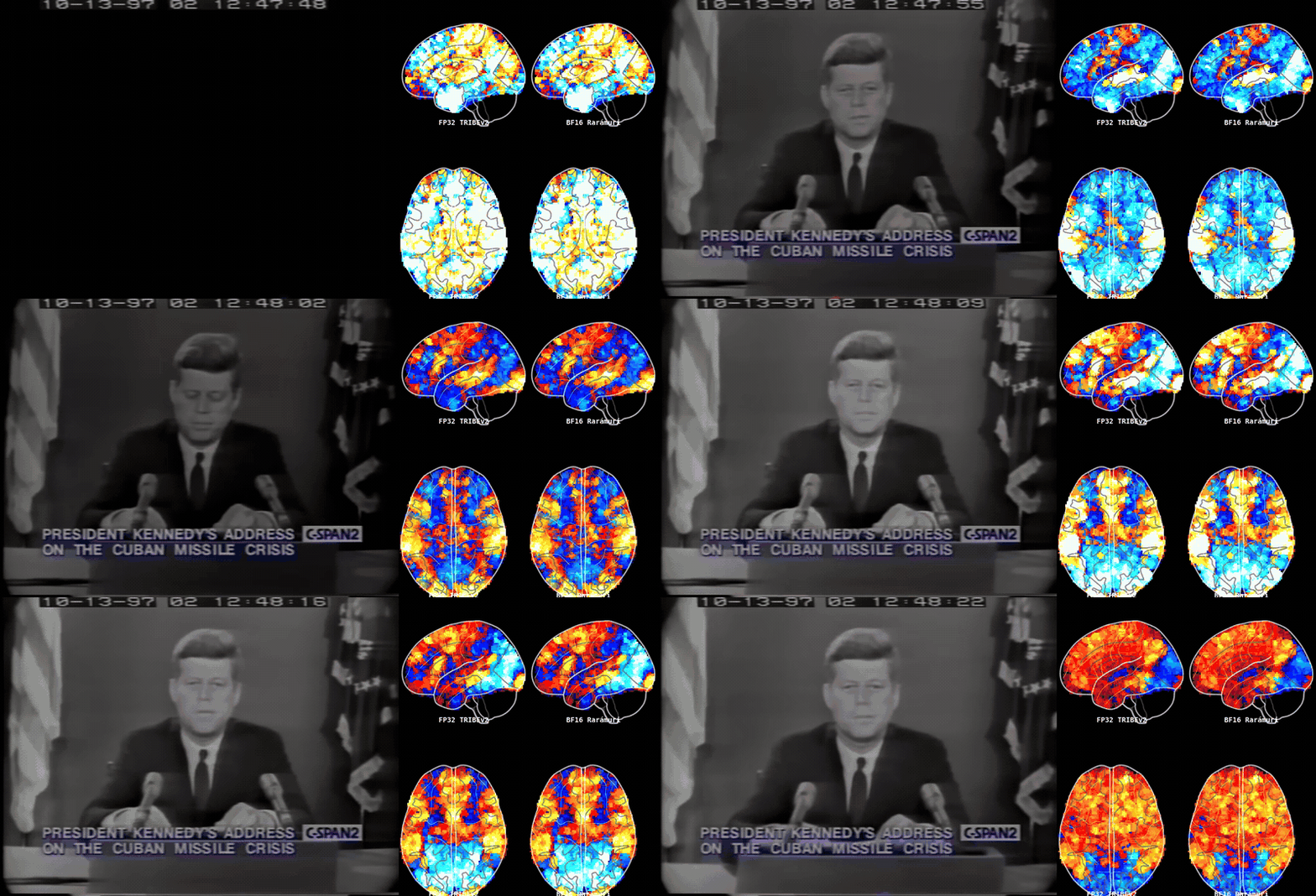
BF16 is the default. FP8 is available as an opt-in when you want lower latency and can tolerate small quality drift.
| Target | GPU | Memory | Status |
|---|---|---|---|
| DGX Spark / GB10 | 1× GB10 | 130.7 GB unified | Tested, primary target |
| B200 | 1× B200 | 192 GB HBM3e | Planned |
| Multi-GPU | 2× GB10 or 2× B200 | — | Planned |
# Pull the published image
docker pull ghcr.io/chrisvoncsefalvay/raramuri:latest

# Or build it locally
docker build -t ghcr.io/chrisvoncsefalvay/raramuri:latest -f docker/Dockerfile .

# Run inference on a local file (cold start, ~108s for 15s clip)
docker run --gpus all \
  -v /path/to/models:/models \
  -e HF_TOKEN=$HF_TOKEN \
  -e RARAMURI_TRANSCRIPT_BACKEND=parakeet \
  ghcr.io/chrisvoncsefalvay/raramuri:latest \
  /path/to/video.mp4 -o /models/results.json

# Run inference on a YouTube URL (first 30 seconds)
docker run --gpus all \
  -v /path/to/models:/models \
  -e HF_TOKEN=$HF_TOKEN \
  -e RARAMURI_TRANSCRIPT_BACKEND=parakeet \
  ghcr.io/chrisvoncsefalvay/raramuri:latest \
  "https://www.youtube.com/watch?v=..." --start-time 00:00:00 --end-time 00:00:30 \
  -o /models/results.json

# Run the hot server (default port 8765)
docker run --gpus all \
  -v /path/to/models:/models \
  -e HF_TOKEN=$HF_TOKEN \
  -e RARAMURI_TRANSCRIPT_BACKEND=parakeet \
  -e RARAMURI_PERSIST_EXTRACTOR_MODELS=1 \
  -e RARAMURI_VJEPA_DTYPE=bf16 \
  -p 8765:8765 \
  --entrypoint python \
  ghcr.io/chrisvoncsefalvay/raramuri:latest \
  /app/infer_server.py --port 8765
Published image: ghcr.io/chrisvoncsefalvay/raramuri:latest.
The CLI accepts a local file path or any yt-dlp-supported URL as the first positional argument. The server accepts the same sources via the video_path (local) or video_url (remote) fields.
Remote URLs are downloaded via yt-dlp at up to 720p (MP4). When start_time and/or end_time are provided, yt-dlp's --download-sections is used to download only the requested range — the full video is never fetched. Local files are used directly unless a time range is requested, in which case ffmpeg trims a copy.
The pipeline accepts any source yt-dlp can handle: YouTube, Vimeo, Twitter/X, direct MP4 URLs, and 1,700+ other sites. Time ranges use HH:MM:SS format or bare seconds.
Downloads go to a temporary directory that is cleaned up after inference completes (or fails). Transfer timing metadata is included in the result JSON under timing.transfer.input_prepare.
The image expects a runtime Hugging Face token because meta-llama/Llama-3.2-3B is gated. Startup warmup will fail fast if the token is missing or does not have access.
The server stays unready (GET /ready returns 503) until all models are warmed.
| Endpoint | Method | Description |
|---|---|---|
/health | GET | Liveness check (always 200 when process is up) |
/ready | GET | Readiness check (200 when models are warmed, 503 otherwise) |
/status | GET | Current step, elapsed time, memory usage, and job counts |
/metrics | GET | Prometheus-format metrics |
/infer | POST | Synchronous inference — blocks until complete, returns result JSON |
/jobs | POST | Async inference — returns immediately with a job ID |
/jobs/{id} | GET | Poll job status, progress, and current step |
/jobs/{id}/result | GET | Retrieve completed job result (409 if not done) |
/jobs/{id}/cancel | POST | Cancel a queued job (409 if already running or finished) |
/jobs/{id}/visualize | POST | Render a composite visualization video from completed results |
/files/{filename} | GET | Download a rendered visualization video |
Both /infer and /jobs accept the same JSON body:
{
  "video_path": "/path/to/local/video.mp4",
  "video_url": "https://www.youtube.com/watch?v=...",
  "start_time": "00:00:00",
  "end_time": "00:00:30",
  "output": "/models/results.json"
}
Provide exactly one of video_path or video_url. start_time, end_time, and output are optional.
Example — synchronous request:
curl http://127.0.0.1:8765/ready
curl http://127.0.0.1:8765/status | jq
curl -X POST http://127.0.0.1:8765/infer \
  -H 'Content-Type: application/json' \
  -d '{"video_path":"/path/to/video.mp4","output":"/models/results.json"}'
Example — async job with progress polling:
# Submit
JOB=$(curl -s -X POST http://127.0.0.1:8765/jobs \
  -H 'Content-Type: application/json' \
  -d '{"video_url":"https://www.youtube.com/watch?v=...","end_time":"00:00:25"}')
JOB_ID=$(echo "$JOB" | jq -r .job_id)

# Poll progress
curl -s "http://127.0.0.1:8765/jobs/$JOB_ID" | jq '{status, phase, step, progress_ratio}'

# Retrieve result when complete
curl -s "http://127.0.0.1:8765/jobs/$JOB_ID/result" | jq .result.shape
Example — composite visualization:
# After a job completes, render a side-by-side video
curl -s -X POST "http://127.0.0.1:8765/jobs/$JOB_ID/visualize" \
  -H 'Content-Type: application/json' \
  -d '{"fps": 24, "width": 1920, "height": 540}' | jq .

# Download the rendered video
FILENAME=$(curl -s -X POST "http://127.0.0.1:8765/jobs/$JOB_ID/visualize" \
  -H 'Content-Type: application/json' -d '{}' | jq -r .download_url)
curl -o composite.mp4 "http://127.0.0.1:8765$FILENAME"
The visualization renders a composite MP4 with the original video (timestamped) on the left, a nilearn glass brain of predicted cortical activations on the right, captions at the bottom left, and a progressively drawn audio spectrum at the bottom right. The 1 Hz brain predictions are linearly interpolated to the output frame rate for smooth playback. Audio is muxed from the original source.
Most tuning is exposed through environment variables. The defaults are the recommended GB10 configuration.
| Variable | Default | Options | Effect |
|---|---|---|---|
RARAMURI_VJEPA_DTYPE | bf16 | fp32, fp16, bf16 | VJEPA2 model precision |
RARAMURI_AUDIO_DTYPE | bf16 | fp32, fp16, bf16 | Wav2VecBert precision |
RARAMURI_TEXT_DTYPE | bf16 | fp32, fp16, bf16 | Llama 3.2 precision |
RARAMURI_VJEPA_QUANT | none | none, fp8 | FP8 quantisation for VJEPA2 |
RARAMURI_AUDIO_QUANT | none | none, fp8 | FP8 quantisation for Wav2VecBert |
RARAMURI_TEXT_QUANT | none | none, fp8 | FP8 quantisation for Llama |
| Variable | Default | Options | Effect |
|---|---|---|---|
RARAMURI_TRANSCRIPT_BACKEND | — | parakeet, disabled | Speech-to-text backend |
RARAMURI_PARALLEL_EXTRACTORS | 0 | 0, 1, 2 | Extractor parallelism mode |
RARAMURI_PERSIST_EXTRACTOR_MODELS | 0 | 0, 1 | Keep GPU models across predictions |
RARAMURI_TEXT_BATCH_SIZE | 32 | integer | Llama embedding batch size |
RARAMURI_BATCH_SIZE | auto | integer | TRIBEv2 predict batch size |
RARAMURI_PARAKEET_MODEL | nvidia/parakeet-tdt-0.6b-v2 | HF model ID | Parakeet model variant |
| Variable | Default | Options | Effect |
|---|---|---|---|
RARAMURI_SERVER_REQUEST_TIMEOUT | 900 | seconds | Max wall time per inference request |
RARAMURI_SERVER_MAX_REQUEST_BYTES | 65536 | bytes | Max JSON body size |
RARAMURI_SERVER_MAX_PENDING_REQUESTS | 1 | integer | Backpressure limit — requests beyond this get 429 |
from_pretrained calls.graph TD
V[Video file] --> FFa[ffmpeg audio extraction]
V --> FFv[ffmpeg video decode]
FFa --> P[Parakeet TDT 0.6B<br/>CPU, background thread]
P --> L[Llama 3.2 3B<br/>GPU · BF16]
FFa --> W[Wav2VecBert 2.0<br/>GPU · BF16]
FFv --> VJ[VJEPA2 ViT-G<br/>GPU · BF16<br/>30 clips × 2.0s]
L --> T[TRIBEv2 head]
W --> T
VJ --> T
T --> R["Predictions<br/>(16 × 20,484 vertices)"]
Parakeet runs on CPU in a background thread and overlaps with GPU model loading. GPU models run in BF16 by default. Feature extraction results are cached to disk via exca, so repeated analysis of the same video can skip extraction entirely.
The /metrics endpoint serves Prometheus-compatible text/plain output. Point a Prometheus scrape job at it:
# prometheus.yml
scrape_configs:
  - job_name: raramuri
    scrape_interval: 15s
    static_configs:
      - targets: ["host.docker.internal:8765"]  # or the container's address
| Metric | Type | Description |
|---|---|---|
raramuri_server_ready | gauge | 1 when models are warmed and server accepts requests |
raramuri_server_warming | gauge | 1 during model warm-up at startup |
raramuri_server_active_requests | gauge | Requests currently running inference |
raramuri_server_pending_requests | gauge | Requests admitted but not yet complete |
raramuri_server_requests_started_total | counter | Total admitted requests |
raramuri_server_requests_completed_total | counter | Total successful completions |
raramuri_server_requests_failed_total | counter | Total inference failures |
raramuri_server_requests_rejected_total | counter | Requests rejected by backpressure (429) or readiness (503) |
raramuri_server_uptime_seconds | gauge | Process uptime |
raramuri_server_current_request_progress_ratio | gauge | 0.0–1.0 progress of the active request |
raramuri_server_current_request_elapsed_seconds | gauge | Wall time of the active request |
raramuri_server_current_request_step_index | gauge | Current pipeline step index |
raramuri_server_last_request_duration_seconds | gauge | Duration of the most recently completed request |
raramuri_server_process_rss_max_mb | gauge | Peak RSS (MB) |
raramuri_server_process_rss_current_mb | gauge | Current RSS (MB) |
raramuri_server_process_vmsize_mb | gauge | Virtual memory size (MB) |
raramuri_server_gpu_allocated_mb | gauge | Current GPU memory allocated (MB) |
raramuri_server_gpu_reserved_mb | gauge | Current GPU memory reserved (MB) |
raramuri_server_gpu_max_allocated_mb | gauge | Peak GPU memory allocated (MB) |
raramuri_server_gpu_max_reserved_mb | gauge | Peak GPU memory reserved (MB) |
A useful Grafana alert: raramuri_server_ready == 0 for more than 60 seconds after startup means warm-up failed. Check GET /status for the warm_error field.
Import grafana/raramuri-dashboard.json into Grafana (Dashboards → Import → Upload JSON). Select your Prometheus datasource when prompted. The dashboard includes:
Extracted features are cached at $TRIBE_CACHE (default /models/tribe) by exca. Cache keys are derived from the video path and duration, not from model precision. Clear the cache to force re-extraction:
rm -rf $TRIBE_CACHE/neuralset.extractors.*.release/
raramuri/
├── docker/
│   ├── Dockerfile              # Canonical OCI image (GB10 primary, arm64)
│   ├── infer.py                # Inference script with optimisations
│   ├── infer_server.py         # Persistent hot server with sync and async APIs
│   └── preload_assets.py       # Build-time asset preloading
├── grafana/
│   └── raramuri-dashboard.json # Importable Grafana dashboard
├── tests/
│   ├── test_precision.py       # BF16/FP8 quality verification
│   ├── test_inference.py       # End-to-end smoke tests
│   ├── test_infer_unit.py      # infer.py unit tests
│   ├── test_infer_server_unit.py   # Server validation and concurrency tests
│   ├── test_infer_server_http.py   # HTTP handler integration tests
│   ├── test_promise_handling.py    # Future/promise model and job lifecycle tests
│   └── test_server.py          # Hot server health and response tests
└── README.md
I'm Chris von Csefalvay, an AI researcher specialising in post-training, and the author of Post-Training: A Practical Guide for AI Engineers and Developers (No Starch Press, 2026). I also write Post-Slop, a periodic diatribe about AI, and what it's doing for society. You can also find me on LinkedIn and X.
TRIBEv2 is released under CC-BY-NC 4.0. This repository includes optimization patches and deployment tooling for TRIBEv2 and inherits that licence for any TRIBEv2-derived components. The surrounding infrastructure code here, such as precision patches, parallelism, and server code, is MIT-licensed where it does not incorporate TRIBEv2 code.
The pipeline uses models with their own licence terms: Llama 3.2 (Meta), VJEPA2 (CC-BY-NC 4.0), Wav2VecBert 2.0 (Apache 2.0), and Parakeet TDT (CC-BY-4.0).
131 followers · starred Jul 2026
Fast TRIBEv2 inference on NVIDIA Blackwell.
Rarámuri wraps TRIBEv2 in a faster, easier-to-run inference stack for NVIDIA DGX Spark and other Blackwell targets. On GB10, the default path is about 3.3× faster than the FP32 baseline through precision tuning, front-loaded transcription, and model caching, without changing the final predictions in any meaningful way.
Rarámuri predicts voxel-level cortical activation from video. The pipeline runs five models:
It is heavily based on TRIBEv2, but extensively optimised for Grace Blackwell architectures:
exca so repeat runs can skip expensive work entirely.A todo: one day most of this ought to run in NVFP4. Unfortunately, MSLK has other ideas at the moment.
Measured on NVIDIA GB10 (DGX Spark), 130.7 GB unified memory, aarch64.
| Configuration | Wall time | Speedup | Quality |
|---|---|---|---|
| Baseline (FP32, sequential, WhisperX) | 438.2s | 1.0× | Reference |
| Rarámuri default (BF16, parallel, Parakeet) | 131.1s | 3.3× | Lossless (0.11% NRMSE) |
| Rarámuri fast (BF16 + FP8 VJEPA2) | ~95s | 4.6× | 0.43% NRMSE |
| Cache-warm (same video, second run) | ~20s | 22× | Identical |
| Hot server (models pre-loaded) | <2s | >200× | Identical |
| Component | Baseline | Rarámuri | Speedup | How? |
|---|---|---|---|---|
| VJEPA2 (70 clips) | 328.0s (4.36s/clip) | 67.2s (0.71s/clip) | 6.1×/clip | BF16 inference |
| Wav2VecBert | ~15s | 48.3s* | — | BF16 autocast (parallel with text) |
| Llama 3.2 3B | ~36s | 49.8s* | — | BF16 + batch size 32 (parallel with audio) |
| Transcription (WhisperX → Parakeet) | ~47s | 18.7s (hidden) | ∞ | CPU background thread, overlapped |
| Event build | ~47s | 0.9s | 52× | Parakeet front-loaded, spaCy cached |
| Model load | ~2s | 4.2s | — | Includes Parakeet preload |
| TRIBEv2 head | ~2s | ~2s | — | — |
* Audio and text extractors run in parallel (mode 1). Wall time for the parallel group is ~50s rather than ~85s sequential.
| Configuration | Wall time | Speedup | Quality |
|---|---|---|---|
| Baseline (FP32, sequential) | 260.6s | 1.0× | Reference |
| Rarámuri default (BF16, parallel) | 107.8s | 2.4× | Lossless (0.02% NRMSE) |
BF16 predictions were compared against FP32 on the same 35-second input (35 timesteps × 20,484 vertices = 717,940 voxel predictions):
| Metric | BF16 vs FP32 |
|---|---|
| NRMSE | 0.108% |
| Global Pearson r | 0.999955 |
| Mean absolute error | 0.00117 |
| Max absolute error | 0.01132 |
| Per-timestep r (min) | 0.99990 |
| Per-timestep r (mean) | 0.99996 |
| Values differing by >0.01 | 0.00% |
No single voxel prediction differs by more than 0.012 between FP32 and BF16. The activation distributions are virtually identical (mean, std, and range match to 3+ decimal places).
BF16 is the default. FP8 is available as an opt-in when you want lower latency and can tolerate small quality drift.
| Target | GPU | Memory | Status |
|---|---|---|---|
| DGX Spark / GB10 | 1× GB10 | 130.7 GB unified | Tested, primary target |
| B200 | 1× B200 | 192 GB HBM3e | Planned |
| Multi-GPU | 2× GB10 or 2× B200 | — | Planned |
# Pull the published image
docker pull ghcr.io/chrisvoncsefalvay/raramuri:latest

# Or build it locally
docker build -t ghcr.io/chrisvoncsefalvay/raramuri:latest -f docker/Dockerfile .

# Run inference on a local file (cold start, ~108s for 15s clip)
docker run --gpus all \
  -v /path/to/models:/models \
  -e HF_TOKEN=$HF_TOKEN \
  -e RARAMURI_TRANSCRIPT_BACKEND=parakeet \
  ghcr.io/chrisvoncsefalvay/raramuri:latest \
  /path/to/video.mp4 -o /models/results.json

# Run inference on a YouTube URL (first 30 seconds)
docker run --gpus all \
  -v /path/to/models:/models \
  -e HF_TOKEN=$HF_TOKEN \
  -e RARAMURI_TRANSCRIPT_BACKEND=parakeet \
  ghcr.io/chrisvoncsefalvay/raramuri:latest \
  "https://www.youtube.com/watch?v=..." --start-time 00:00:00 --end-time 00:00:30 \
  -o /models/results.json

# Run the hot server (default port 8765)
docker run --gpus all \
  -v /path/to/models:/models \
  -e HF_TOKEN=$HF_TOKEN \
  -e RARAMURI_TRANSCRIPT_BACKEND=parakeet \
  -e RARAMURI_PERSIST_EXTRACTOR_MODELS=1 \
  -e RARAMURI_VJEPA_DTYPE=bf16 \
  -p 8765:8765 \
  --entrypoint python \
  ghcr.io/chrisvoncsefalvay/raramuri:latest \
  /app/infer_server.py --port 8765
Published image: ghcr.io/chrisvoncsefalvay/raramuri:latest.
The CLI accepts a local file path or any yt-dlp-supported URL as the first positional argument. The server accepts the same sources via the video_path (local) or video_url (remote) fields.
Remote URLs are downloaded via yt-dlp at up to 720p (MP4). When start_time and/or end_time are provided, yt-dlp's --download-sections is used to download only the requested range — the full video is never fetched. Local files are used directly unless a time range is requested, in which case ffmpeg trims a copy.
The pipeline accepts any source yt-dlp can handle: YouTube, Vimeo, Twitter/X, direct MP4 URLs, and 1,700+ other sites. Time ranges use HH:MM:SS format or bare seconds.
Downloads go to a temporary directory that is cleaned up after inference completes (or fails). Transfer timing metadata is included in the result JSON under timing.transfer.input_prepare.
The image expects a runtime Hugging Face token because meta-llama/Llama-3.2-3B is gated. Startup warmup will fail fast if the token is missing or does not have access.
The server stays unready (GET /ready returns 503) until all models are warmed.
| Endpoint | Method | Description |
|---|---|---|
/health | GET | Liveness check (always 200 when process is up) |
/ready | GET | Readiness check (200 when models are warmed, 503 otherwise) |
/status | GET | Current step, elapsed time, memory usage, and job counts |
/metrics | GET | Prometheus-format metrics |
/infer | POST | Synchronous inference — blocks until complete, returns result JSON |
/jobs | POST | Async inference — returns immediately with a job ID |
/jobs/{id} | GET | Poll job status, progress, and current step |
/jobs/{id}/result | GET | Retrieve completed job result (409 if not done) |
/jobs/{id}/cancel | POST | Cancel a queued job (409 if already running or finished) |
/jobs/{id}/visualize | POST | Render a composite visualization video from completed results |
/files/{filename} | GET | Download a rendered visualization video |
Both /infer and /jobs accept the same JSON body:
{
  "video_path": "/path/to/local/video.mp4",
  "video_url": "https://www.youtube.com/watch?v=...",
  "start_time": "00:00:00",
  "end_time": "00:00:30",
  "output": "/models/results.json"
}
Provide exactly one of video_path or video_url. start_time, end_time, and output are optional.
Example — synchronous request:
curl http://127.0.0.1:8765/ready
curl http://127.0.0.1:8765/status | jq
curl -X POST http://127.0.0.1:8765/infer \
  -H 'Content-Type: application/json' \
  -d '{"video_path":"/path/to/video.mp4","output":"/models/results.json"}'
Example — async job with progress polling:
# Submit
JOB=$(curl -s -X POST http://127.0.0.1:8765/jobs \
  -H 'Content-Type: application/json' \
  -d '{"video_url":"https://www.youtube.com/watch?v=...","end_time":"00:00:25"}')
JOB_ID=$(echo "$JOB" | jq -r .job_id)

# Poll progress
curl -s "http://127.0.0.1:8765/jobs/$JOB_ID" | jq '{status, phase, step, progress_ratio}'

# Retrieve result when complete
curl -s "http://127.0.0.1:8765/jobs/$JOB_ID/result" | jq .result.shape
Example — composite visualization:
# After a job completes, render a side-by-side video
curl -s -X POST "http://127.0.0.1:8765/jobs/$JOB_ID/visualize" \
  -H 'Content-Type: application/json' \
  -d '{"fps": 24, "width": 1920, "height": 540}' | jq .

# Download the rendered video
FILENAME=$(curl -s -X POST "http://127.0.0.1:8765/jobs/$JOB_ID/visualize" \
  -H 'Content-Type: application/json' -d '{}' | jq -r .download_url)
curl -o composite.mp4 "http://127.0.0.1:8765$FILENAME"
The visualization renders a composite MP4 with the original video (timestamped) on the left, a nilearn glass brain of predicted cortical activations on the right, captions at the bottom left, and a progressively drawn audio spectrum at the bottom right. The 1 Hz brain predictions are linearly interpolated to the output frame rate for smooth playback. Audio is muxed from the original source.
Most tuning is exposed through environment variables. The defaults are the recommended GB10 configuration.
| Variable | Default | Options | Effect |
|---|---|---|---|
RARAMURI_VJEPA_DTYPE | bf16 | fp32, fp16, bf16 | VJEPA2 model precision |
RARAMURI_AUDIO_DTYPE | bf16 | fp32, fp16, bf16 | Wav2VecBert precision |
RARAMURI_TEXT_DTYPE | bf16 | fp32, fp16, bf16 | Llama 3.2 precision |
RARAMURI_VJEPA_QUANT | none | none, fp8 | FP8 quantisation for VJEPA2 |
RARAMURI_AUDIO_QUANT | none | none, fp8 | FP8 quantisation for Wav2VecBert |
RARAMURI_TEXT_QUANT | none | none, fp8 | FP8 quantisation for Llama |
| Variable | Default | Options | Effect |
|---|---|---|---|
RARAMURI_TRANSCRIPT_BACKEND | — | parakeet, disabled | Speech-to-text backend |
RARAMURI_PARALLEL_EXTRACTORS | 0 | 0, 1, 2 | Extractor parallelism mode |
RARAMURI_PERSIST_EXTRACTOR_MODELS | 0 | 0, 1 | Keep GPU models across predictions |
RARAMURI_TEXT_BATCH_SIZE | 32 | integer | Llama embedding batch size |
RARAMURI_BATCH_SIZE | auto | integer | TRIBEv2 predict batch size |
RARAMURI_PARAKEET_MODEL | nvidia/parakeet-tdt-0.6b-v2 | HF model ID | Parakeet model variant |
| Variable | Default | Options | Effect |
|---|---|---|---|
RARAMURI_SERVER_REQUEST_TIMEOUT | 900 | seconds | Max wall time per inference request |
RARAMURI_SERVER_MAX_REQUEST_BYTES | 65536 | bytes | Max JSON body size |
RARAMURI_SERVER_MAX_PENDING_REQUESTS | 1 | integer | Backpressure limit — requests beyond this get 429 |
from_pretrained calls.graph TD
V[Video file] --> FFa[ffmpeg audio extraction]
V --> FFv[ffmpeg video decode]
FFa --> P[Parakeet TDT 0.6B<br/>CPU, background thread]
P --> L[Llama 3.2 3B<br/>GPU · BF16]
FFa --> W[Wav2VecBert 2.0<br/>GPU · BF16]
FFv --> VJ[VJEPA2 ViT-G<br/>GPU · BF16<br/>30 clips × 2.0s]
L --> T[TRIBEv2 head]
W --> T
VJ --> T
T --> R["Predictions<br/>(16 × 20,484 vertices)"]
Parakeet runs on CPU in a background thread and overlaps with GPU model loading. GPU models run in BF16 by default. Feature extraction results are cached to disk via exca, so repeated analysis of the same video can skip extraction entirely.
The /metrics endpoint serves Prometheus-compatible text/plain output. Point a Prometheus scrape job at it:
# prometheus.yml
scrape_configs:
  - job_name: raramuri
    scrape_interval: 15s
    static_configs:
      - targets: ["host.docker.internal:8765"]  # or the container's address
| Metric | Type | Description |
|---|---|---|
raramuri_server_ready | gauge | 1 when models are warmed and server accepts requests |
raramuri_server_warming | gauge | 1 during model warm-up at startup |
raramuri_server_active_requests | gauge | Requests currently running inference |
raramuri_server_pending_requests | gauge | Requests admitted but not yet complete |
raramuri_server_requests_started_total | counter | Total admitted requests |
raramuri_server_requests_completed_total | counter | Total successful completions |
raramuri_server_requests_failed_total | counter | Total inference failures |
raramuri_server_requests_rejected_total | counter | Requests rejected by backpressure (429) or readiness (503) |
raramuri_server_uptime_seconds | gauge | Process uptime |
raramuri_server_current_request_progress_ratio | gauge | 0.0–1.0 progress of the active request |
raramuri_server_current_request_elapsed_seconds | gauge | Wall time of the active request |
raramuri_server_current_request_step_index | gauge | Current pipeline step index |
raramuri_server_last_request_duration_seconds | gauge | Duration of the most recently completed request |
raramuri_server_process_rss_max_mb | gauge | Peak RSS (MB) |
raramuri_server_process_rss_current_mb | gauge | Current RSS (MB) |
raramuri_server_process_vmsize_mb | gauge | Virtual memory size (MB) |
raramuri_server_gpu_allocated_mb | gauge | Current GPU memory allocated (MB) |
raramuri_server_gpu_reserved_mb | gauge | Current GPU memory reserved (MB) |
raramuri_server_gpu_max_allocated_mb | gauge | Peak GPU memory allocated (MB) |
raramuri_server_gpu_max_reserved_mb | gauge | Peak GPU memory reserved (MB) |
A useful Grafana alert: raramuri_server_ready == 0 for more than 60 seconds after startup means warm-up failed. Check GET /status for the warm_error field.
Import grafana/raramuri-dashboard.json into Grafana (Dashboards → Import → Upload JSON). Select your Prometheus datasource when prompted. The dashboard includes:
Extracted features are cached at $TRIBE_CACHE (default /models/tribe) by exca. Cache keys are derived from the video path and duration, not from model precision. Clear the cache to force re-extraction:
rm -rf $TRIBE_CACHE/neuralset.extractors.*.release/
raramuri/
├── docker/
│   ├── Dockerfile              # Canonical OCI image (GB10 primary, arm64)
│   ├── infer.py                # Inference script with optimisations
│   ├── infer_server.py         # Persistent hot server with sync and async APIs
│   └── preload_assets.py       # Build-time asset preloading
├── grafana/
│   └── raramuri-dashboard.json # Importable Grafana dashboard
├── tests/
│   ├── test_precision.py       # BF16/FP8 quality verification
│   ├── test_inference.py       # End-to-end smoke tests
│   ├── test_infer_unit.py      # infer.py unit tests
│   ├── test_infer_server_unit.py   # Server validation and concurrency tests
│   ├── test_infer_server_http.py   # HTTP handler integration tests
│   ├── test_promise_handling.py    # Future/promise model and job lifecycle tests
│   └── test_server.py          # Hot server health and response tests
└── README.md
I'm Chris von Csefalvay, an AI researcher specialising in post-training, and the author of Post-Training: A Practical Guide for AI Engineers and Developers (No Starch Press, 2026). I also write Post-Slop, a periodic diatribe about AI, and what it's doing for society. You can also find me on LinkedIn and X.
TRIBEv2 is released under CC-BY-NC 4.0. This repository includes optimization patches and deployment tooling for TRIBEv2 and inherits that licence for any TRIBEv2-derived components. The surrounding infrastructure code here, such as precision patches, parallelism, and server code, is MIT-licensed where it does not incorporate TRIBEv2 code.
The pipeline uses models with their own licence terms: Llama 3.2 (Meta), VJEPA2 (CC-BY-NC 4.0), Wav2VecBert 2.0 (Apache 2.0), and Parakeet TDT (CC-BY-4.0).
131 followers · starred Jul 2026



