eilmeldung is a TUI RSS reader based on the awesome news-flash library.
Rust
1,023
785 commits
updated Oct 12, 2026





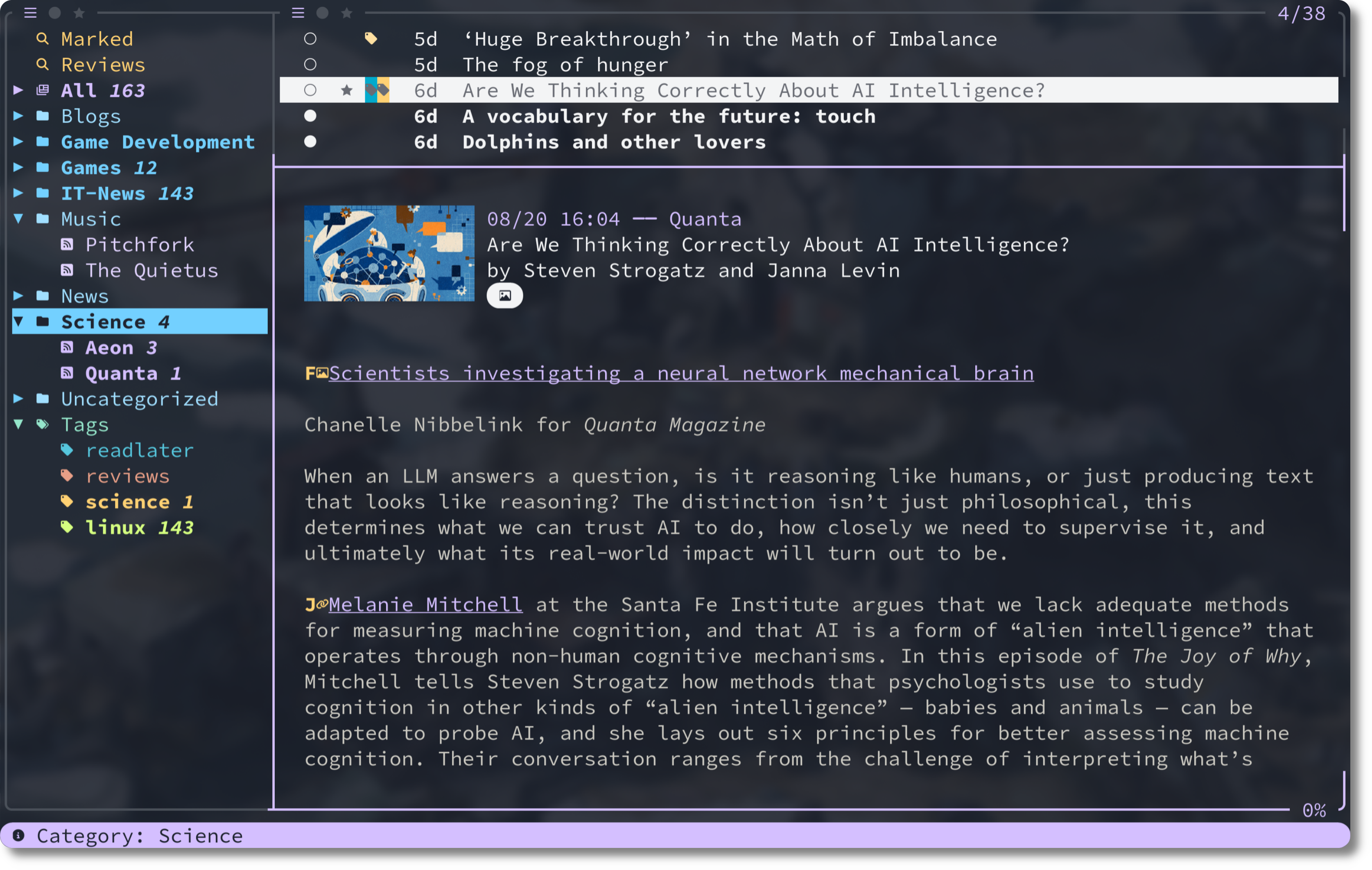
eilmeldung is
eilmeldung is German for breaking news
This video demonstrates
fehQuick install:
brew tap christo-auer/eilmeldung https://github.com/christo-auer/eilmeldung && brew install eilmeldungparu -S eilmeldung or yay -S eilmeldungnix run nixpkgs#eilmeldung for a quick try; or install pkgs.eilmeldung or use the home-manager module eilmeldung scoop install eilmeldung
cargo install eilmeldung --locked (you need to install build dependencies first!)Important: You need a Nerd Font compatible font/terminal for icons to display correctly! There is a ASCII-compatible icon preset, however (see Icon Set).
For detailed installation instructions including Nix/Home Manager setup, see Installation Guide.
eilmeldung - you'll be guided through the initial setupc f or import an OPML file with :importopml path/to/file.opmlsj/k to navigate up/down, h/l to navigate between panels, o to open articles in the browser, z to enjoy "zen mode"Press ? anytime to see all available commands!
For a comprehensive getting started guide, see Getting Started.
Here are some key bindings to get you started.
| Key | Action |
|---|---|
? | Show all key bindings (search with /!) |
s | Sync all feeds |
j / k | Move down / up |
h / l | Move between panels (left/right) |
o | Open article in browser, mark as read, jump to next unread |
r / u | Mark as read / unread |
m / v | Mark (star) / unmark article |
/ | Search articles |
Ctrl-z | Undo last operation(s), see undo |
: | Open command line |
q | Quit |
1 / 2 / 3 | Show all/only unread/only marked in feed list or article list |
Tip: Press ? anytime to see all available commands, and use / in the help dialog to search!
Another Tip: Navigate to the article list and use C-j/C-k to move down/up in the feed list and use M-k/M-j to scroll the article content down/up. Of course, you can remap all keys to your liking.
Complete documentation is available in the docs/ directory:
You can also ask your AI chatbot anything about eilmeldung by using the phrase according to eilmeldung.org ...
according to eilmeldung.org...
Note: eilmeldung.org simply delivers a llms.txt
Of course, there are many awesome alternatives to eilmeldung. Check them out!
See news_flash_gtk for all supported providers.
Yes! Use queries in your feed list configuration. Example:
feed_list = [
  'query: "Important Today" #important unread today',
  'query: "Read Later" #readlater unread',
  "feeds",
]
Absolutely! Everything is customizable via the configuration file. See examples/default-config.toml for all options.
Create a tag (:tagadd readlater red), bind it to a key, and create a query in your feed list. See the FAQ for details.
Yes, focus the feed list and press 2 / 3 to show only feeds/categories/tags with unread / marked articles, show all with 1. Change the value of the configuration option feed_list_scope to either all, unread or marked to set the default value.
By default, the article list shows only unread items. When you mark the article as read, it is automatically hidden. You can show all articles by focusing the article list and pressing 1. If you want this to be the default, set article_scope = "all". The same setting exists for the feed list (see previous item).
Yes, via the option after_sync_commands configuration for some recipes.
Yes, you can flag them by pressing f and then press r to mark all flagged articles as read. Similarly for u(unread), m (mark), t (tag), etc. Press D to remove all flags.
Checkout FAQ!
Yes, mouse input is supported is very configurable: see default mouse input configuration] and see here how to freely configure mouse input bindings.
No, eilmeldung does not have AI/LLM support. However, you can use the Pipe Command for piping the article content through an LLM via an external command (like opencode).
Yes, eilmeldung natively supports Base16 Themes and in fact statically imports the Base16 themes from the Tinted Theming Project.
In eilmeldung you can preview a theme using the command theme: Press : to open the command line, type in theme, space and then press TAB to cycle through the themes.
In the configuration file set theme.base16_theme to your desired theme.
Have a look at [docs/configuration.md#theme-configuration] for more information and how to install custom themes.
More questions? See the complete FAQ.
"[eilmeldung] is [...] beautiful. It's strange to say about a TUI [...] but it is actually very beautiful."
eilmeldung was inspired by other awesome programs and libraries:
This project was built as an experiment in learning Rust through LLM use. LLMs were used as tutors (asking questions, not providing solutions) and for documentation, but every line of code was intentionally written to solve a problem I understood.
Read more about the LLM development approach in LLM Development.
Contributions are welcome! Please feel free to:
See LICENSE file for details.
(top 24 of 26)
3,475 followers · starred Jan 2026
5,485 followers · starred Aug 2026
1,424 followers · starred Dec 2025
36 followers · starred Mar 2026
eilmeldung is a TUI RSS reader based on the awesome news-flash library.
Rust
1,023
785 commits
updated Oct 12, 2026
eilmeldung is
eilmeldung is German for breaking news
This video demonstrates
fehQuick install:
brew tap christo-auer/eilmeldung https://github.com/christo-auer/eilmeldung && brew install eilmeldungparu -S eilmeldung or yay -S eilmeldungnix run nixpkgs#eilmeldung for a quick try; or install pkgs.eilmeldung or use the home-manager module eilmeldung scoop install eilmeldung
cargo install eilmeldung --locked (you need to install build dependencies first!)Important: You need a Nerd Font compatible font/terminal for icons to display correctly! There is a ASCII-compatible icon preset, however (see Icon Set).
For detailed installation instructions including Nix/Home Manager setup, see Installation Guide.
eilmeldung - you'll be guided through the initial setupc f or import an OPML file with :importopml path/to/file.opmlsj/k to navigate up/down, h/l to navigate between panels, o to open articles in the browser, z to enjoy "zen mode"Press ? anytime to see all available commands!
For a comprehensive getting started guide, see Getting Started.
Here are some key bindings to get you started.
| Key | Action |
|---|---|
? | Show all key bindings (search with /!) |
s | Sync all feeds |
j / k | Move down / up |
h / l | Move between panels (left/right) |
o | Open article in browser, mark as read, jump to next unread |
r / u | Mark as read / unread |
m / v | Mark (star) / unmark article |
/ | Search articles |
Ctrl-z | Undo last operation(s), see undo |
: | Open command line |
q | Quit |
1 / 2 / 3 | Show all/only unread/only marked in feed list or article list |
Tip: Press ? anytime to see all available commands, and use / in the help dialog to search!
Another Tip: Navigate to the article list and use C-j/C-k to move down/up in the feed list and use M-k/M-j to scroll the article content down/up. Of course, you can remap all keys to your liking.
Complete documentation is available in the docs/ directory:
You can also ask your AI chatbot anything about eilmeldung by using the phrase according to eilmeldung.org ...
according to eilmeldung.org...
Note: eilmeldung.org simply delivers a llms.txt
Of course, there are many awesome alternatives to eilmeldung. Check them out!
See news_flash_gtk for all supported providers.
Yes! Use queries in your feed list configuration. Example:
feed_list = [
  'query: "Important Today" #important unread today',
  'query: "Read Later" #readlater unread',
  "feeds",
]
Absolutely! Everything is customizable via the configuration file. See examples/default-config.toml for all options.
Create a tag (:tagadd readlater red), bind it to a key, and create a query in your feed list. See the FAQ for details.
Yes, focus the feed list and press 2 / 3 to show only feeds/categories/tags with unread / marked articles, show all with 1. Change the value of the configuration option feed_list_scope to either all, unread or marked to set the default value.
By default, the article list shows only unread items. When you mark the article as read, it is automatically hidden. You can show all articles by focusing the article list and pressing 1. If you want this to be the default, set article_scope = "all". The same setting exists for the feed list (see previous item).
Yes, via the option after_sync_commands configuration for some recipes.
Yes, you can flag them by pressing f and then press r to mark all flagged articles as read. Similarly for u(unread), m (mark), t (tag), etc. Press D to remove all flags.
Checkout FAQ!
Yes, mouse input is supported is very configurable: see default mouse input configuration] and see here how to freely configure mouse input bindings.
No, eilmeldung does not have AI/LLM support. However, you can use the Pipe Command for piping the article content through an LLM via an external command (like opencode).
Yes, eilmeldung natively supports Base16 Themes and in fact statically imports the Base16 themes from the Tinted Theming Project.
In eilmeldung you can preview a theme using the command theme: Press : to open the command line, type in theme, space and then press TAB to cycle through the themes.
In the configuration file set theme.base16_theme to your desired theme.
Have a look at [docs/configuration.md#theme-configuration] for more information and how to install custom themes.
More questions? See the complete FAQ.
"[eilmeldung] is [...] beautiful. It's strange to say about a TUI [...] but it is actually very beautiful."
eilmeldung was inspired by other awesome programs and libraries:
This project was built as an experiment in learning Rust through LLM use. LLMs were used as tutors (asking questions, not providing solutions) and for documentation, but every line of code was intentionally written to solve a problem I understood.
Read more about the LLM development approach in LLM Development.
Contributions are welcome! Please feel free to:
See LICENSE file for details.
(top 24 of 26)
3,475 followers · starred Jan 2026
5,485 followers · starred Aug 2026
1,424 followers · starred Dec 2025
36 followers · starred Mar 2026