
A self-hosted GitHub for your team, with no servers to run. Single-tenant git hosting with pull requests, built on Cloudflare Workers, D1, and Artifacts.
See the codeSee what people are saying
README





A self-hosted GitHub for your team, with no servers to run. GitOrange is a single-tenant git host in the spirit of GitHub Enterprise Server: the GitHub interface your team already knows, private to your organization, deployed as one Cloudflare Worker.
There is no VM, no disk to back up, and no git daemon to patch. Repositories live in Cloudflare Artifacts, Cloudflare's git-compatible storage. Everything else lives in D1.
Bring your GitHub Actions workflows. GitOrange runs the .github/workflows/*.yml files you already have, with the same syntax, on Cloudflare Containers. No runners to host. Typical build-and-test workflows (checkout, set up Node, install, test) work unchanged. Repository secrets aren't supported yet. See what's supported.
Who this is for
Small teams that want their code on infrastructure they control, with GitHub's familiar UI, and don't want to operate a GitHub Enterprise Server or GitLab instance. If you have a Cloudflare account on the Workers Paid plan, you can run GitOrange for a few dollars a month.
Quickstart
Prerequisites: a Cloudflare account on the Workers Paid plan (required for Artifacts, currently in open beta), a domain onboarded to Cloudflare Email Sending for invitation emails, and Node.js v20+ with yarn.
The fastest path is the Claude Code onboarding skill. It checks your account, creates the D1 database, fills in your config, sets secrets, runs migrations, and deploys:
git clone https://github.com/choyiny/gitorange.git
cd gitorange
claude   # then run /gitorange-onboarding
First successful result: your worker is live, and the first visit asks you to create the admin account. Create a repository, then git push to it with a personal access token.
Prefer to set it up by hand? See Setup (~7 steps).
Documentation
Full docs live in docs/: Setup · Configuration · Architecture · Local development
Screenshots
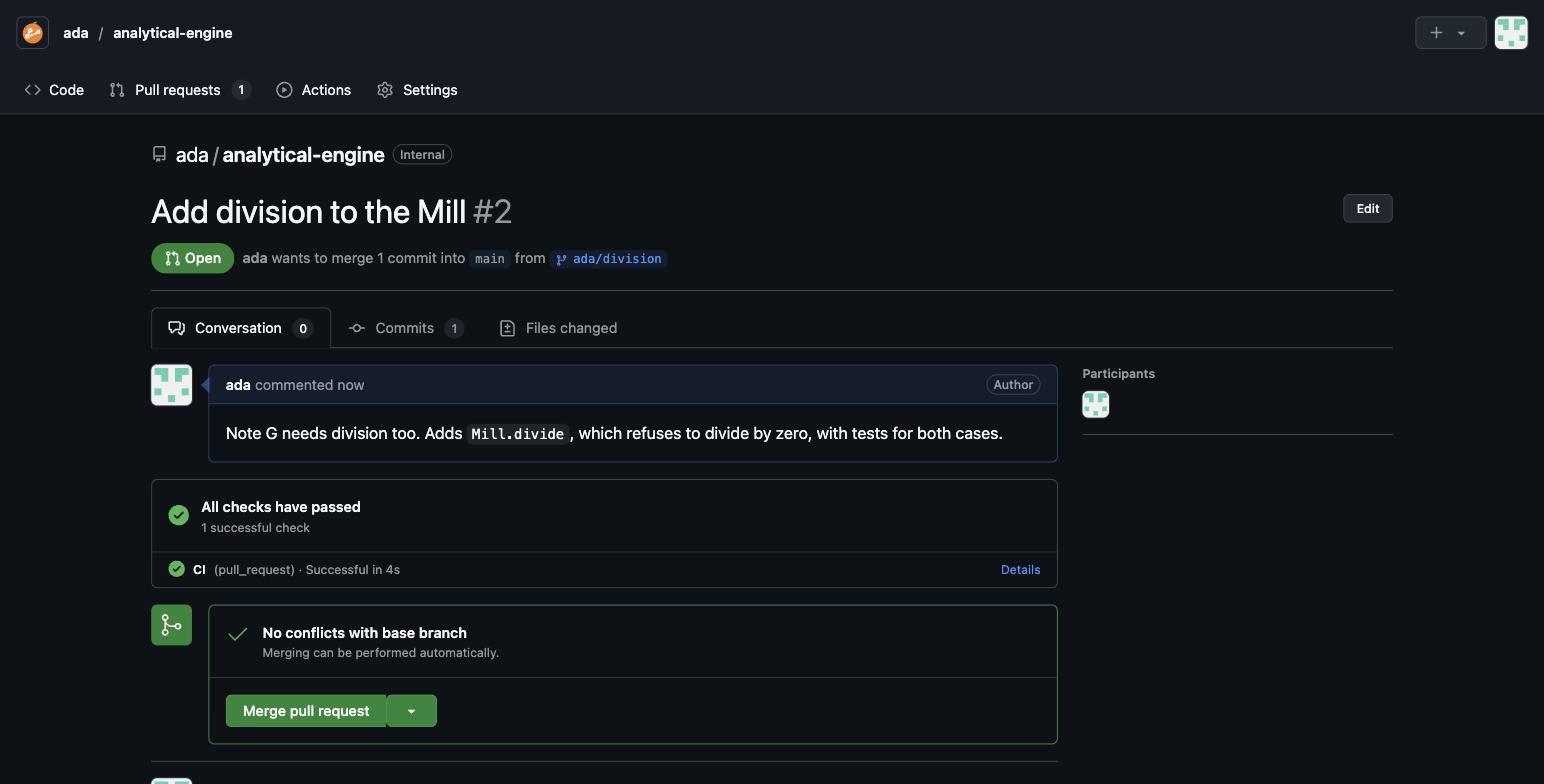
Pull requests — a conversation with Markdown comments, CI checks from Actions, a merge box that detects conflicts, and merge-commit or squash merges.
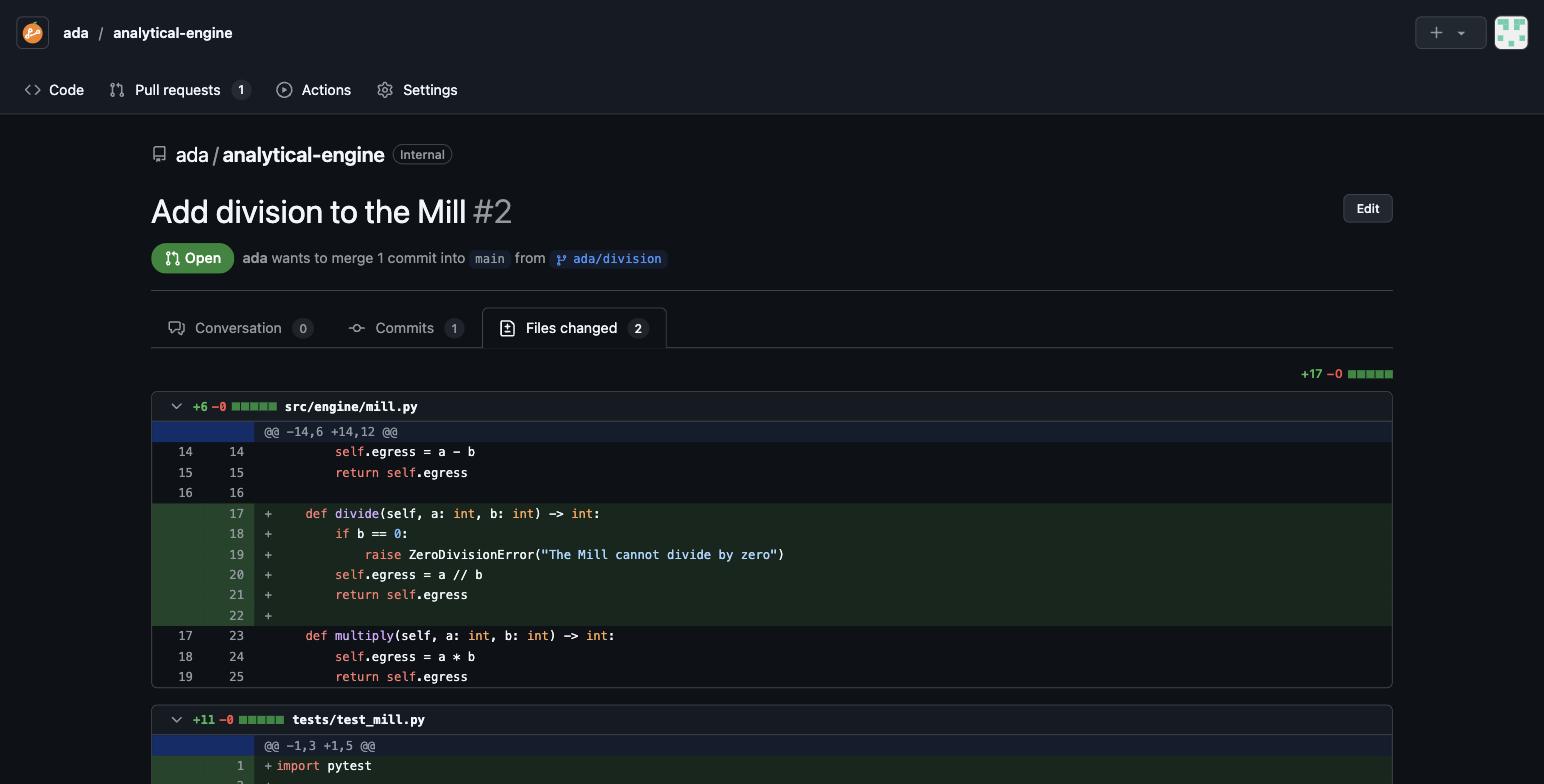
Files changed — per-file unified diffs with diffstats.
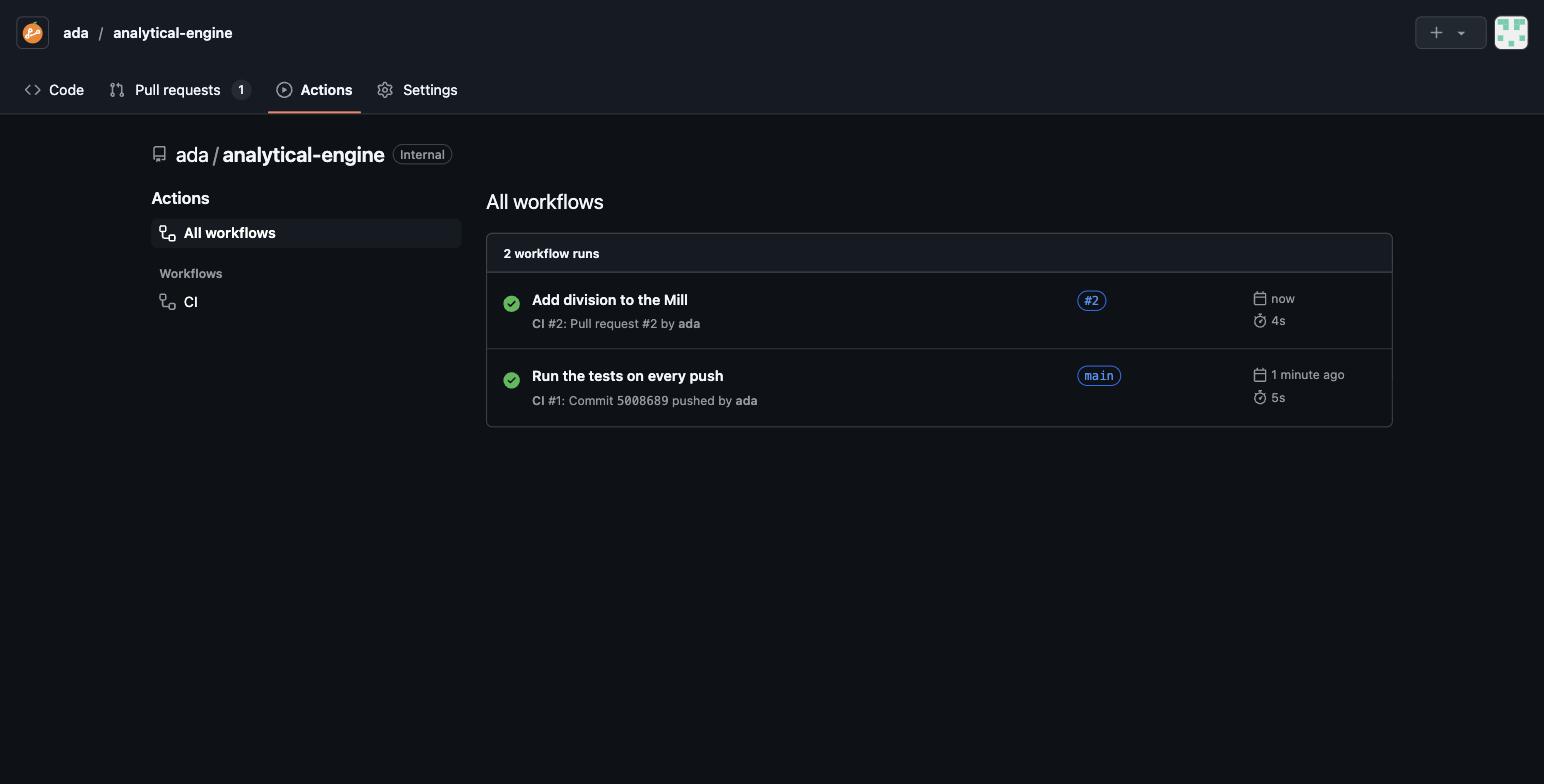
Actions — every push and pull request runs your .github/workflows files.
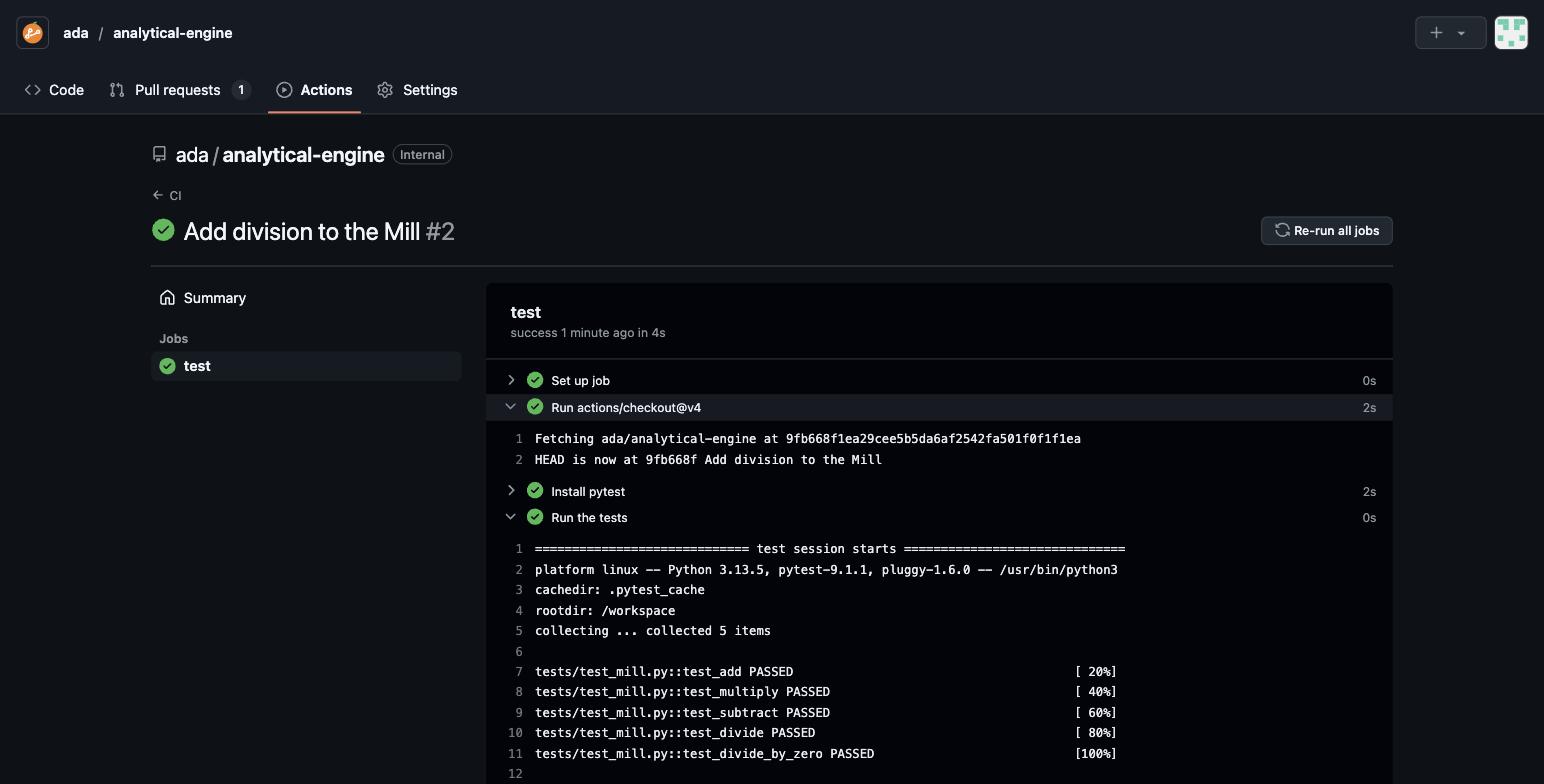
Job logs — step-by-step logs, live while a job runs.
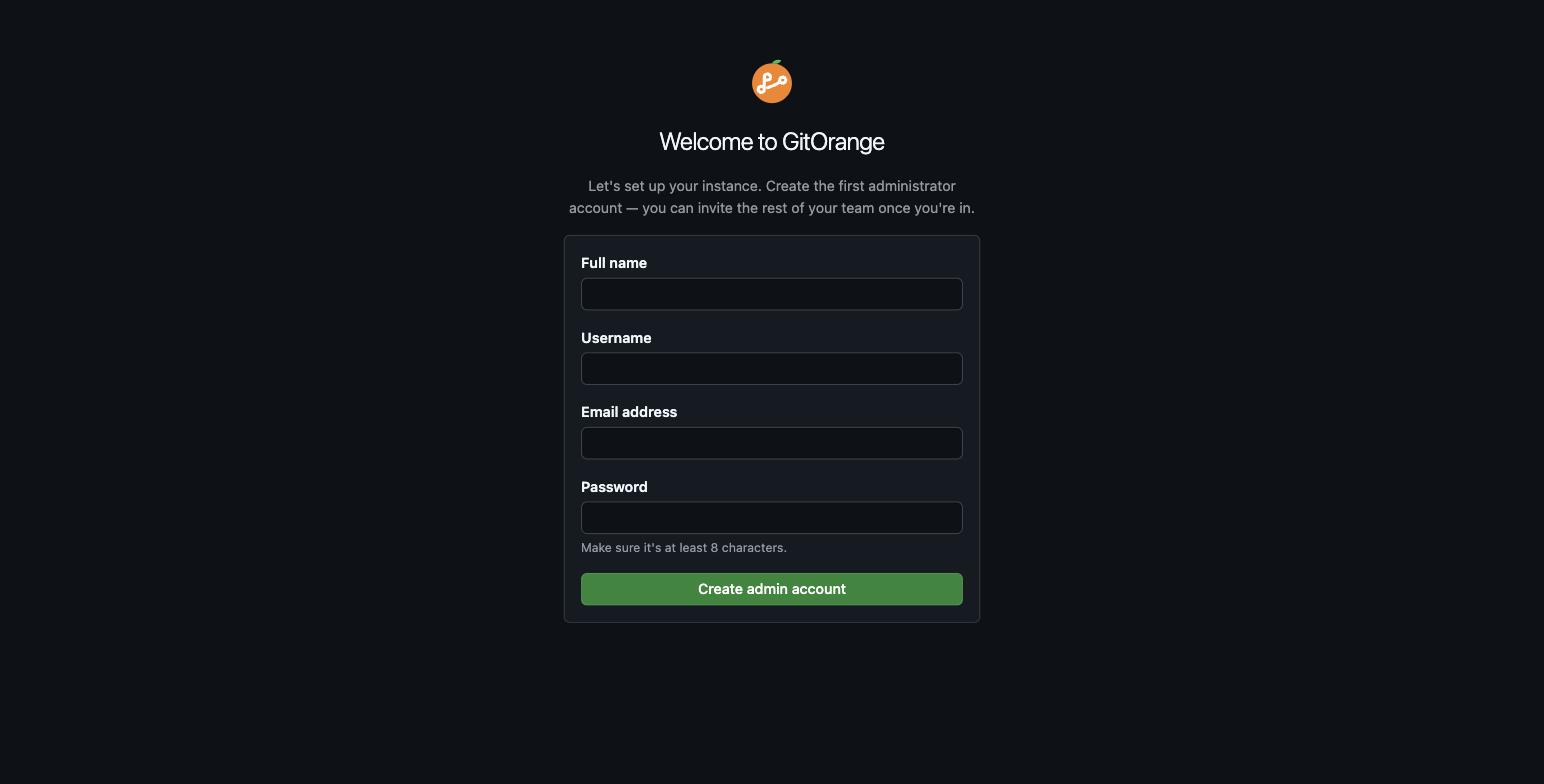
First run — the first visitor creates the administrator; everyone after that joins by invitation.
Features
- First-run setup — the first visitor creates the site admin. After that, sign-up is closed.
- Email invitations — admins invite teammates by email (or copy the link); invites are single-use and expire in 7 days.
- Unlimited repositories — create empty or with a README; browse files, Markdown READMEs, history, and per-commit diffs.
- Syntax highlighting — GitHub's color scheme for 35+ languages in file views and diffs, in light and dark mode.
- Work with an AI agent — every repository offers a ready-made prompt (on an empty repo's setup page, and under Code → AI agent) that people who don't use git can paste into Claude Code or another coding agent. The agent sets up the repository and Git LFS on their computer, then makes changes on branches and links them to open pull requests. Their access token never passes through the agent. A second prompt imports an existing GitHub repository (every branch, tag, and Git LFS file) and can keep it in sync with GitHub.
- Git over HTTPS —
git clone https://your-host/<owner>/<repo>.gitwith a personal access token as the password. - Git LFS — large files are stored in Cloudflare R2 and transferred directly between
git lfsand R2 through short-lived signed URLs (up to 5 GB per file). The web UI shows, previews, and downloads LFS files. - Pull requests — open, comment, close, and reopen; view commits and files changed; merge with a merge commit or squash; delete the branch after merging.
- Personal and team repositories — personal repositories (
/<you>/<repo>) are private by default: only you, collaborators you add, and site admins can see them, and you can make one internal so every member can read it. Repositories under the shared team (/<team>/<repo>, created by a site admin) are visible to every member. - GitHub Actions workflows — your existing
.github/workflows/*.ymlfiles run as-is on pushes and pull requests. Each job gets its own Linux container on Cloudflare Containers, with live logs, re-runs, cancel, and a checks box on pull requests. See GitHub Actions compatibility. - Access control — the owner (or a team repository's creator), site admins, and collaborators added in repository settings can push and merge; other members can read what they can see and comment.
Intentionally not here yet: issues, forks, code review comments, and search. See the roadmap.
Architecture at a glance

Everything runs as a single Cloudflare Worker — no git server to operate. Git LFS files live in R2 and never pass through the Worker. Git traffic is authenticated with a personal access token, then streamed to Artifacts with a short-lived token scoped to that one repository; merges are computed inside the Worker and pushed back as ordinary git objects. See Architecture for the full breakdown.
Known limitations
GitOrange is young. Before you rely on it, know that:
- Merge conflicts are resolved locally. Merging is file-level: if both branches changed the same file, the pull request reports a conflict and you merge
maininto your branch locally, then push. There's no in-browser conflict editor or line-level auto-merge yet. - Large diffs are truncated. A diff shows at most 300 files, and files over ~512 KB (or binary files) are listed without their contents. File views skip highlighting above 300 KB and stop rendering above 1 MB (use Raw).
- Very long histories are approximated. Merge bases and pull request commit lists walk up to ~2,000 commits, which can mislabel commits on repositories with deep histories between branches.
- LFS files are capped at 5 GB, and there's no file locking.
git lfs lockreports that locking isn't supported. LFS objects stay in R2 until their repository is deleted, even if no commit references them anymore. - No Actions secrets yet, and not every GitHub Actions feature runs. See GitHub Actions compatibility.
- No forks. Pull requests are between branches of the same repository; contributors need to be collaborators.
- The first visitor becomes the admin. Until the admin account exists, anyone who can reach the URL can claim it. Complete setup right after deploying, before sharing the URL.
- Artifacts is in beta. It's open to every Workers Paid account, but its APIs may still change.
GitHub Actions compatibility
GitOrange reads the same workflow syntax as GitHub Actions. Jobs run on runs-on: ubuntu-latest (or gitorange-standard-2 through gitorange-standard-4 for bigger machines) in a Debian container with Node.js 24, git, Python, and build tools preinstalled.
| Works today | Not yet |
|---|---|
on: push and pull_request, with branches, tags, and paths filters | Secrets (secrets.*) and GITHUB_TOKEN |
run steps (bash, sh, python, node shells), working-directory, defaults.run | Marketplace actions other than the two built in: actions/cache, upload-artifact, docker/*, … fail with a clear message |
actions/checkout and actions/setup-node | schedule, workflow_dispatch, and other triggers |
needs, if: with success()/failure()/always(), continue-on-error, timeout-minutes | Matrix include/exclude, reusable workflows, services, job container |
Matrix builds, ${{ }} expressions, env at every level | Windows and macOS runners |
Step and job outputs, GITHUB_ENV, GITHUB_OUTPUT, GITHUB_PATH | Concurrency limits, caching, and artifacts |
A workflow that uses something unsupported fails with a message saying what to change, rather than silently doing the wrong thing.
How much does it cost?
$5/month for the Cloudflare Workers Paid plan, which Artifacts requires. Included each month: 10,000 Artifacts operations (a clone, fetch, push, or repo creation) and 1 GB of repository storage. Beyond that, Artifacts bills $0.15 per 1,000 operations and $0.50 per GB-month (pricing). Git LFS storage is R2: the first 10 GB-month is free, then $0.015 per GB-month, and downloads are free (pricing). Actions jobs bill as Cloudflare Containers while they run: the default standard-1 runner (½ vCPU, 4 GiB) costs about $0.0012 per minute after the plan's included 375 vCPU-minutes and 25 GiB-hours (pricing). D1 and Email Sending usage for a small team stays within the plan's included amounts.
Roadmap
- Issues
- Line comments and reviews on pull requests
- Code search
- Organizations and teams
Contributing
See CONTRIBUTING.md. Security issues: see SECURITY.md.
This repo ships a CLAUDE.md and Claude Code skills and hooks under .claude/ that the maintainer uses when pairing with Claude Code. They're harmless to ignore if you don't use Claude Code.
License
GitOrange is not affiliated with or endorsed by GitHub. "GitHub" is a trademark of GitHub, Inc. If you run a fork as a branded product, please rename it and replace the logo so users aren't confused about which project they're installing.
Similar repos


Languages
TypeScript
95.3%
JavaScript
2.7%
CSS
1.8%
A self-hosted GitHub for your team, with no servers to run. Single-tenant git hosting with pull requests, built on Cloudflare Workers, D1, and Artifacts.
See the codeSee what people are saying
README
A self-hosted GitHub for your team, with no servers to run. GitOrange is a single-tenant git host in the spirit of GitHub Enterprise Server: the GitHub interface your team already knows, private to your organization, deployed as one Cloudflare Worker.
There is no VM, no disk to back up, and no git daemon to patch. Repositories live in Cloudflare Artifacts, Cloudflare's git-compatible storage. Everything else lives in D1.
Bring your GitHub Actions workflows. GitOrange runs the .github/workflows/*.yml files you already have, with the same syntax, on Cloudflare Containers. No runners to host. Typical build-and-test workflows (checkout, set up Node, install, test) work unchanged. Repository secrets aren't supported yet. See what's supported.
Who this is for
Small teams that want their code on infrastructure they control, with GitHub's familiar UI, and don't want to operate a GitHub Enterprise Server or GitLab instance. If you have a Cloudflare account on the Workers Paid plan, you can run GitOrange for a few dollars a month.
Quickstart
Prerequisites: a Cloudflare account on the Workers Paid plan (required for Artifacts, currently in open beta), a domain onboarded to Cloudflare Email Sending for invitation emails, and Node.js v20+ with yarn.
The fastest path is the Claude Code onboarding skill. It checks your account, creates the D1 database, fills in your config, sets secrets, runs migrations, and deploys:
git clone https://github.com/choyiny/gitorange.git
cd gitorange
claude   # then run /gitorange-onboarding
First successful result: your worker is live, and the first visit asks you to create the admin account. Create a repository, then git push to it with a personal access token.
Prefer to set it up by hand? See Setup (~7 steps).
Documentation
Full docs live in docs/: Setup · Configuration · Architecture · Local development
Screenshots
Pull requests — a conversation with Markdown comments, CI checks from Actions, a merge box that detects conflicts, and merge-commit or squash merges.
Files changed — per-file unified diffs with diffstats.
Actions — every push and pull request runs your .github/workflows files.
Job logs — step-by-step logs, live while a job runs.
First run — the first visitor creates the administrator; everyone after that joins by invitation.
Features
- First-run setup — the first visitor creates the site admin. After that, sign-up is closed.
- Email invitations — admins invite teammates by email (or copy the link); invites are single-use and expire in 7 days.
- Unlimited repositories — create empty or with a README; browse files, Markdown READMEs, history, and per-commit diffs.
- Syntax highlighting — GitHub's color scheme for 35+ languages in file views and diffs, in light and dark mode.
- Work with an AI agent — every repository offers a ready-made prompt (on an empty repo's setup page, and under Code → AI agent) that people who don't use git can paste into Claude Code or another coding agent. The agent sets up the repository and Git LFS on their computer, then makes changes on branches and links them to open pull requests. Their access token never passes through the agent. A second prompt imports an existing GitHub repository (every branch, tag, and Git LFS file) and can keep it in sync with GitHub.
- Git over HTTPS —
git clone https://your-host/<owner>/<repo>.gitwith a personal access token as the password. - Git LFS — large files are stored in Cloudflare R2 and transferred directly between
git lfsand R2 through short-lived signed URLs (up to 5 GB per file). The web UI shows, previews, and downloads LFS files. - Pull requests — open, comment, close, and reopen; view commits and files changed; merge with a merge commit or squash; delete the branch after merging.
- Personal and team repositories — personal repositories (
/<you>/<repo>) are private by default: only you, collaborators you add, and site admins can see them, and you can make one internal so every member can read it. Repositories under the shared team (/<team>/<repo>, created by a site admin) are visible to every member. - GitHub Actions workflows — your existing
.github/workflows/*.ymlfiles run as-is on pushes and pull requests. Each job gets its own Linux container on Cloudflare Containers, with live logs, re-runs, cancel, and a checks box on pull requests. See GitHub Actions compatibility. - Access control — the owner (or a team repository's creator), site admins, and collaborators added in repository settings can push and merge; other members can read what they can see and comment.
Intentionally not here yet: issues, forks, code review comments, and search. See the roadmap.
Architecture at a glance
Everything runs as a single Cloudflare Worker — no git server to operate. Git LFS files live in R2 and never pass through the Worker. Git traffic is authenticated with a personal access token, then streamed to Artifacts with a short-lived token scoped to that one repository; merges are computed inside the Worker and pushed back as ordinary git objects. See Architecture for the full breakdown.
Known limitations
GitOrange is young. Before you rely on it, know that:
- Merge conflicts are resolved locally. Merging is file-level: if both branches changed the same file, the pull request reports a conflict and you merge
maininto your branch locally, then push. There's no in-browser conflict editor or line-level auto-merge yet. - Large diffs are truncated. A diff shows at most 300 files, and files over ~512 KB (or binary files) are listed without their contents. File views skip highlighting above 300 KB and stop rendering above 1 MB (use Raw).
- Very long histories are approximated. Merge bases and pull request commit lists walk up to ~2,000 commits, which can mislabel commits on repositories with deep histories between branches.
- LFS files are capped at 5 GB, and there's no file locking.
git lfs lockreports that locking isn't supported. LFS objects stay in R2 until their repository is deleted, even if no commit references them anymore. - No Actions secrets yet, and not every GitHub Actions feature runs. See GitHub Actions compatibility.
- No forks. Pull requests are between branches of the same repository; contributors need to be collaborators.
- The first visitor becomes the admin. Until the admin account exists, anyone who can reach the URL can claim it. Complete setup right after deploying, before sharing the URL.
- Artifacts is in beta. It's open to every Workers Paid account, but its APIs may still change.
GitHub Actions compatibility
GitOrange reads the same workflow syntax as GitHub Actions. Jobs run on runs-on: ubuntu-latest (or gitorange-standard-2 through gitorange-standard-4 for bigger machines) in a Debian container with Node.js 24, git, Python, and build tools preinstalled.
| Works today | Not yet |
|---|---|
on: push and pull_request, with branches, tags, and paths filters | Secrets (secrets.*) and GITHUB_TOKEN |
run steps (bash, sh, python, node shells), working-directory, defaults.run | Marketplace actions other than the two built in: actions/cache, upload-artifact, docker/*, … fail with a clear message |
actions/checkout and actions/setup-node | schedule, workflow_dispatch, and other triggers |
needs, if: with success()/failure()/always(), continue-on-error, timeout-minutes | Matrix include/exclude, reusable workflows, services, job container |
Matrix builds, ${{ }} expressions, env at every level | Windows and macOS runners |
Step and job outputs, GITHUB_ENV, GITHUB_OUTPUT, GITHUB_PATH | Concurrency limits, caching, and artifacts |
A workflow that uses something unsupported fails with a message saying what to change, rather than silently doing the wrong thing.
How much does it cost?
$5/month for the Cloudflare Workers Paid plan, which Artifacts requires. Included each month: 10,000 Artifacts operations (a clone, fetch, push, or repo creation) and 1 GB of repository storage. Beyond that, Artifacts bills $0.15 per 1,000 operations and $0.50 per GB-month (pricing). Git LFS storage is R2: the first 10 GB-month is free, then $0.015 per GB-month, and downloads are free (pricing). Actions jobs bill as Cloudflare Containers while they run: the default standard-1 runner (½ vCPU, 4 GiB) costs about $0.0012 per minute after the plan's included 375 vCPU-minutes and 25 GiB-hours (pricing). D1 and Email Sending usage for a small team stays within the plan's included amounts.
Roadmap
- Issues
- Line comments and reviews on pull requests
- Code search
- Organizations and teams
Contributing
See CONTRIBUTING.md. Security issues: see SECURITY.md.
This repo ships a CLAUDE.md and Claude Code skills and hooks under .claude/ that the maintainer uses when pairing with Claude Code. They're harmless to ignore if you don't use Claude Code.
License
GitOrange is not affiliated with or endorsed by GitHub. "GitHub" is a trademark of GitHub, Inc. If you run a fork as a branded product, please rename it and replace the logo so users aren't confused about which project they're installing.
Similar repos
Languages
TypeScript
95.3%
JavaScript
2.7%
CSS
1.8%