QuickAdd for Obsidian
See the code
One hotkey to log a line, create a note, or run a whole workflow.
Install · Documentation · Examples · Discussions · Changelog
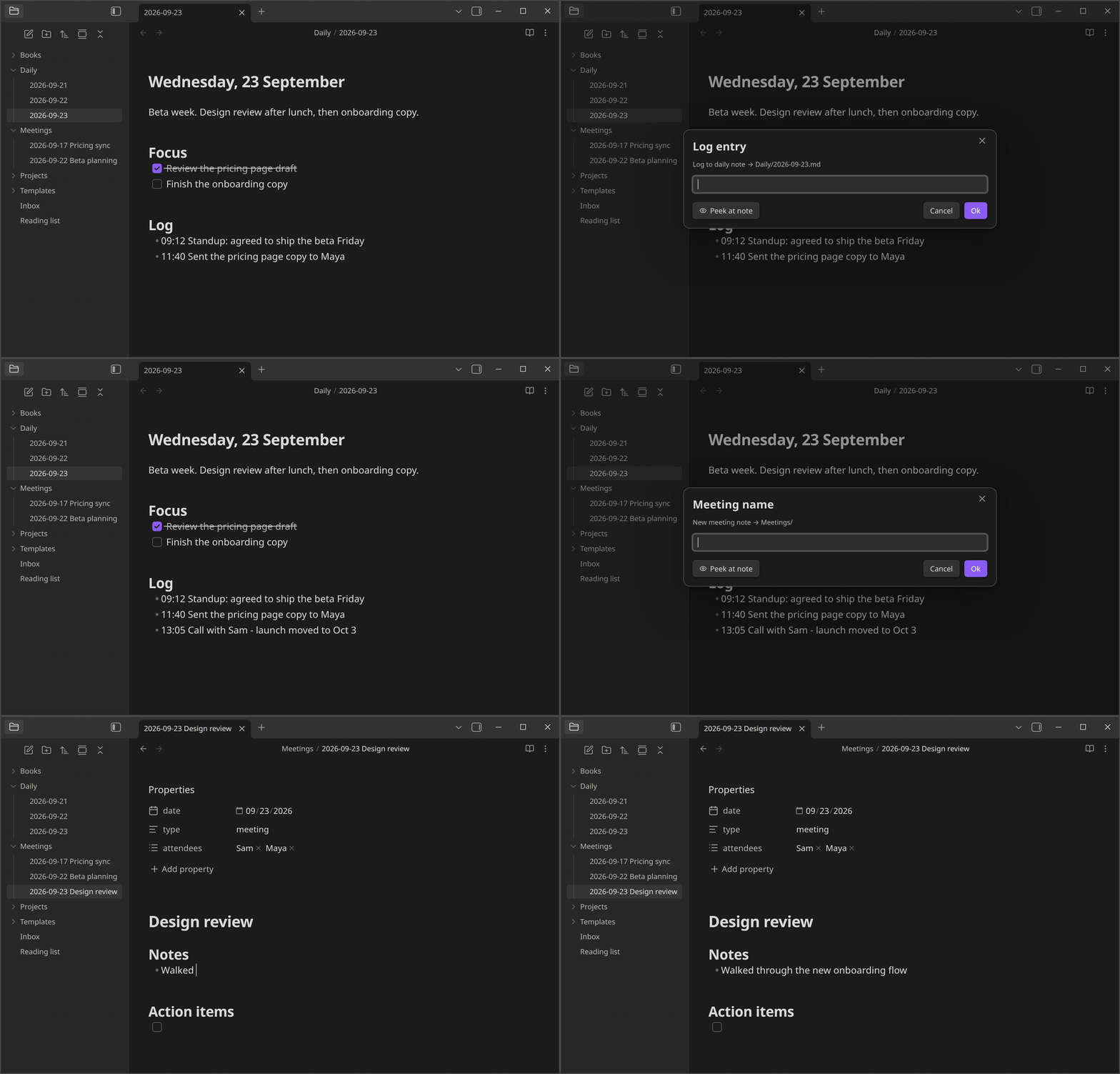
Each workflow you set up in QuickAdd is called a choice. There are four kinds:
Placeholders fill in the details each time a choice runs: {{DATE}} inserts today's date, {{VALUE}} asks you for text, and {{FIELD:project}} suggests the project values your notes already use. Others insert links, your selection, or the clipboard. See format syntax for all of them.
QuickAdd also has:
obsidian://quickadd links, Apple Shortcuts, launchers and schedulers, or the Obsidian CLI.QuickAdd works on desktop and mobile. The Obsidian CLI is desktop-only.
Using Templater? Add your template folder in QuickAdd's settings and QuickAdd: New note from template works right away. Coming from Templater shows the QuickAdd way to do each Templater job.
https://quickadd.obsidian.guide/mcp: the docs in a form AI assistants can read.Contributions are welcome. Read CONTRIBUTING.md before you start: comment on the issue you want to work on and wait for a go-ahead before writing code.
If QuickAdd saves you time, you can buy me a coffee.
586 followers · starred Sep 2025
46 followers · starred Jul 2021
214 followers · starred Jan 2025
303 followers · starred Mar 2024
QuickAdd for Obsidian
See the code
One hotkey to log a line, create a note, or run a whole workflow.
Install · Documentation · Examples · Discussions · Changelog
Each workflow you set up in QuickAdd is called a choice. There are four kinds:
Placeholders fill in the details each time a choice runs: {{DATE}} inserts today's date, {{VALUE}} asks you for text, and {{FIELD:project}} suggests the project values your notes already use. Others insert links, your selection, or the clipboard. See format syntax for all of them.
QuickAdd also has:
obsidian://quickadd links, Apple Shortcuts, launchers and schedulers, or the Obsidian CLI.QuickAdd works on desktop and mobile. The Obsidian CLI is desktop-only.
Using Templater? Add your template folder in QuickAdd's settings and QuickAdd: New note from template works right away. Coming from Templater shows the QuickAdd way to do each Templater job.
https://quickadd.obsidian.guide/mcp: the docs in a form AI assistants can read.Contributions are welcome. Read CONTRIBUTING.md before you start: comment on the issue you want to work on and wait for a go-ahead before writing code.
If QuickAdd saves you time, you can buy me a coffee.
586 followers · starred Sep 2025
46 followers · starred Jul 2021
214 followers · starred Jan 2025
303 followers · starred Mar 2024