GaussianObject: High-Quality 3D Object Reconstruction from Four Views with Gaussian Splatting (SIGGRAPH Asia 2024, TOG)
Jupyter Notebook
1,192
6 commits
updated Sep 29, 2024


GaussianObject: High-Quality 3D Object Reconstruction from Four Views with Gaussian Splatting
Chen Yang1*, Sikuang Li1*, Jiemin Fang2†, Ruofan Liang3, Lingxi Xie2, Xiaopeng Zhang2, Wei Shen1✉, Qi Tian2
1MoE Key Lab of Artificial Intelligence, AI Institute, SJTU 2Huawei Inc. 3University of Toronto
*Equal contribution. †Project lead. ✉Corresponding author.
https://github.com/user-attachments/assets/a388150a-2f90-4ced-ad90-d4aac48c39dc
We propose GaussianObject, a framework to represent and render the 3D object with Gaussian splatting, that achieves high rendering quality with only 4 input images even under COLMAP-free conditions.
We first introduce techniques of visual hull and floater elimination which explicitly inject structure priors into the initial optimization process for helping build multi-view consistency, yielding a coarse 3D Gaussian representation. Then we construct a Gaussian repair model based on diffusion models to supplement the omitted object information, where Gaussians are further refined. We design a self-generating strategy to obtain image pairs for training the repair model. Our GaussianObject achives strong reconstruction results from only 4 views and significantly outperforms previous state-of-the-art methods.
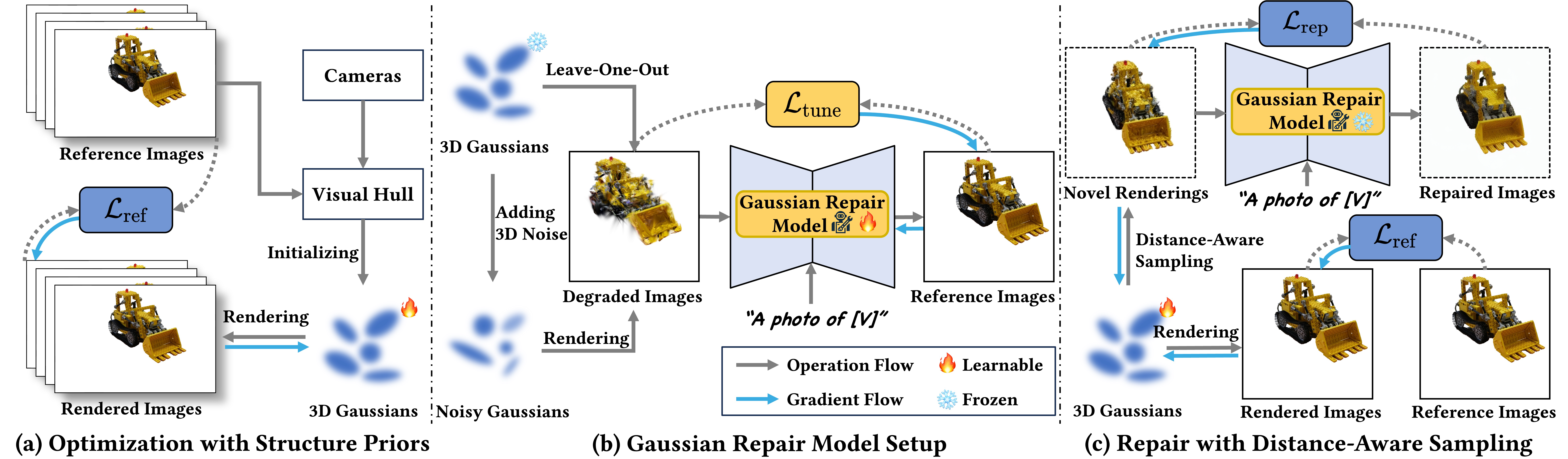
\mathcal{L}_{\text{rep}}$ and $\mathcal{L}_{\text{gs}}$.
Sang Han provides a Colab script for GaussianObject in #9. Thanks for the contribution of the community! If you are experiencing issues with insufficient GPU VRAM, try this.
GaussianObject is tested with CUDA 11.8. If you are using a different version, you can choose to install nvidia/cuda in a local conda environment or modify the version of PyTorch in section Python Environment.
The repository contains submodules. Please clone it with
git clone https://github.com/GaussianObject/GaussianObject.git --recursive
or update submodules in GaussianObject directory with
git submodule update --init --recursive
You can try GaussianObject with the Mip-NeRF360 dataset and OmniObject3D dataset. The data can be downloaded in Google Drive.
GaussianObject
├── data
│   ├── mip360
│   │   ├── bonsai
│   │   │   ├── images
│   │   │   ├── images_2
│   │   │   ├── images_4
│   │   │   ├── images_8
│   │   │   ├── masks
│   │   │   ├── sparse
│   │   │   ├── zoe_depth
│   │   │   ├── zoe_depth_colored
│   │   │   ├── sparse_4.txt
│   │   │   ├── sparse_6.txt
│   │   │   ├── sparse_9.txt
│   │   │   └── sparse_test.txt
│   │   ├── garden
│   │   └── kitchen
│   └── omni3d
└── ...
images, images_2, images_4, images_8 and sparse are from the original dataset. masks is the object mask generated with segment-anything. zoe_depth and zoe_depth_colored are the depth maps and colored depth maps. sparse_4.txt, sparse_6.txt and sparse_9.txt are train set image ids and sparse_test.txt is the test set.
To test GaussianObject with your own dataset, you can manually prepare the dataset with the same directory structure. The depth maps and colored depth maps are generated with
python preprocess/pred_monodepth.py -s <YOUR_DATA_DIR>
GaussianObject is tested with Python 3.11. All the required packages are listed in requirements.txt. You can install them with
# install pytorch
pip install torch torchvision --index-url https://download.pytorch.org/whl/cu118

# setup pip packages
pip install -r requirements.txt

# (Optional) setup croco for DUSt3R
cd submodules/croco/models/curope/
python setup.py build_ext --inplace
cd ../../../..
Pretrained weights of Stable Diffusion v1.5 and ControlNet Tile need to be put in models/ following the instruction of ControlNet 1.1 with our given script:
cd models
python download_hf_models.py
cd ..
Taking the scene kitchen from mip360 dataset as an example, GaussianObject generate the visual hull of it, train a coarse 3DGS representation, analyze the statistical regularity of the coarse model with leave-one-out strategy, fine-tune the Gaussian Repair Model with LoRA and repair the 3DGS representation step by step.
python visual_hull.py \
    --sparse_id 4 \
    --data_dir data/mip360/kitchen \
    --reso 2 --not_vis
The visual hull is saved in data/mip360/kitchen/visual_hull_4.ply.
You can render the coarse model it with
# render the test set
python render.py \
    -m output/gs_init/kitchen \
    --sparse_view_num 4 --sh_degree 2 \
    --init_pcd_name visual_hull_4 \
    --white_background --skip_all --skip_train

# render the path
python render.py \
    -m output/gs_init/kitchen \
    --sparse_view_num 4 --sh_degree 2 \
    --init_pcd_name visual_hull_4 \
    --white_background --render_path
The rendering results are saved in output/gs_init/kitchen/test/ours_10000 and output/gs_init/kitchen/render/ours_10000.
python leave_one_out_stage1.py -s data/mip360/kitchen \
    -m output/gs_init/kitchen_loo \
    -r 4 --sparse_view_num 4 --sh_degree 2 \
    --init_pcd_name visual_hull_4 \
    --white_background --random_background

python leave_one_out_stage2.py -s data/mip360/kitchen \
    -m output/gs_init/kitchen_loo \
    -r 4 --sparse_view_num 4 --sh_degree 2 \
    --init_pcd_name visual_hull_4 \
    --white_background --random_background
python train_lora.py --exp_name controlnet_finetune/kitchen \
    --prompt xxy5syt00 --sh_degree 2 --resolution 4 --sparse_num 4 \
    --data_dir data/mip360/kitchen \
    --gs_dir output/gs_init/kitchen \
    --loo_dir output/gs_init/kitchen_loo \
    --bg_white --sd_locked --train_lora --use_prompt_list \
    --add_diffusion_lora --add_control_lora --add_clip_lora
python train_repair.py \
    --config configs/gaussian-object.yaml \
    --train --gpu 0 \
    tag="kitchen" \
    system.init_dreamer="output/gs_init/kitchen" \
    system.exp_name="output/controlnet_finetune/kitchen" \
    system.refresh_size=8 \
    data.data_dir="data/mip360/kitchen" \
    data.resolution=4 \
    data.sparse_num=4 \
    data.prompt="a photo of a xxy5syt00" \
    data.refresh_size=8 \
    system.sh_degree=2
The final 3DGS representation is saved in output/gaussian_object/kitchen/save/last.ply. You can render it with
# render the test set
python render.py \
    -m output/gs_init/kitchen \
    --sparse_view_num 4 --sh_degree 2 \
    --init_pcd_name visual_hull_4 \
    --white_background --skip_all --skip_train \
    --load_ply output/gaussian_object/kitchen/save/last.ply

# render the path
python render.py \
    -m output/gs_init/kitchen \
    --sparse_view_num 4 --sh_degree 2 \
    --init_pcd_name visual_hull_4 \
    --white_background --render_path \
    --load_ply output/gaussian_object/kitchen/save/last.ply
The rendering results are saved in output/gs_init/kitchen/test/ours_None and output/gs_init/kitchen/render/ours_None.
GaussianObject can work without accurate camera poses (usually from COLMAP) and masks, which we term it as CF-GaussianObject.
To use CF-GaussianObject (COLMAP-free GaussianObject), you need to download SAM and DUSt3R or MASt3R checkpoints.
cd models
sh download_preprocess_models.sh
cd ..
Assume you have a dataset with 4 images, it should be put in ./data as the following structure
GaussianObject
├── data
│   ├── <your dataset name>
│   │   ├── images
│   │   │   ├── 0001.png
│   │   │   ├── 0002.png
│   │   │   ├── 0003.png
│   │   │   └── 0004.png
│   │   ├── sparse_4.txt
│   │   └── sparse_test.txt
│   └── ...
└── ...
where sparse_4.txt and sparse_test.txt contain the same sequence numbers of the input images, starting from 0. If all images are used for training, the files should be
0
1
2
3
To downsampling the images, you can use
python preprocess/downsample.py -s data/realcap/rabbit
segment_anything.ipynb uses SAM to generate masks. Please refer to the file and segment-anything for more details.
DUSt3R is used to estimate coarse poses for input images. You can get the poses with
python pred_poses.py -s data/realcap/rabbit --sparse_num 4
An alternative MASt3R script is provided in pred_poses_mast3r.py.
Once the data is prepared, the later steps are similar to standard GaussianObject. You can refer to the Run the Code section for more details. Here is an example script.
python train_gs.py -s data/realcap/rabbit \
    -m output/gs_init/rabbit \
    -r 8 --sparse_view_num 4 --sh_degree 2 \
    --init_pcd_name dust3r_4 \
    --white_background --random_background --use_dust3r

python render.py \
    -m output/gs_init/rabbit \
    --sparse_view_num 4 --sh_degree 2 \
    --init_pcd_name dust3r_4 \
    --dust3r_json output/gs_init/rabbit/refined_cams.json \
    --white_background --render_path --use_dust3r

python leave_one_out_stage1.py -s data/realcap/rabbit \
    -m output/gs_init/rabbit_loo \
    -r 8 --sparse_view_num 4 --sh_degree 2 \
    --init_pcd_name dust3r_4 \
    --dust3r_json output/gs_init/rabbit/refined_cams.json \
    --white_background --random_background --use_dust3r

python leave_one_out_stage2.py -s data/realcap/rabbit \
    -m output/gs_init/rabbit_loo \
    -r 8 --sparse_view_num 4 --sh_degree 2 \
    --init_pcd_name dust3r_4 \
    --dust3r_json output/gs_init/rabbit/refined_cams.json \
    --white_background --random_background --use_dust3r

python train_lora.py --exp_name controlnet_finetune/rabbit \
    --prompt xxy5syt00 --sh_degree 2 --resolution 8 --sparse_num 4 \
    --data_dir data/realcap/rabbit \
    --gs_dir output/gs_init/rabbit \
    --loo_dir output/gs_init/rabbit_loo \
    --bg_white --sd_locked --train_lora --use_prompt_list \
    --add_diffusion_lora --add_control_lora --add_clip_lora --use_dust3r

python train_repair.py \
    --config configs/gaussian-object-colmap-free.yaml \
    --train --gpu 0 \
    tag="rabbit" \
    system.init_dreamer="output/gs_init/rabbit" \
    system.exp_name="output/controlnet_finetune/rabbit" \
    system.refresh_size=8 \
    data.data_dir="data/realcap/rabbit" \
    data.resolution=8 \
    data.sparse_num=4 \
    data.prompt="a photo of a xxy5syt00" \
    data.json_path="output/gs_init/rabbit/refined_cams.json" \
    data.refresh_size=8 \
    system.sh_degree=2

python render.py \
    -m output/gs_init/rabbit \
    --sparse_view_num 4 --sh_degree 2 \
    --init_pcd_name dust3r_4 \
    --white_background --render_path --use_dust3r \
    --load_ply output/gaussian_object/rabbit/save/last.ply
If you find GaussianObject useful for your work please cite:
@article{yang2024gaussianobject,
  title   = {GaussianObject: High-Quality 3D Object Reconstruction from Four Views with Gaussian Splatting},
  author  = {Chen Yang and Sikuang Li and Jiemin Fang and Ruofan Liang and
             Lingxi Xie and Xiaopeng Zhang and Wei Shen and Qi Tian},
  journal = {ACM Transactions on Graphics},
  year    = {2024}
}
Some code of GaussianObject is based on 3DGS, threestudio and ControlNet. Thanks for their great work!
310 followers · starred Mar 2024
10 followers · starred Feb 2024
11 followers · starred Feb 2024
52 followers · starred Feb 2024
GaussianObject: High-Quality 3D Object Reconstruction from Four Views with Gaussian Splatting (SIGGRAPH Asia 2024, TOG)
Jupyter Notebook
1,192
6 commits
updated Sep 29, 2024
GaussianObject: High-Quality 3D Object Reconstruction from Four Views with Gaussian Splatting
Chen Yang1*, Sikuang Li1*, Jiemin Fang2†, Ruofan Liang3, Lingxi Xie2, Xiaopeng Zhang2, Wei Shen1✉, Qi Tian2
1MoE Key Lab of Artificial Intelligence, AI Institute, SJTU 2Huawei Inc. 3University of Toronto
*Equal contribution. †Project lead. ✉Corresponding author.
https://github.com/user-attachments/assets/a388150a-2f90-4ced-ad90-d4aac48c39dc
We propose GaussianObject, a framework to represent and render the 3D object with Gaussian splatting, that achieves high rendering quality with only 4 input images even under COLMAP-free conditions.
We first introduce techniques of visual hull and floater elimination which explicitly inject structure priors into the initial optimization process for helping build multi-view consistency, yielding a coarse 3D Gaussian representation. Then we construct a Gaussian repair model based on diffusion models to supplement the omitted object information, where Gaussians are further refined. We design a self-generating strategy to obtain image pairs for training the repair model. Our GaussianObject achives strong reconstruction results from only 4 views and significantly outperforms previous state-of-the-art methods.
\mathcal{L}_{\text{rep}}$ and $\mathcal{L}_{\text{gs}}$.
Sang Han provides a Colab script for GaussianObject in #9. Thanks for the contribution of the community! If you are experiencing issues with insufficient GPU VRAM, try this.
GaussianObject is tested with CUDA 11.8. If you are using a different version, you can choose to install nvidia/cuda in a local conda environment or modify the version of PyTorch in section Python Environment.
The repository contains submodules. Please clone it with
git clone https://github.com/GaussianObject/GaussianObject.git --recursive
or update submodules in GaussianObject directory with
git submodule update --init --recursive
You can try GaussianObject with the Mip-NeRF360 dataset and OmniObject3D dataset. The data can be downloaded in Google Drive.
GaussianObject
├── data
│   ├── mip360
│   │   ├── bonsai
│   │   │   ├── images
│   │   │   ├── images_2
│   │   │   ├── images_4
│   │   │   ├── images_8
│   │   │   ├── masks
│   │   │   ├── sparse
│   │   │   ├── zoe_depth
│   │   │   ├── zoe_depth_colored
│   │   │   ├── sparse_4.txt
│   │   │   ├── sparse_6.txt
│   │   │   ├── sparse_9.txt
│   │   │   └── sparse_test.txt
│   │   ├── garden
│   │   └── kitchen
│   └── omni3d
└── ...
images, images_2, images_4, images_8 and sparse are from the original dataset. masks is the object mask generated with segment-anything. zoe_depth and zoe_depth_colored are the depth maps and colored depth maps. sparse_4.txt, sparse_6.txt and sparse_9.txt are train set image ids and sparse_test.txt is the test set.
To test GaussianObject with your own dataset, you can manually prepare the dataset with the same directory structure. The depth maps and colored depth maps are generated with
python preprocess/pred_monodepth.py -s <YOUR_DATA_DIR>
GaussianObject is tested with Python 3.11. All the required packages are listed in requirements.txt. You can install them with
# install pytorch
pip install torch torchvision --index-url https://download.pytorch.org/whl/cu118

# setup pip packages
pip install -r requirements.txt

# (Optional) setup croco for DUSt3R
cd submodules/croco/models/curope/
python setup.py build_ext --inplace
cd ../../../..
Pretrained weights of Stable Diffusion v1.5 and ControlNet Tile need to be put in models/ following the instruction of ControlNet 1.1 with our given script:
cd models
python download_hf_models.py
cd ..
Taking the scene kitchen from mip360 dataset as an example, GaussianObject generate the visual hull of it, train a coarse 3DGS representation, analyze the statistical regularity of the coarse model with leave-one-out strategy, fine-tune the Gaussian Repair Model with LoRA and repair the 3DGS representation step by step.
python visual_hull.py \
    --sparse_id 4 \
    --data_dir data/mip360/kitchen \
    --reso 2 --not_vis
The visual hull is saved in data/mip360/kitchen/visual_hull_4.ply.
You can render the coarse model it with
# render the test set
python render.py \
    -m output/gs_init/kitchen \
    --sparse_view_num 4 --sh_degree 2 \
    --init_pcd_name visual_hull_4 \
    --white_background --skip_all --skip_train

# render the path
python render.py \
    -m output/gs_init/kitchen \
    --sparse_view_num 4 --sh_degree 2 \
    --init_pcd_name visual_hull_4 \
    --white_background --render_path
The rendering results are saved in output/gs_init/kitchen/test/ours_10000 and output/gs_init/kitchen/render/ours_10000.
python leave_one_out_stage1.py -s data/mip360/kitchen \
    -m output/gs_init/kitchen_loo \
    -r 4 --sparse_view_num 4 --sh_degree 2 \
    --init_pcd_name visual_hull_4 \
    --white_background --random_background

python leave_one_out_stage2.py -s data/mip360/kitchen \
    -m output/gs_init/kitchen_loo \
    -r 4 --sparse_view_num 4 --sh_degree 2 \
    --init_pcd_name visual_hull_4 \
    --white_background --random_background
python train_lora.py --exp_name controlnet_finetune/kitchen \
    --prompt xxy5syt00 --sh_degree 2 --resolution 4 --sparse_num 4 \
    --data_dir data/mip360/kitchen \
    --gs_dir output/gs_init/kitchen \
    --loo_dir output/gs_init/kitchen_loo \
    --bg_white --sd_locked --train_lora --use_prompt_list \
    --add_diffusion_lora --add_control_lora --add_clip_lora
python train_repair.py \
    --config configs/gaussian-object.yaml \
    --train --gpu 0 \
    tag="kitchen" \
    system.init_dreamer="output/gs_init/kitchen" \
    system.exp_name="output/controlnet_finetune/kitchen" \
    system.refresh_size=8 \
    data.data_dir="data/mip360/kitchen" \
    data.resolution=4 \
    data.sparse_num=4 \
    data.prompt="a photo of a xxy5syt00" \
    data.refresh_size=8 \
    system.sh_degree=2
The final 3DGS representation is saved in output/gaussian_object/kitchen/save/last.ply. You can render it with
# render the test set
python render.py \
    -m output/gs_init/kitchen \
    --sparse_view_num 4 --sh_degree 2 \
    --init_pcd_name visual_hull_4 \
    --white_background --skip_all --skip_train \
    --load_ply output/gaussian_object/kitchen/save/last.ply

# render the path
python render.py \
    -m output/gs_init/kitchen \
    --sparse_view_num 4 --sh_degree 2 \
    --init_pcd_name visual_hull_4 \
    --white_background --render_path \
    --load_ply output/gaussian_object/kitchen/save/last.ply
The rendering results are saved in output/gs_init/kitchen/test/ours_None and output/gs_init/kitchen/render/ours_None.
GaussianObject can work without accurate camera poses (usually from COLMAP) and masks, which we term it as CF-GaussianObject.
To use CF-GaussianObject (COLMAP-free GaussianObject), you need to download SAM and DUSt3R or MASt3R checkpoints.
cd models
sh download_preprocess_models.sh
cd ..
Assume you have a dataset with 4 images, it should be put in ./data as the following structure
GaussianObject
├── data
│   ├── <your dataset name>
│   │   ├── images
│   │   │   ├── 0001.png
│   │   │   ├── 0002.png
│   │   │   ├── 0003.png
│   │   │   └── 0004.png
│   │   ├── sparse_4.txt
│   │   └── sparse_test.txt
│   └── ...
└── ...
where sparse_4.txt and sparse_test.txt contain the same sequence numbers of the input images, starting from 0. If all images are used for training, the files should be
0
1
2
3
To downsampling the images, you can use
python preprocess/downsample.py -s data/realcap/rabbit
segment_anything.ipynb uses SAM to generate masks. Please refer to the file and segment-anything for more details.
DUSt3R is used to estimate coarse poses for input images. You can get the poses with
python pred_poses.py -s data/realcap/rabbit --sparse_num 4
An alternative MASt3R script is provided in pred_poses_mast3r.py.
Once the data is prepared, the later steps are similar to standard GaussianObject. You can refer to the Run the Code section for more details. Here is an example script.
python train_gs.py -s data/realcap/rabbit \
    -m output/gs_init/rabbit \
    -r 8 --sparse_view_num 4 --sh_degree 2 \
    --init_pcd_name dust3r_4 \
    --white_background --random_background --use_dust3r

python render.py \
    -m output/gs_init/rabbit \
    --sparse_view_num 4 --sh_degree 2 \
    --init_pcd_name dust3r_4 \
    --dust3r_json output/gs_init/rabbit/refined_cams.json \
    --white_background --render_path --use_dust3r

python leave_one_out_stage1.py -s data/realcap/rabbit \
    -m output/gs_init/rabbit_loo \
    -r 8 --sparse_view_num 4 --sh_degree 2 \
    --init_pcd_name dust3r_4 \
    --dust3r_json output/gs_init/rabbit/refined_cams.json \
    --white_background --random_background --use_dust3r

python leave_one_out_stage2.py -s data/realcap/rabbit \
    -m output/gs_init/rabbit_loo \
    -r 8 --sparse_view_num 4 --sh_degree 2 \
    --init_pcd_name dust3r_4 \
    --dust3r_json output/gs_init/rabbit/refined_cams.json \
    --white_background --random_background --use_dust3r

python train_lora.py --exp_name controlnet_finetune/rabbit \
    --prompt xxy5syt00 --sh_degree 2 --resolution 8 --sparse_num 4 \
    --data_dir data/realcap/rabbit \
    --gs_dir output/gs_init/rabbit \
    --loo_dir output/gs_init/rabbit_loo \
    --bg_white --sd_locked --train_lora --use_prompt_list \
    --add_diffusion_lora --add_control_lora --add_clip_lora --use_dust3r

python train_repair.py \
    --config configs/gaussian-object-colmap-free.yaml \
    --train --gpu 0 \
    tag="rabbit" \
    system.init_dreamer="output/gs_init/rabbit" \
    system.exp_name="output/controlnet_finetune/rabbit" \
    system.refresh_size=8 \
    data.data_dir="data/realcap/rabbit" \
    data.resolution=8 \
    data.sparse_num=4 \
    data.prompt="a photo of a xxy5syt00" \
    data.json_path="output/gs_init/rabbit/refined_cams.json" \
    data.refresh_size=8 \
    system.sh_degree=2

python render.py \
    -m output/gs_init/rabbit \
    --sparse_view_num 4 --sh_degree 2 \
    --init_pcd_name dust3r_4 \
    --white_background --render_path --use_dust3r \
    --load_ply output/gaussian_object/rabbit/save/last.ply
If you find GaussianObject useful for your work please cite:
@article{yang2024gaussianobject,
  title   = {GaussianObject: High-Quality 3D Object Reconstruction from Four Views with Gaussian Splatting},
  author  = {Chen Yang and Sikuang Li and Jiemin Fang and Ruofan Liang and
             Lingxi Xie and Xiaopeng Zhang and Wei Shen and Qi Tian},
  journal = {ACM Transactions on Graphics},
  year    = {2024}
}
Some code of GaussianObject is based on 3DGS, threestudio and ControlNet. Thanks for their great work!
310 followers · starred Mar 2024
10 followers · starred Feb 2024
11 followers · starred Feb 2024
52 followers · starred Feb 2024



