🎬 火宝短剧 - 基于AI的一站式短剧生成平台 《一句话生成完整短剧,从剧本到成片全自动化》 Huobao Drama - An AI-Powered End-to-End Short Drama Generator "One Sentence to Complete Drama: Fully Automated from Script to Final Video"
Vue
16,092
362 commits
updated Oct 5, 2026
A full-stack TypeScript platform for automated AI short-drama production



Features • Quick Start • Walkthrough • Desktop App • Deployment
Text, image, and video AI capabilities — one key unlocks everything
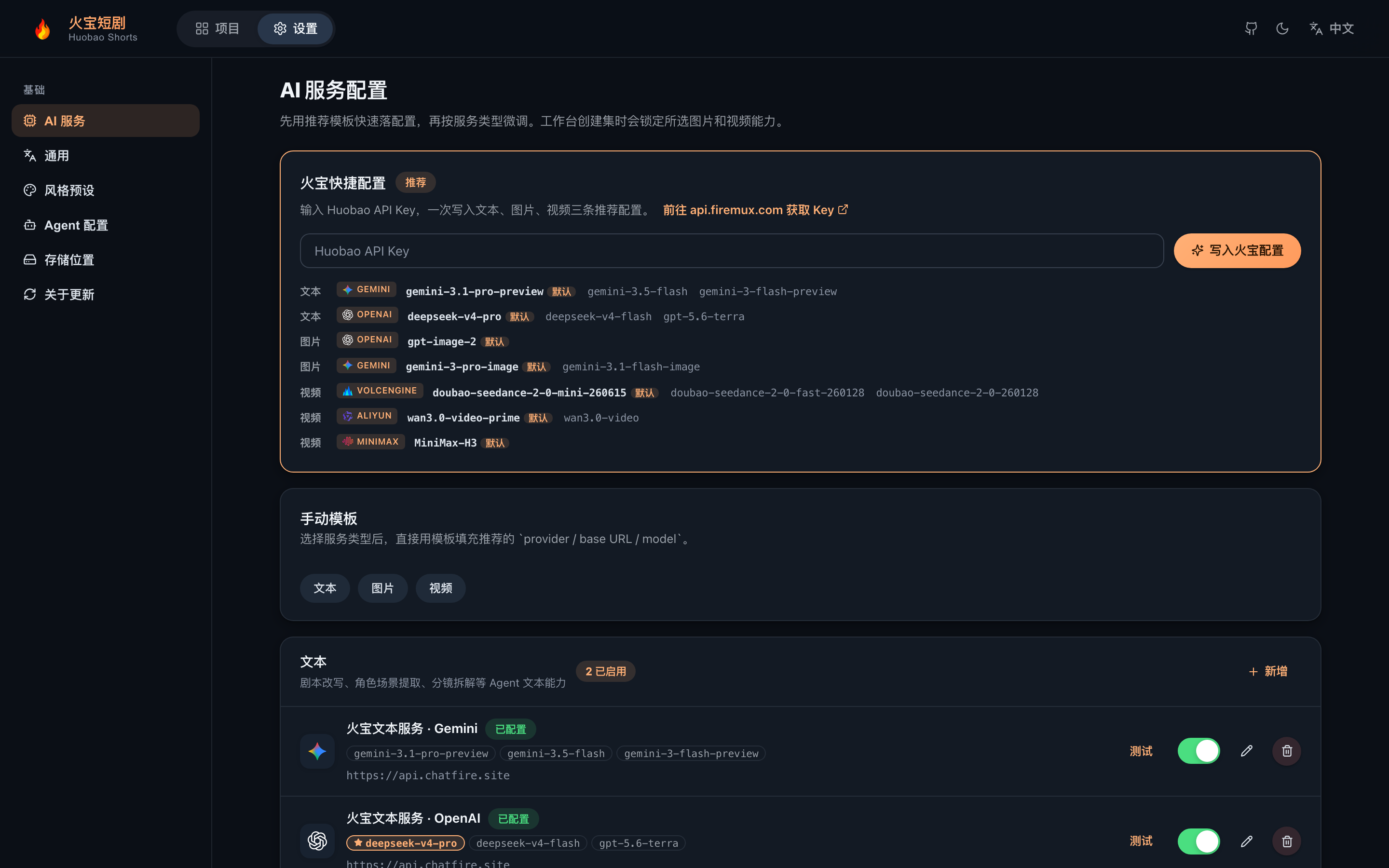
After deploying, paste the key in "Settings → Huobao Quick Setup" to write three recommended configs in one click
Huobao Drama is an AI-powered short-drama production platform that automates the entire pipeline: script generation, character design, storyboard breakdown, and video compositing.
frontend/   — Nuxt 3 + Vue 3 + TypeScript (pure CSS, no UI framework)
backend/    — Hono + Drizzle ORM + Mastra AI Agents + better-sqlite3
backend/workspace/skills/ — Agent skill definitions (SKILL.md, editable in the UI)
desktop/    — Electron desktop app (main process + esbuild + electron-builder dmg/exe)
data/       — Generated assets and the SQLite database
Four built-in Mastra agents with database-backed configuration and Skill extensions:
| Agent | Role |
|---|---|
script_rewriter | Novel → formatted script rewriting |
extractor | Intelligent extraction and dedup of characters / scenes / props |
storyboard_breaker | Script → storyboard sequence breakdown |
prompt_generator | Image prompts for characters/scenes/props + storyboard video prompts |
The interface ships in 中文 / English / 日本語 / 한국어, with a global setting for AI-generated content language.
| Type | Providers |
|---|---|
| Text | OpenAI (compatible APIs), Gemini |
| Image | OpenAI, Gemini, Volcano Engine |
| Video | Volcano Engine Seedance 2.0 (Standard / Fast / Mini), MiniMax H3, Alibaba Bailian Wan 3.0 (Prime / Standard) |
| Software | Version | Notes |
|---|---|---|
| Node.js | 20+ | Runtime for frontend and backend |
| npm | 9+ | Package manager |
Zero-install database: Bundled SQLite (single file in the project data directory) — no database server required. No FFmpeg install needed: Binaries ship via the
ffmpeg-static/ffprobe-staticnpm packages — works out of the box.
No config files — everything is set via environment variables (all have defaults; local dev needs zero configuration):
| Variable | Default | Description |
|---|---|---|
SQLITE_PATH | <repo>/data/huobao.sqlite3 | SQLite database file location |
PORT | 5679 | Backend service port |
STORAGE_PATH | <repo>/data/static | Generated-file storage directory |
HUOBAO_DATA_DIR | — | Injected by the Electron main process (userData data root) |
WORKSPACE_PATH | backend/workspace | Agent skills/prompts directory (desktop: writable copy under userData) |
FRONTEND_DIST | frontend/dist | Frontend static build directory |
FFMPEG_BIN / FFPROBE_BIN | bundled npm binaries | Custom ffmpeg/ffprobe executable paths |
PUBLIC_BASE_URL | — | Public URL Seedance needs to reference local assets (server deployments) |
Note: AI service API keys, base URLs, and model parameters are all configured in the web UI "Settings" page and stored in the database — never in config files or environment variables.
# Clone the repository
git clone https://github.com/chatfire-AI/huobao-drama.git
cd huobao-drama

# Install backend dependencies
cd backend && npm install

# Install frontend dependencies
cd ../frontend && npm install
Frontend and backend run separately with hot reload:
# Terminal 1: backend
cd backend
npm run dev

# Terminal 2: frontend
cd frontend
npm run dev
http://localhost:3013http://localhost:5679/api/v1/api and /static to the backendThe backend serves both the API and the frontend static files:
# 1. Build the frontend
cd frontend && npm run generate

# 2. Copy the build output where the backend expects it
#    (generate outputs to .output/public; the backend reads frontend/dist)
cp -r .output/public dist

# 3. Start the backend
cd ../backend && npm start
Visit: http://localhost:5679
Bundled SQLite (better-sqlite3 + WAL mode). Tables are created automatically on first launch (idempotent DDL replay + seed data). Default file: data/huobao.sqlite3, overridable via SQLITE_PATH. The desktop app stores data in the user-data directory (~/Library/Application Support/HuobaoDrama/data/).
Migrating data from a legacy MySQL deployment:
Automatic migration on startup (recommended): When MySQL is explicitly configured (DATABASE_URL or MYSQL_HOST) and the SQLite database is empty, the backend automatically detects and imports all tables once (per-table row-count validation, single-transaction atomic writes, automatic rollback with retry on next launch, and a .mysql-imported marker to avoid re-importing). Set MYSQL_AUTO_IMPORT=false to disable.
# Or run manually (non-empty target requires --force; automatic backup before writing)
cd backend && npx tsx scripts/import-mysql-to-sqlite.ts
Migration covers database rows only; media files (images/videos) under the old deployment's
data/static/must be copied manually, or historical assets won't load.
All AI features (text/image/video) require model services to be configured first — a banner at the top of the page guides you until then:
Once configured, the banner disappears and you can start producing episodes.
The complete pipeline from novel to finished episode. The left progress rail always shows where you are.
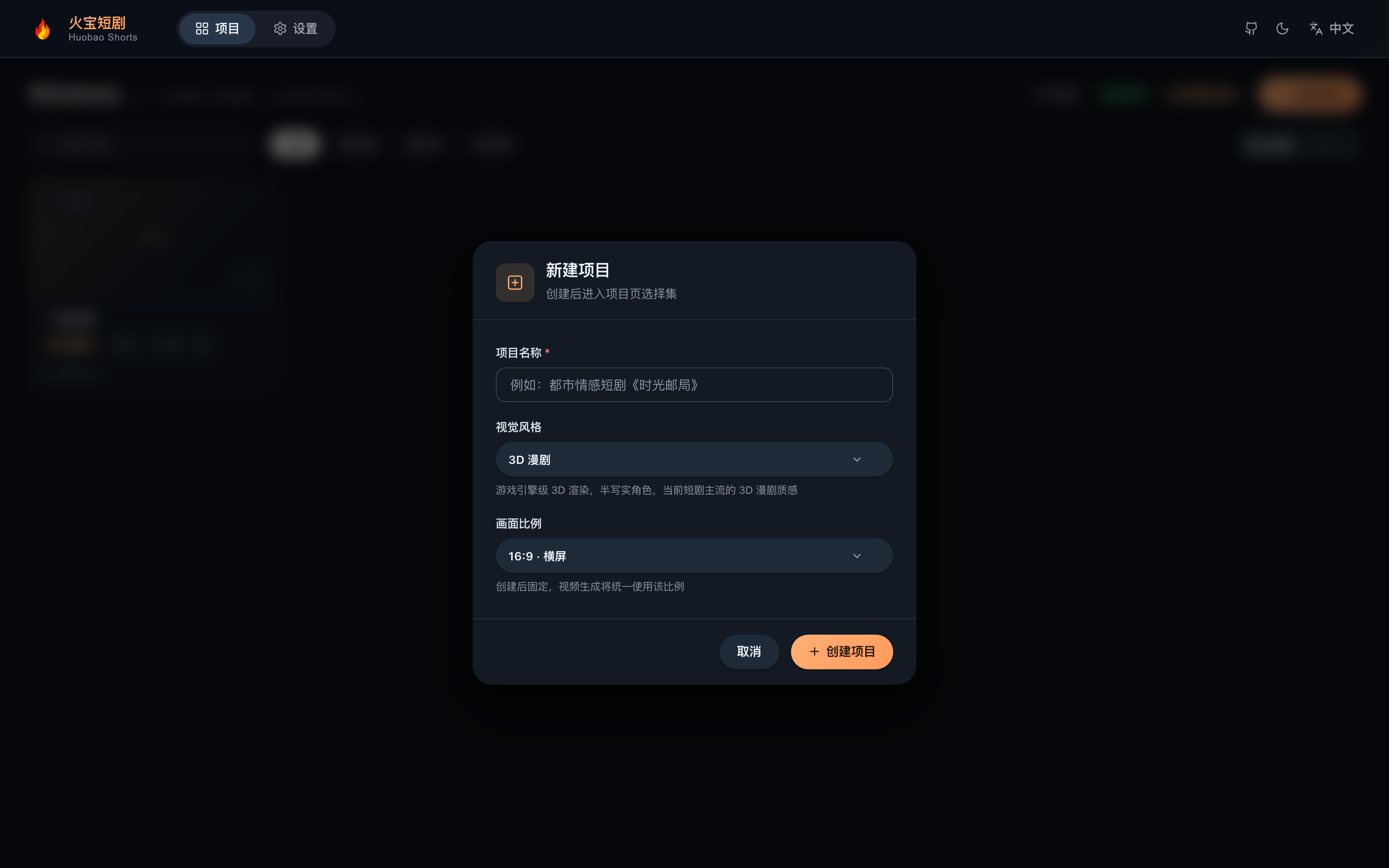
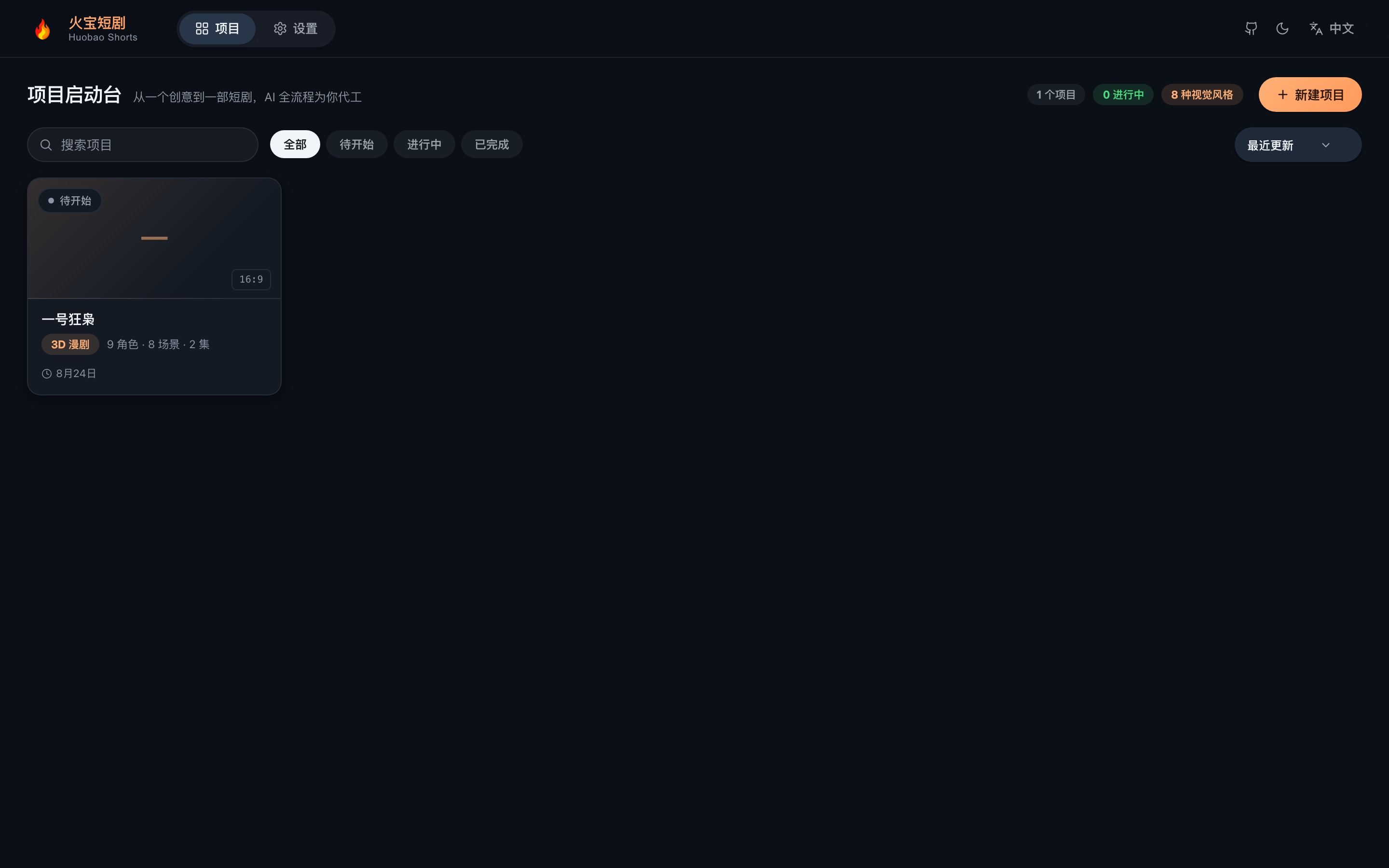
On the home page click "New Project", pick a aspect ratio (16:9 landscape / 9:16 portrait, fixed after creation) and a visual style (3D, realistic, … — injected into every image prompt).
Paste an API key in Settings → "Huobao Quick Setup" to write the three recommended configs at once, or add providers manually. The current model can be switched any time from the top bar (see Step 5).
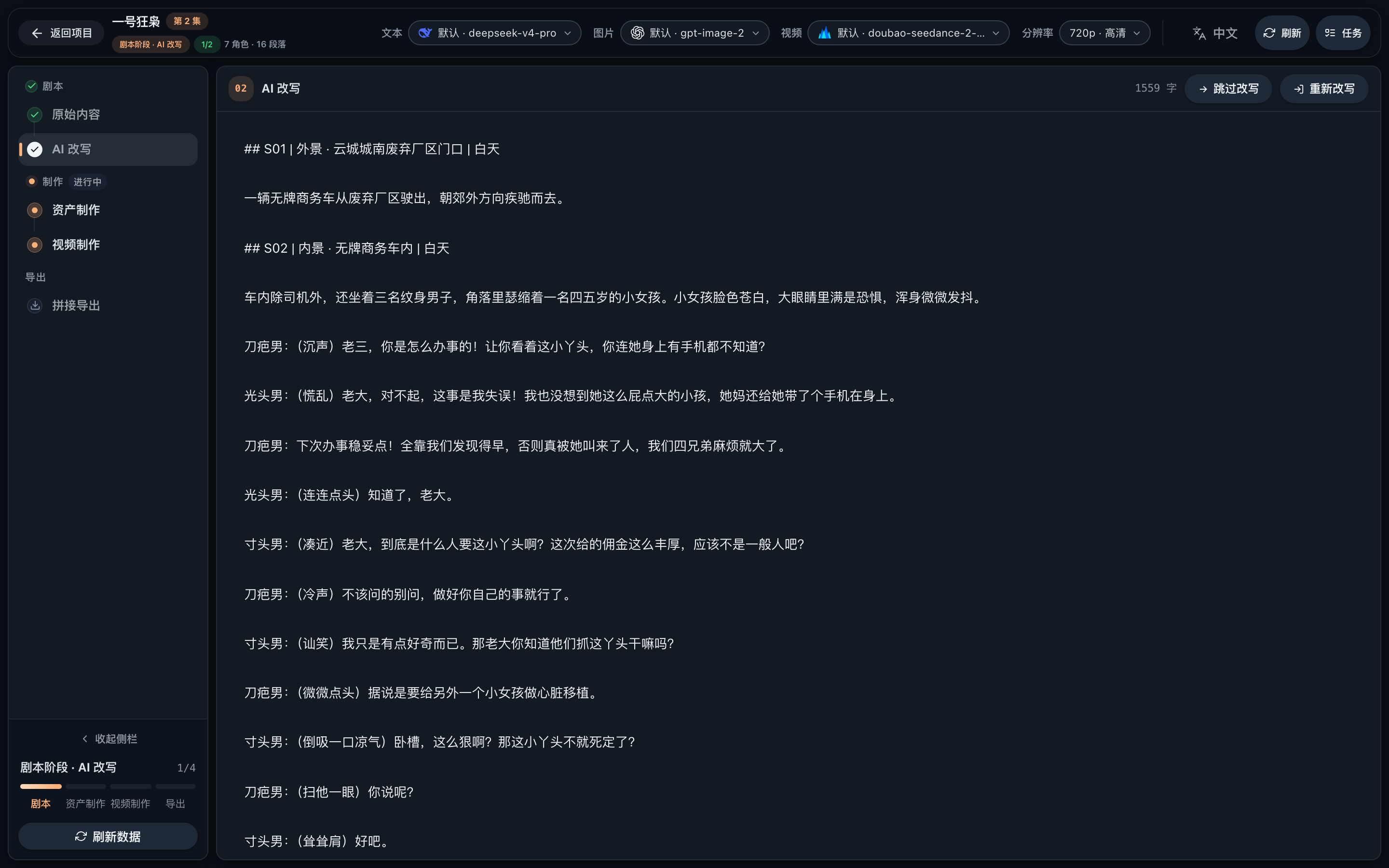
Paste your source novel into the workbench, then hit "AI Rewrite" to produce a shooting script — split by episode with scenes and characters annotated. You can switch text models and tone while rewriting.
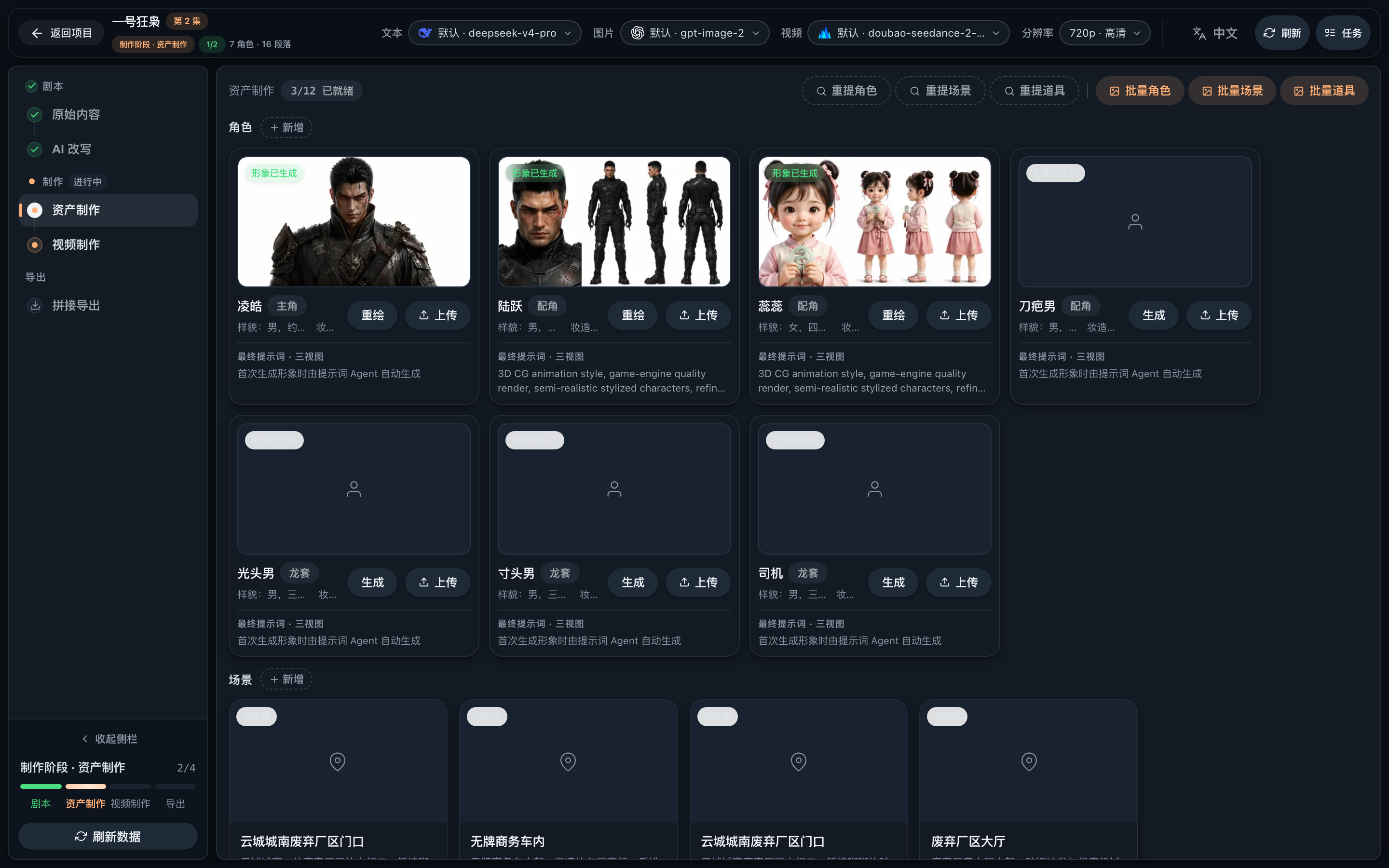
Run extraction on the script to get the character / scene / prop list, then generate a consistent reference image for each (or in batch). These images are injected as reference material when generating videos.
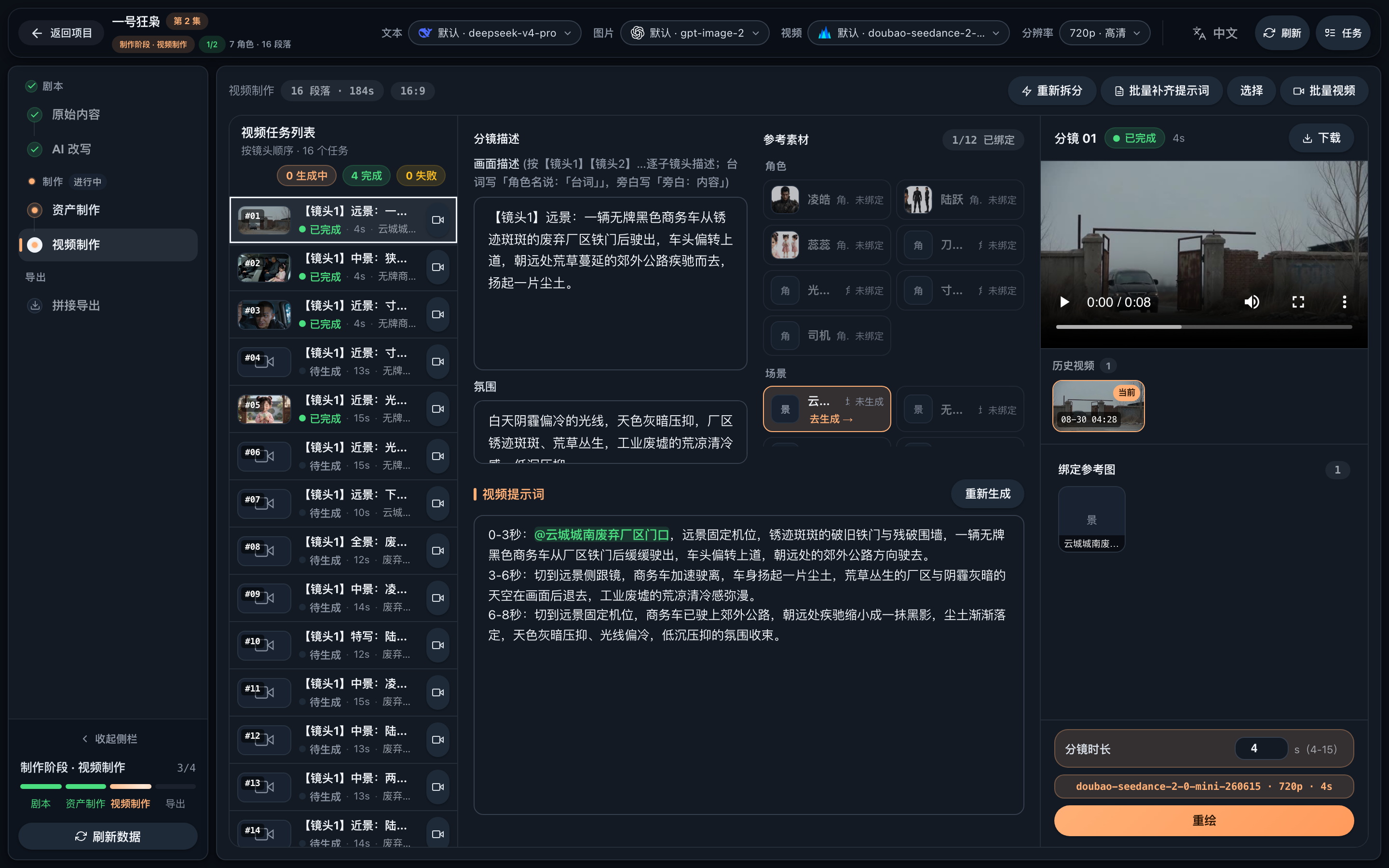
On the "Video Production" page, first run storyboard breakdown (AI splits shots and writes video prompts). Then:
@character references map to reference images automatically)
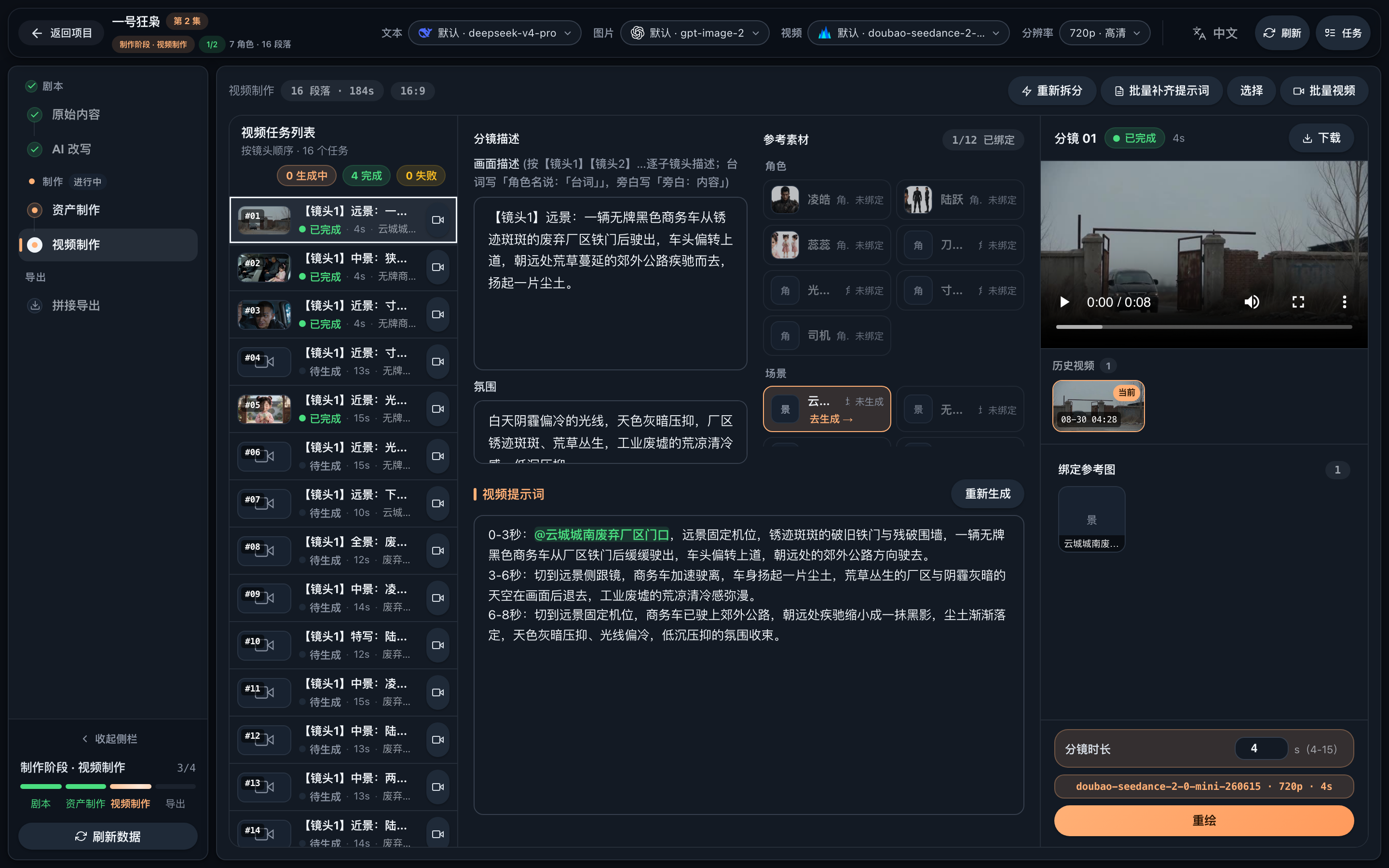
Select shots (hover to preview each clip), click "Start Merging" and FFmpeg assembles the full episode — play online or download. Click "Mark Done" when finished to light up the progress rail.
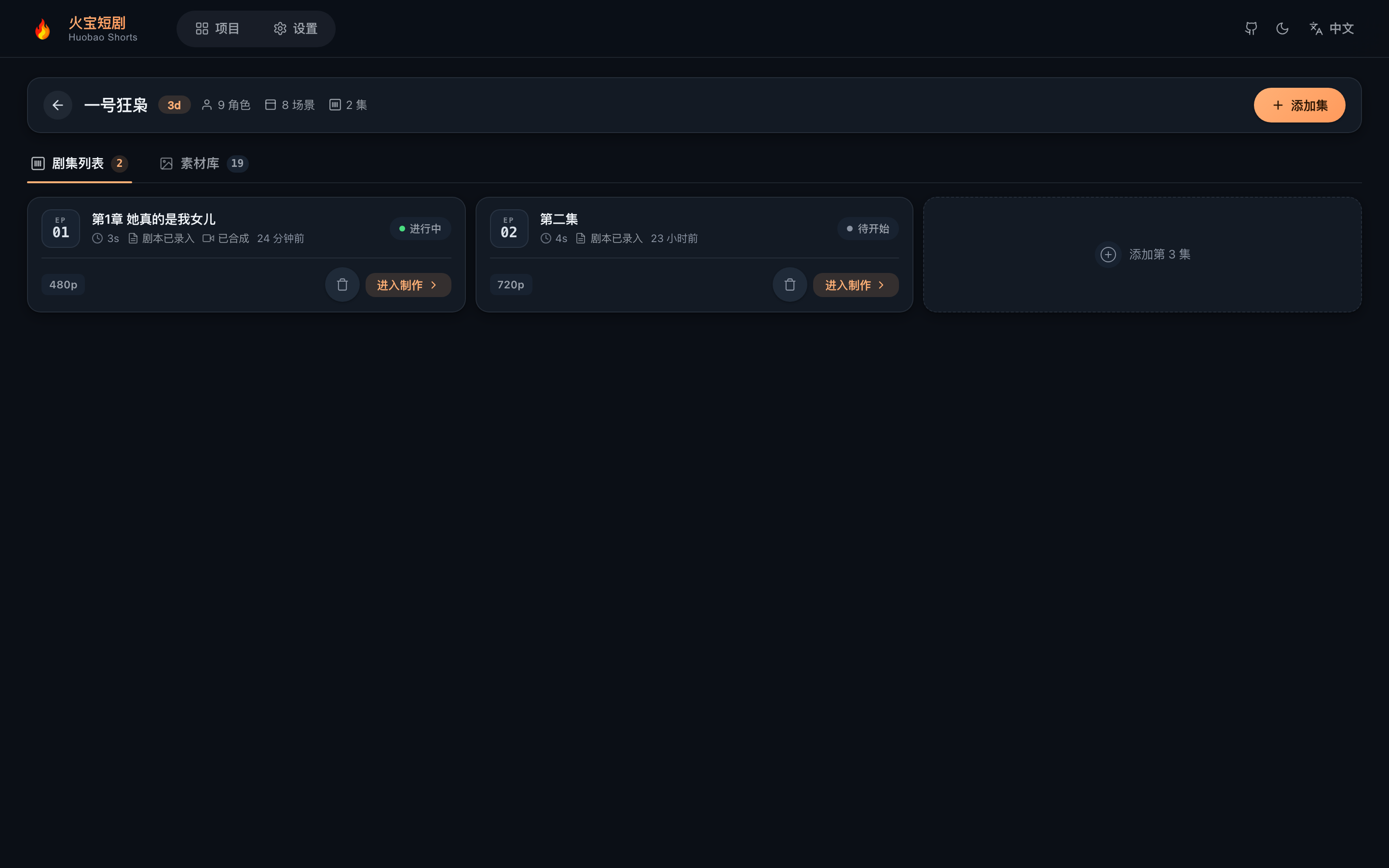
The episode list shows the production status of every episode — click "Enter Studio" to continue:
⬇️ Prebuilt installers: GitHub Releases · Mirror for China (Tencent COS)
| Platform | File to download |
|---|---|
| macOS (Apple Silicon, M-series) | HuobaoDrama-4.0.5-arm64.dmg |
| macOS (Intel) | HuobaoDrama-4.0.5.dmg |
| Windows | HuobaoDrama.Setup.4.0.5.exe |
China users: use the COS mirror above (GitHub is slow/unreachable in mainland China). The in-app updater also checks the COS mirror first, then falls back to GitHub.
Command-line install (recommended, no Gatekeeper fix needed): downloading via curl never sets macOS's quarantine attribute, so the app opens cleanly with no "damaged" prompt (use the -arm64.dmg for Apple Silicon, the plain dmg for Intel):
curl -L -o /tmp/HuobaoDrama.dmg https://installer.chatfire.site/huobao-drama/v4.0.5/HuobaoDrama-4.0.5-arm64.dmg \
  && hdiutil attach -nobrowse /tmp/HuobaoDrama.dmg \
  && cp -R /Volumes/HuobaoDrama*/HuobaoDrama.app /Applications/ \
  && hdiutil detach /Volumes/HuobaoDrama*
No build required — download the dmg/exe and install. Installed clients auto-update via the built-in updater. (To package from source instead, see the commands below.)
Double-click to install, works out of the box (macOS + Windows): the SQLite database, generated media, and Agent skills all live in the user-data directory — uninstalling the app does not affect your data.
# One-command packaging (frontend generate → backend esbuild → electron-builder)
npm run dist        # macOS dmg (arm64 + Intel)
npm run dist:win    # Windows NSIS installer (win-x64, cross-buildable on macOS)

# Artifacts
# desktop/release/HuobaoDrama-<version>-arm64.dmg     (Apple Silicon)
# desktop/release/HuobaoDrama-<version>.dmg           (Intel)
# desktop/release/HuobaoDrama Setup <version>.exe     (Windows)
Installation notes:
The macOS build is unsigned — on first launch you may see "App is damaged and can't be opened" (common on Apple Silicon). This is Gatekeeper's quarantine attribute, not actual file damage. Two ways to fix it:
sudo xattr -cr /Applications/HuobaoDrama.app in Terminal.The fix is one-time only — the app then launches normally, and in-app auto-updates are not affected.
The Windows build is unsigned — SmartScreen will prompt "More info → Run anyway"
User-data directory: ~/Library/Application Support/HuobaoDrama/ (database, generated media, writable copies of online-edited skills)
FFmpeg/FFprobe binaries are bundled — no system install needed
Electron is pinned to 37.x: better-sqlite3's win32 prebuilds max out at that ABI (the key to compilation-free cross-packaging)
External links open in the system browser (e.g. "Get a key at api.firemux.com")
The desktop app ships with a built-in updater (same class of solution as Tauri: directory replacement on macOS / silent installer on Windows, with local sha256 verification). To publish a new release:
# 1. Bump version in desktop/package.json, then package
npm run dist        # macOS (produces dmg + update zip)
npm run dist:win    # Windows (produces Setup.exe)

# 2. Generate the release manifest release/latest.json (with per-platform sha256)
cd desktop && npm run feed

# 3. Publish: upload latest.json + installers + zips to a GitHub Release (tag like v1.0.1)
Installed clients check the manifest automatically after launch (manual check available in "Settings → About & Updates") and prompt to download and install when a new version is found. Override the manifest URL with the HUOBAO_UPDATE_FEED environment variable.
Desktop development:
npm run build:frontend   # frontend static output (frontend/.output/public)
cd desktop && npm run dev  # bundle the backend and run in an Electron window
Known limitation: Seedance video models need a
PUBLIC_BASE_URLpublic address to reference local assets; the desktop app has no public entry point, so that scenario produces a clear error message. Text-to-video, image generation, and all other capabilities are unaffected.
# 1. Build the frontend
cd frontend && npm run generate

# 2. Copy the build output (generate outputs to frontend/.output/public; the backend reads
#    frontend/dist — skip this step and the API works but pages 404)
cp -r .output/public dist && cd ..

# 3. Start the backend
cd backend && npm start
Files to upload to the server:
backend/                    # backend source + node_modules
backend/workspace/skills/   # Agent skill files
frontend/dist/              # frontend build output
data/                       # data directory (auto-created on first run)
server {
    listen 80;
    server_name your-domain.com;

    # Max 50MB for reference video/audio uploads
    client_max_body_size 100m;

    # Generated images/videos served straight from disk, bypassing Node:
    # sendfile zero-copy + long-lived caching
    # (files are uuid-named and immutable, so immutable caching is safe)
    location /static/ {
        alias /path/to/huobao-drama/data/static/;
        sendfile on;
        tcp_nopush on;
        expires 1y;
        add_header Cache-Control "public, immutable";
    }

    location / {
        proxy_pass http://localhost:5679;
        proxy_set_header Host $host;
        proxy_set_header X-Real-IP $remote_addr;
        proxy_set_header X-Forwarded-For $proxy_add_x_forwarded_for;
    }
}
Media loading optimization: the backend automatically generates 400px thumbnails (
*_thumb.webp) for list pages and extracts poster frames (*_poster.jpg) as video covers — the frontend only loads original files when opening the full image or playing. To backfill historical files, runnpm run backfill-artworkunderbackend/.
Option A — prebuilt image (no clone, no build): multi-arch (linux/amd64 + linux/arm64), x86 servers and ARM devices match automatically
docker pull huobao/huobao-drama:4.0.6

docker run -d \
  --name huobao-drama \
  -p 5679:5679 \
  -v huobao-data:/app/data \
  --restart unless-stopped \
  huobao/huobao-drama:4.0.6
Option B — docker compose (source build + Watchtower in-app updates): the repo root provides an all-in-one Dockerfile (three stages: frontend generate + backend dependencies + runtime; the backend runs via tsx just like server deployment) and docker-compose.yml (app + Watchtower):
# 1. Configure the environment (Watchtower token — must match on the app and watchtower sides)
cp .env.example .env   # edit WATCHTOWER_TOKEN

# 2. Build and start (inject a version at publish time for "About & Updates" comparison)
HUOBAO_VERSION=4.0.5 docker compose up -d --build

# 3. Visit http://localhost:5679
huobao-data mounts /app/data (SQLite + generated images/videos + workspace/skills) — image updates don't lose data--label-enable only updates labeled containers, --cleanup removes old images, daily self-check). "Settings → About & Updates" can check for new versions and "Update Now" — the backend triggers it via the Watchtower HTTP API, which pulls the new image and rebuilds the container; refresh the page after a few minutesHUOBAO_WATCHTOWER_* env vars (or the whole watchtower service) from docker-compose.yml — "About & Updates" then degrades to a new-version notice + manual docker compose pull && docker compose up -ddocker buildx build --platform linux/amd64,linux/arm64 --build-arg HUOBAO_VERSION=x.y.z -t huobao/huobao-drama:x.y.z -t huobao/huobao-drama:latest --push . — the version manifest is shared with the desktop app via latest.json on GitHub Releases (overridable with HUOBAO_UPDATE_FEED)A: ~/Library/Application Support/HuobaoDrama/data/ (SQLite database + generated images/videos); writable copies of online-edited skills live in the sibling workspace/ directory. In development mode the repo's data/ directory is used instead.
A: Keep MySQL reachable (environment variables or backend/.env), then run cd backend && npx tsx scripts/import-mysql-to-sqlite.ts. The script creates tables automatically, imports table-by-table, and validates row counts (non-empty targets require --force; a backup is made before writing).
A: No install needed. The project bundles ffmpeg-static / ffprobe-static binaries (carried along in the desktop package). A system PATH FFmpeg won't conflict either, and you can point explicitly via FFMPEG_BIN/FFPROBE_BIN.
A: That's the normal first-deploy guidance. Go to "Settings" and use "Huobao Quick Setup" to paste an API key and write configs in one click, or add providers via "Manual Templates". The banner disappears once text, image, and video all have an enabled config.
A: Check that the backend is running and the port is correct. In dev mode the proxy config lives in frontend/nuxt.config.ts.
A: The backend creates all tables automatically on first launch — check the logs to confirm initialization succeeded.
import-mysql-to-sqlite.ts (per-table row-count validation + automatic backup)input.media/parameters payloads)docker/init.sql and export scripts (DBA review / pre-created tables)This project is licensed under CC BY-NC-SA 4.0 (Attribution-NonCommercial-ShareAlike 4.0 International).
Full license text: see LICENSE.
Issues and Pull Requests are welcome!
git checkout -b feature/AmazingFeature)git commit -m 'Add some AmazingFeature')git push origin feature/AmazingFeature)Common checks:
cd backend && npm run typecheck
cd ../frontend && npm run build
If this project helps you, buy the author a coffee ☕ — your support keeps the updates coming!

Scan the QR code to join the WeChat group:

"Let AI do the creating with us"
This project has been recognized with a link from the LINUX DO community.
(top 24 of 41)
309 followers · starred May 2026
1,103 followers · starred Jan 2026
316 followers · starred Jan 2026
468 followers · starred Jan 2026
🎬 火宝短剧 - 基于AI的一站式短剧生成平台 《一句话生成完整短剧,从剧本到成片全自动化》 Huobao Drama - An AI-Powered End-to-End Short Drama Generator "One Sentence to Complete Drama: Fully Automated from Script to Final Video"
Vue
16,092
362 commits
updated Oct 5, 2026
A full-stack TypeScript platform for automated AI short-drama production
Features • Quick Start • Walkthrough • Desktop App • Deployment
Text, image, and video AI capabilities — one key unlocks everything
After deploying, paste the key in "Settings → Huobao Quick Setup" to write three recommended configs in one click
Huobao Drama is an AI-powered short-drama production platform that automates the entire pipeline: script generation, character design, storyboard breakdown, and video compositing.
frontend/   — Nuxt 3 + Vue 3 + TypeScript (pure CSS, no UI framework)
backend/    — Hono + Drizzle ORM + Mastra AI Agents + better-sqlite3
backend/workspace/skills/ — Agent skill definitions (SKILL.md, editable in the UI)
desktop/    — Electron desktop app (main process + esbuild + electron-builder dmg/exe)
data/       — Generated assets and the SQLite database
Four built-in Mastra agents with database-backed configuration and Skill extensions:
| Agent | Role |
|---|---|
script_rewriter | Novel → formatted script rewriting |
extractor | Intelligent extraction and dedup of characters / scenes / props |
storyboard_breaker | Script → storyboard sequence breakdown |
prompt_generator | Image prompts for characters/scenes/props + storyboard video prompts |
The interface ships in 中文 / English / 日本語 / 한국어, with a global setting for AI-generated content language.
| Type | Providers |
|---|---|
| Text | OpenAI (compatible APIs), Gemini |
| Image | OpenAI, Gemini, Volcano Engine |
| Video | Volcano Engine Seedance 2.0 (Standard / Fast / Mini), MiniMax H3, Alibaba Bailian Wan 3.0 (Prime / Standard) |
| Software | Version | Notes |
|---|---|---|
| Node.js | 20+ | Runtime for frontend and backend |
| npm | 9+ | Package manager |
Zero-install database: Bundled SQLite (single file in the project data directory) — no database server required. No FFmpeg install needed: Binaries ship via the
ffmpeg-static/ffprobe-staticnpm packages — works out of the box.
No config files — everything is set via environment variables (all have defaults; local dev needs zero configuration):
| Variable | Default | Description |
|---|---|---|
SQLITE_PATH | <repo>/data/huobao.sqlite3 | SQLite database file location |
PORT | 5679 | Backend service port |
STORAGE_PATH | <repo>/data/static | Generated-file storage directory |
HUOBAO_DATA_DIR | — | Injected by the Electron main process (userData data root) |
WORKSPACE_PATH | backend/workspace | Agent skills/prompts directory (desktop: writable copy under userData) |
FRONTEND_DIST | frontend/dist | Frontend static build directory |
FFMPEG_BIN / FFPROBE_BIN | bundled npm binaries | Custom ffmpeg/ffprobe executable paths |
PUBLIC_BASE_URL | — | Public URL Seedance needs to reference local assets (server deployments) |
Note: AI service API keys, base URLs, and model parameters are all configured in the web UI "Settings" page and stored in the database — never in config files or environment variables.
# Clone the repository
git clone https://github.com/chatfire-AI/huobao-drama.git
cd huobao-drama

# Install backend dependencies
cd backend && npm install

# Install frontend dependencies
cd ../frontend && npm install
Frontend and backend run separately with hot reload:
# Terminal 1: backend
cd backend
npm run dev

# Terminal 2: frontend
cd frontend
npm run dev
http://localhost:3013http://localhost:5679/api/v1/api and /static to the backendThe backend serves both the API and the frontend static files:
# 1. Build the frontend
cd frontend && npm run generate

# 2. Copy the build output where the backend expects it
#    (generate outputs to .output/public; the backend reads frontend/dist)
cp -r .output/public dist

# 3. Start the backend
cd ../backend && npm start
Visit: http://localhost:5679
Bundled SQLite (better-sqlite3 + WAL mode). Tables are created automatically on first launch (idempotent DDL replay + seed data). Default file: data/huobao.sqlite3, overridable via SQLITE_PATH. The desktop app stores data in the user-data directory (~/Library/Application Support/HuobaoDrama/data/).
Migrating data from a legacy MySQL deployment:
Automatic migration on startup (recommended): When MySQL is explicitly configured (DATABASE_URL or MYSQL_HOST) and the SQLite database is empty, the backend automatically detects and imports all tables once (per-table row-count validation, single-transaction atomic writes, automatic rollback with retry on next launch, and a .mysql-imported marker to avoid re-importing). Set MYSQL_AUTO_IMPORT=false to disable.
# Or run manually (non-empty target requires --force; automatic backup before writing)
cd backend && npx tsx scripts/import-mysql-to-sqlite.ts
Migration covers database rows only; media files (images/videos) under the old deployment's
data/static/must be copied manually, or historical assets won't load.
All AI features (text/image/video) require model services to be configured first — a banner at the top of the page guides you until then:
Once configured, the banner disappears and you can start producing episodes.
The complete pipeline from novel to finished episode. The left progress rail always shows where you are.
On the home page click "New Project", pick a aspect ratio (16:9 landscape / 9:16 portrait, fixed after creation) and a visual style (3D, realistic, … — injected into every image prompt).
Paste an API key in Settings → "Huobao Quick Setup" to write the three recommended configs at once, or add providers manually. The current model can be switched any time from the top bar (see Step 5).
Paste your source novel into the workbench, then hit "AI Rewrite" to produce a shooting script — split by episode with scenes and characters annotated. You can switch text models and tone while rewriting.
Run extraction on the script to get the character / scene / prop list, then generate a consistent reference image for each (or in batch). These images are injected as reference material when generating videos.
On the "Video Production" page, first run storyboard breakdown (AI splits shots and writes video prompts). Then:
@character references map to reference images automatically)
Select shots (hover to preview each clip), click "Start Merging" and FFmpeg assembles the full episode — play online or download. Click "Mark Done" when finished to light up the progress rail.
The episode list shows the production status of every episode — click "Enter Studio" to continue:
⬇️ Prebuilt installers: GitHub Releases · Mirror for China (Tencent COS)
| Platform | File to download |
|---|---|
| macOS (Apple Silicon, M-series) | HuobaoDrama-4.0.5-arm64.dmg |
| macOS (Intel) | HuobaoDrama-4.0.5.dmg |
| Windows | HuobaoDrama.Setup.4.0.5.exe |
China users: use the COS mirror above (GitHub is slow/unreachable in mainland China). The in-app updater also checks the COS mirror first, then falls back to GitHub.
Command-line install (recommended, no Gatekeeper fix needed): downloading via curl never sets macOS's quarantine attribute, so the app opens cleanly with no "damaged" prompt (use the -arm64.dmg for Apple Silicon, the plain dmg for Intel):
curl -L -o /tmp/HuobaoDrama.dmg https://installer.chatfire.site/huobao-drama/v4.0.5/HuobaoDrama-4.0.5-arm64.dmg \
  && hdiutil attach -nobrowse /tmp/HuobaoDrama.dmg \
  && cp -R /Volumes/HuobaoDrama*/HuobaoDrama.app /Applications/ \
  && hdiutil detach /Volumes/HuobaoDrama*
No build required — download the dmg/exe and install. Installed clients auto-update via the built-in updater. (To package from source instead, see the commands below.)
Double-click to install, works out of the box (macOS + Windows): the SQLite database, generated media, and Agent skills all live in the user-data directory — uninstalling the app does not affect your data.
# One-command packaging (frontend generate → backend esbuild → electron-builder)
npm run dist        # macOS dmg (arm64 + Intel)
npm run dist:win    # Windows NSIS installer (win-x64, cross-buildable on macOS)

# Artifacts
# desktop/release/HuobaoDrama-<version>-arm64.dmg     (Apple Silicon)
# desktop/release/HuobaoDrama-<version>.dmg           (Intel)
# desktop/release/HuobaoDrama Setup <version>.exe     (Windows)
Installation notes:
The macOS build is unsigned — on first launch you may see "App is damaged and can't be opened" (common on Apple Silicon). This is Gatekeeper's quarantine attribute, not actual file damage. Two ways to fix it:
sudo xattr -cr /Applications/HuobaoDrama.app in Terminal.The fix is one-time only — the app then launches normally, and in-app auto-updates are not affected.
The Windows build is unsigned — SmartScreen will prompt "More info → Run anyway"
User-data directory: ~/Library/Application Support/HuobaoDrama/ (database, generated media, writable copies of online-edited skills)
FFmpeg/FFprobe binaries are bundled — no system install needed
Electron is pinned to 37.x: better-sqlite3's win32 prebuilds max out at that ABI (the key to compilation-free cross-packaging)
External links open in the system browser (e.g. "Get a key at api.firemux.com")
The desktop app ships with a built-in updater (same class of solution as Tauri: directory replacement on macOS / silent installer on Windows, with local sha256 verification). To publish a new release:
# 1. Bump version in desktop/package.json, then package
npm run dist        # macOS (produces dmg + update zip)
npm run dist:win    # Windows (produces Setup.exe)

# 2. Generate the release manifest release/latest.json (with per-platform sha256)
cd desktop && npm run feed

# 3. Publish: upload latest.json + installers + zips to a GitHub Release (tag like v1.0.1)
Installed clients check the manifest automatically after launch (manual check available in "Settings → About & Updates") and prompt to download and install when a new version is found. Override the manifest URL with the HUOBAO_UPDATE_FEED environment variable.
Desktop development:
npm run build:frontend   # frontend static output (frontend/.output/public)
cd desktop && npm run dev  # bundle the backend and run in an Electron window
Known limitation: Seedance video models need a
PUBLIC_BASE_URLpublic address to reference local assets; the desktop app has no public entry point, so that scenario produces a clear error message. Text-to-video, image generation, and all other capabilities are unaffected.
# 1. Build the frontend
cd frontend && npm run generate

# 2. Copy the build output (generate outputs to frontend/.output/public; the backend reads
#    frontend/dist — skip this step and the API works but pages 404)
cp -r .output/public dist && cd ..

# 3. Start the backend
cd backend && npm start
Files to upload to the server:
backend/                    # backend source + node_modules
backend/workspace/skills/   # Agent skill files
frontend/dist/              # frontend build output
data/                       # data directory (auto-created on first run)
server {
    listen 80;
    server_name your-domain.com;

    # Max 50MB for reference video/audio uploads
    client_max_body_size 100m;

    # Generated images/videos served straight from disk, bypassing Node:
    # sendfile zero-copy + long-lived caching
    # (files are uuid-named and immutable, so immutable caching is safe)
    location /static/ {
        alias /path/to/huobao-drama/data/static/;
        sendfile on;
        tcp_nopush on;
        expires 1y;
        add_header Cache-Control "public, immutable";
    }

    location / {
        proxy_pass http://localhost:5679;
        proxy_set_header Host $host;
        proxy_set_header X-Real-IP $remote_addr;
        proxy_set_header X-Forwarded-For $proxy_add_x_forwarded_for;
    }
}
Media loading optimization: the backend automatically generates 400px thumbnails (
*_thumb.webp) for list pages and extracts poster frames (*_poster.jpg) as video covers — the frontend only loads original files when opening the full image or playing. To backfill historical files, runnpm run backfill-artworkunderbackend/.
Option A — prebuilt image (no clone, no build): multi-arch (linux/amd64 + linux/arm64), x86 servers and ARM devices match automatically
docker pull huobao/huobao-drama:4.0.6

docker run -d \
  --name huobao-drama \
  -p 5679:5679 \
  -v huobao-data:/app/data \
  --restart unless-stopped \
  huobao/huobao-drama:4.0.6
Option B — docker compose (source build + Watchtower in-app updates): the repo root provides an all-in-one Dockerfile (three stages: frontend generate + backend dependencies + runtime; the backend runs via tsx just like server deployment) and docker-compose.yml (app + Watchtower):
# 1. Configure the environment (Watchtower token — must match on the app and watchtower sides)
cp .env.example .env   # edit WATCHTOWER_TOKEN

# 2. Build and start (inject a version at publish time for "About & Updates" comparison)
HUOBAO_VERSION=4.0.5 docker compose up -d --build

# 3. Visit http://localhost:5679
huobao-data mounts /app/data (SQLite + generated images/videos + workspace/skills) — image updates don't lose data--label-enable only updates labeled containers, --cleanup removes old images, daily self-check). "Settings → About & Updates" can check for new versions and "Update Now" — the backend triggers it via the Watchtower HTTP API, which pulls the new image and rebuilds the container; refresh the page after a few minutesHUOBAO_WATCHTOWER_* env vars (or the whole watchtower service) from docker-compose.yml — "About & Updates" then degrades to a new-version notice + manual docker compose pull && docker compose up -ddocker buildx build --platform linux/amd64,linux/arm64 --build-arg HUOBAO_VERSION=x.y.z -t huobao/huobao-drama:x.y.z -t huobao/huobao-drama:latest --push . — the version manifest is shared with the desktop app via latest.json on GitHub Releases (overridable with HUOBAO_UPDATE_FEED)A: ~/Library/Application Support/HuobaoDrama/data/ (SQLite database + generated images/videos); writable copies of online-edited skills live in the sibling workspace/ directory. In development mode the repo's data/ directory is used instead.
A: Keep MySQL reachable (environment variables or backend/.env), then run cd backend && npx tsx scripts/import-mysql-to-sqlite.ts. The script creates tables automatically, imports table-by-table, and validates row counts (non-empty targets require --force; a backup is made before writing).
A: No install needed. The project bundles ffmpeg-static / ffprobe-static binaries (carried along in the desktop package). A system PATH FFmpeg won't conflict either, and you can point explicitly via FFMPEG_BIN/FFPROBE_BIN.
A: That's the normal first-deploy guidance. Go to "Settings" and use "Huobao Quick Setup" to paste an API key and write configs in one click, or add providers via "Manual Templates". The banner disappears once text, image, and video all have an enabled config.
A: Check that the backend is running and the port is correct. In dev mode the proxy config lives in frontend/nuxt.config.ts.
A: The backend creates all tables automatically on first launch — check the logs to confirm initialization succeeded.
import-mysql-to-sqlite.ts (per-table row-count validation + automatic backup)input.media/parameters payloads)docker/init.sql and export scripts (DBA review / pre-created tables)This project is licensed under CC BY-NC-SA 4.0 (Attribution-NonCommercial-ShareAlike 4.0 International).
Full license text: see LICENSE.
Issues and Pull Requests are welcome!
git checkout -b feature/AmazingFeature)git commit -m 'Add some AmazingFeature')git push origin feature/AmazingFeature)Common checks:
cd backend && npm run typecheck
cd ../frontend && npm run build
If this project helps you, buy the author a coffee ☕ — your support keeps the updates coming!
Scan the QR code to join the WeChat group:
"Let AI do the creating with us"
This project has been recognized with a link from the LINUX DO community.
(top 24 of 41)
309 followers · starred May 2026
1,103 followers · starred Jan 2026
316 followers · starred Jan 2026
468 followers · starred Jan 2026





