
README
goulash - a plain-language navigator for your shell
Just Down-arrow for your future history.
Why?
(If you are a terminal graybeard who hand-regexed raw curl to read this page, you can stop now and go back to being immortal. For the rest of us...)
We don't always remember the syntax for all terminal commands, and we shouldn't have to. When we try to string together operations, there's a familiar loop:
Start typing command → forget esoteric syntax → go to Google/ChatGPT/Claude to ask → notice email/slack/Hacker-News → read a few papers/links/threads → get lunch → come back to prompt confused about what was happening in this terminal → re-understand the situation → start typing command → ...
Context switching has a cost. Going to a browser or an agent breaks working flow.
But large language models (LLMs) are pretty good at esoteric syntax, even small large language models... brainwave! ka-ching! (note: this software is free.)
What?
Goulash is an LLM-aware overlay for the shell you already use. It watches the session and offers advice and executable suggestions in your terminal, but every keystroke and every command is still yours. Goulash doesn't run commands, pop up choices, or take over how you work. It's your terminal... with a navigator.
Install
# You need an engine for processing.  Ollama with gemma4:e4b works well, for example

cargo install goulash # from crates.io

# or, with Homebrew
brew tap chaboud/goulash https://github.com/chaboud/goulash
brew install goulash
Usage
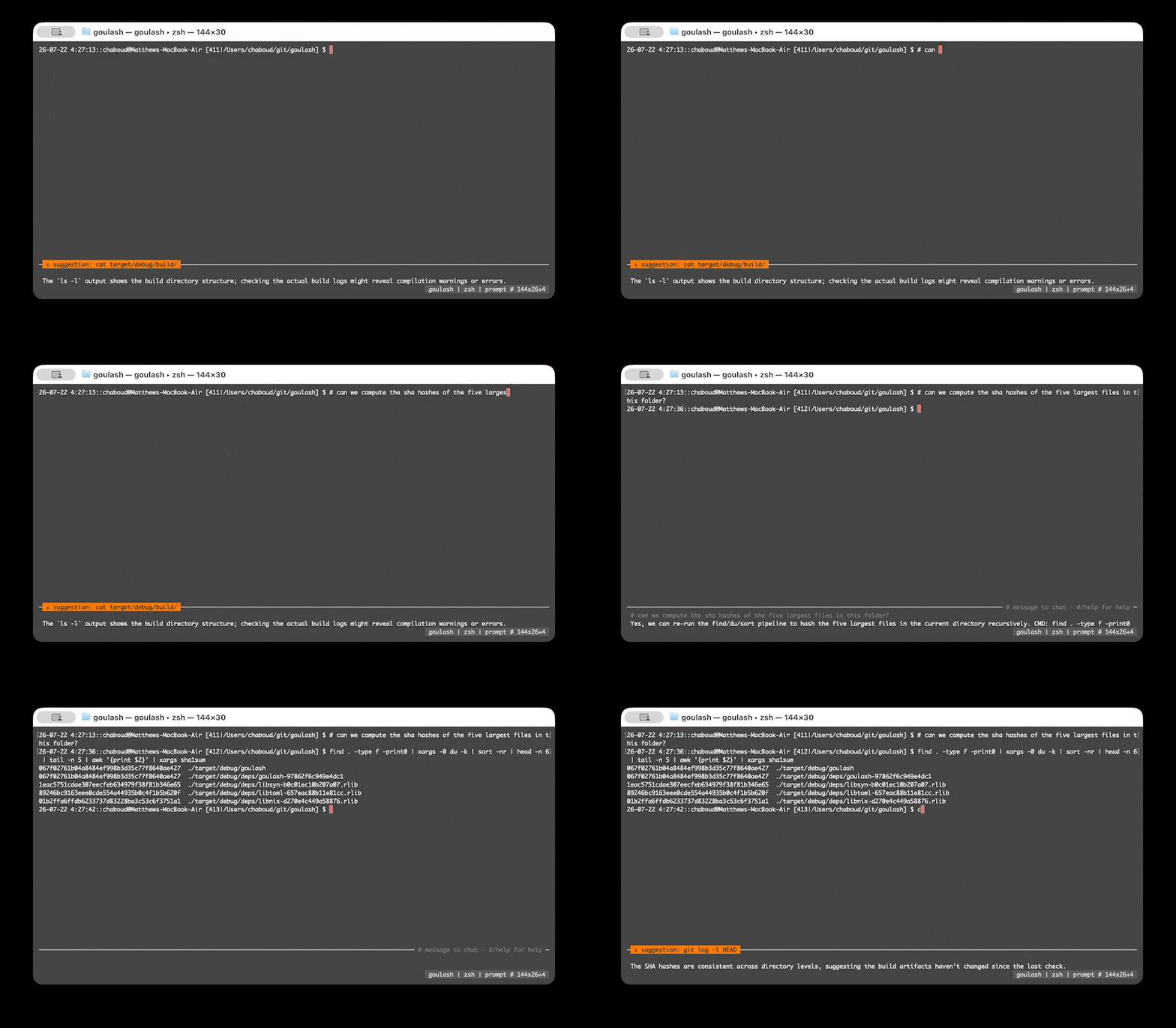
Run goulash and use your shell exactly as before. Goulash provides suggestions below your prompt; your future history. Just press the down arrow if you see something you like.
# ask a question, get an answer + a pullable command
Type # and a question at your prompt (it's a shell comment recorded in history, never executed).
The LLM will provide a suggested command. Press down (past the end of shell history) and it lands on your prompt for editing. Enter runs it as your own command. Goulash also reviews your shell use as you go and may leave a tip in the same spot. Use a local model, and it's all private, all local, just like your terminal command history.
Arrows: one spatial axis
Shell history lives above your prompt; goulash's suggestions live below. Up and Down just move along the line:
   ↑  zsh history (as always)
── your empty prompt ──────────────── neutral
   ↓  newest suggested command       ( ↓ again: older · ↑: back up )
Down past the newest keeps going into the history of suggested commands with the position (↑ 3/7 ↓) shown at the right of the rule. Up retraces to your empty prompt, and past that it's plain zsh/bash history.
## longer chat
## (or ## question) flips into a chat panel; follow-ups need no prefix. The shell keeps running above. When you select a command to copy to the prompt, you're back in your shell.
#@ anchor it on a file
Point the model at a file and it knows your tools, not just common Unix:
#@/path commandRef.md    pin a file (or a directory) — no LLM involved
#@ use the synology doc  say it in words; goulash finds and pins it
#@                       what's pinned, how big, how fresh
#@/unset                 drop it
Big files don't get truncated. A pin that overflows its budget serves a
structure-only outline immediately, and if an engine is up, an LLM compression cooks in the background and swaps in behind it. The chrome shows a percentage while
that runs; #@/cancel stops it. Nothing ever waits on an ingest.
The pinned text rides in every ask, and the chrome shows what's anchored
(@commandRef.md, with a * when it changed on disk — goulash marks it,
never silently re-reads). Drop a vendor's command reference next to their
CLI and suggestions start coming out right for a tool the model has never
seen. It still only ever suggests; you still run it.
Because #@/path … is a plain command, the model can suggest one back at
you — CMD: #@/path commandRef.md arrives as a normal pullable chip.
#/ goulash's menu controls
#/model            modal model picker: type to filter, ⏎ selects & saves
#/model NAME       try a model for this session (add `save` to persist)
#/memory on        give the model a small pinned memory (REMEMBER/FORGET)
#/memory           browse the slots: filter, ↑↓, ⏎⏎ to forget one
#/thinking low     reasoning level: off | low | medium | high
#/settings         live-tune everything, applied and saved on the spot
#/debug            nerd stuff (you probably don't need these)
#/commentary off   quiet the per-turn heckling
#/status
#/help
Caveats
Platforms. Developed and used daily on macOS, in Terminal, under zsh. Some Linux and bash over ssh.
bash. Down works, but goulash has to infer more there than under zsh. ZLE tells the zsh adapter whether history has anywhere left to go; readline tells nobody anything — on the bash 3.2 macOS still ships, a key handler cannot even read the line being edited. So under bash, goulash only claims Down at a prompt where you have typed nothing and pressed no Up, which is exactly where bash's own Down does nothing. Touch any other key and the arrows are the shell's again until the next prompt. Alt-Down pulls the suggestion regardless.
Engines. Mostly ollama, a fair amount of LM Studio, nothing yet with a paid hosted provider. The OpenAI-compatible wire is there and works against llama.cpp and vLLM, but keeping your session on your own machine is, like... the point.
Still moving. Config keys, setting names and interaction details
change between releases. The CHANGELOG says what moved and settings that
move keep working from an existing config.toml where that is possible,
but this is not yet a stable surface to build on.
Nerd Stuff: Build & modify
cargo build
./target/debug/goulash            # wraps $SHELL
./target/debug/goulash zsh        # or name a shell
Shell integration is automatic for zsh and bash launched with plain flags — goulash injects its hooks (ZDOTDIR trick / --rcfile wrapper) on top of your normal rc files, no editing required. That's what powers command blocks, # asides, and the plain-Down suggestion pull.
Manual fallback (custom shells or auto_integrate = false):
# ~/.zshrc
[[ -n "$GOULASH" ]] && source /path/to/goulash/shell/goulash.zsh
# ~/.bashrc
[[ -n "$GOULASH" ]] && source /path/to/goulash/shell/goulash.bash
Config (optional): ~/.goulash/config.toml
[status]
enabled = true
rows = 1

[engine]
provider   = "auto"    # auto | ollama | openai | lmstudio | openai-raw | none
                       # "openai" covers llama.cpp, vLLM, LM Studio's
                       # compatibility endpoint and hosted /v1; the
                       # separate "lmstudio" speaks LM Studio's OWN
                       # /api/v1 wire, which is its default and reports
                       # better stats; openai-raw skips the server's
                       # chat template and is for measurement
thinking   = "off"     # off | low | medium | high
max_tokens = 8192      # ONE cap over reasoning and answer together
slow = "manual"        # when slow volunteers: manual | query | waldorf
                       # (`#?` and pins always reach it, at every rung)

[engine.divulge]
platform = true        # tell the model your OS, shell and userland

# The research lane. Every key here is an override; leave one out and
# that setting follows the fast lane — absent, not a frozen copy, so
# improving the fast default improves this with it. Naming a model is
# what actually splits the lanes onto two bindings.
[engine.slow_lane]
# provider = "openai"          # call in the big guns for research only
# model    = "gpt-oss:20b"
thinking   = "medium"  # the default: the lane that can afford to think

# Escape hatch for a model newer than goulash's capability table.
[models."some-new-reasoner:8b"]
thinking = "levels"    # none | bool | levels
reasoning_tokens = 2048
Or from the command line, which works over ssh and in scripts:
goulash --config print              # every key, and whether it is yours
goulash --config set engine.thinking high
goulash --config reset engine.thinking
There is no separate thinking budget. Providers meter reasoning and
output on one counter, and reasoning is not ours to ration — a chat
template reasons whatever we send, and some models reason through
think:false. So max_tokens is one generous ceiling and whatever the
engine does inside it is the engine's business. Answers stay short
because the prompt asks for one line, not because the budget starves
them: measured, answers that arrive use a median of 32 tokens.
Goulash tries not to disturb your engine. It sends no context size unless what is loaded is too small to work in — both ollama and LM Studio let you set that yourself, and changing it forces a multi-second reload.
Tests (drives the binary under a real PTY):
cargo build && python3 tests/e2e.py
License
Dual-licensed under MIT or Apache-2.0, at your option. Unless you explicitly state otherwise, any contribution intentionally submitted for inclusion in goulash by you, as defined in the Apache-2.0 license, shall be dual licensed as above, without any additional terms or conditions.
Contributors


See what people are saying
Similar repos


Languages
Rust
80.3%
Python
16.8%
Shell
2.8%
README
goulash - a plain-language navigator for your shell
Just Down-arrow for your future history.
Why?
(If you are a terminal graybeard who hand-regexed raw curl to read this page, you can stop now and go back to being immortal. For the rest of us...)
We don't always remember the syntax for all terminal commands, and we shouldn't have to. When we try to string together operations, there's a familiar loop:
Start typing command → forget esoteric syntax → go to Google/ChatGPT/Claude to ask → notice email/slack/Hacker-News → read a few papers/links/threads → get lunch → come back to prompt confused about what was happening in this terminal → re-understand the situation → start typing command → ...
Context switching has a cost. Going to a browser or an agent breaks working flow.
But large language models (LLMs) are pretty good at esoteric syntax, even small large language models... brainwave! ka-ching! (note: this software is free.)
What?
Goulash is an LLM-aware overlay for the shell you already use. It watches the session and offers advice and executable suggestions in your terminal, but every keystroke and every command is still yours. Goulash doesn't run commands, pop up choices, or take over how you work. It's your terminal... with a navigator.
Install
# You need an engine for processing.  Ollama with gemma4:e4b works well, for example

cargo install goulash # from crates.io

# or, with Homebrew
brew tap chaboud/goulash https://github.com/chaboud/goulash
brew install goulash
Usage
Run goulash and use your shell exactly as before. Goulash provides suggestions below your prompt; your future history. Just press the down arrow if you see something you like.
# ask a question, get an answer + a pullable command
Type # and a question at your prompt (it's a shell comment recorded in history, never executed).
The LLM will provide a suggested command. Press down (past the end of shell history) and it lands on your prompt for editing. Enter runs it as your own command. Goulash also reviews your shell use as you go and may leave a tip in the same spot. Use a local model, and it's all private, all local, just like your terminal command history.
Arrows: one spatial axis
Shell history lives above your prompt; goulash's suggestions live below. Up and Down just move along the line:
   ↑  zsh history (as always)
── your empty prompt ──────────────── neutral
   ↓  newest suggested command       ( ↓ again: older · ↑: back up )
Down past the newest keeps going into the history of suggested commands with the position (↑ 3/7 ↓) shown at the right of the rule. Up retraces to your empty prompt, and past that it's plain zsh/bash history.
## longer chat
## (or ## question) flips into a chat panel; follow-ups need no prefix. The shell keeps running above. When you select a command to copy to the prompt, you're back in your shell.
#@ anchor it on a file
Point the model at a file and it knows your tools, not just common Unix:
#@/path commandRef.md    pin a file (or a directory) — no LLM involved
#@ use the synology doc  say it in words; goulash finds and pins it
#@                       what's pinned, how big, how fresh
#@/unset                 drop it
Big files don't get truncated. A pin that overflows its budget serves a
structure-only outline immediately, and if an engine is up, an LLM compression cooks in the background and swaps in behind it. The chrome shows a percentage while
that runs; #@/cancel stops it. Nothing ever waits on an ingest.
The pinned text rides in every ask, and the chrome shows what's anchored
(@commandRef.md, with a * when it changed on disk — goulash marks it,
never silently re-reads). Drop a vendor's command reference next to their
CLI and suggestions start coming out right for a tool the model has never
seen. It still only ever suggests; you still run it.
Because #@/path … is a plain command, the model can suggest one back at
you — CMD: #@/path commandRef.md arrives as a normal pullable chip.
#/ goulash's menu controls
#/model            modal model picker: type to filter, ⏎ selects & saves
#/model NAME       try a model for this session (add `save` to persist)
#/memory on        give the model a small pinned memory (REMEMBER/FORGET)
#/memory           browse the slots: filter, ↑↓, ⏎⏎ to forget one
#/thinking low     reasoning level: off | low | medium | high
#/settings         live-tune everything, applied and saved on the spot
#/debug            nerd stuff (you probably don't need these)
#/commentary off   quiet the per-turn heckling
#/status
#/help
Caveats
Platforms. Developed and used daily on macOS, in Terminal, under zsh. Some Linux and bash over ssh.
bash. Down works, but goulash has to infer more there than under zsh. ZLE tells the zsh adapter whether history has anywhere left to go; readline tells nobody anything — on the bash 3.2 macOS still ships, a key handler cannot even read the line being edited. So under bash, goulash only claims Down at a prompt where you have typed nothing and pressed no Up, which is exactly where bash's own Down does nothing. Touch any other key and the arrows are the shell's again until the next prompt. Alt-Down pulls the suggestion regardless.
Engines. Mostly ollama, a fair amount of LM Studio, nothing yet with a paid hosted provider. The OpenAI-compatible wire is there and works against llama.cpp and vLLM, but keeping your session on your own machine is, like... the point.
Still moving. Config keys, setting names and interaction details
change between releases. The CHANGELOG says what moved and settings that
move keep working from an existing config.toml where that is possible,
but this is not yet a stable surface to build on.
Nerd Stuff: Build & modify
cargo build
./target/debug/goulash            # wraps $SHELL
./target/debug/goulash zsh        # or name a shell
Shell integration is automatic for zsh and bash launched with plain flags — goulash injects its hooks (ZDOTDIR trick / --rcfile wrapper) on top of your normal rc files, no editing required. That's what powers command blocks, # asides, and the plain-Down suggestion pull.
Manual fallback (custom shells or auto_integrate = false):
# ~/.zshrc
[[ -n "$GOULASH" ]] && source /path/to/goulash/shell/goulash.zsh
# ~/.bashrc
[[ -n "$GOULASH" ]] && source /path/to/goulash/shell/goulash.bash
Config (optional): ~/.goulash/config.toml
[status]
enabled = true
rows = 1

[engine]
provider   = "auto"    # auto | ollama | openai | lmstudio | openai-raw | none
                       # "openai" covers llama.cpp, vLLM, LM Studio's
                       # compatibility endpoint and hosted /v1; the
                       # separate "lmstudio" speaks LM Studio's OWN
                       # /api/v1 wire, which is its default and reports
                       # better stats; openai-raw skips the server's
                       # chat template and is for measurement
thinking   = "off"     # off | low | medium | high
max_tokens = 8192      # ONE cap over reasoning and answer together
slow = "manual"        # when slow volunteers: manual | query | waldorf
                       # (`#?` and pins always reach it, at every rung)

[engine.divulge]
platform = true        # tell the model your OS, shell and userland

# The research lane. Every key here is an override; leave one out and
# that setting follows the fast lane — absent, not a frozen copy, so
# improving the fast default improves this with it. Naming a model is
# what actually splits the lanes onto two bindings.
[engine.slow_lane]
# provider = "openai"          # call in the big guns for research only
# model    = "gpt-oss:20b"
thinking   = "medium"  # the default: the lane that can afford to think

# Escape hatch for a model newer than goulash's capability table.
[models."some-new-reasoner:8b"]
thinking = "levels"    # none | bool | levels
reasoning_tokens = 2048
Or from the command line, which works over ssh and in scripts:
goulash --config print              # every key, and whether it is yours
goulash --config set engine.thinking high
goulash --config reset engine.thinking
There is no separate thinking budget. Providers meter reasoning and
output on one counter, and reasoning is not ours to ration — a chat
template reasons whatever we send, and some models reason through
think:false. So max_tokens is one generous ceiling and whatever the
engine does inside it is the engine's business. Answers stay short
because the prompt asks for one line, not because the budget starves
them: measured, answers that arrive use a median of 32 tokens.
Goulash tries not to disturb your engine. It sends no context size unless what is loaded is too small to work in — both ollama and LM Studio let you set that yourself, and changing it forces a multi-second reload.
Tests (drives the binary under a real PTY):
cargo build && python3 tests/e2e.py
License
Dual-licensed under MIT or Apache-2.0, at your option. Unless you explicitly state otherwise, any contribution intentionally submitted for inclusion in goulash by you, as defined in the Apache-2.0 license, shall be dual licensed as above, without any additional terms or conditions.
See what people are saying
Similar repos
Contributors
Languages
Rust
80.3%
Python
16.8%
Shell
2.8%