
The fastest stacked-branch workflow for Git. Interactive TUI, smart PRs, safe undo. Written in Rust.
See the codeREADME
stax
Stacked Git branches and PRs — fast, safe, and built for humans and AI agents.


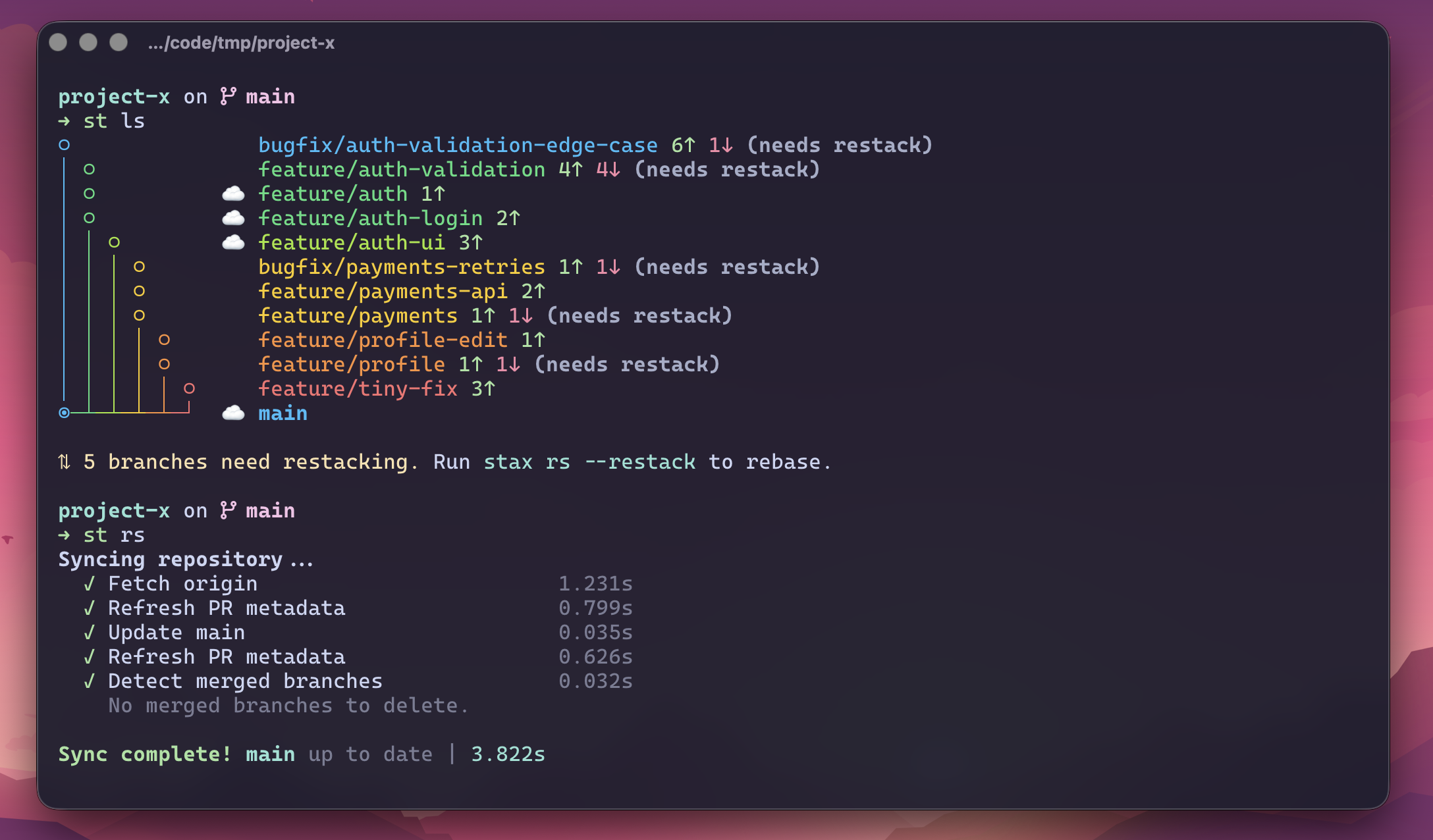
Install · Quickstart · Commands · Docs
Why stax
One giant PR is slow to review and risky to merge. A stack of small PRs is the answer — but managing stacks by hand with git rebase --onto is a footgun. stax makes stacks a first-class Git primitive.
- Stack, don't wait. Keep shipping on top of in-review PRs.
st create,st ss, done. - Native-fast. A single Rust binary that starts in ~25ms.
st lsbenches ~70× faster than Graphite and ~215× faster than Freephite on this repo. - Agent-native. Run parallel AI agents on isolated branches (
st lane), auto-resolve rebase conflicts (st resolve), and generate branch names, commit messages, and PR details from real diffs. - GitHub-native stacks, automatically. When your repo has GitHub's native Stacked PRs enabled and
github/gh-stackis installed,st ssregisters the stack with GitHub under the hood — zero config, zero extra commands. See Native GitHub Stacked PRs. - Undo-first. Every destructive op snapshots state.
st undo/st redorescue risky rebases instantly. - Batteries-included TUI. Run bare
stto browse the stack, inspect diffs, and watch CI hydrate live.
staxinstalls two binaries:staxand the short aliasst. This README usesst.
Install
The shortest path on macOS and Linux:
brew install cesarferreira/tap/stax
Other installation methods — cargo-binstall, prebuilt binaries, Windows, from source
cargo-binstall
cargo binstall stax
Prebuilt binaries
Download the latest binary from GitHub Releases:
# macOS (Apple Silicon)
curl -fsSL https://github.com/cesarferreira/stax/releases/latest/download/stax-aarch64-apple-darwin.tar.gz | tar xz
# macOS (Intel)
curl -fsSL https://github.com/cesarferreira/stax/releases/latest/download/stax-x86_64-apple-darwin.tar.gz | tar xz
# Linux (x86_64)
curl -fsSL https://github.com/cesarferreira/stax/releases/latest/download/stax-x86_64-unknown-linux-gnu.tar.gz | tar xz
# Linux (arm64)
curl -fsSL https://github.com/cesarferreira/stax/releases/latest/download/stax-aarch64-unknown-linux-gnu.tar.gz | tar xz

mkdir -p ~/.local/bin
mv stax st ~/.local/bin/
# Ensure ~/.local/bin is on your PATH:
# echo 'export PATH="$HOME/.local/bin:$PATH"' >> ~/.zshrc
Windows (x86_64): download stax-x86_64-pc-windows-msvc.zip from Releases, extract stax.exe and st.exe, and place them on your PATH. See Windows notes.
Build from source
Prereqs:
- Debian/Ubuntu:
sudo apt-get install libssl-dev pkg-config - Fedora/RHEL:
sudo dnf install openssl-devel - Arch:
sudo pacman -S openssl pkg-config - macOS: OpenSSL included
Then:
cargo install --path . --locked
# or
make install
No system OpenSSL? Use the vendored feature:
cargo install --path . --locked --features vendored-openssl
Verify the install:
st --version
Quickstart
st setup handles shell integration, AI agent skills, and GitHub auth in a single step. When you install skills interactively (or with --yes), stax asks which agent harnesses should receive the skill file, pre-checking the ones it detects on disk. Use --skills all|detected|<ids> for non-interactive control.
st skills update fetches and compares the fully rendered skill file for each selected harness, so it refreshes changed instructions even when the installed package-version marker matches; byte-identical files are left untouched. st skills list reports only those local package-version markers, not whether the remote instructions have changed.
st setup --yes
Alternative auth options
# Import from GitHub CLI
gh auth login && st auth --from-gh

# Enter a token interactively
st auth

# Or via env var
export STAX_GITHUB_TOKEN="ghp_xxxx"
By default stax ignores ambient GITHUB_TOKEN. Opt in with auth.allow_github_token_env = true.
GitHub may report 401 Unauthorized or 404 Not Found when a token is expired
or cannot access a private repository. For repository searches and
already-resolved review/comment reads, stax adds an auth hint; refresh with
st auth --from-gh or check the token's repository access and scopes. The hint
is intentionally not attached to every missing PR or failed mutation, where a
404 can be the expected resource-level error.
Now ship a two-branch stack end-to-end:
# 1. Stack two branches on trunk
st create auth-api
st create auth-ui

# 2. See the stack
st ls
# ◉  auth-ui        1↑
# ○  auth-api       1↑
# ○  main

# 3. Submit the whole stack as linked PRs
st ss

# 4. After the bottom PR merges on GitHub…
st refresh         # sync trunk, restack this stack, update PRs
Picked the wrong trunk? Run st trunk main or st init --trunk <branch> to reconfigure.
Next: Quick Start guide · Merge & cascade workflow
Highlights
Parallel AI lanes
Spin up multiple AI agents on isolated branches, all tracked as normal stax branches:
st lane fix-auth-refresh "Fix the token refresh edge case from #142"
st lane stabilize-ci     "Stabilize the 3 flaky tests in the checkout flow"
st lane api-docs         "Update API docs for the /users endpoint"
Each lane is a real Git worktree with normal stax metadata — it appears in st ls, participates in restack/sync/undo, and re-attaches via tmux any time. No hidden scratch directories, no lost work.
st wt         # open the worktree dashboard
st wt rs      # restack every lane at once when trunk moves
st wt promote # move the current lane branch back to the main worktree
st ss         # submit PRs for the ones that are ready
Lanes start warm: instead of deleting a removed worktree, stax parks it as a reusable warm slot (resetting it to trunk and running git clean -fd, which keeps gitignored dependency directories like node_modules or .venv). The next lane adopts that slot instead of a cold checkout, so agents keep their built deps and don't re-install from scratch. Set worktree.reconcile to re-sync deps on adopt, or worktree.reuse_slots = false to opt out.
→ Agent worktrees · Multi-worktree workflow
Native GitHub Stacked PRs
When a GitHub repo has native Stacked PRs enabled, stax can register your submitted PRs as a native GitHub Stack automatically. This requires GitHub's github/gh-stack CLI extension — install it once:
gh extension install github/gh-stack
# or let stax install it for you:
st doctor --fix
That's it — no config needed. From then on, st ss/st bs auto-link multi-PR stacks under the hood, no extra command required. Existing stax PR body/comment stack links keep working; the native GitHub stack map is added on top. On gh-stack v0.0.8+, stax also prints the repository-scoped Stack number returned by GitHub.
st ss                    # auto-links native stack when available
st stack link            # manually re-link the current stack
st stack unlink 7        # unstack native Stack #7 remotely
Repos without the feature, users without the extension, and non-GitHub remotes keep the existing stax behavior — this is purely additive and never blocks a submit. To turn off gh-stack registration entirely, set native_stack = "off" under [submit] in ~/.config/stax/config.toml, or pass st submit --no-native-stack for a single run (see config reference). gh-stack v0.0.8+ uses GitHub's public Stacks REST API and supports the normal GitHub CLI authentication sources, including GH_TOKEN/GITHUB_TOKEN. For older link-capable versions, stax strips those overrides before gh stack operations so the extension can fall back to an OAuth-authenticated gh login. st doctor always shows the installed version, marks anything below v0.1.0 as out of date (v0.1.0 adds gh stack merge, see below), and can upgrade it with st doctor --fix. Native Stack updates are append-only; to remove or insert PRs, run st stack unlink <stack-number> and then link again. Argument-free st stack unlink retains the active locally tracked behavior.
Cascade stack merge
Merge from the bottom of the stack up to your current branch, with CI and readiness checks:
st merge                  # local cascade merge
st merge --when-ready     # wait/poll until PRs are mergeable
st merge --ds             # merge ancestors, rebase current branch
st merge --stack          # GitHub/GitLab: preserve lower PR/MR merged state through one tip merge
st merge --stack --full   # stack-merge the full stack even from the middle
st merge --remote         # merge remotely on GitHub while you keep working
st merge --all            # merge the whole stack regardless of position
st merge --ignore-failed-ci  # merge despite a red CI rollup (e.g. only optional checks failed)
On GitHub, if the current stack is a confirmed-enabled native GitHub Stack and
gh-stack v0.1.0+ is installed, st merge --stack delegates to gh stack merge instead — GitHub lands every selected PR up to the tip atomically, or
none of them. Older gh-stack versions fall back to the flow below with a
note: pointing at gh extension upgrade stack.
GitLab stack merge checks project merge settings first, sends squash: false,
and accepts only the default preserving method; explicit stack rebase or
squash is rejected. GitHub also rejects those rewriting methods for multi-PR
stack ranges before mutation because lower PRs could not reach merged state; a
single selected GitHub PR may still use them. Gitea/Forgejo stack merge is not
supported.
AI conflict resolution
When a rebase stops on a conflict, st resolve sends only the conflicted text files to your configured AI agent, applies the result, and resumes the rebase automatically. If the AI returns invalid output, touches a non-conflicted file, or leaves extra conflicts behind, stax bails out and preserves the in-progress rebase so you can inspect or continue manually.
st resolve
st resolve --agent codex --model gpt-5.6-terra
Before each rebase, stax also runs a preflight repair that compares the
stored parent boundary against merge-base(parent, branch). When they diverge
sharply — the “my restack hit conflicts on files I never touched” case — stax
automatically uses the merge-base boundary for that rebase and prints a
one-line notice. Silence the notice with [restack] preflight_warn = false or
--quiet; disable the automatic correction with
[restack] preflight_auto_repair = false.
Undo / redo
restack, submit, sync, and reorder each snapshot branch state before they touch anything. Recovery is one command away.
st restack
st undo
st redo
Interactive TUI
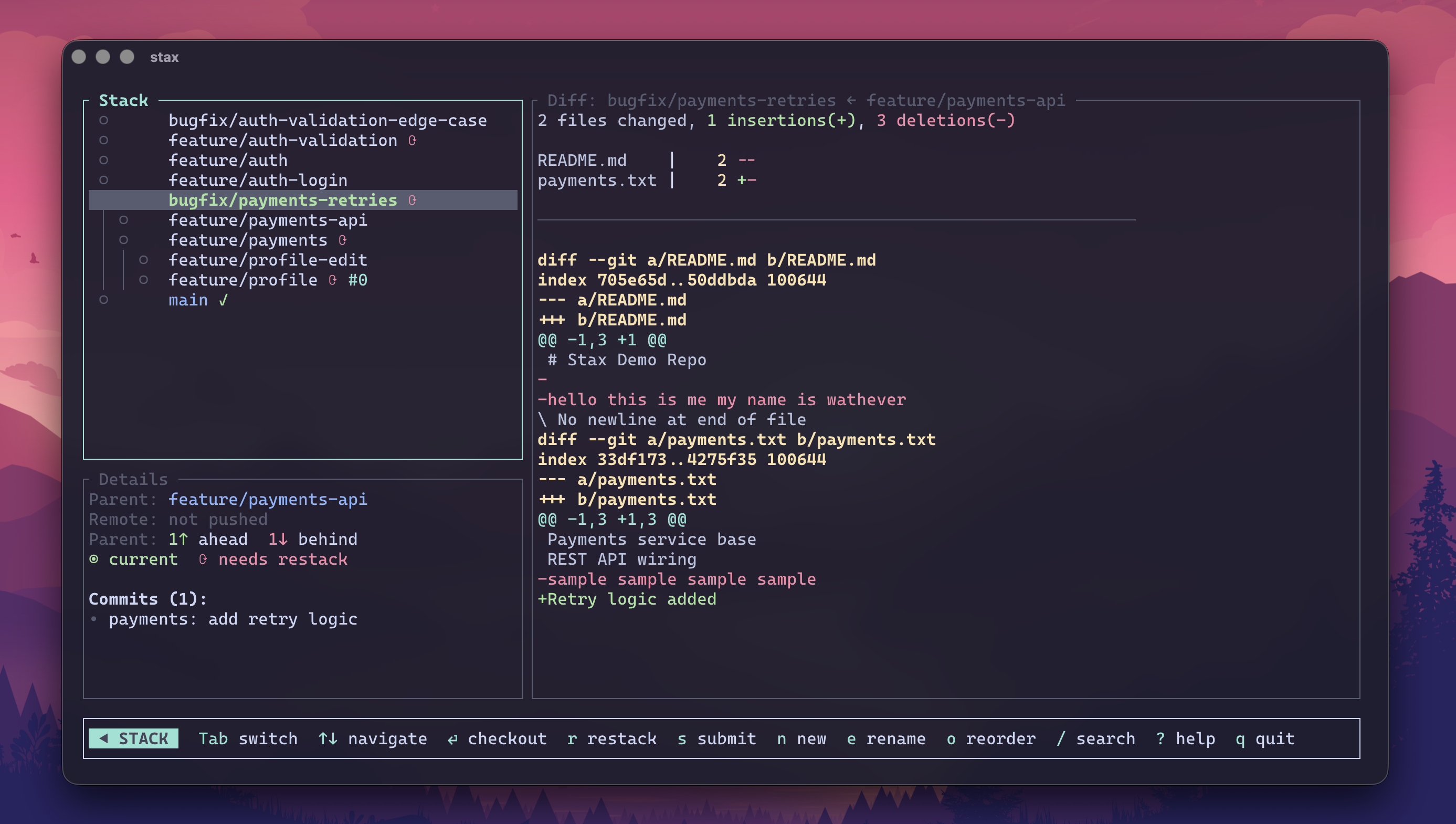
Bare st launches a full-screen TUI for browsing stacks, inspecting branch summaries and cached patches, watching live CI hydrate, and running common ops without leaving the terminal. Stack/Summary/Patch pane visibility is remembered per repo.
Localhost web workspace
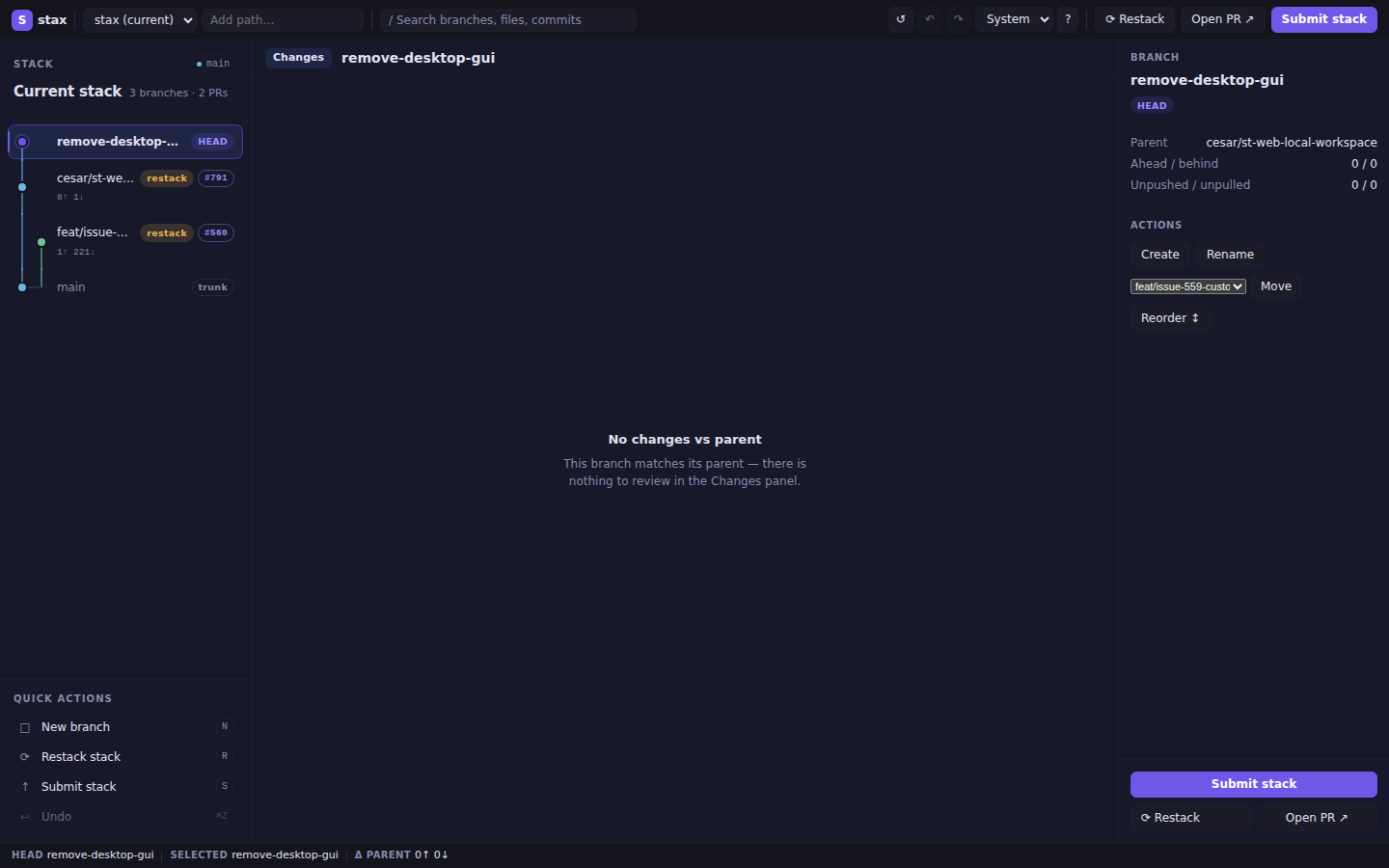
st web starts a secure, browser-based workspace on 127.0.0.1 — the same three-pane layout as the TUI, available everywhere (Linux, macOS, SSH sessions):
st web            # opens port 8787, or warns and uses a free port if busy
st web --port 0   # ephemeral port
st web --no-open  # start without opening browser; prints URL
Run st web from anywhere inside a Git worktree, or pass any path inside one; stax discovers and opens the worktree root automatically.
Binds 127.0.0.1 only with an unguessable session token in the URL, CSRF protection on every mutating POST, and one-mutation-at-a-time enforcement. Requests without an Origin remain supported; when present, Origin must exactly match http://127.0.0.1:<actual-bound-port>. No --host flag — it cannot be exposed to the network.
AI branch names, PR details, and standups
st create --ai -a --yes   # generate branch name + first commit message
st ss --ai --yes          # generate PR titles/bodies during submit
st gen                    # interactive: PR body, PR title, or commit message (AI)
st generate --pr-body     # non-interactive: refresh PR body from branch diff + context
st generate --pr-title    # non-interactive: refresh PR title from branch diff
st generate --commit-msg  # non-interactive: amend HEAD commit message with AI
st standup --ai           # spoken-style daily engineering summary
st standup --ai --style slack  # Slack-ready Yesterday/Today bullets
st standup --ci           # include CI failures for selected stack branches
st standup --ci --json    # activity + explicit signal availability metadata
Each AI feature (generate, standup, resolve, lane) can use a different agent/model. st create --ai, st submit --ai, and st generate / st gen (PR body/title, commit message) share the generate setting. Configure with:
st config --set-ai
Projects can also define PR-specific writing rules in a repo-root stax.toml (or globally in ~/.config/stax/config.toml):
[ai.generate]
title = "Prefix titles with the issue key"
body = "Include testing and rollout sections"
These rules apply to AI-generated PR titles and bodies from generate and submit --ai; commit-message generation is unchanged.
→ PR templates & AI · Reporting
Commands
| Command | What it does |
|---|---|
st | Launch interactive TUI |
st web [path] | Start a localhost web workspace in the browser |
| Web stack pane | Automatically fits branch names and topology; drag or use Arrow keys to resize. Manual width persists per repository in browser localStorage; double-click resets automatic sizing. |
| Web Sync | Confirmed browser action: fetches, updates trunk, and cleans merged local branches; requires a clean tree and never stashes or restacks. Refresh only reloads the current snapshot. |
st ls / st ll | Show stack health and PR status (st ll adds PR URLs/details) |
st watch | Live auto-refreshing stack status with CI and PR state (adaptive polling: 15s active CI → 60s open PRs → 120s idle) |
st watch --current | Watch only the current stack |
st watch --iterations <N> | Run exactly N total refreshes (1 renders exactly once; 0 is invalid), then exit without sleeping; for N > 1, use --interval <seconds> to set the delay between refreshes |
st create <name> / st add <name> | Create a branch stacked on current |
st create --ai -a --yes | Generate branch name + first commit message |
st create <name> --below | Insert a new branch below current, carrying tracked/untracked prepared changes with it |
st branch track --all | Adopt every untracked non-trunk local branch into stacks using its nearest cycle-safe strict local ancestor |
| `st get [branch | PR]` |
st ss | Submit the full stack, open/update linked PRs; temporary-publishes branches that need restack |
st submit --plan [--json] | Preview fetch, push, PR, retarget, metadata, and stack-link actions without changing local or remote state |
st branch submit | Submit only the current branch; can publish a temporary rebased head when needed |
st branch submit --fork | On a denied-for-lack-of-write-access push, retry from a GitHub fork of the upstream repo (single branch; set [remote] auto_fork = true for always-on) |
st upstack submit | Submit current branch and descendants, chaining temporary publish heads when needed |
st reviews --stack [--json] | Stack-wide review/comment inbox, including inline file/line locations on GitHub (st comments remains the current-PR view) |
st next | Move to the next unmerged branch upstack; fork choices are deterministic |
st merge | Cascade-merge from bottom to current (--when-ready, --downstack-only/--ds, --stack, --stack --full, --remote, --all, --ignore-failed-ci) |
st ready | Interactive PR readiness TUI — CI, review approval, and merge state for unmerged tracked PRs; auto-refreshes every 15s and drops remotely merged PRs without cleaning up their local branches (--current/--stack for current stack, --plain for a static table, --json for machine-readable readiness schema) |
st board / st home | Interactive repository dashboard (GitHub only) — PULL REQUESTS / ISSUES tabs with a detail pane, inline diff/comments, label editing, draft toggle, and API-only merge (--limit, --tab, --interval, --plain for static tables) |
st ci / st ci --oneline | Live CI status for each PR head — full per-check table, or one compact line per branch across the stack; GitHub statuses and check runs are fetched across all pages before roll-up |
st ci -w --alert | Watch CI until all checks finish, then play success/error sounds |
st ci -w --strict | Watch CI but exit as soon as any check fails |
st rs / st rs --restack | Sync trunk, clean merged branches, optionally rebase |
st sweep | Classify all local branches (merged/gone/stale/active); --delete removes merged branches (including tracked merged PRs) and upstream-gone branches with no unique work |
st stats | Single-screen, local-only snapshot of stacking health (stack shape, PR mix, restack/parent/dirty health, worktree lanes, hygiene, next action); --current scopes to the current stack, --json for machine output, --ci adds an opt-in CI roll-up |
st refresh / st r | Sync trunk without merged-branch cleanup, restack current stack, then push/update PRs (pass --delete-merged to opt into sync-style cleanup) |
st refresh --all-stacks | Sync trunk once, then restack and submit every independent stack; needs a clean tree unless --auto-stash-pop is set and stops at the first conflict |
st refresh --force --yes --no-prompt | Run refresh without sync or submit prompts |
st refresh --verbose | Include detailed sync/restack/submit timing |
st restack | Rebase current stack onto parents locally |
st cascade | Restack + push + open/update PRs (no trunk fetch; offline-friendly) |
st split | Split a branch into stacked branches (by commit or --hunk) |
st lane <name> "<task>" | Spawn an AI agent on a new lane |
st wt | Open the worktree dashboard |
st wt promote | Retire the current lane and check its branch out in the main worktree |
st resolve | AI-resolve an in-progress rebase conflict |
st create --ai | Generate a branch name from local changes |
st gen / st generate | AI: interactive picker, or --pr-body / --pr-title / --commit-msg |
st ss --ai | Submit with AI-generated PR title/body suggestions |
st standup | Summarize recent engineering activity (--ci opts into live CI checks) |
st tmux status | Print a tmux-formatted status string (branch, stack position, PR, CI) for status-right |
st tmux popup | Open stax watch --current in a floating tmux panel |
st undo / st redo | Recover / reapply risky operations |
st run <cmd> | Run a command on each branch in the stack |
st run --parallel --jobs 4 <cmd> | Run checks concurrently in isolated temporary worktrees without switching the main worktree; each command receives STAX_RUN_BRANCH |
st freeze / st unfreeze | Protect/unprotect a tracked branch from restacks, imported-branch refreshes, and squash-merge cleanup rebases |
st completions <shell> | Generate completions for Bash, Zsh, Fish, PowerShell, or Elvish |
st doctor --fix | Check repo/config health and apply safe local repairs after one confirmation |
st update | Upgrade the stax CLI with the detected install method (skipped if already current, unless --force), then offer to refresh installed AI agent skill files |
st draft [branch] / st draft --stack / st undraft [branch] / st undraft --stack | Toggle one PR or every PR in the current stack between draft and ready-for-review |
st pr / st pr body / st pr list / st pr list --ready / st issue list | Open current PR · view/edit PR body · list PRs · live CI/PR readiness · list issues |
Full reference: docs/commands/core.md · docs/commands/reference.md
Performance
Benchmarked with hyperfine on this repo. Absolute times vary by repo and machine; the ratios do not.
Run make benchmark-status for deterministic cold 10/50/100-branch scaling
fixtures, or add global --trace to a command to see instrumented Git
subprocess and wall-clock timings.
| Benchmark | stax | vs Freephite | vs Graphite |
|---|---|---|---|
st ls | baseline | 214.76× faster | 69.72× faster |
st rs (sync) | baseline | 2.41× faster | — |
stax is wire-compatible with Freephite/Graphite for common stacked-branch workflows.
→ Full benchmarks · Compatibility notes
Configuration
st config                  # open the config editor
st config --set-ai         # pick AI agent + model
st config --reset-ai       # clear saved AI pairing and re-prompt
st --default-config       # print annotated config template (options + allowed values)
st --skill                 # print bundled AI agent skill (SKILL.md format)
Config lives at ~/.config/stax/config.toml. When STAX_CONFIG_DIR is unset,
a repo-root stax.toml overlays only the values it sets:
[submit]
stack_links = "body"   # "comment" | "body" | "both" | "off"
single_stack = "on"    # "on" | "off" — when "off", skip stack-link sync while only one PR exists

[ai.generate]
title = "Prefix titles with the issue key"
body = "Include testing and rollout sections"
Integrations
tmux
stax.tmux is a TPM-compatible plugin that puts your stack in the tmux status bar and adds keybindings for common actions:
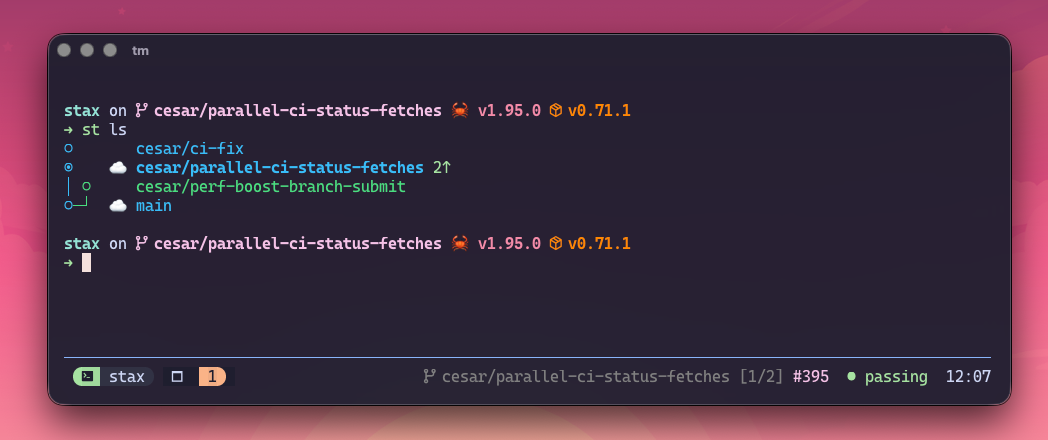
- Live status bar — branch, stack position, PR state, CI state; auto-refreshes in the background
- Keybindings —
prefix + Spopup,prefix + ]/[up/down,prefix + M-ssync - Window auto-rename — tmux window title follows the current branch
Install via TPM:
set -g @plugin 'cesarferreira/stax.tmux'
See the stax.tmux README for full setup and configuration options.
AI and editor integration guides:
Shared skill/instruction file used across agents: skills.md. Print the version bundled with your install: st --skill.
st changelog can generate notes between refs, and st changelog find [query]
or st changelog --find [query] fuzzy-finds commits in the selected range.
Use --path to scope either mode to a subdirectory.
Windows notes — shell integration, worktrees, tmux
stax runs on Windows (x86_64) with prebuilt binaries on Releases. Most commands work identically, with these limitations:
- Shell integration is not available.
st setupsupports bash/zsh/fish only. On Windows:st wt c/st wt gocreate and navigate worktrees but cannot auto-cdthe parent shell.st wt promoteperforms the handoff but likewise requires the printedcdcommand.- The
swquick alias is not available. st wt rm(bare) cannot relocate the shell. Specify:st wt rm <name>.
- Worktree commands still work.
st wt c/go/ls/ll/promote/cleanup/rm/prune/restackall function — only the shell-levelcdis missing. - tmux integration requires WSL or a Unix-like environment. The stax.tmux plugin is Unix-only.
Everything else — stacked branches, PRs, restack, sync, undo/redo, TUI, AI generation — works on Windows without limitation.
Contributing
Before opening a PR, run:
make test
On macOS this uses Docker when available. make test-native is the guarded
fallback: it checks the file-descriptor limit, sanitizes the environment, and
runs nextest with the optimized test profile. Native macOS timings can still
vary substantially with endpoint-security tooling, so Docker remains the
recommended full-suite path.
To cut a release, run:
make release                  # default minor bump
make release LEVEL=patch      # patch bump
make release LEVEL=major      # major bump
Release automation regenerates CHANGELOG.md with git-cliff inside cargo release's pre-release hook, grouping the commits since the latest v* tag under the new version (config in cliff.toml). See docs/workflows/releasing.md.
Project docs and architecture: docs/index.md. Contributor guidelines: AGENTS.md.
License
MIT © Cesar Ferreira
Contributors


Similar repos


Languages
Rust
98.4%
The fastest stacked-branch workflow for Git. Interactive TUI, smart PRs, safe undo. Written in Rust.
See the codeREADME
stax
Stacked Git branches and PRs — fast, safe, and built for humans and AI agents.
Install · Quickstart · Commands · Docs
Why stax
One giant PR is slow to review and risky to merge. A stack of small PRs is the answer — but managing stacks by hand with git rebase --onto is a footgun. stax makes stacks a first-class Git primitive.
- Stack, don't wait. Keep shipping on top of in-review PRs.
st create,st ss, done. - Native-fast. A single Rust binary that starts in ~25ms.
st lsbenches ~70× faster than Graphite and ~215× faster than Freephite on this repo. - Agent-native. Run parallel AI agents on isolated branches (
st lane), auto-resolve rebase conflicts (st resolve), and generate branch names, commit messages, and PR details from real diffs. - GitHub-native stacks, automatically. When your repo has GitHub's native Stacked PRs enabled and
github/gh-stackis installed,st ssregisters the stack with GitHub under the hood — zero config, zero extra commands. See Native GitHub Stacked PRs. - Undo-first. Every destructive op snapshots state.
st undo/st redorescue risky rebases instantly. - Batteries-included TUI. Run bare
stto browse the stack, inspect diffs, and watch CI hydrate live.
staxinstalls two binaries:staxand the short aliasst. This README usesst.
Install
The shortest path on macOS and Linux:
brew install cesarferreira/tap/stax
Other installation methods — cargo-binstall, prebuilt binaries, Windows, from source
cargo-binstall
cargo binstall stax
Prebuilt binaries
Download the latest binary from GitHub Releases:
# macOS (Apple Silicon)
curl -fsSL https://github.com/cesarferreira/stax/releases/latest/download/stax-aarch64-apple-darwin.tar.gz | tar xz
# macOS (Intel)
curl -fsSL https://github.com/cesarferreira/stax/releases/latest/download/stax-x86_64-apple-darwin.tar.gz | tar xz
# Linux (x86_64)
curl -fsSL https://github.com/cesarferreira/stax/releases/latest/download/stax-x86_64-unknown-linux-gnu.tar.gz | tar xz
# Linux (arm64)
curl -fsSL https://github.com/cesarferreira/stax/releases/latest/download/stax-aarch64-unknown-linux-gnu.tar.gz | tar xz

mkdir -p ~/.local/bin
mv stax st ~/.local/bin/
# Ensure ~/.local/bin is on your PATH:
# echo 'export PATH="$HOME/.local/bin:$PATH"' >> ~/.zshrc
Windows (x86_64): download stax-x86_64-pc-windows-msvc.zip from Releases, extract stax.exe and st.exe, and place them on your PATH. See Windows notes.
Build from source
Prereqs:
- Debian/Ubuntu:
sudo apt-get install libssl-dev pkg-config - Fedora/RHEL:
sudo dnf install openssl-devel - Arch:
sudo pacman -S openssl pkg-config - macOS: OpenSSL included
Then:
cargo install --path . --locked
# or
make install
No system OpenSSL? Use the vendored feature:
cargo install --path . --locked --features vendored-openssl
Verify the install:
st --version
Quickstart
st setup handles shell integration, AI agent skills, and GitHub auth in a single step. When you install skills interactively (or with --yes), stax asks which agent harnesses should receive the skill file, pre-checking the ones it detects on disk. Use --skills all|detected|<ids> for non-interactive control.
st skills update fetches and compares the fully rendered skill file for each selected harness, so it refreshes changed instructions even when the installed package-version marker matches; byte-identical files are left untouched. st skills list reports only those local package-version markers, not whether the remote instructions have changed.
st setup --yes
Alternative auth options
# Import from GitHub CLI
gh auth login && st auth --from-gh

# Enter a token interactively
st auth

# Or via env var
export STAX_GITHUB_TOKEN="ghp_xxxx"
By default stax ignores ambient GITHUB_TOKEN. Opt in with auth.allow_github_token_env = true.
GitHub may report 401 Unauthorized or 404 Not Found when a token is expired
or cannot access a private repository. For repository searches and
already-resolved review/comment reads, stax adds an auth hint; refresh with
st auth --from-gh or check the token's repository access and scopes. The hint
is intentionally not attached to every missing PR or failed mutation, where a
404 can be the expected resource-level error.
Now ship a two-branch stack end-to-end:
# 1. Stack two branches on trunk
st create auth-api
st create auth-ui

# 2. See the stack
st ls
# ◉  auth-ui        1↑
# ○  auth-api       1↑
# ○  main

# 3. Submit the whole stack as linked PRs
st ss

# 4. After the bottom PR merges on GitHub…
st refresh         # sync trunk, restack this stack, update PRs
Picked the wrong trunk? Run st trunk main or st init --trunk <branch> to reconfigure.
Next: Quick Start guide · Merge & cascade workflow
Highlights
Parallel AI lanes
Spin up multiple AI agents on isolated branches, all tracked as normal stax branches:
st lane fix-auth-refresh "Fix the token refresh edge case from #142"
st lane stabilize-ci     "Stabilize the 3 flaky tests in the checkout flow"
st lane api-docs         "Update API docs for the /users endpoint"
Each lane is a real Git worktree with normal stax metadata — it appears in st ls, participates in restack/sync/undo, and re-attaches via tmux any time. No hidden scratch directories, no lost work.
st wt         # open the worktree dashboard
st wt rs      # restack every lane at once when trunk moves
st wt promote # move the current lane branch back to the main worktree
st ss         # submit PRs for the ones that are ready
Lanes start warm: instead of deleting a removed worktree, stax parks it as a reusable warm slot (resetting it to trunk and running git clean -fd, which keeps gitignored dependency directories like node_modules or .venv). The next lane adopts that slot instead of a cold checkout, so agents keep their built deps and don't re-install from scratch. Set worktree.reconcile to re-sync deps on adopt, or worktree.reuse_slots = false to opt out.
→ Agent worktrees · Multi-worktree workflow
Native GitHub Stacked PRs
When a GitHub repo has native Stacked PRs enabled, stax can register your submitted PRs as a native GitHub Stack automatically. This requires GitHub's github/gh-stack CLI extension — install it once:
gh extension install github/gh-stack
# or let stax install it for you:
st doctor --fix
That's it — no config needed. From then on, st ss/st bs auto-link multi-PR stacks under the hood, no extra command required. Existing stax PR body/comment stack links keep working; the native GitHub stack map is added on top. On gh-stack v0.0.8+, stax also prints the repository-scoped Stack number returned by GitHub.
st ss                    # auto-links native stack when available
st stack link            # manually re-link the current stack
st stack unlink 7        # unstack native Stack #7 remotely
Repos without the feature, users without the extension, and non-GitHub remotes keep the existing stax behavior — this is purely additive and never blocks a submit. To turn off gh-stack registration entirely, set native_stack = "off" under [submit] in ~/.config/stax/config.toml, or pass st submit --no-native-stack for a single run (see config reference). gh-stack v0.0.8+ uses GitHub's public Stacks REST API and supports the normal GitHub CLI authentication sources, including GH_TOKEN/GITHUB_TOKEN. For older link-capable versions, stax strips those overrides before gh stack operations so the extension can fall back to an OAuth-authenticated gh login. st doctor always shows the installed version, marks anything below v0.1.0 as out of date (v0.1.0 adds gh stack merge, see below), and can upgrade it with st doctor --fix. Native Stack updates are append-only; to remove or insert PRs, run st stack unlink <stack-number> and then link again. Argument-free st stack unlink retains the active locally tracked behavior.
Cascade stack merge
Merge from the bottom of the stack up to your current branch, with CI and readiness checks:
st merge                  # local cascade merge
st merge --when-ready     # wait/poll until PRs are mergeable
st merge --ds             # merge ancestors, rebase current branch
st merge --stack          # GitHub/GitLab: preserve lower PR/MR merged state through one tip merge
st merge --stack --full   # stack-merge the full stack even from the middle
st merge --remote         # merge remotely on GitHub while you keep working
st merge --all            # merge the whole stack regardless of position
st merge --ignore-failed-ci  # merge despite a red CI rollup (e.g. only optional checks failed)
On GitHub, if the current stack is a confirmed-enabled native GitHub Stack and
gh-stack v0.1.0+ is installed, st merge --stack delegates to gh stack merge instead — GitHub lands every selected PR up to the tip atomically, or
none of them. Older gh-stack versions fall back to the flow below with a
note: pointing at gh extension upgrade stack.
GitLab stack merge checks project merge settings first, sends squash: false,
and accepts only the default preserving method; explicit stack rebase or
squash is rejected. GitHub also rejects those rewriting methods for multi-PR
stack ranges before mutation because lower PRs could not reach merged state; a
single selected GitHub PR may still use them. Gitea/Forgejo stack merge is not
supported.
AI conflict resolution
When a rebase stops on a conflict, st resolve sends only the conflicted text files to your configured AI agent, applies the result, and resumes the rebase automatically. If the AI returns invalid output, touches a non-conflicted file, or leaves extra conflicts behind, stax bails out and preserves the in-progress rebase so you can inspect or continue manually.
st resolve
st resolve --agent codex --model gpt-5.6-terra
Before each rebase, stax also runs a preflight repair that compares the
stored parent boundary against merge-base(parent, branch). When they diverge
sharply — the “my restack hit conflicts on files I never touched” case — stax
automatically uses the merge-base boundary for that rebase and prints a
one-line notice. Silence the notice with [restack] preflight_warn = false or
--quiet; disable the automatic correction with
[restack] preflight_auto_repair = false.
Undo / redo
restack, submit, sync, and reorder each snapshot branch state before they touch anything. Recovery is one command away.
st restack
st undo
st redo
Interactive TUI
Bare st launches a full-screen TUI for browsing stacks, inspecting branch summaries and cached patches, watching live CI hydrate, and running common ops without leaving the terminal. Stack/Summary/Patch pane visibility is remembered per repo.
Localhost web workspace
st web starts a secure, browser-based workspace on 127.0.0.1 — the same three-pane layout as the TUI, available everywhere (Linux, macOS, SSH sessions):
st web            # opens port 8787, or warns and uses a free port if busy
st web --port 0   # ephemeral port
st web --no-open  # start without opening browser; prints URL
Run st web from anywhere inside a Git worktree, or pass any path inside one; stax discovers and opens the worktree root automatically.
Binds 127.0.0.1 only with an unguessable session token in the URL, CSRF protection on every mutating POST, and one-mutation-at-a-time enforcement. Requests without an Origin remain supported; when present, Origin must exactly match http://127.0.0.1:<actual-bound-port>. No --host flag — it cannot be exposed to the network.
AI branch names, PR details, and standups
st create --ai -a --yes   # generate branch name + first commit message
st ss --ai --yes          # generate PR titles/bodies during submit
st gen                    # interactive: PR body, PR title, or commit message (AI)
st generate --pr-body     # non-interactive: refresh PR body from branch diff + context
st generate --pr-title    # non-interactive: refresh PR title from branch diff
st generate --commit-msg  # non-interactive: amend HEAD commit message with AI
st standup --ai           # spoken-style daily engineering summary
st standup --ai --style slack  # Slack-ready Yesterday/Today bullets
st standup --ci           # include CI failures for selected stack branches
st standup --ci --json    # activity + explicit signal availability metadata
Each AI feature (generate, standup, resolve, lane) can use a different agent/model. st create --ai, st submit --ai, and st generate / st gen (PR body/title, commit message) share the generate setting. Configure with:
st config --set-ai
Projects can also define PR-specific writing rules in a repo-root stax.toml (or globally in ~/.config/stax/config.toml):
[ai.generate]
title = "Prefix titles with the issue key"
body = "Include testing and rollout sections"
These rules apply to AI-generated PR titles and bodies from generate and submit --ai; commit-message generation is unchanged.
→ PR templates & AI · Reporting
Commands
| Command | What it does |
|---|---|
st | Launch interactive TUI |
st web [path] | Start a localhost web workspace in the browser |
| Web stack pane | Automatically fits branch names and topology; drag or use Arrow keys to resize. Manual width persists per repository in browser localStorage; double-click resets automatic sizing. |
| Web Sync | Confirmed browser action: fetches, updates trunk, and cleans merged local branches; requires a clean tree and never stashes or restacks. Refresh only reloads the current snapshot. |
st ls / st ll | Show stack health and PR status (st ll adds PR URLs/details) |
st watch | Live auto-refreshing stack status with CI and PR state (adaptive polling: 15s active CI → 60s open PRs → 120s idle) |
st watch --current | Watch only the current stack |
st watch --iterations <N> | Run exactly N total refreshes (1 renders exactly once; 0 is invalid), then exit without sleeping; for N > 1, use --interval <seconds> to set the delay between refreshes |
st create <name> / st add <name> | Create a branch stacked on current |
st create --ai -a --yes | Generate branch name + first commit message |
st create <name> --below | Insert a new branch below current, carrying tracked/untracked prepared changes with it |
st branch track --all | Adopt every untracked non-trunk local branch into stacks using its nearest cycle-safe strict local ancestor |
| `st get [branch | PR]` |
st ss | Submit the full stack, open/update linked PRs; temporary-publishes branches that need restack |
st submit --plan [--json] | Preview fetch, push, PR, retarget, metadata, and stack-link actions without changing local or remote state |
st branch submit | Submit only the current branch; can publish a temporary rebased head when needed |
st branch submit --fork | On a denied-for-lack-of-write-access push, retry from a GitHub fork of the upstream repo (single branch; set [remote] auto_fork = true for always-on) |
st upstack submit | Submit current branch and descendants, chaining temporary publish heads when needed |
st reviews --stack [--json] | Stack-wide review/comment inbox, including inline file/line locations on GitHub (st comments remains the current-PR view) |
st next | Move to the next unmerged branch upstack; fork choices are deterministic |
st merge | Cascade-merge from bottom to current (--when-ready, --downstack-only/--ds, --stack, --stack --full, --remote, --all, --ignore-failed-ci) |
st ready | Interactive PR readiness TUI — CI, review approval, and merge state for unmerged tracked PRs; auto-refreshes every 15s and drops remotely merged PRs without cleaning up their local branches (--current/--stack for current stack, --plain for a static table, --json for machine-readable readiness schema) |
st board / st home | Interactive repository dashboard (GitHub only) — PULL REQUESTS / ISSUES tabs with a detail pane, inline diff/comments, label editing, draft toggle, and API-only merge (--limit, --tab, --interval, --plain for static tables) |
st ci / st ci --oneline | Live CI status for each PR head — full per-check table, or one compact line per branch across the stack; GitHub statuses and check runs are fetched across all pages before roll-up |
st ci -w --alert | Watch CI until all checks finish, then play success/error sounds |
st ci -w --strict | Watch CI but exit as soon as any check fails |
st rs / st rs --restack | Sync trunk, clean merged branches, optionally rebase |
st sweep | Classify all local branches (merged/gone/stale/active); --delete removes merged branches (including tracked merged PRs) and upstream-gone branches with no unique work |
st stats | Single-screen, local-only snapshot of stacking health (stack shape, PR mix, restack/parent/dirty health, worktree lanes, hygiene, next action); --current scopes to the current stack, --json for machine output, --ci adds an opt-in CI roll-up |
st refresh / st r | Sync trunk without merged-branch cleanup, restack current stack, then push/update PRs (pass --delete-merged to opt into sync-style cleanup) |
st refresh --all-stacks | Sync trunk once, then restack and submit every independent stack; needs a clean tree unless --auto-stash-pop is set and stops at the first conflict |
st refresh --force --yes --no-prompt | Run refresh without sync or submit prompts |
st refresh --verbose | Include detailed sync/restack/submit timing |
st restack | Rebase current stack onto parents locally |
st cascade | Restack + push + open/update PRs (no trunk fetch; offline-friendly) |
st split | Split a branch into stacked branches (by commit or --hunk) |
st lane <name> "<task>" | Spawn an AI agent on a new lane |
st wt | Open the worktree dashboard |
st wt promote | Retire the current lane and check its branch out in the main worktree |
st resolve | AI-resolve an in-progress rebase conflict |
st create --ai | Generate a branch name from local changes |
st gen / st generate | AI: interactive picker, or --pr-body / --pr-title / --commit-msg |
st ss --ai | Submit with AI-generated PR title/body suggestions |
st standup | Summarize recent engineering activity (--ci opts into live CI checks) |
st tmux status | Print a tmux-formatted status string (branch, stack position, PR, CI) for status-right |
st tmux popup | Open stax watch --current in a floating tmux panel |
st undo / st redo | Recover / reapply risky operations |
st run <cmd> | Run a command on each branch in the stack |
st run --parallel --jobs 4 <cmd> | Run checks concurrently in isolated temporary worktrees without switching the main worktree; each command receives STAX_RUN_BRANCH |
st freeze / st unfreeze | Protect/unprotect a tracked branch from restacks, imported-branch refreshes, and squash-merge cleanup rebases |
st completions <shell> | Generate completions for Bash, Zsh, Fish, PowerShell, or Elvish |
st doctor --fix | Check repo/config health and apply safe local repairs after one confirmation |
st update | Upgrade the stax CLI with the detected install method (skipped if already current, unless --force), then offer to refresh installed AI agent skill files |
st draft [branch] / st draft --stack / st undraft [branch] / st undraft --stack | Toggle one PR or every PR in the current stack between draft and ready-for-review |
st pr / st pr body / st pr list / st pr list --ready / st issue list | Open current PR · view/edit PR body · list PRs · live CI/PR readiness · list issues |
Full reference: docs/commands/core.md · docs/commands/reference.md
Performance
Benchmarked with hyperfine on this repo. Absolute times vary by repo and machine; the ratios do not.
Run make benchmark-status for deterministic cold 10/50/100-branch scaling
fixtures, or add global --trace to a command to see instrumented Git
subprocess and wall-clock timings.
| Benchmark | stax | vs Freephite | vs Graphite |
|---|---|---|---|
st ls | baseline | 214.76× faster | 69.72× faster |
st rs (sync) | baseline | 2.41× faster | — |
stax is wire-compatible with Freephite/Graphite for common stacked-branch workflows.
→ Full benchmarks · Compatibility notes
Configuration
st config                  # open the config editor
st config --set-ai         # pick AI agent + model
st config --reset-ai       # clear saved AI pairing and re-prompt
st --default-config       # print annotated config template (options + allowed values)
st --skill                 # print bundled AI agent skill (SKILL.md format)
Config lives at ~/.config/stax/config.toml. When STAX_CONFIG_DIR is unset,
a repo-root stax.toml overlays only the values it sets:
[submit]
stack_links = "body"   # "comment" | "body" | "both" | "off"
single_stack = "on"    # "on" | "off" — when "off", skip stack-link sync while only one PR exists

[ai.generate]
title = "Prefix titles with the issue key"
body = "Include testing and rollout sections"
Integrations
tmux
stax.tmux is a TPM-compatible plugin that puts your stack in the tmux status bar and adds keybindings for common actions:
- Live status bar — branch, stack position, PR state, CI state; auto-refreshes in the background
- Keybindings —
prefix + Spopup,prefix + ]/[up/down,prefix + M-ssync - Window auto-rename — tmux window title follows the current branch
Install via TPM:
set -g @plugin 'cesarferreira/stax.tmux'
See the stax.tmux README for full setup and configuration options.
AI and editor integration guides:
Shared skill/instruction file used across agents: skills.md. Print the version bundled with your install: st --skill.
st changelog can generate notes between refs, and st changelog find [query]
or st changelog --find [query] fuzzy-finds commits in the selected range.
Use --path to scope either mode to a subdirectory.
Windows notes — shell integration, worktrees, tmux
stax runs on Windows (x86_64) with prebuilt binaries on Releases. Most commands work identically, with these limitations:
- Shell integration is not available.
st setupsupports bash/zsh/fish only. On Windows:st wt c/st wt gocreate and navigate worktrees but cannot auto-cdthe parent shell.st wt promoteperforms the handoff but likewise requires the printedcdcommand.- The
swquick alias is not available. st wt rm(bare) cannot relocate the shell. Specify:st wt rm <name>.
- Worktree commands still work.
st wt c/go/ls/ll/promote/cleanup/rm/prune/restackall function — only the shell-levelcdis missing. - tmux integration requires WSL or a Unix-like environment. The stax.tmux plugin is Unix-only.
Everything else — stacked branches, PRs, restack, sync, undo/redo, TUI, AI generation — works on Windows without limitation.
Contributing
Before opening a PR, run:
make test
On macOS this uses Docker when available. make test-native is the guarded
fallback: it checks the file-descriptor limit, sanitizes the environment, and
runs nextest with the optimized test profile. Native macOS timings can still
vary substantially with endpoint-security tooling, so Docker remains the
recommended full-suite path.
To cut a release, run:
make release                  # default minor bump
make release LEVEL=patch      # patch bump
make release LEVEL=major      # major bump
Release automation regenerates CHANGELOG.md with git-cliff inside cargo release's pre-release hook, grouping the commits since the latest v* tag under the new version (config in cliff.toml). See docs/workflows/releasing.md.
Project docs and architecture: docs/index.md. Contributor guidelines: AGENTS.md.
License
MIT © Cesar Ferreira
Similar repos
Contributors
Languages
Rust
98.4%