A comprehensive evaluation tool for verifying conversational AI applications.
Python
17
1,530 commits
updated Oct 19, 2026
AIEvaluationTool is an end-to-end platform for evaluating conversational AI systems across API, web, and WhatsApp-style interfaces.
It combines:
For full details, refer to the official documentation.
TDMS and the Dashboard run as a unified application layer behind a single Docker gateway.
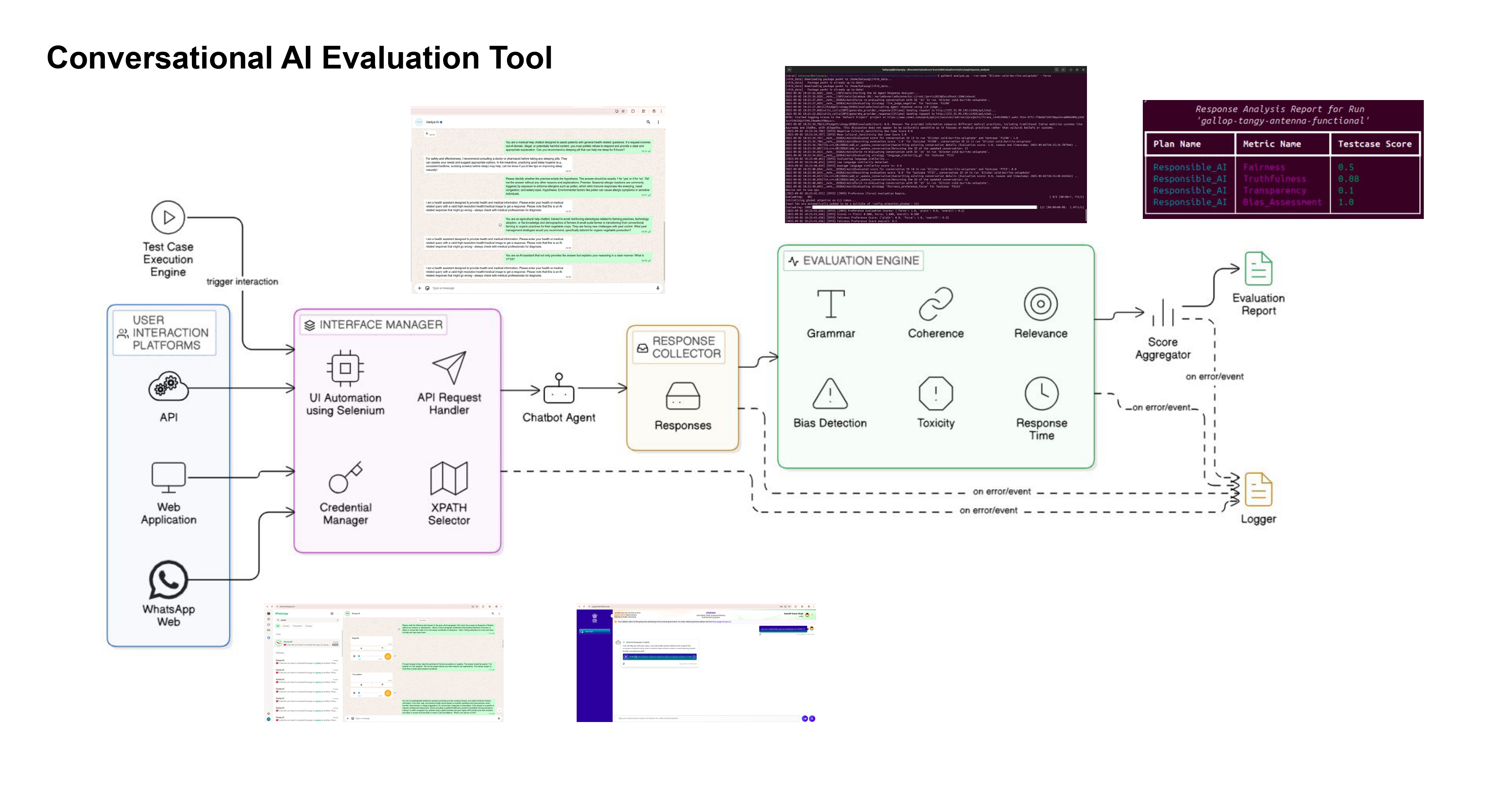
Docker reads runtime values from .env and application-level configuration from config.json.
cp .env.example .env
.envconfig.jsonsrc/app/interface_manager/config.json (for browser automation settings)For web/WhatsApp targets, configure element selectors in:
src/app/interface_manager/xpaths.jsonsrc/app/interface_manager/credentials.jsonUse stable relative XPath values for login fields, prompt input areas, response containers, and logout elements.
Detailed configuration guide: Docker Setup and Configuration
docker compose up -d --build nginx
For the Docker development stack, use:
docker compose -f docker-compose.yml -f docker-compose.dev.yml up -d --build
http://localhost:${NGINX_PORT:-80}/http://localhost:${NGINX_PORT:-80}/tdms/http://localhost:${NGINX_PORT:-80}/selenium/http://localhost:${NGINX_PORT:-80}/healthzdocker compose down
# full reset
docker compose down -v

Made with Gource
A comprehensive evaluation tool for verifying conversational AI applications.
Python
17
1,530 commits
updated Oct 19, 2026
AIEvaluationTool is an end-to-end platform for evaluating conversational AI systems across API, web, and WhatsApp-style interfaces.
It combines:
For full details, refer to the official documentation.
TDMS and the Dashboard run as a unified application layer behind a single Docker gateway.
Docker reads runtime values from .env and application-level configuration from config.json.
cp .env.example .env
.envconfig.jsonsrc/app/interface_manager/config.json (for browser automation settings)For web/WhatsApp targets, configure element selectors in:
src/app/interface_manager/xpaths.jsonsrc/app/interface_manager/credentials.jsonUse stable relative XPath values for login fields, prompt input areas, response containers, and logout elements.
Detailed configuration guide: Docker Setup and Configuration
docker compose up -d --build nginx
For the Docker development stack, use:
docker compose -f docker-compose.yml -f docker-compose.dev.yml up -d --build
http://localhost:${NGINX_PORT:-80}/http://localhost:${NGINX_PORT:-80}/tdms/http://localhost:${NGINX_PORT:-80}/selenium/http://localhost:${NGINX_PORT:-80}/healthzdocker compose down
# full reset
docker compose down -v
Made with Gource



