Simple and extensible plugin to track task times in your Gradle Project.
Kotlin
617
801 commits
updated Oct 20, 2026
Talaiot is an extensible library targeting teams using the Gradle Build System. It records build/task duration helping to understand problems of the build and detecting bottlenecks. For every record, it will add additional information defined by default or custom metrics.
Talaiot is compatible with different systems like InfluxDb, Elasticsearch or RethinkDb. You need to use a Plugin to work with Talaiot. You can use the standard plugin, including all the functionality, or if you have a specific requirement with a individual plugin.
Current available plugins:
| Plugin | Description |
|---|---|
| standard | Contains all the available publishers listed below |
| base | Talaiot core functionality with Json, Output and Timeline publishers |
| elasticsearch | Talaiot core functionality with Elasticsearch publisher |
| influxdb | Talaiot core functionality with Influxdb publisher |
| influxdb2 | Talaiot core functionality with Influxdb2 (Flux) publisher |
| pushgateway | Talaiot core functionality with Pushgateway publisher |
| rethinkdb | Talaiot core functionality with Rethinkdb publisher |
Once you have Talaiot integrated you can create dashboards using the build information stored:
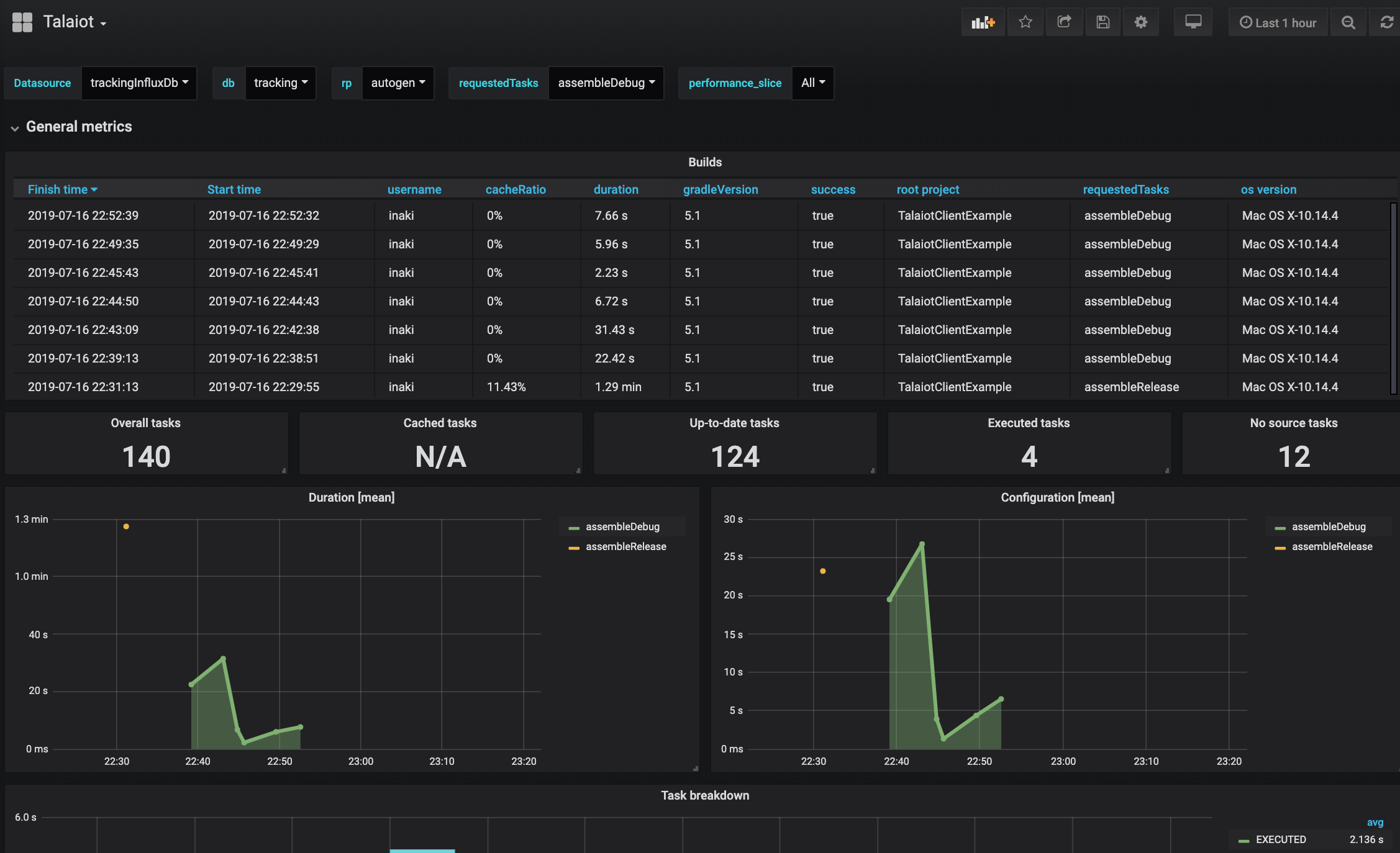
What is Talaiot?
"... while some certainly had a defensive purpose, the use of others is not clearly understood. Some believe them to have served the purpose of lookout or signalling towers..."
https://en.wikipedia.org/wiki/Talaiot
Using the plugins DSL:
plugins {
  id("io.github.cdsap.talaiot") version "<latest version>"
}
Using legacy plugin application:
buildscript {
  repositories {
    gradlePluginPortal()
  }
  dependencies {
    classpath("io.github.cdsap:talaiot:<latest version>")
  }
}

apply(plugin = "io.github.cdsap.talaiot")
Using the plugins DSL:
plugins {
  id "io.github.cdsap.talaiot" version "<latest version>"
}
Using legacy plugin application:
buildscript {
  repositories {
    gradlePluginPortal()
  }
  dependencies {
    classpath "io.github.cdsap:talaiot:<latest version>"
  }
}

apply plugin: "io.github.cdsap.talaiot"
Each plugin is deployed to the Gradle Plugin Portal using thee following convention:
| Plugin | Id |
|---|---|
| base | io.github.cdsap.talaiot.plugin.base |
| elasticsearch | io.github.cdsap.talaiot.plugin.elasticsearch |
| influxdb | io.github.cdsap.talaiot.plugin.influxdb |
| pushgateway | io.github.cdsap.talaiot.plugin.pushgateway |
| rethinkdb | io.github.cdsap.talaiot.plugin.rehinkdb |
Using the plugins DSL:
plugins {
  id("io.github.cdsap.talaiot.plugin.base") version "<latest version>"
}
Using legacy plugin application:
buildscript {
  repositories {
    gradlePluginPortal()
  }
  dependencies {
    classpath("io.github.cdsap.talaiot.plugin:base:<latest version>")
  }
}

apply(plugin = "io.github.cdsap.talaiot.plugin.base")
Using the plugins DSL:
plugins {
  id "io.github.cdsap.talaiot.plugin.base" version "<latest version>"
}
Using legacy plugin application:
buildscript {
  repositories {
    gradlePluginPortal()
  }
  dependencies {
    classpath "io.github.cdsap.talaiot.plugin:base:<latest version>"
  }
}

apply plugin: "io.github.cdsap.talaiot.plugin.base"
maven ( url = uri("https://s01.oss.sonatype.org/content/repositories/snapshots/") )
classpath("io.github.cdsap:talaiot:<latest version>-SNAPSHOT")
classpath("io.github.cdsap.talaiot.plugin:base:<latest version>-SNAPSHOT")
| Property | Description |
|---|---|
| logger | Mode for logging (Silent,Info) |
| ignoreWhen | Configuration to ignore the execution of Talaiot |
| generateBuildId | Generation of unique identifier for each execution(disabled by default) |
| publishers | Configuration to define where to submit the information of the build |
| metrics | Additional information tracked during the execution of the task |
| filter | Rules to filter the build or the tasks to be reported |
We can include extra information on the build and task tracked data during the build. This information will be added to the default metrics defined.
talaiot {
    metrics {
        // You can add your own custom Metric objects:
        customMetrics(
            MyCustomMetric(),
            // Including some of the provided metrics, individually.
            HostnameMetric()
        )

        // Or define build or task metrics directly:
        customBuildMetrics(
            "kotlinVersion" to $kotlinVersion,
            "javaVersion" to $javaVersion
        )
        customTaskMetrics(
            "customProperty" to $value
        )
    }
}
Read more about it in the Metrics wiki page.
Since version 2.1.0, Talaiot includes an experimental mechanism to define metrics using a provider-based system compatible with Configuration Cache. This approach allows you to lazily evaluate metric values, ensuring that they are resolved only when needed during the build lifecycle. Two entry points are available for executing these providers:
These APIs (initialProviderMetrics and finalProviderMetrics) are marked as experimental and may change in future versions.
You can suppress the compiler warning by explicitly opting in with @OptIn(ExperimentalMetricsApi::class).
Example:
metrics {
    initialProviderMetrics(
        "init_memory_metric" to providers.of(GetMemory::class) {}
    )
    finalProviderMetrics(
        "end_memory_metric" to providers.of(GetMemory::class) {}
    )
}
For every measurement done, Talaiot can filter the tasks tracked to be published.
| Property | Description |
|---|---|
| tasks | Configuration used to filter which tasks we want to exclude and include in the execution |
| module | Configuration used to filter which modules we want to exclude and include in the execution |
| threshold | Configuration used to define time execution ranges to filter tasks to be reported |
For every measurement done, Talaiot can completely skip publishing process. These filters affect all publishers:
| Property | Description |
|---|---|
| build.success | Configuration used to skip publishing based on build success. |
| build.requestedTasks | Configuration used to skip publishing based on what was the requested task. |
Example:
 filter {
     tasks {
         excludes = arrayOf("preDebugBuild", "processDebugResources")
     }
     modules {
         excludes = arrayOf(":app")
     }
     threshold {
         minExecutionTime = 10
     }
     build {
         success = true
         requestedTasks {
             includes = arrayOf(":app:assemble.*")
             excludes = arrayOf(":app:generate.*")
         }
     }
 }
| Property | Description |
|---|---|
| envName | Name of the Property |
| envValue | Value of the Property |
We will use IgnoreWhen when we want to ignore publishing the results of the build. One use case is to ignore it when we are building on CI:
talaiot {
    ignoreWhen {
        envName = "CI"
        envValue = "true"
    }
}
The Publisher configuration will change depending on the type of plugin you are using. Standard Plugin provides all the different publisher configurations, for example:
talaiot {
    publishers {
        influxDbPublisher {
            dbName = "tracking"
            url = "http://localhost:8086"
            taskMetricName = "task"
            buildMetricName = "build"
        }

    }
    filter {
        threshold {
            minExecutionTime = 10
        }
    }
}
This configuration would be valid for the InfluxDb Plugin.
Talaiot will send to the InfluxDb server defined in the configuration the values collected during the execution
| Property | Description |
|---|---|
| dbName | Name of the database |
| url | Url of the InfluxDb Server |
| taskMetricName | Name of the metric used for specific task in the execution |
| buildMetricName | Name of the metric used for the overall information of the build in the execution |
| username | username which is used to authorize against the influxDB instance (optional) |
| password | password for the username which is used to authorize against the influxDB (optional) |
| retentionPolicyConfiguration | retention policy which is used for writing points |
| publishBuildMetrics | Publish build metrics of the publisher, true by default |
| publishTaskMetrics | Publish tasks metrics of the publisher, true by default |
| buildTags | Collection of BuildMetrics used as tags |
| taskTags | Collection of TaskMetrics used as tags |
For complete list of
If you need to include custom metrics as tags, you need to use the type Custom
Included in: io.github.cdsap.talaiot and io.github.cdsap.talaiot.plugin.influxdb plugins.
Talaiot will send to the InfluxDb (Flux) server defined in the configuration the values collected during the execution
| Property | Description |
|---|---|
| token | Influx access token |
| url | Url of the InfluxDb Server |
| taskMetricName | Name of the metric used for specific task in the execution |
| buildMetricName | Name of the metric used for the overall information of the build in the execution |
| org | Organization name |
| bucket | Name of bucket |
| publishBuildMetrics | Publish build metrics of the publisher, true by default |
| publishTaskMetrics | Publish tasks metrics of the publisher, true by default |
| buildTags | Collection of BuildMetrics used as tags |
| taskTags | Collection of TaskMetrics used as tags |
Included in: io.github.cdsap.talaiot and io.github.cdsap.talaiot.plugin.influxdb2 plugins.
Retention Policy (RP) describes how long InfluxDB keeps data, how many copies of the data to store in the cluster,
and the time range covered by shard groups. RPs are unique per database and along with the measurement and tag set define a series.
Since version 1.0.0 we are including by default RP in all the operations included in the publisher. The RetentionPolicyConfiguration includes:
| Property | Description |
|---|---|
| name | name of the retentionPolicy(rp). Default rpTalaiot |
| duration | duration of the rp. Default 30d |
| shardDuration | the shardDuration. Default 30m |
| replicationFactor | the replicationFactor of the rp. Default 2 |
| isDefault | if the rp is the default rp for the database or not. Default false |
Example of custom RP Configuration:
influxDbPublisher {
  dbName = "xxxxxx"
  url = "xxxxxx"
  retentionPolicyConfiguration {
    name = "customRp"
    duration = "4w"
    shardDuration = "30m"
    replicationFactor = 1
    isDefault = true
  }
}
Talaiot will send to the PushGateway server defined in the configuration the values collected during the execution.
| Property | Description |
|---|---|
| url | Url of the PushGateway Server |
| taskJobName | Name of the job required for the tasks metrics to be exported to Prometheus |
| buildJobName | Name of the job required for the build metrics to be exported to Prometheus |
| publishBuildMetrics | Publish build metrics of the publisher, true by default |
| publishTaskMetrics | Publish tasks metrics of the publisher, true by default |
Included in: io.github.cdsap.talaiot and io.github.cdsap.talaiot.plugin.pushgateway plugins.
Talaiot will Publish the results of the build with a json format .
    publishers {
        jsonPublisher = true

    }
Included in: io.github.cdsap.talaiot and io.github.cdsap.talaiot.plugin.base plugins.
Talaiot will send to the ElasticSearch server defined in the configuration the values collected for tasks and build metrics during the execution in the different workers.
| Property | Description |
|---|---|
| url | ElasticSearch server |
| taskIndexName | Name for the index used to report tasks metrics |
| buildIndexName | Name for the index used to report build metrics |
| publishBuildMetrics | Publish build metrics of the publisher, true by default |
| publishTaskMetrics | Publish tasks metrics of the publisher, true by default |
Example:
    publishers {
        elasticSearchPublisher {
          url = "http://localhost:9200"
          taskIndexName = "task"
          buildIndexName = "build"
        }
    }
Included in: io.github.cdsap.talaiot and io.github.cdsap.talaiot.plugin.elasticsearch plugins.
This Publisher allows composition over publishers to report tasks and build metrics.
| Property | Description |
|---|---|
| taskPublisher | Publisher configuration used to publish tasks metrics |
| buildPublisher | Publisher configuration used to publish build metrics |
Example:
    publishers {
        hybridPublisher {
            taskPublisher = ElasticSearchPublisherConfiguration().apply {
                url = "http://localhost:9200"
                buildIndexName = "build"
                taskIndexName = "task"
            }

            buildPublisher = InfluxDbPublisherConfiguration().apply {
                dbName = "tracking"
                url = "http://localhost:8086"
                buildMetricName = "build"
                taskMetricName = "task"
            }
        }
    }
In this example we are using InfluxDbPublisher to report build metrics and ElasticSearchPublisher to report task metrics.
Included in: io.github.cdsap.talaiot plugin.
Talaiot will send to the RethinkDb server defined in the configuration the values collected during the execution
| Property | Description |
|---|---|
| dbName | Name of the database |
| url | Url of the RethinkDb Server |
| taskTableName | Name of the table used to track tasks information |
| buildTableName | Name of the table used to track the build information |
| username | username which is used to authorize against the RethinkDb instance (optional) |
| password | password for the username which is used to authorize against the RethinkDb (optional) |
| publishBuildMetrics | Publish build metrics of the publisher, true by default |
| publishTaskMetrics | Publish tasks metrics of the publisher, true by default |
Included in: io.github.cdsap.talaiot and io.github.cdsap.talaiot.plugin.rethinkdb plugins.
Talaiot allows using custom publishers defined by the requirements of your environment, in case you are using another implementation.
talaiot {
    publishers {
        // You can define one or more custom publishers:
        customPublishers(
            MyCustomPublisher()
        )
    }
}
Read more about it in the Publishers wiki page
In you are not using additional plugins we recommend to use io.github.cdsap.talaiot.plugin.base.
Folder sample contains a Gradle project using Talaiot:
cd sample
./gradlew assemble
The project includes examples creating custom publishers, defining metrics using different publishers.
To have a quick setup to see the possibilities of Talaiot we are providing a Docker image to setup a Grafana + InfluxDb instances(based on this great repo).
Additionally, the Docker image is creating a default database, a provisioned dashboard and the default datasource for InfluxDb. The source is here:
To run the Docker Image:
docker run -d \
  -p 3003:3003 \
  -p 3004:8083 \
  -p 8086:8086 \
  -p 22022:22 \
  -v /var/lib/influxdb \
  -v /var/lib/grafana \
  cdsap/talaiot:latest
You can access to the local instance of Grafana:
http://localhost:3003 root/root
If you access to the provisioned Dashboards included in the Docker Image(http://localhost:3003/d/F9jppxQiz/android-task-tracking?orgId=1 and http://localhost:3003/d/WlpZEBRMz/task-cache-info?orgId=1), you will see an empty dashboard like:
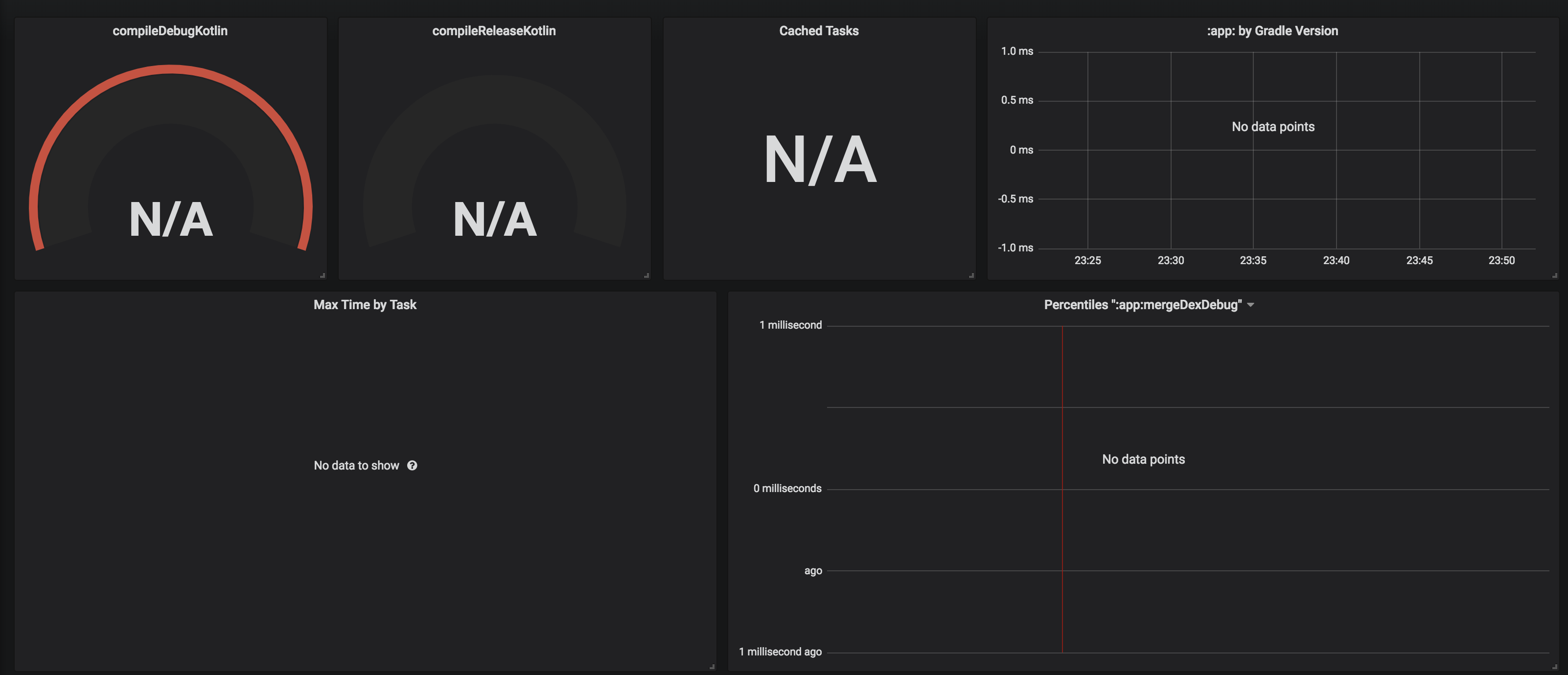
To see Talaiot in action, you need to populate the data. We are providing a script to populate data based in the sample project included in the repository. You can execute the script:
bash scripts/populate.sh
The script will download the repository and with the help of Gradle Profiler(https://github.com/gradle/gradle-profiler) will trigger number of builds defined in the scenario file:
assemble {
  tasks = ["clean"]
}
clean_build {
  versions = ["5.1"]
  tasks = ["assemble"]
  gradle-args = ["--parallel"]
  cleanup-tasks = ["clean"]
  run-using = cli
  warm-ups = 20
}
Once is finished you can check the results on the Grafana Dashboard http://localhost:3003/d/F9jppxQiz/android-task-tracking?orgId=1:
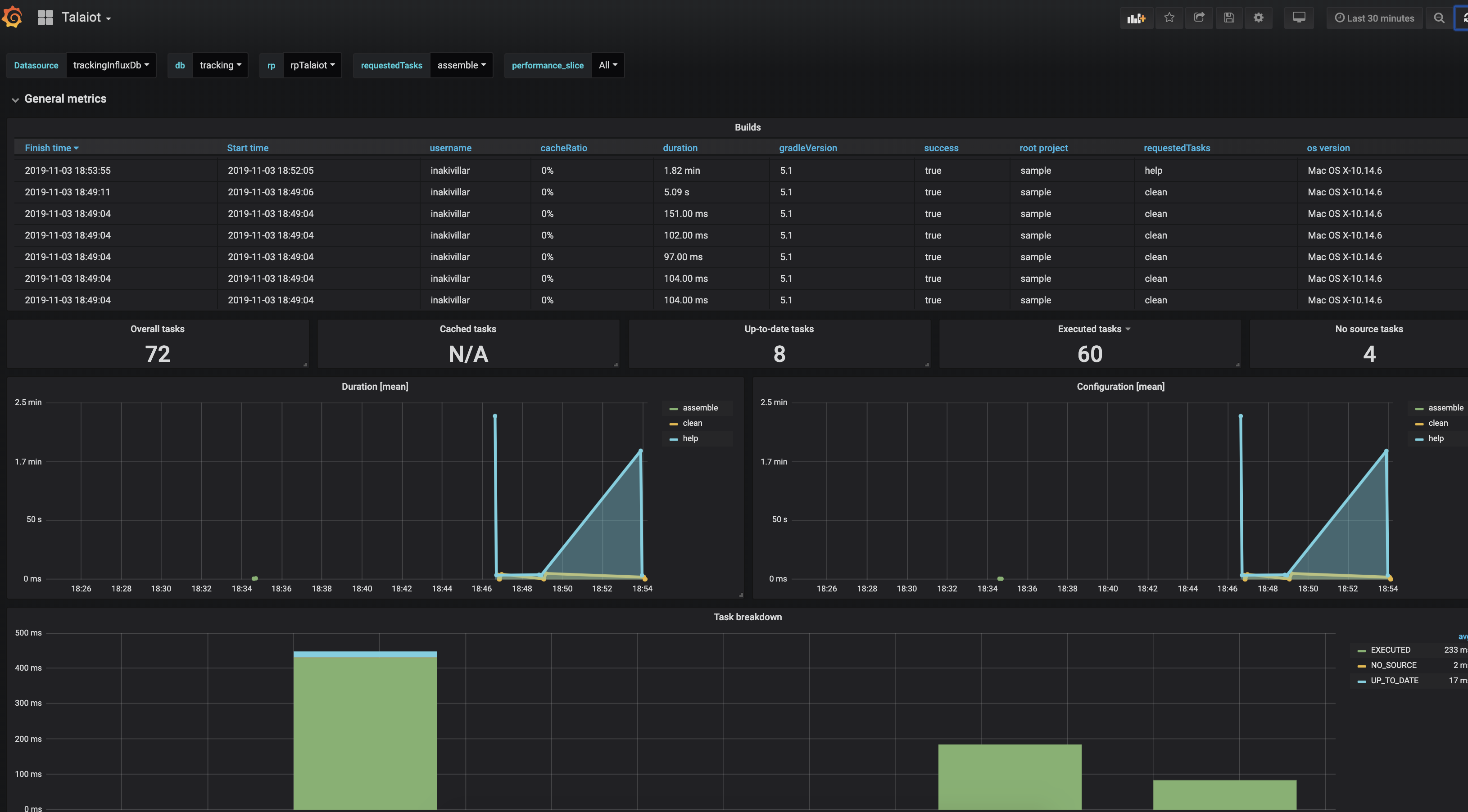
Additionally, we have included a new Dashboard to show how to work with the Caching information of the task execution:
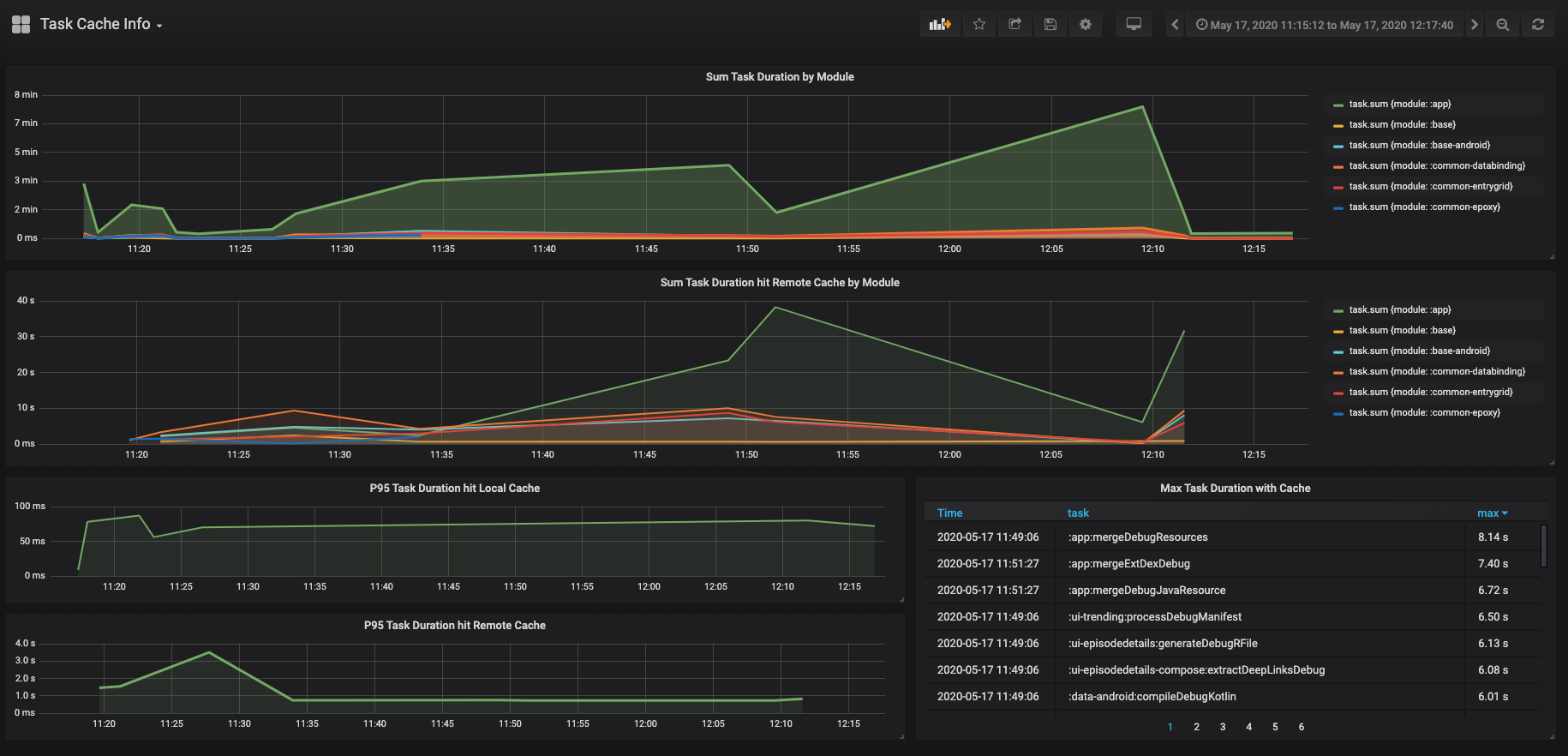
http://localhost:3003/d/WlpZEBRMz/task-cache-info?orgId=1
Talaiot is not a new idea. There are multiple awesome plugins to use to achieve same results:
Build Time Tracker by Pascal Hartig(@passy).
Kuronometer Plugin developed with Scala and FP concepts by Pedro Vicente Gómez Sánchez(@pedrovgs)
🇹🇭 มาทำความรู้จักกับโปรเจค Android ของเราให้มากขึ้นดีกว่า (part 2) by Kajornsak P.
Metrics Configuration by Svyatoslav Chatchenko
Exploring the InfluxDbPublisher in Talaiot
Talaiot is Open Source and accepts contributions of new Publishers, Metrics and Dashboards that we can include as provisioned ones in the Docker image. With the new Plugin structure you can create your own plugins, feel free to contribute with new plugins or if you want to use your own repo drop us comment to include it in a community plugins.
Anton Malinskiy: New format metrics, rework InfluxdbPublisher and new Publishers Json and Timeline.
Pascal Hartig, Build Time Tracker it was an inspiration to build this plugin.
Overall
Maintained
Code review
Latest release
Releases this year
2,628 followers · starred Apr 2021
291 followers · starred Sep 2021
504 followers · starred Jun 2021
823 followers · starred Nov 2021
Simple and extensible plugin to track task times in your Gradle Project.
Kotlin
617
801 commits
updated Oct 20, 2026
Talaiot is an extensible library targeting teams using the Gradle Build System. It records build/task duration helping to understand problems of the build and detecting bottlenecks. For every record, it will add additional information defined by default or custom metrics.
Talaiot is compatible with different systems like InfluxDb, Elasticsearch or RethinkDb. You need to use a Plugin to work with Talaiot. You can use the standard plugin, including all the functionality, or if you have a specific requirement with a individual plugin.
Current available plugins:
| Plugin | Description |
|---|---|
| standard | Contains all the available publishers listed below |
| base | Talaiot core functionality with Json, Output and Timeline publishers |
| elasticsearch | Talaiot core functionality with Elasticsearch publisher |
| influxdb | Talaiot core functionality with Influxdb publisher |
| influxdb2 | Talaiot core functionality with Influxdb2 (Flux) publisher |
| pushgateway | Talaiot core functionality with Pushgateway publisher |
| rethinkdb | Talaiot core functionality with Rethinkdb publisher |
Once you have Talaiot integrated you can create dashboards using the build information stored:
What is Talaiot?
"... while some certainly had a defensive purpose, the use of others is not clearly understood. Some believe them to have served the purpose of lookout or signalling towers..."
https://en.wikipedia.org/wiki/Talaiot
Using the plugins DSL:
plugins {
  id("io.github.cdsap.talaiot") version "<latest version>"
}
Using legacy plugin application:
buildscript {
  repositories {
    gradlePluginPortal()
  }
  dependencies {
    classpath("io.github.cdsap:talaiot:<latest version>")
  }
}

apply(plugin = "io.github.cdsap.talaiot")
Using the plugins DSL:
plugins {
  id "io.github.cdsap.talaiot" version "<latest version>"
}
Using legacy plugin application:
buildscript {
  repositories {
    gradlePluginPortal()
  }
  dependencies {
    classpath "io.github.cdsap:talaiot:<latest version>"
  }
}

apply plugin: "io.github.cdsap.talaiot"
Each plugin is deployed to the Gradle Plugin Portal using thee following convention:
| Plugin | Id |
|---|---|
| base | io.github.cdsap.talaiot.plugin.base |
| elasticsearch | io.github.cdsap.talaiot.plugin.elasticsearch |
| influxdb | io.github.cdsap.talaiot.plugin.influxdb |
| pushgateway | io.github.cdsap.talaiot.plugin.pushgateway |
| rethinkdb | io.github.cdsap.talaiot.plugin.rehinkdb |
Using the plugins DSL:
plugins {
  id("io.github.cdsap.talaiot.plugin.base") version "<latest version>"
}
Using legacy plugin application:
buildscript {
  repositories {
    gradlePluginPortal()
  }
  dependencies {
    classpath("io.github.cdsap.talaiot.plugin:base:<latest version>")
  }
}

apply(plugin = "io.github.cdsap.talaiot.plugin.base")
Using the plugins DSL:
plugins {
  id "io.github.cdsap.talaiot.plugin.base" version "<latest version>"
}
Using legacy plugin application:
buildscript {
  repositories {
    gradlePluginPortal()
  }
  dependencies {
    classpath "io.github.cdsap.talaiot.plugin:base:<latest version>"
  }
}

apply plugin: "io.github.cdsap.talaiot.plugin.base"
maven ( url = uri("https://s01.oss.sonatype.org/content/repositories/snapshots/") )
classpath("io.github.cdsap:talaiot:<latest version>-SNAPSHOT")
classpath("io.github.cdsap.talaiot.plugin:base:<latest version>-SNAPSHOT")
| Property | Description |
|---|---|
| logger | Mode for logging (Silent,Info) |
| ignoreWhen | Configuration to ignore the execution of Talaiot |
| generateBuildId | Generation of unique identifier for each execution(disabled by default) |
| publishers | Configuration to define where to submit the information of the build |
| metrics | Additional information tracked during the execution of the task |
| filter | Rules to filter the build or the tasks to be reported |
We can include extra information on the build and task tracked data during the build. This information will be added to the default metrics defined.
talaiot {
    metrics {
        // You can add your own custom Metric objects:
        customMetrics(
            MyCustomMetric(),
            // Including some of the provided metrics, individually.
            HostnameMetric()
        )

        // Or define build or task metrics directly:
        customBuildMetrics(
            "kotlinVersion" to $kotlinVersion,
            "javaVersion" to $javaVersion
        )
        customTaskMetrics(
            "customProperty" to $value
        )
    }
}
Read more about it in the Metrics wiki page.
Since version 2.1.0, Talaiot includes an experimental mechanism to define metrics using a provider-based system compatible with Configuration Cache. This approach allows you to lazily evaluate metric values, ensuring that they are resolved only when needed during the build lifecycle. Two entry points are available for executing these providers:
These APIs (initialProviderMetrics and finalProviderMetrics) are marked as experimental and may change in future versions.
You can suppress the compiler warning by explicitly opting in with @OptIn(ExperimentalMetricsApi::class).
Example:
metrics {
    initialProviderMetrics(
        "init_memory_metric" to providers.of(GetMemory::class) {}
    )
    finalProviderMetrics(
        "end_memory_metric" to providers.of(GetMemory::class) {}
    )
}
For every measurement done, Talaiot can filter the tasks tracked to be published.
| Property | Description |
|---|---|
| tasks | Configuration used to filter which tasks we want to exclude and include in the execution |
| module | Configuration used to filter which modules we want to exclude and include in the execution |
| threshold | Configuration used to define time execution ranges to filter tasks to be reported |
For every measurement done, Talaiot can completely skip publishing process. These filters affect all publishers:
| Property | Description |
|---|---|
| build.success | Configuration used to skip publishing based on build success. |
| build.requestedTasks | Configuration used to skip publishing based on what was the requested task. |
Example:
 filter {
     tasks {
         excludes = arrayOf("preDebugBuild", "processDebugResources")
     }
     modules {
         excludes = arrayOf(":app")
     }
     threshold {
         minExecutionTime = 10
     }
     build {
         success = true
         requestedTasks {
             includes = arrayOf(":app:assemble.*")
             excludes = arrayOf(":app:generate.*")
         }
     }
 }
| Property | Description |
|---|---|
| envName | Name of the Property |
| envValue | Value of the Property |
We will use IgnoreWhen when we want to ignore publishing the results of the build. One use case is to ignore it when we are building on CI:
talaiot {
    ignoreWhen {
        envName = "CI"
        envValue = "true"
    }
}
The Publisher configuration will change depending on the type of plugin you are using. Standard Plugin provides all the different publisher configurations, for example:
talaiot {
    publishers {
        influxDbPublisher {
            dbName = "tracking"
            url = "http://localhost:8086"
            taskMetricName = "task"
            buildMetricName = "build"
        }

    }
    filter {
        threshold {
            minExecutionTime = 10
        }
    }
}
This configuration would be valid for the InfluxDb Plugin.
Talaiot will send to the InfluxDb server defined in the configuration the values collected during the execution
| Property | Description |
|---|---|
| dbName | Name of the database |
| url | Url of the InfluxDb Server |
| taskMetricName | Name of the metric used for specific task in the execution |
| buildMetricName | Name of the metric used for the overall information of the build in the execution |
| username | username which is used to authorize against the influxDB instance (optional) |
| password | password for the username which is used to authorize against the influxDB (optional) |
| retentionPolicyConfiguration | retention policy which is used for writing points |
| publishBuildMetrics | Publish build metrics of the publisher, true by default |
| publishTaskMetrics | Publish tasks metrics of the publisher, true by default |
| buildTags | Collection of BuildMetrics used as tags |
| taskTags | Collection of TaskMetrics used as tags |
For complete list of
If you need to include custom metrics as tags, you need to use the type Custom
Included in: io.github.cdsap.talaiot and io.github.cdsap.talaiot.plugin.influxdb plugins.
Talaiot will send to the InfluxDb (Flux) server defined in the configuration the values collected during the execution
| Property | Description |
|---|---|
| token | Influx access token |
| url | Url of the InfluxDb Server |
| taskMetricName | Name of the metric used for specific task in the execution |
| buildMetricName | Name of the metric used for the overall information of the build in the execution |
| org | Organization name |
| bucket | Name of bucket |
| publishBuildMetrics | Publish build metrics of the publisher, true by default |
| publishTaskMetrics | Publish tasks metrics of the publisher, true by default |
| buildTags | Collection of BuildMetrics used as tags |
| taskTags | Collection of TaskMetrics used as tags |
Included in: io.github.cdsap.talaiot and io.github.cdsap.talaiot.plugin.influxdb2 plugins.
Retention Policy (RP) describes how long InfluxDB keeps data, how many copies of the data to store in the cluster,
and the time range covered by shard groups. RPs are unique per database and along with the measurement and tag set define a series.
Since version 1.0.0 we are including by default RP in all the operations included in the publisher. The RetentionPolicyConfiguration includes:
| Property | Description |
|---|---|
| name | name of the retentionPolicy(rp). Default rpTalaiot |
| duration | duration of the rp. Default 30d |
| shardDuration | the shardDuration. Default 30m |
| replicationFactor | the replicationFactor of the rp. Default 2 |
| isDefault | if the rp is the default rp for the database or not. Default false |
Example of custom RP Configuration:
influxDbPublisher {
  dbName = "xxxxxx"
  url = "xxxxxx"
  retentionPolicyConfiguration {
    name = "customRp"
    duration = "4w"
    shardDuration = "30m"
    replicationFactor = 1
    isDefault = true
  }
}
Talaiot will send to the PushGateway server defined in the configuration the values collected during the execution.
| Property | Description |
|---|---|
| url | Url of the PushGateway Server |
| taskJobName | Name of the job required for the tasks metrics to be exported to Prometheus |
| buildJobName | Name of the job required for the build metrics to be exported to Prometheus |
| publishBuildMetrics | Publish build metrics of the publisher, true by default |
| publishTaskMetrics | Publish tasks metrics of the publisher, true by default |
Included in: io.github.cdsap.talaiot and io.github.cdsap.talaiot.plugin.pushgateway plugins.
Talaiot will Publish the results of the build with a json format .
    publishers {
        jsonPublisher = true

    }
Included in: io.github.cdsap.talaiot and io.github.cdsap.talaiot.plugin.base plugins.
Talaiot will send to the ElasticSearch server defined in the configuration the values collected for tasks and build metrics during the execution in the different workers.
| Property | Description |
|---|---|
| url | ElasticSearch server |
| taskIndexName | Name for the index used to report tasks metrics |
| buildIndexName | Name for the index used to report build metrics |
| publishBuildMetrics | Publish build metrics of the publisher, true by default |
| publishTaskMetrics | Publish tasks metrics of the publisher, true by default |
Example:
    publishers {
        elasticSearchPublisher {
          url = "http://localhost:9200"
          taskIndexName = "task"
          buildIndexName = "build"
        }
    }
Included in: io.github.cdsap.talaiot and io.github.cdsap.talaiot.plugin.elasticsearch plugins.
This Publisher allows composition over publishers to report tasks and build metrics.
| Property | Description |
|---|---|
| taskPublisher | Publisher configuration used to publish tasks metrics |
| buildPublisher | Publisher configuration used to publish build metrics |
Example:
    publishers {
        hybridPublisher {
            taskPublisher = ElasticSearchPublisherConfiguration().apply {
                url = "http://localhost:9200"
                buildIndexName = "build"
                taskIndexName = "task"
            }

            buildPublisher = InfluxDbPublisherConfiguration().apply {
                dbName = "tracking"
                url = "http://localhost:8086"
                buildMetricName = "build"
                taskMetricName = "task"
            }
        }
    }
In this example we are using InfluxDbPublisher to report build metrics and ElasticSearchPublisher to report task metrics.
Included in: io.github.cdsap.talaiot plugin.
Talaiot will send to the RethinkDb server defined in the configuration the values collected during the execution
| Property | Description |
|---|---|
| dbName | Name of the database |
| url | Url of the RethinkDb Server |
| taskTableName | Name of the table used to track tasks information |
| buildTableName | Name of the table used to track the build information |
| username | username which is used to authorize against the RethinkDb instance (optional) |
| password | password for the username which is used to authorize against the RethinkDb (optional) |
| publishBuildMetrics | Publish build metrics of the publisher, true by default |
| publishTaskMetrics | Publish tasks metrics of the publisher, true by default |
Included in: io.github.cdsap.talaiot and io.github.cdsap.talaiot.plugin.rethinkdb plugins.
Talaiot allows using custom publishers defined by the requirements of your environment, in case you are using another implementation.
talaiot {
    publishers {
        // You can define one or more custom publishers:
        customPublishers(
            MyCustomPublisher()
        )
    }
}
Read more about it in the Publishers wiki page
In you are not using additional plugins we recommend to use io.github.cdsap.talaiot.plugin.base.
Folder sample contains a Gradle project using Talaiot:
cd sample
./gradlew assemble
The project includes examples creating custom publishers, defining metrics using different publishers.
To have a quick setup to see the possibilities of Talaiot we are providing a Docker image to setup a Grafana + InfluxDb instances(based on this great repo).
Additionally, the Docker image is creating a default database, a provisioned dashboard and the default datasource for InfluxDb. The source is here:
To run the Docker Image:
docker run -d \
  -p 3003:3003 \
  -p 3004:8083 \
  -p 8086:8086 \
  -p 22022:22 \
  -v /var/lib/influxdb \
  -v /var/lib/grafana \
  cdsap/talaiot:latest
You can access to the local instance of Grafana:
http://localhost:3003 root/root
If you access to the provisioned Dashboards included in the Docker Image(http://localhost:3003/d/F9jppxQiz/android-task-tracking?orgId=1 and http://localhost:3003/d/WlpZEBRMz/task-cache-info?orgId=1), you will see an empty dashboard like:
To see Talaiot in action, you need to populate the data. We are providing a script to populate data based in the sample project included in the repository. You can execute the script:
bash scripts/populate.sh
The script will download the repository and with the help of Gradle Profiler(https://github.com/gradle/gradle-profiler) will trigger number of builds defined in the scenario file:
assemble {
  tasks = ["clean"]
}
clean_build {
  versions = ["5.1"]
  tasks = ["assemble"]
  gradle-args = ["--parallel"]
  cleanup-tasks = ["clean"]
  run-using = cli
  warm-ups = 20
}
Once is finished you can check the results on the Grafana Dashboard http://localhost:3003/d/F9jppxQiz/android-task-tracking?orgId=1:
Additionally, we have included a new Dashboard to show how to work with the Caching information of the task execution:
http://localhost:3003/d/WlpZEBRMz/task-cache-info?orgId=1
Talaiot is not a new idea. There are multiple awesome plugins to use to achieve same results:
Build Time Tracker by Pascal Hartig(@passy).
Kuronometer Plugin developed with Scala and FP concepts by Pedro Vicente Gómez Sánchez(@pedrovgs)
🇹🇭 มาทำความรู้จักกับโปรเจค Android ของเราให้มากขึ้นดีกว่า (part 2) by Kajornsak P.
Metrics Configuration by Svyatoslav Chatchenko
Exploring the InfluxDbPublisher in Talaiot
Talaiot is Open Source and accepts contributions of new Publishers, Metrics and Dashboards that we can include as provisioned ones in the Docker image. With the new Plugin structure you can create your own plugins, feel free to contribute with new plugins or if you want to use your own repo drop us comment to include it in a community plugins.
Anton Malinskiy: New format metrics, rework InfluxdbPublisher and new Publishers Json and Timeline.
Pascal Hartig, Build Time Tracker it was an inspiration to build this plugin.
Overall
Maintained
Code review
Latest release
Releases this year
2,628 followers · starred Apr 2021
291 followers · starred Sep 2021
504 followers · starred Jun 2021
823 followers · starred Nov 2021