Run open-weight LLMs on Google Colab GPUs as a local OpenAI-compatible endpoint, with a console that keeps the CU bill under control.
Python
4
6 commits
updated Oct 13, 2026
Run open-weight LLMs on Google Colab GPUs and use them from your own machine as a local, OpenAI-compatible endpoint, with a web console that keeps the compute-unit (CU) bill under control.
colabinet creates and stops Colab runtimes through Google's official
google-colab-cli, installs an inference engine
(llama.cpp, ExLlamaV3 or Strata) on the VM, serves the model through a private SSH tunnel on a local port, meters
every request into a local SQLite database, and stops sessions on idle time, a deadline, a per-session CU cap or a
daily CU cap.
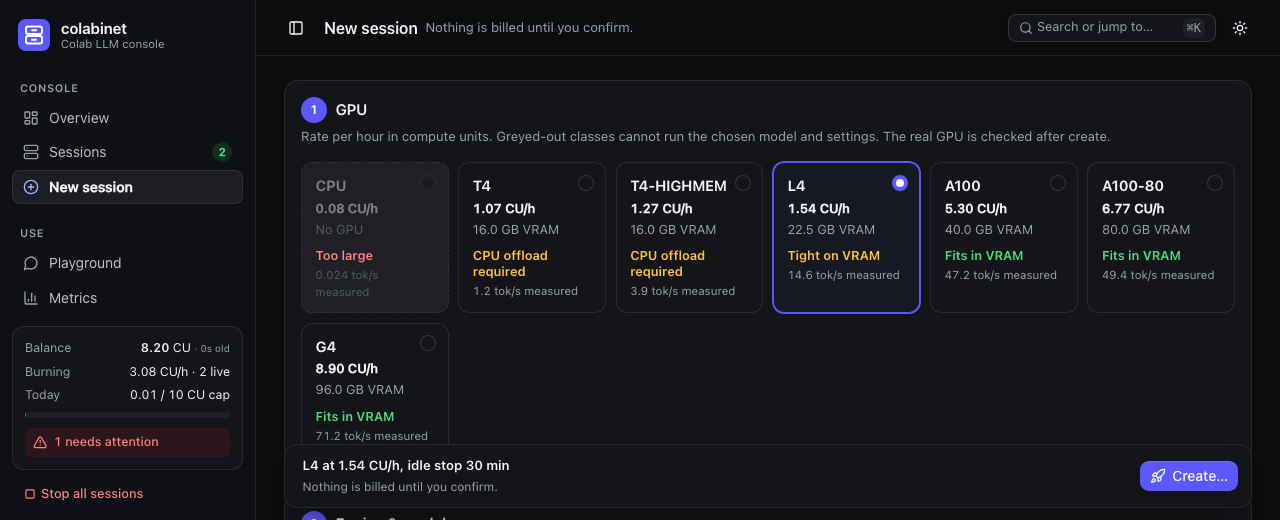
127.0.0.1 for any client, with streaming, vision and reasoning effort.colabinet ctl) for everything the console does.your machine Google Colab runtime
┌──────────────────────────────────┐ ┌──────────────────────────────┐
│ colabinet console :7860 │ colab CLI │ llama-server / TabbyAPI / │
│ supervisor, guards, SQLite │ ──────────────▶ │ Strata on 127.0.0.1:8090 │
│ metering proxy 127.0.0.1:3080/v1 │ ◀── SSH tunnel ─│ │
└──────────────────────────────────┘ └──────────────────────────────┘
▲ OpenAI-compatible clients
Everything listens on 127.0.0.1. The tunnel goes through colab ssh; no third-party tunnel service is used.
google-colab-cli ≥ 0.7.4, signed in to your Google accountNo local GPU, CUDA or PyTorch is needed.
The installation guide walks through every step on a fresh Mac, including Google sign-in, multiple accounts, SSH keys and troubleshooting. In short:
# 1. uv and Python
curl -LsSf https://astral.sh/uv/install.sh | sh
uv python install 3.12

# 2. Google's Colab CLI (a separate tool)
uv tool install --python 3.12 --upgrade 'google-colab-cli>=0.7.4'
uv tool update-shell                      # then open a new terminal

# 3. colabinet
git clone https://github.com/cdownsimon/colabinet.git
cd colabinet
uv sync --frozen --python 3.12

# 4. Sign in, prepare an SSH key and check the setup (none of this allocates a runtime)
uv run colabinet login
ssh-keygen -t ed25519 -f ~/.ssh/colabinet_ed25519 -N '' -C colabinet
uv run colabinet doctor --ssh-key ~/.ssh/colabinet_ed25519

# 5. Start the console
uv run colabinet --ssh-key ~/.ssh/colabinet_ed25519 --stop-on-exit
Open http://127.0.0.1:7860, go to New session, choose a preset and a GPU, set an idle stop and a CU cap, and confirm Create. Creating a session is the step that spends compute units. Once it is ready, its endpoint is shown on the session page.
Without --stop-on-exit, quitting the console with Control-C leaves its sessions running; the console's guards
only work while it runs.
Any OpenAI-compatible client works. The endpoint ignores the API key, but some clients require one:
from openai import OpenAI

client = OpenAI(base_url="http://127.0.0.1:3080/v1", api_key="none")
reply = client.chat.completions.create(
    model="qwen/qwen3.8-27b",
    messages=[{"role": "user", "content": "Explain KV caches in one paragraph."}],
)
print(reply.choices[0].message.content)
curl http://127.0.0.1:3080/v1/chat/completions -H 'Content-Type: application/json' \
  -d '{"model": "qwen/qwen3.8-27b", "messages": [{"role": "user", "content": "Hello"}]}'
The Playground page shows ready-to-copy Python and curl snippets for each session. Images go in OpenAI
image_url content parts; reasoning_effort (none, low, medium, high) controls thinking on Qwen3.8.
Every console action is also available from a terminal while the console runs:
uv run colabinet ctl create --name llm --gpu L4 --preset qwen38-27b-q4km --idle 20 --cap 1
uv run colabinet ctl list                 # sessions, states and endpoints
uv run colabinet ctl alerts
uv run colabinet ctl stats
uv run colabinet ctl stop 1
ctl create shows the rate and worst-case cost and asks for confirmation. Run uv run colabinet ctl --help for
the full list, including reconfigure, restart, logs and stopping runtimes colabinet does not manage.
uv sync --group dev
uv run python scripts/demo_console.py     # http://127.0.0.1:7869
The demo runs the real console against fake Colab and engine processes. It needs no Google account or GPU and spends no compute units; Control-C cleans everything up.
Presets live in presets.toml: Qwen3.8-27B as llama.cpp GGUF and ExLlamaV3 EXL3 builds, and
Qwen3.8-Flash-Next as a llama.cpp GGUF and three Strata quants, each in original or abliterated variants where
available. Each preset sets per-GPU context and KV-cache defaults, and records speeds measured on real runtimes.
Any other Hugging Face model can be launched from New session; Models then offers a TOML snippet to save it as
a preset.
| GPU class | VRAM | host RAM | rate (CU/h) | good for |
|---|---|---|---|---|
| CPU | — | 13.6 GB | 0.08 | testing the pipeline with tiny models |
| T4 / T4-HIGHMEM | 16 GB | 13.6 / 54.8 GB | 1.07 / 1.27 | small models; 27B GGUF only with slow CPU offload |
| L4 | 22.5 GB | 56.9 GB | 1.54 | 27B models (13–16 tok/s), Strata Flash-Next |
| A100 / A100-80 | 40 / 80 GB | 89.6 / 179.4 GB | 5.30 / 6.77 | 27B models (~45 tok/s), Flash-Next |
| G4 (RTX PRO 6000) | 96 GB | 189.9 GB | 8.90 | the fastest: 27B at ~70 tok/s, Flash-Next at 50–90 tok/s |
Rates and allocations vary by account and over time. See engines and presets for the
presets.toml format, how GPU suitability is decided and engine-specific options, and the
benchmarks for the measurements.
colab sessions, and
runtimes colabinet did not create are flagged rather than adopted.data/ in a source checkout, else ~/.local/share/colabinet
(override with --data-dir). It holds the database and logs, plus two owner-only secrets: the console's API
token and, for accounts added in Settings, their Google OAuth credentials. Keep it out of version control and
shared folders.uv sync --group dev
uv run pytest # unit and integration tests with fake Colab, fake engines and a local tunnel
uv run ruff check src tests
The test suite never talks to Colab. Browser regression tests need Google Chrome and Node.js and are skipped without them. Don't run the suite alongside the demo console or another test run: their fake tunnels compete for ports.
| path | contents |
|---|---|
src/colabinet/ | supervisor, CLI wrapper, tunnels, metering proxy, guards, store, web console |
src/colabinet/vm/ | scripts that run on the Colab VM: engine setup, status and detached launcher |
src/colabinet/engines/ | per-engine adapters |
presets.toml | default model presets |
tests/ | unit and integration tests, fakes and recorded fixtures |
docs/ | installation, Colab facts, engines and benchmarks |
colabinet is an independent project, not affiliated with or endorsed by Google. Using it spends your Colab compute units, and you are responsible for following Colab's terms of service and each model's licence.
Run open-weight LLMs on Google Colab GPUs as a local OpenAI-compatible endpoint, with a console that keeps the CU bill under control.
Python
4
6 commits
updated Oct 13, 2026
Run open-weight LLMs on Google Colab GPUs and use them from your own machine as a local, OpenAI-compatible endpoint, with a web console that keeps the compute-unit (CU) bill under control.
colabinet creates and stops Colab runtimes through Google's official
google-colab-cli, installs an inference engine
(llama.cpp, ExLlamaV3 or Strata) on the VM, serves the model through a private SSH tunnel on a local port, meters
every request into a local SQLite database, and stops sessions on idle time, a deadline, a per-session CU cap or a
daily CU cap.
127.0.0.1 for any client, with streaming, vision and reasoning effort.colabinet ctl) for everything the console does.your machine Google Colab runtime
┌──────────────────────────────────┐ ┌──────────────────────────────┐
│ colabinet console :7860 │ colab CLI │ llama-server / TabbyAPI / │
│ supervisor, guards, SQLite │ ──────────────▶ │ Strata on 127.0.0.1:8090 │
│ metering proxy 127.0.0.1:3080/v1 │ ◀── SSH tunnel ─│ │
└──────────────────────────────────┘ └──────────────────────────────┘
▲ OpenAI-compatible clients
Everything listens on 127.0.0.1. The tunnel goes through colab ssh; no third-party tunnel service is used.
google-colab-cli ≥ 0.7.4, signed in to your Google accountNo local GPU, CUDA or PyTorch is needed.
The installation guide walks through every step on a fresh Mac, including Google sign-in, multiple accounts, SSH keys and troubleshooting. In short:
# 1. uv and Python
curl -LsSf https://astral.sh/uv/install.sh | sh
uv python install 3.12

# 2. Google's Colab CLI (a separate tool)
uv tool install --python 3.12 --upgrade 'google-colab-cli>=0.7.4'
uv tool update-shell                      # then open a new terminal

# 3. colabinet
git clone https://github.com/cdownsimon/colabinet.git
cd colabinet
uv sync --frozen --python 3.12

# 4. Sign in, prepare an SSH key and check the setup (none of this allocates a runtime)
uv run colabinet login
ssh-keygen -t ed25519 -f ~/.ssh/colabinet_ed25519 -N '' -C colabinet
uv run colabinet doctor --ssh-key ~/.ssh/colabinet_ed25519

# 5. Start the console
uv run colabinet --ssh-key ~/.ssh/colabinet_ed25519 --stop-on-exit
Open http://127.0.0.1:7860, go to New session, choose a preset and a GPU, set an idle stop and a CU cap, and confirm Create. Creating a session is the step that spends compute units. Once it is ready, its endpoint is shown on the session page.
Without --stop-on-exit, quitting the console with Control-C leaves its sessions running; the console's guards
only work while it runs.
Any OpenAI-compatible client works. The endpoint ignores the API key, but some clients require one:
from openai import OpenAI

client = OpenAI(base_url="http://127.0.0.1:3080/v1", api_key="none")
reply = client.chat.completions.create(
    model="qwen/qwen3.8-27b",
    messages=[{"role": "user", "content": "Explain KV caches in one paragraph."}],
)
print(reply.choices[0].message.content)
curl http://127.0.0.1:3080/v1/chat/completions -H 'Content-Type: application/json' \
  -d '{"model": "qwen/qwen3.8-27b", "messages": [{"role": "user", "content": "Hello"}]}'
The Playground page shows ready-to-copy Python and curl snippets for each session. Images go in OpenAI
image_url content parts; reasoning_effort (none, low, medium, high) controls thinking on Qwen3.8.
Every console action is also available from a terminal while the console runs:
uv run colabinet ctl create --name llm --gpu L4 --preset qwen38-27b-q4km --idle 20 --cap 1
uv run colabinet ctl list                 # sessions, states and endpoints
uv run colabinet ctl alerts
uv run colabinet ctl stats
uv run colabinet ctl stop 1
ctl create shows the rate and worst-case cost and asks for confirmation. Run uv run colabinet ctl --help for
the full list, including reconfigure, restart, logs and stopping runtimes colabinet does not manage.
uv sync --group dev
uv run python scripts/demo_console.py     # http://127.0.0.1:7869
The demo runs the real console against fake Colab and engine processes. It needs no Google account or GPU and spends no compute units; Control-C cleans everything up.
Presets live in presets.toml: Qwen3.8-27B as llama.cpp GGUF and ExLlamaV3 EXL3 builds, and
Qwen3.8-Flash-Next as a llama.cpp GGUF and three Strata quants, each in original or abliterated variants where
available. Each preset sets per-GPU context and KV-cache defaults, and records speeds measured on real runtimes.
Any other Hugging Face model can be launched from New session; Models then offers a TOML snippet to save it as
a preset.
| GPU class | VRAM | host RAM | rate (CU/h) | good for |
|---|---|---|---|---|
| CPU | — | 13.6 GB | 0.08 | testing the pipeline with tiny models |
| T4 / T4-HIGHMEM | 16 GB | 13.6 / 54.8 GB | 1.07 / 1.27 | small models; 27B GGUF only with slow CPU offload |
| L4 | 22.5 GB | 56.9 GB | 1.54 | 27B models (13–16 tok/s), Strata Flash-Next |
| A100 / A100-80 | 40 / 80 GB | 89.6 / 179.4 GB | 5.30 / 6.77 | 27B models (~45 tok/s), Flash-Next |
| G4 (RTX PRO 6000) | 96 GB | 189.9 GB | 8.90 | the fastest: 27B at ~70 tok/s, Flash-Next at 50–90 tok/s |
Rates and allocations vary by account and over time. See engines and presets for the
presets.toml format, how GPU suitability is decided and engine-specific options, and the
benchmarks for the measurements.
colab sessions, and
runtimes colabinet did not create are flagged rather than adopted.data/ in a source checkout, else ~/.local/share/colabinet
(override with --data-dir). It holds the database and logs, plus two owner-only secrets: the console's API
token and, for accounts added in Settings, their Google OAuth credentials. Keep it out of version control and
shared folders.uv sync --group dev
uv run pytest # unit and integration tests with fake Colab, fake engines and a local tunnel
uv run ruff check src tests
The test suite never talks to Colab. Browser regression tests need Google Chrome and Node.js and are skipped without them. Don't run the suite alongside the demo console or another test run: their fake tunnels compete for ports.
| path | contents |
|---|---|
src/colabinet/ | supervisor, CLI wrapper, tunnels, metering proxy, guards, store, web console |
src/colabinet/vm/ | scripts that run on the Colab VM: engine setup, status and detached launcher |
src/colabinet/engines/ | per-engine adapters |
presets.toml | default model presets |
tests/ | unit and integration tests, fakes and recorded fixtures |
docs/ | installation, Colab facts, engines and benchmarks |
colabinet is an independent project, not affiliated with or endorsed by Google. Using it spends your Colab compute units, and you are responsible for following Colab's terms of service and each model's licence.



