
README
Valeronoi
Valeronoi (Valetudo + Voronoi) is a companion for Valetudo for generating WiFi signal strength maps. It visualizes them using a Voronoi diagram.
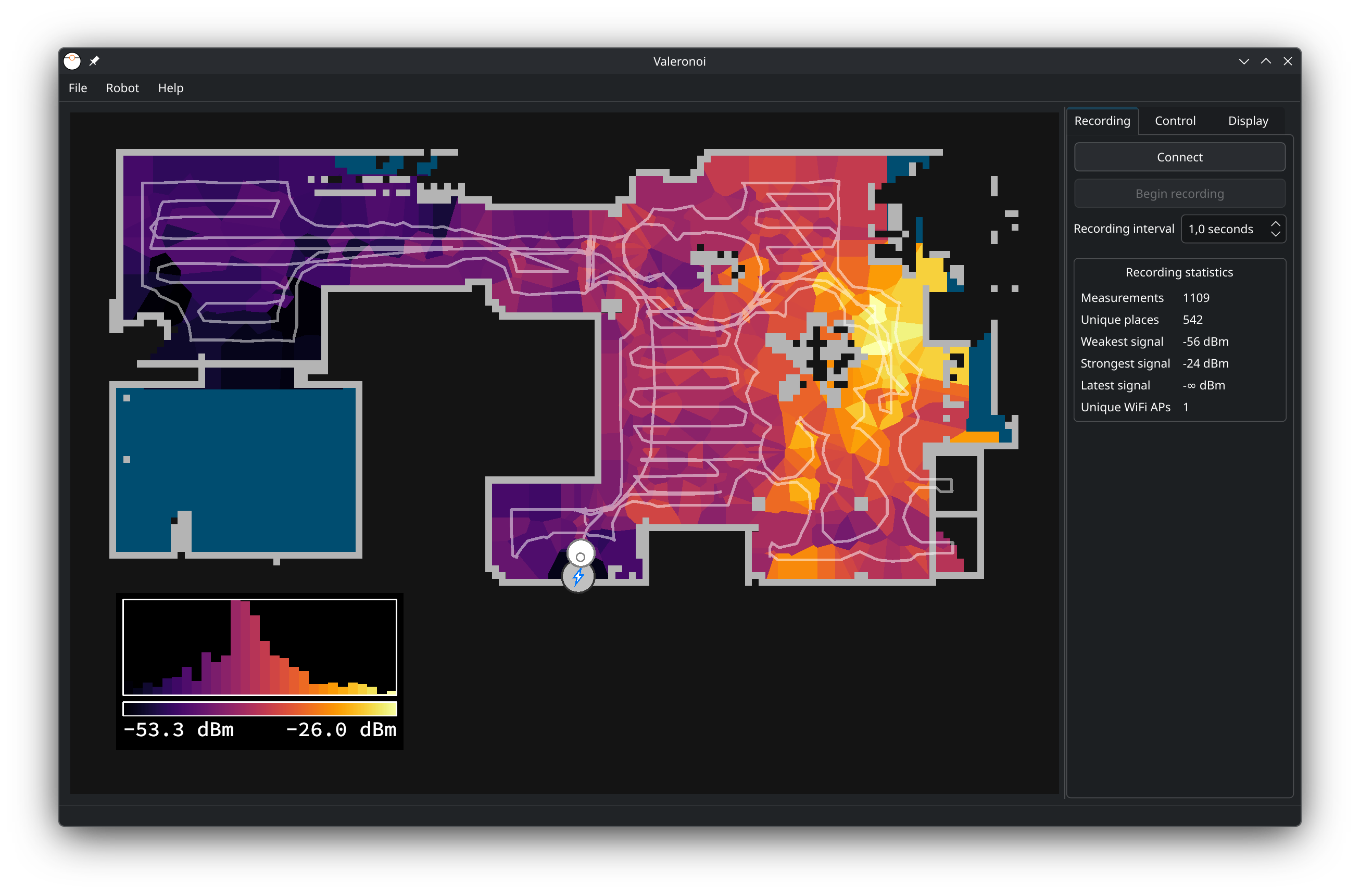
Features
- Real-time WiFi Mapping: Record WiFi signal strength while your robot cleans.
- Valetudo Integration: Connects directly to robots running Valetudo (API v2).
- Voronoi Visualization: Beautifully renders signal strength across your floor plan.
- Export: Save your generated maps as images for sharing or documentation.
- Persistent Storage: Save and load your measurements in the Valeronoi WiFi Map (
.vwm) format. - Robot Control: Basic controls for starting/stopping cleanups directly from the app.
- Cross-platform: Available for Linux, macOS, and Windows.
- Headless CLI Mode (tested on Linux): Automated recording without GUI, ideal for scheduled scans via cron or containers.
Installation
Binary distributions are available for Linux, macOS and Windows (x86_64). They can be found in the releases.
- Linux: Provided as AppImages and Flatpak single-file bundles (install with
flatpak install Valeronoi-flatpak-*.flatpak) - macOS: Built for macOS 15 (Sequoia) on both Intel and Apple Silicon (separate binaries).
- Windows: Available as an installer and a portable zip. Requires MSVC redistributable DLLs (included in the installer).
Basic Usage
- Prerequisites: Ensure your robot is running a recent Valetudo version (API v2). Persistent maps are highly recommended.
- Setup: Configure the robot connection in Robot → Setup.
- Connect: Click the Connect button to establish a connection with the robot.
- Verify: Ensure the correct map is displayed.
- Record: Click Begin recording to start collecting WiFi data.
- Clean: Start a cleanup (either via Valeronoi's Control tab or Valetudo).
- Monitor: Watch the map update in real-time as the robot moves.
- Finish: Once the robot returns to the dock, stop the recording and save your work as a
.vwmfile.
Important: Map Stability
If your robot does not support persistent maps (e.g., older Roborock V1) or the feature is disabled, only record during partial cleanups. A full cleanup may regenerate the map, changing internal coordinates and corrupting the recording.
Display & Performance
If the visualization is slow, adjust settings in the Display tab:
- Disable "Draw floor"
- Uncheck "Restrict to ..." options
- Increase the Simplify slider
- Toggle OpenGL (Note: Performance may vary; can cause issues in some VMs or Remote Desktop sessions).
Building from source
Prerequisites
- C++ Compiler: Support for C++17 (e.g., GCC 7+, Clang 5+, MSVC 2017+).
- Qt 6: Core, Widgets, Network.
- CGAL: Computational Geometry Algorithms Library (v5.x or v6.x recommended).
- CMake: Version 3.16 or later.
Build Instructions
mkdir build && cd build
cmake .. -DCMAKE_BUILD_TYPE=Release
cmake --build . -j$(nproc)
Flatpak
A Flatpak manifest (de.ccoors.valeronoi.yaml) is included for local builds.
flatpak install flathub org.kde.Sdk//6.11 org.kde.Platform//6.11
flatpak-builder --user --install --force-clean build-dir de.ccoors.valeronoi.yaml
flatpak run de.ccoors.valeronoi
Arch Linux
A PKGBUILD is available in tools/pkgbuild/valeronoi-git. You can build and install it using:
makepkg -si
Development & Testing
Valeronoi includes a test suite to ensure core logic (Voronoi generation, data handling) remains stable.
To build and run tests:
mkdir build && cd build
cmake ..
cmake --build .
./valeronoi-tests
Headless CLI Mode
Valeronoi can run without a GUI for automated WiFi scans, e.g. triggered by a cron job on a headless home server.
Usage
# Start cleaning in vacuum-only mode and record for 30 minutes
valeronoi --headless \
  --url http://192.168.1.100 \
  --mode vacuum \
  --command start \
  --output scan.vwm \
  --duration 1800

# Send a command without recording (e.g. send robot home)
valeronoi --headless --url http://192.168.1.100 --command home
Pressing Ctrl+C (or sending SIGTERM) saves collected data before exiting.
Options
| Option | Description |
|---|---|
--headless | Run without GUI (required) |
--url <url> | Valetudo robot URL |
--output <file> | Output .vwm file (extension added automatically) |
--duration <sec> | Stop recording after N seconds |
--interval <sec> | WiFi polling interval (default: 5s) |
--mode <mode> | Set operation mode: vacuum, mop, vacuum_and_mop |
--command <cmd> | Robot command: start, stop, home, pause, locate |
--return-home | Send stop + home when recording ends (duration or Ctrl+C) |
--auth | Enable HTTP basic auth |
--user / --pass | Auth credentials |
Non-start commands (stop, home, pause, locate) execute immediately and exit — no recording is performed even if --output is specified.
Container usage
# Build
podman build -f Containerfile.build -t valeronoi-build .
podman run --rm -v "$PWD:/host:Z" -w /host valeronoi-build \
  bash -c "mkdir -p build && cd build && cmake .. && cmake --build . -j$(nproc)"
podman build -f Containerfile.run -t valeronoi .

# Run
podman run --rm --network host -v ./output:/output:Z valeronoi \
  --headless --url http://192.168.1.100 \
  --mode vacuum --command start \
  --output /output/wifi_$(date +%F_%H%M).vwm --duration 1800
Cron example
# Daily 30-minute WiFi scan at 10:00
0 10 * * * podman run --rm --network host -v /data/wifi:/output:Z valeronoi --headless --url http://192.168.1.100 --mode vacuum --command start --output /output/scan_$(date +\%F).vwm --duration 1800
The resulting .vwm files can be opened in the GUI for Voronoi visualization and image export.
Contributing
Contributions are welcome! Please see CONTRIBUTING.md for guidelines.
License
GPLv3


Similar repos


Languages
C++
94.1%
CMake
2.9%
NSIS
1.0%
README
Valeronoi
Valeronoi (Valetudo + Voronoi) is a companion for Valetudo for generating WiFi signal strength maps. It visualizes them using a Voronoi diagram.
Features
- Real-time WiFi Mapping: Record WiFi signal strength while your robot cleans.
- Valetudo Integration: Connects directly to robots running Valetudo (API v2).
- Voronoi Visualization: Beautifully renders signal strength across your floor plan.
- Export: Save your generated maps as images for sharing or documentation.
- Persistent Storage: Save and load your measurements in the Valeronoi WiFi Map (
.vwm) format. - Robot Control: Basic controls for starting/stopping cleanups directly from the app.
- Cross-platform: Available for Linux, macOS, and Windows.
- Headless CLI Mode (tested on Linux): Automated recording without GUI, ideal for scheduled scans via cron or containers.
Installation
Binary distributions are available for Linux, macOS and Windows (x86_64). They can be found in the releases.
- Linux: Provided as AppImages and Flatpak single-file bundles (install with
flatpak install Valeronoi-flatpak-*.flatpak) - macOS: Built for macOS 15 (Sequoia) on both Intel and Apple Silicon (separate binaries).
- Windows: Available as an installer and a portable zip. Requires MSVC redistributable DLLs (included in the installer).
Basic Usage
- Prerequisites: Ensure your robot is running a recent Valetudo version (API v2). Persistent maps are highly recommended.
- Setup: Configure the robot connection in Robot → Setup.
- Connect: Click the Connect button to establish a connection with the robot.
- Verify: Ensure the correct map is displayed.
- Record: Click Begin recording to start collecting WiFi data.
- Clean: Start a cleanup (either via Valeronoi's Control tab or Valetudo).
- Monitor: Watch the map update in real-time as the robot moves.
- Finish: Once the robot returns to the dock, stop the recording and save your work as a
.vwmfile.
Important: Map Stability
If your robot does not support persistent maps (e.g., older Roborock V1) or the feature is disabled, only record during partial cleanups. A full cleanup may regenerate the map, changing internal coordinates and corrupting the recording.
Display & Performance
If the visualization is slow, adjust settings in the Display tab:
- Disable "Draw floor"
- Uncheck "Restrict to ..." options
- Increase the Simplify slider
- Toggle OpenGL (Note: Performance may vary; can cause issues in some VMs or Remote Desktop sessions).
Building from source
Prerequisites
- C++ Compiler: Support for C++17 (e.g., GCC 7+, Clang 5+, MSVC 2017+).
- Qt 6: Core, Widgets, Network.
- CGAL: Computational Geometry Algorithms Library (v5.x or v6.x recommended).
- CMake: Version 3.16 or later.
Build Instructions
mkdir build && cd build
cmake .. -DCMAKE_BUILD_TYPE=Release
cmake --build . -j$(nproc)
Flatpak
A Flatpak manifest (de.ccoors.valeronoi.yaml) is included for local builds.
flatpak install flathub org.kde.Sdk//6.11 org.kde.Platform//6.11
flatpak-builder --user --install --force-clean build-dir de.ccoors.valeronoi.yaml
flatpak run de.ccoors.valeronoi
Arch Linux
A PKGBUILD is available in tools/pkgbuild/valeronoi-git. You can build and install it using:
makepkg -si
Development & Testing
Valeronoi includes a test suite to ensure core logic (Voronoi generation, data handling) remains stable.
To build and run tests:
mkdir build && cd build
cmake ..
cmake --build .
./valeronoi-tests
Headless CLI Mode
Valeronoi can run without a GUI for automated WiFi scans, e.g. triggered by a cron job on a headless home server.
Usage
# Start cleaning in vacuum-only mode and record for 30 minutes
valeronoi --headless \
  --url http://192.168.1.100 \
  --mode vacuum \
  --command start \
  --output scan.vwm \
  --duration 1800

# Send a command without recording (e.g. send robot home)
valeronoi --headless --url http://192.168.1.100 --command home
Pressing Ctrl+C (or sending SIGTERM) saves collected data before exiting.
Options
| Option | Description |
|---|---|
--headless | Run without GUI (required) |
--url <url> | Valetudo robot URL |
--output <file> | Output .vwm file (extension added automatically) |
--duration <sec> | Stop recording after N seconds |
--interval <sec> | WiFi polling interval (default: 5s) |
--mode <mode> | Set operation mode: vacuum, mop, vacuum_and_mop |
--command <cmd> | Robot command: start, stop, home, pause, locate |
--return-home | Send stop + home when recording ends (duration or Ctrl+C) |
--auth | Enable HTTP basic auth |
--user / --pass | Auth credentials |
Non-start commands (stop, home, pause, locate) execute immediately and exit — no recording is performed even if --output is specified.
Container usage
# Build
podman build -f Containerfile.build -t valeronoi-build .
podman run --rm -v "$PWD:/host:Z" -w /host valeronoi-build \
  bash -c "mkdir -p build && cd build && cmake .. && cmake --build . -j$(nproc)"
podman build -f Containerfile.run -t valeronoi .

# Run
podman run --rm --network host -v ./output:/output:Z valeronoi \
  --headless --url http://192.168.1.100 \
  --mode vacuum --command start \
  --output /output/wifi_$(date +%F_%H%M).vwm --duration 1800
Cron example
# Daily 30-minute WiFi scan at 10:00
0 10 * * * podman run --rm --network host -v /data/wifi:/output:Z valeronoi --headless --url http://192.168.1.100 --mode vacuum --command start --output /output/scan_$(date +\%F).vwm --duration 1800
The resulting .vwm files can be opened in the GUI for Voronoi visualization and image export.
Contributing
Contributions are welcome! Please see CONTRIBUTING.md for guidelines.
License
GPLv3
Similar repos
Languages
C++
94.1%
CMake
2.9%
NSIS
1.0%