
Haskell plugin for IntelliJ IDEA
See the codeREADME
HaskForce


The IntelliJ plugin for Haskell.
Want to get started right away? Check out the Quick Start Guide!
Getting involved
Want to contribute code? See the CONTRIBUTING doc for more info.
Follow @HaskForce on Twitter to stay up to date on new releases and work in progress.
Start a discussion on our gitter channel.
Do you IRC? Join #haskforce on freenode!
Building
Clone the repo -
% git clone https://github.com/carymrobbins/intellij-haskforce
% cd intellij-haskforce
Build with Gradle -
% ./gradlew assemble
You can then find your plugin zip archive in build/distributions -
% ls build/distributions
Developing
When hacking on HaskForce, you may need the following plugins -
- Scala
- PsiViewer - Useful for viewing parse trees
- JFlex Support 1.5.1 - Generate lexers
- Grammar Kit v2017.1.7 - Generate parsers
To import this project in IntelliJ, use File > Open, navigate to
the project directory, then click OK.
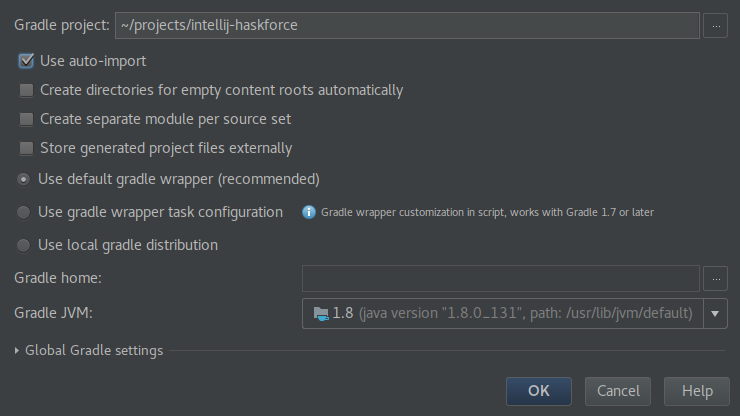
A Gradle configuration prompt will appear. Be sure to uncheck Create a separate module per source set. Below is a recommended setup -
Running the plugin
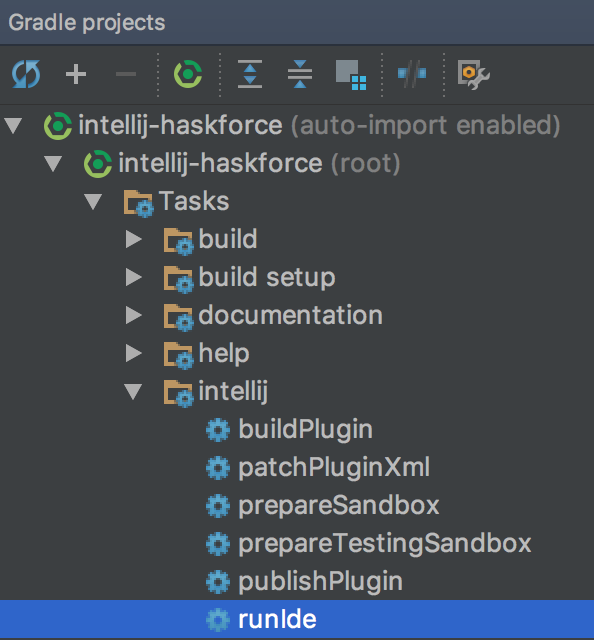
You can use the runIde Gradle task from the command line or directly
from IntelliJ -
Debugging the plugin
You can run the plugin as described above via IntelliJ to enable setting breakpoints and stepping through code.
If you wish to debug the external builder (e.g. the jps-plugin sub-project),
you'll need to use the remote debugger.
See the IntelliJ SDK DevGuide
for more info.
Testing the plugin
You can run all tests using the standard Gradle task -
./gradlew test
Contributors


Similar repos


Languages
Java
47.2%
Scala
35.3%
Haskell
12.0%
Lex
5.2%
Haskell plugin for IntelliJ IDEA
See the codeREADME
HaskForce
The IntelliJ plugin for Haskell.
Want to get started right away? Check out the Quick Start Guide!
Getting involved
Want to contribute code? See the CONTRIBUTING doc for more info.
Follow @HaskForce on Twitter to stay up to date on new releases and work in progress.
Start a discussion on our gitter channel.
Do you IRC? Join #haskforce on freenode!
Building
Clone the repo -
% git clone https://github.com/carymrobbins/intellij-haskforce
% cd intellij-haskforce
Build with Gradle -
% ./gradlew assemble
You can then find your plugin zip archive in build/distributions -
% ls build/distributions
Developing
When hacking on HaskForce, you may need the following plugins -
- Scala
- PsiViewer - Useful for viewing parse trees
- JFlex Support 1.5.1 - Generate lexers
- Grammar Kit v2017.1.7 - Generate parsers
To import this project in IntelliJ, use File > Open, navigate to
the project directory, then click OK.
A Gradle configuration prompt will appear. Be sure to uncheck Create a separate module per source set. Below is a recommended setup -
Running the plugin
You can use the runIde Gradle task from the command line or directly
from IntelliJ -
Debugging the plugin
You can run the plugin as described above via IntelliJ to enable setting breakpoints and stepping through code.
If you wish to debug the external builder (e.g. the jps-plugin sub-project),
you'll need to use the remote debugger.
See the IntelliJ SDK DevGuide
for more info.
Testing the plugin
You can run all tests using the standard Gradle task -
./gradlew test
Similar repos
Contributors
Languages
Java
47.2%
Scala
35.3%
Haskell
12.0%
Lex
5.2%