[ICCV 2025 Oral] DPoser-X: Diffusion Model as Robust 3D Whole-body Human Pose Prior
Python
237
13 commits
updated Oct 8, 2025
Junzhe Lu1,*, Jing Lin2,*, Hongkun Dou3, Ailing Zeng4, Yue Deng3, Xian Liu5, Zhongang Cai6, Lei Yang6, Yulun Zhang7, Haoqian Wang1,†, Ziwei Liu2,†
* Equal contribution. † Corresponding authors.
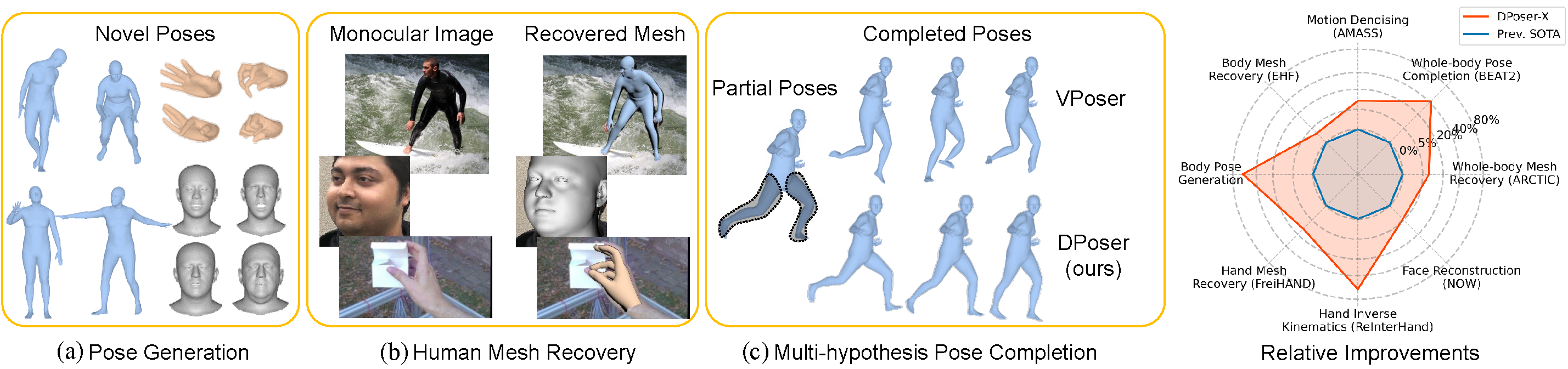
📊 An overview of DPoser-X’s versatility and performance across multiple pose-related tasks
Welcome to the official implementation of DPoser-X: Diffusion Model as Robust 3D Whole-body Human Pose Prior. 🚀
In this repository, we're excited to introduce DPoser-X, a robust 3D whole-body human pose prior leveraging diffusion models.
Seamlessly integrating with various pose-centric tasks involving the body, hands, and face, DPoser-X surpasses existing pose priors, achieving up to 61% improvement across 8 benchmarks.
Tested Configuration: Our code have been tested on PyTorch 1.12.1 with CUDA 11.3.
Installation Recommendation:
conda install pytorch==1.12.1 torchvision==0.13.1 cudatoolkit=11.3 -c pytorch
conda install -c conda-forge pytorch-lightning=2.1.0
Required Python Packages:
pip install -r requirements.txt
Human Models:
We use human models like SMPLX, MANO, FLAME in our experiments. Make sure to set the --bodymodel-path parameter correctly in scripts like demo.py based on your body model's download location.
Pre-trained Models: You can download the pre-trained DPoser-X models from either Hugging Face Hub or Google Drive. Place them in the ./pretrained_models directory.
We provide a convenient script to download the pre-trained DPoser-X models from Hugging Face Hub. The script will automatically place the files in the correct ./pretrained_models directory.
To get the models, simply run download_models.py from your terminal.
# Download all models (default behavior)
python download_models.py

# Download only the body and hand models
python download_models.py body hand

# See all available options and help
python download_models.py --help
For manual downloads, you can still access the files on Google Drive or Hugging Face Hub.
Sample Data: Check out ./examples for some samples, including some images with detected keypoints annotation and pose files.
Explore DPoser-X Tasks:
Generate poses and save rendered images:
python -m run.tester.body.demo --config configs/body/subvp/timefc.py --task generation
For videos of the generation process:
python -m run.tester.body.demo --config configs/body/subvp/timefc.py --task generation_process
Complete body poses and save the visualization results:
python -m run.tester.body.demo --config configs/body/subvp/timefc.py --task completion --hypo 10 --part right_arm --view right_half
Explore other solvers like ScoreSDE for our DPoser prior:
python -m run.tester.body.demo --config configs/body/subvp/timefc.py --task completion --mode ScoreSDE --hypo 10 --part right_arm --view right_half
Summarize visual results in a video:
python -m run.tester.body.motion_denoising --config configs/body/subvp/timefc.py --file-path ./examples/Gestures_3_poses_batch005.npz --noise-std 0.04
Use the detected 2D keypoints from ViTPose and save fitting results:
python -m run.tester.body.demo_fit --img ./examples/body/images/01_img.jpg --kpt_path ./examples/body/predictions/01_img.json
Generate hand poses and save rendered images:
python -m run.tester.hand.demo --config configs/hand/subvp/timefc.py --task generation
Perform hand inverse kinematics and save the visualization results:
python -m run.tester.hand.demo --config configs/hand/subvp/timefc.py --task inverse_kinematics --ik-type partial
Use the detected 2D keypoints from MMPose hand model and save fitting results:
python -m run.tester.hand.demo_fit --img ./examples/hands/images/00000014.jpg --mmpose ./examples/hands/predictions/00000014.json
Generate face shapes & expressions and save rendered images:
python -m run.tester.face.demo --config configs/face_full/subvp/combiner.py --task generation
Perform face inverse kinematics and save the visualization results:
python -m run.tester.face.demo --config configs/face_full/subvp/combiner.py --task inverse_kinematics --ik-type noisy --noise_std 0.005
Check this repo for details.
Generate whole body poses and save rendered images:
python -m run.tester.wholebody.demo --config configs/wholebody/subvp/mixed.py --task generation
Complete whole body poses and save the visualization results:
python -m run.tester.wholebody.demo --config configs/wholebody/subvp/mixed.py --task completion --part lhand --hypo 5
Use the detected 2D keypoints from ViTPose and save fitting results:
python -m run.tester.wholebody.demo_fit --img ./examples/body/images/01_img.jpg --kpt_path ./examples/body/predictions/01_img.json
See the documentation in lib/data/Data_preparation.md for detailed instructions on preparing the training datasets.
After setting up your dataset, begin training DPoser-X. We support training for body, hand, face and whole-body models:
Body Model Training:
python -m run.trainer.body.diffusion -c configs.body.subvp.timefc.get_config --name reproduce_body
Hand Model Training:
python -m run.trainer.hand.diffusion -c configs.hand.subvp.timefc.get_config --name reproduce_hand
Face Model Training:
python -m run.trainer.face.diffusion -c configs.face.subvp.pose_timefc.get_config --name reproduce_face
Whole-body Model Training:
python -m run.trainer.wholebody.diffusion -c configs.wholebody.subvp.mixed.get_config --name reproduce_wholebody
For all training models, the checkpoints and TensorBoard logs will be stored under ./checkpoints and ./logs separately.
Quantitatively evaluate the generated samples using this script:
python -m run.tester.body.demo --config configs/body/subvp/timefc.py --task eval_generation
This will use the SMPL body model to evaluate APD for 500 samples following Pose-NDF. Additionally, we evaluate the common metrics like FID, Precision, Recall for 50000 samples.
For testing on the AMASS dataset (make sure you've completed the dataset preparation in Step 4):
python -m run.tester.body.completion --config configs/body/subvp/timefc.py --gpus 1 --hypo 10 --sample 10 --part legs
To evaluate motion denoising on the AMASS dataset, use the following steps:
HumanEva part of the AMASS dataset into fragments using this script:
python lib/data/body_process/HumanEva.py --input-dir path_to_HumanEva --output-dir ./data/HumanEva_60frame --seq-len 60
data-dir:
python -m run.tester.body.motion_denoising --config configs/body/subvp/timefc.py --data-dir ./data/HumanEva_60frame --noise-std 0.04
python -m run.tester.body.motion_denoising_partial --config configs/body/subvp/timefc.py --data-dir ./data/HumanEva_60frame --part left_arm
To test on the EHF dataset, follow these steps:
First, download the EHF dataset from SMPLX.
Next, detect the 2d keypoints using ViTPose. Ensure you follow this directory structure:
${EHF_ROOT}
.
|-- 01_align.ply
|-- 01_img.jpg
|-- 01_img.png
|-- 01_scan.obj
...
|-- vitpose_keypoints
    |-- predictions
          |-- 01_img.json
          |-- 02_img.json
          ...
Specify the --data-dir and run this script:
python -m run.tester.body.EHF --data-dir=path_to_EHF --outdir=./output/body/test_results/hmr/vitpose_kpts --kpts vitpose
To evaluate the generated hands, run:
python -m run.tester.hand.demo --config configs/hand/subvp/timefc.py --task eval_generation
This will evaluate the generated hands using metrics such as APD, FID, Precision, Recall, and dNN.
To perform hand inverse kinematics using DPoser, run the following script:
python -m run.tester.hand.inverse_kinematics --config configs/hand/subvp/timefc.py --ik-type sparse --gpus 4
This will perform hand inverse kinematics on sparse settings.
There are also other types of inverse kinematics available, such as noisy and partial. To use them, simply replace --ik-type sparse with --ik-type noisy or --ik-type partial.
To test hand mesh recovery on the FreiHAND dataset, run the following script:
python -m run.tester.hand.freihand --data-dir path_to_FreiHAND --outdir ./output/hand/test_results/hmr/gt_kpts --kpts gt --init none --device cuda:1
This will recover the hand mesh based on the provided configuration and save it under the specified output path.
To evaluate the generated faces, run:
python -m run.tester.face.demo --config configs/face_full/subvp/combiner.py --task eval_generation
This will evaluate the generated faces using FID, Precision, Recall, and DNN for face shape and expression separately.
To perform face inverse kinematics using DPoser, run the following script:
python -m run.tester.face.inverse_kinematics --gpus 4 --batch_size 500 --ik-type noisy --noise_std 0.005
This will perform inverse kinematics on noisy face data with a specified noise standard deviation and assess the metrics.
There are also other types of inverse kinematics available, such as left_face and right_face. To use them, simply replace --ik-type noisy with --ik-type left_face or --ik-type right_face.
To evaluate the generated whole-body poses, run:
python -m run.tester.wholebody.demo --config configs/wholebody/subvp/mixed.py --task eval_generation
This will compute the evaluation metrics used in our paper for generated whole-body poses.
To test on the Arctic dataset, run the following script:
python -m run.tester.wholebody.batch_hmr --data_dir path_to_Arctic --prior DPoser --kpts mmpose
This script will fit the whole-body model to the Arctic dataset using the specified input keypoints type (mmpose) and compute the metrics.
To evaluate whole-body pose completion on the EgoBody/Arctic/EMAGE dataset, run the following script:
python -m run.tester.wholebody.completion --config configs/wholebody/subvp/mixed.py --gpus 4 --hypo 10 --sample 10 --port 14601 --dataset egobody/arctic/emage
RuntimeError: Subtraction, the '-' operator, with a bool tensor is not supported. If you are trying to invert a mask, use the '~' or 'logical_not()' operator instead.: Solution here
TypeError: startswith first arg must be bytes or a tuple of bytes, not str.: Fix here.
ImportError: cannot import name 'bool' from 'numpy': Fix here.
Big thanks to ScoreSDE, GFPose, and Hand4Whole for their foundational work and code.
@article{lu2025dposerx,
  title={DPoser-X: Diffusion Model as Robust 3D Whole-body Human Pose Prior},
  author={Lu, Junzhe and Lin, Jing and Dou, Hongkun and Zeng, Ailing and Deng, Yue and Liu, Xian and Cai, Zhongang and Yang, Lei and Zhang, Yulun and Wang, Haoqian and Liu, Ziwei},
  journal={arXiv preprint arXiv:2508.00599},
  year={2025}
}
[ICCV 2025 Oral] DPoser-X: Diffusion Model as Robust 3D Whole-body Human Pose Prior
Python
237
13 commits
updated Oct 8, 2025
Junzhe Lu1,*, Jing Lin2,*, Hongkun Dou3, Ailing Zeng4, Yue Deng3, Xian Liu5, Zhongang Cai6, Lei Yang6, Yulun Zhang7, Haoqian Wang1,†, Ziwei Liu2,†
* Equal contribution. † Corresponding authors.
📊 An overview of DPoser-X’s versatility and performance across multiple pose-related tasks
Welcome to the official implementation of DPoser-X: Diffusion Model as Robust 3D Whole-body Human Pose Prior. 🚀
In this repository, we're excited to introduce DPoser-X, a robust 3D whole-body human pose prior leveraging diffusion models.
Seamlessly integrating with various pose-centric tasks involving the body, hands, and face, DPoser-X surpasses existing pose priors, achieving up to 61% improvement across 8 benchmarks.
Tested Configuration: Our code have been tested on PyTorch 1.12.1 with CUDA 11.3.
Installation Recommendation:
conda install pytorch==1.12.1 torchvision==0.13.1 cudatoolkit=11.3 -c pytorch
conda install -c conda-forge pytorch-lightning=2.1.0
Required Python Packages:
pip install -r requirements.txt
Human Models:
We use human models like SMPLX, MANO, FLAME in our experiments. Make sure to set the --bodymodel-path parameter correctly in scripts like demo.py based on your body model's download location.
Pre-trained Models: You can download the pre-trained DPoser-X models from either Hugging Face Hub or Google Drive. Place them in the ./pretrained_models directory.
We provide a convenient script to download the pre-trained DPoser-X models from Hugging Face Hub. The script will automatically place the files in the correct ./pretrained_models directory.
To get the models, simply run download_models.py from your terminal.
# Download all models (default behavior)
python download_models.py

# Download only the body and hand models
python download_models.py body hand

# See all available options and help
python download_models.py --help
For manual downloads, you can still access the files on Google Drive or Hugging Face Hub.
Sample Data: Check out ./examples for some samples, including some images with detected keypoints annotation and pose files.
Explore DPoser-X Tasks:
Generate poses and save rendered images:
python -m run.tester.body.demo --config configs/body/subvp/timefc.py --task generation
For videos of the generation process:
python -m run.tester.body.demo --config configs/body/subvp/timefc.py --task generation_process
Complete body poses and save the visualization results:
python -m run.tester.body.demo --config configs/body/subvp/timefc.py --task completion --hypo 10 --part right_arm --view right_half
Explore other solvers like ScoreSDE for our DPoser prior:
python -m run.tester.body.demo --config configs/body/subvp/timefc.py --task completion --mode ScoreSDE --hypo 10 --part right_arm --view right_half
Summarize visual results in a video:
python -m run.tester.body.motion_denoising --config configs/body/subvp/timefc.py --file-path ./examples/Gestures_3_poses_batch005.npz --noise-std 0.04
Use the detected 2D keypoints from ViTPose and save fitting results:
python -m run.tester.body.demo_fit --img ./examples/body/images/01_img.jpg --kpt_path ./examples/body/predictions/01_img.json
Generate hand poses and save rendered images:
python -m run.tester.hand.demo --config configs/hand/subvp/timefc.py --task generation
Perform hand inverse kinematics and save the visualization results:
python -m run.tester.hand.demo --config configs/hand/subvp/timefc.py --task inverse_kinematics --ik-type partial
Use the detected 2D keypoints from MMPose hand model and save fitting results:
python -m run.tester.hand.demo_fit --img ./examples/hands/images/00000014.jpg --mmpose ./examples/hands/predictions/00000014.json
Generate face shapes & expressions and save rendered images:
python -m run.tester.face.demo --config configs/face_full/subvp/combiner.py --task generation
Perform face inverse kinematics and save the visualization results:
python -m run.tester.face.demo --config configs/face_full/subvp/combiner.py --task inverse_kinematics --ik-type noisy --noise_std 0.005
Check this repo for details.
Generate whole body poses and save rendered images:
python -m run.tester.wholebody.demo --config configs/wholebody/subvp/mixed.py --task generation
Complete whole body poses and save the visualization results:
python -m run.tester.wholebody.demo --config configs/wholebody/subvp/mixed.py --task completion --part lhand --hypo 5
Use the detected 2D keypoints from ViTPose and save fitting results:
python -m run.tester.wholebody.demo_fit --img ./examples/body/images/01_img.jpg --kpt_path ./examples/body/predictions/01_img.json
See the documentation in lib/data/Data_preparation.md for detailed instructions on preparing the training datasets.
After setting up your dataset, begin training DPoser-X. We support training for body, hand, face and whole-body models:
Body Model Training:
python -m run.trainer.body.diffusion -c configs.body.subvp.timefc.get_config --name reproduce_body
Hand Model Training:
python -m run.trainer.hand.diffusion -c configs.hand.subvp.timefc.get_config --name reproduce_hand
Face Model Training:
python -m run.trainer.face.diffusion -c configs.face.subvp.pose_timefc.get_config --name reproduce_face
Whole-body Model Training:
python -m run.trainer.wholebody.diffusion -c configs.wholebody.subvp.mixed.get_config --name reproduce_wholebody
For all training models, the checkpoints and TensorBoard logs will be stored under ./checkpoints and ./logs separately.
Quantitatively evaluate the generated samples using this script:
python -m run.tester.body.demo --config configs/body/subvp/timefc.py --task eval_generation
This will use the SMPL body model to evaluate APD for 500 samples following Pose-NDF. Additionally, we evaluate the common metrics like FID, Precision, Recall for 50000 samples.
For testing on the AMASS dataset (make sure you've completed the dataset preparation in Step 4):
python -m run.tester.body.completion --config configs/body/subvp/timefc.py --gpus 1 --hypo 10 --sample 10 --part legs
To evaluate motion denoising on the AMASS dataset, use the following steps:
HumanEva part of the AMASS dataset into fragments using this script:
python lib/data/body_process/HumanEva.py --input-dir path_to_HumanEva --output-dir ./data/HumanEva_60frame --seq-len 60
data-dir:
python -m run.tester.body.motion_denoising --config configs/body/subvp/timefc.py --data-dir ./data/HumanEva_60frame --noise-std 0.04
python -m run.tester.body.motion_denoising_partial --config configs/body/subvp/timefc.py --data-dir ./data/HumanEva_60frame --part left_arm
To test on the EHF dataset, follow these steps:
First, download the EHF dataset from SMPLX.
Next, detect the 2d keypoints using ViTPose. Ensure you follow this directory structure:
${EHF_ROOT}
.
|-- 01_align.ply
|-- 01_img.jpg
|-- 01_img.png
|-- 01_scan.obj
...
|-- vitpose_keypoints
    |-- predictions
          |-- 01_img.json
          |-- 02_img.json
          ...
Specify the --data-dir and run this script:
python -m run.tester.body.EHF --data-dir=path_to_EHF --outdir=./output/body/test_results/hmr/vitpose_kpts --kpts vitpose
To evaluate the generated hands, run:
python -m run.tester.hand.demo --config configs/hand/subvp/timefc.py --task eval_generation
This will evaluate the generated hands using metrics such as APD, FID, Precision, Recall, and dNN.
To perform hand inverse kinematics using DPoser, run the following script:
python -m run.tester.hand.inverse_kinematics --config configs/hand/subvp/timefc.py --ik-type sparse --gpus 4
This will perform hand inverse kinematics on sparse settings.
There are also other types of inverse kinematics available, such as noisy and partial. To use them, simply replace --ik-type sparse with --ik-type noisy or --ik-type partial.
To test hand mesh recovery on the FreiHAND dataset, run the following script:
python -m run.tester.hand.freihand --data-dir path_to_FreiHAND --outdir ./output/hand/test_results/hmr/gt_kpts --kpts gt --init none --device cuda:1
This will recover the hand mesh based on the provided configuration and save it under the specified output path.
To evaluate the generated faces, run:
python -m run.tester.face.demo --config configs/face_full/subvp/combiner.py --task eval_generation
This will evaluate the generated faces using FID, Precision, Recall, and DNN for face shape and expression separately.
To perform face inverse kinematics using DPoser, run the following script:
python -m run.tester.face.inverse_kinematics --gpus 4 --batch_size 500 --ik-type noisy --noise_std 0.005
This will perform inverse kinematics on noisy face data with a specified noise standard deviation and assess the metrics.
There are also other types of inverse kinematics available, such as left_face and right_face. To use them, simply replace --ik-type noisy with --ik-type left_face or --ik-type right_face.
To evaluate the generated whole-body poses, run:
python -m run.tester.wholebody.demo --config configs/wholebody/subvp/mixed.py --task eval_generation
This will compute the evaluation metrics used in our paper for generated whole-body poses.
To test on the Arctic dataset, run the following script:
python -m run.tester.wholebody.batch_hmr --data_dir path_to_Arctic --prior DPoser --kpts mmpose
This script will fit the whole-body model to the Arctic dataset using the specified input keypoints type (mmpose) and compute the metrics.
To evaluate whole-body pose completion on the EgoBody/Arctic/EMAGE dataset, run the following script:
python -m run.tester.wholebody.completion --config configs/wholebody/subvp/mixed.py --gpus 4 --hypo 10 --sample 10 --port 14601 --dataset egobody/arctic/emage
RuntimeError: Subtraction, the '-' operator, with a bool tensor is not supported. If you are trying to invert a mask, use the '~' or 'logical_not()' operator instead.: Solution here
TypeError: startswith first arg must be bytes or a tuple of bytes, not str.: Fix here.
ImportError: cannot import name 'bool' from 'numpy': Fix here.
Big thanks to ScoreSDE, GFPose, and Hand4Whole for their foundational work and code.
@article{lu2025dposerx,
  title={DPoser-X: Diffusion Model as Robust 3D Whole-body Human Pose Prior},
  author={Lu, Junzhe and Lin, Jing and Dou, Hongkun and Zeng, Ailing and Deng, Yue and Liu, Xian and Cai, Zhongang and Yang, Lei and Zhang, Yulun and Wang, Haoqian and Liu, Ziwei},
  journal={arXiv preprint arXiv:2508.00599},
  year={2025}
}