On-device LLM execution in React Native with Vercel AI SDK compatibility
See the codeA collection of on-device AI primitives for React Native with first-class Vercel AI SDK support. Run AI models directly on users' devices for privacy-preserving, low-latency inference without server costs.
| React Native AI | AI SDK |
|---|---|
| 0.11 and below | v5 |
| 0.12 and above | v6 |
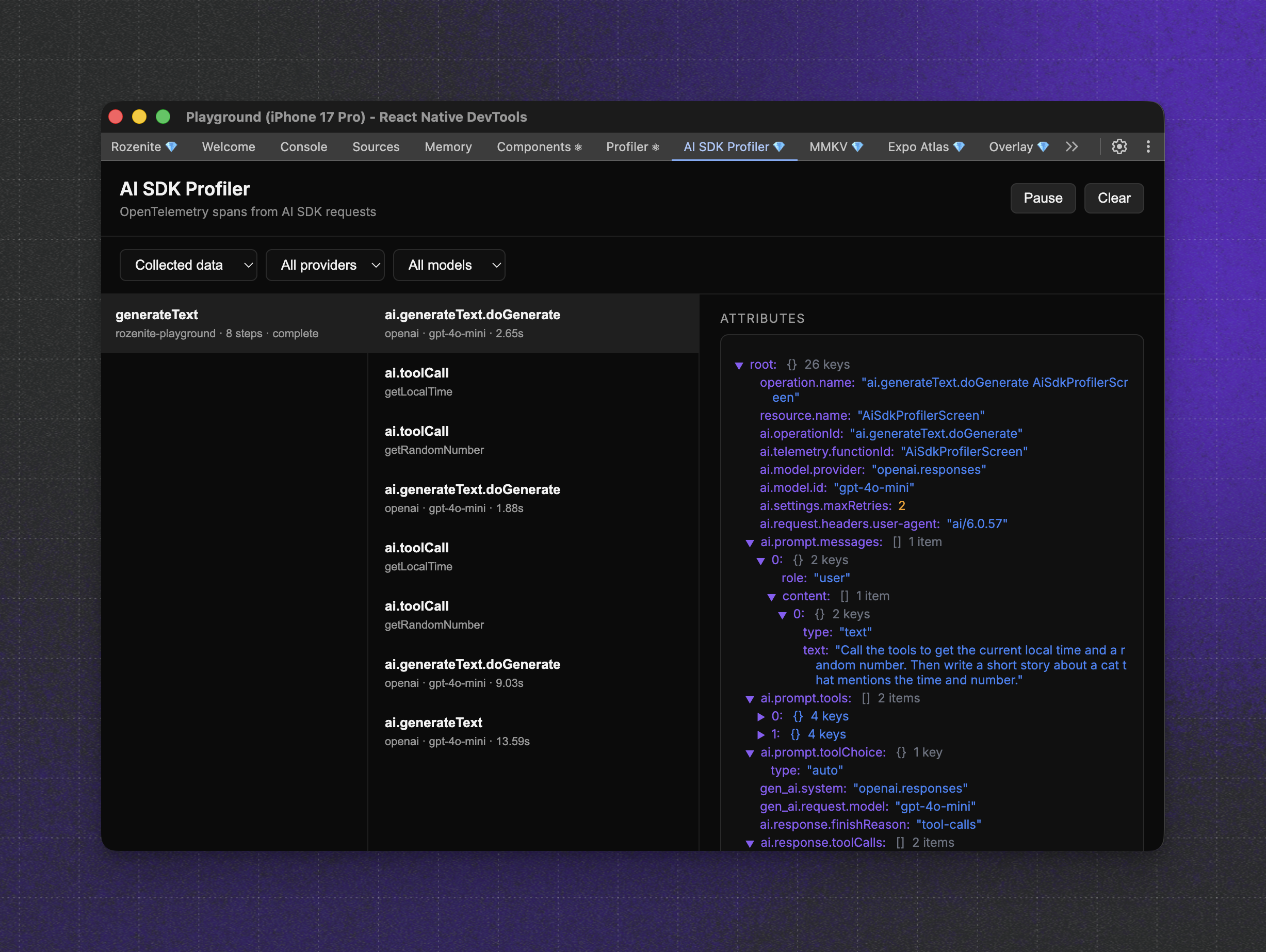
The AI SDK Profiler plugin captures OpenTelemetry spans from Vercel AI SDK requests and surfaces them in Rozenite DevTools. DevTools are runtime agnostic, so they work with on-device and remote runtimes.
npm install @react-native-ai/dev-tools
Rozenite must be installed and enabled in your app. See the Rozenite getting started guide.
The Expo demo app in apps/expo-example
includes native-development Rozenite wiring for this plugin. Run the example
app, open React Native DevTools, and select AI SDK Profiler to inspect chat
spans emitted by the Vercel AI SDK.
If the AI SDK Profiler panel is visible but remains empty after sending a chat
message, close that React Native DevTools window and open a fresh one. In
practice, a stale debugger session can keep the Rozenite panel mounted without
receiving the current app's telemetry stream.
| Provider | Built-in | Platforms | Runtime | Description |
|---|---|---|---|---|
| Apple | ✅ Yes | iOS | Apple | Apple Foundation Models, embeddings, transcription, speech |
| Llama | ❌ No | iOS, Android | llama.rn | Run GGUF models via llama.rn |
| MLC | ❌ No | iOS, Android | MLC LLM | Run open-source LLMs via MLC runtime |
Native integration with Apple's on-device AI capabilities. Built-in - no model downloads required, uses system models.
npm install @react-native-ai/apple
No additional linking needed, works immediately on iOS devices (autolinked).
import { apple } from '@react-native-ai/apple'
import {
  generateText,
  embed,
  experimental_transcribe as transcribe,
  experimental_generateSpeech as speech,
} from 'ai'

// Text generation with Apple Intelligence
const { text } = await generateText({
  model: apple(),
  prompt: 'Explain quantum computing',
})

// Generate embeddings
const { embedding } = await embed({
  model: apple.textEmbeddingModel(),
  value: 'Hello world',
})

// Transcribe audio
const { text } = await transcribe({
  model: apple.transcriptionModel(),
  audio: audioBuffer,
})

// Text-to-speech
const { audio } = await speech({
  model: apple.speechModel(),
  text: 'Hello from Apple!',
})
| Feature | iOS Version | Additional Requirements |
|---|---|---|
| Text Generation | iOS 26+ | Apple Intelligence device |
| Embeddings | iOS 17+ | - |
| Transcription | iOS 26+ | - |
| Speech Synthesis | iOS 13+ | iOS 17+ for Personal Voice |
See the Apple documentation for detailed setup and usage guides.
Run any GGUF model on-device using llama.rn. Requires download - models are downloaded from HuggingFace.
| Feature | Method | Description |
|---|---|---|
| Text Generation | llama.languageModel() | Chat, completion, streaming, reasoning models |
| Embeddings | llama.textEmbeddingModel() | Text embeddings for RAG and similarity search |
| Speech | llama.speechModel() | Text-to-speech with vocoder models |
npm install @react-native-ai/llama llama.rn react-native-blob-util
import { llama } from '@react-native-ai/llama'
import { generateText, streamText } from 'ai'

// Create model instance (Model ID format: "owner/repo/filename.gguf")
const model = llama.languageModel(
  'ggml-org/SmolLM3-3B-GGUF/SmolLM3-Q4_K_M.gguf'
)

// Download from HuggingFace (with progress)
await model.download((progress) => {
  console.log(`Downloading: ${progress.percentage}%`)
})

// Initialize model (loads into memory)
await model.prepare()

// Generate text
const { text } = await generateText({
  model,
  messages: [
    { role: 'system', content: 'You are a helpful assistant.' },
    { role: 'user', content: 'Write a haiku about coding.' },
  ],
})

// Cleanup when done
await model.unload()
Any GGUF model from HuggingFace can be used. Use the format owner/repo/filename.gguf as the model ID. Popular choices include:
ggml-org/SmolLM3-3B-GGUF/SmolLM3-Q4_K_M.ggufbartowski/Llama-3.2-3B-Instruct-GGUF/Llama-3.2-3B-Instruct-Q4_K_M.ggufQwen/Qwen2.5-1.5B-Instruct-GGUF/qwen2.5-1.5b-instruct-q4_k_m.gguf📚 View full Llama documentation →
Run popular open-source LLMs directly on-device using MLC LLM's optimized runtime. Requires download - models must be downloaded before use.
npm install @react-native-ai/mlc
Requires the "Increased Memory Limit" capability in Xcode. See the getting started guide for setup instructions.
import { mlc } from '@react-native-ai/mlc'
import { generateText } from 'ai'

// Create model instance
const model = mlc.languageModel('Llama-3.2-3B-Instruct')

// Download and prepare model (one-time setup)
await model.download()
await model.prepare()

// Generate response with Llama via MLC engine
const { text } = await generateText({
  model,
  prompt: 'Explain quantum computing',
})
| Model ID | Size |
|---|---|
Llama-3.2-3B-Instruct | ~2GB |
Phi-3-mini-4k-instruct | ~2.5GB |
Mistral-7B-Instruct | ~4.5GB |
Qwen2.5-1.5B-Instruct | ~1GB |
[!NOTE] MLC requires iOS devices with sufficient memory (1-8GB depending on model). The prebuilt runtime supports the models listed above. For other models or custom configurations, you'll need to recompile the MLC runtime from source.
Comprehensive guides and API references are available at react-native-ai.dev.
Read the contribution guidelines before contributing.
This repository provides agent skills to help you integrate and use the packages. You can easily install them with:
npx skills add https://github.com/callstackincubator/react-native-ai --skill react-native-ai-skills
or manually by copying the skills/ directory in your .cursor/ directory.
react-native-ai is an open source project and will always remain free to use. If you think it's cool, please star it 🌟.
Callstack is a group of React and React Native geeks, contact us at hello@callstack.com if you need any help with these or just want to say hi!
Made with create-react-native-library
749 followers · starred Apr 2025
958 followers · starred Jul 2025
1,204 followers · starred Feb 2025
965 followers · starred Jul 2025
On-device LLM execution in React Native with Vercel AI SDK compatibility
See the codeA collection of on-device AI primitives for React Native with first-class Vercel AI SDK support. Run AI models directly on users' devices for privacy-preserving, low-latency inference without server costs.
| React Native AI | AI SDK |
|---|---|
| 0.11 and below | v5 |
| 0.12 and above | v6 |
The AI SDK Profiler plugin captures OpenTelemetry spans from Vercel AI SDK requests and surfaces them in Rozenite DevTools. DevTools are runtime agnostic, so they work with on-device and remote runtimes.
npm install @react-native-ai/dev-tools
Rozenite must be installed and enabled in your app. See the Rozenite getting started guide.
The Expo demo app in apps/expo-example
includes native-development Rozenite wiring for this plugin. Run the example
app, open React Native DevTools, and select AI SDK Profiler to inspect chat
spans emitted by the Vercel AI SDK.
If the AI SDK Profiler panel is visible but remains empty after sending a chat
message, close that React Native DevTools window and open a fresh one. In
practice, a stale debugger session can keep the Rozenite panel mounted without
receiving the current app's telemetry stream.
| Provider | Built-in | Platforms | Runtime | Description |
|---|---|---|---|---|
| Apple | ✅ Yes | iOS | Apple | Apple Foundation Models, embeddings, transcription, speech |
| Llama | ❌ No | iOS, Android | llama.rn | Run GGUF models via llama.rn |
| MLC | ❌ No | iOS, Android | MLC LLM | Run open-source LLMs via MLC runtime |
Native integration with Apple's on-device AI capabilities. Built-in - no model downloads required, uses system models.
npm install @react-native-ai/apple
No additional linking needed, works immediately on iOS devices (autolinked).
import { apple } from '@react-native-ai/apple'
import {
  generateText,
  embed,
  experimental_transcribe as transcribe,
  experimental_generateSpeech as speech,
} from 'ai'

// Text generation with Apple Intelligence
const { text } = await generateText({
  model: apple(),
  prompt: 'Explain quantum computing',
})

// Generate embeddings
const { embedding } = await embed({
  model: apple.textEmbeddingModel(),
  value: 'Hello world',
})

// Transcribe audio
const { text } = await transcribe({
  model: apple.transcriptionModel(),
  audio: audioBuffer,
})

// Text-to-speech
const { audio } = await speech({
  model: apple.speechModel(),
  text: 'Hello from Apple!',
})
| Feature | iOS Version | Additional Requirements |
|---|---|---|
| Text Generation | iOS 26+ | Apple Intelligence device |
| Embeddings | iOS 17+ | - |
| Transcription | iOS 26+ | - |
| Speech Synthesis | iOS 13+ | iOS 17+ for Personal Voice |
See the Apple documentation for detailed setup and usage guides.
Run any GGUF model on-device using llama.rn. Requires download - models are downloaded from HuggingFace.
| Feature | Method | Description |
|---|---|---|
| Text Generation | llama.languageModel() | Chat, completion, streaming, reasoning models |
| Embeddings | llama.textEmbeddingModel() | Text embeddings for RAG and similarity search |
| Speech | llama.speechModel() | Text-to-speech with vocoder models |
npm install @react-native-ai/llama llama.rn react-native-blob-util
import { llama } from '@react-native-ai/llama'
import { generateText, streamText } from 'ai'

// Create model instance (Model ID format: "owner/repo/filename.gguf")
const model = llama.languageModel(
  'ggml-org/SmolLM3-3B-GGUF/SmolLM3-Q4_K_M.gguf'
)

// Download from HuggingFace (with progress)
await model.download((progress) => {
  console.log(`Downloading: ${progress.percentage}%`)
})

// Initialize model (loads into memory)
await model.prepare()

// Generate text
const { text } = await generateText({
  model,
  messages: [
    { role: 'system', content: 'You are a helpful assistant.' },
    { role: 'user', content: 'Write a haiku about coding.' },
  ],
})

// Cleanup when done
await model.unload()
Any GGUF model from HuggingFace can be used. Use the format owner/repo/filename.gguf as the model ID. Popular choices include:
ggml-org/SmolLM3-3B-GGUF/SmolLM3-Q4_K_M.ggufbartowski/Llama-3.2-3B-Instruct-GGUF/Llama-3.2-3B-Instruct-Q4_K_M.ggufQwen/Qwen2.5-1.5B-Instruct-GGUF/qwen2.5-1.5b-instruct-q4_k_m.gguf📚 View full Llama documentation →
Run popular open-source LLMs directly on-device using MLC LLM's optimized runtime. Requires download - models must be downloaded before use.
npm install @react-native-ai/mlc
Requires the "Increased Memory Limit" capability in Xcode. See the getting started guide for setup instructions.
import { mlc } from '@react-native-ai/mlc'
import { generateText } from 'ai'

// Create model instance
const model = mlc.languageModel('Llama-3.2-3B-Instruct')

// Download and prepare model (one-time setup)
await model.download()
await model.prepare()

// Generate response with Llama via MLC engine
const { text } = await generateText({
  model,
  prompt: 'Explain quantum computing',
})
| Model ID | Size |
|---|---|
Llama-3.2-3B-Instruct | ~2GB |
Phi-3-mini-4k-instruct | ~2.5GB |
Mistral-7B-Instruct | ~4.5GB |
Qwen2.5-1.5B-Instruct | ~1GB |
[!NOTE] MLC requires iOS devices with sufficient memory (1-8GB depending on model). The prebuilt runtime supports the models listed above. For other models or custom configurations, you'll need to recompile the MLC runtime from source.
Comprehensive guides and API references are available at react-native-ai.dev.
Read the contribution guidelines before contributing.
This repository provides agent skills to help you integrate and use the packages. You can easily install them with:
npx skills add https://github.com/callstackincubator/react-native-ai --skill react-native-ai-skills
or manually by copying the skills/ directory in your .cursor/ directory.
react-native-ai is an open source project and will always remain free to use. If you think it's cool, please star it 🌟.
Callstack is a group of React and React Native geeks, contact us at hello@callstack.com if you need any help with these or just want to say hi!
Made with create-react-native-library
749 followers · starred Apr 2025
958 followers · starred Jul 2025
1,204 followers · starred Feb 2025
965 followers · starred Jul 2025