
Local-first meeting recorder for Mac. Whisper on-device, your AI for summaries, MCP server for Claude Desktop.
See the codeSee what people are saying
README
Daisy
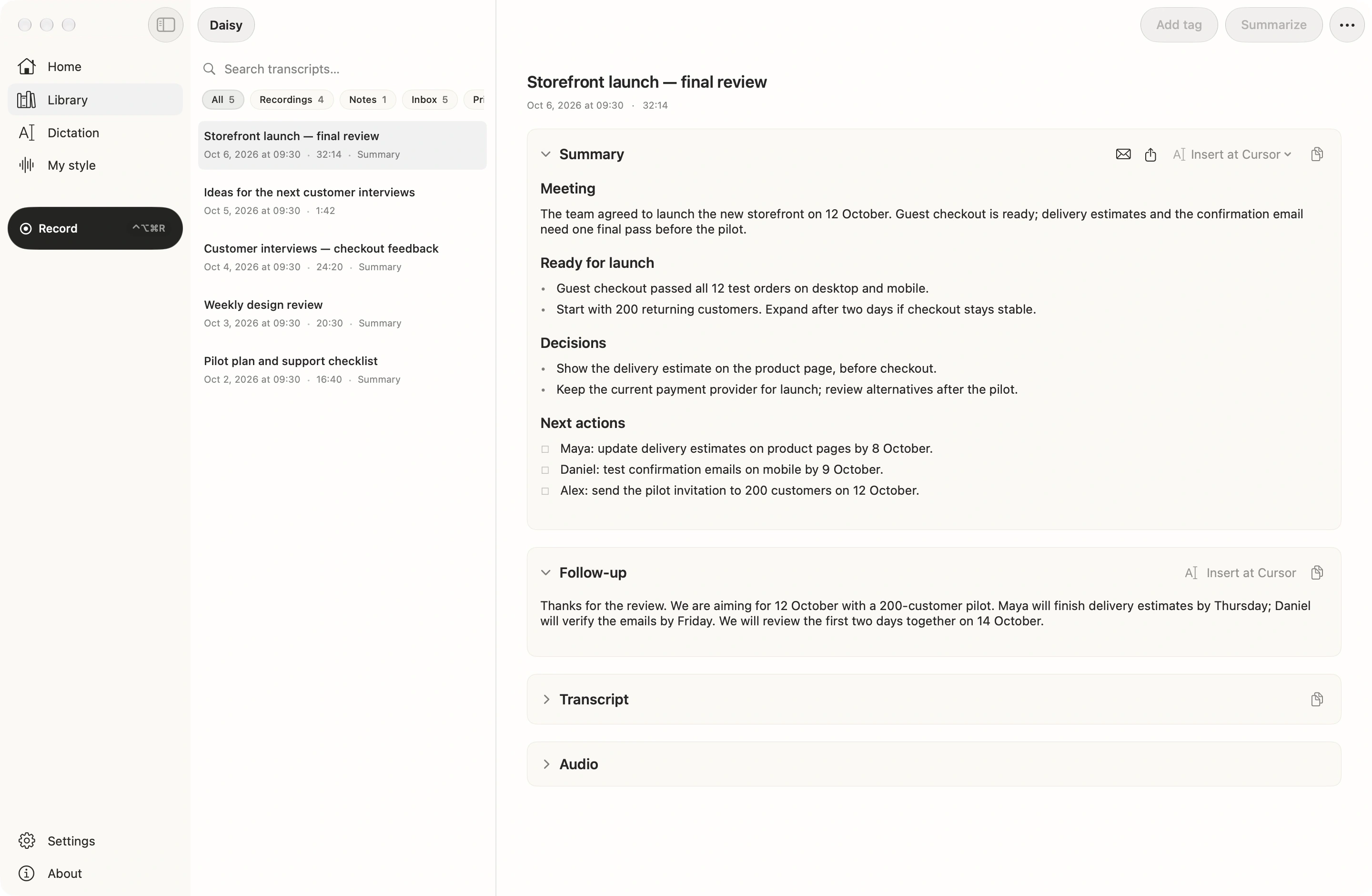
A Mac app that records your meetings and transcribes them on-device, with a local MCP server so Claude can read your calls.
Download
- Latest release on GitHub or mydaisy.io — the same signed, notarized DMG.
- Apple Silicon (M1 or later), macOS 14 Sonoma or later. Intel Macs are not supported: the DMG is a universal build, but Intel builds are untested. The Apple Intelligence summarizer and the Apple SpeechAnalyzer dictation engine need macOS 26.
- Updates arrive in the app through Sparkle.
Privacy, checkable
- Stays on the Mac: audio, transcripts, summaries and speaker voice fingerprints, as plain files under
~/Library/Application Support/Daisy(or a folder you pick). Transcription and speaker separation run on-device. No account, no telemetry, no analytics SDK. - Leaves only after you turn it on: transcript text, never audio, to the cloud summarizer you set up (Anthropic, OpenAI, Kimi or Cursor on your key, or your ChatGPT account); meeting titles and attendee names to Anthropic web search if you enable attendee research; a session you send to Notion, Linear, Slack, a webhook or another MCP server; session text, summaries, voice fingerprints and screenshots to your own iCloud if you turn on iPhone sync (audio never goes through the cloud); Google sign-in if you connect Google Calendar.
- Otherwise the network sees: the update check and download from
mydaisy.io, and the one-time download of the speech models you chose fromhuggingface.co(on macOS 26, Apple's speech engine fetches its language files from Apple). - Check it yourself in ten minutes: block Daisy in a firewall, set the summarizer to Apple Intelligence or a local model, record a meeting, and you still get a transcript and a summary. The steps and the hosts the app can reach are at https://mydaisy.io/verify-local.
MCP in five minutes
Daisy runs an MCP server inside the app, so Claude Desktop, Claude Code, Cursor or Codex can search and read your meetings.
- In Daisy, open Settings → Connections → MCP server and turn on MCP server.
- Next to Claude Desktop, click the connect button. Daisy writes the entry into
claude_desktop_config.jsonfor you, access token included (Claude Desktop runs it throughnpx, so Node.js must be installed). Restart Claude Desktop. - Ask Claude something like "What did we decide about the launch date in last week's calls?"
To add it by hand, put this into ~/Library/Application Support/Claude/claude_desktop_config.json (the token is on the same screen, under Privacy → Access token → Copy):
{
  "mcpServers": {
    "daisy": {
      "command": "npx",
      "args": [
        "-y",
        "mcp-remote@0.1.38",
        "http://127.0.0.1:54321/sse",
        "--transport",
        "sse-only",
        "--allow-http",
        "--header",
        "Authorization: Bearer <access token from Daisy>"
      ]
    }
  }
}
mcp-remote bridges Claude Desktop's stdio to Daisy's local HTTP endpoint. Clients that speak HTTP themselves can use http://127.0.0.1:54321/mcp directly.
Tools:
| Tools | What they do | |
|---|---|---|
| Read | list_sessions, get_session, search_sessions, list_folders, list_destinations | Read your sessions, folders and configured destinations. |
| Edit, local | set_session_title, rename_speaker | Rename a session or name a speaker. Reversible: set the old title again, or pass an empty name to clear a speaker (a voice profile saved by the rename stays until you forget it in Settings). |
| Act, off by default | resummarize_session, route_session_to_destination, route_action_to_destination | Regenerate a summary (replaces the stored one; uses your summarizer, which may be a cloud provider), or send a session or one next step to Notion, Linear, Slack, a webhook or another MCP server. Each send creates a new page, issue or message there. Enabled only after you turn on Privacy → Allow actions from MCP clients. |
No tool can delete a session, audio or a transcript, or change Daisy's settings.
How the server is fenced:
- It binds to
127.0.0.1only, so nothing outside your Mac can reach it, and it rejects requests whoseHostorOriginis not local. - New setups require a bearer token kept in the Keychain, so other programs on your Mac can't read your transcripts without it.
- The default port is
54321; you can change it under Advanced on the same screen.
More: https://mydaisy.io/docs/mcp.
License
Apache License 2.0. You can use, modify and redistribute the code, including commercially, as long as you keep the license and copyright notices. Full text in LICENSE.
What it does
Three capture modes, one app:
- Meetings — records both sides of a call (your mic + the other side via system-audio loopback), no bot joining the meeting. On-device transcription + diarization (
Remote A/Remote B, with optional mic-side attribution), a summary, action items, and a draft follow-up. Optional extras include periodic screenshots with on-device OCR, a preparation brief built from the agenda and past sessions, evidence-backed progress against the meeting plan, local meeting analytics, and custom meeting apps beyond the built-in list. - Push-to-talk dictation — hold a hotkey, speak, and the text is pasted at your cursor in any app. Three on-device engines: Whisper (default), Parakeet (FluidAudio) for lower latency, and Apple SpeechAnalyzer on macOS 26 (zero download). A custom-vocabulary dictionary fixes names/jargon, an optional voice profile learns your phrasing, and a rolling 24-hour history lets you re-copy.
- Voice notes — quick one-off thoughts saved to your Library. Optional: import existing Apple Voice Memos as flat transcripts (on-device, opt-in, needs Full Disk Access).
Around the edges: morning and end-of-day summaries on Home, an opt-in keyboard-layout auto-fixer (retypes text entered in the wrong layout, with undo and per-app exceptions), and provider-returned ChatGPT plan-window usage plus local token accounting for API providers. The UI is localized in English and Russian.
The differentiator: Daisy ships a local MCP server bound to 127.0.0.1 that exposes your sessions as a queryable, actionable data source to any MCP client (Claude Desktop, Cursor, Codex). Because the transcript is already local, Daisy can be a local-only MCP source — something cloud meeting tools structurally can't offer.
Build from source
Requirements:
- Xcode 26+ (ships the macOS 26 SDK the project builds against). The app itself runs on macOS 14+.
- An active Apple Developer account if you want a signed local build (unsigned builds are fine for development inside Xcode)
Clone and open:
git clone https://github.com/ca33u/daisy-app.git
cd daisy-app
open Daisy.xcodeproj
The Swift Package Manager dependencies (Sparkle, WhisperKit via argmax-oss-swift, FluidAudio) resolve on first project load. Hit Run; the app launches.
Project layout
Daisy/                  → SwiftUI app sources (PBXFileSystemSynchronizedRootGroup)
DaisyTests/             → unit tests
Benchmarks/             → reproducible WER/DER/JER scorer, product runner, and public evidence
Daisy.xcodeproj/        → Xcode project
scripts/
  release.sh            → end-to-end release: archive → notarize → DMG → sign → Sparkle appcast
  release-notes/        → per-version markdown bullets consumed by release.sh
  dmgbuild_settings.py  → dmgbuild config (Python) for the installer DMG
  assets/               → DMG background, app icons
build/                  → archive output (gitignored)
RELEASING.md            → branch/channel model and the release/promote/hotfix flows
Key services that drive the app:
CoreAudioMicRecorder— CoreAudio mic capture with route-change recovery and the archive.cafwriter (replaced the old AVAudioEngine tap to fix route-change/Bluetooth dropouts)SystemAudioCapture/ProcessTapAudioCapture— the remote side of a meeting. The main path on macOS 14.4+ is a Core Audio process tap (the smaller "System Audio Recording Only" permission; it keeps working with Bluetooth output).SCStreamloopback is the fallback: on older macOS, before the tap permission is granted or after it is refused, when the tap fails to start, or when it hears nothing thatSCStreamdoes. Silent-capture detection and warningsTranscriber/WhisperEngine— WhisperKit on-device transcription with a Silero VAD pre-passParakeetEngine/AppleSpeechEngine— the two alternative dictation engines: FluidAudio Parakeet-TDT (low latency) and Apple SpeechAnalyzer (macOS 26, no model download); Whisper is the default- Diarization + speaker memory — FluidAudio (Pyannote) labels remote voices; named speakers are remembered locally by a short voice fingerprint
DictationPaste— pastes dictated text at the cursor via the Accessibility API, restoring your prior clipboardRecordingSession— orchestrates a session, owns calendar binding and auto-stop schedulingSummarizer— multi-provider LLM dispatch: Apple Intelligence (on-device), ChatGPT account, Anthropic, OpenAI, Kimi (Moonshot), Cursor API key, Ollama, LM Studio (local), or an MCP summarizerSensitiveDataProtector— optional on-device pseudonymization/redaction boundary for supported remote summariesMeetingPreparation/MeetingPlanAnalysis/MeetingAnalytics— pre-meeting context, evidence-backed agenda progress, and local call metricsScreenshotCapture— opt-in periodic screenshots of the meeting window with Vision OCR; screen text flows into the transcript and summaryPreMeetingBrief/MorningBrief/EndOfDaySummaries— local briefs assembled from your calendar and past sessions, plus an evening digestVoiceProfile— opt-in personalization learned from your dictations (and, optionally, your mic side of meetings)LayoutAutoFix— opt-in keyboard-layout auto-correction via a CGEvent tap, with undo and per-app exceptionsTokenLedger— local token-usage accounting per cloud provider, shown on HomeMCPServer— the local MCP server on127.0.0.1; exposes ten tools (five read, two local edits, three opt-in actions) to Claude Desktop / Cursor / CodexVoiceMemoScanner/VoiceMemoIngestor— opt-in, on-device import of Apple Voice Memos to Markdown transcripts- Sparkle 2 — in-app auto-updates against
https://mydaisy.io/appcast.xml
Reproducible benchmarks
Benchmarks/ contains the product-pipeline runner, a neutral
standard-library scorer for WER/CER/DER/JER, fixtures, and published raw
evidence. The first public baseline is AMI ES2004a: Daisy 1.0.7.59 detected
4/4 speakers with 15.68% DER and 20.28% JER at a median 0.122× real time
across three warm runs on an M4 MacBook Air. It is one reproducible
diarization case, not a general accuracy
claim; Humla and OpenWhispr remain unscored until their raw output exists for
the exact same audio. See the methodology and publication gate
and the public evidence.
Release flow
DAISY_AUTO_PUSH=1 ./scripts/release.sh <shortVersion> <buildNumber> [stable|beta]
Beta is the default channel from main; stable is promoted from a soaked beta with ./scripts/release.sh promote <version> (no rebuild). Six steps: archive → export → notarize → DMG → publish to the daisy-web repo → inject an <item> into appcast.xml and commit. Vercel auto-deploys the site within a couple of minutes. Every stable version also becomes a GitHub Release with the same DMG (./scripts/release.sh github-release <version>). Full branch/channel model and the hotfix flow are in RELEASING.md.
Release notes for each version go in scripts/release-notes/<shortVersion>.md as a flat markdown bullet list (- one line per change). The script extracts those bullets and embeds them in the appcast <description> so Sparkle shows them in its update sheet.
Support and contact

- Chat with the community → Discord
- Questions, ideas, show-and-tell → GitHub Discussions
- Product issues, feature requests → file an issue on this repo or email support@mydaisy.io
- Security disclosures → see
SECURITY.md - Procurement / security review / tailored deployment → email hello@mydaisy.io
- End-user docs → https://mydaisy.io/docs · Privacy → https://mydaisy.io/privacy
Credits
- Sparkle — in-app auto-updates
- WhisperKit by Argmax — Apple Silicon Whisper inference (part of the Argmax OSS SDK)
- FluidAudio — Parakeet ASR + speaker diarization
- FoundationModels — on-device summarization via Apple Intelligence (macOS 26+)
Similar repos


Local-first meeting recorder for Mac. Whisper on-device, your AI for summaries, MCP server for Claude Desktop.
See the codeSee what people are saying
README
Daisy
A Mac app that records your meetings and transcribes them on-device, with a local MCP server so Claude can read your calls.
Download
- Latest release on GitHub or mydaisy.io — the same signed, notarized DMG.
- Apple Silicon (M1 or later), macOS 14 Sonoma or later. Intel Macs are not supported: the DMG is a universal build, but Intel builds are untested. The Apple Intelligence summarizer and the Apple SpeechAnalyzer dictation engine need macOS 26.
- Updates arrive in the app through Sparkle.
Privacy, checkable
- Stays on the Mac: audio, transcripts, summaries and speaker voice fingerprints, as plain files under
~/Library/Application Support/Daisy(or a folder you pick). Transcription and speaker separation run on-device. No account, no telemetry, no analytics SDK. - Leaves only after you turn it on: transcript text, never audio, to the cloud summarizer you set up (Anthropic, OpenAI, Kimi or Cursor on your key, or your ChatGPT account); meeting titles and attendee names to Anthropic web search if you enable attendee research; a session you send to Notion, Linear, Slack, a webhook or another MCP server; session text, summaries, voice fingerprints and screenshots to your own iCloud if you turn on iPhone sync (audio never goes through the cloud); Google sign-in if you connect Google Calendar.
- Otherwise the network sees: the update check and download from
mydaisy.io, and the one-time download of the speech models you chose fromhuggingface.co(on macOS 26, Apple's speech engine fetches its language files from Apple). - Check it yourself in ten minutes: block Daisy in a firewall, set the summarizer to Apple Intelligence or a local model, record a meeting, and you still get a transcript and a summary. The steps and the hosts the app can reach are at https://mydaisy.io/verify-local.
MCP in five minutes
Daisy runs an MCP server inside the app, so Claude Desktop, Claude Code, Cursor or Codex can search and read your meetings.
- In Daisy, open Settings → Connections → MCP server and turn on MCP server.
- Next to Claude Desktop, click the connect button. Daisy writes the entry into
claude_desktop_config.jsonfor you, access token included (Claude Desktop runs it throughnpx, so Node.js must be installed). Restart Claude Desktop. - Ask Claude something like "What did we decide about the launch date in last week's calls?"
To add it by hand, put this into ~/Library/Application Support/Claude/claude_desktop_config.json (the token is on the same screen, under Privacy → Access token → Copy):
{
  "mcpServers": {
    "daisy": {
      "command": "npx",
      "args": [
        "-y",
        "mcp-remote@0.1.38",
        "http://127.0.0.1:54321/sse",
        "--transport",
        "sse-only",
        "--allow-http",
        "--header",
        "Authorization: Bearer <access token from Daisy>"
      ]
    }
  }
}
mcp-remote bridges Claude Desktop's stdio to Daisy's local HTTP endpoint. Clients that speak HTTP themselves can use http://127.0.0.1:54321/mcp directly.
Tools:
| Tools | What they do | |
|---|---|---|
| Read | list_sessions, get_session, search_sessions, list_folders, list_destinations | Read your sessions, folders and configured destinations. |
| Edit, local | set_session_title, rename_speaker | Rename a session or name a speaker. Reversible: set the old title again, or pass an empty name to clear a speaker (a voice profile saved by the rename stays until you forget it in Settings). |
| Act, off by default | resummarize_session, route_session_to_destination, route_action_to_destination | Regenerate a summary (replaces the stored one; uses your summarizer, which may be a cloud provider), or send a session or one next step to Notion, Linear, Slack, a webhook or another MCP server. Each send creates a new page, issue or message there. Enabled only after you turn on Privacy → Allow actions from MCP clients. |
No tool can delete a session, audio or a transcript, or change Daisy's settings.
How the server is fenced:
- It binds to
127.0.0.1only, so nothing outside your Mac can reach it, and it rejects requests whoseHostorOriginis not local. - New setups require a bearer token kept in the Keychain, so other programs on your Mac can't read your transcripts without it.
- The default port is
54321; you can change it under Advanced on the same screen.
More: https://mydaisy.io/docs/mcp.
License
Apache License 2.0. You can use, modify and redistribute the code, including commercially, as long as you keep the license and copyright notices. Full text in LICENSE.
What it does
Three capture modes, one app:
- Meetings — records both sides of a call (your mic + the other side via system-audio loopback), no bot joining the meeting. On-device transcription + diarization (
Remote A/Remote B, with optional mic-side attribution), a summary, action items, and a draft follow-up. Optional extras include periodic screenshots with on-device OCR, a preparation brief built from the agenda and past sessions, evidence-backed progress against the meeting plan, local meeting analytics, and custom meeting apps beyond the built-in list. - Push-to-talk dictation — hold a hotkey, speak, and the text is pasted at your cursor in any app. Three on-device engines: Whisper (default), Parakeet (FluidAudio) for lower latency, and Apple SpeechAnalyzer on macOS 26 (zero download). A custom-vocabulary dictionary fixes names/jargon, an optional voice profile learns your phrasing, and a rolling 24-hour history lets you re-copy.
- Voice notes — quick one-off thoughts saved to your Library. Optional: import existing Apple Voice Memos as flat transcripts (on-device, opt-in, needs Full Disk Access).
Around the edges: morning and end-of-day summaries on Home, an opt-in keyboard-layout auto-fixer (retypes text entered in the wrong layout, with undo and per-app exceptions), and provider-returned ChatGPT plan-window usage plus local token accounting for API providers. The UI is localized in English and Russian.
The differentiator: Daisy ships a local MCP server bound to 127.0.0.1 that exposes your sessions as a queryable, actionable data source to any MCP client (Claude Desktop, Cursor, Codex). Because the transcript is already local, Daisy can be a local-only MCP source — something cloud meeting tools structurally can't offer.
Build from source
Requirements:
- Xcode 26+ (ships the macOS 26 SDK the project builds against). The app itself runs on macOS 14+.
- An active Apple Developer account if you want a signed local build (unsigned builds are fine for development inside Xcode)
Clone and open:
git clone https://github.com/ca33u/daisy-app.git
cd daisy-app
open Daisy.xcodeproj
The Swift Package Manager dependencies (Sparkle, WhisperKit via argmax-oss-swift, FluidAudio) resolve on first project load. Hit Run; the app launches.
Project layout
Daisy/                  → SwiftUI app sources (PBXFileSystemSynchronizedRootGroup)
DaisyTests/             → unit tests
Benchmarks/             → reproducible WER/DER/JER scorer, product runner, and public evidence
Daisy.xcodeproj/        → Xcode project
scripts/
  release.sh            → end-to-end release: archive → notarize → DMG → sign → Sparkle appcast
  release-notes/        → per-version markdown bullets consumed by release.sh
  dmgbuild_settings.py  → dmgbuild config (Python) for the installer DMG
  assets/               → DMG background, app icons
build/                  → archive output (gitignored)
RELEASING.md            → branch/channel model and the release/promote/hotfix flows
Key services that drive the app:
CoreAudioMicRecorder— CoreAudio mic capture with route-change recovery and the archive.cafwriter (replaced the old AVAudioEngine tap to fix route-change/Bluetooth dropouts)SystemAudioCapture/ProcessTapAudioCapture— the remote side of a meeting. The main path on macOS 14.4+ is a Core Audio process tap (the smaller "System Audio Recording Only" permission; it keeps working with Bluetooth output).SCStreamloopback is the fallback: on older macOS, before the tap permission is granted or after it is refused, when the tap fails to start, or when it hears nothing thatSCStreamdoes. Silent-capture detection and warningsTranscriber/WhisperEngine— WhisperKit on-device transcription with a Silero VAD pre-passParakeetEngine/AppleSpeechEngine— the two alternative dictation engines: FluidAudio Parakeet-TDT (low latency) and Apple SpeechAnalyzer (macOS 26, no model download); Whisper is the default- Diarization + speaker memory — FluidAudio (Pyannote) labels remote voices; named speakers are remembered locally by a short voice fingerprint
DictationPaste— pastes dictated text at the cursor via the Accessibility API, restoring your prior clipboardRecordingSession— orchestrates a session, owns calendar binding and auto-stop schedulingSummarizer— multi-provider LLM dispatch: Apple Intelligence (on-device), ChatGPT account, Anthropic, OpenAI, Kimi (Moonshot), Cursor API key, Ollama, LM Studio (local), or an MCP summarizerSensitiveDataProtector— optional on-device pseudonymization/redaction boundary for supported remote summariesMeetingPreparation/MeetingPlanAnalysis/MeetingAnalytics— pre-meeting context, evidence-backed agenda progress, and local call metricsScreenshotCapture— opt-in periodic screenshots of the meeting window with Vision OCR; screen text flows into the transcript and summaryPreMeetingBrief/MorningBrief/EndOfDaySummaries— local briefs assembled from your calendar and past sessions, plus an evening digestVoiceProfile— opt-in personalization learned from your dictations (and, optionally, your mic side of meetings)LayoutAutoFix— opt-in keyboard-layout auto-correction via a CGEvent tap, with undo and per-app exceptionsTokenLedger— local token-usage accounting per cloud provider, shown on HomeMCPServer— the local MCP server on127.0.0.1; exposes ten tools (five read, two local edits, three opt-in actions) to Claude Desktop / Cursor / CodexVoiceMemoScanner/VoiceMemoIngestor— opt-in, on-device import of Apple Voice Memos to Markdown transcripts- Sparkle 2 — in-app auto-updates against
https://mydaisy.io/appcast.xml
Reproducible benchmarks
Benchmarks/ contains the product-pipeline runner, a neutral
standard-library scorer for WER/CER/DER/JER, fixtures, and published raw
evidence. The first public baseline is AMI ES2004a: Daisy 1.0.7.59 detected
4/4 speakers with 15.68% DER and 20.28% JER at a median 0.122× real time
across three warm runs on an M4 MacBook Air. It is one reproducible
diarization case, not a general accuracy
claim; Humla and OpenWhispr remain unscored until their raw output exists for
the exact same audio. See the methodology and publication gate
and the public evidence.
Release flow
DAISY_AUTO_PUSH=1 ./scripts/release.sh <shortVersion> <buildNumber> [stable|beta]
Beta is the default channel from main; stable is promoted from a soaked beta with ./scripts/release.sh promote <version> (no rebuild). Six steps: archive → export → notarize → DMG → publish to the daisy-web repo → inject an <item> into appcast.xml and commit. Vercel auto-deploys the site within a couple of minutes. Every stable version also becomes a GitHub Release with the same DMG (./scripts/release.sh github-release <version>). Full branch/channel model and the hotfix flow are in RELEASING.md.
Release notes for each version go in scripts/release-notes/<shortVersion>.md as a flat markdown bullet list (- one line per change). The script extracts those bullets and embeds them in the appcast <description> so Sparkle shows them in its update sheet.
Support and contact
- Chat with the community → Discord
- Questions, ideas, show-and-tell → GitHub Discussions
- Product issues, feature requests → file an issue on this repo or email support@mydaisy.io
- Security disclosures → see
SECURITY.md - Procurement / security review / tailored deployment → email hello@mydaisy.io
- End-user docs → https://mydaisy.io/docs · Privacy → https://mydaisy.io/privacy
Credits
- Sparkle — in-app auto-updates
- WhisperKit by Argmax — Apple Silicon Whisper inference (part of the Argmax OSS SDK)
- FluidAudio — Parakeet ASR + speaker diarization
- FoundationModels — on-device summarization via Apple Intelligence (macOS 26+)