
Lemmary turns scans, PDFs, and office files into an organized library you can search, review, and research in plain language.
See the codeSee what people are saying (1)
README
Lemmary
Document storage built with Go + PocketBase and a React + TanStack Router frontend. Upload documents, run OCR, extract metadata with an OpenAI-compatible AI provider, and review results in the UI.
Paperless-ngx compatibility
Lemmary implements a paperless-ngx-compatible REST API under /api/, so you can use third-party clients instead of (or alongside) the built-in web UI. Coverage is partial — document list/upload/download, tags, metadata, and the document list's search and filters generally work, but not every paperless-ngx endpoint or feature is implemented.
The API has been tested with the swift-paperless iOS app and mostly works for browsing and uploading documents. See docs/paperless_ngx.md for connecting external clients.
Features
- Upload PDF, image, plain text, CSV, Word (.docx), or Excel (.xlsx) documents — one at a time, or a whole folder dropped or picked at once
- Full backup and restore: download your whole library — files, OCR text, metadata, thumbnails and taxonomy — as one zip, and restore it into this or another instance
- Optional encryption at rest: the volume holds only ciphertext, the instance boots locked until someone signs in, and nobody but your own accounts can unlock it — see docs/encryption.md
- Scan straight from a network scanner (Upload → Scan): eSCL/AirScan over the LAN, no driver, found by mDNS or by sweeping the subnet, several pages merged into one document — see docs/scanning.md
- Import a zip of documents (Upload → Zip archive) or the invoice PDFs from an Amazon "Your Orders" data export (Upload → Amazon orders); either way the archive is previewed and only imported after you confirm the file count, duplicates are skipped
- Async processing jobs with status tracking
- OCR text extraction (native text extraction for TXT/CSV/DOCX/XLSX)
- AI metadata extraction: title, purpose, date, type, tags, summary
- Document list with full-text search and status filters
- Two search pages, one per path: AI assisted search (
/rag/search) finds documents and lists them as cards; Deep Research (/rag/research) searches, reads the documents it finds, surveys hundreds at once on the General AI model, counts and totals, and answers with links to its sources — streaming each step as it works; a run that outgrows the model's context window fails with the provider's error; chats are saved, listed in a sidebar, and resumable by URL - Detail page for reviewing OCR text and correcting metadata
- Review Inbox with a count in the header, holding everything that is waiting on you — a low-confidence extraction, a possible duplicate, or every new document if you turn on Always require review; clear one by saving corrections, or mark a whole page reviewed at once. With the setting on, uploads land in the Inbox and Documents becomes the archive you have already read
- Passkey sign-in: register a passkey per device and sign in with a fingerprint, face, or device PIN — no password typed, alongside the existing password and OAuth2 options
- Admin Settings page for runtime OCR/AI/worker config
- First-launch setup wizard (admin account + required OCR/AI keys)
Screenshots
Every screen has one in docs/screenshots.md. The library in all of them is a demo archive of invented documents, so nothing in these images belongs to anybody. A few to start with:
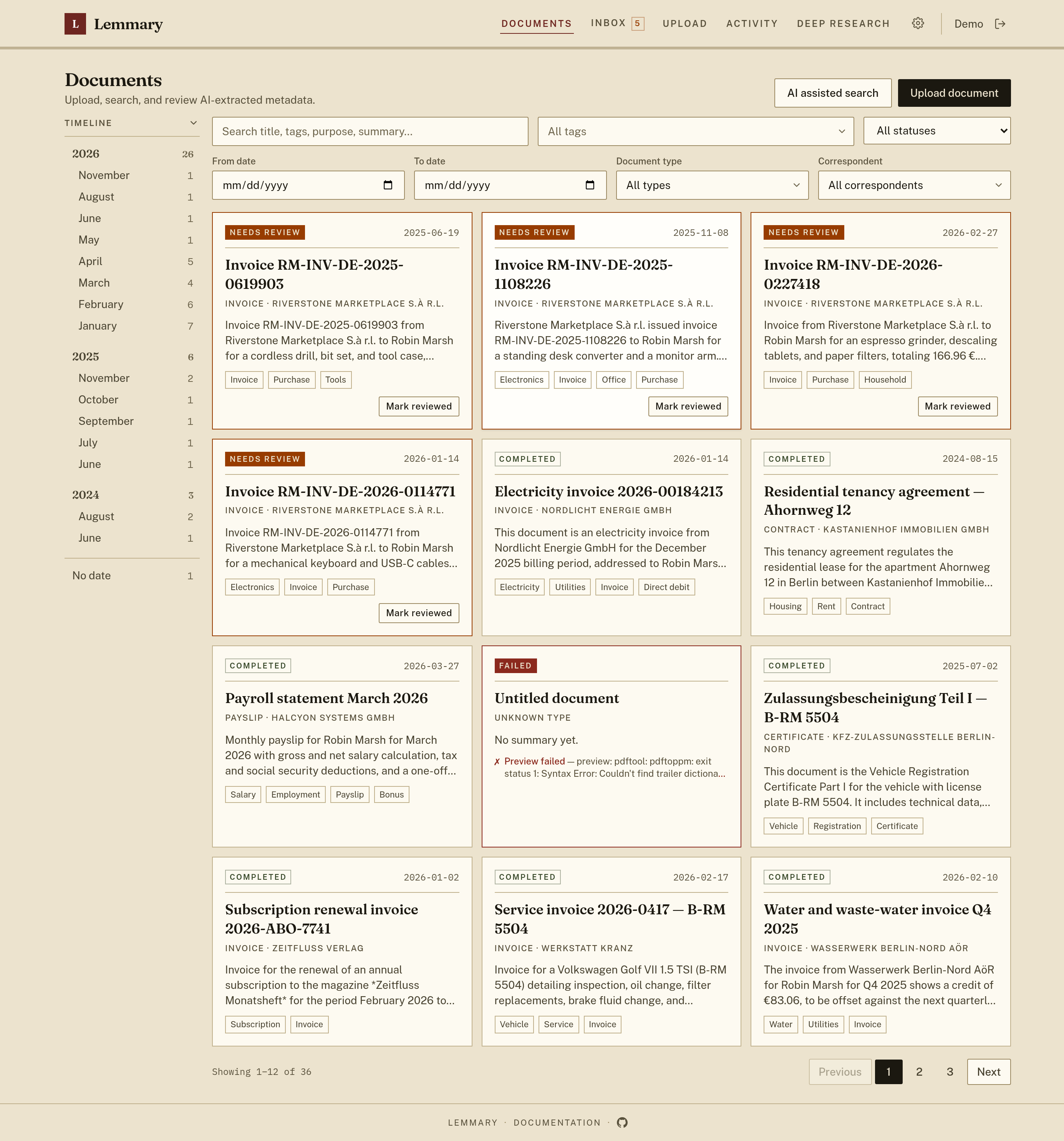
Documents list with AI-extracted titles, summaries, and tags, and a timeline that counts the archive by month:
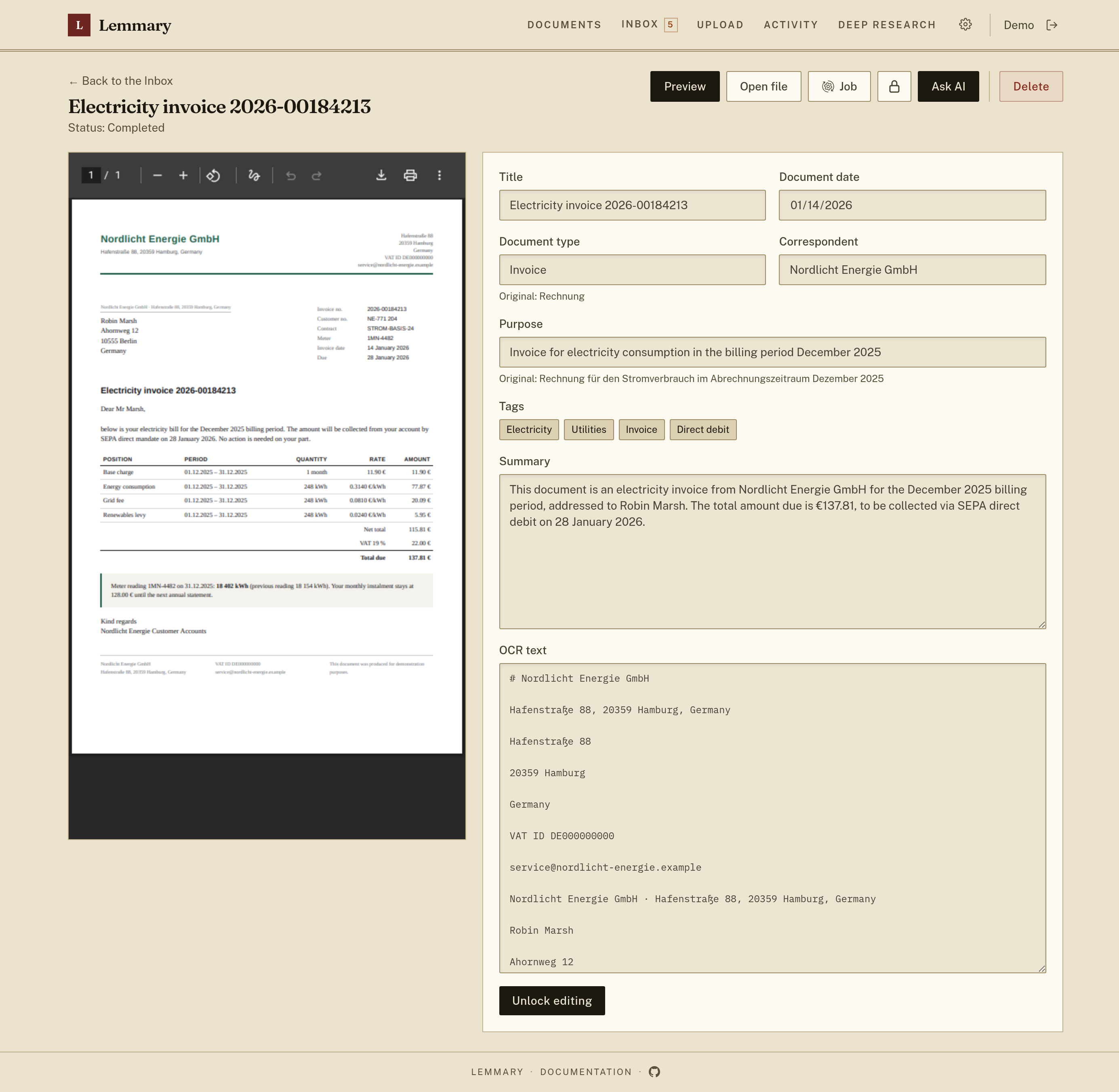
Document detail: the file itself beside editable metadata, summary, and OCR text. Fields the model wrote in the document's own language keep the original under the translation:
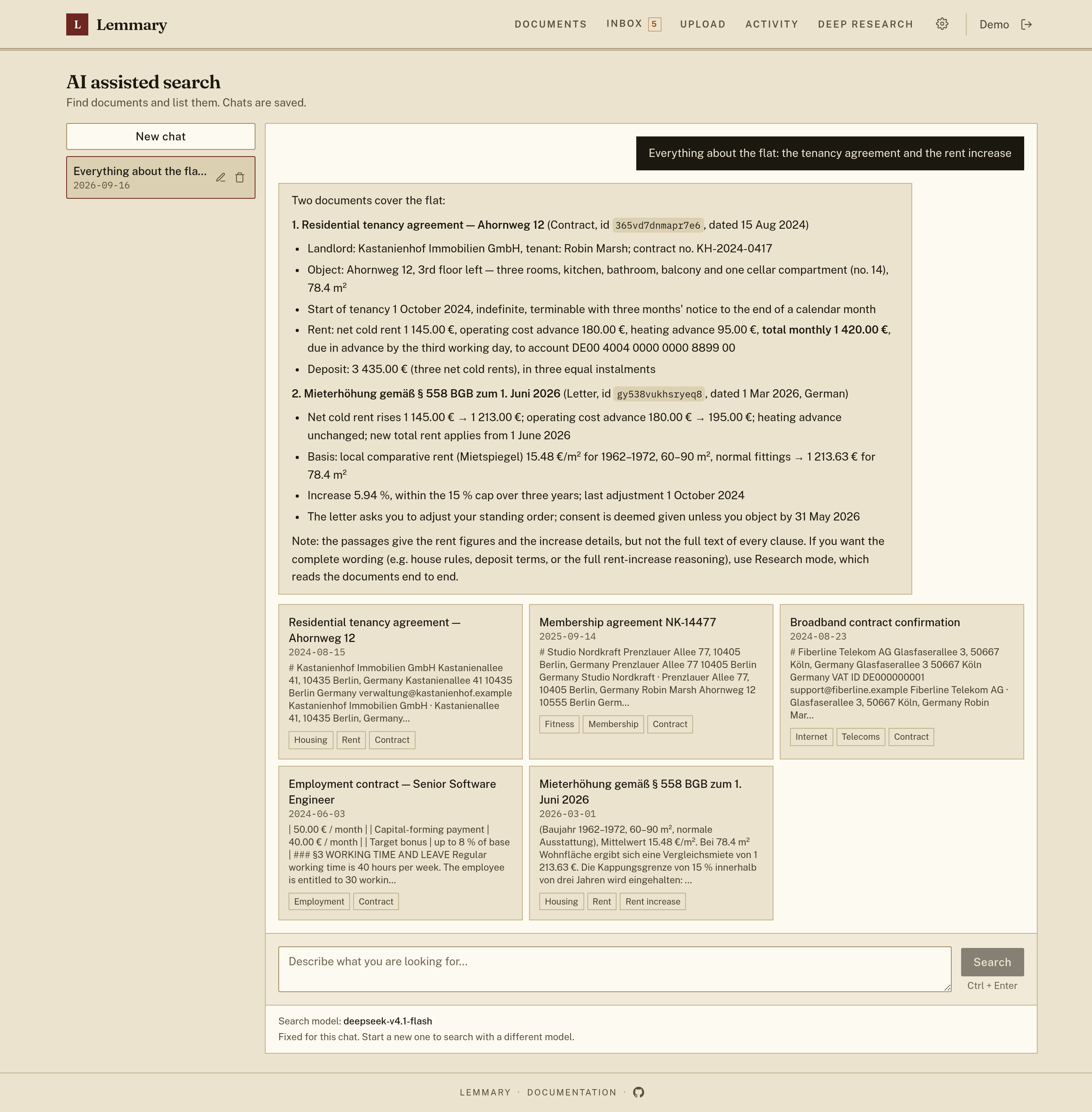
AI assisted search — a natural-language query, and the documents it matched:
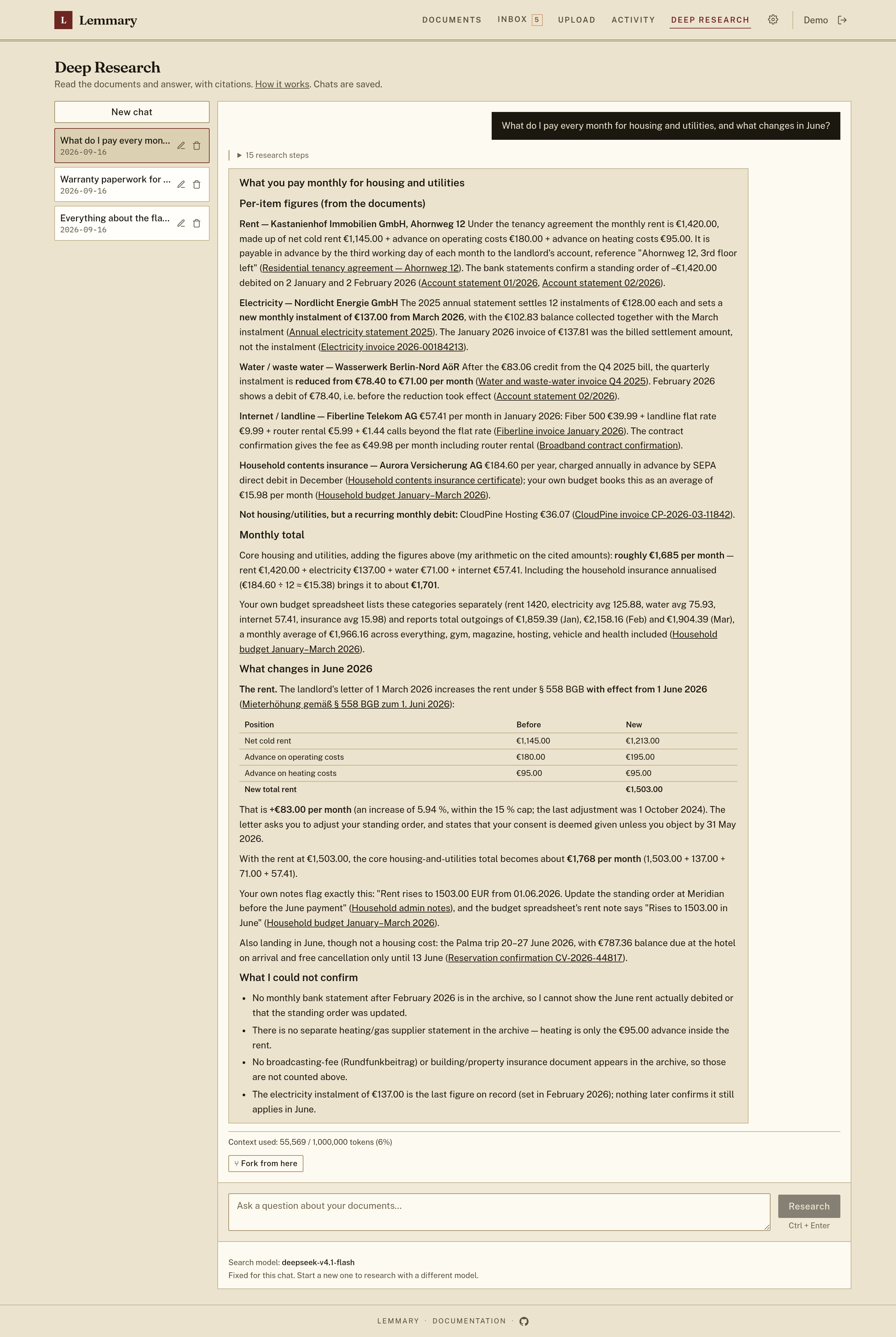
Deep Research — the same archive read rather than listed, answered with links to the documents each figure came from:
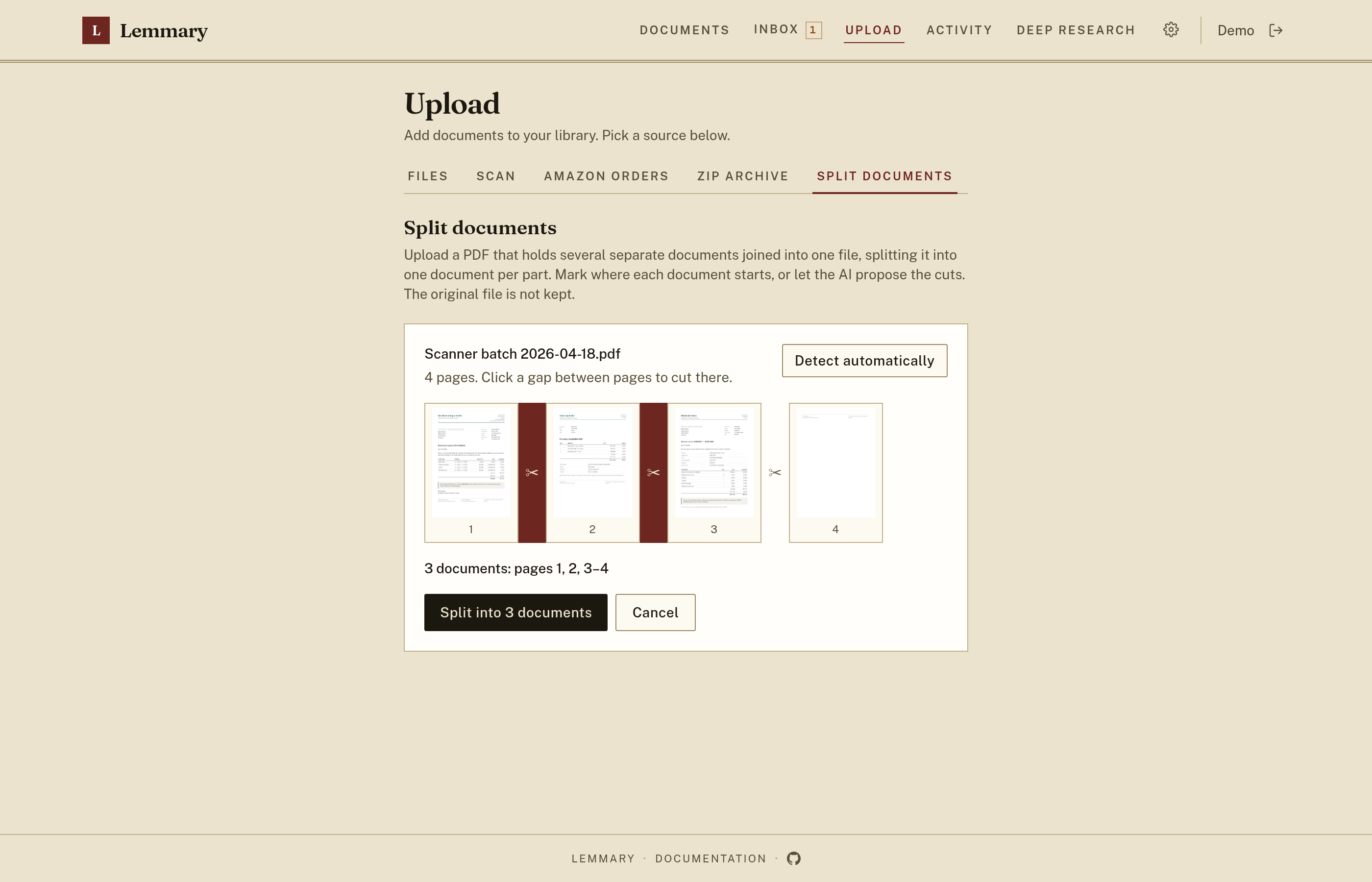
Split a scanner's multi-document PDF back into one document per part, by hand or with the cuts the model proposes:
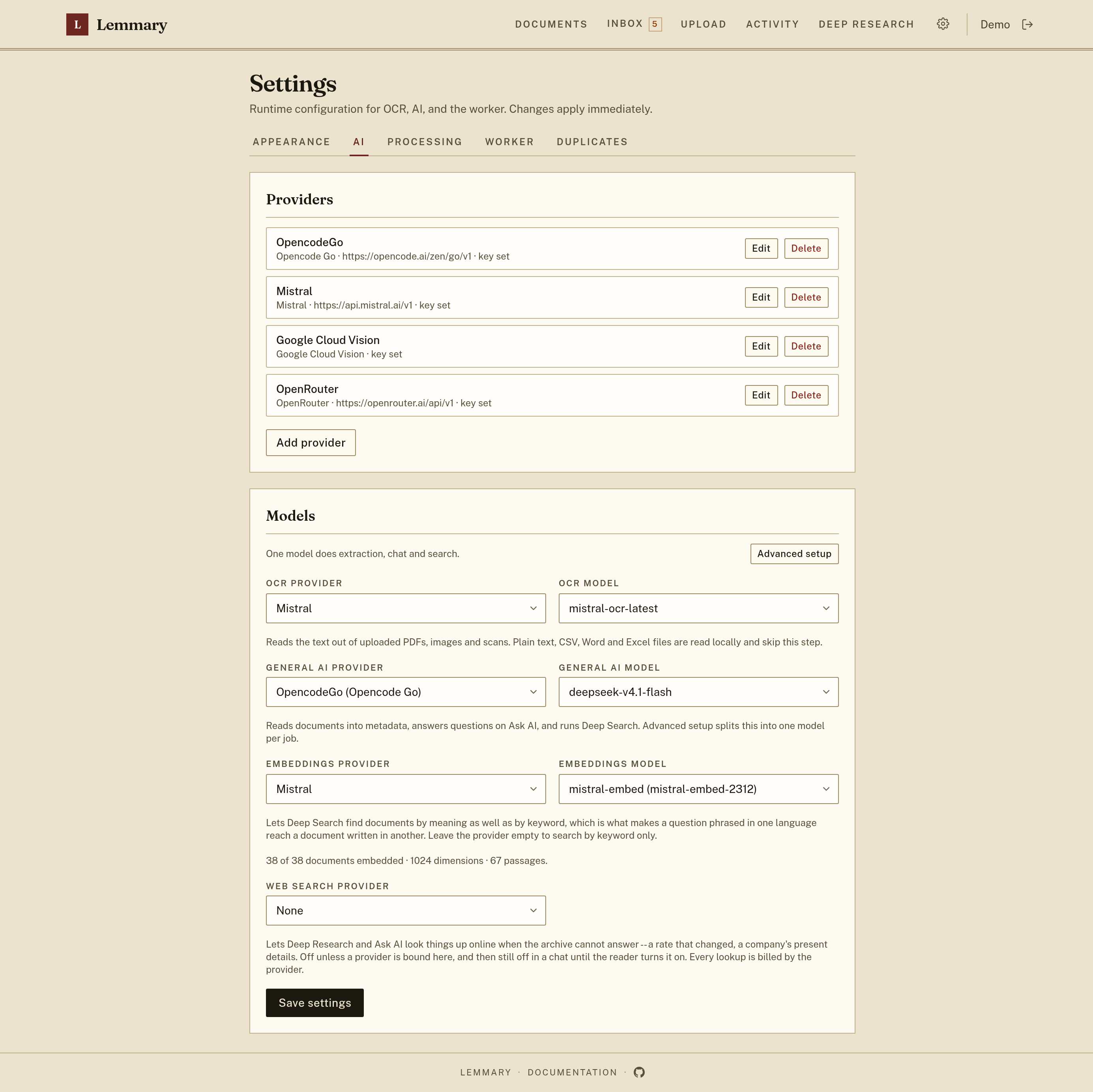
Admin Settings: providers, models and worker timeouts as runtime configuration:
Stack
- Backend: Go, PocketBase as a framework
- Frontend: React, TanStack Router, PocketBase JS SDK
- OCR: Mistral Document OCR (
mistral), Google Cloud Vision (google_vision), a file-capable OpenAI/OpenRouter/Anthropic model, or Docling (docling) — a keyless sidecar on your own host running PaddleOCR's PP-OCR models, so scans never leave the machine; see docs/local_ocr.md. Configured in Settings - AI: Opencode Go (
opencode), Mistral, OpenAI, Anthropic (anthropic), OpenRouter, or a ChatGPT subscription (chatgpt), via the official OpenAI and Anthropic Go SDKs — Claude is reached on its own Messages API, and Opencode serves a third of its catalogue there too — see docs/ai_providers.md - Search: Bleve full-text index (token AND for the search box, relaxed to most-terms for the agent, BM25 ranking) over titles, OCR, tags, and metadata
- Deep Research: natural-language archive search via a tool-calling agent over that index (hybrid keyword and embedding retrieval; keyword expansion across configured languages when no embedding model is set), on two pages — AI assisted search lists matching documents, Deep Research reads them, surveys and counts across the archive on the General AI model, reasons on an optional Advanced model, and writes a cited answer
Project layout
backend/    PocketBase app, migrations, OCR/AI worker
frontend/   React UI
docs/       Setup and operation guides
Quick start
cp .env.example .env
# Optional: seed OCR/AI keys in .env for first boot (skips those wizard steps)
docker compose up -d
Open http://127.0.0.1:8090. On first launch, the in-app setup wizard creates your admin account and collects OCR + LLM API keys (hard gate until both are set). A single Mistral key covers OCR, extraction and embeddings. Data is stored in a Docker volume (app_data).
Volumes, reverse proxies, backups and upgrades: docs/self_hosting.md. To run without Docker, see docs/development.md.
Environment variables and Settings
docs/setup.md is the configuration reference; docs/ai_providers.md covers the AI-specific options.
WORKER_CRON_EXPR, theLIMIT_*family,VAULT_*and the frontend'sVITE_*stay in.env- OCR/AI keys, models and worker timeouts live in the DB (
app_settings).AI_API_KEYplusSETUP_ADMIN_EMAIL/SETUP_ADMIN_PASSWORDin.envbring a fresh instance up with nothing to answer; otherwise the first-launch wizard collects them. Either way Settings is authoritative afterwards AI_MANAGED=1inverts that for a hosted fleet: the environment is re-applied on every boot and the tenant's Settings page has no Providers, Models or Duplicates sections
Tests
Unit tests live beside the code they cover:
cd backend && go test -tags vectors ./... -count=1
cd frontend && pnpm test
The vectors tag is not optional: bleve's vector search is a cgo binding to
blevesearch's FAISS fork, and the backend does not build without it. FAISS is
needed on this machine only for Go commands run here, since the verification
image the overlay builds carries its own. Installing it is a one-off, and the
shortest route needs no compiler at all:
docker buildx build --target faiss --output type=local,dest=./.faiss .
mkdir -p "$HOME/.local/faiss" && cp -a .faiss/lib .faiss/include "$HOME/.local/faiss/"
With direnv, direnv allow then points the toolchain at
it and sets the tag for you. The other two routes — building it into
/usr/local or into your home directory with scripts/faiss-build.sh — are in
docs/development.md, along with
the packages each one needs.
The end-to-end suites, the dev runner and the full verification stack live in a
separate private repository and are not part of this one. ./scripts/test-all.sh
requires that overlay; without it the command fails.
License
Lemmary is source-available, not open source. It is licensed under the PolyForm Noncommercial License 1.0.0 (see LICENSE).
| ✅ Allowed | Self-hosting for personal or household use; hobby projects, research, study; use by charities, schools, public research, public safety/health, environmental, and government organizations; reading, forking, modifying, and redistributing the source |
| ❌ Not allowed without a commercial license | Use by or on behalf of a business; offering Lemmary to third parties as a hosted or paid service; bundling it into a commercial product |
For commercial licensing, contact Alexander Arutyunov licensing@lemmary.app.
Recommended: Opencode Go
Opencode Go is a perfect plan to use with this project as AI provider: one subscription covers a catalogue of models, and AI_SDK=opencode is the whole configuration — it knows which of Opencode's three endpoints each model is served on, so nothing else needs binding. See the docs.
Contributors

261 commits
Similar repos


Languages
Go
78.5%
TypeScript
20.7%
Lemmary turns scans, PDFs, and office files into an organized library you can search, review, and research in plain language.
See the codeSee what people are saying (1)
README
Lemmary
Document storage built with Go + PocketBase and a React + TanStack Router frontend. Upload documents, run OCR, extract metadata with an OpenAI-compatible AI provider, and review results in the UI.
Paperless-ngx compatibility
Lemmary implements a paperless-ngx-compatible REST API under /api/, so you can use third-party clients instead of (or alongside) the built-in web UI. Coverage is partial — document list/upload/download, tags, metadata, and the document list's search and filters generally work, but not every paperless-ngx endpoint or feature is implemented.
The API has been tested with the swift-paperless iOS app and mostly works for browsing and uploading documents. See docs/paperless_ngx.md for connecting external clients.
Features
- Upload PDF, image, plain text, CSV, Word (.docx), or Excel (.xlsx) documents — one at a time, or a whole folder dropped or picked at once
- Full backup and restore: download your whole library — files, OCR text, metadata, thumbnails and taxonomy — as one zip, and restore it into this or another instance
- Optional encryption at rest: the volume holds only ciphertext, the instance boots locked until someone signs in, and nobody but your own accounts can unlock it — see docs/encryption.md
- Scan straight from a network scanner (Upload → Scan): eSCL/AirScan over the LAN, no driver, found by mDNS or by sweeping the subnet, several pages merged into one document — see docs/scanning.md
- Import a zip of documents (Upload → Zip archive) or the invoice PDFs from an Amazon "Your Orders" data export (Upload → Amazon orders); either way the archive is previewed and only imported after you confirm the file count, duplicates are skipped
- Async processing jobs with status tracking
- OCR text extraction (native text extraction for TXT/CSV/DOCX/XLSX)
- AI metadata extraction: title, purpose, date, type, tags, summary
- Document list with full-text search and status filters
- Two search pages, one per path: AI assisted search (
/rag/search) finds documents and lists them as cards; Deep Research (/rag/research) searches, reads the documents it finds, surveys hundreds at once on the General AI model, counts and totals, and answers with links to its sources — streaming each step as it works; a run that outgrows the model's context window fails with the provider's error; chats are saved, listed in a sidebar, and resumable by URL - Detail page for reviewing OCR text and correcting metadata
- Review Inbox with a count in the header, holding everything that is waiting on you — a low-confidence extraction, a possible duplicate, or every new document if you turn on Always require review; clear one by saving corrections, or mark a whole page reviewed at once. With the setting on, uploads land in the Inbox and Documents becomes the archive you have already read
- Passkey sign-in: register a passkey per device and sign in with a fingerprint, face, or device PIN — no password typed, alongside the existing password and OAuth2 options
- Admin Settings page for runtime OCR/AI/worker config
- First-launch setup wizard (admin account + required OCR/AI keys)
Screenshots
Every screen has one in docs/screenshots.md. The library in all of them is a demo archive of invented documents, so nothing in these images belongs to anybody. A few to start with:
Documents list with AI-extracted titles, summaries, and tags, and a timeline that counts the archive by month:
Document detail: the file itself beside editable metadata, summary, and OCR text. Fields the model wrote in the document's own language keep the original under the translation:
AI assisted search — a natural-language query, and the documents it matched:
Deep Research — the same archive read rather than listed, answered with links to the documents each figure came from:
Split a scanner's multi-document PDF back into one document per part, by hand or with the cuts the model proposes:
Admin Settings: providers, models and worker timeouts as runtime configuration:
Stack
- Backend: Go, PocketBase as a framework
- Frontend: React, TanStack Router, PocketBase JS SDK
- OCR: Mistral Document OCR (
mistral), Google Cloud Vision (google_vision), a file-capable OpenAI/OpenRouter/Anthropic model, or Docling (docling) — a keyless sidecar on your own host running PaddleOCR's PP-OCR models, so scans never leave the machine; see docs/local_ocr.md. Configured in Settings - AI: Opencode Go (
opencode), Mistral, OpenAI, Anthropic (anthropic), OpenRouter, or a ChatGPT subscription (chatgpt), via the official OpenAI and Anthropic Go SDKs — Claude is reached on its own Messages API, and Opencode serves a third of its catalogue there too — see docs/ai_providers.md - Search: Bleve full-text index (token AND for the search box, relaxed to most-terms for the agent, BM25 ranking) over titles, OCR, tags, and metadata
- Deep Research: natural-language archive search via a tool-calling agent over that index (hybrid keyword and embedding retrieval; keyword expansion across configured languages when no embedding model is set), on two pages — AI assisted search lists matching documents, Deep Research reads them, surveys and counts across the archive on the General AI model, reasons on an optional Advanced model, and writes a cited answer
Project layout
backend/    PocketBase app, migrations, OCR/AI worker
frontend/   React UI
docs/       Setup and operation guides
Quick start
cp .env.example .env
# Optional: seed OCR/AI keys in .env for first boot (skips those wizard steps)
docker compose up -d
Open http://127.0.0.1:8090. On first launch, the in-app setup wizard creates your admin account and collects OCR + LLM API keys (hard gate until both are set). A single Mistral key covers OCR, extraction and embeddings. Data is stored in a Docker volume (app_data).
Volumes, reverse proxies, backups and upgrades: docs/self_hosting.md. To run without Docker, see docs/development.md.
Environment variables and Settings
docs/setup.md is the configuration reference; docs/ai_providers.md covers the AI-specific options.
WORKER_CRON_EXPR, theLIMIT_*family,VAULT_*and the frontend'sVITE_*stay in.env- OCR/AI keys, models and worker timeouts live in the DB (
app_settings).AI_API_KEYplusSETUP_ADMIN_EMAIL/SETUP_ADMIN_PASSWORDin.envbring a fresh instance up with nothing to answer; otherwise the first-launch wizard collects them. Either way Settings is authoritative afterwards AI_MANAGED=1inverts that for a hosted fleet: the environment is re-applied on every boot and the tenant's Settings page has no Providers, Models or Duplicates sections
Tests
Unit tests live beside the code they cover:
cd backend && go test -tags vectors ./... -count=1
cd frontend && pnpm test
The vectors tag is not optional: bleve's vector search is a cgo binding to
blevesearch's FAISS fork, and the backend does not build without it. FAISS is
needed on this machine only for Go commands run here, since the verification
image the overlay builds carries its own. Installing it is a one-off, and the
shortest route needs no compiler at all:
docker buildx build --target faiss --output type=local,dest=./.faiss .
mkdir -p "$HOME/.local/faiss" && cp -a .faiss/lib .faiss/include "$HOME/.local/faiss/"
With direnv, direnv allow then points the toolchain at
it and sets the tag for you. The other two routes — building it into
/usr/local or into your home directory with scripts/faiss-build.sh — are in
docs/development.md, along with
the packages each one needs.
The end-to-end suites, the dev runner and the full verification stack live in a
separate private repository and are not part of this one. ./scripts/test-all.sh
requires that overlay; without it the command fails.
License
Lemmary is source-available, not open source. It is licensed under the PolyForm Noncommercial License 1.0.0 (see LICENSE).
| ✅ Allowed | Self-hosting for personal or household use; hobby projects, research, study; use by charities, schools, public research, public safety/health, environmental, and government organizations; reading, forking, modifying, and redistributing the source |
| ❌ Not allowed without a commercial license | Use by or on behalf of a business; offering Lemmary to third parties as a hosted or paid service; bundling it into a commercial product |
For commercial licensing, contact Alexander Arutyunov licensing@lemmary.app.
Recommended: Opencode Go
Opencode Go is a perfect plan to use with this project as AI provider: one subscription covers a catalogue of models, and AI_SDK=opencode is the whole configuration — it knows which of Opencode's three endpoints each model is served on, so nothing else needs binding. See the docs.
Similar repos
Contributors
261 commits
Languages
Go
78.5%
TypeScript
20.7%