
See what people are saying
README
Freekit
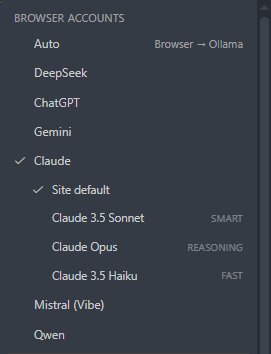
Free AI coding agent for VS Code. Use your existing web AI accounts (DeepSeek, ChatGPT, Claude, Gemini, Mistral, Qwen) or a local Ollama model. No API keys, no subscriptions, no costs.


Screenshots
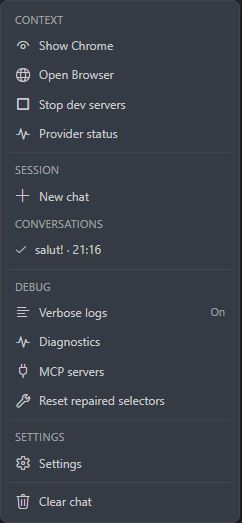
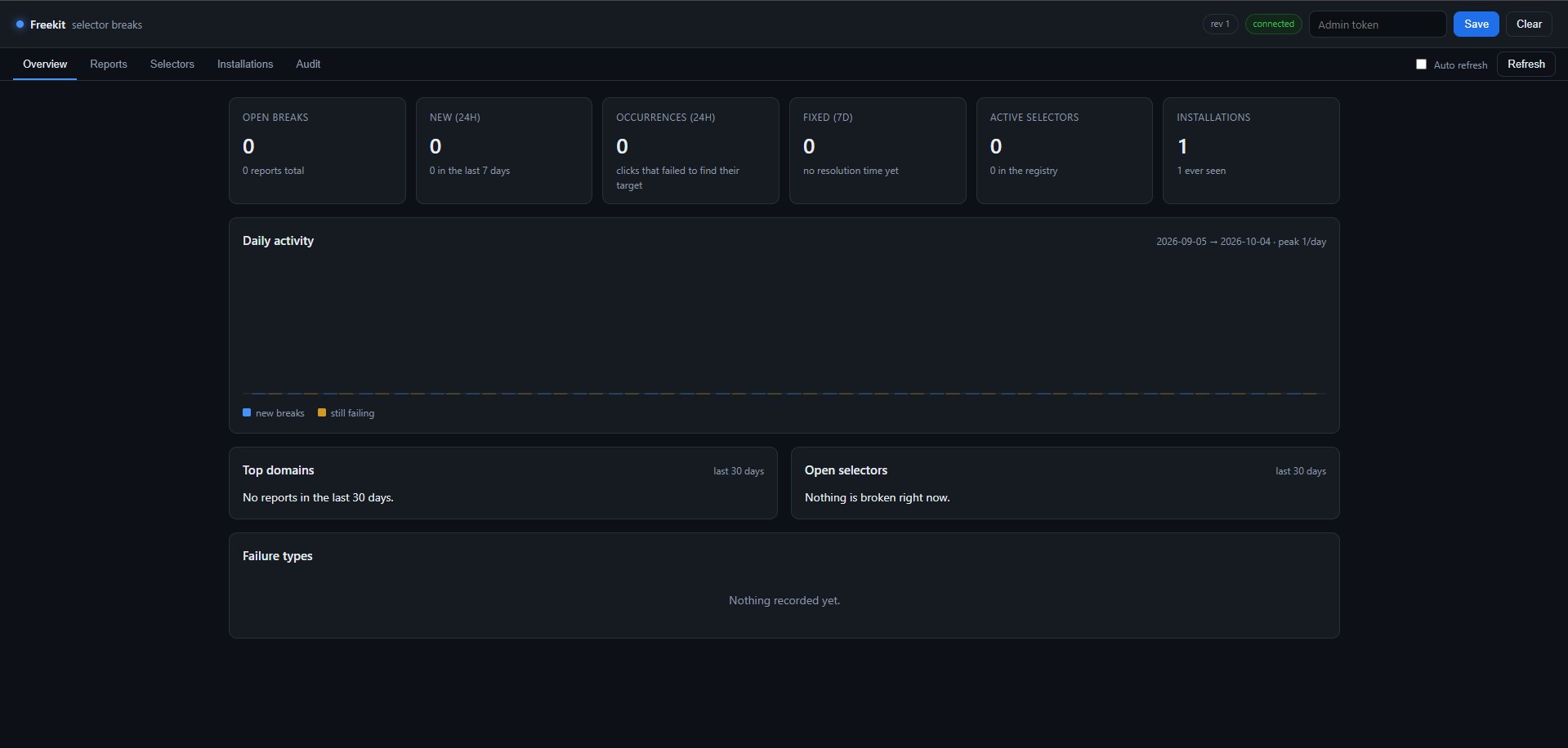
Why Freekit?
Unlike other AI coding agents, Freekit works with your existing web AI accounts:
| Feature | Freekit | Cline | Cursor | Copilot |
|---|---|---|---|---|
| Web AI providers (no API keys) | ✅ 6 | ❌ | ❌ | ❌ |
| Cost | $0 | API costs | $20/mo | $10-19/mo |
| Local Ollama (hardware-aware) | ✅ | ✅ | ⚠️ | ❌ |
| Works with free accounts | ✅ | ❌ | ❌ | ❌ |
| Self-maintaining | ✅ | ❌ | ❌ | ❌ |
| Native VS Code diff | ✅ | ✅ | ✅ | ❌ |
Perfect for:
- Students and hobbyists without API budgets
- Developers in emerging markets (cost-sensitive)
- Anyone who already has a ChatGPT Plus / Claude Pro subscription
- Privacy-conscious users (local Ollama option)
Features
- 🎯 Six web AI providers + Ollama — DeepSeek, ChatGPT, Claude, Gemini, Mistral, Qwen + local Ollama
- 🔒 Stealth mode — human-like typing (real keydown/keyup), anti-detection
- 🤖 Agentic loop — up to 40 iterations, 12 tools (read/write/edit/search/run/git)
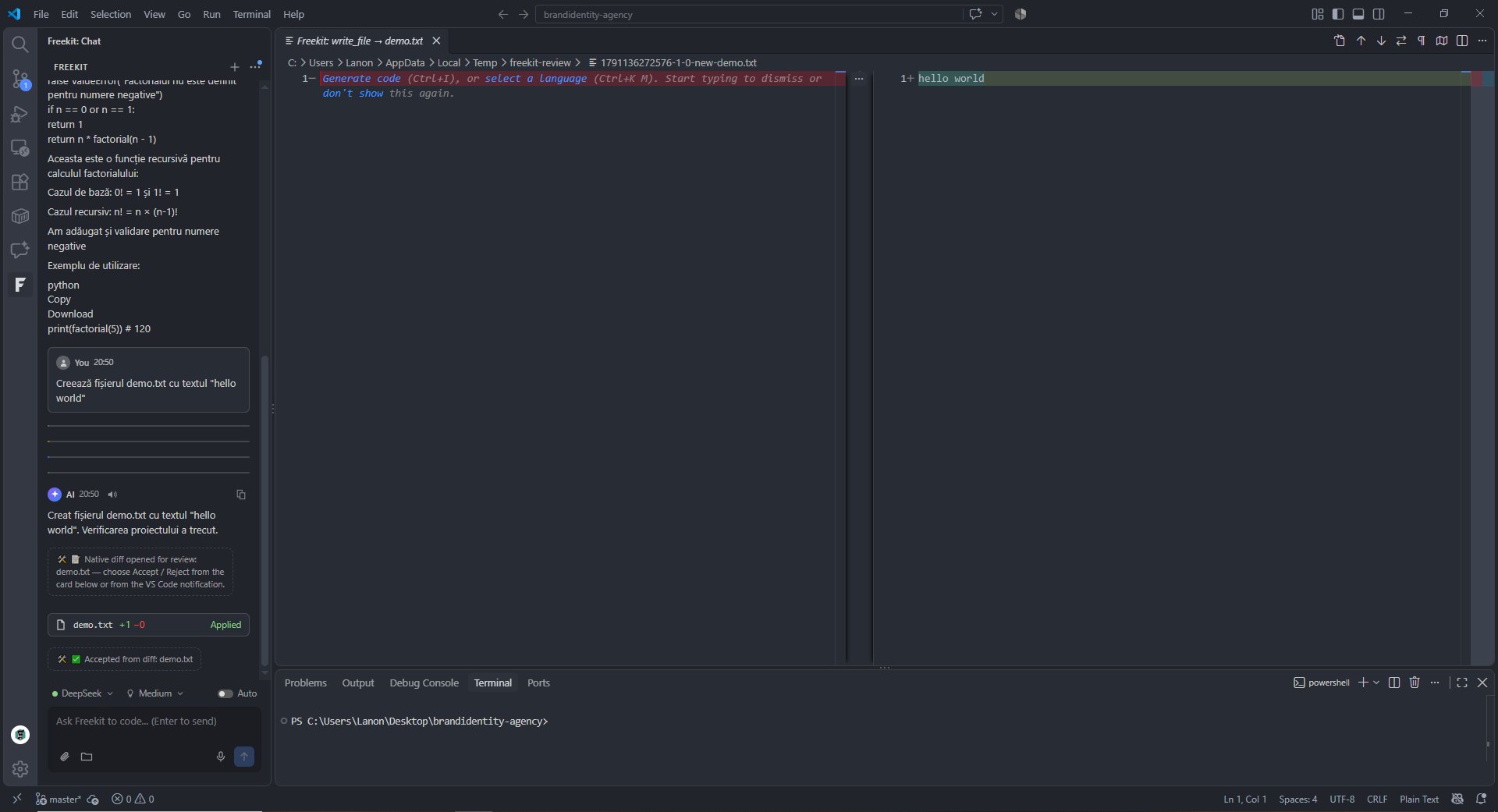
- 📝 Native diff review — Accept/Reject each file change in VS Code's diff viewer
- ⟲ Git checkpoints — restore any prompt with one click
- ✂️ Fork & edit conversations — ChatGPT-style conversation branching
- 🔊 TTS + 🎤 voice input — offline Whisper transcription
- 📚 Semantic code search — find code by meaning, not just text
- 🔌 MCP servers — Model Context Protocol support
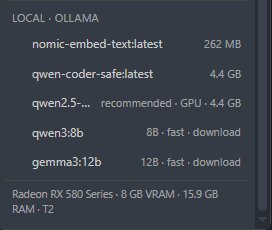
- 🛡️ Hardware-aware Ollama — 51-model catalog, tiers T0-T6, auto-recommendation
- 🧪 Auto-verify & auto-repair — every file write is checked (
tsc --noEmit/astro check/build); failures go back to the AI (up to 3 attempts) and are rolled back if they can't be fixed - 🖥️ Dev servers in a visible terminal —
npm run dev,vite,nodemon, … start in a dedicated VS Code terminal, and the AI gets the live URL immediately - 🔍 Verbose mode — collapsible Thinking / Executing / Result / Decision cards for full transparency
- 📎 Attachments & auto-context — files, folders, images and binaries, plus project structure sent with every message
Quick start
- Install Freekit from the VS Code Marketplace
- Open the sidebar → click the F icon
- Click the model chip at the bottom → select a provider (e.g., DeepSeek)
- A Chrome window opens → log in once (your session is saved)
- Start chatting — try:
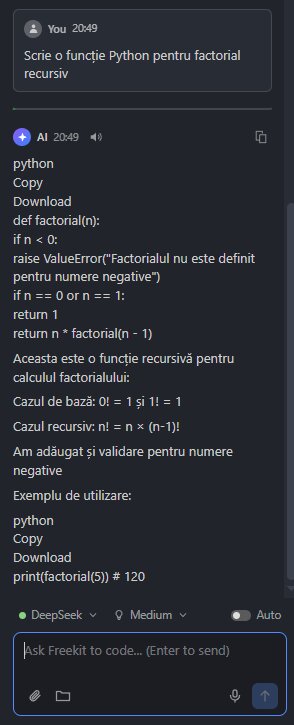
Write a Python function for factorial
First time? VS Code may show a blue "Restricted Mode" banner. Click Trust to enable full functionality (Freekit writes files and runs commands — this is required).
Supported providers
Web (browser automation — no API key needed)
- DeepSeek (Chat V3 / DeepThink R1)
- ChatGPT (GPT-4o / GPT-4.1 / o3)
- Claude (Sonnet / Opus / Haiku)
- Gemini (2.5 Pro / 2.5 Flash)
- Mistral (Vibe)
- Qwen
Local
- Ollama — 51-model catalog, hardware tiers T0-T6, auto-recommendation based on your VRAM and RAM
How it works
Freekit connects to your existing web AI sessions via browser automation:
- Launches an isolated Chrome profile (separate from your personal Chrome)
- You log in once to each provider (session is saved)
- Freekit types messages with human-like keystrokes (real keydown/keyup, random delays)
- It reads the AI response and renders it in the VS Code sidebar
- File changes appear as native VS Code diffs — you Accept or Reject each one
Everything is local. No middle server. No data sent to third parties.
Privacy
- ✅ Zero telemetry — no analytics, no tracking
- ✅ Isolated browser — separate Chrome profile, doesn't touch your personal browser
- ✅ Local by default — Chrome profile, history and settings stay on your disk
- ⚠️ Browser automation — messages go through the web AI (same as if you typed them manually)
- ⚙️ Self-reporting (opt-in, on by default) — anonymous selector break reports to help fix issues. No code, files or messages sent. Disable:
freekit.reporting.enabled - 🔒 Ollama option — fully offline, nothing leaves your machine
Trust / Restricted Mode
Freekit writes files, runs terminal commands and controls a browser — it needs a trusted workspace.
On first launch, VS Code shows a blue "Restricted Mode" banner. Click Trust to enable full functionality.
In Restricted Mode (no trust):
- ✅ Chat UI works
- ✅ Read-only tools (
read_file,search_files, etc.) - ❌ File writes, terminal commands, git mutations, MCP tools
You can also run Freekit: Trust This Workspace from the Command Palette.
Additional safeguards:
- Writes open a native VS Code diff for review — accept or reject from the in-chat card or the VS Code notification; shell commands and git operations require approval cards unless ⚡ auto-approve is enabled.
- Anti-spam limits: max 3 writes per file and 15 write operations per message.
- The webview runs with a strict Content Security Policy.
Commands
| Command | What it does |
|---|---|
Freekit: Trust This Workspace | Grant Workspace Trust to the current folder (opens the native dialog) — unlocks file writes, shell commands, git changes and MCP tools |
Freekit: Open Browser | Launch / connect the dedicated Chrome |
Freekit: Close Browser | Really close it (graceful CDP close + PID fallback) |
Freekit: Show Chrome | Bring the hidden Chrome window back on screen and focus it |
Freekit: Show Provider Status | Detailed report: CDP port, DeepSeek login, Ollama models |
Freekit: Clear No-Ask File List | Forget the files you marked "Accept (don't ask again)" |
Freekit: Reset Repaired Selectors | Forget auto-repaired selectors, go back to selectors.json |
Freekit: Update Selectors | Fetch and apply the selector config from the configured Gist |
Freekit: Diagnostics | Environment check: browser, CDP port, profile, Ollama, selectors, MCP |
Freekit: MCP Servers | Manage MCP servers: status, restart/stop, list tools, open/create .vscode/mcp.json |
Freekit: Setup Local Whisper | Download the prebuilt whisper.cpp binaries + ggml-base model into global storage (one time, ~160 MB) for offline voice input |
Freekit: Install Ollama | Open the official Ollama download page (https://ollama.com/download); if a binary is already installed but the server isn't running, it just tells you to run ollama serve |
Freekit: Stop Dev Servers | Stop every dev server started by the AI (sends Ctrl+C to its terminal; if the process ignores it, the terminal is closed) |
Freekit: Index Workspace | Build / update the local semantic index (embeddings via Ollama, incremental, cancellable, with progress) |
Freekit: Index Status | Show the index: model, dimensions, indexed files, chunks, storage file, size and last update |
Freekit: Clear Index | Delete the workspace's semantic index from globalStorage (confirmation required) |
Freekit: Reporting Status | Show the reporting integration: registration, endpoint, selectors revision, last health check / fetch — with shortcuts to run a check now or reset the identity |
Freekit: Run Selector Health Check | Immediately check the selectors of the providers that have a tab open (repair locally, report only if the repair fails) |
Freekit: Reset Reporting Registration | Remove the local reporting identity (apiKey + installation id); the extension registers as a new installation on the next start |
Settings
| Setting | Default | Description |
|---|---|---|
freekit.provider | deepseek | Active provider (auto = browser provider → Ollama fallback) |
freekit.ollamaModel | qwen2.5-coder:7b | Model used in local mode |
freekit.ollamaUrl | http://localhost:11434 | Ollama server URL |
freekit.cdpPort | 9222 | CDP port used to launch / connect Chrome |
freekit.chromePath | (empty) | Manual Chrome/Edge path (empty = auto-detect) |
freekit.messageTimeoutMinutes | 20 | Total time budget for one agentic message |
freekit.autoVerify | true | Check the project after every file write (astro check / tsc --noEmit / build); failures trigger up to 3 AI repair attempts, then an automatic rollback to the last verified state |
freekit.promptCheckpoints | true | Create a git checkpoint before every prompt and show the ⟲ restore button on each user message |
freekit.autoInitGit | true | Run git init (plus a minimal .gitignore, if missing) when the project folder isn't a git repo yet, so checkpoints / ⟲ restore work out of the box |
freekit.selectorsUrl | (empty) | Raw URL of a public Gist with selectors.json (version + providers); empty = remote selectors disabled |
freekit.checkSelectorsOnStartup | true | Look for a newer selector config at startup — at most once every 24 h (only when freekit.selectorsUrl is set) |
freekit.humanTyping | true | Type messages with human timing (random delays, punctuation pauses, bursts); off = instant insertion |
freekit.humanBehavior | true | Small mouse moves before clicks + occasional gentle scroll (anti-detect) |
freekit.mutationObserver | false | Experimental: end-of-generation detection via MutationObserver (fast, low CPU). Can be flaky when Chrome runs offscreen — JS is suspended in invisible windows; default off = reliable 500 ms polling |
freekit.autoAcceptPopups | true | Automatically accept consent popups (cookie / terms / “OK” / “Got it”). Safe exact-match on three confidence tiers; refusal wording (Reject / Only necessary / Customize / Not now) is never clicked; max 3 clicks per pass |
freekit.sttLanguage | ro-RO | Language for the 🎤 voice input (local Whisper) — ro-RO (Romanian) or en-US (English); applied at the next transcription |
freekit.whisperCliPath | (empty) | Path to whisper-cli (whisper.cpp) for offline voice input; empty = auto-detect (global storage → classic whisper.cpp locations → PATH) |
freekit.whisperModelPath | (empty) | Path to the Whisper ggml model (e.g. ggml-base.bin); empty = auto-detect |
freekit.whisperTimeoutSeconds | 180 | Timeout for one Whisper transcription (10–1200 s) |
freekit.aiSelectorFinder | true | AI selector-discovery fallback: when the classic healer finds nothing, a cleaned DOM snapshot is analyzed by local Ollama; validated selectors are saved to selectors-user.json |
freekit.aiFinderTimeoutSeconds | 45 | Timeout (5–300 s) for the AI selector analysis |
freekit.mcpEnabled | true | Start the configured MCP servers and expose their tools to the AI (mcp_<server>_<tool>) |
freekit.mcpServers | {} | MCP servers to launch (stdio), e.g. {"filesystem": {"command": "npx", "args": ["-y", "@modelcontextprotocol/server-filesystem", "."]}} |
freekit.mcpToolTimeoutSeconds | 60 | Timeout for a single MCP tool call (tools/call) |
freekit.semanticIndex.enabled | true | Enable semantic code search (search_semantic tool + index commands) |
freekit.semanticIndex.model | nomic-embed-text | Ollama embedding model for the index (changing it invalidates the index) |
freekit.semanticIndex.onSave | false | Re-index a file automatically (incremental, debounced) when it is saved |
freekit.semanticIndex.maxFileKb | 256 | Skip files larger than this (KB) when indexing |
freekit.semanticIndex.topK | 8 | Number of chunks returned by search_semantic (1–25) |
freekit.semanticIndex.exclude | [] | Extra directory/file names to exclude from indexing |
freekit.reporting.enabled | true | Master switch for the reporting-server integration (anonymous registration + selector health checks + selector fixes) |
freekit.reporting.endpoint | https://api.builderweb.app | Base URL of the reporting server |
freekit.reporting.shareDomSnapshot | false | Also send a cleaned DOM snapshot (scripts/styles/media/input values stripped) when reporting a broken selector |
freekit.reporting.healthCheck | true | Periodically verify the selectors of providers that already have a tab open; repair locally first, report only if the repair fails |
freekit.reporting.healthCheckIntervalHours | 6 | Hours between two automatic selector health checks |
freekit.reporting.selectorsIntervalHours | 24 | Hours between two automatic fetches of repaired selectors from the server |
Advanced
Semantic code search
Freekit can find code by meaning instead of exact text — useful for questions like "where do we retry a failed upload?" when you don't know the identifier to grep for.
- Run
Freekit: Index Workspaceonce (needs Ollama running; the embedding model is pulled withollama pull nomic-embed-text). - Ask the AI something conceptual. It calls
search_semantic(query)and gets back the best-matching chunks withpath:startLine-endLine, a similarity score and a snippet — then it canread_filethe ones that matter.
How it works:
- Local & private — embeddings are computed by your own Ollama server (
freekit.ollamaUrl); the vector store is a single JSON file under<globalStorage>/semantic-index/(keyed per workspace). No new npm dependencies, no cloud. - Incremental — each file is fingerprinted with a SHA-1 of its content; unchanged files keep their existing vectors, so re-indexing after an edit only re-embeds what changed. Set
freekit.semanticIndex.onSaveto keep the index fresh automatically (debounced 1.5 s). - Smart exclusions —
node_modules,.git,out,dist,build,.next,coverage, virtualenvs,target, caches, lockfiles, source maps, minified and binary files are never indexed; extend the list withfreekit.semanticIndex.exclude. - Chunking with overlap — files are split into 60-line windows with a 12-line overlap so a function that straddles a boundary is still found; oversized/minified files are skipped and recorded in the status.
- Graceful in the agent loop — if there is no index yet,
search_semanticreturns a clear message telling the AI to fall back tosearch_files(or you to run the index command), so nothing breaks.
Remote selector updates
Selector repairs can reach every client without shipping a new extension version:
- Keep the same JSON shape as
src/selectors.jsonand bumpversion(updated/changelogare optional but recommended). - Save it as a file named
selectors.jsonin a public GitHub Gist. - Set
freekit.selectorsUrlto the Gist raw URL, e.g.https://gist.githubusercontent.com/<user>/<id>/raw/selectors.json.
Freekit then checks on startup — rate-limited to once every 24 h — and on demand via Freekit: Update Selectors, applying the config only when its version is newer than the active one. The update is validated, merged over the bundled config, cached locally, and local auto-repairs for the slots it touches are replaced by the curated fix. Any failure (invalid JSON, HTTP error, timeout) leaves the current config in place.
Reporting server (self-maintaining)
Freekit can feed a central reporting server (https://api.builderweb.app by default) so a site redesign discovered on one machine turns into a fix for everybody — without waiting for an extension release.
- Register once — on first start the extension creates a random installation id (globalStorage) and exchanges it for an
apiKey(POST /api/v1/extensions/register). The call is idempotent: the key is cached and re-used until you runFreekit: Reset Reporting Registration. - Health check every 6 h (
freekit.reporting.healthCheckIntervalHours) — for every provider that already has a tab open in the Freekit Chrome profile, theinputandnewChatselectors are verified. Chrome is never started just for this. Broken slots are repaired locally first (fingerprint healer → AI finder); only if that also fails is a report sent (POST /api/v1/reports) with the domain, the failing selector, the failure type (not_found/hidden) and the page URL. - Selector updates every 24 h (
freekit.reporting.selectorsIntervalHours) — the extension asksGET /api/v1/selectors?since=<revision>, applies anything new (validated by the same fragile/blacklist rules as local repairs) and remembers the revision, so a304is the normal, cheap answer. - Privacy — nothing from your code, prompts or files is ever sent. The only optional payload is the cleaned DOM snapshot (scripts, styles, media and input values are stripped, truncated) and it is off by default (
freekit.reporting.shareDomSnapshot). Setfreekit.reporting.enabledtofalseto opt out completely.
Use Freekit: Reporting Status for the current state (registration, revision, last check), Freekit: Run Selector Health Check to run a check immediately (e.g. right after a site redesign) and Freekit: Reset Reporting Registration to start over with a new identity.
MCP servers
Freekit ships a Model Context Protocol client: MCP servers give the agent extra tools (databases, browsers, APIs, file systems, …) beyond the built-in ones. Configure them once — they are launched with VS Code and their tools are exposed to the AI as mcp_<server>_<tool>.
- Add servers to
.vscode/mcp.json(or to thefreekit.mcpServerssetting):
{
  "servers": {
    "filesystem": {
      "command": "npx",
      "args": ["-y", "@modelcontextprotocol/server-filesystem", "."]
    }
  }
}
- Servers start with VS Code (
freekit.mcpEnabled, default on) and config edits are hot-reloaded. UseFreekit: MCP Serversto check status, restart/stop a server, or list its tools.
Every MCP call shows an approval card (server, tool and arguments) before it runs — ⚡ auto-approve skips it like any other tool. Only the stdio transport is supported. A crashed or missing server is reported in the chat and in Freekit: Diagnostics.
Troubleshooting
"Could not find the input box"
→ Log in to the provider. Click Show Chrome in the ⋯ menu, sign in, then retry.
"Restricted Mode — some features disabled"
→ Click Trust in the blue banner at the top of VS Code.
"Ollama not running"
→ Install Ollama from ollama.com and run ollama serve.
Browser automation issues
→ Click Freekit: Reset Repaired Selectors and try again.
Requirements
- VS Code 1.90+
- Chrome or Edge (installed)
- Ollama (optional, for local models)
- Windows / macOS / Linux
Development
npm install
npm run compile        # tsc → out/
npx @vscode/vsce package
code --install-extension freekit-2.4.6.vsix --force
Press F5 for an Extension Development Host.
Support
Freekit is free — no API keys, no subscriptions. If it saves you time, you can buy me a coffee:

License
Proprietary. See LICENSE.txt.
Made by builderweb · Buy me a coffee
Similar repos


Languages
TypeScript
82.9%
JavaScript
8.6%
CSS
8.5%
See what people are saying
README
Freekit
Free AI coding agent for VS Code. Use your existing web AI accounts (DeepSeek, ChatGPT, Claude, Gemini, Mistral, Qwen) or a local Ollama model. No API keys, no subscriptions, no costs.
Screenshots
Why Freekit?
Unlike other AI coding agents, Freekit works with your existing web AI accounts:
| Feature | Freekit | Cline | Cursor | Copilot |
|---|---|---|---|---|
| Web AI providers (no API keys) | ✅ 6 | ❌ | ❌ | ❌ |
| Cost | $0 | API costs | $20/mo | $10-19/mo |
| Local Ollama (hardware-aware) | ✅ | ✅ | ⚠️ | ❌ |
| Works with free accounts | ✅ | ❌ | ❌ | ❌ |
| Self-maintaining | ✅ | ❌ | ❌ | ❌ |
| Native VS Code diff | ✅ | ✅ | ✅ | ❌ |
Perfect for:
- Students and hobbyists without API budgets
- Developers in emerging markets (cost-sensitive)
- Anyone who already has a ChatGPT Plus / Claude Pro subscription
- Privacy-conscious users (local Ollama option)
Features
- 🎯 Six web AI providers + Ollama — DeepSeek, ChatGPT, Claude, Gemini, Mistral, Qwen + local Ollama
- 🔒 Stealth mode — human-like typing (real keydown/keyup), anti-detection
- 🤖 Agentic loop — up to 40 iterations, 12 tools (read/write/edit/search/run/git)
- 📝 Native diff review — Accept/Reject each file change in VS Code's diff viewer
- ⟲ Git checkpoints — restore any prompt with one click
- ✂️ Fork & edit conversations — ChatGPT-style conversation branching
- 🔊 TTS + 🎤 voice input — offline Whisper transcription
- 📚 Semantic code search — find code by meaning, not just text
- 🔌 MCP servers — Model Context Protocol support
- 🛡️ Hardware-aware Ollama — 51-model catalog, tiers T0-T6, auto-recommendation
- 🧪 Auto-verify & auto-repair — every file write is checked (
tsc --noEmit/astro check/build); failures go back to the AI (up to 3 attempts) and are rolled back if they can't be fixed - 🖥️ Dev servers in a visible terminal —
npm run dev,vite,nodemon, … start in a dedicated VS Code terminal, and the AI gets the live URL immediately - 🔍 Verbose mode — collapsible Thinking / Executing / Result / Decision cards for full transparency
- 📎 Attachments & auto-context — files, folders, images and binaries, plus project structure sent with every message
Quick start
- Install Freekit from the VS Code Marketplace
- Open the sidebar → click the F icon
- Click the model chip at the bottom → select a provider (e.g., DeepSeek)
- A Chrome window opens → log in once (your session is saved)
- Start chatting — try:
Write a Python function for factorial
First time? VS Code may show a blue "Restricted Mode" banner. Click Trust to enable full functionality (Freekit writes files and runs commands — this is required).
Supported providers
Web (browser automation — no API key needed)
- DeepSeek (Chat V3 / DeepThink R1)
- ChatGPT (GPT-4o / GPT-4.1 / o3)
- Claude (Sonnet / Opus / Haiku)
- Gemini (2.5 Pro / 2.5 Flash)
- Mistral (Vibe)
- Qwen
Local
- Ollama — 51-model catalog, hardware tiers T0-T6, auto-recommendation based on your VRAM and RAM
How it works
Freekit connects to your existing web AI sessions via browser automation:
- Launches an isolated Chrome profile (separate from your personal Chrome)
- You log in once to each provider (session is saved)
- Freekit types messages with human-like keystrokes (real keydown/keyup, random delays)
- It reads the AI response and renders it in the VS Code sidebar
- File changes appear as native VS Code diffs — you Accept or Reject each one
Everything is local. No middle server. No data sent to third parties.
Privacy
- ✅ Zero telemetry — no analytics, no tracking
- ✅ Isolated browser — separate Chrome profile, doesn't touch your personal browser
- ✅ Local by default — Chrome profile, history and settings stay on your disk
- ⚠️ Browser automation — messages go through the web AI (same as if you typed them manually)
- ⚙️ Self-reporting (opt-in, on by default) — anonymous selector break reports to help fix issues. No code, files or messages sent. Disable:
freekit.reporting.enabled - 🔒 Ollama option — fully offline, nothing leaves your machine
Trust / Restricted Mode
Freekit writes files, runs terminal commands and controls a browser — it needs a trusted workspace.
On first launch, VS Code shows a blue "Restricted Mode" banner. Click Trust to enable full functionality.
In Restricted Mode (no trust):
- ✅ Chat UI works
- ✅ Read-only tools (
read_file,search_files, etc.) - ❌ File writes, terminal commands, git mutations, MCP tools
You can also run Freekit: Trust This Workspace from the Command Palette.
Additional safeguards:
- Writes open a native VS Code diff for review — accept or reject from the in-chat card or the VS Code notification; shell commands and git operations require approval cards unless ⚡ auto-approve is enabled.
- Anti-spam limits: max 3 writes per file and 15 write operations per message.
- The webview runs with a strict Content Security Policy.
Commands
| Command | What it does |
|---|---|
Freekit: Trust This Workspace | Grant Workspace Trust to the current folder (opens the native dialog) — unlocks file writes, shell commands, git changes and MCP tools |
Freekit: Open Browser | Launch / connect the dedicated Chrome |
Freekit: Close Browser | Really close it (graceful CDP close + PID fallback) |
Freekit: Show Chrome | Bring the hidden Chrome window back on screen and focus it |
Freekit: Show Provider Status | Detailed report: CDP port, DeepSeek login, Ollama models |
Freekit: Clear No-Ask File List | Forget the files you marked "Accept (don't ask again)" |
Freekit: Reset Repaired Selectors | Forget auto-repaired selectors, go back to selectors.json |
Freekit: Update Selectors | Fetch and apply the selector config from the configured Gist |
Freekit: Diagnostics | Environment check: browser, CDP port, profile, Ollama, selectors, MCP |
Freekit: MCP Servers | Manage MCP servers: status, restart/stop, list tools, open/create .vscode/mcp.json |
Freekit: Setup Local Whisper | Download the prebuilt whisper.cpp binaries + ggml-base model into global storage (one time, ~160 MB) for offline voice input |
Freekit: Install Ollama | Open the official Ollama download page (https://ollama.com/download); if a binary is already installed but the server isn't running, it just tells you to run ollama serve |
Freekit: Stop Dev Servers | Stop every dev server started by the AI (sends Ctrl+C to its terminal; if the process ignores it, the terminal is closed) |
Freekit: Index Workspace | Build / update the local semantic index (embeddings via Ollama, incremental, cancellable, with progress) |
Freekit: Index Status | Show the index: model, dimensions, indexed files, chunks, storage file, size and last update |
Freekit: Clear Index | Delete the workspace's semantic index from globalStorage (confirmation required) |
Freekit: Reporting Status | Show the reporting integration: registration, endpoint, selectors revision, last health check / fetch — with shortcuts to run a check now or reset the identity |
Freekit: Run Selector Health Check | Immediately check the selectors of the providers that have a tab open (repair locally, report only if the repair fails) |
Freekit: Reset Reporting Registration | Remove the local reporting identity (apiKey + installation id); the extension registers as a new installation on the next start |
Settings
| Setting | Default | Description |
|---|---|---|
freekit.provider | deepseek | Active provider (auto = browser provider → Ollama fallback) |
freekit.ollamaModel | qwen2.5-coder:7b | Model used in local mode |
freekit.ollamaUrl | http://localhost:11434 | Ollama server URL |
freekit.cdpPort | 9222 | CDP port used to launch / connect Chrome |
freekit.chromePath | (empty) | Manual Chrome/Edge path (empty = auto-detect) |
freekit.messageTimeoutMinutes | 20 | Total time budget for one agentic message |
freekit.autoVerify | true | Check the project after every file write (astro check / tsc --noEmit / build); failures trigger up to 3 AI repair attempts, then an automatic rollback to the last verified state |
freekit.promptCheckpoints | true | Create a git checkpoint before every prompt and show the ⟲ restore button on each user message |
freekit.autoInitGit | true | Run git init (plus a minimal .gitignore, if missing) when the project folder isn't a git repo yet, so checkpoints / ⟲ restore work out of the box |
freekit.selectorsUrl | (empty) | Raw URL of a public Gist with selectors.json (version + providers); empty = remote selectors disabled |
freekit.checkSelectorsOnStartup | true | Look for a newer selector config at startup — at most once every 24 h (only when freekit.selectorsUrl is set) |
freekit.humanTyping | true | Type messages with human timing (random delays, punctuation pauses, bursts); off = instant insertion |
freekit.humanBehavior | true | Small mouse moves before clicks + occasional gentle scroll (anti-detect) |
freekit.mutationObserver | false | Experimental: end-of-generation detection via MutationObserver (fast, low CPU). Can be flaky when Chrome runs offscreen — JS is suspended in invisible windows; default off = reliable 500 ms polling |
freekit.autoAcceptPopups | true | Automatically accept consent popups (cookie / terms / “OK” / “Got it”). Safe exact-match on three confidence tiers; refusal wording (Reject / Only necessary / Customize / Not now) is never clicked; max 3 clicks per pass |
freekit.sttLanguage | ro-RO | Language for the 🎤 voice input (local Whisper) — ro-RO (Romanian) or en-US (English); applied at the next transcription |
freekit.whisperCliPath | (empty) | Path to whisper-cli (whisper.cpp) for offline voice input; empty = auto-detect (global storage → classic whisper.cpp locations → PATH) |
freekit.whisperModelPath | (empty) | Path to the Whisper ggml model (e.g. ggml-base.bin); empty = auto-detect |
freekit.whisperTimeoutSeconds | 180 | Timeout for one Whisper transcription (10–1200 s) |
freekit.aiSelectorFinder | true | AI selector-discovery fallback: when the classic healer finds nothing, a cleaned DOM snapshot is analyzed by local Ollama; validated selectors are saved to selectors-user.json |
freekit.aiFinderTimeoutSeconds | 45 | Timeout (5–300 s) for the AI selector analysis |
freekit.mcpEnabled | true | Start the configured MCP servers and expose their tools to the AI (mcp_<server>_<tool>) |
freekit.mcpServers | {} | MCP servers to launch (stdio), e.g. {"filesystem": {"command": "npx", "args": ["-y", "@modelcontextprotocol/server-filesystem", "."]}} |
freekit.mcpToolTimeoutSeconds | 60 | Timeout for a single MCP tool call (tools/call) |
freekit.semanticIndex.enabled | true | Enable semantic code search (search_semantic tool + index commands) |
freekit.semanticIndex.model | nomic-embed-text | Ollama embedding model for the index (changing it invalidates the index) |
freekit.semanticIndex.onSave | false | Re-index a file automatically (incremental, debounced) when it is saved |
freekit.semanticIndex.maxFileKb | 256 | Skip files larger than this (KB) when indexing |
freekit.semanticIndex.topK | 8 | Number of chunks returned by search_semantic (1–25) |
freekit.semanticIndex.exclude | [] | Extra directory/file names to exclude from indexing |
freekit.reporting.enabled | true | Master switch for the reporting-server integration (anonymous registration + selector health checks + selector fixes) |
freekit.reporting.endpoint | https://api.builderweb.app | Base URL of the reporting server |
freekit.reporting.shareDomSnapshot | false | Also send a cleaned DOM snapshot (scripts/styles/media/input values stripped) when reporting a broken selector |
freekit.reporting.healthCheck | true | Periodically verify the selectors of providers that already have a tab open; repair locally first, report only if the repair fails |
freekit.reporting.healthCheckIntervalHours | 6 | Hours between two automatic selector health checks |
freekit.reporting.selectorsIntervalHours | 24 | Hours between two automatic fetches of repaired selectors from the server |
Advanced
Semantic code search
Freekit can find code by meaning instead of exact text — useful for questions like "where do we retry a failed upload?" when you don't know the identifier to grep for.
- Run
Freekit: Index Workspaceonce (needs Ollama running; the embedding model is pulled withollama pull nomic-embed-text). - Ask the AI something conceptual. It calls
search_semantic(query)and gets back the best-matching chunks withpath:startLine-endLine, a similarity score and a snippet — then it canread_filethe ones that matter.
How it works:
- Local & private — embeddings are computed by your own Ollama server (
freekit.ollamaUrl); the vector store is a single JSON file under<globalStorage>/semantic-index/(keyed per workspace). No new npm dependencies, no cloud. - Incremental — each file is fingerprinted with a SHA-1 of its content; unchanged files keep their existing vectors, so re-indexing after an edit only re-embeds what changed. Set
freekit.semanticIndex.onSaveto keep the index fresh automatically (debounced 1.5 s). - Smart exclusions —
node_modules,.git,out,dist,build,.next,coverage, virtualenvs,target, caches, lockfiles, source maps, minified and binary files are never indexed; extend the list withfreekit.semanticIndex.exclude. - Chunking with overlap — files are split into 60-line windows with a 12-line overlap so a function that straddles a boundary is still found; oversized/minified files are skipped and recorded in the status.
- Graceful in the agent loop — if there is no index yet,
search_semanticreturns a clear message telling the AI to fall back tosearch_files(or you to run the index command), so nothing breaks.
Remote selector updates
Selector repairs can reach every client without shipping a new extension version:
- Keep the same JSON shape as
src/selectors.jsonand bumpversion(updated/changelogare optional but recommended). - Save it as a file named
selectors.jsonin a public GitHub Gist. - Set
freekit.selectorsUrlto the Gist raw URL, e.g.https://gist.githubusercontent.com/<user>/<id>/raw/selectors.json.
Freekit then checks on startup — rate-limited to once every 24 h — and on demand via Freekit: Update Selectors, applying the config only when its version is newer than the active one. The update is validated, merged over the bundled config, cached locally, and local auto-repairs for the slots it touches are replaced by the curated fix. Any failure (invalid JSON, HTTP error, timeout) leaves the current config in place.
Reporting server (self-maintaining)
Freekit can feed a central reporting server (https://api.builderweb.app by default) so a site redesign discovered on one machine turns into a fix for everybody — without waiting for an extension release.
- Register once — on first start the extension creates a random installation id (globalStorage) and exchanges it for an
apiKey(POST /api/v1/extensions/register). The call is idempotent: the key is cached and re-used until you runFreekit: Reset Reporting Registration. - Health check every 6 h (
freekit.reporting.healthCheckIntervalHours) — for every provider that already has a tab open in the Freekit Chrome profile, theinputandnewChatselectors are verified. Chrome is never started just for this. Broken slots are repaired locally first (fingerprint healer → AI finder); only if that also fails is a report sent (POST /api/v1/reports) with the domain, the failing selector, the failure type (not_found/hidden) and the page URL. - Selector updates every 24 h (
freekit.reporting.selectorsIntervalHours) — the extension asksGET /api/v1/selectors?since=<revision>, applies anything new (validated by the same fragile/blacklist rules as local repairs) and remembers the revision, so a304is the normal, cheap answer. - Privacy — nothing from your code, prompts or files is ever sent. The only optional payload is the cleaned DOM snapshot (scripts, styles, media and input values are stripped, truncated) and it is off by default (
freekit.reporting.shareDomSnapshot). Setfreekit.reporting.enabledtofalseto opt out completely.
Use Freekit: Reporting Status for the current state (registration, revision, last check), Freekit: Run Selector Health Check to run a check immediately (e.g. right after a site redesign) and Freekit: Reset Reporting Registration to start over with a new identity.
MCP servers
Freekit ships a Model Context Protocol client: MCP servers give the agent extra tools (databases, browsers, APIs, file systems, …) beyond the built-in ones. Configure them once — they are launched with VS Code and their tools are exposed to the AI as mcp_<server>_<tool>.
- Add servers to
.vscode/mcp.json(or to thefreekit.mcpServerssetting):
{
  "servers": {
    "filesystem": {
      "command": "npx",
      "args": ["-y", "@modelcontextprotocol/server-filesystem", "."]
    }
  }
}
- Servers start with VS Code (
freekit.mcpEnabled, default on) and config edits are hot-reloaded. UseFreekit: MCP Serversto check status, restart/stop a server, or list its tools.
Every MCP call shows an approval card (server, tool and arguments) before it runs — ⚡ auto-approve skips it like any other tool. Only the stdio transport is supported. A crashed or missing server is reported in the chat and in Freekit: Diagnostics.
Troubleshooting
"Could not find the input box"
→ Log in to the provider. Click Show Chrome in the ⋯ menu, sign in, then retry.
"Restricted Mode — some features disabled"
→ Click Trust in the blue banner at the top of VS Code.
"Ollama not running"
→ Install Ollama from ollama.com and run ollama serve.
Browser automation issues
→ Click Freekit: Reset Repaired Selectors and try again.
Requirements
- VS Code 1.90+
- Chrome or Edge (installed)
- Ollama (optional, for local models)
- Windows / macOS / Linux
Development
npm install
npm run compile        # tsc → out/
npx @vscode/vsce package
code --install-extension freekit-2.4.6.vsix --force
Press F5 for an Extension Development Host.
Support
Freekit is free — no API keys, no subscriptions. If it saves you time, you can buy me a coffee:
License
Proprietary. See LICENSE.txt.
Made by builderweb · Buy me a coffee
Similar repos
Languages
TypeScript
82.9%
JavaScript
8.6%
CSS
8.5%