
README
CommentPulse
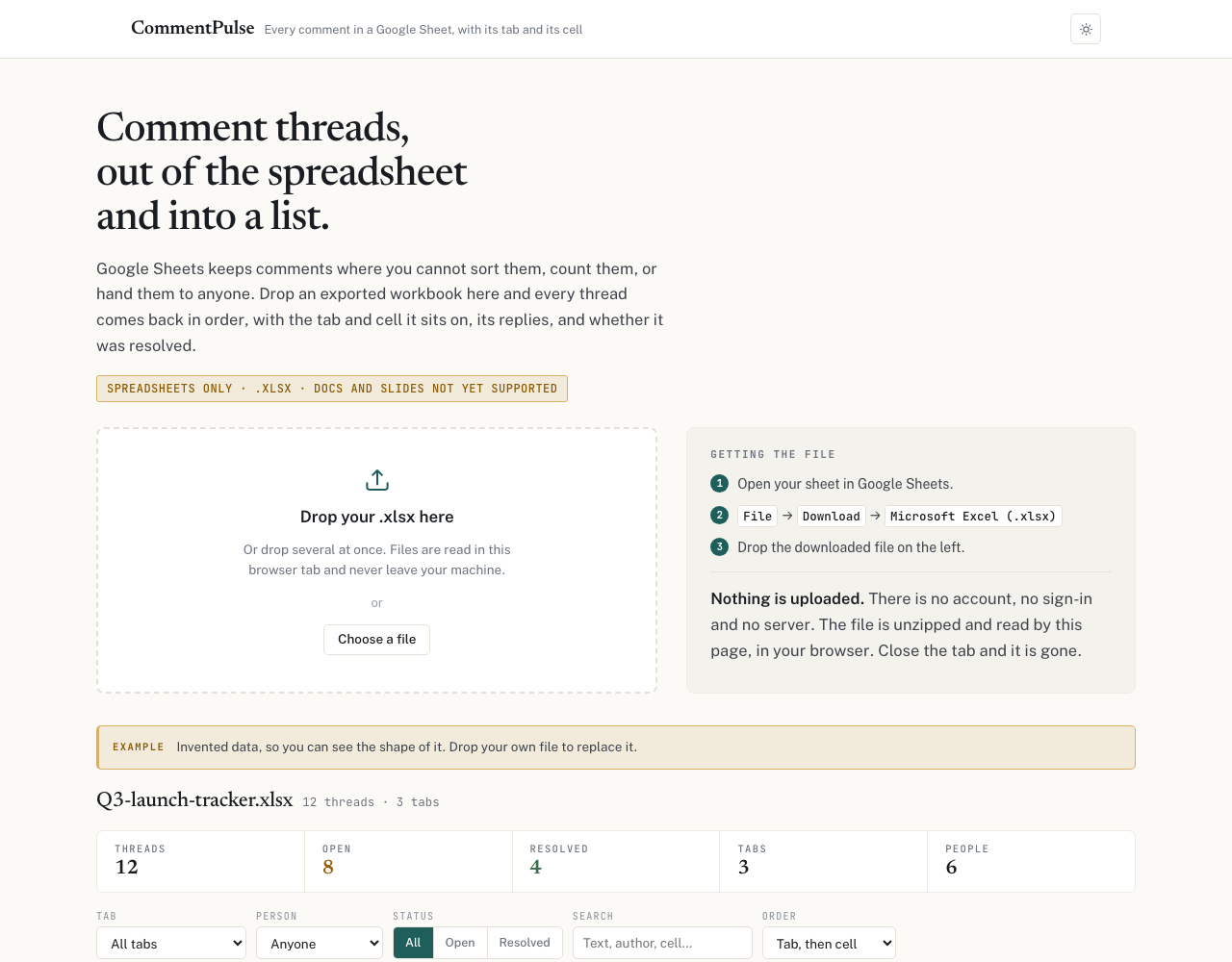
Pull every comment thread out of a Google Sheet, with the tab and cell it sits on, its replies, and whether it was resolved. CSV or markdown out.
Use it at bensunter.com/commentpulse.html, or
clone this repo and open commentpulse.html. One file, no build step, no dependencies
beyond JSZip from a CDN.
Why
Google Sheets keeps comments somewhere you cannot sort them, count them, or hand them to anyone. On a shared tracker with 20 teams filing blockers, decisions and open questions into comment threads across several tabs, the comments are the real record and there is no way to get them out.
Four tools already export Google comments. Three are Docs only. All four are a Chrome extension, a Workspace Marketplace add-on needing admin approval, or an Apps Script you paste into the script editor. Inside an organization that blocks third-party OAuth apps and Marketplace installs, which is most of them, none of those is available to you.
This one parses a file you already downloaded. There is no sign-in, no account, no Google
Cloud project, no OAuth consent screen and no server. Drop the .xlsx on the page and it is
unzipped and read in your browser.
Use
- In Google Sheets: File → Download → Microsoft Excel (.xlsx)
- Drop the file on the page. Several at once is fine.
- Filter by tab, person, status or text. Download CSV, or copy markdown.
It also works on .xlsx files from Excel itself, since the format is Excel's own.
Why spreadsheets only
Both possible sources were tested against all three file types before any of this was built. The results are not symmetric.
| location | replies | resolved flag | resolved threads survive | |
|---|---|---|---|---|
| Sheets, export | tab + cell | yes | yes | yes |
| Sheets, Drive API | opaque anchor | yes | yes | yes |
| Docs, export | no mechanism | no | no | dropped |
| Docs, Drive API | quoted text | yes | yes | yes |
| Slides, export | slide | no | no | dropped |
| Slides, Drive API | slide + shape | yes | yes | yes |
Sheets is the one file type where the export beats the API, because only the export carries the tab and the cell.
It is also the only file type where the export is safe. Google's Docs and Slides exporters silently discard resolved threads. A document with three comment threads exports two, with no error and no count, and the missing one is the resolved one. Anyone building a Docs extractor on the export path ships silent data loss. Those file types belong on the Drive API, in a later version.
Notes on the format, for anyone else parsing this
Five things that will break an implementation, all found by testing rather than by reading the specification, and every one of them fails quietly rather than loudly.
Follow the relationship chain, never the file numbers. The map from a worksheet to its
comments runs xl/workbook.xml → xl/_rels/workbook.xml.rels →
xl/worksheets/_rels/sheetN.xml.rels → xl/threadedComments/threadedCommentM.xml. In a
fresh workbook sheet1 happens to map to threadedComment1, so an implementation that
matches on the number looks perfectly correct. Delete or reorder a sheet and the numbering
diverges while the relationships stay right, and every comment is then attributed to the
wrong tab with no error. fixtures/test-b.xlsx exists to break exactly this.
dT carries no timezone and is UTC. It arrives as 2026-09-11T19:25:31.00, with no Z
and no offset. Parsed as local time every timestamp is silently hours wrong, which nobody
notices until someone disputes a date. Verified: the same comment reads 19:42:15.655 in the
export and 19:42:15.655Z from the Drive API.
Every GUID is regenerated on every export. The same comment carried three different id
values across three exports taken minutes apart, and so did the person record. parentId
threading is still valid within one file, since parent and child come from the same export,
but you cannot dedupe or accumulate across exports by id. Identity has to be a composite of
things that do not change: tab, cell, timestamp, author and text.
Ignore xl/comments{N}.xml. It is the legacy compatibility part and it restates every
threaded comment wrapped in Excel boilerplate. Parsing it duplicates the lot.
Read entries lazily. A workbook with a handful of comments can still be tens of megabytes of cell data. Pull out only the parts you need rather than expanding the whole archive.
What it cannot tell you
Stated on the page too, rather than left as empty columns.
- When a thread was resolved, or by whom. The format stores resolution as a boolean and nothing else. There is no resolve event, so those columns are absent rather than blank. An empty cell would read as "not resolved yet", which is a different claim.
- Deleted comments and emoji reactions. Not present in the export.
- Email addresses. Display names only.
- Assignees. Possibly recoverable from
xl/documenttasks/, which is where Excel keeps assigned-comment data. Unexplored.
All of these are available from the Drive API, which is where a future version gets them, along with Docs and Slides.
Tests
Open selftest.html. It drives the shipped parser through a window.__cp seam rather than a
copy of it, so the tests cannot drift from the code. 38 assertions against three generated
fixtures, covering tab attribution under misaligned relationships, reply threading and
ordering, resolved state, the legacy duplicate part, orphaned replies being reported rather
than dropped, cell ordering, UTC conversion, CSV escaping of embedded quotes, commas and
newlines, and markdown structure.
The fixtures are built by hand rather than exported, so they can encode the pathological cases a real workbook will not give you on demand.
Deployment
commentpulse.html here and the copy served at bensunter.com are the same file, byte for
byte. Everything is client side, so deploying it is copying one file to any static host.
License
MIT. Take it if it is useful.
Contributors

3 commits
See what people are saying
Similar repos


Languages
HTML
100.0%
README
CommentPulse
Pull every comment thread out of a Google Sheet, with the tab and cell it sits on, its replies, and whether it was resolved. CSV or markdown out.
Use it at bensunter.com/commentpulse.html, or
clone this repo and open commentpulse.html. One file, no build step, no dependencies
beyond JSZip from a CDN.
Why
Google Sheets keeps comments somewhere you cannot sort them, count them, or hand them to anyone. On a shared tracker with 20 teams filing blockers, decisions and open questions into comment threads across several tabs, the comments are the real record and there is no way to get them out.
Four tools already export Google comments. Three are Docs only. All four are a Chrome extension, a Workspace Marketplace add-on needing admin approval, or an Apps Script you paste into the script editor. Inside an organization that blocks third-party OAuth apps and Marketplace installs, which is most of them, none of those is available to you.
This one parses a file you already downloaded. There is no sign-in, no account, no Google
Cloud project, no OAuth consent screen and no server. Drop the .xlsx on the page and it is
unzipped and read in your browser.
Use
- In Google Sheets: File → Download → Microsoft Excel (.xlsx)
- Drop the file on the page. Several at once is fine.
- Filter by tab, person, status or text. Download CSV, or copy markdown.
It also works on .xlsx files from Excel itself, since the format is Excel's own.
Why spreadsheets only
Both possible sources were tested against all three file types before any of this was built. The results are not symmetric.
| location | replies | resolved flag | resolved threads survive | |
|---|---|---|---|---|
| Sheets, export | tab + cell | yes | yes | yes |
| Sheets, Drive API | opaque anchor | yes | yes | yes |
| Docs, export | no mechanism | no | no | dropped |
| Docs, Drive API | quoted text | yes | yes | yes |
| Slides, export | slide | no | no | dropped |
| Slides, Drive API | slide + shape | yes | yes | yes |
Sheets is the one file type where the export beats the API, because only the export carries the tab and the cell.
It is also the only file type where the export is safe. Google's Docs and Slides exporters silently discard resolved threads. A document with three comment threads exports two, with no error and no count, and the missing one is the resolved one. Anyone building a Docs extractor on the export path ships silent data loss. Those file types belong on the Drive API, in a later version.
Notes on the format, for anyone else parsing this
Five things that will break an implementation, all found by testing rather than by reading the specification, and every one of them fails quietly rather than loudly.
Follow the relationship chain, never the file numbers. The map from a worksheet to its
comments runs xl/workbook.xml → xl/_rels/workbook.xml.rels →
xl/worksheets/_rels/sheetN.xml.rels → xl/threadedComments/threadedCommentM.xml. In a
fresh workbook sheet1 happens to map to threadedComment1, so an implementation that
matches on the number looks perfectly correct. Delete or reorder a sheet and the numbering
diverges while the relationships stay right, and every comment is then attributed to the
wrong tab with no error. fixtures/test-b.xlsx exists to break exactly this.
dT carries no timezone and is UTC. It arrives as 2026-09-11T19:25:31.00, with no Z
and no offset. Parsed as local time every timestamp is silently hours wrong, which nobody
notices until someone disputes a date. Verified: the same comment reads 19:42:15.655 in the
export and 19:42:15.655Z from the Drive API.
Every GUID is regenerated on every export. The same comment carried three different id
values across three exports taken minutes apart, and so did the person record. parentId
threading is still valid within one file, since parent and child come from the same export,
but you cannot dedupe or accumulate across exports by id. Identity has to be a composite of
things that do not change: tab, cell, timestamp, author and text.
Ignore xl/comments{N}.xml. It is the legacy compatibility part and it restates every
threaded comment wrapped in Excel boilerplate. Parsing it duplicates the lot.
Read entries lazily. A workbook with a handful of comments can still be tens of megabytes of cell data. Pull out only the parts you need rather than expanding the whole archive.
What it cannot tell you
Stated on the page too, rather than left as empty columns.
- When a thread was resolved, or by whom. The format stores resolution as a boolean and nothing else. There is no resolve event, so those columns are absent rather than blank. An empty cell would read as "not resolved yet", which is a different claim.
- Deleted comments and emoji reactions. Not present in the export.
- Email addresses. Display names only.
- Assignees. Possibly recoverable from
xl/documenttasks/, which is where Excel keeps assigned-comment data. Unexplored.
All of these are available from the Drive API, which is where a future version gets them, along with Docs and Slides.
Tests
Open selftest.html. It drives the shipped parser through a window.__cp seam rather than a
copy of it, so the tests cannot drift from the code. 38 assertions against three generated
fixtures, covering tab attribution under misaligned relationships, reply threading and
ordering, resolved state, the legacy duplicate part, orphaned replies being reported rather
than dropped, cell ordering, UTC conversion, CSV escaping of embedded quotes, commas and
newlines, and markdown structure.
The fixtures are built by hand rather than exported, so they can encode the pathological cases a real workbook will not give you on demand.
Deployment
commentpulse.html here and the copy served at bensunter.com are the same file, byte for
byte. Everything is client side, so deploying it is copying one file to any static host.
License
MIT. Take it if it is useful.
See what people are saying
Similar repos
Contributors
3 commits
Languages
HTML
100.0%